


Stay Ahead With Linux Security HOWTOs
How to Secure My Network security advisory intrusion detection
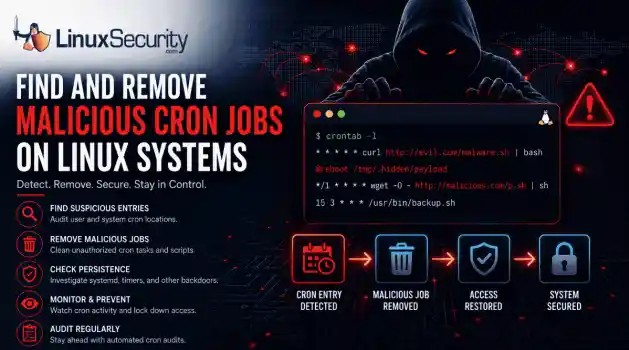
security advisory intrusion detection A compromised Linux server can continue running malware long after the initial intrusion. One of the most common persistence techniques is a malicious cron job that silently downloads payloads, restarts malware, or re-establishes attacker access every few minutes. This guide shows how to identify suspicious cron entries, preserve forensic evidence, remove unauthorized scheduled tasks, and verify that no additional persistence mechanisms remain. . What Should You Save Before Removing Cron Jobs...
 Jun 09, 2026

How to Secure My Networkaccess control Linux administration
access control Linux administration Most SSH hardening advice ends at the same recommendation: Disable password authentication and use SSH keys. . That's good advice. It removes entire classes of attacks, including password spraying, credential stuffing, and brute-force attempts against exposed servers. The problem is what happens next. Many administrators treat SSH keys as the finish line when they are really the beginning of the hardening process. Attackers rarely care whether they obtained access with a password or a private...
Jun 05, 2026

How to Secure My Networksecurity advisory remote access
security advisory remote access Most of the time, nobody notices. SSH authentication succeeds, no alerts are generated, and the connection looks exactly the way it did the day the key was installed. That's part of the problem. . When security teams investigate unauthorized access on Linux systems, they often focus on passwords, exposed services, or vulnerable software. Trusted access receives less attention. Yet a single forgotten or unauthorized SSH key can provide the same access as a legitimate user while attracting very...
Jun 03, 2026

How to Secure My Networkintrusion detection application security
intrusion detection application security The wrong IPS rule can look like a security fix right up until it becomes an outage. . On Linux systems, detection and prevention are often discussed together, but they do not carry the same operational risk. One tells admins that something suspicious happened. The other can decide whether traffic is allowed to continue. That is why IDS vs IPS is not just a definition to memorize. It is a deployment decision about where to monitor, where to block, and how much confidence a team needs before...
Jun 01, 2026

How to Secure My Networkunauthorized access security techniques
unauthorized access security techniques Exposed SSH servers are continuously hammered by brute-force attacks, password spraying, credential stuffing, and recycled passwords from infostealer dumps. Attackers rotate usernames, test weak credentials, and probe for anything that gives them initial access. The logs usually look messy long before the compromise happens. . The difficult part is separating harmless failures from actual intrusion activity. One failed login from an internal workstation rarely matters. Repeated failures...
May 28, 2026
 Refine HOWTOs
X Clear Filters
Get the latest News and Insights
Get the latest Linux and open source security news straight to your inbox.
Community Poll
What got you started with Linux?
Loading...
Explore Latest Linux Security HOWTOs
We found -1 articles for you...
166
 command executionsecurity measuresuser permissions
Mastering Sudo: Installation and Permission Configuration for Linux
The tutorial linked below will walk you through the basic commands of sudo. The sudo command allows a user to run a command either as the superuser or as another user. This is determined by the security policies in the sudoers files. . We will explore the basic installation and usage of sudo and the configuration of detailed permissions via the sudoers files. This ensures both flexibility and security for administrative operations. You will learn how to set up access for users and groups. You will also customize the command execution environment and implement security measures that log or restrict usage. Understanding these configurations will allow you to manage your system's privileges effectively, protecting it from unauthorized changes and facilitating administrative tasks. . The Sudo Command is essential for Linux system management, allowing command execution with elevated privileges. Explore its installation, usage, and secure permission configuration. Sudo Command Examples, User Permissions Linux, Sudo Configuration Guide, Linux Admin Tools. . Brittany Day
 May 21, 2024
•
May 21, 2024
• How to Learn Tips and Tricks
166
system administrationuser experienceuser engagementCreative User Experience With Sudo Insults for Password Attempts
"The life of an admin doesn't have to be dry. For example, when a user enters a wrong password, why not respond with a message that says, 'You're fired!' With sudo insults, you can." . Learn about the sudo command, how to elevate privileges using sudo, how to modify sudo to insult your friends, and more in the tutorial linked below. . Explore creative methods to leverage quirky rebukes when users input the wrong password, turning frustrating moments into entertaining exchanges.. Sudo Command, User Interaction, System Administration Tips. . Dave Wreski
Mar 29, 2024
•
How to Learn Tips and Tricks

166
 security risksuser permissionsadministrative access
How To Use Sudo Command For User Permissions Management
Ever tried to execute a command on your Linux system and received a “Permission Denied” error? The simplest solution to counter this error is using the “sudo” command. . In this article, we will delve deep into the world of sudo and explore its functionality to overcome the notorious “Permission Denied” error in Linux. We will learn how to use the sudo command in Linux along with some examples here. Now that you know that the root user holds the complete administrative rights of the Linux system, you may be wondering if you can grant administrative rights to all users. Well, this could lead to a complete disaster leading to various security risks in the system. This is where the sudo command in Linux comes into play. sudo stands for “Superuser do” and allows system administrators to grant specific permissions to various system users, allowing them to run only specific administrative tasks. Thus, it offers a much more precise and controlled approach to user privilege management. . The sudo command in Linux empowers users to execute commands with elevated privileges, crucial for effective user permission management and system security. Sudo Command, User Privileges, Administrative Access, Linux Security. . Brittany Day
Jun 20, 2023
•
How to Learn Tips and Tricks
166
access controlcommand executionsystem securityAnalyzing Sudo Command Usage for Enhanced Security in Linux
The sudo command gives a user superuser or root powers. No doubt you gave them the “with great power comes great responsibility” speech. Here’s how to check if they listened or not. . The sudo command stands for “substitute user do.” It lets an authorized person execute a command as though they were another user. It can take command line parameters, one of which is the name of the user you wish to have the command executed as. The most common way sudo is used is to omit the command line options and use the default action. This effectively executes the command as the root user. To use sudo in this way requires special permission. Only the privileged can use sudo . When you install a modern Linux distribution, you’re prompted to set up a root password that you can use with sudo . Permission to do so is granted to the regular user that you create during installation. This is the preferred way to handle access to the capabilities of the root user. The old way was to create a root user and log in as them in order to administer your system. The link for this article located at How-To Geek is no longer available. . The su command empowers permitted users to run operations as a different user, bolstering system safety and administration.. Sudo Command, Enhanced Security, User Permissions, Command Management, Linux Best Practices. . Brittany Day
Sep 30, 2022
•
How to Learn Tips and Tricks

Get the latest News and Insights
Get the latest Linux and open source security news straight to your inbox.
Community Poll
What got you started with Linux?
Search Topics
Powered By

Linux Security - Your source for Top Linux News, Advisories, HOWTOs and Feature Releases
QUICK LINKS
subscribe to newsletters!
Like staying secure? So do we.
Sign up for updates, tips, and alerts!
Discover faster search, smarter navigation, and deeper Linux security insights. Read More