


Security Vulnerabilities  malware linux
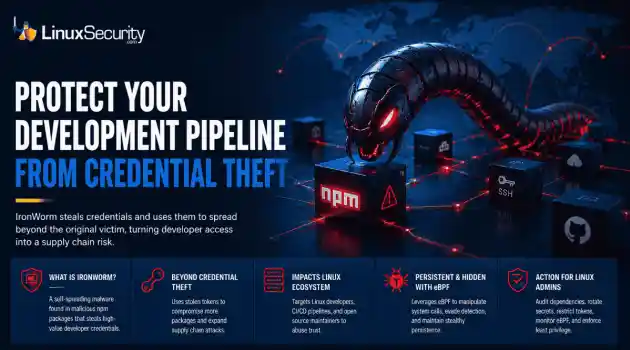
malware linux IronWorm steals credentials and uses them to spread beyond the original victim, turning developer access into a supply chain risk. . A new campaign targeting npm has evolved past simple credential theft. Researchers identified IronWorm, a self-spreading threat. It harvests high-value Linux development secrets—SSH keys, cloud tokens, package publishing credentials. One compromised workstation becomes a launchpad for downstream supply chain attacks. This is not a get-in-and-get-out operation....
 Jun 08, 2026

Network Securitysystem security Linux network
system security Linux network The romanticized image of the digital nomad – a laptop on a sun-drenched balcony – rarely accounts for the actual friction of maintaining a professional development environment on the move. . The friction is amplified with Linux. We are looking for a setup that respects our kernel configurations, handles volatile network handovers, and maintains a strict security posture without the hand-holding of a consumer-grade OS – so, put simply, more than just a laptop and a sunny deck. The hardware is...
May 26, 2026

Server Securityopen-source Linux administration
open-source Linux administration Cron has existed in Unix and Linux environments for decades, handling backups, cleanup scripts, patching jobs, log rotation, monitoring tasks, and other maintenance work that administrators do not want to run manually. Most Linux servers rely on it constantly, which is exactly why attackers continue abusing it for persistence after a system has already been compromised. . Persistence through cron is not complicated. Attackers do not need a rootkit or advanced malware framework to maintain...
May 25, 2026

Vendors/Productssecurity breach linux
security breach linux A major internal repository breach at GitHub has exposed a critical and overlooked blind spot in Linux supply chain security. Kernel exploits, exposed SSH services, weak firewall rules, and vulnerable daemons dominated the Linux threat model for years, and in many environments, they still matter. But recent supply-chain incidents involving GitHub ecosystems, npm packages, and malicious developer tooling point somewhere else entirely: the developer workstation. . The breach matters because...
May 21, 2026

Security Trends access control multi-tenant
access control multi-tenant Linux administrators often face an ugly choice in the cloud: prioritize convenience and cost-efficiency by sharing infrastructure, or sacrifice those benefits for the sake of total isolation. Most modern Linux workloads don't live on their own private servers anymore. They live in shared environments like Kubernetes clusters, where multiple teams and services run side-by-side. It sounds efficient, and it usually is. . But cloud isolation isn't as ironclad as it looks on the diagram. If you...
May 21, 2026
 Refine news
X Clear Filters
Get the latest News and Insights
Get the latest Linux and open source security news straight to your inbox.
Community Poll
What got you started with Linux?
Loading...
Explore Latest Linux Security news
We found -3 articles for you...
72
 security advisoryfirewalllinux
Comprehensive Guide to Troubleshooting Linux UFW Firewall Issues
UFW looks simple until you put it on a long-lived server and real traffic hits it. This focuses on the gap between what ufw status shows and what packets are actually doing on production hosts, after rules have already been set up and systems have been up for a while. . Why Does UFW Say a Port Is Blocked, But It Is Still Reachable? One possibility is that the connection was already established before the rule changed. UFW is stateful, and existing TCP sessions are allowed to continue even after a deny is applied. You usually run into this during a scan or a quick external test. ufw status shows the port as blocked, but traffic still flows because the kernel is tracking an active session and honoring it. This is normal behavior, not a bypass. You can confirm this by looking at current connections. ss -atp If you see the port in ESTAB state, that session will persist until it closes. To prove the rule itself is working, terminate the connection and test again. ss -K dst dport = Once the session is gone, new connection attempts should fail. When they do, it confirms the firewall rule is being enforced, and the earlier reachability was explained by state tracking, which is often the root cause when debugging the UFW firewall. How Can I Confirm Which Ports are Actually Exposed on a Server? By testing what the kernel sees and what the network can reach, not what UFW intends to allow or deny. ufw status reflects the configured policy, but it does not tell you whether packets arrive or whether anything is actually listening. Confirming exposure means stepping outside the abstraction. You need to observe traffic at the socket and packet level, and you need at least one test from outside the host to remove local assumptions. Tool What the tool tells you nmap Whether the port is reachable from the network curl Whether the application responds on that port ss-tulpen Whether a process is actually listening tcpdump Whether packets arrive at the interface A port is exposed only when packets arrive, and a listener exists to receive them. Anything else is intent, configuration, or guesswork. Why Do My UFW Rules Look Correct, But Do Not Match Real Network Behavior? Because the rule you are reading is not the rule being applied to the packet. This usually comes down to attribution errors rather than syntax mistakes. Check whether the service is even listening on the protocol you think it is. ss -tulpen Verify that the rule exists in the active chains and is evaluated where you expect. ufw show raw Confirm which interface and route the packet actually uses to reach the host. ip route get If the protocol does not match, the ingress interface is different, or another rule matches first, the UFW rule you are focused on will never fire. When a rule is shadowed or evaluated after an earlier accept, it becomes invisible to the traffic you are trying to explain, which is where most firewall troubleshooting efforts stall. How Does Docker Bypass UFW Firewall Rules? Docker programs its own iptables chains and routes container traffic through them before UFW rules are evaluated. In many cases, UFW never sees the packets at all. This shows up when a host-level deny looks correct but a containerized service remains reachable. Docker inserts NAT and filter rules that short-circuit the normal UFW path, so traffic can be accepted long before it would hit a UFW -managed chain. You can see where this happens by inspecting the Docker user chain. iptables -L DOCKER-USER -n If traffic is accepted here, it bypasses UFW -managed chains entirely. At that point, the firewall behavior is being defined by Docker’s rule set, not by anything you configured through the UFW CLI. Why Do UFW Logs Show Ports Instead of Application Profile Names? Because UFW application profilesonly exist at the UFW layer. Once packets reach the kernel, they are evaluated and logged by port, protocol, and address, not by profile labels. Profiles are a convenience for rule management, not a runtime attribute. Netfilter has no concept of Apache or OpenSSH, only TCP and UDP flows tied to numbers. That distinction disappears as soon as the packet hits the logging path. Operationally, this matters when reading UFW logging output. The logs confirm that packets moved through the firewall and how they were handled, but they do not reflect which profile you thought you were enforcing. They validate packet flow, not profile intent, which is the correct way to interpret UFW logging . Why Is a Port Still Open After I Deleted a UFW Rule or Profile? Because either the traffic is already established, or the traffic is never governed by the rule you removed. There are only two causes that consistently appear in real environments. The first is existing connections. UFW does not tear down active TCP sessions when a rule or profile is deleted. Those sessions stay alive until they close, by design. ss -atp If you see the port tied to ESTAB connections, that traffic will continue regardless of rule changes. Nothing is misconfigured. The kernel is doing exactly what state tracking requires. The second cause is rule precedence outside the UFW CLI. Rules defined in UFW ’s early chains are evaluated before any deny rules you added or removed later. grep ACCEPT /etc/ufw/before.rules Any accept here overrides CLI-level denies. If traffic matches these rules, deleting a UFW rule will not change behavior, because that rule was never in the decision path to begin with. Why Does Blocking a Client IP Not Stop Access in UFW? Because the IP you are blocking is not the IP reaching the firewall. NAT , reverse proxies, and load balancers all rewrite source addresses before packets hit UFW . What UFW evaluates is the post- NAT source. If traffic is coming through aproxy or a managed frontend, the original client address is already gone by the time filtering happens. You can see this directly by watching traffic arrive. tcpdump -i any port -n The source IP in the capture is the only one UFW can act on. If that address is allowed, blocking the original client IP will have no effect. Why Do UFW Rules Work After Reload but Fail After Reboot? Because rule evaluation depends on timing and ownership during startup. After a reload, UFW applies rules to a live, initialized network stack. After a reboot, that order is not guaranteed. Interfaces may not be up when rules load, or routes may not exist yet. Other tools can insert or rewrite iptables rules later in the boot process, changing evaluation order without touching UFW configuration. From a diagnostic standpoint, the key is recognizing that this is a sequencing problem, not a syntax one. When behavior changes across reboots without rule changes, something else is influencing when and how the firewall rules are applied. How Do I Troubleshoot UFW on Production Servers? By starting with what the server actually sees on the wire, not what the rules claim should happen. On production hosts, traffic almost never enters the way the mental model assumes. Multiple interfaces shift where rules apply. Reverse proxies collapse many clients into a single private source. Bastion hosts turn inbound access into internal traffic. Internal-only services often get tested on paths they were never exposed to. The rules look right because they are right, just not for the packets you are thinking about. A typical case is a database port that looks blocked but stays reachable from an application tier. The deny is written for eth0 , but the traffic arrives on eth1 from a private address after passing through a proxy. UFW evaluates the packet correctly. It just evaluates a different packet than the admin had in mind. Once you get used to tracing traffic from the client to the interface and into thekernel, these mismatches stop looking mysterious. That perspective tends to matter more than any individual rule when running UFW for Servers. What Is the Correct Order to Troubleshoot UFW Issues? The order matters because each step answers a different question about where traffic is being handled or dropped. Skipping ahead usually creates false conclusions. Check Intent: ufw status verbose (Is the rule actually there, and is the default policy what you think it is?) Check the Socket: ss -tulpen (Is the application actually bound to the port and interface?) Check the Raw Rules: ufw show raw (Is an earlier ACCEPT chain in iptables shadowing your new rule?) Check the Wire: tcpdump -i any port -n (Are packets even reaching the network card?) If the behavior still persists after disabling UFW entirely, then UFW is not the cause. The Isolation Test: ufw disable (If the problem persists, the issue is upstream—check Cloud Security Groups or your ISP.) That isolation test is blunt, but it is definitive. When traffic behaves the same way with UFW off, the problem is somewhere else in the path. Why Does UFW Allow Traffic but Nothing Reaches the Server? Because the packets never arrive at the host. An allow rule cannot act on traffic that is dropped upstream. You can confirm this by watching for packets directly. tcpdump -i any port If nothing shows up, the block is happening before the server ever sees the traffic. That usually means a cloud security group, provider firewall, or upstream network control, not UFW . How Does UFW Fit Into the Linux Firewall Stack? UFW is a frontend that writes rules. Netfilter is what actually enforces them. All diagnostics that matter happen at the kernel level because that is where packets are accepted, dropped, or forwarded. UFW only shapes intent and ordering before that point. When behavior and configuration diverge, the kernel view is the authoritative one, which is whyeffective troubleshooting always anchors on UFW in Linux. . Explore troubleshooting techniques for UFW on Linux servers to ensure effective firewall rule application and diagnose issues.. UFW troubleshooting,Linux firewall,network security,firewall rules,packet inspection. . MaK Ulac
 Jan 16, 2026
•
Jan 16, 2026
• Firewalls
74
 cryptographynetwork configurationsecurity measure
Guide to Configuring IPSec VPNs on FreeBSD with Troubleshooting Tips
In the next two articles, I'll demonstrate how to configure and troubleshoot an IPSec VPN on a FreeBSD system. When I first started configuring VPNs, I quickly discovered two things. First, there is more than one way to configure a VPN . . . . In the next two articles, I'll demonstrate how to configure and troubleshoot an IPSec VPN on a FreeBSD system. When I first started configuring VPNs, I quickly discovered two things. First, there is more than one way to configure a VPN correctly . Along with my demonstration configuration files, I'll be including URLs to other IPSec tutorials, and you'll see for yourself that the syntax will vary slightly from tutorial to tutorial. Don't let the discrepancies bother you; instead, choose a configuration style that makes sense to you and results in a working VPN. Second, I found that I was typically left to my own devices when a VPN didn't work. There are few things in life more frustrating than following a set of instructions, only to discover that they don't work for your specific situation. Accordingly, I've included error messages which I have run across and my resolutions in the hopes that they might aid you in troubleshooting. . Discover how to set up and resolve issues with an IPSec VPN on FreeBSD, including hands-on advice and solutions for common problems.. IPSec VPN, FreeBSD, network configuration, troubleshooting IPSec, VPN solutions. . Anthony Pell
Dec 31, 2002
•
Network Security


Get the latest News and Insights
Get the latest Linux and open source security news straight to your inbox.
Community Poll
What got you started with Linux?
Search Topics
Powered By

Linux Security - Your source for Top Linux News, Advisories, HOWTOs and Feature Releases
QUICK LINKS
subscribe to newsletters!
Like staying secure? So do we.
Sign up for updates, tips, and alerts!
Discover faster search, smarter navigation, and deeper Linux security insights. Read More