Explore top 10 tips to secure your open-source projects now. Read More
×


How to Diagnose Suspicious Outbound Connections on Linux Servers
 May 27, 2026
•
May 27, 2026
•
 MaK Ulac
7 - 14 min read
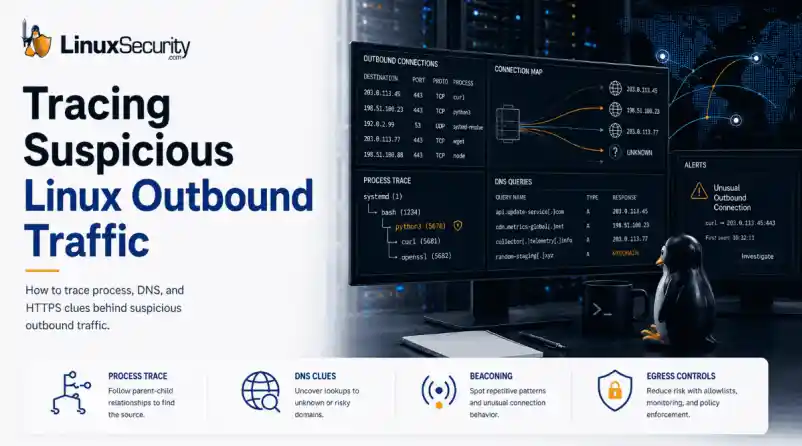

When a Linux server initiates an unauthorized outbound connection to an unknown IP address, it rarely triggers an immediate system failure. Instead, the server continues running normally, and the connection is usually only discovered during a routine firewall log review, a DNS audit, or a post-incident investigation. Because there are no obvious system crashes or performance drops, these quiet outbound sessions can easily be overlooked.
However, treating these anomalies lightly is a significant security risk. While an unexpected connection might simply be a misconfigured monitoring agent, a new package repository, or a developer's temporary test script, it can also be the first warning sign of a compromised host. Once attackers gain access to a server, they rely on outbound connections to download malicious tools, receive commands from a command-and-control server, or exfiltrate sensitive data.
To secure your environment, you cannot rely on guesswork. When a server communicates in a way that contradicts its defined role, you must systematically investigate the traffic, isolate the specific local process responsible, and determine whether the connection is legitimate or malicious.
Why Does Outbound Traffic Matter on a Linux Server?
Most Linux hardening discussions focus on what can reach the server. SSH exposure, open ports, web application attacks, firewall rules, and failed logins. That is still important, but it only covers one side of the problem.
Once a server is compromised, the attacker often needs the server to call out. That outbound connection may be used to: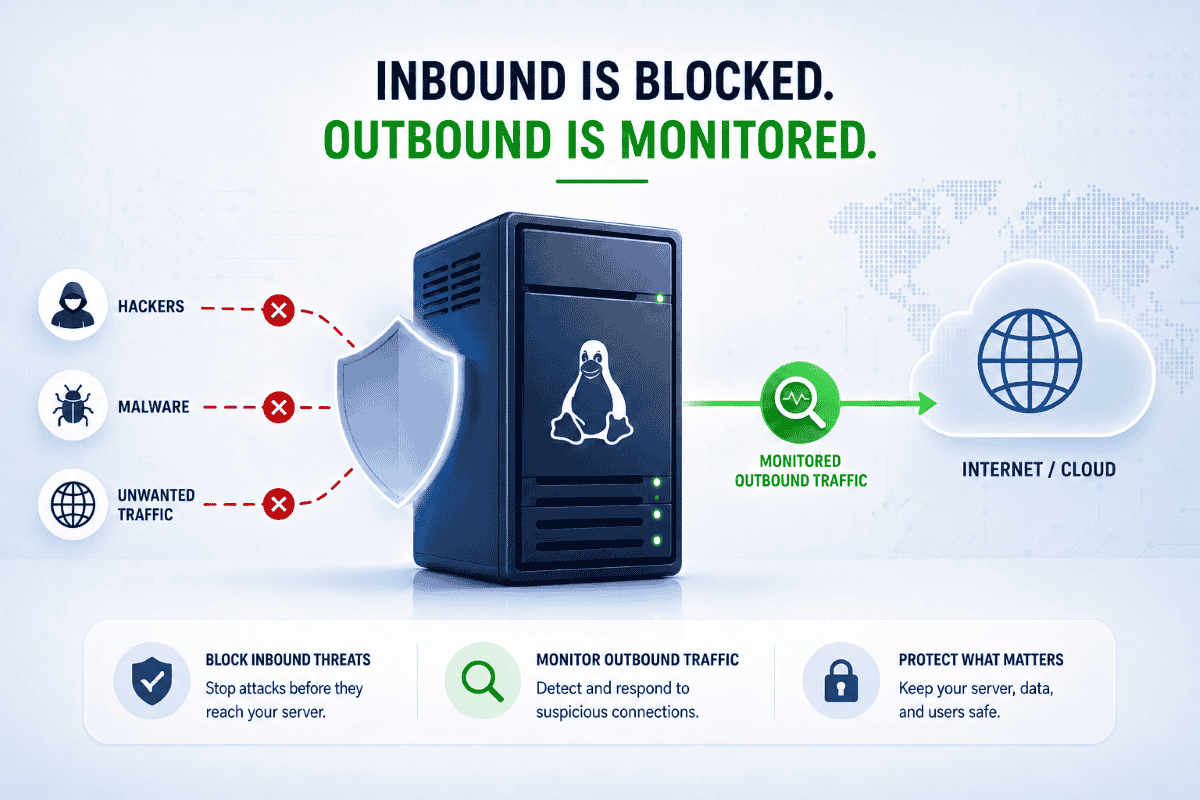
- Download a tool
- Receive commands
- Resolve attacker-controlled infrastructure
- Send stolen data
- Keep a quiet foothold alive
It may look like normal HTTPS or DNS because those protocols are already common in most environments.
The practical question is not “Is outbound traffic bad?” Linux servers need outbound access for real work. The question is whether this specific server, running this specific process under this specific account, should connect to that destination at that time.
NOTE: A web server connecting to an internal API may be expected. The same web server connecting to an unknown VPS provider from a PHP child process is different. A CI runner talking to registries and cloud APIs may be normal. A database host making repeated HTTPS requests to random domains should get attention fast.
What Should You Check First?
1. Start with the server’s purpose
This sounds basic, but it prevents wasted time. Before chasing an IP reputation score, ask what the host is supposed to do.
A DNS resolver, mail relay, Kubernetes node, Git runner, web server, database server, and backup appliance all have different normal traffic. You cannot judge the connection without that context.
2. Identify the local process
This is where the investigation becomes concrete. An unknown IP address is vague. A process name, user account, parent process, and binary path give you something to work with.
A quick live check may start with:
Bash
ss -tunap
lsof -i -n -P
Use those as snapshots, not proof. Short-lived connections may be gone before you run the command. On busy hosts, the output can also be noisy. Still, when the connection is active, these commands often tell you whether you are looking at a normal daemon, an admin session, a script, or something that should not be there.
The useful details are simple:
- Process name and PID
- Local user
- Remote address and port
- Whether the connection is established or only briefly appears
Write them down. Do not trust memory during an incident.
How Do You Decide Whether the Process Makes Sense?
The process should fit the server’s job. That is the main test.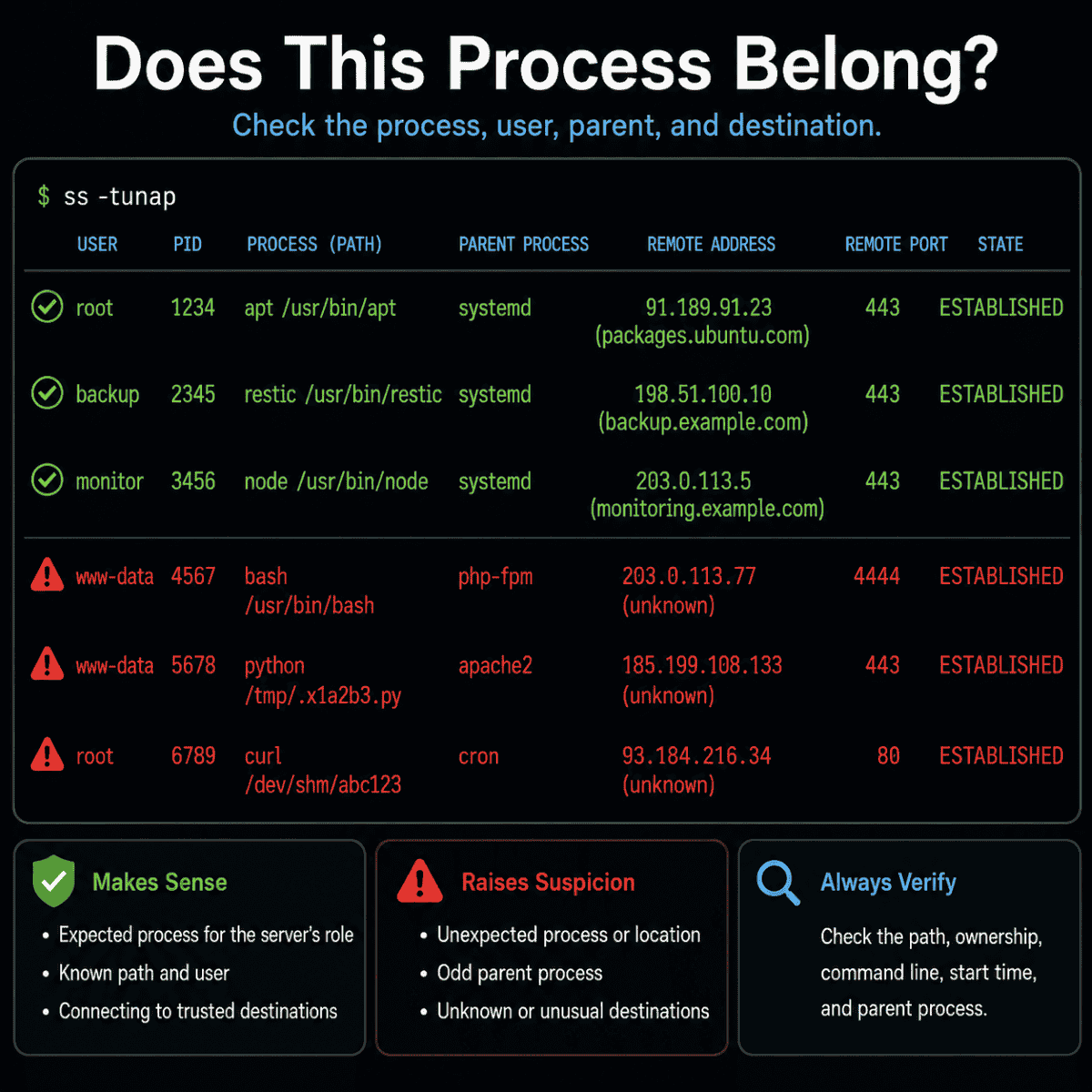
- What makes sense: A package manager reaching a known repository during a patch window, a backup agent connecting to its configured backup target, or a monitoring daemon sending data to the monitoring platform. Those still need validation, but they are at least plausible.
- What raises suspicion: When the process does not belong in the network path. Shells, interpreters, and temporary binaries should not usually be opening unexplained outbound connections from production servers. There are exceptions, but exceptions should have owners.
Look closely at processes like bash, sh, python, perl, php, node, curl, wget, and unknown binaries in writable paths. A script in /opt/company/scripts/ may be part of operations. A binary in /tmp or /dev/shm with an ordinary-looking name is a different conversation.
Parent process matters:
- curl launched by a known deployment job is one thing. curl launched by a web server worker is another.
- python running from an application virtual environment may be normal. python running from an upload directory after a suspicious web request is not normal at all.
Do not stop at the process name. Attackers rename files. A process called systemd-update is not trustworthy just because the name looks familiar. Check the path, ownership, command line, start time, and parent.
What Does Beaconing Look Like in Practice?
Beaconing is repeated outbound contact. A compromised host checks in with an external system, often with small amounts of data. Sometimes it happens every minute. Sometimes every hour. Sometimes the timing shifts slightly to avoid looking too mechanical.
In practice, beaconing often looks boring. That is the trick.
You may see the same server contacting the same destination again and again. The traffic may be small. The connection may close quickly. DNS may happen right before the connection. The process may sleep, wake up, connect, then disappear or go quiet.
This is where older logs help. A live command only shows what is happening right now. Firewall logs, proxy logs, DNS logs, and process logs show whether this is a pattern. One strange connection may be a test or a failed update. A repeated pattern from the same odd process needs more care.
Do not assume slow means safe. A server that checks in every six hours can still be under control. Some attackers prefer slow traffic because it blends into normal background noise. On Linux servers that run for months without rebooting, a quiet callback can live a long time.
The practical move is to line up timestamps. When did the outbound traffic start? Did it begin after a:
- Package install or deployment?
- New container image?
- Admin login or failed SSH burst?
- Web exploit attempt?
- File modification?
Timing often gives the first real lead.
How Should You Investigate Suspicious DNS Activity?
DNS is one of the best places to look because many command channels need name resolution, and some abuse DNS directly. It is also noisy. That means you need patterns, not one-off panic.
Check the Resolver Path
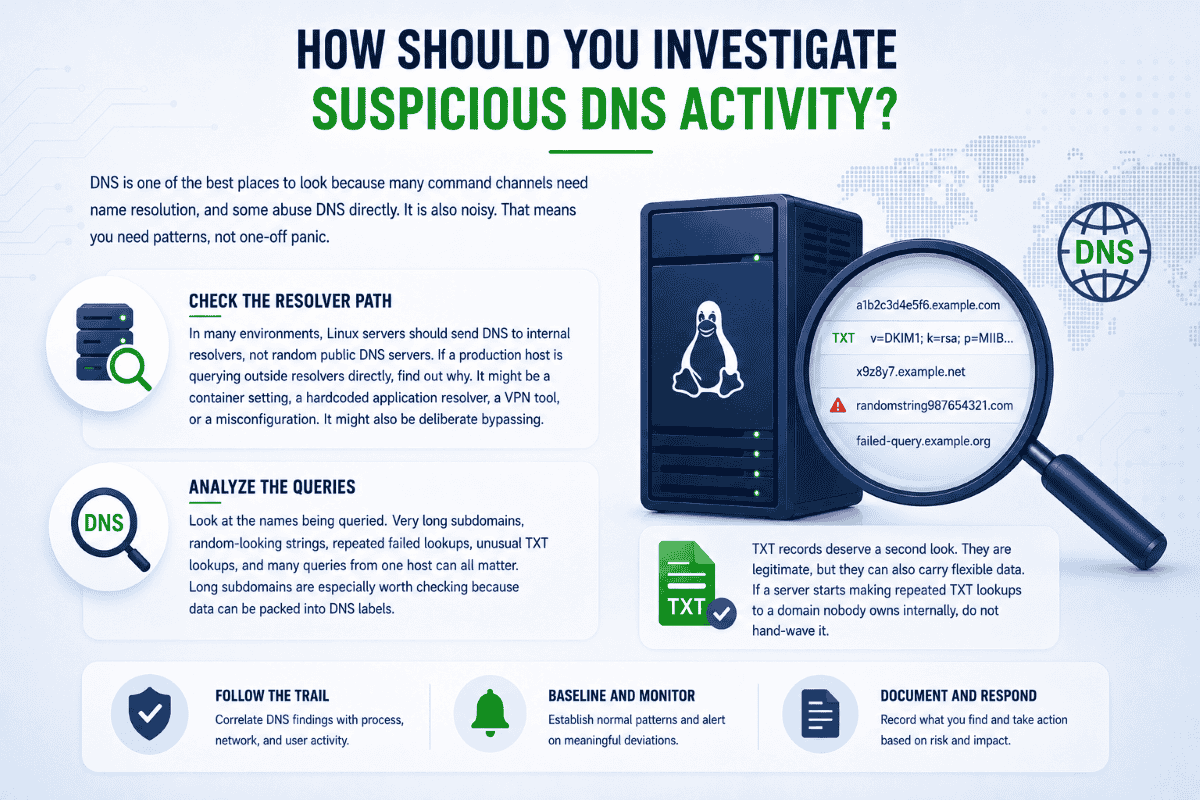
In many environments, Linux servers should send DNS to internal resolvers, not random public DNS servers. If a production host is querying outside resolvers directly, find out why. It might be a container setting, a hardcoded application resolver, a VPN tool, or a misconfiguration. It might also be deliberate bypassing.
Analyze the Queries
Look at the names being queried. Very long subdomains, random-looking strings, repeated failed lookups, unusual TXT lookups, and many queries from one host can all matter. Long subdomains are especially worth checking because data can be packed into DNS labels.
TXT records deserve a second look. They are legitimate, but they can also carry flexible data. If a server starts making repeated TXT lookups to a domain nobody owns internally, do not hand-wave it.
Watch for DNS over HTTPS (DoH)
DNS over HTTPS adds another wrinkle. It hides DNS queries inside HTTPS traffic. That may be common on some desktops, but most Linux servers do not need it unless the environment intentionally uses it. If a server is running a DoH client and nobody can explain it, treat that as a finding even before proving malware.
The goal is not to block every strange domain on sight. First, connect the DNS activity back to a process or workload. DNS from the system resolver during a package update is different from DNS generated by a script in a writable directory.
Why Is HTTPS Still Useful to Investigate?
HTTPS hides content, but it does not hide everything. You can still learn from the process, destination, timing, amount of data, and whether the traffic fits the server.
Most attacker-controlled traffic today can look like web traffic. That does not make investigation impossible. It just means admins need to stop expecting payload visibility to answer every question.
For suspicious HTTPS, focus on what you can prove:
- Which process opened the connection?
- Which user ran it?
- Was there a DNS query first?
- Did the connection repeat?
- Was more data sent than received?
- Did it start after a new file appeared?
- Does the destination match anything in the application configuration?
A small HTTPS request from a strange process can be more important than a large transfer from a known backup job. Size alone does not decide severity. Context does.
Be careful with cloud destinations. An IP owned by a major cloud provider does not make the traffic safe. Attackers use the same platforms everyone else uses. Object storage, paste services, temporary hosting, and developer platforms are common places to stage tools or receive data.
This is also where outbound allow rules can become too loose. “Allow HTTPS anywhere” is operationally convenient. It also gives compromised systems a clean way out. Some servers need broad egress. Many do not.
How Do You Tell Normal Admin Work From Something Bad?
This is where Linux experience matters. Real environments are messy.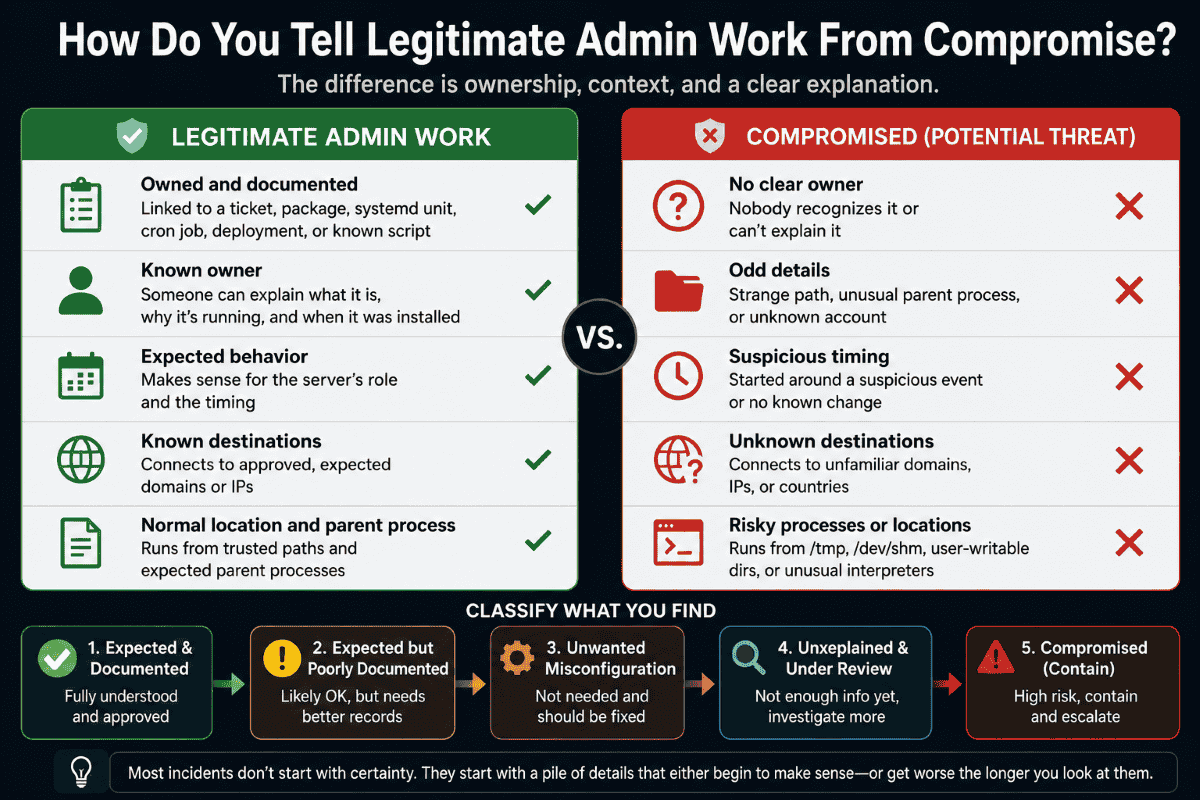
A cron job may call a script with curl. A monitoring plugin may run under a service account. A backup agent may connect to a vendor endpoint. A container may resolve domains the host owner does not recognize. Ugly does not always mean hostile.
The difference is whether the behavior can be explained and owned. Normal admin work usually has a trail: a ticket, a package, a systemd unit, a cron entry, a deployment, a known script path, or a person who says, “Yes, that is ours.” Compromise often has gaps. Nobody owns it. The path is odd. The parent process is strange. The timing lines up with suspicious activity.
Do not accept weak explanations too quickly. “It is probably monitoring” is not enough. Which agent? Which config? Which destination? Which account? When was it installed? Why did it start now?
A practical classification helps:
- Expected and documented
- Expected but poorly documented
- Unwanted misconfiguration
- Unexplained and under review
- Suspicious enough to contain
Most incidents do not start with certainty. They start with a pile of details that either begin to make sense or get worse the longer you look at them.
What Local Persistence Should You Check?
On Linux, persistence does not need to be advanced. Cron still works. Systemd services and timers work. User-level systemd units work. Shell profile files, init scripts, application hooks, and modified service files also show up often enough to check.
Look at the obvious places first. It is not glamorous, but it catches real issues.
- System Tasks: Review cron entries for root and relevant service accounts. Check systemd units and timers created or modified around the time the traffic began.
- File Paths: Look for scripts in writable directories. Review recently changed files in application paths. Check whether a web process wrote files it should not have written.
- Web Servers: Inspect upload directories, plugin directories, cache directories, temporary paths, and application-specific writable folders. A small web shell may be enough to start outbound connections. The network symptom may be the second thing you notice, not the first.
- CI and Automation Servers: Be more aggressive. These systems often hold secrets and have broad outbound access by design. A suspicious connection from a build runner may indicate token theft or pipeline abuse, not just a compromised host.
What Should You Do Before Killing the Process?
Do not erase the evidence too early; it’s a common mistake. If the connection looks active and risky, containment may be urgent. But before killing processes or deleting files, capture enough detail to understand what happened. Even a quick note is better than nothing.
At a minimum, collect:
- Process name, PID, and command line
- User and parent process
- Binary path and open network connection
- Destination, start time, and related DNS names
Save relevant logs. Hash suspicious files before removing them if practical.
Blocking outbound traffic is often safer than immediately destroying the process. A firewall rule, proxy block, security group change, or network policy can stop the callout while leaving the host available for review. That is not always possible, but it is worth considering.
If the server is high value, assume credentials may be exposed. Rotate keys and tokens that lived on the host. Review SSH keys, cloud credentials, database passwords, deployment tokens, and application secrets. Attackers often use the first compromised server as a way to reach better systems.
Rebuilding may be the right answer after the investigation. But rebuild from known-good sources, not from the same compromised state. Otherwise, you are just reinstalling the problem.
How Can You Make This Easier Next Time?
The best time to define normal outbound traffic is before an alert. The second-best time is after the first painful investigation.
- Start with server roles: A database server should have a short list of expected outbound needs. A web server may need APIs, DNS, logging, monitoring, and package repositories. A CI runner may need much more. That difference should be documented somewhere that admins actually use.
- Log Retention: Keep DNS logs long enough to investigate. Keep firewall or proxy logs long enough to see patterns. Where possible, collect process start information so a network connection can be tied back to a local process. Without that link, every investigation takes longer.
- Egress Controls: Egress controls help when they are realistic. Blocking all outbound traffic sounds clean until patching, logging, backups, and cloud integrations break. A better approach is role-based egress. Servers get the outbound access they need, not a default path to the whole internet.
- Review Exceptions: Old allow rules are where risk collects. A temporary “allow HTTPS anywhere” rule for troubleshooting often becomes permanent because nobody removes it. Attackers like permanent temporary rules.
What Linux Admins Should Keep in Mind
Suspicious outbound traffic is a reasoning problem, not just a command problem. The commands help, but the answer comes from context.
Start with the server’s job. Find the process. Check the user account, parent process, path, timing, destination, and DNS behavior. Then decide whether the traffic fits what the server is supposed to be doing.
DNS and HTTPS deserve special attention because they are normal enough to hide inside. Long DNS queries, direct external resolver use, odd TXT lookups, repeated small HTTPS sessions, and outbound traffic from shells or interpreters are all worth slowing down for.
Do not dismiss strange traffic because the server still works. Many compromised Linux systems keep doing their normal job while quietly doing something else. That is why outbound investigation matters.
The working rule is plain enough: unknown outbound traffic is not proof of compromise, but every unexplained connection should eventually become explained, contained, or removed.
Stay Ahead of Linux Security & Infrastructure Trends
Interested in more in-depth coverage of Linux server monitoring, outbound traffic analysis, firewall behavior, persistence detection, and enterprise hardening strategies? Subscribe to the LinuxSecurity newsletter for weekly threat analysis, infrastructure security insights, and practical guidance covering the Linux and open-source ecosystem.
Related Reading
- Egress Filtering Primer for Monitoring Outbound Traffic
- Linux Server Monitoring Essential for Modern Security Operations
- Linux Attackers Abuse Admin Tools For Stealthy Intrusions
- Strengthening Linux SSH Configurations to Prevent Proxy Attacks
- Understanding Linux Persistence Mechanisms and Detection Tools
 PREVIOUS

 NEXT
NEXT

Powered By

Linux Security - Your source for Top Linux News, Advisories, HOWTOs and Feature Releases
QUICK LINKS
subscribe to newsletters!
Like staying secure? So do we.
Sign up for updates, tips, and alerts!