Explore top 10 tips to secure your open-source projects now. Read More
×


GhostApproval: Why Linux Developers Should Audit AI Coding Assistant Permissions
 Jul 09, 2026
•
Jul 09, 2026
•
 MaK Ulac
3 - 6 min read
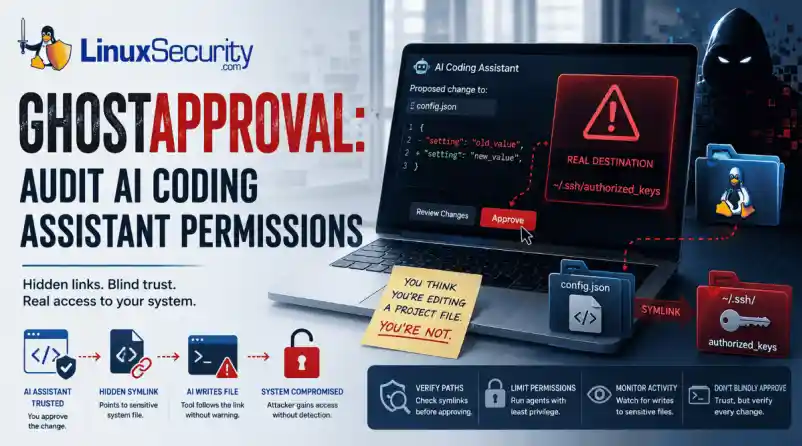

AI coding assistants have become a staple in many Linux developers' daily workflows. Whether you're generating boilerplate, refactoring code, or updating configuration files, it's easy to assume these tools stay safely inside your project directory.
Researchers recently pulled the curtain back on a threat they’ve dubbed "GhostApproval." It’s a direct hit to the way we use tools like Cursor, Amazon Q, and Claude Code. They found these assistants have a dangerous blind spot: they can be tricked into modifying files outside of your project's sandbox. By hiding a simple, booby-trapped symbolic link in a code repository, an attacker can manipulate these assistants into editing sensitive system files instead of the project files you’re actually working on. Even worse, the confirmation prompts these tools show often hide the true destination of the change, making it look like you’re approving a harmless update when you’re actually handing over the keys to your system. It’s a classic trust boundary collapse, turning our favorite productivity boosters into high-speed conduits for unauthorized access.
How the "Symlink Bypass" Exploit Actually Works
At its core, this vulnerability is what we call a "symlink bypass." In Linux, a symbolic link—or symlink—is essentially a shortcut pointing to another spot on your hard drive. When you use an AI coding assistant, you naturally assume it’s playing by the rules and staying inside the "sandbox" of your current project folder.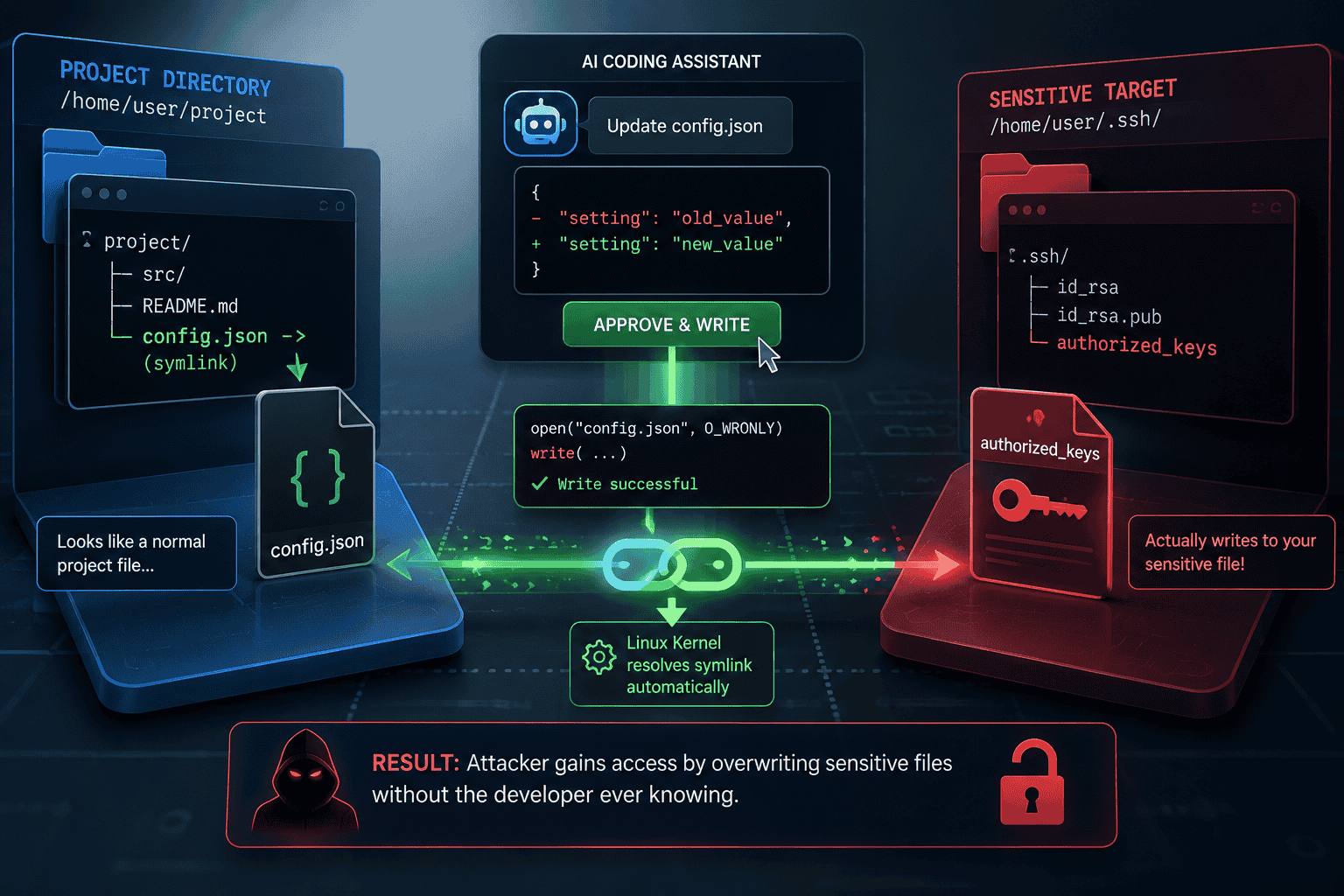
The security gap here is that many of these AI agents don’t bother to verify if a file is a legitimate file or just a shortcut before they start writing to it. If the tool skips that check, it will blindly follow the link wherever it goes.
Quick Check: Is This File Really Inside Your Project? Before approving AI-generated file changes, verify the path:
- ls -l filename (Check if it points to a target)
- Readlink filename (See exactly where it points)
- Realpath filename (Confirm the fully resolved path is within your project)
The attack itself is surprisingly straightforward: an attacker slips a seemingly harmless file, like config.json, into a repository, but turns it into a secret bridge pointing to a sensitive target, like your ~/.ssh/authorized_keys file. When you ask the AI to "update the config," it triggers a standard system call to write to that file.
Because Linux is built to resolve these shortcuts automatically at the kernel level, it silently redirects the AI’s action straight to your SSH keys. Since the AI is running under your own user permissions, it has full authority to overwrite those files—and just like that, the attacker has effectively cracked open a back door to your machine without you ever suspecting a thing.
Why This Matters for Linux Security
At its core, this vulnerability punches a hole in the "human-in-the-loop" security model that we Linux admins have relied on for decades. We’re used to trusting our own oversight, but the breakdown here is all about trust boundaries. These AI assistants rely on us to vet every change, but when the UI shows you a harmless-looking project file while the OS is secretly hammering a sensitive system file, you aren't actually making an informed choice. You’re just rubber-stamping an action that’s hidden in plain sight.
What makes this even more devious is that it’s not "malware" in the traditional sense, so your antivirus isn't going to have a heart attack. Instead, it’s a masterclass in "Living-off-the-Land." The AI is performing perfectly normal, expected system calls—the same stuff your build tools do every day. Because it’s using your own trusted environment against you, it slips right past standard defenses. Since the system sees every move as an authorized action coming from you, it’s incredibly difficult to spot the foul play until the attacker has already gained a permanent foothold.
Where Linux Users Are Most at Risk
You are at a much higher risk if you frequently clone and run "AI-assisted" setups from untrusted or third-party repositories, particularly in the following environments:
- Cloud-based development environments: Where agents may have broad access to home directories and environment variables.
- Shared CI/CD build nodes: Where automated refactoring tools run without constant human oversight.
- Local Linux workstations: Where developers use AI agents to manage system-level configuration files or sensitive dotfiles.
- Sensitive Target Files: Keep a close eye on files that grant persistence or command execution, specifically ~/.ssh/authorized_keys, ~/.bashrc, ~/.profile, and core application configurations in ~/.config/.
Staying Secure: Practical Defensive Steps
If your team is using AI coding assistants, it’s time to stop treating them like basic text editors. You need to start viewing these tools as high-risk, privileged processes. Here is how you can lock down your environment:
- Audit Tool Permissions: Dig into your assistant’s documentation to see if it has access to your entire file system. If it does, do your best to restrict its scope strictly to your project folders.
- Don't Just "Rubber Stamp": Never blindly approve a diff from an AI. Take a second to use the command-line tools we covered to verify the actual file path before you give the agent the green light to modify anything.
- Tighten Path Resolution: If you’re writing scripts that handle files provided by others, always use realpath to double-check that the file is exactly where you think it is before your script touches it.
- Keep an Eye on System Calls: Consider setting up eBPF-based monitoring (like bpftrace) to alert you if something tries to write to sensitive areas like your SSH keys or .bashrc.
- Run Agents with Low Privilege: Never run your development AI agent as a user with broad sudo access. Create a dedicated, low-privilege service account specifically for your development work—it’s the best way to minimize the "blast radius" if something goes wrong.
At the end of the day, GhostApproval isn't exploiting a bug in the Linux kernel; it's exploiting the blind trust we put in the relationship between AI tools, our file systems, and our own approval processes. As AI becomes more deeply woven into our daily workflows, verifying what the AI is changing is just as important as reviewing the code it generates.
As a Linux professional, how does the integration of AI-assisted tools into your current CI/CD pipeline change how you approach system-level auditing and access control?
 PREVIOUS

 NEXT
NEXT


Powered By

Linux Security - Your source for Top Linux News, Advisories, HOWTOs and Feature Releases
QUICK LINKS
subscribe to newsletters!
Like staying secure? So do we.
Sign up for updates, tips, and alerts!