Explore top 10 tips to secure your open-source projects now. Read More
×



Server Security data privacy automation
data privacy automation Every system admin has lived through the same Monday morning ritual. A queue of forty tickets, half of them password resets, permission errors, or disk space warnings that any experienced technician could resolve in under two minutes. The other half require actual judgment. For years, automation promised that software would eventually sort the two apart on its own. That promise is now being tested in production Linux environments. . Early results are reshaping how IT teams think about tier-1...
 Jul 17, 2026

Privacydata collection automation
data collection automation You're running a web scraping project to collect pricing data from e-commerce sites. You set up a pool of datacenter proxies, launch your scripts, and within minutes — banned . CAPTCHAs everywhere. Your data pipeline stops before it really begins. . It's a frustrating scenario that plays out daily in ad verification, market research, and multi-account management. The website doesn't know you're doing legitimate research or monitoring. It just sees traffic coming from IP ranges it recognizes as...
Jul 17, 2026

Security Trends security advisory social engineering
security advisory social engineering Business Email Compromise used to be a numbers game — mass-blasted emails, broken English, an obvious "URGENT WIRE TRANSFER" subject line. That era is over. Generative AI has turned BEC into a tailored, low-noise operation that mimics writing style, voice, and even video presence. This piece looks at what's actually changed under the hood, what defenders are testing in response, and why so many organizations are still structurally unprepared for it. . The Infrastructure Problem Nobody Wants to...
Jul 17, 2026

Security Trends cybersecurity Linux documentation
cybersecurity Linux documentation Linux operating systems have gained prominence due to their stability, adaptability, and excellent security options. In the case of developing documentation, designing cybersecurity dashboards, or educational material, visuals are of vital importance when it comes to making things clear. The use of icons allows one to understand the message regarding alerts, authorization, encryption, authentication, or the state of the system just by looking at the visual cue without having to read long...
Jul 17, 2026

Security Vulnerabilities security advisory linux distribution
security advisory linux distribution ESET researchers identified 11 old and forgotten Linux UEFI shim bootloaders at versions 0.9 and below that can be used to bypass UEFI Secure Boot on any UEFI-based machine that trusts Microsoft’s Microsoft Corporation UEFI CA 2011 third-party certificate authority, regardless of the installed operating system (OS). Reported shims can be exploited to execute untrusted code during system boot, enabling attackers to deploy malicious UEFI bootkits even on systems with UEFI Secure Boot enabled.....
Jul 16, 2026
 Refine news
X Clear Filters
Get the latest News and Insights
Get the latest Linux and open source security news straight to your inbox.
Community Poll
Is continuous patching actually viable?
Loading...
Explore Latest Linux Security news
We found 111 articles for you...
77
 security advisoryprivilege escalationimportant
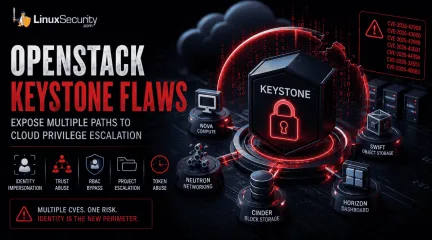
OpenStack Keystone Flaws Expose Multiple Paths to Cloud Privilege Escalation
The recent Keystone advisory is unusual because the vulnerabilities are scattered across several features but keep affecting the same class of security controls. Application credentials, trusts, RBAC enforcement, project ownership validation, token expiration. Different code paths. Similar failures. . Most require authentication already. The concern is what happens after access exists. Several of the disclosed vulnerabilities affect how Keystone validates identity, ownership, delegation, and authorization. For environments running OpenStack, that puts the focus on privilege expansion rather than initial compromise. What Is OpenStack Keystone? Most OpenStack services do not evaluate identity independently. A user authenticates to Keystone, receives a token, and presents that token to other services. Nova uses Keystone identities when processing compute requests. Neutron relies on the Keystone project and role information when handling network operations. Horizon uses Keystone during authentication and authorization workflows. Similar trust relationships exist throughout the platform. Keystone also manages application credentials, trusts, federation, project membership, and role assignments. Those functions appear repeatedly throughout the advisory because they are the mechanisms responsible for determining who an identity represents and what actions that identity can perform. That position gives Keystone an unusual amount of influence over the OpenStack security posture. A bug in Nova typically affects compute operations. A bug in Keystone can affect how identities, permissions, projects, and delegated access are interpreted across multiple services at the same time. The vulnerabilities disclosed in this advisory target several of those mechanisms directly. Do These Attacks Require Authentication? In most cases, yes. The advisory does not describe a collection of unauthenticated remote code execution vulnerabilities. Attackers generally need some form of existing access before thesecloud security vulnerabilities become relevant. These vulnerabilities start becoming relevant once an identity already exists inside Keystone. That might be a service account used by automation, an application credential tied to a deployment pipeline, or a federated account brought in through an external identity provider. None of those identities necessarily begin with administrative access. The interesting part is what happens after authentication succeeds. Several of the disclosed flaws affect the checks Keystone performs when validating ownership, evaluating permissions, creating delegated access, or issuing new credentials. Those identities often start with limited permissions. The next challenge is finding a way to extend access, bypass restrictions, or operate outside the boundaries originally assigned to the account. Several of the Keystone vulnerabilities affect exactly those controls. Why These Vulnerabilities Are Related At first glance, the advisory reads like a collection of unrelated implementation bugs. One issue affects application credentials. Another involves trust relationships. Others target OpenStack RBAC , policy enforcement, project ownership validation , LDAP integration, or token handling. The code paths are different, but the failures keep landing in the same place. Keystone is responsible for validating identity, ownership, authorization, delegation, and access scope. The disclosed vulnerabilities challenge one or more of those decisions. That shared theme is what makes the advisory interesting. Rather than exposing a single weakness, the bugs reveal multiple ways identity and authorization controls can become unreliable under specific conditions. How the Vulnerabilities Could Be Exploited Looking at the vulnerabilities through attack scenarios provides a clearer picture than reviewing each CVE in isolation. Impersonating Another User (CVE-2026-42998) This issue involved application credential authentication . Keystone failed to verify that the usersupplied during authentication actually owned the application credential being presented. Under normal conditions, an application credential should remain tied to the identity that created it. Ownership is part of the trust decision. The vulnerability weakened that relationship. The immediate concern is not simply access; activity can become associated with the wrong user. Audit trails become harder to trust, and administrative actions may appear to originate from an account that never performed them. Combining Trust Relationships and Privilege Escalation (CVE-2026-43000) Trust relationships exist to support delegated access. A user authorizes another identity or service to act on their behalf within defined limits. The trust functionality is not unusual. Large OpenStack deployments depend on it for delegated access. What stands out here is how it interacts with the impersonation flaw. Once Keystone accepts the wrong identity, the trust system starts operating on that decision. The result is not a single authorization failure. New trust relationships can be created with privileges the original account never possessed . Weakening RBAC Enforcement (CVE-2026-42999) OpenStack RBAC is one of the primary mechanisms OpenStack uses to separate users, operators, auditors, service accounts, and administrators. The vulnerability involved Keystone incorporating untrusted JSON request data into policy evaluation decisions . Authorization systems depend on trusted inputs. Once policy evaluation begins consuming attacker-controlled attributes, permission decisions become harder to predict and harder to trust. Crossing Project Boundaries (CVE-2026-43001) Project isolation sits at the center of OpenStack's multi-tenant model. Researchers found that Keystone did not correctly validate project ownership during EC2 credential creation. Under certain conditions, users could create credentials associated with projects they did not own . Organizations depend on project boundaries to separate departments,customers, workloads, and environments. When credential ownership and project ownership become disconnected, those boundaries become less reliable. Access That Refuses to Expire (CVE-2026-44394) Token expiration is intended to limit how long compromised access remains useful. The advisory describes a situation where federated token rescoping did not preserve original expiration restrictions. A user could repeatedly obtain newly scoped tokens with fresh lifetimes . During incident response, token expiration often serves as a containment mechanism. Additional Keystone Vulnerabilities Restricted Application Credentials ( CVE-2026-33551 ): This vulnerability allowed restricted credentials to create EC2 credentials despite intended permission boundaries. LDAP Account State Validation ( CVE-2026-40683 ): Researchers found conditions where Keystone improperly handled LDAP user-enabled status values, creating a gap between how an account appears in the directory and how Keystone interprets it. What OpenStack Administrators Should Do Applying vendor patches should be the immediate priority. Administrators should also review how application credentials are used, examine existing trust relationships, validate RBAC assignments, and review federated identity deployments. Historical activity deserves attention as well. Because these vulnerabilities involve privilege escalation, successful exploitation may look like legitimate user activity. Keystone logs are the most valuable starting point for auditing: Application credential creation activity Unexpected EC2 credential generation Cross-project credential creation attempts New trust relationship creation Role assignment changes Token rescoping activity Conclusion The Keystone advisory is best understood as a collection of failures affecting identity and authorization controls. Keystone is making decisions about identity and authority that other OpenStack services rely on without question. For organizations operatingLinux-based OpenStack environments, that makes Keystone one of the highest-value services to patch and review. When trust decisions fail at the identity layer, the effects rarely stay confined to the identity service itself. Want more Linux security news, vulnerability analysis, and software supply chain updates? Subscribe to the LinuxSecurity Newsletter and get the latest threats, advisories, and expert insights delivered directly to your inbox. Related Reading Linux Privilege Escalation Patterns and Mitigation Strategies Privilege Escalation Risks: Controls for Linux Security Securing Linux Cloud Workloads: Key Practices for Safety . OpenStack Keystone vulnerabilities threaten identity controls, leading to privilege escalation risks and unauthorized actions.. OpenStack Security Flaws, Cloud Privilege Escalation, Identity Abuse, Keystone Vulnerabilities. . MaK Ulac
 Jun 19, 2026
•
Jun 19, 2026
• Server Security
78
 incident responsecloud securityLinux environment
MXDR Provider Selection for Linux Environments and Security Services
Managed Extended Detection and Response (MXDR) has become one of the most sought-after security services in the enterprise market — and with good reason. It promises the holy grail: broad visibility across endpoints, network, cloud, email, and identity, combined with the 24/7 human expertise most organizations simply cannot build in-house. . However, the rapid growth of the market has produced a wide range of providers whose capabilities vary considerably beneath the surface. Choosing the right MXDR solution is not just about buying software; it’s about hiring a specialized team that understands the difference between a standard workstation and a mission-critical Linux server. If you are going to trust someone with your infrastructure, you need to look past the pitch and evaluate the actual substance. Define What You Actually Need Before You Evaluate Anyone A lot of teams start vendor calls too early. They have a rough MXDR budget, maybe a shortlist, but not a clear view of what they need the provider to cover. That creates noise quickly because the MXDR solution is not a single fixed service. Providers vary in coverage, response authority, integration depth, and how much human triage sits behind the platform. Before you speak with vendors, get your team aligned on the basics: What environments need coverage? Decide whether you only need endpoint monitoring, or whether cloud workloads, identity, email, and network traffic need to be in scope too. For Linux-heavy environments, ask whether the provider can see kernel-level events , container runtimes, and meaningful telemetry, not just raw syslogs pushed into a dashboard. What should the partnership actually do? Some teams want to approve every response action. Others need a provider that can isolate hosts, block indicators, or escalate incidents when internal staff are offline. Spell that out before procurement gets involved. What are your compliance constraints? GDPR, NIS2, HIPAA, and PCI DSS can affect datahandling, storage location, access controls, and reporting. Do not leave this for the contract review stage. By then, the wrong provider may already look like the favorite. Does the provider fit your current stack? Map what you already use for patching, identity governance, email security, endpoint control, and cloud monitoring. Then ask how the MXDR provider will extend that stack instead of duplicating alerts your team already sees. Clear answers make vendor conversations sharper. They also reduce the odds of choosing a provider because their pitch looked strong, while their actual coverage misses the systems creating most of your exposure. Not All MXDR Coverage Is Equal The defining characteristic of MXDR — the "extended" element — is coverage across multiple security domains simultaneously. In practice, however, providers differ considerably in how genuinely cross-domain their visibility is. Some platforms offer native integrations across endpoints, network, cloud, identity, and email. Others aggregate feeds from separate products, which can introduce data gaps, latency, and correlation blind spots. In a Linux-heavy environment, an attacker might use sophisticated persistence or fileless techniques that simple log aggregation will miss. When evaluating coverage, go beyond the marketing slides. Ask specifically: Which environments does the provider have native sensor coverage for? Which rely on third-party integrations? What happens to detection quality when telemetry from one domain is unavailable? A provider whose detection capability degrades significantly when a specific integration is absent is not a true MXDR partner; they are a SIEM in disguise, and they may leave dangerous gaps in the environments that matter most to your organization. Human Expertise: Who Is Actually Watching? MXDR is fundamentally a people and process service layered on top of technology. You can have the most advanced detection engine in the world, but if the analyst team isunderstaffed, junior, or drowning in a shared queue, you are just paying for fancy noise. Don’t buy the "we have a global, 24/7 SOC" line without stress-testing it. Ask the blunt questions: The Coverage Model: Is your account assigned a dedicated team, or are you in a giant shared pool? If you are in a pool, you are competing with a hundred other customers for the attention of a tired analyst who likely has no idea what a custom Linux binary looks like in your environment. The Experience Gap: Who is actually looking at your alerts at 3:00 AM? Is it a Senior Incident Responder who can interpret a suspicious kernel-level anomaly, or a monitor-tech who just follows a basic flowchart? The Communication Workflow: When a high-fidelity threat is identified, how do they talk to you? Do they just dump a generic ticket in your lap, or do they provide an executive summary that explains the why and the how ? If you are serious about a vendor, skip the sales-led reference call. Find an existing customer in your industry and ask them: "The last time a real threat hit your network, did the provider show up and help you drive the response, or did they just send you an email saying they saw something weird?" Response Authority and Speed How much authority does the provider have to act when a threat is confirmed? Some providers offer "human-in-the-loop" workflows where every action requires your sign-off. Others can isolate endpoints, block processes, and revoke sessions autonomously. There is no "correct" model, but the right answer depends on your team’s maturity. Organizations with lean security teams and limited out-of-hours coverage generally benefit from providers with broader autonomous response capability. Those in highly regulated environments, or teams running complex OT, usually need a firmer hand on every response action. That is not overcaution. It is how you avoid turning a containment play into an outage. Look for a provider that lets you tune response workflowsinstead of forcing one operating model. Heimdal’s platform supports that kind of balance, giving teams room to adjust autonomous action and human approval as trust builds. You might start with “notify only” on high-risk assets, then move toward stronger automated containment once detections, escalation paths, and false positives have been tested in real incidents. SLAs, Transparency, and Reporting Mean time to detect, or MTTD, and mean time to respond, or MTTR, are often quoted. The problem is definition drift. Some providers count time spent triaging low-confidence alerts that later prove benign, while others measure only confirmed threats with enough signal to justify a response, so the numbers can look comparable on a slide while measuring very different work. Reporting matters just as much. A useful post-incident report should be led by forensics and show what happened, how the activity was identified, what actions were taken, and what risk remains after containment. Vague summaries do not help your team patch gaps, tune controls, or hold the provider accountable. The Bottom Line Choosing an MXDR provider is not just a procurement call. It shapes how detection, escalation, containment, and reporting work inside your environment for years. Pick the team you can question under pressure, not just the one with the cleanest dashboard. The providers worth selecting are those who demonstrate their capabilities transparently, communicate clearly under pressure, and operate in a way that matches your team's capacity and risk tolerance — not just the ones who present best in a structured demonstration. Take the time to go beyond the pitch; do the legwork now, and the decision becomes significantly clearer when the next incident hits. . Explore how to choose the right MXDR provider for your Linux environment, focusing on key factors beyond the sales pitch.. MXDR provider, Linux security, incident response strategy, cloud security services. . MaK Ulac
May 19, 2026
•
Vendors/Products

209
 data protectioninfrastructure securitycloud security
Rethinking Data Protection in Modern Linux Cloud Environments
For a long time, security teams approached infrastructure with a fairly simple idea. Protect the perimeter, patch the servers inside it, and keep attackers from crossing the boundary. That model made sense when systems were stable, and applications lived on a handful of long-running machines. . Modern Linux cloud environments do not behave that way anymore. Containers appear and disappear constantly, services communicate through internal APIs, and storage layers stretch across regions and clusters. Data moves through the system faster than most security tools were originally designed to track. That shift forces a different conversation around Linux security. Instead of concentrating primarily on where the network boundary sits, teams are increasingly asking a more practical question. Where is the sensitive data actually living right now? Once you start looking closely, the answer is often more complicated than expected. The Quiet Problem of Data Sprawl Infrastructure grows quickly in most DevOps environments . New services appear during development cycles, staging environments spin up for testing, and developers regularly create temporary databases or volumes to debug something that looked strange in production. Sometimes those resources disappear the same day. Sometimes they stay online for months. Over time, the environment accumulates all kinds of leftover data locations. Old snapshots sitting in storage. Test databases are still reachable from internal networks. Containers that wrote logs or exported files into volumes nobody remembers creating. From a Linux operations perspective, this is normal. The infrastructure evolves constantly, and people move on to the next task before everything is perfectly cleaned up. From a Linux security perspective, it creates blind spots. Attackers scanning cloud environments tend to look for exactly these forgotten assets. An unencrypted volume, an exposed storage endpoint, or a staging database with real production data copied into itfor testing. None of those systems was intended to stay accessible, but they often do. The simple reality is that protecting data becomes difficult once teams lose track of where it lives. Visibility Across Distributed Linux Systems Tracking data locations used to be easier. Applications ran on predictable servers, databases lived on well-defined storage, and access patterns stayed relatively stable. Cloud-native Linux environments changed that pattern. Data now moves between several layers of infrastructure: Containers exchanging data across clusters Object storage buckets created during development or testing Internal APIs collecting logs, telemetry, or user activity Background services exporting files into shared storage volumes Integrations that temporarily copy data into external systems Each of these paths can leave data behind. A developer copies a dataset into a staging environment. A backup process creates snapshots every night. A container writes logs into a persistent volume that nobody monitors very closely. Why DSPM Matters in Linux Security Data Security Posture Management focuses on mapping and understanding data rather than only scanning infrastructure for vulnerabilities. Instead of starting with servers or applications, the analysis begins with the information itself. Where is the data stored, how sensitive is it, and who has access to it? In large Linux cloud environments, the answers are rarely obvious. Data might be spread across container volumes, managed databases, backup snapshots, and storage buckets created by automated deployment scripts. DSPM platforms help build a map of that landscape. They identify where data resides and how it interacts with the surrounding infrastructure, which gives Linux security teams a clearer understanding of the real exposure points inside their systems. The value often becomes obvious the first time discovery runs across a large environment. Automated Discovery Across Linux Infrastructure Manualdata tracking does not scale well once environments grow beyond a handful of systems. That is why many discovery tools rely on agentless scanning rather than installing software inside every Linux host. These tools examine infrastructure through APIs and cloud integrations, scanning disk volumes, databases, and storage services across clusters. Because the process does not rely on agents, it can observe the environment without adding additional management overhead to every machine. Once the data is located, classification begins. Different types of information require different protection strategies. Security tools typically scan for patterns that indicate sensitive content, including: Personally identifiable information stored in application databases Payment or transaction records generated by financial systems Proprietary source code sitting in shared repositories or storage volumes Regulated data that falls under compliance frameworks such as GDPR Automation helps here because manual tagging rarely survives long in fast-moving infrastructure. Developers create new services, databases appear during testing, and data gets copied between systems more often than anyone expects. Understanding Risk Through Data Context Security teams always have more alerts than they can realistically address at once. The real challenge is determining which problems matter most. A misconfigured security group might appear concerning at first glance. The level of risk changes quickly depending on what sits behind that configuration. If the rule exposes an empty development instance, the urgency might be limited. If the same rule exposes a database containing unencrypted customer records, the situation becomes far more serious. DSPM systems provide context that helps clarify those situations. By evaluating data sensitivity alongside permissions and infrastructure configuration, they highlight combinations that create meaningful risk. Security teams often look at several factorstogether: The sensitivity level of the exposed data How broadly users or services can access it Whether the system is reachable from external networks The privileges attached to the accounts interacting with the data When those signals align in the wrong way, the exposure becomes easier to prioritize. That approach has become increasingly important in Linux security environments where thousands of containers, services, and storage layers operate simultaneously. Bringing Security into the Linux Pipeline One pattern appears in nearly every cloud-native organization. Security issues discovered late in the deployment process take much longer to resolve. Linux teams increasingly address this by integrating security checks directly into CI/CD pipelines . Infrastructure-as-code templates can be analyzed before deployment, allowing tools to evaluate permissions, storage configuration, and data exposure while systems are still being built. Developers receive feedback early rather than discovering problems after services reach production. This “shift-left” model works particularly well in Linux environments where automation already drives most infrastructure changes. Security checks become another step in the pipeline rather than an external review process that slows development. Consistency Across Linux Cloud Platforms Many organizations now run Linux workloads across multiple environments. Some systems operate in AWS , others in Azure , and many teams maintain hybrid infrastructure that mixes public cloud services with internal clusters. Without consistent policies, security practices can drift between those environments. One platform might enforce strict storage permissions while another allows broader access during development cycles. Logging policies differ. Backup configurations change. Over time, the differences accumulate. Maintaining unified policies across Linux platforms helps prevent those gaps from forming. When security controls behaveconsistently regardless of where workloads run, teams gain clearer visibility into how data moves across the environment. That visibility is becoming central to modern Linux security programs. Cloud infrastructure will continue expanding. Containers, microservices, and distributed storage systems are not going away. As those systems grow more complex, understanding where sensitive data lives inside Linux environments becomes one of the most practical ways to reduce risk. . Explore new strategies for data protection in Linux cloud environments, addressing data visibility and security integrations.. Cloud Security Strategies, Linux Data Protection, DSPM Solutions, Infrastructure Security Practices. . MaK Ulac
Mar 16, 2026
•
Security Trends
214
 Linux securityattack techniquescloud security
Linux Security Strategies for Cloud and IoT Environments
For years, Linux security has triggered two very different arguments. One side sees the problem as largely solved. The operating system has a strong permissions model, and open source transparency allows vulnerabilities to be inspected and fixed quickly. The other side sees a growing crisis, pointing to the constant stream of CVEs and the increasing sophistication of modern attacks. In reality, the situation falls somewhere between those views. The more useful question is: who targets Linux systems, and why? . How Attackers Target Linux Systems Linux attackers are not as mysterious as people sometimes assume. Many campaigns are documented in detail after researchers analyze incidents and publish their findings. State-sponsored actors have long understood that a single compromised Linux server can lead to access across an entire network. Financially motivated attackers learned something similar years ago. Linux systems often host valuable databases, and idle compute resources can be quietly redirected into crypto-mining operations that run unnoticed for months. What has changed in recent years is precision. Attackers are no longer relying on broad scanning alone. They study their targets. Kernel versions, distribution choices, and patch cycles all become useful intelligence. Even the default credentials of a particular IoT device model can provide an entry point when thousands of identical deployments exist. Attack motivations usually fall into a few familiar patterns: Data theft: accessing databases, credentials, or sensitive internal records. Resource exploitation: hijacking servers for crypto-mining or botnet activity. Long-term persistence: maintaining quiet access that can be used later for deeper compromise. Different goals, same reality. The initial footholds tend to appear in predictable places. The Potential Access Points That Do Not Disappear Across breach investigations, several Linux entry points appear again and again: Weak SSHconfigurations : password authentication left enabled or root login allowed. Unmanaged package dependencies: vulnerable libraries hidden deep inside dependency chains. Unscanned container base images: images pulled from public repositories without review. Unpatched IoT devices: embedded Linux systems that rarely receive updates. SSH access illustrates the pattern well. A server gets deployed, remote access is enabled, and the plan is to harden it later. That follow-up often never happens. Months pass. Sometimes years. Eventually, automated scanners find the system and begin testing credentials. At that point, the intrusion rarely requires anything sophisticated. Dependencies create a quieter problem. Linux repositories contain thousands of packages, and modern applications often rely on complex dependency trees. A vulnerable library several layers down may sit unnoticed for long periods. Container environments amplify the same risk. Developers pull base images from public registries, build applications on top, and move directly into production. If the base layer already contains a flaw, the application inherits it. IoT devices introduce yet another version of the same issue. Many run Linux kernels that never change after deployment. Manufacturers ship the device and move on to the next model. Years later, those same devices are still operating with the original firmware while attackers continue scanning for them. Practical Linux Security Practices Good Linux security rarely depends on complicated tools. What matters more is consistency. Attackers typically succeed because they encounter systems that were left half-finished or forgotten after deployment. Simply making infrastructure slightly harder to compromise than surrounding targets can dramatically reduce risk. Kubernetes environments highlight this relationship clearly. The control plane runs on Linux. Worker nodes run Linux. Cluster state often lives inside the etcd database on Linux hosts. When one of thoselayers is exposed, the rest of the cluster quickly follows. Securing Kubernetes, therefore, starts with securing the operating systems underneath it. Security teams also watch patch timelines and infrastructure weaknesses closely because they reveal broader industry cyberthreat trends that attackers repeatedly exploit. Security Challenges in Linux-Based IoT Devices IoT environments create their own complications. Many devices simply cannot run traditional security tools. Limited memory, minimal storage, and restricted processing power leave little room for additional software. Some devices cannot even receive updates after deployment. Risk management in these environments usually focuses on a few practical safeguards: Network segmentation: keeping IoT devices separate from core infrastructure networks. Credential enforcement: removing default passwords and requiring unique credentials. Firmware tracking and updates: monitoring device versions and applying updates when possible. Segmentation alone can prevent a small compromise from becoming a major incident. If an IoT device communicates only with a narrow set of services, the damage remains contained even when that device is exploited. Credential management matters just as much. Default passwords remain one of the most common weaknesses in large IoT deployments. Changing credentials across hundreds of devices takes effort, but ignoring the problem leaves attackers an easy path. Firmware updates are often the final challenge. Patches may exist, yet deployed devices never receive them. Organizations that track firmware versions and update devices in a coordinated way significantly reduce long-term exposure. Developing Sustainable Security Habits In the end, Linux security comes down to habits. The organizations that handle it well are rarely the ones with the largest security budgets. More often, they are the teams that keep systems patched, review configurations regularly, and actually read their logs. Those habits scale surprisingly well. The same discipline protecting a single web server can protect a Kubernetes cluster or an entire fleet of IoT devices. Infrastructure changes, but the fundamentals stay the same. Attackers will keep adapting. New techniques will appear, new vulnerabilities will surface, and new tools will be built. Yet many breaches still begin with the same familiar weaknesses. A missing patch. An exposed SSH service . A forgotten device running old firmware. When those small issues are handled consistently, a large portion of the threat landscape simply disappears. . Explore effective Linux security practices for cloud and IoT environments. Learn strategies to prevent attacks and secure infrastructure.. Linux Security, Attack Techniques, Cloud Security, IoT Security, Remediation Strategies. . MaK Ulac
Mar 04, 2026
•
IoT Security
72
 data protectionincident responseLinux administration
SonicWall: Firewall Management and Security Lessons After Breach
SonicWall confirmed a breach in its cloud backup system that exposed customer configuration files. It’s the kind of incident that looks small until you see what was taken. Inside those backups were network layouts, VPN details, and even admin credentials. . Plenty of Linux shops rely on SonicWall gear for edge filtering, site-to-site tunnels, or IDS feeds. When that stuff leaks, it’s not just a vendor issue — it’s a blueprint of your internal layout. You can patch the OS all day, but if your firewall settings are public, that’s the open door. We’ll break down what actually went wrong here, where the weak spots usually hide in firewall management, and what Linux admins can do to harden things before the next breach makes headlines. What Happened: SonicWall’s Disclosure and Breach Overview SonicWall’s disclosure confirms that attackers accessed a cloud storage system tied to MySonicWall accounts. The breach was discovered during routine monitoring, when their team noticed unusual activity on the backup service. It didn’t compromise SonicOS itself, but it did expose configuration files uploaded from customer firewalls. Those backups contained everything needed to understand how a network is built. Firewall rules, VPN setups, NAT data, and internal IPs that outline how traffic moves through the network. Anyone holding that data can see which hosts matter most and where the trust lines stop. In Linux environments, that exposure runs deep because it can point directly to management interfaces or backend servers. SonicWall contained the issue by isolating the affected systems and invalidating backup tokens. They also told customers to reset passwords and review stored configurations. The fix was quick, but the risk runs deeper than a leaked backup. Those configuration files define how Linux servers connect, what subnets they trust, and which gateways secure them. Once that information is out, attackers can plan targeted moves through the network instead of guessing their wayin. How Firewall Management Gaps Expose Linux Systems Analysis of the leaked data made the risk clear. Those configuration files weren’t harmless backups; they showed how internal systems link behind the firewall. That connection between network control and host exposure is where firewall management turns into a Linux security concern, consistent with recent industry guidance . Several parts of the leaked data create direct risk: VPN and ACL details can expose Linux SSH, web admin, or NFS servers to targeted scans. Routing and NAT information reveals the internal addressing of Linux hosts hidden behind perimeter firewalls. Backup credentials or SNMP strings reused across Linux systems can be used for lateral movement once an attacker gains access. Metadata from rule comments may identify Linux distributions, kernel versions, or management tools such as Cockpit or Webmin. Those pieces turn configuration data into a working map of the environment. Attackers no longer have to scan or guess; they can move straight toward known services and reachable hosts. With that level of detail, it’s easier to slip through detection tools and stay active inside the network longer. Once the firewall’s layout is exposed, the rest of the infrastructure starts to follow predictable patterns. System hardening keeps that exposure from turning into a full compromise. Each Linux host needs strict access control, current patches, and locked-down management ports to resist lateral movement. Good firewall management limits what gets in, but hardened systems decide how far an attacker can go. Official Remediation Steps and What Linux Admins Should Do Next The vendor’s published remediation steps focused on recovery and control. The plan called for rotating credentials, rebuilding configurations, auditing user access, and reviewing logs for unusual activity. Each action translates cleanly into day-to-day Linux administration. Vendor Recommendation Linux AdminTask Purpose Rotate credentials Regenerate VPN and SSH keys, refresh RADIUS or LDAP binds. Prevent credential reuse. Rebuild configs Rebaseline iptables or nftables rules, verify policies against known-good backups. Remove inherited misconfigurations. Audit accounts Disable old sudoers and service users, enforce MFA on admin roles. Limit privilege escalation. Inspect logs Review syslog, auditd, and VPN logs for repeated or suspicious authentication events. Catch lateral movement early. For Linux admins, this is about keeping control of firewall management even when parts of it run outside the local network. Using an external firewall management tool can save time, but it also exposes stored configurations and credentials to another environment. Once that data leaves your perimeter, it’s only as safe as the service hosting it. The real defense is server hardening. Linux hosts should be built to stay secure if the management plane goes down. Patched systems, limited accounts, and locked management ports stop an exposed configuration from becoming a full breach. The firewall limits what comes in, but hardened systems decide what stays contained. Strengthening Firewall Management Tools in Linux Environments The breach exposed a common problem across infrastructure operations. When teams rely on cloud-hosted services to manage critical systems, they lose control over how data is stored and protected. In Linux environments, secure firewall management begins with knowing where configurations live and who has access to them. To strengthen that control, focus on the fundamentals that make firewall management dependable and verifiable: Use open-source, self-hosted firewall management solutions such as firewalld, nftables, or Shorewall for direct integration with Linux systems. Encrypt and store configuration backups locally instead of inshared cloud platforms. Keeping data isolated reduces shared risk. Apply version control with Git to track configuration history and maintain clear audit trails. Restrict administrative access with IP allowlists and role-based permissions to limit unnecessary reach. Review configurations quarterly to catch drift before it weakens the security posture. Each of these measures reinforces the reliability of the firewall management tool itself. Strong local control keeps network policies consistent and limits the fallout if an external service is ever compromised. A well-structured backup strategy supports the same goal. Backups should be encrypted, verified, and stored in isolated locations so they can’t be turned into another attack path. These practices anchor ongoing Linux security and help keep day-to-day operations stable and predictable. System and Server Hardening After a Firewall Breach When a firewall fails, the next safeguard is the Linux host. Attackers who reach the internal network start testing what’s unprotected — unpatched kernels, idle services, weak privileges. That’s where system hardening matters most. Start with the essentials that close off the easiest entry points: Keep kernels and packages fully updated across all servers. Configure SELinux or AppArmor to enforce least privilege across processes. Use auditd to log detailed activity and line up events with firewall alerts. Disable daemons and background services that serve no operational purpose. Rotate every API token, SSH key, and certificate tied to firewall rules or scripts. Check sudoers, PAM policies, and cron jobs for changes that shouldn’t be there. Test recovery from clean, isolated backups to confirm restoration works as planned. For teams tightening configurations further, internal guidance on kernel hardening covers compile-time protections and kernel-level mitigations. These measures reinforce the foundation once routine system hardening is in place. Server hardening completes that process by making each host self-sufficient. When credentials or configurations leak, these layers limit how far an attacker can move. Together, they keep Linux security steady even when the perimeter gives way. FAQs: Firewall Management, Tools, and Linux Security Admins tend to ask the same things when locking down Linux systems. These answers keep it practical: how to manage traffic, pick tools that last, and keep hosts secure even when the edge fails. What is firewall management in Linux security? In Linux, firewall management is really about control, deciding what traffic comes in and what goes out. The goal isn’t to block everything, it’s to let the right connections move the way they should. Most admins use tools like iptables, nftables, or firewalld to do that. Each handles the job a little differently, but the idea stays the same: keep the rules clear and easy to manage. Which firewall management tools are most reliable for Linux servers? A few tools have proven steady over time. Firewalld is simple to adjust and handles dynamic changes well. Nftables is faster and cleaner for complex rules once you’re familiar with its syntax. Shorewall works best in multi-interface setups where readability matters. The right firewall management tool depends on scale and workflow, but all three keep configurations transparent and easy to audit. How does system hardening prevent breach escalation? System hardening cuts down what an attacker can do once they’re in. Kernel controls keep processes from crossing lines they shouldn’t. Dropping extra services shrinks what’s exposed. Locking down credentials stops one bad login from turning into ten. When those pieces are in place, a breach stays small instead of spreading. What server hardening steps should you follow after a firewall compromise? If a firewall is breached, start from the inside out. Update every package and kernel, rotate SSH keys and API tokens, and review logs for unusualauthentication activity. Then tighten privileges, clean up idle accounts, and confirm backups are safe and recoverable. These server hardening steps make sure hosts don’t become the next jump point for an attacker. How can Linux admins prevent future SonicWall-type exposures? The best defense is to keep control close. Host your own management systems, audit regularly, and watch for drift in policies or permissions. Avoid depending on external services for storage or configuration syncing. Steady monitoring, tested recovery, and consistent patching keep Linux security stable even when outside systems fail. Lessons for Firewall Management and Linux Security Going Forward The breach showed how quickly control can slip when firewall management runs through a single cloud service. It wasn’t only a vendor problem. Centralized control spreads risk across every network that depends on it. For Linux teams, the takeaway is simple. Keep configuration and access close to home, and failure stays contained. Here’s what matters going forward: Keep management interfaces self-hosted, segmented, and accessible only from trusted networks. Encrypt every configuration archive and rotate credentials on a regular schedule. Fold system hardening into each patch cycle so that new code doesn’t reopen old paths. Treat vendor-hosted tools and “cloud convenience” features as potential threat vectors that need the same oversight as internal systems. Security still comes down to layers. Linux admins can’t control how vendors design their platforms, but they can control how resilient their own hosts remain. Strong server hardening, consistent monitoring, and disciplined response keep Linux security steady even when the larger ecosystem stumbles. . SonicWall's breach highlights crucial lessons in managing Linux firewall security and protecting customer data.. firewall management, Linux security, SonicWall incident, incident response, system hardening. . MaK Ulac
Nov 08, 2025
•
Firewalls
81
 data protectionencryption practicesprivacy concerns
Privacy Concerns and Data Protection in TTS Applications
Text-to-Speech (TTS) software has become a necessity in most industries, including customer support, education, and accessibility services. Even content creators working on Linux and hoping to add voice capabilities to their projects are depending on Linux text to speech tools. . With the increased demand for TTS technology, however, concerns about privacy and data protection arise. Since TTS software handles personal information, companies and developers must address privacy threats and make sure to meet data protection laws. This article examines the privacy issues with TTS applications and gives guidelines on user data protection. What Are the Privacy Issues with TTS Applications? A Brief Look TTS applications are making industries much more accessible and inclusive, especially by making it easier for individuals with reading disabilities or those with visual impairments to interact and connect with brands. However, in order to function optimally, TTS applications have to continually collect and analyze data, which raises privacy issues. Some of those issues are discussed below. Collection and Storage of User Data The inputs for TTS applications are user-based, e.g., voice recordings, text data, and metadata. Depending on how these inputs are processed, there is a risk of unauthorized access, data leakage, and misuse. Certain TTS vendors store audio logs to enhance voice models. However, there are some concerns about how long data is stored and who has access to it. In addition, voice data, at times, includes individual identifiers. Therefore, a violation or misappropriation could disclose personal information about an individual. Without proper protection, anonymized data can be used to identify individuals. This has made policies for data collection a central part of regulatory compliance and ethical AI development. Risk of Unauthorized Data Access The majority of TTS solutions operate on cloud servers, which are vulnerable to cyberattacks. In the absence of encryption or security of user data , hackers can sniff out confidential information, leading to potential data breaches . Unauthorized access to cloud-based TTS systems through cyber attacks can result in identity theft, fraud, and other types of cybercrime. Third-party integrations and Data Sharing Most corporations incorporate TTS functionality within third-party capabilities to ensure optimal performance. The sharing of personal information with third parties raises concerns regarding data exploitation and highlights the transparency issues present in the management of personal data. Lacking inordinate levels of security processes among third-party providers means that individual information gets lost or can be used in another capacity unrelated to the collection. For instance, various TTS service providers utilize third-party AI models to improve their voices, and in doing so, they must outsource voice data. Without the explicit consent of the users, this could be a major breach of privacy laws and ethics. Speech Recognition and PII Exposure Certain TTS systems use speech recognition to enhance performance without realizing that they are exposing personally identifiable information (PII) . Without anonymizing the data, this can lead to privacy violations. PII can include names, addresses, credit card information, and even biometric details. Organizations that employ TTS for customer support and finance need to be more careful when dealing with sensitive user interactions. For instance, voice-based banking assistants can hold transaction information as audio files. If the attackers do not get the audio files properly encrypted, they can fetch financial data and cause security intrusions. User Consent and Lack of Transparency Users are using TTS applications without knowing how their data is collected and stored. Ambiguous consent procedures and transparency can raise legal and ethical issues. Companies need to ensure that privacy policies are written in simple language,clearly defining what data is collected, for what it is being used, and with whom it is being shared. Best Practices for Safeguarding User Data in TTS Applications Although gathering user data is unavoidable, it is possible for businesses to ensure the data is stored securely so that users can be assured of their safety. One of the best practices for protecting user data in TTS applications is data encryption and secure storage. Companies must implement end-to-end encryption in order to secure information in both storage and transmission. A secure storage control must comply with industry norms so that user inputs cannot be accessed without authentication. Companies must encrypt data in transit and at rest in order to combat cyberattacks. By using decentralized storage for highly sensitive data, risks can be minimized. Organizations can keep all user data on multiple secure servers instead of keeping it all on one server. Another practice that companies can adopt is to only collect data that is required for TTS functionality. Wherever practicable, personal data must be anonymized to prevent identification risks in case of a breach. Reducing data gathering not only improves security but also helps businesses comply with privacy legislation. Moreover, companies can use differential privacy techniques so that TTS applications can learn from data without exposing individual details. It is also important that organizations have clear user consent mechanisms in place. Inform users of data collection policies prior to allowing them to use TTS applications. Implement transparent opt-in and opt-out mechanisms. Provide users with fine-grained control over their data, such as the ability to erase stored recordings. Periodic security audits and compliance verification are also measures that businesses need to implement to ensure users feel secure sharing their data. By performing regular security audits, companies will be able to inspect the weaknesses of TTS applications. Compliance withlegislation protecting data has to be maintained through frequent screening and updating security policies. Businesses also need to appoint outside cybersecurity experts to check for and mend weaknesses. Finally, firms can limit access to TTS application data through role-based access control (RBAC) and multi-factor authentication (MFA) to guarantee that sensitive data is only made available to authorized personnel. Access control driven by artificial intelligence can facilitate this by actively monitoring unusual access and blocking suspicious traffic. Maintain Compliance with Data Protection Legislation Companies must strive to adhere to the following data protection legislation: General Data Protection Regulation (GDPR) The GDPR necessitates the adoption of robust data protection processes while processing personal information. In order to meet the requirements of GDPR while using TTS applications, companies must get explicit consent from users before harvesting their data, give users access to edit or delete their information, process data securely and in a lawful way, and notify authorities and impacted individuals if there’s an occurrence of a data breach. California Consumer Privacy Act (CCPA) The CCPA provides rights to California residents over their personal data. Entities that employ TTS applications have to reveal their data collection methods, permit users to opt out of third-party information sharing, and have mechanisms for users to erase data. Children's Online Privacy Protection Act (COPPA) TTS applications utilized by children under 13 years must be COPPA compliant. They need to obtain parental permission prior to obtaining personal information and implement safeguards to prevent unauthorized sharing of data. Conclusion With the advancement of TTS applications, there is a greater need for robust data protection to prevent the risk of unauthorized access to data. Organizations need to take proactive steps in addressing privacy issues by clearlystating their data collection methods, using encryption to safely store the collected data, protecting user consent, and adhering to international data protection laws, such as GDPR, CCPA, etc. Is your company using TTS applications to boost inclusivity, accessibility, and convenience? What steps are you taking to safeguard user data and address privacy concerns? Share your thoughts. . With the increased demand for TTS technology, however, concerns about privacy and data protection ar. text-to-speech, (tts), software, become, necessity, industries, customer, support. . MaK Ulac
Mar 27, 2025
•
Privacy
72
cybersecuritycloud securityattack strategiesWAF vs. Hackers: Who's Winning the Cyber Battle in 2025?
The hackers and Web Application Firewalls (WAFs) war is getting more intense day by day as we progress towards 2025. . Learning to manage WAF cyber security is now a necessity for organizations that are interested in protecting their online resources. This cyber arms race is what is dictating the future of internet security with defenders and attackers both refining their techniques. This article examines current trends, strategies, and technologies in the confrontation between WAF deployments and cyber threats . By gaining insight into both perspectives of this conflict, organizations can better safeguard their online resources and maintain an advantage in cybersecurity. The Role of WAFs in Modern Cyber Security One of the most important defense tools in modern cyber defense is the web application firewall. HTTP traffic to and from online services is inspected and filtered by a WAF, a firewall that lies between web apps and the internet. Its main responsibility is to protect online applications from attacks such as file inclusion, SQL injection , and cross-site scripting (XSS) . Recent innovations have considerably strengthened WAF capabilities: Machine Learning Integration : Contemporary WAFs utilize AI and machine learning methods to identify patterns and make potential threat predictions. Real-time Threat Intelligence : WAFs increasingly leverage recent threat feeds to deal with newly found attack vectors. Cloud Solutions : Moving to cloud-based WAFs provides better scalability and management for businesses of all sizes. There was a fascinating demonstration of WAF efficiency when a major web shopping portal fended off a very sophisticated DDoS attack with AI-powered WAF and saved potential losses amounting to millions. The Hacker's Playbook: Strategies and Techniques WAFs adapt, and hackers do, too. The cybercrime landscape has transformed significantly in recent times: Advanced Persistent Threats (APTs) : Attackers are employinglong-term and multi-stage attacks that are more difficult to identify and neutralize. AI-powered Attacks : AI is used by cybercriminals to automate and increase attacks and make them less predictable. Social Engineering : Although not new, social engineering techniques are more advanced and are increasingly able to circumvent technical controls. The reasons for hacking are multifarious and can go anywhere from financial motivations and industrial espionage to political activism and cyber warfare on a national-state level. This diversity of motivations makes cyber defense more difficult. Comparing Effectiveness: WAFs vs. Hackers While WAFs have advanced significantly in protecting web applications, they remain imperfect. Their advantages include: Real-time threat detection and mitigation Customizable rule sets for specific application needs Integration with broader security ecosystems However, WAFs face several challenges: Risk of false positives that can interrupt legitimate traffic Need for frequent updates to remain effective against new threats Difficulties processing encrypted traffic without compromising performance Hackers' ability to adapt to new circumstances is quite high during this time. They are continually working to improve their methods in order to use vulnerabilities to their advantage and circumvent security restrictions. It is because of this ongoing competition that security professionals are always on the lookout for potential threats. Maaging WAF Cyber Security in 2025 For effective WAF security management in 2025 and beyond, organizations should follow these best practices: Regular Updates and Patch Management : Maintain current WAF software and rule sets to guard against the latest threats. Customized Configuration : Adapt WAF settings to your specific application architecture and business requirements. Integration with Other Security Measures : Deploy WAFs as part of a comprehensive security approach,including intrusion detection systems and endpoint protection. Continuous Monitoring and Analysis : Routinely examine WAF logs and performance metrics to spot potential weaknesses or areas for improvement. Future-proofing your WAF strategy requires the following: Investing in advanced technologies such as AI and machine learning Creating a culture of ongoing learning and adaptation within your security team Working with cybersecurity experts and joining threat intelligence sharing programs Industry specialists recommend a proactive approach to WAF management, stressing the importance of regular security audits and penetration testing to identify vulnerabilities before exploitation. The Future of Cyber Security As 2025 gets closer, the competition between WAFs and hackers is still an important part of defense. Hackers are always coming up with new ways to test WAFs, even though these defenses are always getting better. To stay ahead of the competition, WAF security management needs to be aggressive and adaptable. Companies need to stay alert by learning about the newest changes in cybersecurity and spending money on strong, flexible security solutions. This method better protects their digital valuables and makes the internet a safer place for everyone. One thing is certain about the future: the cyber battle will keep changing, and everyone in the digital environment will have to keep coming up with new ideas and working together. The question isn't whether we can get rid of all computer threats but how well we can handle and lower them in a digital world that is always changing. . Explore the escalating battle between WAFs and hackers as we approach 2025, and learn how to enhance your cyber defenses.. hackers, application, firewalls, (wafs), getting, intense, progre. . MaK Ulac
Mar 24, 2025
•
Firewalls
212
security advisorycloud securityautomated scanningInfrastructure as Code Security Strategies: Protect Against Cloud Threats
Infrastructure as Code (IaC) has revolutionized how you design, deploy, and manage IT resources. Treating infrastructure configuration as code allows you to automate provisioning, reduce manual errors, and ensure consistency across environments. However, as with any codebase, IaC introduces security challenges that must be addressed to maintain a robust and secure software ecosystem. . In this article, you’ll learn how to mitigate security risks in IaC by implementing best practices such as secure secret management, continuous monitoring, incident response planning, and using open-source security tools. By following these guidelines, you can protect your infrastructure from misconfigurations, privilege escalation, and malicious exploits. Understanding the Risks of IaC While IaC offers numerous advantages, it also presents unique vulnerabilities. Misconfigurations, excessive permissions, insecure third-party modules, or hardcoded secrets can expose your infrastructure to threats. Moreover, because IaC files are stored in version control systems, a single leaked API key or exposed misconfiguration can lead to unauthorized access. For example, the 2019 Capital One breach occurred due to a misconfigured AWS IAM role, highlighting the dangers of mismanaged permissions in cloud infrastructure. Addressing these risks requires a proactive approach to securing your IaC processes and artifacts. Understanding these risks is the first step toward building a more secure infrastructure. The next step is implementing best practices to mitigate vulnerabilities proactively. Best Practices for IaC Security 1. Shift Security Left Incorporate security measures early in the development lifecycle. Integrating IaC security checks into your CI/CD pipelines allows you to identify and remediate vulnerabilities before they reach production. Leverage policy-as-code tools like Open Policy Agent (OPA) , Sentinel, or Terrascan to enforce compliance automatically. For example, adding an fsec scan to aGitHub Actions pipeline can prevent insecure Terraform configurations from being merged into production. 2. Use Version Control Effectively Store all IaC scripts in a secure, monitored version control system like Git. Implement branch protection rules and require peer reviews for code changes to minimize the risk of introducing insecure configurations. Maintain a detailed commit history to facilitate auditing and traceability. Additionally, signed commits (GPG verification) should be implemented, and GitHub Actions or GitLab CI/CD security policies should be used to prevent unauthorized changes to infrastructure code. 3. Adopt the Principle of Least Privilege Ensure that IAM roles and permissions defined in your IaC scripts follow the principle of least privilege. Avoid granting excessive permissions and periodically review configurations to prevent privilege creep. For example, avoid using AdministratorAccess in AWS IAM policies and instead grant specific resource-level permissions. Implement tools like IAM Access Analyzer to detect over-privileged roles. 4. Scan for Vulnerabilities Automated tools are used to scan IaC templates for common misconfigurations and vulnerabilities. Tools like Checkov, tfsec, and Terrascan can identify potential risks and offer remediation advice. Integrate these tools into your CI/CD pipelines to automatically block deployments with security misconfigurations. For example, a Checkov scan can be run as a pre-commit hook to ensure security best practices before the code is pushed. 5. Secure Secrets Management Never hardcode sensitive information, such as API keys or passwords, in your IaC files. Instead, use a secure secrets management solution, such as AWS Secrets Manager, HashiCorp Vault, or SOPS, to handle credentials securely. Example: Instead of storing database credentials in a Terraform file, use AWS Secrets Manager and retrieve secrets dynamically within your deployment process. To further protect secrets, enable automaticrotation for API keys and credentials to reduce the impact of potential leaks. 6. Monitor and Audit Continuously Implement continuous monitoring and auditing of your IaC deployments. Log all infrastructure changes and regularly assess compliance with your organization's security policies. Use tools like AWS Config, Azure Policy, or Open Policy Agent (OPA) to enforce security policies dynamically. Additionally, you can enable AWS CloudTrail, Azure Monitor, and Google Cloud Security Command Center to detect unauthorized access attempts in real-time. 7. Implement Incident Response and Recovery for IaC Security incidents related to IaC can lead to critical infrastructure failures. Define and automate an incident response plan specific to IaC-related breaches. Key actions include: Version Control Rollback : Use Git and Terraform state management to quickly revert infrastructure changes. Automated Recovery : Implement self-healing infrastructure patterns, such as immutable infrastructure and blue-green deployments. Log Analysis & Alerting : To detect unauthorized infrastructure changes, set up alerts in AWS CloudWatch, Azure Monitor, or Google Operations Suite. For example, if an unauthorized change is detected in an S3 bucket policy, an AWS Lambda function can automatically revert it using the last known good configuration stored in version control. Using Open Source Tools for IaC Security To strengthen your security stance, utilize open-source Infrastructure as Code (IaC) security tools that integrate seamlessly with your DevOps pipelines. These tools can detect and address misconfigurations, security policies, and vulnerabilities even before your infrastructure is deployed, minimizing cloud-native environment risks. Checkov : Efficient static analysis tool that scans Terraform, AWS CloudFormation, Kubernetes manifest files, Helm charts, and other IaC tools for security misconfigurations. Checkov enforces best practices by using a range of several hundredout-of-the-box policies taken from industry standards, including CIS Benchmarks and NIST. Tfsec : a developer-first Terraform security scanner that identifies vulnerabilities even before your infrastructure is deployed. It statically audits HCL for security vulnerabilities, including hardcoded credentials, overly permissive IAM policies, and improper network settings. Terrascan : a security tool that compels compliance with security frameworks such as CIS, NIST, and PCI-DSS via a mechanism of policy-as-code. It scans Terraform, Kubernetes, and other IaC environments for compliance with security best practices in cloud environments. Trivy : Aqua Security’s security scanner, in full, can detect vulnerabilities in various layers, including container images, IaC configuration, reports, and even clusters of Kubernetes. It can integrate with CI/CD pipelines seamlessly to provide continuous security analysis. By incorporating such tools in your DevSecOps pipeline , you can actively counter security vulnerabilities and ensure compliance with security best practices. DevSecOps and IaC Security IaC security is a crucial part of DevSecOps , where security is integrated throughout the development lifecycle. By embedding security checks within CI/CD pipelines and enforcing policy-as-code, organizations can ensure infrastructure security without slowing down development. For example, using GitHub Actions with OPA and Terrascan ensures that infrastructure code is validated against security policies before deployment. The Benefits of Securing IaC By prioritizing IaC security, you protect your organization's assets, enhance operational efficiency, and build stakeholder confidence. Adopting best practices in secret management, automated compliance scanning, and continuous monitoring helps maintain security and regulatory compliance (e.g., NIST, SOC 2, CIS benchmarks). By proactively addressing vulnerabilities, organizations can avoid costly breaches , improve governance, and foster asecurity-first culture. Building a Resilient IaC Security Strategy Infrastructure as Code offers immense potential to streamline your operations, but its security demands careful attention. By adopting the best practices outlined in this article—secure secrets management, continuous monitoring, policy-as-code enforcement, incident response planning, and automated security scans —you can fortify your infrastructure and mitigate risks. Security is an ongoing process, and leveraging automation ensures that your IaC deployments remain resilient against evolving threats. By integrating security into your DevOps pipelines, you create a culture of security that scales with your infrastructure. . Protect your infrastructure from misconfigurations and exploits with essential IaC security strategies and best practices.. infrastructure, (iac), revolutionized, design, deploy, manage, resources. . MaK Ulac
Feb 06, 2025
•
Cloud Security

Get the latest News and Insights
Get the latest Linux and open source security news straight to your inbox.
Community Poll
Is continuous patching actually viable?
Search Topics
Powered By

Linux Security - Your source for Top Linux News, Advisories, HOWTOs and Feature Releases
QUICK LINKS
subscribe to newsletters!
Like staying secure? So do we.
Sign up for updates, tips, and alerts!