Explore top 10 tips to secure your open-source projects now. Read More
×



Server Security data privacy automation
data privacy automation Every system admin has lived through the same Monday morning ritual. A queue of forty tickets, half of them password resets, permission errors, or disk space warnings that any experienced technician could resolve in under two minutes. The other half require actual judgment. For years, automation promised that software would eventually sort the two apart on its own. That promise is now being tested in production Linux environments. . Early results are reshaping how IT teams think about tier-1...
 Jul 17, 2026

Privacydata collection automation
data collection automation You're running a web scraping project to collect pricing data from e-commerce sites. You set up a pool of datacenter proxies, launch your scripts, and within minutes — banned . CAPTCHAs everywhere. Your data pipeline stops before it really begins. . It's a frustrating scenario that plays out daily in ad verification, market research, and multi-account management. The website doesn't know you're doing legitimate research or monitoring. It just sees traffic coming from IP ranges it recognizes as...
Jul 17, 2026

Security Trends security advisory social engineering
security advisory social engineering Business Email Compromise used to be a numbers game — mass-blasted emails, broken English, an obvious "URGENT WIRE TRANSFER" subject line. That era is over. Generative AI has turned BEC into a tailored, low-noise operation that mimics writing style, voice, and even video presence. This piece looks at what's actually changed under the hood, what defenders are testing in response, and why so many organizations are still structurally unprepared for it. . The Infrastructure Problem Nobody Wants to...
Jul 17, 2026

Security Trends cybersecurity Linux documentation
cybersecurity Linux documentation Linux operating systems have gained prominence due to their stability, adaptability, and excellent security options. In the case of developing documentation, designing cybersecurity dashboards, or educational material, visuals are of vital importance when it comes to making things clear. The use of icons allows one to understand the message regarding alerts, authorization, encryption, authentication, or the state of the system just by looking at the visual cue without having to read long...
Jul 17, 2026

Security Vulnerabilities security advisory linux distribution
security advisory linux distribution ESET researchers identified 11 old and forgotten Linux UEFI shim bootloaders at versions 0.9 and below that can be used to bypass UEFI Secure Boot on any UEFI-based machine that trusts Microsoft’s Microsoft Corporation UEFI CA 2011 third-party certificate authority, regardless of the installed operating system (OS). Reported shims can be exploited to execute untrusted code during system boot, enabling attackers to deploy malicious UEFI bootkits even on systems with UEFI Secure Boot enabled.....
Jul 16, 2026
 Refine news
X Clear Filters
Get the latest News and Insights
Get the latest Linux and open source security news straight to your inbox.
Community Poll
Is continuous patching actually viable?
Loading...
Explore Latest Linux Security news
We found 68 articles for you...
210
 security advisorylinux distributionuntrusted code
Linux UEFI Shim Vulnerability Severe Exploitation of Obsolete Bootloaders
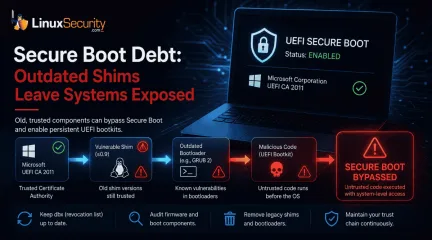
ESET researchers identified 11 old and forgotten Linux UEFI shim bootloaders at versions 0.9 and below that can be used to bypass UEFI Secure Boot on any UEFI-based machine that trusts Microsoft’s Microsoft Corporation UEFI CA 2011 third-party certificate authority, regardless of the installed operating system (OS). Reported shims can be exploited to execute untrusted code during system boot, enabling attackers to deploy malicious UEFI bootkits even on systems with UEFI Secure Boot enabled. . While two CVE IDs were assigned to this case, CVE-2026-8863 and CVE-2026-10797 , exploitation of each reported shim is not just about a single bug that can be found in these old shims directly. In fact, the attack surface is extended by the shims’ trusted, second-stage bootloaders—most notably GRUB 2—which, like the shims themselves, often include outdated versions with known vulnerabilities. The discovered shims come from various software packages, including PC-diagnostics utilities and older Linux distributions. Importantly, exploitation is not limited to systems with the affected software installed, as attackers can bring their own copy of these vulnerable, Microsoft-signed shims to any UEFI system with the Microsoft third-party certificate enrolled. The Problem of "Secure Boot Debt" This is not merely a collection of 11 vulnerable binaries; it is a textbook case of "Secure Boot debt"—the accumulation of old, trusted code that creates a persistent attack surface. To allow Linux distributions to boot on Secure Boot-enabled systems without Microsoft signing every distribution-specific bootloader, the open-source shim project provides a small first-stage bootloader that Microsoft signs once. This shim acts as a secondary anchor, verifying and launching the rest of the boot stack. The breakdown occurs here: these shims do not have an expiration date. In the eyes of the firmware, a shim signed in 2013 is often just as "valid" as one signed in 2026. Because these legacy shims predatesecurity features like Secure Boot Advanced Targeting (SBAT) , which embeds generation metadata into boot components to allow entire vulnerable generations to be revoked, they simply ignore current revocation policies. Risk and Persistence It is vital to note that this is primarily a persistence mechanism rather than a remote, "one-click" initial access vector. Exploitation generally requires an attacker to already possess significant privileges or control over the boot process, such as administrative access, physical access to the machine, or a successful compromise of the host OS. Once a vulnerable shim is utilized, however, the malicious code operates from a position of authority, establishing persistence that survives OS reinstalls and disk wipes. Since this exploit occurs before the OS loads, many OS-level security controls, including EDR agents, cannot observe the initial compromise. Strengthening the Chain The primary obstacle to revocation is the scale of ecosystem coordination. While newer mechanisms like SBAT are critical for scalability, systems running bootloaders from a decade ago do not know how to verify those policies. To protect systems, administrators should prioritize the following: Prioritize the dbx Update: Ensure all systems have applied the latest Secure Boot revocation list updates. This is the primary defense against the execution of these specific binaries. Audit Firmware Lifecycle: Firmware-level auditing must be incorporated into standard vulnerability management. Treat bootloader inventory with the same scrutiny applied to OS-level package managers. Retire Legacy Components: Periodically inventory the boot chain and remove obsolete shim and GRUB binaries from deployment images. Old, signed components should not remain available simply because they still boot successfully. The BootHole disclosure demonstrated that Secure Boot depends on every trusted component in the boot chain. Secure Boot Is Only as Strong as Its Trust Chain Secure Boot isn't a security feature that you can "set it and forget it"; it's a trust model that needs to be maintained all the time. Updating the operating system is only half the battle if old boot components are still trusted below it. Linux administrators can lower Secure Boot debt and protect the boot chain's integrity by regularly applying Secure Boot revocation updates, getting rid of old shim and GRUB binaries, and including firmware in regular security maintenance. . Obsolete Linux UEFI shims introduce security risks, enabling attackers to exploit vulnerabilities during boot.. Linux UEFI, Trust Chain, Secure Boot, Bootloader Vulnerabilities, GRUB Security. . MaK Ulac
 Jul 16, 2026
•
Jul 16, 2026
• Security Vulnerabilities
81
 security advisorylinux distributionprivacy
Comprehending Fingerprinting Risks Faced by Linux Users Today
Linux systems block a lot of noise that targets other platforms, but they still leak enough information through the browser to make users identifiable. Fingerprinting takes the data a site can read in the first few milliseconds of a connection and turns it into a profile that follows the device across sessions, networks, and privacy tools. Cookies aren’t involved. The browser itself is the signal. . The mix of distributions, desktop environments, GPU drivers, and hardware variations makes Linux machines stand out more than most users expect. Tracking scripts take advantage of that uniqueness. Attackers do the same when they want to link activity from one session to another, even when the machine moves between networks or hides behind a VPN. Below are the fingerprinting methods that matter most for Linux security and how they expose device-level details. Browser Fingerprinting on Linux Browser fingerprinting collects configuration data that reveals how the system is built and how the browser behaves. Screen size, timezone, fonts, plugin support, language settings, rendering quirks, GPU information, and driver details all feed into a single device fingerprint. Linux setups generate high entropy because few systems look alike. A workstation running Wayland on AMD hardware leaves a different device fingerprint than a lightweight Debian install running X11 with Intel graphics. The Chromium sandbox, Firefox ESR, and hardened builds introduce their own patterns. These patterns persist. A fresh session in a private window won’t change them. Switching networks won’t change them. Several research groups maintain in-depth analyses of how these models operate, making it straightforward to track new browser fingerprinting techniques and understand how they evolve. Canvas Fingerprinting on Linux Canvas fingerprinting forces the browser to draw an image through HTML5 Canvas. The result depends on GPU type, drivers, subpixel rendering, anti-aliasing, font libraries, and the compositor.Linux diversity shows through in the output. Wayland and X11 differ. Mesa and proprietary Nvidia drivers differ. Fontconfig settings, color profiles, and the specific browser build all affect the final canvas fingerprint. Most users never see any of it. A script draws the image in the background, reads the pixel data, and uses the variation as a stable identifier. Even when a Linux browser runs in a VM or container, the rendering pipeline leaves recognizable fingerprints unless the environment forces strict uniformity. WebGL Fingerprinting and Linux Graphics Stacks WebGL fingerprinting goes deeper into the GPU. It uses shaders, floating-point math tests, and rendering operations that reveal the fine details of the graphics stack. The output exposes information about the GPU model, driver version, Mesa implementation, GLX behavior, and how the browser interfaces with the hardware. Because Linux supports multiple driver branches, open-source stacks, and hardware-specific quirks, WebGL output is rarely generic. Scripts only need a few WebGL calls to build a unique device fingerprint. For users relying on Tor or a VPN, WebGL fingerprinting becomes a problem. The network path might be hidden, but the GPU pipeline is not. Audio Fingerprinting in Linux Browsers Audio fingerprinting runs a short signal through the system and records the final waveform. Differences in sound cards, PulseAudio or PipeWire configuration, chipset behavior, and browser audio APIs all influence the result. The technique isn’t as strong on its own, but it strengthens browser fingerprinting, canvas fingerprinting, and WebGL fingerprinting when combined. Linux distros often ship with different audio stacks, driver versions, and kernel modules, which increases system variability and makes audio fingerprinting more useful to attackers building a full device fingerprint. Fingerprinting Methods That Affect Linux Users Each method reveals different pieces of information that an attacker can use to identify aLinux host. Device Fingerprinting on Linux Systems Device fingerprinting pulls data from hardware, kernel behavior, system libraries, and the surrounding software stack. The goal is to build a device fingerprint that stays consistent no matter which browser is used. Linux exposes more variation than most operating systems. Kernel versions shift from one distro to the next. Firmware differs. Compositors, drivers, and CPU features create small changes in timing and behavior that can be measured. These signals help an attacker connect activity across browsers. A device fingerprint can match a Chromium session to a Firefox session when both run on the same machine. Entropy on Linux systems is high enough that the link often survives. Website Visitor Identification in a Security Context Website visitor identification is treated as an analytics tool in most discussions, but the security impact is more important here. Fingerprinting makes it possible to track a Linux system across IP changes, browser resets, and privacy modes without relying on cookies. Tracking scripts watch how the browser draws text, how the GPU renders specific tests, which drivers are active, and how the OS responds to timing probes. Attackers use website visitor identification to follow a specific workstation across sessions, see which services it contacts, recognize repeated visits from the same Linux host, and map behavior to a single device fingerprint. When a phishing lure is reused, the same fingerprint confirms whether it reached its target. Linux diversity strengthens these signatures instead of obscuring them. Cookie Alternatives That Matter for Linux Users Cookies are simple to block or clear, so tracking scripts use cookie alternatives that survive resets. These identifiers blend with browser fingerprinting, canvas fingerprinting, audio fingerprinting, and WebGL fingerprinting to create a more persistent profile. The cookie alternatives that matter most for Linux security include: LocalStorageidentifiers IndexedDB data ETags reused as trackers HSTS supercookies that outlive regular clearing Service Worker caches TLS session identifiers Linux users often depend on hardened browsers or privacy extensions, but these cookie alternatives work outside those controls. When combined with a device fingerprint, they create an identifier that can stay active through fresh sessions, proxy changes, and browser resets. How Fingerprinting Methods Combine Against Linux Users Each fingerprinting method reveals only part of the system. When combined, they create a stable identifier. A device fingerprint, a canvas fingerprinting signature, GPU output from WebGL fingerprinting, and the variations exposed through audio fingerprinting all feed into one profile. Cookie alternatives reinforce it. Linux machines rarely produce similar fingerprints. Driver branches differ. Kernels differ. Hardware mixes differ. Distributions ship different defaults. That separation gives tracking systems more confidence when they attempt to match one session to the next. Attackers use the same signals to follow a Linux host across networks and privacy tools . The combined fingerprint persists through private browsing, browser reinstalls, VPN rotation, network changes, IP masking techniques, and many anti-tracking features. For Linux users, this means the system itself becomes the identifier unless steps are taken to reduce the entropy that fingerprinting relies on. How Attackers Use Fingerprinting Against Linux Users Fingerprinting gives attackers a way to follow a Linux system even when the user rotates IP addresses or switches browsers. A canvas fingerprinting signature helps confirm that two separate visits come from the same host. WebGL fingerprinting shows GPU and driver characteristics that don’t change often. Audio fingerprinting and device fingerprinting add their own variations. Together, these signals form a stable profile that attackers can use to track a workstation over time. Forhigh-value targets, fingerprinting supports targeted phishing and session correlation. A unique device fingerprint can confirm when a specific Linux machine lands on a decoy page or triggers a malicious script. Attackers also use website visitor identification to watch which services a machine contacts after an initial compromise attempt. Cookie alternatives make this persistence harder to shake, even when privacy controls are in place. Reducing Fingerprinting Exposure on Linux Linux users can limit exposure by lowering the system’s entropy — the unique characteristics that make a device fingerprint stand out. The goal isn’t to hide every detail. It’s to blend into a common profile that tracking scripts can’t separate easily. The most effective steps include: Using Firefox ESR, Tor Browser, or a hardened Chromium configuration that restricts fingerprintable APIs Limiting fonts and disabling optional rendering libraries when possible Using Wayland, where supported, since it reduces some timing leaks compared to X11 Restricting WebGL or forcing it into a safer, more uniform mode Clearing or disabling cookie alternatives such as LocalStorage, IndexedDB, and Service Worker caches Avoiding unnecessary browser extensions that introduce new signals into the device fingerprint Running high-risk browsing in a dedicated VM or container that maintains a consistent environment None of these steps eliminates fingerprinting on its own. They reduce the reliability of the device fingerprint and make it harder for scripts to match one session to the next. Hardening Linux Browsers Against Fingerprinting Browser-level controls matter because many fingerprinting operations originate from JavaScript. Linux users can gain a significant advantage by tightening the browser’s permissions and limiting access to features that feed canvas fingerprinting, WebGL fingerprinting, audio fingerprinting, and device fingerprinting. Practical adjustments include: Disabling WebGLentirely when it isn’t required Restricting Canvas readout functions instead of blocking Canvas altogether Enforcing a uniform User-Agent string Blocking third-party scripts and cross-site requests that enable website visitor identification Using privacy filters that randomize some fingerprinting outputs without breaking core functionality The aim is to reduce the number of unique values the browser exposes. As entropy increases, fingerprinting becomes less precise because systems become more diverse and unpredictable. Conclusion Fingerprinting persists because the browser and the system behind it reveal more than most users realize. Linux offers strong security fundamentals, but the variety in hardware, drivers, kernels, and browser builds gives scripts more ways to build a device fingerprint. When these signals combine, they allow tracking to continue across sessions, networks, and privacy tools. Reducing exposure requires controlling which signals the system leaks and keeping the environment as uniform as possible. Browser configuration, system settings, and disciplined separation of tasks help limit how fingerprinting scripts identify the device. For Linux security, understanding these methods is part of maintaining a defensive posture against tracking, targeted phishing, and long-term session correlation. . Understanding fingerprinting techniques is vital for Linux users to enhance privacy and security against tracking risks.. Fingerprinting Techniques, Linux Privacy, Browser Security, Device Identification, Tracking Protection. . MaK Ulac
Nov 28, 2025
•
Privacy

209
 security advisorylinux distributionsystem security
SELinux and AppArmor: Insights into Security Trends and Framework Efficacy
Let’s get one thing clear upfront: Mandatory Access Control (MAC) isn’t new, but its role in Linux security has shifted from being a “nice-to-have” to a cornerstone of system hardening. If you’ve ever built or maintained a Linux environment—whether it’s a small personal project or a sprawling enterprise setup—you already know security is not about installing once and walking away. It’s system isolation, granular policy enforcement, compliance readiness, and an ongoing effort to deal with the evolving threat landscape. . This is where tools like SELinux and AppArmor come into play. These two MAC frameworks dominate Linux ecosystems but approach security in slightly different ways. Their broader adoption in recent years hasn’t come out of nowhere; it’s the result of technical innovation, growing vendor support, and the demand for hardened-by-default distributions. However, their popularity also reflects the fact that today’s Linux admins aren't merely tweaking firewall rules—they’re navigating layered security architectures with containers, cloud workloads, and enterprise-level policies. Let’s break down what’s driving the uptake, why these frameworks matter, and how you can choose between them to align with your specific needs. Linux Distributor Defaults: Shifting the Security Baseline If you’re installing a new Linux distribution, chances are it already has a MAC framework baked in—and in many cases, it’s preconfigured to some degree. Defaults matter in security, especially for general-purpose installations or environments where admins might shy away from manual policy creation. Take OpenSUSE as a recent example. The distribution moved from AppArmor to SELinux as its default MAC in newer installations, arguing that SELinux’s policy expressiveness benefits high-security setups. Changes like this don’t just alter the toolchain; they often influence uptake at an ecosystem level. With SELinux already integrated into Red Hat Enterprise Linux (RHEL),Fedora, Debian, and even Android, the sheer weight of vendor context starts tipping the scales. This isn’t to say AppArmor is fading into obscurity; Ubuntu’s continued default support for AppArmor underscores its ease of use, especially for single-server or lightweight configurations. If your Linux environment is tied to a specific distro or vendor ecosystem, your decision might already be made. But if you’re building or migrating systems and evaluating MAC tools, it’s worth dissecting what’s beneath the surface of these defaults. Big Players, Granular Security One of SELinux’s defining features is its detailed policy language. It doesn’t just restrict access—it defines explicit roles, permissions, and multilevel security. You’re not simply saying “no access” to a directory or executable; you’re creating rules governing which processes can interact with which files under which context. That level of detail is invaluable for type enforcement, RBAC (Role-Based Access Control) , and multi-tenancy isolation in enterprise environments—especially as compliance standards like PCI DSS and HIPAA start dictating technical configurations. But let’s not overlook AppArmor. While its comparatively simpler profile-based approach means it doesn’t deliver the policy depth of SELinux, it’s more approachable for many admins. If you want to confine Apache, for example, you can write a profile without diving into SELinux’s complex type-system nuances. Its appeal lies in getting a functional MAC quickly without needing a crash course in policy labeling. Both frameworks isolate applications and processes in ways that reduce the blast radius of vulnerabilities. If an attacker compromises a service running under AppArmor or SELinux confines, the exploit doesn’t grant carte blanche access to the rest of the system reliably. Instead, the damage is scoped to the permissions of that confined application. Containers and Cloud Security: SELinux Steps Ahead The rise of Kubernetes,Docker, Podman, and other orchestrated environments has made workload isolation a top priority. As you pack multiple containers into the same host, you’re introducing shared utilities, libraries, and kernel dependencies—not to mention the potential for noisy neighbors or lateral movement within the node. SELinux takes center stage here. Distributions like Fedora and solutions like OpenShift ship workloads with SELinux policies precisely configured for this kind of high-security environment. Even Kubernetes documentation highlights SELinux support for node security. You can, for instance, configure Pod security settings with SELinux annotations, ensuring containers run in isolation aligned to label-based enforcement. This has made SELinux a mainstay in regulated environments where compliance standards demand clearly defined isolation boundaries. AppArmor is no slouch, though. It has integrations with Docker as well, but it functions at a slightly higher level of abstraction. You’re not working with the same granular control that SELinux operators wield, but in smaller-scale environments—or when performance overhead is a concern—it still proves itself as a capable MAC tool. Better Tools, Less Hesitation If MAC frameworks once had a reputation for being “too complex,” that’s changing fast. SELinux tools like audit2allow simplify policy creation by analyzing denial logs and generating allow rules that can be integrated into policies. SELinux booleans—logical switches that toggle specific policy behaviors—make it simpler to adapt policies rather than completely rewriting them. AppArmor isn’t lagging either; profile templates, readable configurations, and straightforward defaults demystify the act of confining processes. With improved documentation and stronger community support for both tools, administrators can now access workflows designed for scaling MAC adoption. Should I Choose SELinux or AppArmor? Here’s the thing: your choice isn’t just technical—it’scontextual. If you’re rolling out lightweight or single-server environments, where simplicity and minimal input matter most, AppArmor could be the better fit. Admins new to MAC tools often find AppArmor’s profiles easier to digest, making smaller deployments more manageable. But if you’re dealing with sprawling enterprise workloads, SELinux is likely the way forward. Its complexity is part of what makes it ideal for environments with strict compliance needs. Whether you’re enforcing multilevel security in a government deployment or fine-tuning RBAC across your Kubernetes clusters, its label-based approach gives you the flexibility and robustness required for advanced policy enforcement. However, migrating between the two isn’t always straightforward. If you’re thinking about transitioning openSUSE workloads from AppArmor to SELinux, prepare for some manual work—default profiles and behaviors don’t directly align. Migration guides help, but planning is critical to avoid accidentally breaking key functionality. The MAC Adoption Shift: A New Baseline Linux security isn’t static—and neither is the role of MAC frameworks. The growing reliance on system isolation, container security , and enterprise policy enforcement reflects a demand for hardened operating systems that deliver security by design. Both SELinux and AppArmor offer the capability to lock down systems, but they do so with different technical philosophies and use cases. The broader adoption of these tools, combined with vendor defaults and improved accessibility, speaks to a larger shift in the way Linux is designed and deployed. As we look ahead to container-heavy architectures and increasingly strict regulatory landscapes, MAC tools represent more than optional system bolting—they’re the new baseline. And for the modern admin, that’s no longer a choice; it’s an expectation. . Explore how SELinux and AppArmor are key for Linux security, emphasizing their differing approaches and adoption trends.. SELinux,AppArmor, Mandatory Access Control, Linux Security, Container Security. . Brittany Day
Jul 28, 2025
•
Security Trends
79
 system integritylinux distributionsecurity enhancements
Chainguard OS: Innovative Integrity & Updates for Linux Security
Chainguard OS is poised to transform Linux security practices with its innovative approach to system integrity and updates. Developed with the guidance of top Linux maintainers, Chainguard OS does away with traditional patching methods. Instead of applying patches, the entire operating system is replaced when updates are needed. This ensures that systems always run the latest, most secure version without the risk of patching errors or incomplete fixes. . Additionally, Chainguard OS employs an automated build system, Chainguard Factory, which constructs a streamlined OS with minimal dependencies, significantly reducing the attack surface. Its zero-trust architecture and immutable infrastructure guarantee that every component is continuously verified, maintaining system integrity and security against potential supply chain attacks. For us, Linux security admins, Chainguard OS represents a robust, secure, and incredibly efficient way to manage and protect our environments. Let’s delve deeper into what makes this distro stand out and how it can reshape your Linux security practices. No Traditional Patching: A Game Changer One of Chainguard OS’s most revolutionary features is its approach to system updates. Traditional Linux distributions rely heavily on patching , a process where individual vulnerabilities are addressed by applying patches. While this has been a standard practice for years, it has drawbacks, including risks of incomplete fixes and potential for errors during patch application. Chainguard OS takes a different and bold approach—when a security update is needed, the entire OS is replaced instead of patched. This method ensures that your systems consistently run the latest, most secure operating system version. It reduces the painstaking manual labor associated with tracking, testing, and applying individual patches. This comprehensive updating approach minimizes the risk of leaving any vulnerabilities unchecked, offering a solid shield against potential threats. This meansless time spent on patch management and more time focusing on strategic security initiatives. Chainguard Factory: An Automated Build System Its automated build system, known as Chainguard Factory , is at the core of Chainguard OS's security model . This automated build system plays an integral part in upholding the OS's integrity by producing an extremely minimalist version of Linux. Unlike traditional OS versions, which contain unnecessary software and dependencies that slow performance down considerably, Chainguard Factory ensures only essential components are present on every build run. Reduced bloat means improved performance and a significantly decreased attack surface. With fewer components, attackers have fewer entry points to breach your OS environment. Chainguard Factory makes building and deploying an OS far less error-prone, significantly decreasing risks from human error during deployment. It also provides reliable management for admins to create lean, secure operating system environments. Zero-Trust, Immutable Infrastructure Chainguard OS's security is further strengthened by its zero-trust architecture and immutable infrastructure. Zero trust security adheres to a philosophy known as "never trust, always verify", where every part of a system must continuously prove itself trustworthy before being trusted unconditionally, compared with traditional models, which place trust unconditionally once established. Chainguard OS features an immutable infrastructure that prevents changes after deployment. This stops unapproved modifications from taking effect and maintains consistent security levels over time. Any updates or changes must replace all systems before individual updates occur, ensuring modifications remain controlled and verified by Chainguard OS administrators. Security admins will greatly benefit from adopting an approach characterized by Zero Trust and immutability. This approach removes worries over insider threats or unapproved changes and gives peace of mindthat their infrastructure maintains its integrity, offering robust defenses against various attack vectors, such as supply-chain attacks. Our Final Thoughts: Embracing the Future of Linux Security with Chainguard OS Chainguard OS represents a revolutionary step in protecting Linux environments. By going beyond traditional patching with automated, minimalistic build systems and zero-trust infrastructures that immutably protect systems from vulnerabilities, Chainguard OS offers security administrators a formidable ally against emerging cyber threats. Adopting Chainguard OS can transform how organizations approach security. It ensures systems remain up-to-date, lean, and verified, increasing security posture and making more efficient use of IT resources. As threats continue emerging, innovative solutions like Chainguard OS will be essential to stay one step ahead and maintain solid defenses. Overall, Chainguard OS offers Linux security admins practical and advanced security measures, providing a more secure environment with greater resilience for years to come. Have you given Chainguard OS a try? We'd love to hear your thoughts @lnxsec! . Skyshield OS reinvents Linux defense through a streamlined, automated compilation framework that guarantees current and authenticated systems.. Chainguard OS, Security Enhancements, Automated Build System, Immutable Infrastructure. . Brittany Day
Apr 07, 2025
•
Security Projects
79
 security advisorypatchlinux distribution
Linux BPF Update: Speculation Barriers Against Spectre Threats
In our ongoing quest to combat sophisticated security vulnerabilities, we Linux admins are always looking for innovative new tools and techniques to safeguard our systems. On Monday, a "request for comments" patch series introduced key Spectre mitigations by adding speculation barriers specifically for Berkeley Packet Filter programs. . Spectre vulnerabilities continue to pose a significant Linux security threat. Thus, these patches aim to close any security holes within BPF programs, which are widely used for dynamic network monitoring, tracing, and various low-level Linux system operations. To help you understand these proposed patches and their potential impact on your security posture, I'll explain the role of speculation barriers in mitigating the risk of Spectre flaws, the potential impact of these patches, and my predictions for the future of BPF security. Let's begin by understanding Spectre vulnerabilities and how they are exploited. Understanding Spectre and Speculative Execution Bugs To fully grasp the significance of the recently proposed patches for Spectre vulnerabilities , it's essential to understand their nature. Modern CPUs use "speculative execution" as a performance-boosting strategy. This involves making educated guesses about which path code might take to execute instructions before actual CPU instructions confirm them. While this helps programs run more quickly, it also introduces security issues. Spectre flaws exploit this behavior to access sensitive information like passwords and encryption keys that should remain out of reach to unauthorized users. Examining The Role of Speculation Barriers in Mitigations Recent patches aim to address these issues by implementing speculation barriers - safeguards that stop CPUs from speculatively executing code paths that could expose sensitive information. By strategically placing these barriers within BPF programs, developers can ensure any potentially dangerous speculative execution is immediately stopped before itcauses harm. From a security perspective, this significantly reduces the attack surface and disrupts speculative execution processes, making it much harder for attackers to exploit vulnerabilities and access sensitive information. This is particularly significant in BPF programs, as they regularly manage and monitor system operations. The Potential Performance Impact of These Patches Though speculation barriers increase security, they do come with potential downsides. One major concern is their impact on performance, as speculation barriers can add unnecessary overhead that delays certain operations from being executed efficiently and swiftly - especially in environments that rely heavily on BPF programs for their efficiency and speed. To prevent potential performance degradation, admins must ensure they test patches thoroughly in their environments to gauge the full extent of their performance implications. Achieving an appropriate balance between improved security and acceptable performance is essential, including tweaking configuration settings or optimizing other areas to lessen their effect. Compatibility and Planning for Updates Administrators can ensure a seamless transition by verifying compatibility between patches and their current kernel versions and identifying which versions include updates that must be planned for. This is especially critical in systems handling sensitive information, as staying current with security patches is integral to maintaining a secure environment. Promptly implementing updates is of utmost importance, as delays in applying security patches could expose systems to attacks. Therefore, Linux admins must devise an update strategy that includes testing patches in non-production environments before rolling them out gradually to production servers to minimize disruption while simultaneously applying all relevant patches. The Importance of Continuous Monitoring and Adaptation Regardless of recent efforts to implement speculation barriers, cyberthreats are ever-evolving and new vulnerabilities emerge daily while attackers devise novel methods of exploiting system weaknesses. Therefore, constant monitoring and adaptation are vital to maintaining robust security. Administrators must focus on installing current patches and pay close attention to future developments. This means staying informed with recent security research findings, attending relevant conferences, and joining community discussions to anticipate emerging threats and be better positioned when they arise. Admins should regularly conduct security audits and vulnerability assessments as part of their security strategy, alongside applying patches. These audits allow us to detect potential weaknesses that have been overlooked or have arisen due to changes in the environment, giving an opportunity to proactively address such weaknesses to maintain a strong security posture. Balancing Security and Performance Linux administrators face an ongoing struggle between security and performance regarding speculation barriers - while they are critical in mitigating Spectre vulnerabilities, they may negatively affect BPF programs essential to various system operations. To achieve balance, administrators should consider employing additional performance optimization techniques. These could include fine-tuning system configurations, augmenting hardware capabilities to better work within new security constraints, or optimizing code to function more efficiently within these parameters. By monitoring system performance closely and making necessary adjustments, they can ensure that security improvements do not significantly compromise overall functionality. Looking Ahead: The Future of BPF Security Introducing speculation barriers into BPF programs is just the first step on a long road toward more secure systems. As cybersecurity advances, new techniques and tools will emerge to combat emerging threats. We Linux administrators must remain aware of these developments to secure oursystems. One area of focus should be the ongoing development of BPF itself. As more sophisticated programs and uses arise for BPF executions, their need for robust security measures increases exponentially - possibly including new types of barriers or entirely novel approaches for protecting executions of the service. Collaboration among security communities will be essential in shaping BPF security going forward. By sharing knowledge, insights, and best practices, the community can work collectively toward strengthening BPF programs and their supporting systems' security. Our Final Thoughts on Mitigating Spectre Vulnerabilities in BPF Programs Recent patches introducing speculation barriers for BPF programs represent a substantial step toward protecting Linux systems against Spectre vulnerabilities. By understanding their role and planning for potential performance impacts and compatibility concerns, Linux administrators can effectively enhance system security. By monitoring new threats as they emerge and working with the security community to adapt systems against them, administrators will also ensure a robust environment where sensitive data remains safe while performance is optimized. . Meltdown exploits represent a serious risk; updates incorporate speculative safeguards to enhance Windows protection.. BPF Security, Linux Admin Strategies, Spectre Mitigations, Performance Optimization, System Security Strategies. . Brittany Day
Feb 27, 2025
•
Security Projects
79
 Debianlinux distributionapplication management
Free10: A Debian-Focused OS for Windows 10 Users Prioritizing Security
If you're a security-conscious Linux admin or a Windows 10 user considering a switch to Linux, you might be surprised to learn about Free10 . This Linux distribution offers significant security benefits while boasting a familiar Windows-like interface. . With a solid Debian foundation, Free10 makes switching easier while providing security benefits - not to mention no need to navigate around a new interface and risk introducing potential security risks! One of the key advantages of Free10 is its customization capabilities to meet your security needs. KDE Plasma-based customization options help meet admins' specific needs, from full-featured setups to interfaces that minimize the attack surface. Furthermore, with Flatpak support available within Free10, you can run applications in isolated environments, further increasing security by restricting their access to system resources. Let's take a closer look at the features that make Free10 user-friendly and robust enough to meet high-security standards and provide a viable Windows 10 alternative for admins looking to transition to Linux. A Familiar Interface with Strong Security Underpinnings Free10 makes transitioning to a new operating system less daunting by providing an interface similar to Windows 10, helping reduce learning curves for those familiar with its use. Its desktop layout, start menu, and overall design philosophy offer familiarity, reducing errors that could compromise security as users adjust to a different system. Debian, renowned for its stability and security, lies beneath this familiar Windows-like shell. Debian's strict package management and regular security updates allow Free10 users to take advantage of all the latest patches without needing to navigate a complex update process, making this environment suitable for newcomers and veteran Linux admins looking for an accessible yet secure system. Desktop Customization for Enhanced Security Free10 stands out among competing OSes because of its flexible desktopenvironment customization features. Users can select from a selection of desktop environments based on KDE Plasma , including full-featured, basic, and minimal setups. Customization does more than satisfy aesthetic preferences; it has significant security implications. Opting for a minimal desktop setup can be especially beneficial to users who prioritize security over all else. A minimal desktop features fewer programs and services running by default, reducing its attack surface and making the system more secure. Furthermore, customizing Linux admin environments to focus on security while offering a usable environment is another helpful approach, ensuring all daily tasks can be performed smoothly. Switching between desktop profiles is especially valuable for administrators overseeing multiple systems or users with differing security needs, such as handling sensitive data in an environment with a minimal setup. On the other hand, development environments might need full-featured desktops equipped with additional applications and services. KDE Discover and Flatpak: Secure Application Management Free10 uses KDE Discover to assist users in discovering and installing applications with minimal hassle, making KDE updates easily available. Hence, users always have access to the latest features and security patches. This approach ensures users can always benefit from accessing new features or patches without delay. One of the more surprising features of Free10 is its support for Flatpak , an innovative packaging format designed to increase application security. Although Free10 doesn't have this support by default, it can be easily accomplished in KDE Discover by opening its settings and clicking "Add Flathub." Flatpak applications run within isolated environments known as sandboxes, which greatly increase security by restricting access to system resources and user data. This is particularly helpful when installing proprietary or third-party applications that pose risks of system-wide issues oraccessing sensitive data. Linux admins will appreciate KDE Discover and Flatpak's sandboxing features, allowing them to monitor applications easily while protecting against security vulnerabilities. Free10 is an attractive option for tech-savvy users who require secure systems and those looking for simpler operating environments with better protections against vulnerabilities. Stability and Regular Updates OS security extends beyond inherent features and hinges upon regular and stable updates . Debian was chosen as the foundation for Free10 because of its proven record for stability, with rigorous testing processes before updates are released. This ensures each update provides improved security and is reliable enough to reduce system crashes or other issues that might compromise it. Free10 takes its inspiration from Debian by providing users with regular and secure updates that keep their systems safe from new threats and ensure users can rely on up-to-date security patches to defend against newer ones. Users can trust that Free10 will always remain up-to-date regarding its defenses against threats as time progresses. With this foundation, they know their system remains protected against persistent and emerging attacks. User and Admin-Friendly Environment Transitioning to a new operating system can be daunting for non-tech-savvy users or those deeply invested in the Windows ecosystem. Free10's design, which mimics that of Windows 10, dramatically lowers the barrier to entry for these users. They don't need to learn unfamiliar workflows or navigation methods, which could cause frustration or compromise security. Linux administrators will benefit from this user-friendly environment in that less time is spent training and supporting end-users. Instead, they can devote more of their attention to configuring and maintaining security on the system. It also empowers end-users to manage basic tasks themselves without incurring unnecessary security risks through unfamiliarity. Community andSupport Free10 benefits from having access to one of the largest and most active Linux communities - Debian . This community contributes regular updates and security patches while providing administrators with plenty of resources they can draw upon when troubleshooting and aiming to increase security on their system. Free10 users also benefit from forums, documentation, and support channels where they can pose their queries, share experiences with fellow users and developers, and get advice from other Free10 users and developers alike. This collaborative environment fosters continuous improvement while keeping an eye on security measures. Our Final Thoughts on Transitioning to Free10 Free10 provides an attractive alternative for security-conscious Linux administrators and Windows 10 users looking to switch over. Featuring a familiar Windows-like interface, robust Debian-based security, customizable desktop environments, and application management support via KDE Discover and Flatpak, Free10 is a safe yet practical choice. Free10 provides everything necessary to secure multiple systems with differing security needs or create a user-friendly yet secure environment for personal use, making it the ideal solution for maintaining high standards without compromising usability. Its familiarity, customization, and strong security foundations make Free10 an attractive alternative to Windows while offering secure workflow capabilities. You can easily download and install Free10 for free. Have you given Free10 a try? We'd love to hear what you think @lnxsec ! . Free10's Debian framework simplifies the switch from macOS, offering enhanced safety and an interface that feels like home.. Free10 Linux, Debian security, KDE Plasma customization, secure Linux alternative, Linux distribution features. . Brittany Day
Feb 25, 2025
•
Security Projects
81
 security advisorysecurity updatelinux distribution
Tails 6.2 Security Update: 21 New Languages For Online Privacy
Tails 6.2 is a new Linux distribution release that expands its multilingual support and improves security features. The distribution is a Debian-based operating system that enables users to remain incognito online and securely browse the web. . Tails 6.2 now supports 21 new languages, including Albanian, Bengali, Icelandic, Korean, and Ukrainian. This expansion makes Tails accessible to more individuals, allowing them to navigate in their native languages and enhance online privacy. Tails encourages participation through the Tor Project Weblate , stating that new languages will be added to future versions once 25% of strings are translated. Why Is This Release So Significant for Admins and Security Practitioners? Along with the expanded language support, Tails 6.2 introduces critical updates that strengthen the system's hardware compatibility, reliability, and security. Updates to critical components, such as the Tor Browser and client , ensure users have the latest secure browsing technology. The operating system's resilience against potential security vulnerabilities like the Spectre v4 has also been enhanced by disabling speculative store bypass. As a result, users can feel more secure while using Tails. The operating system's developers have demonstrated their commitment to the open-source community by encouraging them to contribute to the translation efforts. The improved language support is a welcome addition that shows the developer's attention to detail. The more people using secure operating systems, the lower the incidence of cyberattacks and data breaches . Tails 6.2's expanded language support, reliability, security and hardware compatibility improvements, and streamlined upgrade process must be highlighted. These improvements make Tails 6.2 a dependable option for individuals to strengthen their online privacy and security. However, It’s vital to note that while Tails 6.2 provides a secure operating system, it's not bulletproof. It is essential to remain vigilant and usebest practices for secure browsing while using Tails 6.2, such as utilizing a VPN, regularly updating the operating system, avoiding suspicious websites, and only connecting to trusted Wi-Fi networks. It should be noted that installing a new version instead of upgrading will result in losing all data stored in Persistent Storage on the USB stick. Hence, it is crucial to carry out the correct installation process to ensure the safety of user data. You can view instructions on downloading, installing, and upgrading Tails 6.2 here . Our Final Thoughts on the Tails 6.2 Release Tails 6.2 is an excellent tool for individuals prioritizing online privacy and security. Its expanded language support will make it more accessible to individuals worldwide, further increasing its popularity. Security practitioners, Linux admins, infosec professionals, internet security enthusiasts, and sysadmins should give Tails 6.2 a try. Its improved features and simplistic installation ensure that everyone interested in enhancing their online privacy can use it. . Tails 6.2 boosts protection and introduces 21 languages, significantly enhancing user satisfaction and internet confidentiality.. Tails 6.2, Multilingual Security, Privacy Enhancements. . Brittany Day
Apr 24, 2024
•
Privacy
79
 linux distributionsoftware managementcommunity support
A Comprehensive Analysis of Security and User Experience: Ubuntu vs Fedora
Ubuntu and Fedora are two prominent Linux distributions, each offering its own set of strengths and features. Ubuntu, created by Canonical Ltd ., boasts a user-friendly interface, stable performance, and a vast repository of pre-installed and downloadable software. On the other hand, Fedora prides itself on being an innovative and secure platform, perfect for experienced Linux users who desire the latest technological advancements. . We'll delve into the key characteristics and strengths of each distro, allowing you to make an informed decision based on your individual needs and preferences. Ubuntu vs. Fedora: What Sets These Distros Apart? As Linux administrators, infosec professionals, and sysadmins, we must analyze the implications of choosing an operating system for our organizations or personal use. Both Ubuntu and Fedora have loyal user bases and merit careful consideration when evaluating their performance, security, and ease of use. Ubuntu, being one of the most recognized Linux distributions, offers a simple and pleasant user experience. The distro comes with pre-installed software covering various needs, from web browsing to multimedia. Additionally, Ubuntu's regular updates and security patches contribute to its stability and protection against potential attacks. Fedora, backed by Red Hat , stands out for its innovation and commitment to security. With its frequent releases, Fedora ensures access to the latest technologies and software advancements. Its advanced security mechanisms protect against malware and other threats. Furthermore, Fedora's wide range of applications caters to users at every level, from beginners to experts. One intriguing point raised by the article is the significance of the package management systems used by each distribution. Ubuntu utilizes DEB format with the APT package manager, known for its speed and ease of use. In contrast, Fedora uses the RPM format with the DNF package manager, providing efficient package management operations. It isessential to understand these differences and choose an operating system that aligns with your workflow and administrative requirements. As security practitioners, it is critical to consider the long-term consequences of our choices. Ubuntu's long-term support (LTS) releases, providing five years of support, makes it an attractive option for organizations seeking stability. Another long-term implication to consider is community support. Ubuntu's large and active community provides abundant resources, such as forums and tutorials, making it a popular choice for those seeking assistance. Fedora's community, while kind and collaborative, does not receive the same level of attention. This discrepancy may impact users' ability to find timely support and guidance when facing challenges or security concerns. Our Final Thoughts on Choosing Between Ubuntu & Fedora Choosing between Ubuntu and Fedora ultimately depends on individual needs and goals. Users seeking a user-friendly and stable experience may find Ubuntu to be their best fit, while those desiring the latest technological advancements and customizable options might prefer Fedora. However, it is essential to assess long-term consequences, such as support cycles and the availability of assistance from the community. Both distributions have their strengths and weaknesses, and the decision should be made carefully considering these critical factors. Which distro are you using? What factor(s) influenced your decision? Connect with us on X @lnxsec and let's have a discussion! . When comparing Ubuntu and Fedora, key differences in security, performance, and user experience should guide your choice based on individual needs and expertise. Ubuntu Strengths,Fedora Features,Linux Distributions,Security Comparison,User-Friendly Linux. . Brittany Day
Feb 18, 2024
•
Security Projects

Get the latest News and Insights
Get the latest Linux and open source security news straight to your inbox.
Community Poll
Is continuous patching actually viable?
Search Topics
Powered By

Linux Security - Your source for Top Linux News, Advisories, HOWTOs and Feature Releases
QUICK LINKS
subscribe to newsletters!
Like staying secure? So do we.
Sign up for updates, tips, and alerts!