Explore top 10 tips to secure your open-source projects now. Read More
×



Server Security data privacy automation
data privacy automation Every system admin has lived through the same Monday morning ritual. A queue of forty tickets, half of them password resets, permission errors, or disk space warnings that any experienced technician could resolve in under two minutes. The other half require actual judgment. For years, automation promised that software would eventually sort the two apart on its own. That promise is now being tested in production Linux environments. . Early results are reshaping how IT teams think about tier-1...
 Jul 17, 2026

Privacydata collection automation
data collection automation You're running a web scraping project to collect pricing data from e-commerce sites. You set up a pool of datacenter proxies, launch your scripts, and within minutes — banned . CAPTCHAs everywhere. Your data pipeline stops before it really begins. . It's a frustrating scenario that plays out daily in ad verification, market research, and multi-account management. The website doesn't know you're doing legitimate research or monitoring. It just sees traffic coming from IP ranges it recognizes as...
Jul 17, 2026

Security Trends security advisory social engineering
security advisory social engineering Business Email Compromise used to be a numbers game — mass-blasted emails, broken English, an obvious "URGENT WIRE TRANSFER" subject line. That era is over. Generative AI has turned BEC into a tailored, low-noise operation that mimics writing style, voice, and even video presence. This piece looks at what's actually changed under the hood, what defenders are testing in response, and why so many organizations are still structurally unprepared for it. . The Infrastructure Problem Nobody Wants to...
Jul 17, 2026

Security Trends cybersecurity Linux documentation
cybersecurity Linux documentation Linux operating systems have gained prominence due to their stability, adaptability, and excellent security options. In the case of developing documentation, designing cybersecurity dashboards, or educational material, visuals are of vital importance when it comes to making things clear. The use of icons allows one to understand the message regarding alerts, authorization, encryption, authentication, or the state of the system just by looking at the visual cue without having to read long...
Jul 17, 2026
Security Vulnerabilities security advisory linux distribution
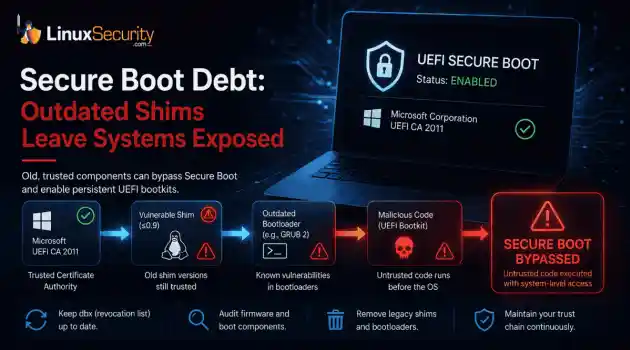
security advisory linux distribution ESET researchers identified 11 old and forgotten Linux UEFI shim bootloaders at versions 0.9 and below that can be used to bypass UEFI Secure Boot on any UEFI-based machine that trusts Microsoft’s Microsoft Corporation UEFI CA 2011 third-party certificate authority, regardless of the installed operating system (OS). Reported shims can be exploited to execute untrusted code during system boot, enabling attackers to deploy malicious UEFI bootkits even on systems with UEFI Secure Boot enabled.....
Jul 16, 2026
 Refine news
X Clear Filters
Get the latest News and Insights
Get the latest Linux and open source security news straight to your inbox.
Community Poll
Is continuous patching actually viable?
Trending News
Loading...
Explore Latest Linux Security news
We found 36 articles for you...
67
 authenticationuser authenticationopen-source security
How Passkey Solutions Revolutionize Authentication in Open-Source Security
Security in open-source projects has always been a challenge. The very nature of open-source software encourages collaboration, transparency, and improvement, all of which make the system potentially more exposed to risks. . One of the most critical yet vulnerable areas is user authentication. For decades, passwords have been the de facto method for authentication. Still, their poor user practices, susceptibility to phishing, and brute-force vulnerabilities have begun to make them an increasingly unreliable solution. Passkey solutions are emerging as a transformative authentication method addressing most of these issues by using public-key cryptography coupled with biometric factors. By implementing the best passkey software solutions for businesses , developers creating or supporting open-source projects can dramatically increase their security and align with the open-source approach. Passkey Solutions at the Technical Level of Understanding Its base is asymmetric cryptography , where authentication is done using a pair of keys: public and private. Here’s how the process works in practical terms: Registration : The user's device generates a cryptographic key pair. It sends the public key to the server and stores the private key securely on the device. Authentication : When logging in, the server sends a challenge (a random string) to the user’s device. The private key signs this challenge, and the server verifies the signature using the corresponding public key. Validation : If the signature is valid, the user has been authenticated without transmitting their private key. This way, even if a server is compromised, no sensitive user authentication data will be exposed. The decentralization aspect works exceptionally well for open-source projects that represent transparency and security. Addressing Common Security Weaknesses Open-source projects usually attract contributors worldwide, which can lead to inconsistencies in security practices. Forinstance, weak or reused passwords can easily compromise a project's integrity. Passkey solutions avoid this risk by eliminating passwords altogether. Another common concern is phishing, in which attackers trick users into providing their credentials. Phishing attacks no longer work with passkeys, which use device-stored private keys that cannot be shared. GitHub has already taken steps to address these challenges with their implementation of passkeys. GitHub’s Adoption of Passkeys: A Model for Open-Source Security GitHub , the world’s largest open-source collaboration platform, has adopted passkeys to enhance user authentication. Millions of developers rely on GitHub to host critical projects, including Kubernetes, React, and Linux distributions, so secure access is essential. GitHub’s integration of FIDO2 standards makes passkey adoption straightforward and compatible with modern devices. This move secures user accounts and strengthens trust in the open-source projects hosted on GitHub. By leading the way in adopting passkeys, GitHub sets a strong example for the open-source community, demonstrating how modern authentication can align with transparency and innovation. Integrating Passkey Solutions in Open-Source Frameworks Integrating passkey solutions may initially seem daunting for an open-source developer, but modern tools and frameworks make it easy. FIDO2 and WebAuthn are top standards that allow APIs to implement passkey authentication. Technical Guide on Implementing Passkey Solutions Passkeys are the next big thing in authentication. They replace passwords with secure cryptographic key pairs, making life easier for users and dramatically improving security. Adding passkeys can be a game-changer if you work on an open-source project. Here’s a no-frills guide to help you implement them. Why and How Passkeys Work Passkeys fix all that by replacing passwords with a pair of cryptographic keys. The private key stays safely on the user’s device, and the public keygets stored on your server. This setup makes passkeys very secure and protects against phishing, credential stuffing, and other common attacks. With big names like Google, Apple, and Microsoft on board, passkeys are quickly becoming the go-to solution for safer, easier logins. Here’s how it works: When someone signs up, their device creates a pair of keys. The private key stays locked down on their device, while the public key gets sent to your server. When they log in, your server sends a challenge to their device. The device signs it with the private key, and your server checks it against the public key. It’s smooth, secure, and way better than juggling passwords. This process eliminates the need for passwords, ensuring security and a seamless user experience. By adopting passkeys, your project gains both modern security and alignment with emerging authentication standards. Backend Setup You’ll need to set up endpoints to handle registration and authentication. If you're using Node.js, a library like @simplewebauthn/server can make this more manageable. Registration Endpoint This endpoint generates the challenge and other WebAuthn options for the front end. const { generateRegistrationOptions } = require('@simplewebauthn/server'); app.post('/register', (req, res) => { const options = generateRegistrationOptions({ rpName: "My Open-Source Project", userID: req.body.userID, // A unique user ID userName: req.body.username, attestationType: 'none', }); res.json(options); }); After verifying the response, you’ll save the public key (returned by the user’s device) in your database. Frontend Setup On the front end, you’ll use the navigator.credentials API to handle the WebAuthn flow. Let’s look at how to collect credentials during registration. Registration Flow The front end fetches the challenge from your server, uses it to generate a credential, and sends that credential back for verification. const options = awaitfetch('/register', { method: 'POST', body: JSON.stringify({ userID, username }), headers: { 'Content-Type': 'application/json' } }).then(res => res.json()); const credential = await navigator.credentials.create({ publicKey: options }); // Send credential back to the server await fetch('/verify-registration', { method: 'POST', body: JSON.stringify(credential), headers: { 'Content-Type': 'application/json' } }); It’s similar to logging in. You fetch the challenge, let the device sign it, and send the result back to your server. What You Need to Know HTTPS is Mandatory : WebAuthn only works over secure connections. Serialization : The credential object contains binary data, so you may need to serialize it (e.g., base64) before sending it to your server. Libraries Save Time : Use tools like @simplewebauthn to handle the heavy lifting for registration and authentication. Passkeys are a considerable upgrade for authentication, and they’re surprisingly straightforward to implement. You can make your project more secure and user-friendly with some backend setup and backend tweaks. Use libraries to simplify the process, test thoroughly, and you’ll be ahead of the curve. Happy coding! Comparing Passkey Solutions for Open-Source Projects Passkeys are redefining authentication, offering a secure and seamless alternative to passwords. With solutions like WebAuthn, FIDO2, and proprietary SDKs available, it’s crucial to pick one that fits your project’s needs. Let’s break them down so you can decide what works best. Passkey Solutions and Features WebAuthn is the standard for passkeys. Since it is W3C-backed, it works seamlessly across all platforms and browsers, making it an excellent choice for open-source projects. It focuses on cryptographic key pairs for secure, passwordless logins. FIDO2 extends this through WebAuthn by adding hardware authenticators such as USB security keys and is particularly suitable for environments withvery high-security demands, especially where multi-device authentication is required. Proprietary SDKs , such as those from Okta or Auth0, simplify integration by offering pre-built tools. While these save time, they can limit flexibility and often come with licensing costs. Pros and Cons Method Pros Cons WebAuthn - Open standard with no vendor lock-in. - Works seamlessly across browsers and devices. - Free and supported by extensive documentation. - Backend setup can be challenging with libraries. - Requires familiarity with cryptographic principles. FIDO2 - Supports external hardware authenticators for added security. - Ideal for multi-device authentication with top-tier security. - Backed by major industry players like Google and Microsoft. - Hardware dependencies can complicate implementation. - Steeper learning curve compared to WebAuthn. Proprietary SDKs - Simple to integrate, making it ideal for small teams or quick deployments. - Often includes extra features like analytics and user management. - Vendor lock-in reduces flexibility. - Licensing fees may not be feasible for open-source projects. Where Each Solution Works Best WebAuthn is an excellent fit for general-purpose open-source projects that need a flexible, passwordless login solution. Its broad support can benefit a CMS or a web app looking for cross-platform compatibility. FIDO2 shines in high-security use cases, such as financial or enterprise applications where hardware tokens and multi-factor authentication are essential. Think banking apps or secure employee portals. Proprietary SDKs work best for teams prioritizing speed and simplicity. If you don’t have the bandwidth for cryptography-heavy integration, these tools can get you up and running quickly—perfect for startups or MVPs. Comparison Feature WebAuthn FIDO2 Proprietary SDKs Integration Effort Moderate Moderate to High Low Security Strong Top-tier Varies Compatibility Cross-platform Adds hardware support Vendor-dependent Community support Large and active Strong via FIDO Alliance Varies Cost Free Free Licensing required Flexibility High High Limited to vendor APIs If you want a flexible, open solution that works across platforms, WebAuthn is your best bet. It’s free, well-supported, and ideal for most open-source projects. Thanks to its hardware-based authentication, FIDO2 is the clear winner for high-security needs. If you need something simple and fast, proprietary SDKs offer convenience but at the cost of flexibility and long-term control. Choose based on your project’s goals, resources, and future plans, and you’ll set yourself up for success with a secure, passwordless future. Future Trends and Innovations in Authentication Emerging technology already shapes how we think about secure logins and identity management, and for open-source developers, understanding these trends is essential to staying ahead. Here’s a look at what’s coming and how it could impact your projects. Decentralized Identity: User-Owned Credentials Decentralized identity (DI) systems are shifting credentials control from centralized databases to users. Tools like Decentralized Identifiers (DIDs) and Verifiable Credentials (VCs) store information in secure, user-owned wallets. This approach reduces liability and strengthens privacy for open-source projects, enabling seamless authentication across platforms without relying on passwords. Adopting DI frameworks like Hyperledger Indy or W3C-compliant tools can help future-proof projects while aligning with increasing demands for user control and data security. Smarter and More Secure Biometrics Biometricsare advancing beyond fingerprints and facial recognition. Behavioral biometrics, such as analyzing typing patterns or mouse movements, offer added security without requiring extra hardware. Wearable devices, like smartwatches, also enable continuous authentication through metrics like heart rate or motion. For developers, integrating biometrics into authentication workflows can enhance security while improving user experience. APIs leveraging device sensors or advanced biometric algorithms are becoming more accessible, making these features more straightforward to implement. Adaptive Security with AI AI is making authentication brighter. AI-driven systems can dynamically adjust security requirements by analyzing user behavior and context. For example, if a user logs in from an unusual location, the system can prompt for additional verification. These adaptive methods reduce friction for legitimate users while blocking suspicious activity. Integrating AI-powered libraries into authentication systems lets developers add context-aware security without needing to build models from scratch, making it a practical upgrade for many open-source projects. Regulatory Pressures and Quantum-Resistant Security New privacy regulations, such as GDPR and CCPA, have been one of the main drivers of how authentication systems treat user data. Truly decentralized and privacy-centered solutions will continue to have increasing relevance as governments press forward with demands for more secure and user-friendly authentication standards. Compliance is the key for open-source developers to ensure scalability globally and retain user trust. While currently in its infancy, quantum computing will eventually pose a significant threat to today's cryptography techniques. Researchers are developing a series of quantum-resistant algorithms. These studies result from projects like the National Institute of Standards and Technology Post-Quantum Cryptography Standardization project, which is leading the effort toward anew set of cryptographic techniques. Staying informed about quantum-safe tools will be critical for long-term security planning. Pair these innovations with awareness of regulatory changes and the potential impact of quantum computing, and you have a clear path to building future-ready systems. Open-source developers who adopt these trends will stay secure and set new standards in user-friendly and resilient authentication. Why Open-Source Projects Need Passkeys Open-source platforms are uniquely positioned to lead in the adoption of passkey solutions. Their open nature enables widespread testing, peer review, and rapid iterative, ideal conditions for implementing and refining cutting-edge authentication technologies. Further, as passkey systems become the new standard, open-source projects that integrate early will stand out as leaders in security and usability. The move towards passkey authentication follows the general trend of decentralization within the development of free and open-source software. By removing reliance on centralized password storage, these systems inherently reduce the risks of large-scale data breaches . This decentralization makes passkeys a natural fit for open-source, where community trust and transparency are essential. . Authentication methods are evolving in open-source initiatives, with passkey technologies enabling secure access without reliance on conventional password systems.. Passkey Solutions, User Authentication, Open-Source Security, FIDO2 Standards, WebAuthn Implementation. . MaK Ulac
 Nov 28, 2024
•
Nov 28, 2024
• Cryptography
215
 security featureuser authenticationdesktop environment
KDE Plasma 5.24: Enhanced Security With Fingerprint Reader Support
The upcoming KDE Plasma 5.24 desktop environment - slated for release on February 8, 2022 - will introduce support for fingerprint readers, allowing users to authenticate in to their Plasma sessions faster, easier, and more securely. . Renowned KDE developer Nate Graham shared today the big news that a fingerprint authentication feature, which is in development for quite a while now, has finally been merged and will be ready for deployment as part of the upcoming KDE Plasma 5.24 desktop environment series, due for release next year. Fingerprint authentication support has been implemented in the Users panel in System Settings. There, users who have a fingerprint reader, either built-in in their laptop or as an external device, will be able to enroll, as well as to de-enroll fingerprints. The link for this article located at 9 to 5 Linux is no longer available. . KDE Plasma 5.24 brings in biometric login support, improving both safety and usability for user access.. KDE Plasma, Fingerprint Support, Desktop Authentication, Security Features. . Brittany Day
Oct 25, 2021
•
Desktop Security

83
 security advisorysecurity updateuser authentication
PHP Repository Breach: Unauthorized Code Insertion Threat Detected
The maintainers of the PHP programming language have issued an update regarding the security incident that came to light late last month , stating that the actors may have gotten hold of a user database containing their passwords to make unauthorized changes to the repository. This was initially treated as a compromise of the git.php.net server - but further investigation into the incident has revealed that the commits were a result of pushing them using HTTPS and password-based authentication. . The PHP code repository was compromised two weeks ago with the insertion of code that, if left in place, would have enabled a backdoor into any web server running it. The code was initially committed in the name of Rasmus Lerdorf, creator of PHP. After it was removed, it was recommitted under Popov’s name. This was initially treated as a compromise of the git.php.net server. Further investigation into the incident has revealed that the commits were a result of pushing them using HTTPS and password-based authentication. This leading them to suspect a possible leak of the master.php.net user database. . A critical security incident occurred in the PHP repository, leading to illicit code integration and grave risks to user information.. PHP Compromise, Repository Breach, User Authentication. . LinuxSecurity.com Team
Apr 13, 2021
•
Hacks/Cracks
78
 security advisoryuser authenticationaccount protection
Google Blocks Log-Ins From Embedded Browsers To Mitigate Phishing Risk
Embedded browsers within apps can be useful if you want to use an existing account from another service -- say, your Gmail log-in -- to access their features. However, they're also really easy to weaponize for man-in-the-middle types of phishing attacks. Since Google can't differentiate between a legitimate log-in and a phishing attempt through a browser from within an application, it's blocking sign-ins from all embedded browser frameworks starting in June. . Bad actors can exploit embedded browsers, such as Chromium Embedded Framework, by intercepting communications between the user and providers like Google. The method gives them a way to steal log-in credentials, sometimes even multi-factor authentication details, in real time. Google has been implementing more security measures around log-ins in recent months in an effort to protect users' details. In late 2018, for instance, it launched a risk-assessment feature that requires JavaScript to be able to sign into your account. The link for this article located at Engadget is no longer available. . Tech giant Microsoft limits third-party app sign-ins to safeguard user data from potential hacks, promoting safer account management practices.. Embedded Browser Security, Phishing Prevention, User Authentication Issues. . LinuxSecurity.com Team
Apr 19, 2019
•
Vendors/Products
79
security innovationbiometric authenticationecommerce securityPayPal's Innovative Move Toward Biometric Authentication
The head of developer advocacy for Paypal and Braintree, Jonathan Leblanc, has an idea that will seem absurd to some, innovative to others and terrifying to still others. The executive of the multi-billion dollar eBay subsidiary suggests in a recent presentation called . fingerprint passwordsHis premise is that user behavior has historically proven the system of password authentication to be inadequate. Users always seem to opt for easy passwords that can be cracked by brute force with ease, and this is not a problem that will lessen with the advancement of technology. The link for this article located at hacked is no longer available. . Sophia Turner advocates for replacing traditional logins with facial recognition, addressing security flaws linked to human habits.. Biometric Authentication, User Authentication, Security Innovation. . LinuxSecurity.com Team
Apr 24, 2015
•
Security Projects
77
user authenticationenhanced securitypassword alternativesGoogle, NXP, CrucialTec Join FIDO Alliance for Enhanced Security
The FIDO Alliance, an organisation that aims to develop user-friendly password alternatives, has gainedPDF several new members and supporters this week. Google, NXP and CrucialTec have joined the Alliance's board of directors, taking seats alongside existing "Board Level" members. . Several other companies have joined as sponsors and associate members. The link for this article located at H Security is no longer available. . Major tech firms collaborate with FIDO to advance alternatives to passwords, aiming for improved security measures. Discover further details.. FIDO Alliance, Security Solutions, User Authentication, Password Alternatives, Tech Partnerships. . LinuxSecurity.com Team
Apr 26, 2013
•
Server Security
83
security advisorydata breachsecurity flawYahoo Security Incident: 443,000 Accounts Compromised In Data Breach
As 450,000 passwords exposed, Yahoo fails security 101 -- If it wasn't clear before, it certainly is now: Your username and password are almost impossible to keep safe.. Nearly 443,000 e-mail addresses and passwords for a Yahoo site were exposed late Wednesday. The impact stretched beyond Yahoo because the site allowed users to log in with credentials from other sites -- which meant that user names and passwords for Yahoo (YHOO, Fortune 500), Google's (GOOG, Fortune 500) Gmail, Microsoft's (MSFT, Fortune 500) Hotmail, AOL (AOL) and many other e-mail hosts were among those posted publicly on a hacker forum. The link for this article located at CNN Money is no longer available. . Nearly 443,000 e-mail addresses and passwords for a Yahoo site were exposed late Wednesday. The impa. passwords, exposed, yahoo, fails, security, wasn't, clear, certainly. . LinuxSecurity.com Team
Jul 12, 2012
•
Hacks/Cracks
83
security advisorydata breachuser authenticationGawker Media: Password Theft Advisory – Change Logins Now
Gawker Media has admitted passwords were stolen in a hack on its user databases. Whilst the stored passwords were encrypted, Gawker said, simple ones may still be vulnerable to a brute force attack, where constant attempts to crack the key are made until the hackers are successful.. Users have been advised to change their passwords for Gawker websites and for any other site on which they use that same password. The link for this article located at IT Pro UK is no longer available. . Vox Media advised members to update their passwords after a security incident jeopardized their information. Secure your accounts immediately.. Gawker Media, Password Security, Cyber Attack Awareness, Data Integrity. . LinuxSecurity.com Team
Dec 13, 2010
•
Hacks/Cracks

Get the latest News and Insights
Get the latest Linux and open source security news straight to your inbox.
Community Poll
Is continuous patching actually viable?
Trending News
Search Topics
Powered By

Linux Security - Your source for Top Linux News, Advisories, HOWTOs and Feature Releases
QUICK LINKS
subscribe to newsletters!
Like staying secure? So do we.
Sign up for updates, tips, and alerts!