


CI/CD Pipelines Vulnerabilities in Trusted Execution Paths March 2026
 Mar 31, 2026
•
Mar 31, 2026
•
 MaK Ulac
4 - 7 min read


Topics Covered
Time and time again, Linux systems execute attacker-controlled code during normal operation, and nothing in the system reports it as a failure.
Security models still lean on the idea that something has to break first. An exploit fires, a misconfiguration opens a path, a control fails. But in these cases, there is no breakpoint to trace back to, because the commands being used are valid, expected, and fully trusted by the system.
The pattern becomes easier to see in automated environments and is a defining trait of modern software supply chain attacks. CI/CD pipelines run these workflows constantly.
They assume the inputs they receive are safe by default, which makes them a clear example of how trusted execution paths turn into execution paths for attacker-controlled code.
CI/CD Pipelines Execute Attacker-Controlled Code Through Rewritten Git Tags
In March 2026, a widely used security tool called Trivy was compromised during a routine CI/CD workflow. Nothing was exploited or misconfigured; the system ran exactly as designed, yet still executed malicious code.
Pipelines automate tasks like pulling code based on version tags (e.g., v0.69.4). These tags are treated as stable references that should always resolve to the same content.
How Git Tags Become Mutable Execution References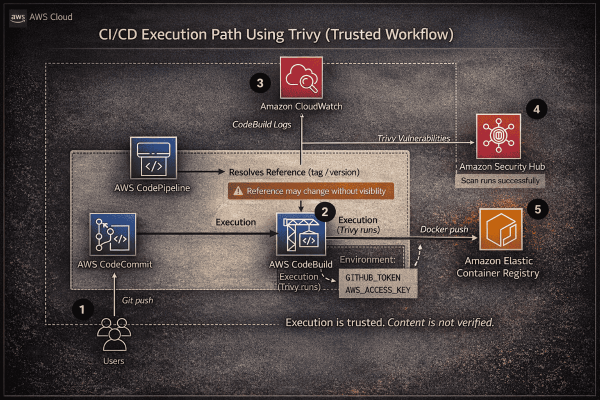
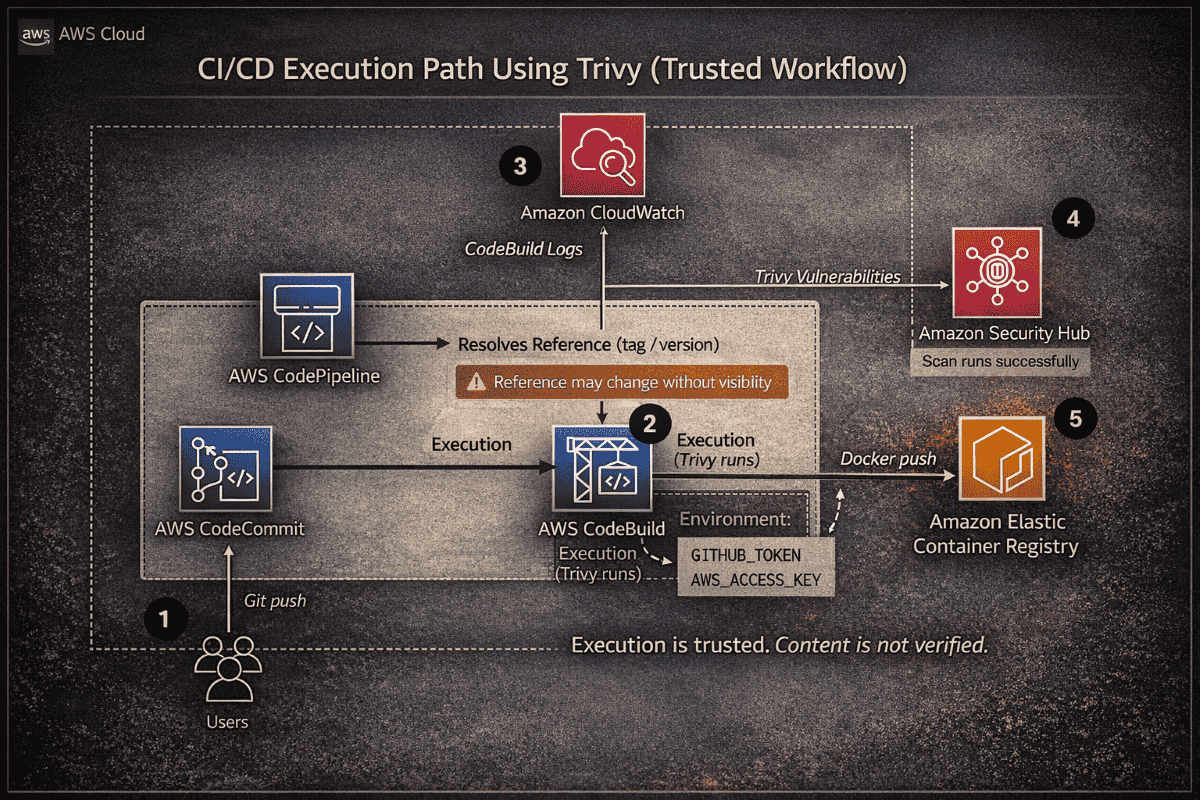
That trust breaks at the reference level. In the Trivy case, attackers reassigned 76 out of 77 tag pointers to malicious commits. Because Git allows tags to be moved, the system accepted this as a valid state.
The pipeline resolved the tag at runtime and executed whatever code it pointed to without verifying if the reference had changed. This is the core issue. The execution path is authorized, so whatever flows through it is trusted by default, even when silently altered.
Why Trusted Execution Paths Fail to Verify Content
What’s missing here isn’t a failed control. It’s how trust is defined in the first place.
Most systems validate access, not whether what they execute is still the same thing. If a workflow is allowed to run and the command is valid, the result is treated as trusted by default. That assumption only holds if the thing being executed stays the same.
In these environments, it doesn’t. A tag can move, a maintainer can change, or a commit can be rewritten, while the execution path remains untouched. The system validates the path, not the content flowing through it, so nothing fails because nothing appears out of place.
The result followed naturally. During execution, the pipeline exposed credentials from environment variables like GitHub tokens and AWS keys, because the process still had full access, and no part of the system recognized that the code being executed was no longer what was originally intended.
The Fix: Stop trusting tags. Pin to the exact content using a full commit SHA. Because a SHA is tied to the code itself, the reference cannot be silently reassigned. For external binaries, always validate a checksum before execution.
npm install Executes Attacker-Controlled Code During Package Installation
While the Trivy case involved manipulated references, the npm ecosystem often suffers from identity failures. Here, the reference remains the same, but the identity behind the code is compromised.
This has happened repeatedly. In multiple incidents, such as the phishing compromise of a prolific maintainer, attackers hijacked accounts to publish malicious updates. Because these updates come from the expected publisher, they are installed automatically. This is a fundamental trust gap: the system validates the publisher, not the content.
On Linux, this leads to immediate execution. npm install does more than pull files; it automatically runs lifecycle scripts as the current user. This allows attacker-controlled code to execute before the application even starts, granting it access to your files, network, and environment variables—all within a "trusted" workflow.
The system doesn’t fail; it simply trusts the wrong thing.
The Fix: Break the link between retrieval and execution by disabling lifecycle scripts during installation:
npm config set ignore-scripts true
npm install --ignore-scripts
This keeps the package on disk without running its code, so execution does not happen until the code is actually reviewed or invoked.
git pull Executes Attacker-Controlled Code From Manipulated Repository History
In the Trivy case, the system trusted a reference. In the npm case, it trusted a hijacked identity. With Git, the trust failure shifts to the repository history itself.
When you run git pull, you likely check git log to see who made changes. What you see looks like a reliable timeline of names and dates. However, a Git commit is simply a stored object containing unverified fields for author name, email, and timestamp.
This is not a hack; it is a core feature. Anyone can use the git commit --author command to set any identity they choose. Because Git does not verify these fields by default, an attacker can rewrite history to include malicious code that appears to be authored by a trusted contributor years ago.
When this rewritten history is pushed, and you git pull, your system accepts it as valid input. You aren't just trusting the code; you are trusting unverified metadata. The result is consistent: malicious code is merged because it looks like it belongs.
The system didn't fail—it trusted a history that was never authenticated.
The Fix: Verify the commit, don't just read it. Enable commit signature visibility to shift trust from easily faked names to cryptographic signatures:
Bash
git config --global log.showSignature true
This ensures the author’s identity and the commit’s integrity are cryptographically proven before you merge.
Linux Must Enforce Execution Boundaries When Trusted Workflows Execute Untrusted Code
By the time the code reaches your system, the critical decisions have often already been made. A reference was resolved, a package was installed, or a repository was pulled—all through trusted workflows that failed to verify the content.
This leaves only one place where control still exists: the moment of execution.
Linux Executes Untrusted Code With Full Permissions
By default, Linux tools run with the same permissions as the user who launched them. Attacker-controlled code inherits your access to files, networks, and environment variables without needing to bypass a single security control.
To limit this, isolate execution. Use Podman to run tools inside containers with restricted access, ensuring that even if code runs, it cannot exfiltrate data or modify your host:
Bash
podman run --rm --network=none -v $(pwd):/apps:ro
Processes Automatically Expose Credentials
Linux processes inherit environment variables from the parent shell. Tokens, API keys, and cloud credentials exported earlier are passed automatically to new processes. Attackers don't need to "find" your secrets; they are handed to them at startup.
Reduce this exposure by using scoped execution via systemd-run or temporary subshells, and avoid exporting sensitive variables globally in files like .bashrc.
The Point of Execution is the Point of Truth
Whether it's a "latest" tag or an unverified binary, the pattern is consistent: the system isn't being bypassed; it is executing exactly what it was given.
To address this, verify the code before it touches your CPU. Use sha256sum to confirm a binary matches its expected value and review commit history for inconsistencies. If the origin of code cannot be cryptographically proven, it must be treated as untrusted.
When verification fails at the workflow level, the only remaining safety net is the execution boundary you build within the OS.
Execution Without Trust
Across all three cases, nothing was exploited, and nothing was misconfigured. The system had access, the workflows were valid, and the commands executed exactly as expected, which is why this keeps happening.
The risk is not unauthorized access. It is authorized execution from unverified sources, where a tag moves, a maintainer changes, or a commit lies, and the system accepts all of it because it trusts what it sees.
Stop trusting what can change:
- Names and labels
- Tags
- Authorship
Start verifying what cannot:
- Commit hashes
- Signatures
- Checksums
Doing this manually does not scale. That is why teams use tools to track and update pinned versions, so the workflow stays usable while the references stay fixed.
If the origin of the code cannot be proven, treat it as untrusted before execution. Because at that point, the system will execute it anyway.
 PREVIOUS

 NEXT
NEXT

Powered By

Linux Security - Your source for Top Linux News, Advisories, HOWTOs and Feature Releases
QUICK LINKS
subscribe to newsletters!
Like staying secure? So do we.
Sign up for updates, tips, and alerts!