Explore top 10 tips to secure your open-source projects now. Read More
×


Why Your "Shadow IT" Developer Tools Are the Biggest Risk to Your Linux Systems
 Apr 13, 2026
•
Apr 13, 2026
•
 MaK Ulac
4 - 8 min read


Every company has a "Shadow IT" layer—a collection of developer-built dashboards, AI workflow runners, and data-science notebooks that weren't built by the central IT team. They are the convenient tools that let your teams push features faster, train models quicker, and visualize data on the fly.
The problem is that these tools have become the most dangerous assets in our stack. Because they were built for speed, they lack the security hardening of our core systems. Right now, they aren't just "support infrastructure"—they are unmonitored backdoors sitting in the middle of our production environment. If you want to know how an attacker skips our firewall and walks straight into your Linux host, it’s not through a complex, movie-style exploit; it’s by logging into a "productivity" tool that we forgot to lock down.
The Invisible Doorway: Direct Access to Your Linux Host
Imagine an office building with guards and locked doors. You have total control over the perimeter. But someone from the dev team installs a "smart" coffee machine that happens to have an unmonitored back door into the building’s power grid.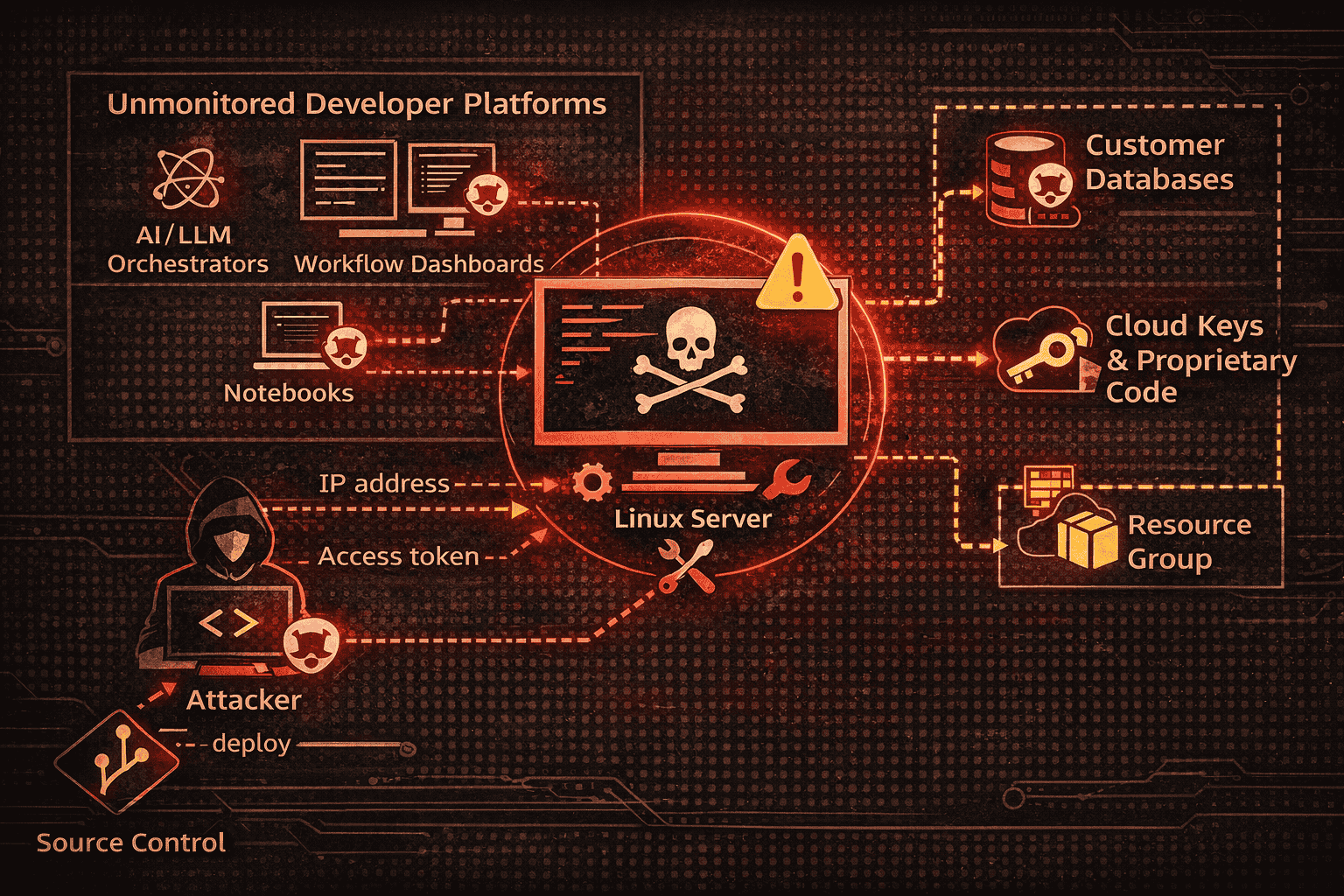
That is exactly what is happening with our internal systems. We aren't being hacked because our front door is weak; we are being hacked because we are installing convenient platforms—often part of a sprawling Shadow IT ecosystem—that act as secret, wide-open entry points directly onto your Linux servers.
Because these tools are designed to remove friction, they often bypass standard application security controls, essentially leaving the keys in the ignition. Here is how an attacker dismantles your business by hijacking your Linux host in three direct steps:
- Phase 1: Reconnaissance (Finding the Door). Attackers don't waste time breaking down your front door. They use automated scanners to crawl internal network ranges, hunting for specific patterns associated with common developer platforms. They find a dashboard that lacks a login prompt—and they’re in.
- Phase 2: Capability Abuse (Exploiting the Linux Environment). The attacker doesn't need to break anything; they simply use the tool’s built-in features. If the interface allows file uploads, they upload a script. If it has a terminal window, they open it. Because the tool trusts anyone who reaches the URL, the dashboard executes the request on the underlying Linux host with the tool's permissions.
- Phase 3: Immediate Escalation (Total Host Control). The attacker runs a command to check the user context on the server. They see they have "root" (the highest level of permission on a Linux system). Because the tool was misconfigured to run as "root" for "ease of use," the attacker doesn't need to perform any complex vulnerability management or privilege escalation. They are already at the top of the food chain. They dump your .env files, scrape your SSH keys, and take full control of the Linux host.
This Pattern Is Already Showing Up Across Modern Tools
Marimo and FalkorDB are not outliers. They are examples of a broader design pattern that is quietly spreading across developer-facing platforms. These tools are built to remove friction—exposing powerful functionality through the browser so developers can move faster, test ideas, and interact with systems in real time. That convenience is the feature. It is also a risk. You can see the same pattern in other environments:
- Marimo: Exposes a browser-based terminal, turning a WebSocket endpoint into direct shell access when authentication fails.
- FalkorDB Browser: Allows file uploads that interact with the underlying filesystem, creating a path to overwrite and execute.
- Langflow: Exposes execution pipelines through UI-driven interfaces, often without strong separation between user input and backend execution.
The issue is not the individual vulnerabilities; it is the consistency of the design. Shadow IT interfaces are being given direct paths to execution without strong trust boundaries in place. That shift is what attackers are exploiting.
Tools That Are Also Likely To Be Exploited
When we talk about compromised dashboards, we aren't talking about your Jira board or your internal HR portal. We are talking about developer-facing platforms that live inside your infrastructure but have the power to talk to your host. If you are running these in your environment, they are the first things you need to audit for application security gaps:
- Data Science Notebooks: Platforms like Jupyter, or custom Python notebooks. They are designed to let users write and execute code in the browser. If a user can execute code in the browser, and that browser is connected to your backend server, an attacker who hijacks that session is essentially "logging in" to your server.
- AI/LLM Workflow Orchestrators: Tools like Flowise are meant to bridge your data to your AI models. They often require broad filesystem access and execution permissions to "process" your data. An attacker doesn't need to break your AI model—they just need to hijack the workflow builder to run commands on the underlying host.
- Database Management Dashboards: Admin panels like pgAdmin or custom database management UIs that aren't properly locked down. These often have features meant to "export" or "import" data, which—if poorly secured—become simple paths for an attacker to upload a shell or read sensitive configuration files.
- Internal CI/CD Build Interfaces: While we usually harden our main CI/CD pipelines, smaller, "ad-hoc" build dashboards created for quick dev testing are rarely protected by the same zero-trust architecture standards. They often run with elevated permissions to save time.
The Linux Security Failure
These tools are not just web apps—they are execution surfaces that live inside your Linux infrastructure. For instance, CVE-2026-39987 demonstrated how a notebook tool's terminal endpoint failed to enforce any authentication, providing direct, unauthenticated shell access to the Linux host.
Similarly, in tools like FalkorDB, CVE-2026-6057 showed that file upload functionality combined with path traversal leads directly to arbitrary file writes. As noted in research from Sysdig, attackers are exploiting these gaps within hours because the design patterns allow them to land on your Linux server without any complex exploit chain.
Why This Matters to the Business
When we talk about compromised dashboards, we are talking about your Linux-based production assets: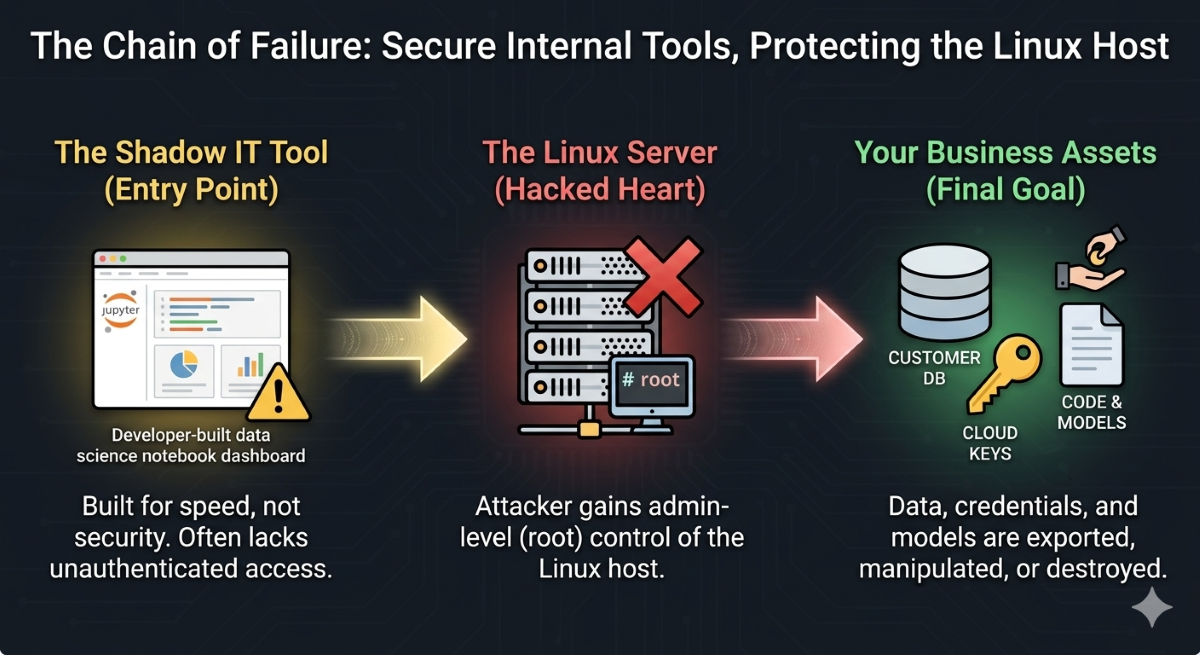
- Customer Databases: When a database management dashboard is exposed, an attacker doesn't just see "data"—they gain the ability to export your entire customer list or manipulate core business records on the Linux filesystem.
- Proprietary Code and AI Models: AI workflow tools bridge your data to your models. Hijacking these tools allows an attacker to steal your proprietary datasets and the models that power your business logic directly from the host.
- Cloud Infrastructure Keys: Many of these tools run with the same permissions as your production servers. A breach here means the attacker can move laterally from the Linux host, hijacking your cloud environment, spinning up rogue services, or shutting down your production stack.
How To Shrink The Surface Area
If an attacker gains host-level access through one of these notebooks or dashboards, they aren't just poking around a UI—they are accessing the keys to our cloud environment and our customer databases.
We need to stop treating internal dashboards as "trusted" and start treating them as part of our core attack surface. If these platforms have the power to execute code or access files on your Linux servers, they need the same authentication, vulnerability management, and Zero Trust Architecture standards as our public-facing production apps.
- Treat internal tools like public services: Secure them like you would your public website.
- Kill the dangerous paths: Isolate or block terminal endpoints and file upload APIs unless strictly necessary.
- Enforce real identity: Network boundaries are not enough. Use SSO and MFA at the application level.
- Reduce your blast radius: Stop running these tools as "root." Use containers and sandboxes to keep the application isolated from the core Linux system.
- Watch the behavior: Stop looking for "logins." Use security as code to monitor traffic, command execution, and unauthorized access to your credential stores.
As noted in the Global Cybersecurity Outlook 2026, the risk from these technologies is climbing as fast as their adoption. By adopting DevSecOps best practices and implementing shift left security, we can bake these guardrails into our deployment lifecycle.
Moving fast is a competitive advantage. But it’s not an advantage if the tools that help us move fast are the same ones that give an attacker the map to our entire production stack.
 PREVIOUS

 NEXT
NEXT

Powered By

Linux Security - Your source for Top Linux News, Advisories, HOWTOs and Feature Releases
QUICK LINKS
subscribe to newsletters!
Like staying secure? So do we.
Sign up for updates, tips, and alerts!