Overly broad permissions can turn one compromised account into a much larger security problem. Learn how to reduce unnecessary access, review privileges, and apply least privilege across modern Linux systems. Review Linux Privileges×


Azure CLI Password Spraying: Why Cloud Identity Is Now Linux Security
 Jul 01, 2026
•
Jul 01, 2026
•
 MaK Ulac
3 - 6 min read
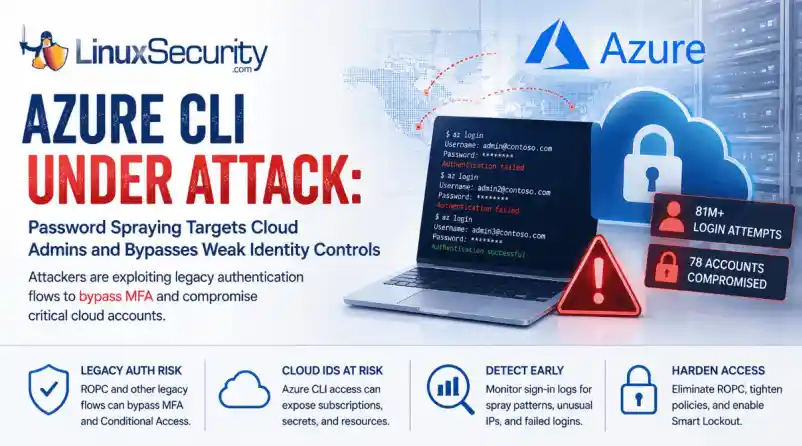

Over the span of just 14 days, threat actors unleashed more than 81 million login attempts against Microsoft’s Azure command-line interface (CLI). The campaign, which security researchers at Huntress identified as an ongoing, automated password-spraying effort, successfully compromised at least 78 Microsoft accounts across 64 organizations between June 12 and June 26, 2026.
While the scale is massive, the underlying strategy is surprisingly surgical. Attackers aren't exploiting a flaw in Azure. Instead, they're taking advantage of the way legacy authentication flows can interact with modern cloud identity controls when organizations haven't fully retired older authentication methods.
This campaign demonstrates that for cloud administrators, the traditional "MFA everywhere" mantra is only as strong as the authentication flows that support it. For Linux administrators, the campaign is particularly relevant because Azure CLI is widely used from Linux workstations, jump hosts, automation servers, and CI/CD pipelines. As cloud administration increasingly shifts to command-line tooling, protecting those identities has become just as important as hardening the underlying operating system.
Administrators Saw the Pattern First
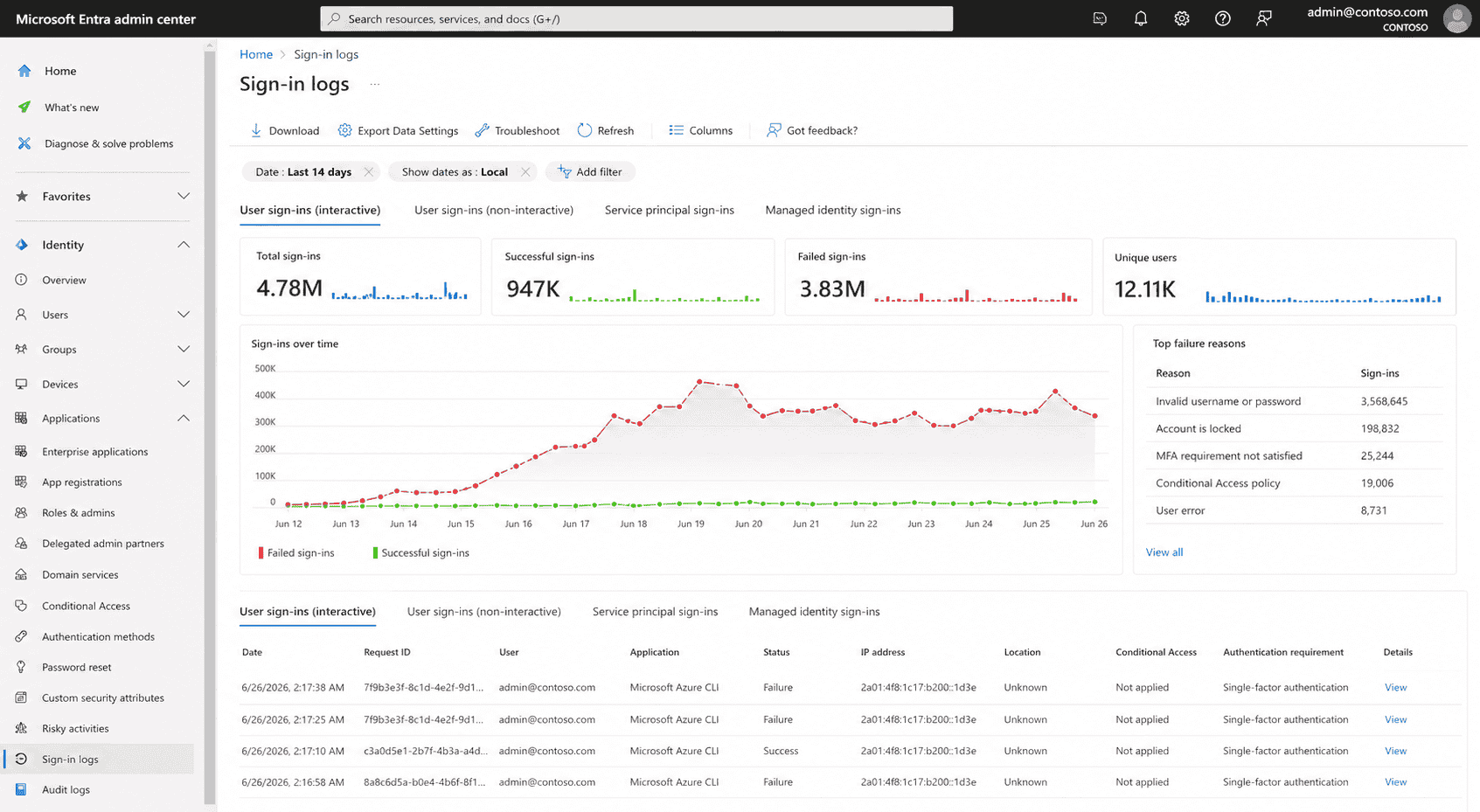
What makes this campaign especially notable is that operational teams appeared to notice the activity well before it became a formal threat report. In sysadmin discussions nearly two weeks earlier, administrators described seeing strange Azure CLI login attempts, persistent account lockouts, and confusion over why Conditional Access (CA) seemed to ignore the authentication traffic.
None of those early reports identified the underlying authentication flow or attributed the activity to a coordinated campaign. They did, however, demonstrate an important reality of modern incident response: administrators often recognize abnormal authentication patterns long before researchers have enough data to characterize them. Reviewing authentication telemetry instead of dismissing repeated login failures as background noise can provide valuable early warning that something larger is unfolding.
Operational takeaway
Large authentication spikes, unexplained account lockouts, and unusual sign-in patterns are often dismissed as background noise. This campaign shows they may instead be the earliest indicators of an emerging attack.
What Happened in the Azure CLI Password Spray Campaign
The attackers used IPv6 infrastructure controlled by the internet provider LSHIY LLC to run their spray. They weren't using sophisticated zero-days; they were testing massive lists of previously stolen credentials against cloud identities, a tactic documented in the Azure Threat Research Matrix as AZT202.
Unlike traditional brute-force attacks that repeatedly target a single account, password spraying tests a small number of commonly used passwords across many accounts to avoid triggering lockout thresholds.
By specifically targeting the Azure CLI, the attackers leaned into a non-interactive authentication path. Because Azure CLI can be used through legacy authentication flows such as Resource Owner Password Credentials (ROPC), authentication may occur without the interactive browser prompt where modern MFA challenges are presented.
Microsoft has long discouraged ROPC because it is incompatible with modern authentication. ROPC itself is not a vulnerability. The risk comes from continuing to support a legacy authentication flow while assuming modern identity protections apply consistently across every authentication path
Why Azure CLI Is an Attractive Target
Azure CLI is a fixture in the modern DevOps stack. It’s the primary interface for infrastructure-as-code (IaC) workflows, Linux administration workstations, jump hosts, and CI/CD pipelines.
Administrative identities increasingly represent the control plane for modern infrastructure. Compromising one account can provide access to cloud resources that would have previously required multiple lateral movement steps inside the network. A single compromised Azure CLI identity can provide keys to the kingdom—including direct control over cloud subscriptions, storage accounts, and secret stores—bypassing the need to pivot through your internal Linux environment.
The ROPC Problem: When MFA Cannot Be Completed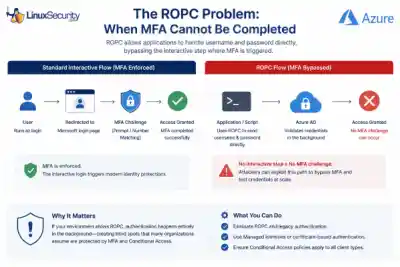
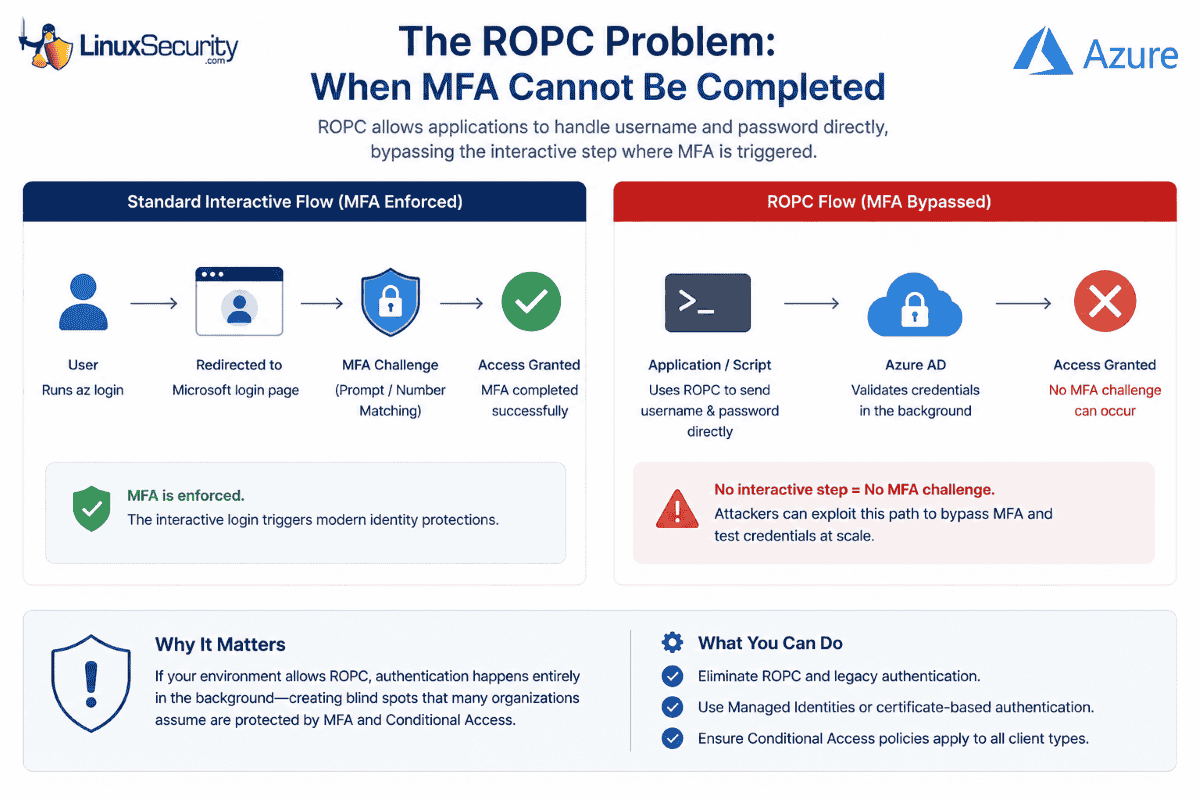
At the center of this attack is the Resource Owner Password Credentials (ROPC) grant. In a standard interactive flow, the user is redirected to a Microsoft login page, which triggers MFA. ROPC, by design, allows an application to handle the username and password directly. Because there is no interactive browser component, there is no place to present an MFA challenge or a number-matching prompt. If your application or script is configured to use ROPC, the authentication flow happens in the background, creating authentication paths that many organizations mistakenly assume are covered by their existing MFA policies, as Microsoft notes in its CLI documentation.
Why Conditional Access Alone May Not Stop Credential Testing
Conditional Access (CA) policies are powerful, but they are not universal if your deployment is partial. A typical failure in this campaign occurred when organizations enforced MFA only for specific "Web Portals" or "Admin Dashboards" while leaving the Azure CLI service principal or user-login surface exposed to ROPC-based authentication.
If Conditional Access policies don't cover every relevant application and client type, authentication requests may not trigger the protections administrators expect. The result isn't that Conditional Access is broken, but that identity protections are applied inconsistently across different authentication paths. Organizations should verify that MFA and Conditional Access policies apply to all cloud applications and supported client types while eliminating legacy authentication flows such as ROPC wherever possible.
What Linux and Cloud Administrators Should Check Now
The priority is to eliminate non-interactive authentication paths wherever they exist.
- Audit CLI Usage: Identify where az login is being triggered in your environments. If scripts are passing clear-text credentials or using ROPC-compatible flows, migrate them to Managed Identities or Certificate-based authentication.
- Eliminate ROPC: Actively disable legacy authentication and ROPC dependencies across your Entra ID tenant.
- Tighten CA Policies: Ensure your Conditional Access policies apply to "All Cloud Apps," "All Users," and "All Client App types." Avoid broad exclusions based on IP address or location.
- Enable Smart Lockout: While not a silver bullet against "low-and-slow" spraying, Microsoft Entra Smart Lockout provides an additional layer of protection by tracking and throttling failed attempts at the tenant level.
How to Investigate Password Spraying in Microsoft Entra ID
If you suspect your organization was targeted, conduct a targeted review of your sign-in logs using the steps outlined in the Microsoft Password Spray Incident Response Playbook:
- Filter by App: Search specifically for "Microsoft Azure CLI" in your sign-in logs.
- Examine Failure Trends: Look for spikes in failed authentications, especially from disparate or unusual IPv6 addresses.
- Check for Success-After-Failure: Look for a successful login for a specific user identity that immediately follows a string of failed attempts.
- Review Client App Types: Investigate "Other clients" in your sign-in logs, as these are often where ROPC and legacy protocol attempts hide.
Final Thoughts
This Azure CLI campaign isn't notable because the attackers guessed a password; it’s notable because it exploited a misalignment in modern identity architecture. The lesson extends well beyond Azure. As Linux administrators increasingly manage infrastructure through cloud APIs instead of local consoles, identity has become part of the operating environment itself. Protecting administrative credentials, eliminating legacy authentication, and continuously reviewing authentication paths now belong alongside patching, hardening, and system monitoring as core Linux security practices.
 PREVIOUS

 NEXT
NEXT



Powered By

Linux Security - Your source for Top Linux News, Advisories, HOWTOs and Feature Releases
QUICK LINKS
subscribe to newsletters!
Like staying secure? So do we.
Sign up for updates, tips, and alerts!