Audit Linux privileges now to limit compromise, escalation, and system-wide damage. Review Linux Privileges×


Stay Ahead With Linux Security HOWTOs
How to Secure My Network incident response open-source
incident response open-source An administrator reports unusual outbound traffic from a Linux server after firewall logs show repeated connections to an unfamiliar external IP address. Nothing obvious appears in the authentication logs, the web server is running normally, and no high-severity endpoint alerts have fired. . The question is not whether one unusual event occurred. It is whether seemingly unrelated events across several log sources describe the same incident. For small teams without an enterprise SIEM or...
 Jul 27, 2026

How to Learn Tips and Tricksincident response system monitoring
incident response system monitoring A Linux server can be fully patched, hardened, and compliant, yet still leave investigators unable to explain how an attacker got in. Without reliable Linux logging, even a well-secured system can become impossible to investigate. . Hardening defines what a system should allow, but logs reveal what actually happened. When visibility is incomplete, security teams lose the evidence they need to detect attacks, understand their scope, and determine how they unfolded. Why Linux Logging Must Come...
Jul 23, 2026

How to Secure My Networkincident response network traffic
incident response network traffic Imagine logging into a production Linux server for routine maintenance and noticing background network activity connecting to an unfamiliar external IP address. Your endpoint protection agent is not popping up with an alert, there is no service failure, and on the surface, the system appears to be running normally. . For Linux administrators and security teams, such a situation is a moment of truth: Is this activity a sign of active intrusion or just a tool that was overlooked in the course of...
Jul 21, 2026

How to Harden My Filesystemsystem hardening open source security
system hardening open source security We all spend a lot of time defending our systems from external threats, but the amount of damage an attacker can cause often depends on what happens after they get in. A single compromised account doesn't always lead to a major incident. The real danger begins when that account has far more access than it actually needs. . That's exactly what the principle of least privilege is designed to prevent. By limiting users, services, and applications to only the permissions required for their jobs,...
Jul 20, 2026

How to Learn Tips and Tricksthreat detection system monitoring
threat detection system monitoring For small security and IT teams, the "enterprise" dream of a fully automated SIEM often feels like a distant luxury. It’s a vision built on massive budgets and dedicated engineering teams—things that, frankly, most of us don't have. But here is the reality: you don’t need a six-figure platform to maintain a secure environment. . Linux systems are, by design, incredibly verbose. Every time a user authenticates, a process executes, or a configuration file changes, your system creates a record of...
Jul 17, 2026
 Refine HOWTOs
X Clear Filters
Get the latest News and Insights
Get the latest Linux and open source security news straight to your inbox.
Community Poll
Should Linux servers automatically install security updates?
Loading...

Explore Latest Linux Security HOWTOs
We found -4 articles for you...
167
 incident responseopen-sourceLinux administration
A Practical Linux Log Correlation Playbook for Small Security Teams
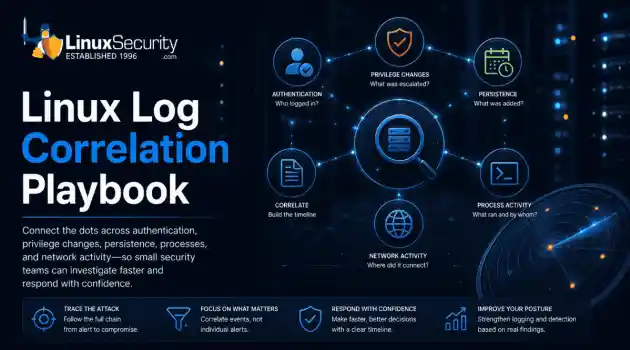
An administrator reports unusual outbound traffic from a Linux server after firewall logs show repeated connections to an unfamiliar external IP address. Nothing obvious appears in the authentication logs, the web server is running normally, and no high-severity endpoint alerts have fired. . The question is not whether one unusual event occurred. It is whether seemingly unrelated events across several log sources describe the same incident. For small teams without an enterprise SIEM or dedicated security operations center, answering that question requires a structured investigation. This playbook explains how to connect authentication activity, privilege changes, persistence, process execution, and network traffic without allowing individual commands to replace investigative judgment. Why Isolated Linux Logs Miss the Attack Chain Individual log entries rarely reveal the full story. Failed SSH logins, sudo activity, new user creation, scheduled tasks, and outbound connections may all appear routine when reviewed separately. Chained together, they can describe an active compromise. Linux administrators need this broader view because the first visible symptom may not appear in the log source closest to the original intrusion. A network anomaly might lead back to an earlier SSH login, privilege escalation, or unauthorized service change. Security analysts face a related problem. Without a structured way to connect events, triage becomes a sequence of disconnected searches. False positives consume time, while meaningful activity remains buried in normal administrative noise. For CIOs and IT directors, weak log correlation means longer detection times, slower investigations, incomplete compliance evidence, and greater uncertainty when deciding whether an incident affects business operations. Improving correlation reduces those risks without immediately requiring a large SIEM investment. How Normal Linux Activity Can Conceal a Compromise Attackers benefit from using the sameutilities administrators use every day. A failed SSH login can look like a mistyped password. A cron entry can resemble routine maintenance. A curl process may appear to be part of an update script. Native administrative tools such as sudo , cron , systemctl , and curl often produce activity that blends into the environment. Basic alerts may identify each event, but they do not necessarily reveal that the events belong to the same sequence. Delayed detection gives an attacker more time to establish recurring access, inspect additional systems, steal credentials, or transfer data. The longer those actions remain disconnected, the more difficult and expensive the response becomes. Verify the Evidence Before Beginning the Investigation Before searching through logs, confirm that the evidence can support a reliable timeline. Verify that clocks are synchronized across the affected systems. Determine whether log rotation has removed part of the relevant period. Confirm that the required authentication, system, application, and network logs are available. Check whether maintenance or an approved administrative change could explain the activity. Identify the system owner and the server’s business purpose. Determine whether the host is supporting production operations. Establish whether the system can be isolated without causing greater operational damage. These checks prevent the team from building conclusions around incomplete timestamps, missing records, or expected administrative behavior. Reconstruct the Linux Attack Timeline The commands below illustrate the investigation process. The objective is not to run every command mechanically. Each step should answer a specific question about what occurred. Establish the Relevant Time Window Begin by narrowing the review to the period surrounding the original alert. journalctl --since "2 hours ago" The goal is to create a manageable chronological window and identify service failures, usersessions, process activity, or configuration changes that occurred near the suspicious connection. Trace Authentication Activity Review successful and failed authentication events. journalctl -u ssh On systems that store authentication events in traditional log files: grep "Accepted" /var/log/auth.log Determine: Which account authenticated? What source IP address was used? Did failures immediately precede the successful login? Was the login time normal for that user? Did the account usually access this server? A successful login is often more important than the failures that came before it. Identify Privilege Changes Check whether the authenticated account elevated privileges shortly after entering the system. grep sudo /var/log/auth.log Determine whether the user ran expected administrative commands or moved immediately into a root shell. Compare the activity with the account’s normal duties and the maintenance schedule. Search for Recurring Access Mechanisms Review scheduled tasks and enabled services for changes that follow the suspicious login. crontab -l systemctl list-unit-files --state=enabled Look for: Newly created cron entries Jobs that download or execute remote content Unfamiliar systemd services Services running from temporary or user-writable directories Tasks created shortly after privilege escalation The presence of a cron job or enabled service does not prove malicious activity. Its timing, owner, command, and relationship to other events determine its significance. Connect Running Processes to the Timeline Examine current process activity and parent-child relationships. ps aux pstree Look for processes that: Run under unexpected accounts Launch from /tmp , /var/tmp , or other unusual locations Have unfamiliar parent processes Execute shell interpreters or download utilities unexpectedly Match commands referenced in cron jobs or systemd units Current process output provides only a snapshot. Use it alongside audit records, service logs, shell history, or process accounting where available. Compare Network Activity With Local Events Review listening services and active connections. ss -tulpn Relevant service events may also appear in the journal: journalctl -u NetworkManager Investigate: Connections to unfamiliar destinations New listening ports Processes communicating with external addresses Repeated encrypted connections at regular intervals Network activity beginning shortly after a new process or scheduled task The aim is to connect the original firewall alert to a local user, process, service, or persistence mechanism. Monitor Event Sequences Instead of Individual Alerts Small security teams should prioritize combinations of events that become more significant when they occur close together. Activity to Monitor Why It Matters Repeated authentication failures followed by a successful login May indicate brute force, password spraying, or credential guessing Successful logins outside normal working patterns May indicate use of compromised credentials sudo activity immediately after remote authentication May reveal rapid privilege escalation New cron jobs or enabled services May provide recurring attacker access Processes launched from temporary directories May indicate unauthorized scripts or payloads New outbound connections after a process or service change May indicate command-and-control traffic or data transfer Similar activity across several hosts May indicate lateral movement or shared credential abuse The security team should alert on these relationships where possible, rather than treating each event as an independent warning. Determine Whether the HostIs Compromised Once the timeline is assembled, evaluate the strength and scope of the evidence. Consider: Does the sequence have a legitimate administrative explanation? Are the events linked by time, user, process, or source address? Does the activity appear on other servers? Is the suspicious account still active? Is the external connection ongoing? Would delaying containment give the attacker additional access? Would immediate isolation disrupt critical operations? Use the findings to choose the next action. Finding Action Normal administrative activity Document the evidence and close the review Suspicious but inconclusive activity Increase monitoring and examine related systems Confirmed compromise Begin formal incident response procedures Active attacker or continuing malicious traffic Isolate the host as quickly as operationally possible Contain the Incident Without Destroying Evidence When the evidence supports a compromise, respond methodically. Preserve Available Evidence Copy relevant logs before rotation overwrites them. Capture volatile information such as active processes, network connections, logged-in users, and mounted filesystems where appropriate. Avoid rebooting the system as an automatic first step. A reboot may remove volatile evidence and stop processes that could help explain the intrusion. Determine the Scope Identify whether the activity is limited to one host or appears elsewhere. Review adjacent servers, shared accounts, SSH keys, administrative workstations, cloud identities, and systems communicating with the same external destination. Isolate the Affected Host Disconnect or restrict the system to stop ongoing command-and-control traffic, data transfer, or lateral movement. Coordinate containment with the system owner when isolation could interrupt critical services. Revoke ExposedCredentials Rotate passwords, SSH keys, API tokens, service credentials, and other secrets connected to the affected accounts or host. Do not assume changing one password removes every access path. Notify the Required Stakeholders Give leadership a factual account of: What was detected Which systems may be affected What evidence supports the conclusion What containment steps were taken What business functions may be disrupted What decisions are still required Move Into Formal Incident Response Log correlation establishes what likely happened. Full incident response must then address eradication, recovery, validation, and lessons learned. Strengthen the Logging Environment After the Incident Improvements should address the specific failures exposed by the investigation. When Timestamps Did Not Align : Enforce reliable time synchronization across Linux hosts, network devices, cloud workloads, and logging platforms. Accurate timestamps are necessary for reconstructing activity across systems. When Authentication Evidence Was Missing : Forward authentication and system logs off-host using tools such as rsyslog , syslog-ng , Loki , or Graylog . Off-host storage helps preserve evidence when an attacker deletes or modifies local records. When Persistence Changes Were Difficult to Detect : Use auditd or another suitable monitoring mechanism to track changes to cron directories, systemd unit files, user accounts, SSH configuration, and other high-value locations. When Rotation Removed the Relevant Evidence : Increase retention or move logs to centralized storage. Retention should reflect how quickly the organization usually discovers and investigates suspicious activity. When Analysts Could Not Recognize Abnormal Behavior : Document normal login times, common administrative accounts, approved cron schedules, expected services, and typical outbound destinations. A useful baseline allows the team to distinguish ananomaly from ordinary system behavior more quickly. When Manual Review Became Too Slow Automate high-value correlations first. Begin with event sequences such as: Authentication failures followed by success Remote login followed by immediate privilege escalation New service creation followed by outbound traffic Cron changes followed by shell or download activity Similar login activity appearing across multiple systems Automation should encode a sound investigation method, not replace one. Frequently Asked Questions Is an Enterprise SIEM Required for Linux Log Correlation? No. Native Linux logging tools and lightweight centralized logging platforms can support effective investigations in smaller environments. A SIEM becomes more valuable as log volume, infrastructure size, compliance requirements, and correlation complexity increase. Which Linux Log Should Be Reviewed First? Start with the evidence that produced the alert. For suspicious remote access, authentication logs may come first. For unexplained outbound traffic, begin with the firewall or network evidence and work backward to the responsible process, service, and user. There is no universal first log. The initial symptom should determine the starting point. How Long Should Linux Logs Be Retained? Retention should reflect regulatory obligations, available storage, incident response maturity, and the organization’s normal detection delay. Keeping only a few days of logs often makes historical investigations impossible. Thirty to 90 days may be a useful operational starting point for some organizations, but it should not be treated as a universal requirement. Does journalctl Replace Traditional Syslog? Not necessarily. The systemd journal provides structured local records, while tools such as rsyslog and syslog-ng can route, filter, and forward logs to other systems. Many environments use them together. Can Small Teams Automate Log Correlation? Yes. Shell scripts, scheduledqueries, detection rules, and lightweight monitoring platforms can identify repeated event sequences. Automation is most effective after the team defines which combinations of events indicate meaningful risk in its environment. . Learn effective strategies for log correlation and incident response in Linux servers to detect and investigate unusual activities.. Linux Log Analysis, Incident Response Strategies, Network Monitoring, Log Correlation Techniques, Security Operations. . Dave Wreski
 Jul 27, 2026
•
Jul 27, 2026
• How to Secure My Network

Get the latest News and Insights
Get the latest Linux and open source security news straight to your inbox.
Community Poll
Should Linux servers automatically install security updates?
Search Topics
Powered By

Linux Security - Your source for Top Linux News, Advisories, HOWTOs and Feature Releases
QUICK LINKS
subscribe to newsletters!
Like staying secure? So do we.
Sign up for updates, tips, and alerts!