Overly broad permissions can turn one compromised account into a much larger security problem. Learn how to reduce unnecessary access, review privileges, and apply least privilege across modern Linux systems. Review Linux Privileges×


How to Investigate Unexpected Outbound Connections on Linux
 Jul 21, 2026
•
Jul 21, 2026
•
 Dave Wreski
6 - 12 min read
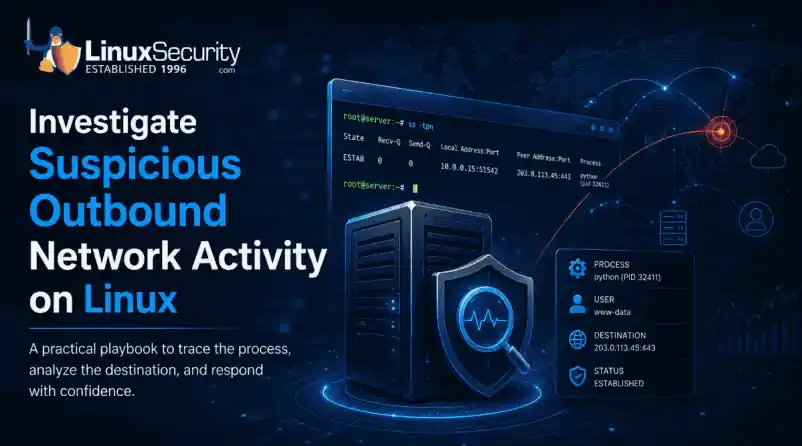

Imagine logging into a production Linux server for routine maintenance and noticing background network activity connecting to an unfamiliar external IP address. Your endpoint protection agent is not popping up with an alert, there is no service failure, and on the surface, the system appears to be running normally.
For Linux administrators and security teams, such a situation is a moment of truth: Is this activity a sign of active intrusion or just a tool that was overlooked in the course of its work? Unexpected outbound connections frequently serve as the initial indicator of a system's abnormality. They may simply be a new management tool, but they can also indicate compromised applications, stolen credentials, malware, or unauthorized data transfers before users see any impact to operations.
One fact about enterprise environments is that unknown network traffic does not automatically indicate a compromise. Modern Linux servers are seldom alone. They consistently connect to external endpoints for package repositories, automated backups, monitoring agents, cloud APIs, container registries, and software integrations. All these legitimate activities generate regular outbound traffic that may initially appear suspicious.
When Does Outbound Linux Traffic Require Investigation?
Most unexplained outbound traffic comes from routine system activity. Package managers contact repositories, monitoring agents send logs and performance data, cloud instances communicate with management APIs, and container platforms retrieve images from external registries. Business applications may also depend on payment services, databases, or vendor APIs that administrators do not immediately recognize. 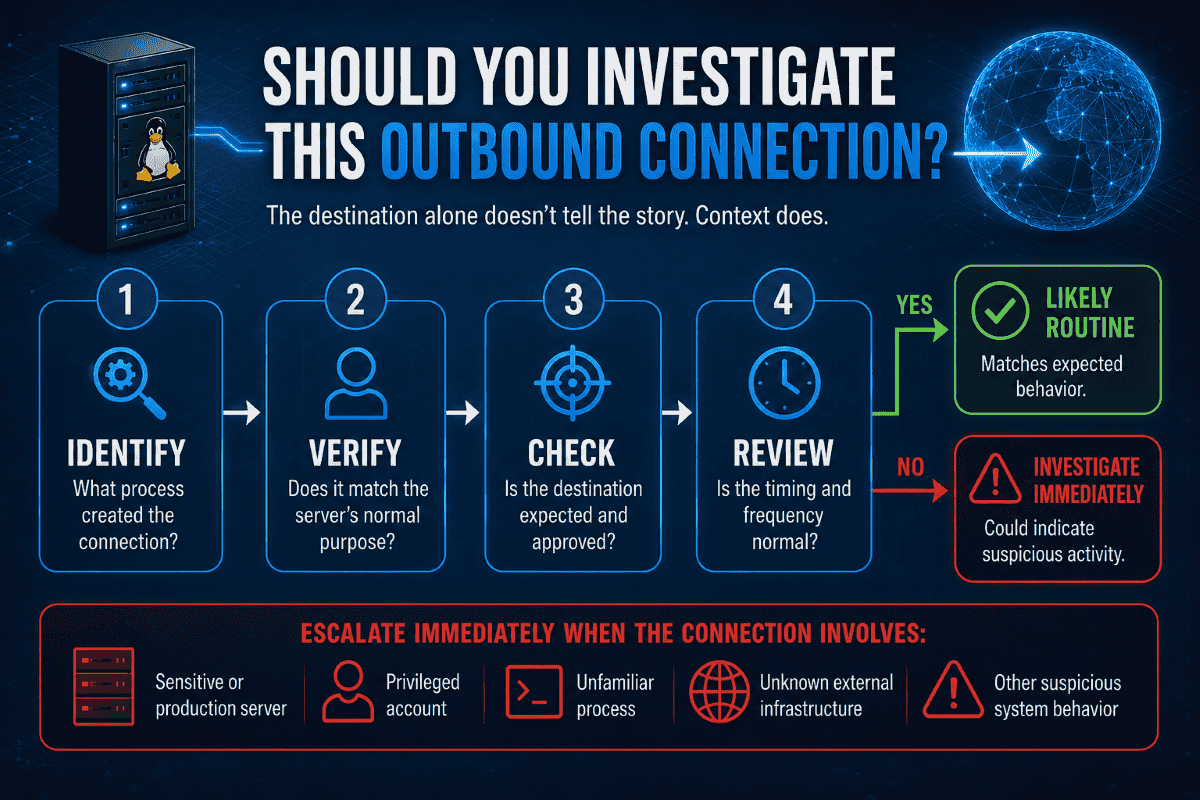
Suspicion increases when the process does not match the host's purpose. An apt process for contacting a distribution mirror during a maintenance window is expected. A web server child process that launches a shell and connects to an unfamiliar cloud address deserves investigation. The destination alone is not what makes the activity suspicious; it's the process creating the connection.
Furthermore, some events demand immediate attention over others. A suspicious connection deserves urgent focus if it originates from a sensitive server, involves privileged accounts, reaches unknown infrastructure, or accompanies other anomalous system behavior.
Trace the Connection Back to the Process
Focusing exclusively on a remote destination IP address rarely provides enough context to make a security decision. Knowing who opened the socket provides investigators much more useful context for their investigation. Process context often determines whether the connection is routine or suspicious.
Identify the Process That Opened the Connection
To begin uncovering this context, move step-by-step through a concise investigative sequence on the host:
sudo ss -tpn
sudo lsof -i -n -P
ps -fp
sudo readlink -f /proc//exe
sudo tr '\0' ' ' < /proc//cmdline
None of these commands answers the question by itself. Together they establish who created the connection, what executed, when it started, and whether the activity matches the server's intended role. Socket statistics are one of the fastest ways to map active connections back to the processes that created them.
Similarly, consulting the official Linux man page for lsof provides a reliable reference when you need a broader file-system and socket correlation. One of the easiest mistakes is to begin blocking traffic at the firewall before checking whether another team recently installed or reconfigured a legitimate service.
Collect Process Context Before Taking Action
Once you have identified a suspicious PID, record its metadata before taking any containment steps. Note the process owner, the full executable path on disk, the complete command-line arguments, the parent process ID, and the process start time. A legitimate package manager looking up updates looks entirely different from a script engine, a shell interpreter, or an unexpected web server child process communicating directly with an unknown external host. Always confirm the administrative context before making assumptions.
Evaluate the Destination and Communication Pattern
Once you identify the process, examine the destination endpoint and the behavioral patterns of the communication. External IP reputation feeds are helpful tools, but they should never form the sole basis for concluding that a connection is malicious. Attackers routinely leverage compromised legitimate websites, trusted cloud hosting providers, and short-lived infrastructure to blend in.
Validate the External Destination
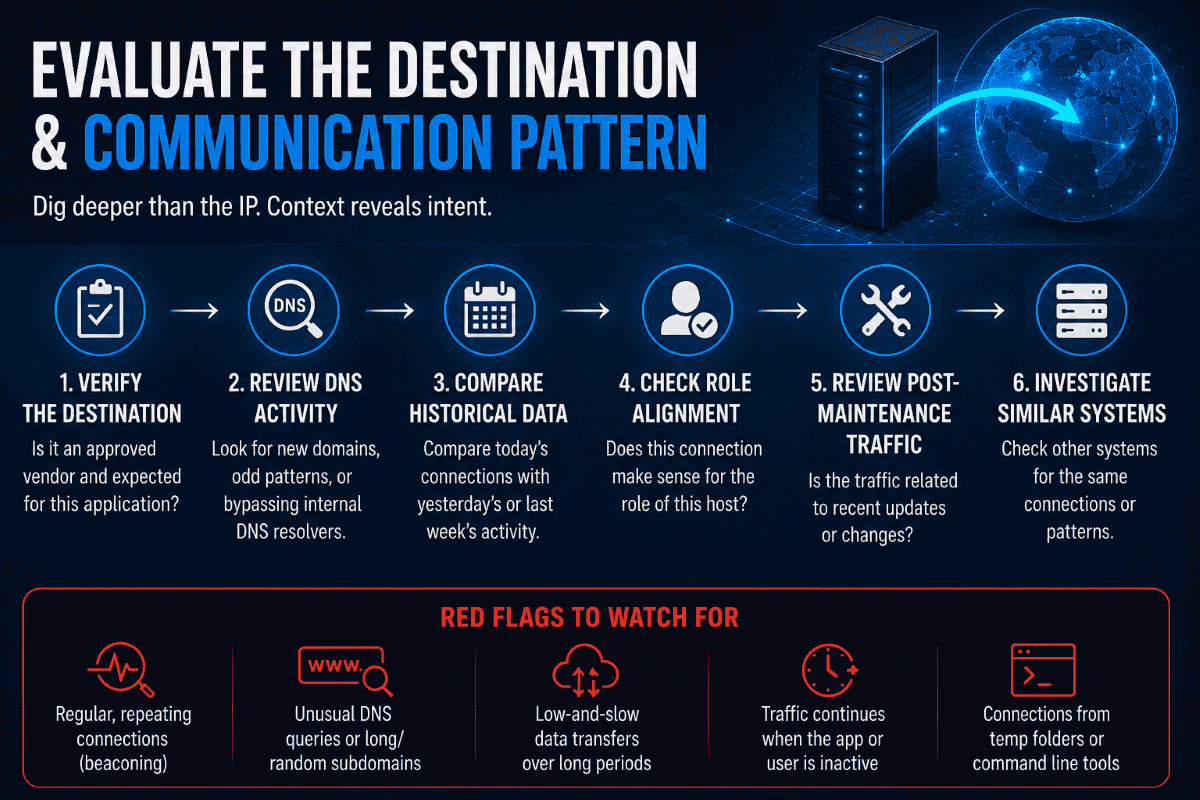
Administrators should evaluate whether the destination belongs to an approved vendor, whether the application is configured to use it, and whether DNS records match the service being contacted. Understanding exposed services and network exposure provides valuable context during an investigation.
DNS activity can provide another layer of context. Examine DNS logs for anomalies such as newly observed domains, queries sent at rigid, periodic intervals, unusually long or random subdomains, or a server bypassing approved internal DNS resolvers to query public providers directly. Compare today's connections with yesterday's or last week's network activity whenever historical logs are available.
Verify external communication, check for administrator expectations, assess traffic post-maintenance, confirm role alignment, and investigate connections from similar systems before labeling the activity as malicious.
Network Traffic Analysis Beyond IP Reputation
Thorough network traffic analysis requires looking past basic geolocation and external IP reputation scores. Because attackers frequently abuse trusted cloud infrastructure or content delivery networks, a clean reputation score does not mean outbound traffic is safe. Investigating the surrounding patterns—such as protocol behavior, transfer frequency, and application state—gives security teams a much clearer picture of intent. In a properly configured environment, this more profound visibility prevents analysts from blindly trusting an external IP address just because it belongs to a known provider.
Look for C2 Beaconing and DNS Abuse
When evaluating potential command-and-control activity, search for behavioral patterns rather than relying on signatures alone. DNS beacons and command-and-control communication: repeated DNS queries serve as a critical indicator without relying on vendor marketing. For example, a compromised host may send a small HTTPS request every minute, receive little or no data, and repeat the pattern for hours. The destination may sit behind a common cloud provider, so reputation checks reveal nothing useful. The process creating the connection and the regular timing are more important than the IP address alone. Other signs to look for are traffic that keeps going even when the app or user session is not active. Connection attempts that fail multiple times before succeeding, and outgoing sessions that start directly from temporary folders or command line tools.
Determine Whether Data Is Leaving the Host
An unexpected outbound connection does not necessarily mean that sensitive data is actively being stolen. The next critical question for investigators is whether the host is transferring significant volumes of data or exchanging unusual content structures.
When deeper visibility is required during a controlled investigation, network packet capture tools like tcpdump can help confirm the timing, direction, volume, ports, and protocols involved in the connection:
sudo tcpdump -i any host A targeted packet capture helps confirm connection frequency, destination ports, transfer direction, and approximate data volume. When analyzing packets, investigators search for ongoing small packet exchanges that suggest tunneling, uneven data flows with large uploads, or repeated connections with unusual data sizes. Packet captures must be handled carefully because they may contain credentials, session cookies, personal information, or authentication tokens. Store and transmit captures securely.
Preserve Evidence Before Disrupting the Activity
When administrators discover an unexpected connection, the instinct is often to immediately kill the process, terminate the network interface, or reboot the server. However, acting too quickly can destroy volatile processes and connection details needed to understand what happened.
Capture the Most Important Evidence First
Before initiating containment—provided operational risk and active destruction allow for a brief delay—collect the minimum information needed to preserve the investigation: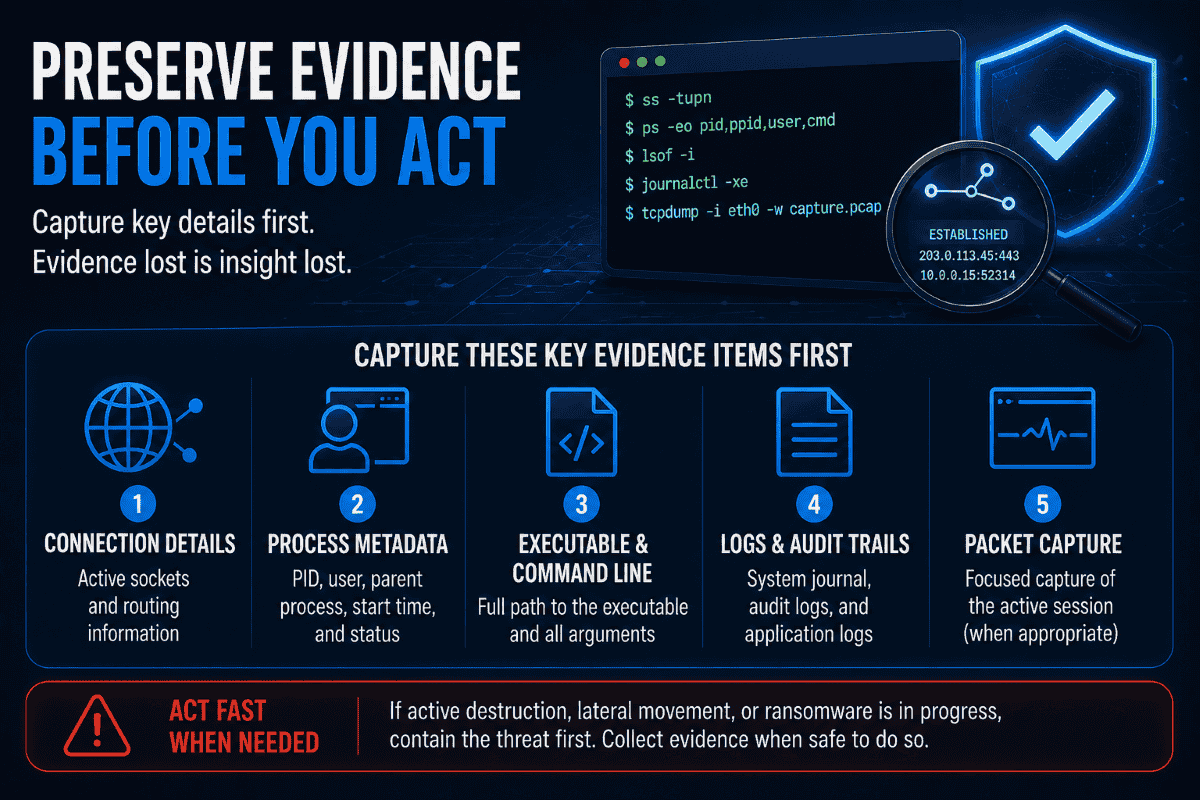
- Active socket connection details and routing tables.
- Complete process metadata, including PID, user ownership, and parent process ID.
- Full executable path on disk and its command-line arguments.
- Relevant system journal, audit, and application logs.
- A focused packet capture of the active session, when appropriate.
For deeper investigations, the security team can subsequently gather extended artifacts such as cryptographic file hashes, environment variables, authentication history, scheduled task definitions, and recent filesystem modifications. Practitioners can also reference tools like the SANS Linux incident response and threat hunting poster as a useful cheat sheet for tracking artifacts and investigation techniques. When active data destruction, lateral movement, or ransomware deployment is happening, collecting evidence should never slow down emergency containment. However, preserving state whenever possible ensures that root-cause analysis remains accurate.
Decide Whether to Isolate the Linux Server
A checklist is not a practical decision framework for whether a production Linux host should be isolated from the network. The criticality of the system impacted should also play into how urgent the investigation is and what the containment strategy will be. An isolated test environment is a different calculus than a core payment gateway or database cluster.
When Isolation Is Appropriate
Isolation is usually justified when investigators confirm active command-and-control communication, unauthorized data transfer, credential theft, malware execution, or movement toward other systems.
When Continued Observation Makes Sense
Continued observation may be reasonable when the process is approved, the destination is still being verified, no sensitive data appears to be leaving, and isolation would interrupt a critical service.
If the process, destination, timing, and server role all align with documented administrative activity, record your findings and close the investigation. Not every unfamiliar connection becomes a security incident. When containment is necessary, immediate isolation may disrupt a critical production service, so the decision should include the application owner and security lead when active harm is not confirmed. For critical production systems, such a decision is also a business decision. Leadership must understand the potential impact, the extent of the activity's spread, and whether containment can proceed without causing a larger operational outage.
It’s important to address the root cause, not just the immediate connection.
Blocking a malicious destination IP address or killing a suspicious process only stops the visible symptom; it doesn't resolve the underlying vulnerability or root cause. A complete response requires determining how the process started, which user account launched it, and whether any credentials, SSH keys, or cloud API tokens were compromised.
Examine all cron jobs, systemd service units, initialization scripts, and authorized user keys for any unauthorized changes. Verify local access controls to ensure that the environment was operating under strict least privilege principles and system hardening guidelines were in place prior to the event. Check for the executable's presence elsewhere, evidence of lateral movement on adjacent systems, and whether system integrity requires patching and cleanup or a full rebuild from a known-good image. If root-cause analysis is not done, the connection will probably reappear through some other process or destination.
Documentation of the investigation is a sign of operational maturity. Document what was seen, who investigated, what evidence was reviewed, why it was deemed legitimate or malicious, and what changes were made.
Improve monitoring of outbound traffic Before the Next Incident
One investigation should also improve monitoring of the wider environment. Security teams should look for first-seen destinations, rare process-to-network relationships, recurring beacon-like traffic, direct external DNS queries, and unexpected outbound data increases. Effective network traffic analysis doesn’t depend on firewall logs alone but correlates process, DNS, network, identity, and host activity. By aggregating these monitoring streams in a centralized platform, anomalous outbound behavior can be flagged across the entire enterprise infrastructure and not just on a single server.
There are also steps that can be taken before an incident occurs, such as documenting expected outbound access from critical Linux systems, centralizing DNS and firewall logs, and retaining enough historical data to establish baselines for comparison, training administrators on socket mapping tools, limiting egress traffic that is not needed, and conducting regular tabletop exercises. Clear baselines of normal server behavior are kept to accelerate future investigations and reduce false positives. Consistent Linux network monitoring provides the historical visibility needed to distinguish routine operational activity from genuine security threats.
Successful investigations don't start with a command or an indicator. They come from understanding how the server is supposed to behave, gathering enough context before taking action, and making containment decisions based on evidence rather than assumptions. Effective network traffic analysis combines process context, communication patterns, and operational knowledge to accurately evaluate unexpected outbound connections.
Frequently Asked Questions
What is an unexpected outbound connection on Linux?
An unexpected outbound connection occurs when a Linux host initiates network communication to an external IP address or domain that is not recognized as part of its normal administrative, application, or system baseline.
Does an outbound connection always indicate malware?
No. Modern Linux servers often talk to the outside world to obtain package updates, cloud metadata APIs, backup services, log forwarding, and container registry syncing. Legitimate administrative traffic is common and must be evaluated against server roles.
What command identifies the process behind a network connection?
Tools like sudo ss -tpn and sudo lsof -i -n -P allow administrators to view active sockets and directly correlate network traffic with the specific process ID (PID) and executable name responsible for the connection.
When should a Linux server be isolated?
A server should be isolated immediately when investigators confirm active command-and-control communication, unauthorized data exfiltration, active malware execution, lateral movement, or credential compromise where continued network access poses an active risk.
 PREVIOUS

 NEXT
NEXT

Powered By

Linux Security - Your source for Top Linux News, Advisories, HOWTOs and Feature Releases
QUICK LINKS
subscribe to newsletters!
Like staying secure? So do we.
Sign up for updates, tips, and alerts!