Explore top 10 tips to secure your open-source projects now. Read More
×



Server Security data privacy automation
data privacy automation Every system admin has lived through the same Monday morning ritual. A queue of forty tickets, half of them password resets, permission errors, or disk space warnings that any experienced technician could resolve in under two minutes. The other half require actual judgment. For years, automation promised that software would eventually sort the two apart on its own. That promise is now being tested in production Linux environments. . Early results are reshaping how IT teams think about tier-1...
 Jul 17, 2026

Privacydata collection automation
data collection automation You're running a web scraping project to collect pricing data from e-commerce sites. You set up a pool of datacenter proxies, launch your scripts, and within minutes — banned . CAPTCHAs everywhere. Your data pipeline stops before it really begins. . It's a frustrating scenario that plays out daily in ad verification, market research, and multi-account management. The website doesn't know you're doing legitimate research or monitoring. It just sees traffic coming from IP ranges it recognizes as...
Jul 17, 2026

Security Trends security advisory social engineering
security advisory social engineering Business Email Compromise used to be a numbers game — mass-blasted emails, broken English, an obvious "URGENT WIRE TRANSFER" subject line. That era is over. Generative AI has turned BEC into a tailored, low-noise operation that mimics writing style, voice, and even video presence. This piece looks at what's actually changed under the hood, what defenders are testing in response, and why so many organizations are still structurally unprepared for it. . The Infrastructure Problem Nobody Wants to...
Jul 17, 2026

Security Trends cybersecurity Linux documentation
cybersecurity Linux documentation Linux operating systems have gained prominence due to their stability, adaptability, and excellent security options. In the case of developing documentation, designing cybersecurity dashboards, or educational material, visuals are of vital importance when it comes to making things clear. The use of icons allows one to understand the message regarding alerts, authorization, encryption, authentication, or the state of the system just by looking at the visual cue without having to read long...
Jul 17, 2026

Security Vulnerabilities security advisory linux distribution
security advisory linux distribution ESET researchers identified 11 old and forgotten Linux UEFI shim bootloaders at versions 0.9 and below that can be used to bypass UEFI Secure Boot on any UEFI-based machine that trusts Microsoft’s Microsoft Corporation UEFI CA 2011 third-party certificate authority, regardless of the installed operating system (OS). Reported shims can be exploited to execute untrusted code during system boot, enabling attackers to deploy malicious UEFI bootkits even on systems with UEFI Secure Boot enabled.....
Jul 16, 2026
 Refine news
X Clear Filters
Get the latest News and Insights
Get the latest Linux and open source security news straight to your inbox.
Community Poll
Is continuous patching actually viable?
Loading...
Explore Latest Linux Security news
We found 1,632 articles for you...
78
 system updateLinux applicationgaming
Linux Roundup: The Biggest Linux Releases This Week
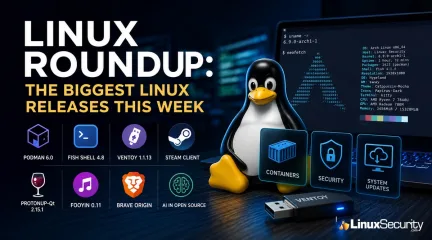
Most weeks in Linux are about new features. This one is about avoiding problems before they happen. Several projects shipped updates that quietly change how systems behave behind the scenes. None of them are particularly flashy, but if you're responsible for containers, workstations, gaming systems, or recovery media, these releases are worth paying attention to. Here's what stood out this week. . Podman 6.0 Is a Major Upgrade, Not a Routine Package Update If your infrastructure depends on Podman, this is the update that deserves your full attention. Podman 6 removes three technologies that have been living on borrowed time: cgroups v1 slirp4netns BoltDB These aren't deprecated anymore; they are gone. For anyone running modern Fedora or recent enterprise distributions, the transition may be almost invisible because most systems have already migrated to SQLite, Pasta networking, and cgroups v2 over the past couple of releases. Older deployments are a different story. Teams that built automation around slirp4netns, never completed the BoltDB migration, or still depend on legacy cgroup layouts, can discover that containers simply "disappear" after upgrading. The data isn't gone, but Podman may no longer recognize the old database format until the migration is completed. The Pro-Tip: Check your database backend before touching anything: podman info --format '{{.Host.DatabaseBackend}}' If the result isn't sqlite, stop there. Run podman system migrate before installing Podman 6, and verify your hosts are already using cgroups v2. This is one of those upgrades that's painless if you prepare for it and a headache if you don't. Read more: Podman 6 Migration Guide & Breaking Changes Fish Shell 4.8 Keeps Improving the Everyday Experience Fish continues doing something few shells manage well: making power-user workflows simpler without hiding complexity. Version 4.8 focuses on quality-of-life improvements: Tracing: Custom key bindings are now easier to debug; Fishtells you exactly which configuration file created them, removing a common source of frustration. Navigation: Improvements to logical and physical path handling make moving through symbolic-link-heavy development environments considerably less confusing. None of these are "headline" features, but they collectively remove dozens of tiny annoyances Linux users encounter every day. Learn more: Fish Shell Releases Ventoy 1.1.13 Fixes a Growing Secure Boot Problem Ventoy has become the go-to rescue USB for administrators. Unfortunately, recent UEFI firmware updates and Microsoft's newer Secure Boot certificates have caused more systems to reject healthy Ventoy drives with cryptic "Verification Failed" errors. Version 1.1.13 updates its Secure Boot shim to work with the newer certificate chain while introducing additional policy controls (VTOY_SECURE_BOOT_POLICY) for systems with unusual firmware. If your recovery media stopped booting on newer enterprise hardware, this update is likely the fix you need. Steam Makes Linux Streaming More Reliable Valve’s latest Steam client update isn't about new games—it's about making your desktop Linux/Steam Deck experience more robust. PipeWire: The session handling has been hardened to recover more gracefully from dropped streams and audio interruptions. Remote Play: You now have access to significantly higher bitrates (up to 250 Mbit/s). On wired local networks, this delivers substantially cleaner image quality, effectively minimizing compression artifacts. These are the kind of "invisible" fixes you appreciate only after realizing your gaming sessions stopped breaking. Read more: Steam Client Update for Linux & Steam Deck ProtonUp-Qt 2.15.1 Makes Life Easier for ARM Gamers ARM-based handhelds are growing in popularity, and ProtonUp-Qt now properly detects these architectures instead of force-feeding them incompatible compatibility layers. The project has also formally prioritized Proton-CachyOS, providing a more performantalternative for those using Lutris or Heroic. This update quietly cleans up the manual workarounds that many Linux gamers have been juggling. Read more: ProtonUp-Qt 2.15.1 Release Fooyin 0.11: Minimalism with More Power Fooyin is quietly becoming one of the most polished lightweight music players on Linux. Version 0.11 adds an integrated internet radio browser, improves indexing for massive libraries (50,000+ tracks), and includes a new real-time spectrum visualizer. It manages to feel "native" and responsive, where other Electron-based players feel sluggish. Learn more: Fooyin Releases Brave Origin: A Minimalist Browser for Linux Brave has launched "Brave Origin," a stripped-down, lightweight edition of their browser that removes "feature creep" like AI, crypto wallets, and VPN tools. The Linux Advantage: While this is a $59.99 premium product on Windows and macOS, it is free for Linux users. The Takeaway: It’s essentially the pure, secure Chromium engine without the extra services. If you’ve wanted the privacy protections of Brave without the baggage, this is the cleanest implementation available. Learn more: Brave Origin Software Freedom Conservancy: Formalizing AI Usage In a move that will likely influence project standards, the Software Freedom Conservancy (SFC) released new guidance for AI-assisted contributions. They are encouraging projects to use "Assisted-By" or "Generated-By" tags in commit metadata. The Goal: It’s not a ban; it’s a transparency requirement. For maintainers, this creates a clear audit trail and reinforces the expectation that human contributors must review, understand, and take responsibility for any code an LLM produces. Read more: Software Freedom Conservancy's AI Guidance Final Thoughts This week’s releases share a common theme: Maturation. Instead of chasing flashy, headline-grabbing features, developers are cleaning up technical debt, retiring legacy infrastructure, and hardening the software we rely on daily. If you're an admin, the Podman 6.0 migration is your highest priority. If you're a desktop user, Ventoy and Brave Origin are the items you'll want to check out this weekend. Sometimes the best Linux news isn't what gets added; it's what finally gets cleaned up. Want more Linux security news, vulnerability analysis, and software supply chain updates? Subscribe to the LinuxSecurity Newsletter and get the latest threats, advisories, and expert insights delivered directly to your inbox. Related Reading Continue exploring the latest Linux administration, container security, and open source trends with these articles from LinuxSecurity.com: Understanding Container Security Best Practices for Linux Admins Installing Podman on Rocky Linux for Security and Admin Efficiency How To Bind Rootless Containers To Privileged Ports In Docker And Podman Emerging Trends and Tools in Container Security Docker Security Management: Techniques and Best Practices . Explore the latest Linux releases focusing on application updates and security improvements for systems and gaming.. Linux Releases, Podman Update, Ventoy Fix, Gaming Applications, System Security. . MaK Ulac
 Jun 25, 2026
•
Jun 25, 2026
• Vendors/Products
78
 security advisorylinuxsupply chain
After Years of Supply Chain Attacks, npm Is Finally Closing the Door on Auto-Scripts
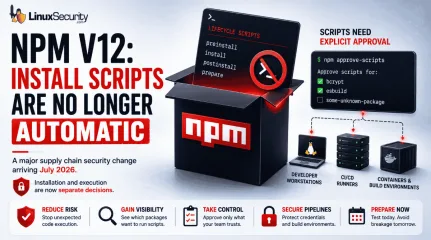
With npm v12 , dependency preinstall, install, and postinstall scripts will no longer execute automatically during package installation. Script execution will require explicit approval through new controls such as npm approve-scripts, with the change expected to arrive in July 2026. . The announcement targets a part of the software supply chain that has repeatedly appeared in package registry abuse, credential theft, and CI/CD compromise investigations. A single npm install could trigger code from direct dependencies, transitive packages, Git repositories, and build hooks before anyone reviewed what was about to run. On Linux systems, that execution often happens on developer workstations, build servers, containers, and self-hosted runners that already hold access to production resources. This is more than a JavaScript ecosystem update. It is a change to how code execution is handled during dependency installation. Teams that rely on install-time compilation, binary downloads, or package setup scripts will need to adjust workflows, while Linux administrators and DevOps teams will need to identify where automatic execution is currently embedded in build and deployment pipelines. npm Install Was Never Just an Install Command A surprising number of developers still think of npm install as a download operation. In practice, npm has long treated package installation as an execution event. Several lifecycle hooks can run automatically during installation, including preinstall, install, postinstall, and prepare. Packages use these to compile native modules or download binaries, but this execution is opaque; a package may pull in hundreds of transitive dependencies, each with its own scripts, meaning code from unknown maintainers can execute on your system without review. On Linux, this execution frequently happens inside infrastructure—such as CI pipelines or container build stages—that often contains SSH keys, cloud credentials, and deployment secrets. A malicious install script does notneed a complicated exploit chain if it is already running with access to those resources. The risk has never been theoretical; once installation begins, the script runs with the permissions available to the process that launched it. Why GitHub Is Changing the Default Now GitHub did not arrive at this decision suddenly. Malicious packages have used install scripts to collect credentials, fingerprint systems, download secondary payloads, and exfiltrate secrets. The common theme is simple: Installation became a trusted execution path. For years, npm treated installation and code execution as closely connected operations. That made development convenient, but it also created an environment where downloading a dependency frequently meant running code before developers had a chance to review what was happening. From an incident response perspective, install-time execution is difficult to track. Because this activity mimics a legitimate package manager during routine builds, it is incredibly difficult to detect—a reality that disabling execution by default aims to fix. Why Install Scripts Became a Security Concern Install-time scripts have been repeatedly abused in software supply chain attacks to steal credentials, fingerprint developer systems, download secondary payloads, and exfiltrate CI/CD secrets. Because these scripts execute as part of a normal package installation process, malicious activity can blend into routine development and build workflows. What npm v12 Actually Changes Install Scripts Will Be Disabled by Default Dependency lifecycle scripts will no longer automatically execute during installation. Packages that depend on these scripts will require explicit approval. The package still installs, but the script remains dormant. This change finally separates dependency retrieval from dependency execution. Teams Must Explicitly Approve Install Scripts Instead of trusting every package by default, teams will decide which packages are allowed to executeinstall-time scripts. Tools such as npm approve-scripts and npm deny-scripts manage these approvals. The allowScripts field in package.json allows organizations to identify and authorize required scripts before v12 becomes the default. For many teams, the first test run will reveal dependencies they did not realize were executing code during installation. That visibility alone has operational value. npm v12 Tightens Controls on Git Dependencies GitHub has also signaled tighter controls around Git-based dependencies, which introduce risk because their contents can change independently of registry workflows. npm v12 will likely push more organizations to inventory and justify these dependencies. Why npm v12 Matters for Linux Systems and CI/CD Pipelines Linux systems sit at the center of modern software delivery pipelines, where install scripts often perform their most dangerous work. Developer Workstations: Scripts run with the permissions of the logged-in user and may access SSH keys, cloud credentials, and local .env files. CI/CD Runners : These are high-value targets containing deployment credentials, signing keys, and internal repository access. Containers & Native Modules: Whether it is a RUN npm install in a Dockerfile or a package requiring node-gyp for native compilation, these execution-heavy workflows will now require explicit approval. Supply Chain Attacks Continue to Rise Industry reports have shown continued growth in software supply chain attacks targeting package registries, open-source dependencies, CI/CD environments, and developer tooling. Attackers increasingly focus on trusted software distribution channels because a single compromised dependency can impact thousands of downstream systems. The Security Benefits and Operational Challenges of npm v12 The immediate security benefit is a reduction in automatic code execution. A compromised dependency can no longer assume its installation script will run automatically onevery target system. The operational impact, however, is real: Building pipelines will break. Native modules may fail to compile. Packages that download binaries may stop working until approvals are configured. CI workflows that previously assumed unrestricted execution will require updates. Organizations that have never reviewed their dependency scripts may discover how heavily they depend on them. That discovery is uncomfortable, but useful. Does Disabling Install Scripts Prevent Supply Chain Attacks? No. Attackers still have plenty of options, including typosquatting, dependency confusion, and compromised maintainer accounts. This change doesn't stop supply chain attacks, but it closes one of the most convenient execution paths available to attackers. The risk does not disappear; the timing simply changes. How Linux Admins and DevOps Teams Can Prepare for npm v12 Start testing builds with npm 11.16.0 or newer to identify packages that trigger install-script warnings. Review script approvals before adding them to allowlists. A package that compiles native code has an understandable reason; a package that performs unrelated network activity deserves scrutiny. Audit Dockerfiles and CI pipelines to determine if dependency installation occurs in privileged stages. Inventory Git dependencies. Removing unnecessary remote dependencies reduces another source of install-time uncertainty. What npm v12 Says About Software Supply Chain Security The larger lesson extends beyond JavaScript. Whether it is container builds, bootstrap tools, or curl-to-shell installers, the pattern of "download-and-execute" is pervasive across Linux environments. The mechanism changes, but the core assumption remains the same: code arrives and is immediately granted permission to run. npm v12 pushes the ecosystem toward a different default, where installation and execution become separate decisions again. Final Thoughts GitHub is not eliminatingsupply chain riskGitHub is not eliminating supply chain risk , but it is eliminating one of the most convenient paths from dependency download to immediate code execution. For Linux environments, that matters because npm rarely runs in isolation; it runs on systems that often hold credentials capable of reaching production infrastructure. After years of incidents tied to install-time behavior, GitHub is finally treating installation and execution as separate actions. Want more Linux security news, vulnerability analysis, and software supply chain updates? Subscribe to the LinuxSecurity Newsletter and get the latest threats, advisories, and expert insights delivered directly to your inbox. Related Reading NPM Attack Exposes Supply Chain Risks in Open Source Software Supply Chain Attacks Impact NPM, PyPI, Docker Hub - 2025 Why Linux Supply Chain Attacks Are Becoming a Nightmare for DevOps Teams Why CI/CD Pipelines Are Targets in Software Supply Chain Attacks Why Software Supply Chain Security Matters in Linux Systems . The announcement targets a part of the software supply chain that has repeatedly appeared in package. dependency, preinstall, install, postinstall, scripts, longer, execute, automat. . MaK Ulac
Jun 11, 2026
•
Vendors/Products

78
 security breachlinuxautomation
Risks of GitHub Repo Breach on Linux Supply Chain Security
A major internal repository breach at GitHub has exposed a critical and overlooked blind spot in Linux supply chain security. Kernel exploits, exposed SSH services, weak firewall rules, and vulnerable daemons dominated the Linux threat model for years, and in many environments, they still matter. But recent supply-chain incidents involving GitHub ecosystems, npm packages, and malicious developer tooling point somewhere else entirely: the developer workstation. . The breach matters because attackers no longer need direct access to hardened Linux servers to compromise production environments. Trusted developer tooling and CI/CD automation can now deliver poisoned code upstream long before defenders realize anything changed. Modern Linux environments increasingly depend on GitHub Actions workflows, container registries, self-hosted runners, and automated deployment pipelines tied directly to developer systems. One compromised extension or dependency may be enough to quietly move malicious code into production infrastructure. Linux environments disproportionately rely on open-source tooling, containerized CI workflows, infrastructure-as-code automation, and developer-managed deployment pipelines. That trust relationship is now becoming one of the weakest points in the modern Linux security model. Why Developer Workstations Have Become a Linux Security Blind Spot Recent supply-chain incidents involving malicious npm packages, compromised developer tooling, and poisoned CI workflows have exposed a growing problem for Linux environments: trusted developer systems now sit directly upstream from production infrastructure. VS Code extensions carry an unusual level of trust inside modern Linux workflows. Developers install them constantly for: Linting and Git integration Container and Kubernetes management Terraform support and build automation Cloud deployment workflows Most teams barely review these extensions beyond install counts and marketplace ratings. Productivityusually wins over scrutiny. Once installed, a compromised extension may gain access to: GitHub session tokens SSH keys and signing credentials npm authentication tokens Kubernetes configurations Cloud secrets and CI environment variables Linux production systems often prioritize automation, minimalism, and operational efficiency over traditional endpoint-style monitoring. That makes trusted developer environments especially valuable to attackers looking for cleaner access paths into infrastructure. Attackers no longer need to fight through hardened Linux servers directly if they can compromise the trusted tooling developers already use upstream. Why the GitHub Supply-Chain Trend Matters for Linux Security Recent supply-chain attacks highlight a dangerous reality for Linux teams: production infrastructure increasingly inherits the trust decisions made upstream inside developer tooling and CI automation. Linux systems often sit at the very end of the attack chain. The broader npm and GitHub ecosystem attacks demonstrated how malicious code can move through legitimate CI infrastructure and trusted publishing systems without immediately triggering suspicion. In several incidents, poisoned packages appeared authentic because they were distributed through otherwise trusted automation pipelines. Even cryptographic provenance becomes less meaningful if the trusted CI pipeline itself has already been compromised. Traditional Linux security still matters. Kernel hardening, SSH lockdowns, segmentation, SELinux policies, and firewall rules remain essential. But they no longer represent the full attack surface. Attackers increasingly target trust relationships because trusted automation provides cleaner and quieter access than exploiting operating systems directly. How a Single Developer Workstation Can Poison Production The attack chain starts quietly. A developer installs or updates what appears to be a legitimate VS Code extension or npm dependency. The toolingbehaves normally enough to avoid suspicion while hidden functionality begins harvesting credentials and session data. From there, attackers can move directly into trusted automation systems. A compromised developer environment may expose: GitHub access tokens SSH keys and signing credentials Kubernetes deployment configurations Cloud authentication secrets CI/CD environment variables Once attackers gain access, CI/CD systems become the amplification layer. GitHub Actions workflows may be modified to inject malicious dependencies, alter build configurations, or poison deployment artifacts. Self-hosted Linux runners create additional exposure because they often maintain persistent credentials and broad internal network access. At that point, attackers no longer need direct access to hardened Linux servers. Trusted automation delivers the malicious code for them. A compromised extension on a developer workstation may ultimately lead to poisoned containers being automatically deployed into Kubernetes clusters or production Linux environments through infrastructure already trusted by the organization. Linux CI/CD Pipelines Are Increasingly Becoming the Real Target Security researchers increasingly view CI/CD systems as the primary target for modern supply-chain attacks in Linux environments. Pipeline compromise bypasses many traditional security controls because the malicious activity occurs inside systems already approved to build and deploy software. GitHub Actions workflows deserve particular scrutiny. Risky patterns such as pull_request_target workflows may allow attacker-controlled code from external pull requests to execute inside trusted repository contexts that may still have access to repository secrets, tokens, or workflow permissions under certain conditions. Self-hosted Linux runners create even larger blast radii because they frequently maintain: Long-lived credentials Access to internal repositories Container registry permissions Terraform state files Kubernetes deployment access Infrastructure-as-code compounds the problem further. Dockerfiles, Terraform manifests, Helm charts, and deployment workflows collectively provide attackers with detailed visibility into production architecture. For Linux teams, CI/CD infrastructure must now be treated as a high-risk security boundary rather than simple deployment automation. npm Supply-Chain Attacks Continue Targeting Linux Development Environments A surge in targeted npm attacks confirms that package ecosystems remain one of the weakest links in Linux-based development environments. Attackers increasingly rely on techniques such as: Typosquatting legitimate package names Maintainer account compromise Dependency confusion attacks Poisoned transitive dependencies Transitive dependencies make the problem significantly worse. Developers may trust a direct package while having little visibility into hundreds of indirect dependencies installed alongside it. By the time defenders detect suspicious behavior, malicious packages may already exist across: CI runners Container images Production workloads Cached deployment artifacts Package trust now directly impacts the integrity of the underlying Linux environment. How Linux Admins Can Detect Exposure Security teams are increasingly adopting new response protocols for supply-chain compromises tied to developer tooling and CI automation. Admins should immediately focus on: Repository activity: Look for unauthorized workflow edits, suspicious commits, or unexpected OAuth authorizations. Runner behavior: Monitor CI runners for unusual outbound traffic, package downloads, or unexpected job execution patterns. Credential rotation: Replace GitHub tokens, SSH keys, npm credentials, cloud secrets, and Kubernetes service accounts. Artifact integrity: Rebuild containers from verified sources and validate SBOMs against known-good baselines. Extension auditing: Reviewinstalled VS Code extensions across developer systems and remove unapproved tooling. Persistence checks are equally important. Malicious workflows, poisoned caches, and hidden automation hooks may survive standard credential rotations. Supply-chain attacks rarely stop at a single layer. Best Practices for Securing Linux CI/CD Pipelines Security teams are increasingly treating developer tooling and CI infrastructure with the same level of scrutiny traditionally reserved for production servers. Endpoint Hardening Restrict VS Code extension installations through allowlists and centralized policy controls. Isolate development environments using containers or disposable workspaces. Monitor workstations for unauthorized extension activity and credential access. GitHub and CI Security Avoid risky GitHub Actions patterns such as pull_request_target unless absolutely necessary. Use MFA, short-lived tokens, and tightly scoped GitHub permissions. Deploy ephemeral CI runners instead of persistent self-hosted systems. Segment CI infrastructure from production deployment networks. Dependency and Artifact Security Verify package provenance using Sigstore or cosign. Continuously audit dependencies and monitor for suspicious package updates. Validate SBOMs before deployment. Use tooling such as OpenSSF Scorecard, Syft, Grype, and Trivy to improve visibility into software supply chains. Visibility remains the final layer. Centralized logging, behavioral monitoring, and threat intelligence integration improve detection speed when trusted tooling becomes the compromise vector. Linux Security Now Starts Before Production Linux admins spent years hardening production infrastructure against direct compromise. Attackers adapted by moving further upstream into developer environments, package ecosystems, and CI/CD automation already trusted to deploy code into production. That shift changes the security model entirely. A fully patched Linux servermay still execute poisoned code delivered through a trusted pipeline, signed package, or compromised developer workflow. In many environments, the workstation now matters just as much as the production server itself. The modern Linux attack surface no longer starts at the edge firewall or exposed SSH port. Increasingly, it starts wherever developers write, build, and ship code. Stay ahead of emerging Linux supply-chain threats, CI/CD risks, and open-source security issues by subscribing to the LinuxSecurity newsletter . Get weekly analysis, practical hardening guidance, and security insights focused on real-world Linux infrastructure. Related Reading Why CI/CD Pipelines Became Targets in Software Supply Chain Attacks GitHub Actions Linux Self-Hosted Runners Security Risks Why Linux Supply Chain Attacks Are Becoming a Nightmare for DevOps Teams The npm Supply Chain Problem: Why Installing Packages Executes Untrusted Code GitHub Actions Critical Misconfigurations Expose Open Source Risks . Explore the risks in Linux supply chain security amidst GitHub's repo breach, revealing the importance of developer tool security.. Linux Supply Chain Security, GitHub Breach, CI/CD Security, Developer Tool Threats, Security Best Practices. . Dave Wreski
May 21, 2026
•
Vendors/Products
78
 incident responsecloud securityLinux environment
MXDR Provider Selection for Linux Environments and Security Services
Managed Extended Detection and Response (MXDR) has become one of the most sought-after security services in the enterprise market — and with good reason. It promises the holy grail: broad visibility across endpoints, network, cloud, email, and identity, combined with the 24/7 human expertise most organizations simply cannot build in-house. . However, the rapid growth of the market has produced a wide range of providers whose capabilities vary considerably beneath the surface. Choosing the right MXDR solution is not just about buying software; it’s about hiring a specialized team that understands the difference between a standard workstation and a mission-critical Linux server. If you are going to trust someone with your infrastructure, you need to look past the pitch and evaluate the actual substance. Define What You Actually Need Before You Evaluate Anyone A lot of teams start vendor calls too early. They have a rough MXDR budget, maybe a shortlist, but not a clear view of what they need the provider to cover. That creates noise quickly because the MXDR solution is not a single fixed service. Providers vary in coverage, response authority, integration depth, and how much human triage sits behind the platform. Before you speak with vendors, get your team aligned on the basics: What environments need coverage? Decide whether you only need endpoint monitoring, or whether cloud workloads, identity, email, and network traffic need to be in scope too. For Linux-heavy environments, ask whether the provider can see kernel-level events , container runtimes, and meaningful telemetry, not just raw syslogs pushed into a dashboard. What should the partnership actually do? Some teams want to approve every response action. Others need a provider that can isolate hosts, block indicators, or escalate incidents when internal staff are offline. Spell that out before procurement gets involved. What are your compliance constraints? GDPR, NIS2, HIPAA, and PCI DSS can affect datahandling, storage location, access controls, and reporting. Do not leave this for the contract review stage. By then, the wrong provider may already look like the favorite. Does the provider fit your current stack? Map what you already use for patching, identity governance, email security, endpoint control, and cloud monitoring. Then ask how the MXDR provider will extend that stack instead of duplicating alerts your team already sees. Clear answers make vendor conversations sharper. They also reduce the odds of choosing a provider because their pitch looked strong, while their actual coverage misses the systems creating most of your exposure. Not All MXDR Coverage Is Equal The defining characteristic of MXDR — the "extended" element — is coverage across multiple security domains simultaneously. In practice, however, providers differ considerably in how genuinely cross-domain their visibility is. Some platforms offer native integrations across endpoints, network, cloud, identity, and email. Others aggregate feeds from separate products, which can introduce data gaps, latency, and correlation blind spots. In a Linux-heavy environment, an attacker might use sophisticated persistence or fileless techniques that simple log aggregation will miss. When evaluating coverage, go beyond the marketing slides. Ask specifically: Which environments does the provider have native sensor coverage for? Which rely on third-party integrations? What happens to detection quality when telemetry from one domain is unavailable? A provider whose detection capability degrades significantly when a specific integration is absent is not a true MXDR partner; they are a SIEM in disguise, and they may leave dangerous gaps in the environments that matter most to your organization. Human Expertise: Who Is Actually Watching? MXDR is fundamentally a people and process service layered on top of technology. You can have the most advanced detection engine in the world, but if the analyst team isunderstaffed, junior, or drowning in a shared queue, you are just paying for fancy noise. Don’t buy the "we have a global, 24/7 SOC" line without stress-testing it. Ask the blunt questions: The Coverage Model: Is your account assigned a dedicated team, or are you in a giant shared pool? If you are in a pool, you are competing with a hundred other customers for the attention of a tired analyst who likely has no idea what a custom Linux binary looks like in your environment. The Experience Gap: Who is actually looking at your alerts at 3:00 AM? Is it a Senior Incident Responder who can interpret a suspicious kernel-level anomaly, or a monitor-tech who just follows a basic flowchart? The Communication Workflow: When a high-fidelity threat is identified, how do they talk to you? Do they just dump a generic ticket in your lap, or do they provide an executive summary that explains the why and the how ? If you are serious about a vendor, skip the sales-led reference call. Find an existing customer in your industry and ask them: "The last time a real threat hit your network, did the provider show up and help you drive the response, or did they just send you an email saying they saw something weird?" Response Authority and Speed How much authority does the provider have to act when a threat is confirmed? Some providers offer "human-in-the-loop" workflows where every action requires your sign-off. Others can isolate endpoints, block processes, and revoke sessions autonomously. There is no "correct" model, but the right answer depends on your team’s maturity. Organizations with lean security teams and limited out-of-hours coverage generally benefit from providers with broader autonomous response capability. Those in highly regulated environments, or teams running complex OT, usually need a firmer hand on every response action. That is not overcaution. It is how you avoid turning a containment play into an outage. Look for a provider that lets you tune response workflowsinstead of forcing one operating model. Heimdal’s platform supports that kind of balance, giving teams room to adjust autonomous action and human approval as trust builds. You might start with “notify only” on high-risk assets, then move toward stronger automated containment once detections, escalation paths, and false positives have been tested in real incidents. SLAs, Transparency, and Reporting Mean time to detect, or MTTD, and mean time to respond, or MTTR, are often quoted. The problem is definition drift. Some providers count time spent triaging low-confidence alerts that later prove benign, while others measure only confirmed threats with enough signal to justify a response, so the numbers can look comparable on a slide while measuring very different work. Reporting matters just as much. A useful post-incident report should be led by forensics and show what happened, how the activity was identified, what actions were taken, and what risk remains after containment. Vague summaries do not help your team patch gaps, tune controls, or hold the provider accountable. The Bottom Line Choosing an MXDR provider is not just a procurement call. It shapes how detection, escalation, containment, and reporting work inside your environment for years. Pick the team you can question under pressure, not just the one with the cleanest dashboard. The providers worth selecting are those who demonstrate their capabilities transparently, communicate clearly under pressure, and operate in a way that matches your team's capacity and risk tolerance — not just the ones who present best in a structured demonstration. Take the time to go beyond the pitch; do the legwork now, and the decision becomes significantly clearer when the next incident hits. . Explore how to choose the right MXDR provider for your Linux environment, focusing on key factors beyond the sales pitch.. MXDR provider, Linux security, incident response strategy, cloud security services. . MaK Ulac
May 19, 2026
•
Vendors/Products
78
 security advisoryrisk managementclamav
What Is ClamAV? A Linux Admin’s Guide to Risk, Monitoring, and Real-World Use
If you’ve worked with Linux long enough, ClamAV has probably crossed your path. It shows up in package repositories, mail server documentation, and the occasional compliance discussion around Linux antivirus. . In many environments, it gets added once a system starts handling untrusted files, such as mail flow, user uploads, shared storage, or cross-platform file exchange. Sometimes that decision is deliberate. Sometimes it is just the default recommendation. Either way, it tends to appear when a Linux host becomes a content boundary. What matters is whether it meaningfully reduces risk in that role or simply satisfies an expectation. The difference comes down to placement, scope, and understanding what ClamAV is designed to do. What Capabilities Does ClamAV Provide? ClamAV is a signature-based antimalware engine. At its core, it compares files against a database of known malicious patterns. That sounds basic, but in the right place it’s effective. It scans files on disk, mail attachments, and file streams. It can unpack common archive formats and inspect nested content. That matters if you’re dealing with compressed attachments or bundled payloads. ClamAV is known for two defining features: First, it supports content inspection beyond just “is this malware?” You can use it to enforce file type rules, block specific file patterns, and inspect archives deeply. In practice, that gives you lightweight DLP-style controls. Not full enterprise DLP , but enough to flag unexpected executables or restricted content moving through mail or upload paths. Second, it’s open source. The signature database is maintained publicly, and you can create and deploy your own signatures. That makes ClamAV closer to a scanning framework than a fixed product. If your environment has known bad artifacts, internal red team samples, or policy-based file restrictions, you can encode those as custom signatures. You’re not waiting on a vendor to define what “bad” means. That flexibilityis one of its real advantages. Do You Actually Need ClamAV? Start with exposure. Are you accepting untrusted files from the internet? Are users uploading documents to your applications? Are you hosting Samba shares for Windows clients? If yes, you have a file-based risk crossing a boundary. ClamAV is designed for that boundary. If your server is a minimal API node with no file uploads and no shared storage, ClamAV probably doesn’t change your risk profile. It won’t stop SSH key abuse, privilege escalation , or kernel exploits. It won’t detect lateral movement through valid credentials. Here’s the practical rule. If your Linux host is acting as a content gateway or file broker, ClamAV is worth evaluating. If it’s just running services with no file ingestion, your effort is usually better spent on patching, hardening, and logging. Does ClamAV Scan Your Whole System? By default, no. ClamAV does not automatically scan your entire filesystem in real time. You decide what gets scanned. You can: Run on-demand scans against specific directories Schedule recurring scans with cron Use clamd for faster scanning of high-traffic paths Integrate it with mail servers or upload workflows There is on-access scanning support on some platforms using fanotify, but that adds overhead and needs careful testing. Most production deployments focus on ingestion points. Mail spool directories. Upload folders. Shared mounts. Scanning / recursively on a busy production server is usually unnecessary and expensive. If you’re thinking, “Does it watch every process and file like endpoint security?” the answer is no. That’s not its model. What Does ClamAV Prevent? ClamAV is strongest against known, file-based threats. It helps prevent: Commodity malware delivered via email attachments Infected files are being redistributed from shared storage Obvious malicious uploads in web applications Known ransomware samples at the file stage Policyviolations based on file signatures or types What Are ClamAV’s Limitations? ClamAV does not prevent: Zero-day kernel exploits Credential abuse over SSH Privilege escalation via local vulnerabilities Fileless attacks Post-exploitation activity in memory In a real incident, you might see ClamAV catch a malicious macro document before a Windows user downloads it. That’s useful. But if an attacker logs in with stolen keys and starts moving laterally, the signal will be in auth logs and process telemetry, not in ClamAV output. It’s a file inspection control. Not a behavior engine. What Are ClamAV’s Requirements? ClamAV is not heavy, but it isn’t free from cost. You need: Enough CPU to handle scans, especially for large archives Memory for the signature database, particularly with clamd Disk I/O capacity if scanning large directory trees A process for monitoring freshclam updates Log aggregation so detections are visible On a mail gateway or file server, this overhead is usually acceptable. On a performance-sensitive application node, you’ll want to test under load. In practice, update failures cause more problems than CPU or memory limits. If freshclam stops running, the database becomes outdated quickly, and detection quality drops. It is crucial to keep in mind that any deployment should include monitoring for signature updates and scan health. How Long Does ClamAV Take to Run? This depends entirely on the scope. Scanning a single attachment through a mail filter is fast, often measured in milliseconds to seconds, depending on size. Scanning a multi-gigabyte directory tree with nested archives can take minutes or longer. Archive depth and compression matter. Large compressed files are expensive to unpack and inspect. If you care about performance, test against real data. Drop representative files into the target directory and measure scan time under load. Don’t assume lab behavior matches production traffic. Is ClamAV Difficult to Use? Operationally, no. Installation is straightforward on most distributions. Configuration is text-based and predictable. Integration with mail servers and upload workflows takes some plumbing, but it’s well documented and widely deployed. The complexity is not in running it. It’s in placing it correctly and monitoring it consistently. You need to: Confirm signatures update regularly Test detection with something like the EICAR file Ensure detections are logged centrally Define who handles alerts Without clear ownership, alerts are likely to be ignored. Does ClamAV Provide DLP? Not in the enterprise, policy-heavy sense. But it does give you content inspection controls. You can: Block specific file types Detect embedded executables inside archives Create custom signatures for sensitive patterns Enforce limits on archive recursion and size In practical terms, that lets you prevent obvious data exfiltration methods or policy violations passing through mail or upload paths. It’s lightweight, but for many environments that’s enough. This is where ClamAV’s open source model matters. You can define what you care about and encode it. Detection logic is not limited to a vendor-defined rule set. Are There Alternatives to ClamAV? Yes. Commercial Linux antivirus and EDR products provide behavioral detection, centralized management, and deeper host visibility. They’re closer to full endpoint protection. There are other open-source scanning tools , but ClamAV remains one of the most widely packaged and integrated options for mail and file workflows. If your goal is behavioral detection and response, evaluate EDR platforms. If your goal is file-based malware scanning at ingestion points, ClamAV is often sufficient. Final Thoughts: When ClamAV Makes Sense ClamAV makes sense when a Linux system is acting as a file ingestion point. Mail gateways, web applications that accept uploads, shared storageserving Windows clients, and any workflow that moves untrusted files across systems are practical examples. In those scenarios, it provides measurable value by scanning content at the point of entry and blocking known file-based threats before they propagate. That is its strength. It is less relevant on systems that do not handle external files. On application nodes with no upload paths or file exchange, effort is usually better spent on patching, access control, logging, and hardening. ClamAV is a signature-based antimalware engine with a defined scope. When deployed at clear ingestion points and monitored properly, it reduces predictable file-based risk. Outside of that role, its impact is limited. . Explore ClamAV's role in Linux security, highlighting its application in malware detection and risk management.. ClamAV antivirus Linux, malware scanning, Linux security controls, file-based malware. . Brittany Day
Feb 28, 2026
•
Vendors/Products
78
security best practicesplatform comparisonPCI complianceComparing Five Platforms for Continuous PCI Compliance in Linux
Maintaining PCI DSS compliance has gone from a sprint to a year-round marathon. Verizon’s 2022 Payment Security Report found only 43.4% of organizations were fully compliant in 2020—up from 27.9% in 2019, but still fewer than half of all merchants. . The pressure intensifies with PCI DSS v4.x. Future-dated controls become mandatory March 31, 2025; after that, any “superseded” requirements are treated as not applicable by assessors—your old safety net is gone. Spreadsheets and once-a-year spot checks can’t keep pace. Configuration drift—or one misconfigured port—can snap you out of compliance overnight. Modern GRC automation platforms now (a) collect evidence directly from cloud, identity, and on-prem systems, (b) map one technical control to multiple frameworks (PCI, SOC 2, ISO 27001, etc.), and (c) trigger real-time alerts when a control falls out of spec. CyberSaint says organizations using automation can eliminate 60–80% of manual effort and cut prep from months to weeks. Why Continuous PCI Compliance Matters in 2025 A decade ago, you could patch findings after the annual audit and breathe easy. Today, that rhythm is a liability. IBM’s 2024 Cost of a Data Breach reports an average breach lifecycle of 258 days—194 to identify and 64 to contain. That’s eight-plus months of undetected dwell time. PCI DSS v4.x cements the reality that security is “a continuous process,” one of the standard’s explicit goals. Assessors care how you’re monitoring today’s state, not last quarter’s snapshot. Linux-first Reality Check For Linux-heavy estates, continuous PCI looks like: Baseline configs & drift control: CIS Benchmarks and OpenSCAP profiles enforced via config management (Ansible/Chef/Puppet); alert on drift in SSH, kernel params, nftables/iptables, and FIPS settings. Patch & vuln management: Feed authenticated Linux scans (e.g., OpenSCAP/lynis + commercial scanners) into your GRC platform to satisfy Requirement 11.x without screenshots. Access control & MFA: Tighten sudoers, enforce key-only SSH, short-lived credentials, and strong PAM stacks; surface stale accounts fast. Logging & detection: Standardize audit rules, forward via journald/rsyslog to SIEM, and map detections to PCI 10.x controls. Segmentation evidence: Export clean proofs for NSC (firewall/SG) changes and route tables to demonstrate scope boundaries. Bottom line: continuous compliance is now the cost of doing business in a world of instant deployments and relentless threats. The rest of this guide compares five automation platforms and what they mean for Linux-forward teams. What To Look For In an Automation Platform Direct answer: The best GRC automation platform for Linux admins managing PCI DSS compliance integrates with Linux-native tools, automates evidence collection for key PCI requirements, monitors critical controls in real time, and produces QSA-ready reports without manual effort. Key criteria for Linux-focused PCI DSS compliance: Linux-native integration – Supports Ansible, Puppet, Chef, SaltStack, and applies CIS Benchmarks or OpenSCAP profiles for baseline enforcement and drift control. Automated evidence collection – Pulls logs, configuration snapshots, and vulnerability scan outputs directly from Linux systems to meet PCI DSS clauses like 8.x, 10.x, and 11.x without screenshots. Real-time control monitoring – Continuously checks SSH configs, PAM settings, firewall rules, kernel parameters, and encryption status; alerts on drift within minutes. Multi-framework mapping – Applies a single Linux control (e.g., FIPS-validated OpenSSL) across PCI DSS, SOC 2, ISO 27001, and more to reduce duplicate work. QSA-ready reporting – Generates exports with timestamps, hostnames, and control IDs in a format assessors can review immediately. Pro tip: Think beyond PCI — choose a platform that can centralize evidence for SOC 2, ISO 27001, HIPAA, and GDPR alongside PCI DSS to save time and reduceaudit fatigue. Quick questions Linux admins often ask when evaluating PCI DSS compliance tools: What features matter most for Linux PCI DSS compliance? Look for native Linux integration, automated evidence collection, real-time drift alerts, and clear, exportable reports. Why is real-time monitoring important? PCI DSS v4.0 requires continuous security. Immediate alerts mean SSH or firewall misconfigurations get fixed before they cause non-compliance. Can one Linux control help with multiple frameworks? Yes — for example, enforcing FIPS-validated OpenSSL helps meet PCI DSS, SOC 2, and ISO 27001 requirements at the same time. How does automation lower compliance costs? By pulling evidence automatically and mapping one control to multiple standards, many teams cut manual work by 60–80%. Vanta: Fast-track Continuous Compliance for Growing Companies Vanta built its reputation on speed and broad coverage. Connect your cloud accounts, code repositories, and identity provider, and within hours, the platform displays a live view of every PCI control in scope. That first-day visibility answers the board’s inevitable question, “How far are we from audit-ready?” Vanta’s platform automates control monitoring and evidence collection across more than 400 connectors and private links for custom apps. These integrations pull proof from AWS policies, Okta settings, ticket queues, and dozens of SaaS tools on a rolling schedule, so your compliance score updates in real time rather than relying on screenshots. Drift detection matches the pace. If an unencrypted S3 bucket appears at 3 a.m., Vanta flags it before the morning stand-up and ties the alert to a remediation playbook. Framework overlap is another win. A single password-policy control maps to PCI DSS, SOC 2, ISO 27001, and the 30-plus frameworks Vanta now supports. More than 8,000 customers use the platform, and partnerships feed pen-test findings directly into the evidence vault, positioning Vanta as a trustmanagement platform rather than a single-standard checklist. Independent auditors report that teams using Vanta automate up to 90 percent of audit artifacts, turning the quarterly scramble into steady, background maintenance. Pricing falls in the mid-to-high five-figure range, but many teams recover the cost through reclaimed engineering hours and quieter audit cycles—gains that grow each time a new framework appears. Drata: Automated Certainty With a Guided Path To Audit If Vanta offers speed, Drata delivers certainty. The platform now supports more than 30 security and privacy frameworks, from PCI DSS and SOC 2 to DORA and NIS 2, and continuously tests every control against live data through over 300 native integrations, according to Drata—an approach that often unlocks the same cost efficiencies reported in multi-site ISO 27001 certification audits that trim audit spend by up to 40 percent. This breadth fuels Drata’s Audit Hub. Every log, configuration snapshot, and screenshot the assessor expects lands in one tamper-evident vault. Auditors have relied on the hub for more than 10,000 formal assessments in the past four years, and customers say that centralizing QSA conversations cuts evidence review from weeks to days. Risk context comes built in. Drata inventories each asset that touches cardholder data, scores vendor risk, and links those scores to failing controls so teams fix the most important gaps first. A single trust-management dashboard shows PCI posture alongside broader GRC health, a view that more than 7,000 organizations count on, from high-growth startups to a third of the Cloud 100 list. Pair that scale with Drata’s step-by-step playbook—where every PCI clause becomes a checklist item paired with automated tests—and compliance officers gain the confidence that nothing slips through the cracks even as requirements grow. Secureframe: Compliance Made Comfortable Secureframe presents itself as the friendliest option in a serious field, and the numbers backit up. More than 3,000 companies run audits on the platform, attracted by a guided onboarding flow that shortens the learning curve for teams without a full-time compliance lead. Open the dashboard, and you land in a workspace that feels more like modern project management than legacy GRC. A short scoping questionnaire loads the exact PCI control set to your merchant level demands, while more than 300 native integrations and a Custom Integrations API pull evidence automatically. Policy generation remains a signature strength. Click “Generate,” adjust your company name, and publish an incident-response plan aligned to Requirement 12.10. The same template library now covers newer frameworks such as GovRAMP and CMMC 2.0, making Secureframe a credible single stop for public-sector-minded teams. Human help matches the software’s tone. Every customer works with an onboarding specialist and receives quarterly check-ins, a safety net that keeps lean teams from falling behind when PCI DSS v4.0 controls become mandatory on March 31, 2025. Secureframe may not offer the deepest risk analytics, but for organizations that value clarity, comfort, and an expanding automation toolkit, it covers the fundamentals and keeps compliance genuinely approachable. OneTrust: Enterprise GRC With PCI Precision OneTrust takes a broad view of PCI, covering governance, risk, privacy, and AI compliance in one console. That reach now supports more than 14,000 customers—including 75 percent of the Fortune 100—who rely on the platform’s Trust Intelligence suite. The legacy of Tugboat Logic still powers a quick start. A built-in AI Policy Generator drafts incident-response or access-control policies in minutes, aligning each clause with PCI DSS. This content feeds OneTrust’s new Compliance Automation module, which ships with more than 50 out-of-the-box frameworks and claims to cut manual compliance effort by up to 60 percent. PCI controls sit alongside vendor questionnaires, data-mapping inventories, andprivacy workflows. When a supplier’s SOC 2 report expires, the Vendor Risk Exchange alerts the owner and flags Requirement 12.8 automatically, building governance discipline into daily operations. The trade-off is complexity. Deploying a broad GRC suite requires more upfront effort than a single-purpose tool, and pricing follows an enterprise model. For organizations managing PCI, GDPR, DORA, and AI risk, however, OneTrust offers one console that keeps every obligation visible and provable. Hyperproof: Making Continuous Compliance a Team Sport Hyperproof is the newest name on our list, yet demand is strong. The company tripled its customer base and recorded 260 percent revenue growth since 2022, now serving brands such as Reddit, Motorola, and Nutanix. Open the app, and you see kanban-style boards where every PCI requirement lives as a card. Drag a card to “Complete,” attach real-time evidence pulled through Hypersync connectors or the open API, and Hyperproof stamps the verification date. Those integrations now cover 85 security and privacy frameworks, giving mid-market teams wide coverage without extra bulk. Reminders keep cards from gathering dust. You can schedule a quarterly access review or a monthly firewall check, and Hyperproof notifies the owner when the deadline approaches. Rather than scrambling before an audit, teams chip away week by week, a cadence that aligns with PCI DSS v4.0’s push for continuous security. Risk context sits beside the workflow. Every control links to one or more risk entries, so leadership can filter the board by “High business impact” and see exactly where to direct resources. In April 2024, Hyperproof added a Trust Center and AI-driven security-questionnaire automation, giving customers a public window into up-to-date PCI evidence. For organizations that want compliance woven into daily stand-ups rather than parked in a silo, Hyperproof’s collaborative interface and growing ecosystem turn PCI management into just another sprintgoal—clear, measurable, and always visible. Comparing The Five Platforms at a Glance Numbers tell a clearer story than adjectives, so the grid below captures the data most PCI leaders want during vendor selection: how much connects automatically, how many frameworks ride on the same control set, and roughly where the price sits today. Platform Evidence integrations Frameworks supported Notable differentiator Typical annual contract Vanta 400+ connectors 30 frameworks Fast time-to-green with real-time drift alerts Mid to high five figures Drata 300+ connectors 20+ frameworks Audit Hub used in 10,000+ formal assessments Mid five figures Secureframe 300+ connectors 20+ frameworks, including GovRAMP and CMMC 2.0 AI Evidence Validation flags stale artifacts Mid five figures OneTrust 200+ connectors (IT and privacy) 50+ frameworks via Compliance Automation Enterprise GRC plus privacy and vendor risk in one suite Low six figures Hyperproof 85+ connectors via Hypersync API 85+ frameworks (controls-first model spans multiple regulations) Kanban workflow with reminder engine Low to mid five figures Takeway PCI DSS v4.x raises the bar from annual checklists to continuous assurance. Spreadsheets and spot checks can’t keep pace; you need a GRC-led program that turns policy into controls and controls into live evidence. The platforms compared here do that by automating collection across cloud, identity, and on-prem systems, mapping one control to multiple frameworks, and alerting the moment drift appears. So you’re proving today’s state, not last quarter’s snapshot. For Linux-heavy estates, the path is straightforward and practical: lock in baseline configs and drift control(CIS/OpenSCAP, SSH hardening, nftables/iptables, FIPS), keep patching and vulnerability scans on cadence, enforce access + MFA, standardize logging and detection (auditd with journald/rsyslog), and maintain segmentation evidence for the CDE. Feed all of that into your GRC platform so proofs stay fresh without screenshots. When you evaluate vendors, stick to the criteria in this guide: strong pre-mapped PCI content, deep evidence automation, true continuous monitoring, and a risk lens that surfaces the most important fixes first. If you can answer “yes” to those and the platform shows real-time alerts and clean exports, move to a short proof-of-concept and validate against 10–15 controls that matter most to you (MFA, SSH, encryption, logging, vuln cadence). Do that, and you’ll turn PCI from a once-a-year scramble into steady, GRC-driven operations—staying audit-ready while your Linux environment keeps shipping. . Maintaining compliance with PCI DSS v4.x demands a proactive strategy with year-round readiness. Explore these five automation platforms to achieve effective ongoing compliance.. PCI Compliance Tools, Linux GRC Platforms, Continuous Security Management. . MaK Ulac
Aug 13, 2025
•
Vendors/Products
78

Linux Secure Boot Safe Despite Upcoming Microsoft UEFI Key Expiry
Let’s address what’s happening head-on: Microsoft’s third-party UEFI Certificate Authority (CA) key—responsible for signing shim bootloaders so Linux distributions can play nicely with Secure Boot —is expiring in September. For many Linux admins and IT pros, the word "expiration" immediately raises red flags about systems failing to boot or enterprise servers grinding to a halt. But take a breath. This isn’t as catastrophic as it sounds. If we untangle the situation, what you’ll see is a nuanced technical shift—not an outright crisis. . The short version is this: systems using existing shim bootloaders signed with the current Microsoft CA key will remain fully functional after the key expires. Timestamping has your back here. A shim signed before the expiration date retains its validity indefinitely, thanks to mechanisms baked into software signing protocols. The firmware trusts the embedded keys that Secure Boot relies on, and those keys, as a rule, don’t expire. That's great news for continuity, but there are important caveats lurking in the fine print; this isn't a "set it and forget it" moment for Secure Boot setups. Which Systems Will Keep Running—and Which Won’t? Let’s start with the systems you know and love—your current fleet running distros like Ubuntu, Fedora , or Rocky Linux on Secure Boot-enabled systems. If those systems were already using a shim signed before the expiration date in September, there’s no change. The signed shim stays valid, the firmware trusts the established CA key, and appliances boot up just as they always did. You might never notice anything different—and many admins won’t need to touch those systems unless specific policies require firmware revocation or dbx updates. Where problems could emerge is with systems that need new versions of the shim or distros pushing updated bootloader packages post-expiration. Any newly signed shim needs to be approved against a fresh CA certificate, and that’s where things get tricky: olderhardware and firmware don’t automatically trust the new CA. If your servers or workstations don’t receive a firmware update to include the new key—or if they’ve long fallen off the update wagon—you could be staring at a Secure Boot rejection screen when installing or upgrading to newer OS versions. For legacy hardware, boot failure isn't theoretical here; it’s entirely possible, and admins need to plan ahead for it. An Old Problem, a New Reminder This situation isn't new. Managing trust chains for Secure Boot has always involved a careful dance between firmware, signed certificates, and revocation databases. Administrators working in environments where Secure Boot is mandatory have likely dealt with dbx updates (to reject vulnerable keys) or manual configuration of trust databases before, but this expiration amplifies those stakes, especially for hardware that’s aging out of regular update cycles. Here’s the big question for Linux admins: what happens when older systems that can’t or won’t receive firmware updates need to boot new distros? There are workarounds—manual enrollment of the new CA key in the UEFI database is one option, though it’s not exactly plug-and-play. Disabling Secure Boot temporarily is another fallback, but let’s be honest: while it’s a functional stopgap, it creates a security blind spot that most infosec professionals aren’t comfortable with, even for quick fixes. The Bigger Picture: What Does This Say About Secure Boot? One of the most illuminating points of this story is what it reveals about the trust architecture of Secure Boot itself. At its core, the system relies on Microsoft’s Certificate Authority as a gatekeeper for Linux bootloaders. Now, this is a practical design choice—Microsoft’s infrastructure is widely supported, and Linux gains compatibility across consumer and enterprise systems. But it’s also a centralized dependency that doesn’t sit well with everyone in the open-source world. When key rollovers or expirationshappen, you’re reliant on Microsoft, a proprietary entity, to gracefully transition your Linux ecosystems to the next trust layer. Self-signing bootloaders or building decentralized signatures is theoretically possible, but let’s be real—it’s complex and cumbersome for the enterprise. If your fleet includes hundreds or thousands of machines, managing a custom trust hierarchy starts to look less like a clever workaround and more like a logistical nightmare. This event points to a need for smoother mechanisms for key transitions in Secure Boot infrastructure—not just for Linux, but across the board. It also highlights the risks posed by older systems, where even something as routine as a new certificate can break compatibility unexpectedly. What Should Linux Admins Do Now to Prepare? If you’re the kind of admin who likes to act early, now’s your time to shine. First things first: inventory your systems, paying particular attention to whether they’re receiving firmware updates nowadays. For those still getting vendor updates, verify that they support the newer Microsoft CA certificate down the line. OEMs and motherboard manufacturers are starting to roll these out, but you don’t want to discover gaps later when boot failures start hitting your helpdesk. For legacy systems—that stubborn older workhorse hardware still hanging around your datacenter or your lab—you’ll need manual intervention plans for adding CA keys or outright switching Secure Boot off during transitions. Temporarily doing so can keep things moving, but take note of your overall threat model and organization’s policy: disabling Secure Boot isn’t always as harmless as it seems. Finally, take this as a chance to evaluate whether reliance on Microsoft’s signing infrastructure is fully aligned with your long-term security architecture. For most admins, Secure Boot in its default configuration works reliably, but if decentralization and autonomy are priorities for your organization, consider investigatingalternate boot architectures. Just be aware—it’s no shortcut to simplicity. Looking Forward: What Does This Mean for Linux Boot Security? The expiration of Microsoft’s UEFI CA key isn’t an emergency—but it’s a reminder. A reminder to check your system’s update cadence, to assess edge cases like aging hardware, and to think more critically about trust chains in your security stack. For most environments, proactive firmware maintenance and a willingness to adapt to new certificates will keep things moving smoothly. For others—especially those running legacy systems—it’s an opportunity to lay down contingency plans and refine their Secure Boot practices. If nothing else? This event is a wake-up call to think about the fragility of centralized CA dependencies and the resilience of open ecosystems. Linux has long thrived in its ability to integrate with proprietary systems while respecting its open-source ideals . But moments like this show the balancing act isn’t without its slips, and the lessons learned here could push the community toward sturdier solutions in the future. For now, though, keep your firmware updated, watch for announcements from your distro(s), and have your fallback strategies ready. Secure Boot isn’t going anywhere—and neither should your systems. . Systems with existing signed bootloaders remain safe despite Microsoft's UEFI key expiration, ensuring continuity.. let’s, address, what’s, happening, head-on, microsoft’s, third-party, certificate, authority. . Brittany Day
Aug 11, 2025
•
Vendors/Products
78
Ubuntu 25.10 Brings TPM Encryption: A Step Toward Safer Systems?
Disk encryption is one of those things that feels almost mandatory in today’s threat landscape. If you're in the business of managing systems, you know what’s at stake if data gets into the wrong hands. . With Ubuntu 25.10 , Canonical is taking an intriguing new step by introducing TPM-backed full-disk encryption as an experimental feature. It’s not just another checkbox security feature either—it’s part of an evolving trend to integrate hardware-based cryptographic modules for securing systems, putting Ubuntu in the same league as other major operating systems that have embraced Trusted Platform Modules (TPMs) . However, this feature isn’t without its caveats, and that’s where we need a deeper dive. So, what’s actually going on here? Let’s unpack the engineering behind it, the risks, and the implications for admins who want to test it out—or at least keep an eye on its development. How Does TPM-Backed Full-Disk Encryption Work? The Trusted Platform Module has been around for years, but its integration in Linux desktop encryption workflows is still catching up to the likes of BitLocker or FileVault. TPMs are essentially hardware chips designed to perform cryptographic operations in a secure, tamper-resistant environment. In the case of Ubuntu 25.10, the mantra is simple: verify first, unlock later. Here’s how it plays out during boot: the TPM takes a snapshot of the low-level execution environment, including the UEFI firmware, GRUB loader, kernel, and initramfs. These measurements are compared against a "golden state." If they match, the TPM releases the encryption key to unlock the disk. If there's any deviation—say, a modified bootloader or mismatched firmware—the key stays locked, rendering the disk unreadable. This essentially helps mitigate attacks that rely on tampering with the pre-boot environment, like the infamous “evil maid” attack. Imagine someone sneaking into a hotel room, plugging in a malicious bootloader via USB, and capturing yourpassphrases. TPM integration makes this scenario much harder to pull off because the system will detect the alteration and simply refuse to decrypt the drive. Admins configuring this feature in Ubuntu 25.10 also get some flexibility. While TPM can unlock the system automatically, you can crank up the security by requiring both TPM validation and a passphrase. Think of it as a layered approach: hardware checks your system integrity, and the user passphrase provides an added safeguard in case the hardware key is compromised (unlikely, but never impossible). The Recovery Key: Not Optional If you're planning to test this new feature, let me preface it with a word of caution: pay attention to the recovery key process. Creating a recovery key is non-negotiable. It’s your lifeline for when things go sideways—like forgetting a passphrase, swapping out hardware, or even updating firmware. Any of these events can disrupt the trust chain that the TPM relies on. During setup, Ubuntu will make you generate this recovery key upfront, and it’s critical you store it somewhere safe (key managers like Hashicorp Vault or even an offline hardware security module come to mind). Otherwise, you're facing the nightmare scenario we all dread: locked-out systems and an irate boss glaring at you over their shoulder. Ubuntu is also adding a nice touch with centralized recovery key management in the Security Center app. You can regenerate or retrieve keys without turning to command-line gymnastics. It’s a small but thoughtful addition that feels surprisingly practical. Why Is This Feature Still Considered Experimental? Now, this all sounds great on paper, but Canonical is being transparent about one thing: this is experimental. If you were thinking of rolling out TPM-backed full-disk encryption for your entire fleet tomorrow, don’t. There’s a laundry list of reasons for this caution. First, driver compatibility. Right now, the implementation doesn’t play nicely with every setup, and the snappedkernel can pose issues for proprietary drivers like NVIDIA's. Anyone responsible for managing GPU-intensive workstations should be wary until these conflicts are fully resolved. Second, TPM hardware isn’t as standard or uniform as we’d all like to believe. Some systems ship with poorly implemented TPMs or firmware that’s out-of-date (or outright buggy). This variability can lead to unforeseen compatibility issues, especially in heterogeneous hardware deployments—a reality in many IT environments. And finally, the user-facing tooling, while promising, isn’t 100% polished yet. Let’s say TPM validation fails during installation—what should you do? The diagnostics and troubleshooting guidance for that scenario are still under development. It’s the kind of rough edge you’d expect from a first iteration, but admins deploying this in a real-world production environment might find the state of the tooling frustrating for now. Canonical is explicitly advising against using this feature in production, and that’s advice worth heeding. Think of it as something for your test lab, not your datacenter. For now, anyway. What’s Next—and Why Does It Matter? The experimental nature of this feature doesn’t mean it’s not worth tracking. Far from it. This is an essential step towards production-ready TPM-backed encryption in future LTS versions of Ubuntu. Canonical’s timeline suggests that we’ll see this feature stabilized—possibly as early as 26.04 LTS. Future iterations will likely smooth out compatibility issues, improve diagnostic messages during installation, and ensure support for the broad range of Linux hardware users throw at it. In addition, Canonical plans to expand installer feedback, making it clearer why issues (such as TPM misconfiguration) are occurring and what admins can do to resolve them. For admins who build hardened systems—or even just need strong encryption without complicating end-user workflows—this evolution could allow Ubuntu to close a significantgap compared to other OS ecosystems. Right now, Ubuntu’s TPM-backed FDE feels like a proof-of-concept. With enough refinement, though, it could become a central part of future Linux deployments in enterprise environments. Our Final Thoughts on This New Security Feature Ubuntu 25.10’s TPM-backed full-disk encryption is a bold experiment. It offers a glimpse of how Linux is catching up—and in some ways, diverging—with hardware-backed security trends seen elsewhere. Yes, it’s a work in progress, but it’s poised to be a critical piece of the security stack for systems where the stakes are high. For now, it’s a playground for those curious to kick the tires and understand the mechanics of TPM-backed disk encryption on Linux. Test it in a lab setting, familiarize yourself with the installation quirks and recovery workflows, and keep a close eye on its trajectory. Because while it may not be ready today, you can bet this is where things are headed. If you’re not preparing now, you’ll be catching up later. . Ubuntu 25.10 introduces experimental TPM-backed full-disk encryption; explore the implications for systems security.. encryption, those, things, feels, almost, mandatory, today’s, threat, landscape. . Brittany Day
Aug 04, 2025
•
Vendors/Products

Get the latest News and Insights
Get the latest Linux and open source security news straight to your inbox.
Community Poll
Is continuous patching actually viable?
Search Topics
Powered By

Linux Security - Your source for Top Linux News, Advisories, HOWTOs and Feature Releases
QUICK LINKS
subscribe to newsletters!
Like staying secure? So do we.
Sign up for updates, tips, and alerts!