Explore top 10 tips to secure your open-source projects now. Read More
×



Network Security privilege escalation open-source
privilege escalation open-source There's a gap between what Linux systems log by default and what you actually need to detect a compromise. Most environments have logging active, which creates a sense of coverage that doesn't hold up under investigation. . When you start pulling logs after an incident, what you find is fragmented activity — a login here, a process there, but no clear narrative of how access was gained, what was executed, or how far the attacker moved. You piece together a timeline rather than reading one....
 Jul 12, 2026

Network Securitysecurity advisory Ubuntu
security advisory Ubuntu Root access on a Linux system rarely arrives through a zero-day. . Honestly, it usually doesn't even arrive through something you'd consider clever. More often — and this shows up in post-incident report after post-incident report — an attacker gets a low-privilege foothold through a misconfigured web app or a reused credential, and then just looks around. What they find is a sudoers entry that's been sitting untouched since the last sysadmin handed off the server. Or a SUID binary a...
Jul 10, 2026

Security Vulnerabilities open-source dependency management
open-source dependency management Every Linux developer who works with Go has run the same workflow a thousand times. You find a library that solves your problem, you see a decent star count on GitHub, and you run go get. It is frictionless and efficient. Lately, however, it is becoming one of the most effective ways for an attacker to get code running on your build servers. The recent "Operation Muck and Load" campaign is a perfect example of why this workflow is risky. Researchers uncovered over 200 GitHub repositories...
Jul 10, 2026
Security Vulnerabilities security advisory unauthorized access
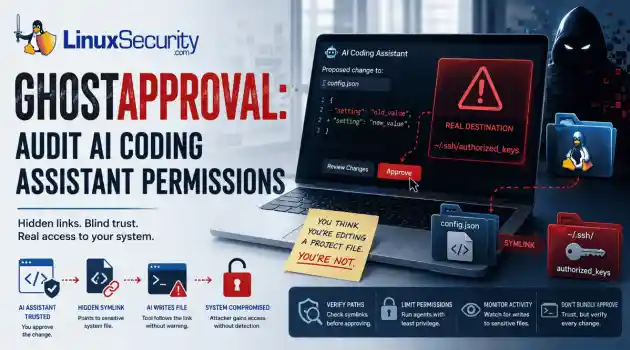
security advisory unauthorized access AI coding assistants have become a staple in many Linux developers' daily workflows. Whether you're generating boilerplate, refactoring code, or updating configuration files, it's easy to assume these tools stay safely inside your project directory. . Researchers recently pulled the curtain back on a threat they’ve dubbed " GhostApproval ." It’s a direct hit to the way we use tools like Cursor, Amazon Q, and Claude Code. They found these assistants have a dangerous blind spot: they can be...
Jul 09, 2026

Network Securitynetwork security firewall management
network security firewall management Linux runs a huge portion of today's infrastructure because it gives administrators an unusual amount of control over the system. That control extends to networking, where almost every aspect of packet flow, routing, filtering, and interface behavior can be customized. The trade-off is that very little of that hardening happens automatically. A fresh installation is usually built to communicate, not to isolate. . As environments grow, servers start exchanging data with monitoring platforms,...
Jul 08, 2026
 Refine news
X Clear Filters
Get the latest News and Insights
Get the latest Linux and open source security news straight to your inbox.
Community Poll
Is application sandboxing truly safe?
Loading...

Explore Latest Linux Security news
We found -4 articles for you...
74
 privilege escalationopen-sourcedetection
Detecting Linux System Compromise Early: Behavioral Indicators and Log-Based Detection
There's a gap between what Linux systems log by default and what you actually need to detect a compromise. Most environments have logging active, which creates a sense of coverage that doesn't hold up under investigation. . When you start pulling logs after an incident, what you find is fragmented activity — a login here, a process there, but no clear narrative of how access was gained, what was executed, or how far the attacker moved. You piece together a timeline rather than reading one. That's not just a technical inconvenience. It's the reason dwell time on Linux systems averages over 10 days before detection. Attackers who understand what Linux logs by default — and what it doesn't — operate well within that window. This article covers what to actually monitor, how to configure auditd to close the most critical gaps, what behavioral indicators to look for at each phase of an attack, and where default logging leaves you exposed. Why Default Logging Leaves Gaps Linux systems generate a lot of log data. They just don't always generate the right log data for security purposes. /var/log/auth.log records authentication events but not what happened after authentication succeeded. /var/log/syslog captures service events but not process behavior. Application logs are application-specific and typically don't cross-reference with system activity. The result: you can often confirm that a login happened from an unusual IP. What you can't confirm from default logs alone is what commands were run, what files were accessed, whether a privilege escalation was attempted, or whether a cron job was modified. The "Copy Fail" problem (CVE-2026-31431) CVE-2026-31431 — the privilege escalation vulnerability affecting virtually every mainstream Linux kernel since 2017, added to CISA's KEV catalog in 2026 — operates entirely in memory. No files written to disk. No changes to the filesystem. The only log entry a compromised system might produce is routine kernel output: kernel:[142.341205] [Firmware Bug]: TSC frequency mismatch detected That's it. Logging is active. Monitoring is running. The attacker has root. Standard log analysis finds nothing because there's nothing standard log analysis is looking for. This is what makes behavioral detection essential — monitoring what processes do rather than what files they create. Log the syscall transitions. Log the process ancestry. Log the timing. Because the file artifacts won't be there. Phase 1: Detecting Initial Access SSH authentication anomalies Start here. SSH is the initial access vector in the majority of Linux server compromises. /var/log/auth.log is your primary source. # All successful SSH logins — baseline review grep "Accepted" /var/log/auth.log # Failed attempts followed by success from the same IP — credential stuffing pattern grep -E "Failed|Accepted" /var/log/auth.log | grep -v "invalid user" | awk '{print $1,$2,$3,$9,$11}' | sort # New IP addresses for existing users (compare against historical baseline) grep "Accepted" /var/log/auth.log | awk '{print $9, $11}' | sort | uniq -c | sort -rn Three login patterns that warrant immediate investigation: Successful authentication from a geographic location the account has never used Successful password authentication on an account that has only ever used key auth A service account — typically never interactive — showing an SSH session The second is particularly significant. If an account's authorized_keys file has valid entries but someone logs in with a password, either the account's credentials were compromised separately or something changed in the authentication configuration. Web application exploitation Web server logs are often the first indicator of initial access via vulnerable application: # Unusual HTTP methods or paths suggesting command injection attempts grep -E "eval|base64|wget|curl|bash|/etc/passwd|/proc/self" /var/log/nginx/access.log grep -E "\.php\?cmd=|exec\(|system\("/var/log/apache2/access.log # Processes spawned by web server user (www-data, nginx, apache) ps aux | grep -E "www-data|nginx|apache" | grep -v "grep" A web server process spawning bash, curl, or wget is not normal activity. A web application process making outbound network connections to non-whitelisted destinations is a strong indicator of successful exploitation. Phase 2: Detecting Post-Exploitation Enumeration Attackers who land on a Linux box with a low-privilege shell immediately begin enumeration. Tools like LinPEAS automate this in under 60 seconds — scanning SUID binaries, sudo configurations, writable cron jobs, kernel version against known CVEs, credentials in config files, and dozens of other vectors. The behavioral fingerprint of automated Linux enumeration is distinctive and detectable: auditd rule for high-frequency find activity: auditctl -a always,exit -F arch=b64 -S execve -F exe=/usr/bin/find -k enum_find After running for a few minutes, check: ausearch -k enum_find --start recent | awk '{print $NF}' | sort | uniq -c | sort -rn Baseline expectation on a normal system: fewer than 5 find executions per non-root process in any 30-second window. A spike to 100+ is anomalous by definition. The fact that LinPEAS is one script rather than a human running individual commands makes the timing compression particularly detectable — dozens of find calls from the same PID within seconds. Additional enumeration indicators: # Rapid sequential reads of sensitive files from same process auditctl -w /etc/sudoers -p r -k sudoers_read auditctl -w /etc/passwd -p r -k passwd_read auditctl -w /etc/shadow -p r -k shadow_read auditctl -w /etc/crontab -p r -k crontab_read # Correlate: same PID reading all of these within a short window = automated enumeration ausearch -k sudoers_read -k passwd_read -k shadow_read --start recent Phase 3: Detecting Privilege Escalation SUID abuse and setuid syscalls When an attacker exploits a SUID binaryfor privilege escalation, the process transitions from the user's UID to root UID. The setuid syscall is the mechanism: # Detect UID transitions via setuid/setgid auditctl -a always,exit -F arch=b64 -S setuid -S setgid -k priv_escalation auditctl -a always,exit -F arch=b64 -S setreuid -S setregid -k priv_escalation Review: ausearch -k priv_escalation --start recent UID transitions are expected for legitimate binaries like sudo, su, passwd. Unexpected processes performing UID transitions — particularly web application processes, backup agents, or anything that doesn't normally interact with privilege boundaries — are worth investigating. Sudo command monitoring # Log all sudo invocations with the actual command auditctl -a always,exit -F arch=b64 -S execve -F path=/usr/bin/sudo -k sudo_exec # Alert on: sudo bash, sudo sh, sudo -s (all shell drops) ausearch -k sudo_exec --start recent | grep -E "bash|sh -i|/bin/sh" apache2 → sudo → bash as a parent-child process chain is not a sysadmin running a command. It's a kill chain. sudoers and authorized_keys modifications auditctl -w /etc/sudoers -p wa -k sudoers_change auditctl -w /etc/sudoers.d/ -p wa -k sudoers_change auditctl -w /root/.ssh/authorized_keys -p wa -k ssh_persistence auditctl -w /home -p wa -k ssh_persistence Any write to authorized_keys files outside of a configuration management operation (Ansible, Puppet) warrants immediate investigation. Key injection is clean persistence — no binary on disk, no process running — and it's invisible without this specific monitoring. Phase 4: Detecting Persistence Mechanisms Cron job modification auditctl -w /etc/cron.d/ -p wa -k cron_change auditctl -w /etc/crontab -p wa -k cron_change auditctl -w /var/spool/cron/ -p wa -k cron_change # Also monitor the scripts cron executes # If a root cron job runs /opt/backup/backup.sh, watch it: auditctl -w /opt/backup/backup.sh -p wa -k cron_script_change Cron modifications outsideof patch windows or change management processes are suspicious. A cron entry that suddenly runs a script in /tmp, /dev/shm, or any user-writable directory is an immediate indicator. SUID bit changes on filesystem # Real-time monitoring for SUID bit changes inotifywait -m -r -e attrib /usr/bin /usr/local/bin /usr/sbin 2> /dev/null | \ grep --line-buffered "ATTRIB" | while read line; do echo "[ALERT] Attribute change: $line" | logger -t suid_monitor done New SUID binaries outside of package manager operations are always worth examining. Developers occasionally set SUID during testing and deploy without removing it — and attackers who gain write access to an executable will set SUID as a persistence mechanism. systemd service persistence auditctl -w /etc/systemd/system/ -p wa -k systemd_change auditctl -w /lib/systemd/system/ -p wa -k systemd_change # Check recently modified systemd units find /etc/systemd/system /lib/systemd/system -newer /var/log/syslog -name "*.service" 2> /dev/null Persistence via new systemd services is a TTP documented in multiple ransomware groups, including RansomHub's campaigns using CVE-2024-1086 for post-compromise privilege escalation. New .service files created after a system's build date deserve scrutiny. Phase 5: Detecting Lateral Movement Outbound SSH connections (pivot indicator) A Linux server making high-volume outbound SSH connections to non-private IP addresses is a strong signal the box has been compromised and is being used as a scanning relay: # Monitor outbound connection attempts auditctl -a always,exit -F arch=b64 -S connect -k outbound_connect # Or via ss for real-time view ss -tnp | grep ESTABLISHED | grep -v "127.0.0.1\|10\.\|192\.168\.\|172\." # Count unique destination IPs from SSH processes netstat -tn | grep ":22" | awk '{print $5}' | cut -d: -f1 | sort | uniq -c | sort -rn A single sshd process connecting to dozens of unique external IPs is the SSHStalker pattern —compromised host immediately scanning for more victims after the initial compromise. /proc/*/net for covert channels # Check for unexpected listening ports ss -tlnp netstat -tlnp # /proc provides raw network data even if netstat is replaced by a rootkit cat /proc/net/tcp | awk '$4 == "0A" {print $2, $3}' # listening sockets in hex cat /proc/net/tcp6 | awk '$4 == "0A" {print $2, $3}' A covert C2 channel hiding as a legitimate service will show up in /proc/net/tcp even if a rootkitted version of netstat is installed. Cross-referencing the two is a quick sanity check. Severity Hierarchy: What to Alert On First Treat every auditd event as equal and you'll train your analysts to ignore alerts. It happens faster than you'd expect. A working detection strategy means explicitly deciding which signals are worth waking someone up for and which ones go into a dashboard nobody checks. Three tiers that actually hold up in practice: Signal Why it matters False positive rate www-data / nginx / apache2 spawning bash or sh Web app exploitation, nearly never legitimate Extremely low New authorized_keys entry outside change management window SSH persistence — clean and durable Low in orgs with CM setuid event on non-standard binary Attacker setting persistence or escalation path Low Root cron job script modified Direct path to persistent root execution Low auditd service stopped or rules cleared Attacker disabling detection — active response needed Very low High — suspicious, needs context: Signal Why it matters Common false positive New sudoers entry Privilege escalation path or new admin access Legitimate admin change 50+ find calls from same PID in 30 seconds Automated enumeration (LinPEAS, etc.) Package manager operations Service account with interactive SSH session Unusual behavior for non-human account Automation with bad config New systemd service created Persistence mechanism Legitimate software install Outbound connection to non-private IP from sshd Compromised host scanning for victims Legitimate backup/monitoring Medium — monitor, establish baseline: Signal Why it matters Common false positive sudo invocation at unusual hours Off-hours admin activity Legitimate admin work across time zones New cron entry for existing user Could be persistence Legitimate scheduled task Read of /etc/shadow by non-root process Credential harvesting attempt Some PAM configurations How to Build a Baseline Before Alerting Deploy detection rules without knowing what normal looks like and you'll spend the first month tuning out false positives until the team stops paying attention to alerts altogether. That's a worse outcome than no rules. A development server, a CI/CD runner, and a production web server have completely different behavioral profiles. sudo running 200 times a day is normal on an Ansible control node. It's not normal on a web server. find executing constantly is expected behavior from a package manager mid-update. It's not expected behavior from a user account at 3am. Before enabling high-severity alerts on any host, collect two weeks of baseline data: # Daily sudo activity ausearch -k sudo_exec --start today | wc -l # Daily setuid events ausearch -k priv_escalation --start today | wc -l # Daily cron modifications ausearch -k cron_change --start today | wc -l # Daily authorized_keys modifications ausearch -k ssh_persistence --start today | wc -l What you're building is a sense of what's routine for that specific host. A production web server that has never once modified authorized_keys in six months of baselining deserves an alert the moment it does. A configuration management server that updates keys daily as part of normal operations does not. Same event, completely different meaning depending on context. Alerts that trigger on deviations from established baseline catch real anomalies. Alerts that trigger on raw event volume catch noise. Signal Correlation: Why Single Events Are Often Misleading Individual events are weak signals. What matters is sequence. A sudo invocation on its own — legitimate. An outbound SSH connection — legitimate. A find command — also probably fine. The picture changes completely when those three things happen from the same user account within a five-minute window, in that order. Look at this sequence: 09:14 SSH login from new source IP 09:15 High-frequency find executions from same PID 09:16 Reads on /etc/sudoers and /etc/shadow 09:18 setuid transition on non-standard process 09:19 Write to /root/.ssh/authorized_keys None of those events alone is a confirmed compromise. Together, they map directly to: Initial Access → Enumeration → Privilege Escalation → Persistence That five-minute chain is LinPEAS running followed by a privilege escalation attempt and an SSH backdoor. It's not subtle — but it only becomes obvious when you're correlating events, not reviewing them one at a time. Build SIEM rules around timing windows and process ancestry. An event that's routine in isolation becomes high-confidence when it's correlated with two others in a short window involving the same PID or user. False Positive Handling in Practice The rules that matter most are also the ones most likely to fire legitimately in certain environments. Before deploying any rule in production, understand its false positive profile. sudo monitoring: In environments withmany sysadmins or where sudo is used frequently as part of standard automation, volume alone isn't diagnostic. Filter for sudo bash, sudo sh, sudo -s, and sudo su — shell-drop patterns. These are rarely legitimate in automated workflows and almost always human or attacker activity. find high-frequency detection: Package managers (apt, yum, dnf) invoke find heavily during updates. Deploy/configuration management tools like Ansible do too. Exclude known-good parent processes and whitelist maintenance windows. Alert on spikes outside those contexts. authorized_keys changes: In environments using configuration management (Puppet, Ansible, Chef), authorized_keys is regularly synced from a central source. Whitelist the CM agent's process. Alert on all other writes. Cron modifications: Legitimate cron changes happen — but they should be traceable to a change ticket or deployment pipeline. If your environment has change management, any cron modification outside a documented change window is an escalation-worthy event. systemd service creation: Package installations create new .service files constantly. Alert on new services created outside of package manager operations, or services that point to binaries in /tmp, /dev/shm, or any user-writable path. SIEM Correlation Rules: From Raw Events to Actionable Alerts Individual auditd events are signals. Correlation turns signals into incidents. These are the highest-value correlation patterns for Linux compromise detection: Rule 1 — Web server spawning shell: IF process.parent.name IN ["apache2", "nginx", "httpd", "php-fpm"] AND process.name IN ["bash", "sh", "dash", "python", "perl", "ruby"] THEN ALERT: Critical — Web Application Exploitation Rule 2 — New device + authorized_keys change (AiTM to persistence chain): IF ssh_login.new_source_ip = TRUE AND authorized_keys.write_event WITHIN 30 minutes THEN ALERT: High — Possible AiTM Compromise with SSH Persistence Rule 3 — Privilege escalationchain: IF setuid_event.user != root AND file_write_event.path IN ["/etc/sudoers", "/root/.ssh/authorized_keys"] AND process.name = "bash" WITHIN 10 minutes THEN ALERT: Critical — Active Privilege Escalation Chain Rule 4 — Automated enumeration fingerprint: IF process.syscall = "execve" AND process.name = "find" AND count(events) > 50 WITHIN 30 seconds AND process.user != root AND process.parent.name NOT IN ["apt", "dpkg", "ansible"] THEN ALERT: High — Automated Enumeration Pattern Rule 5 — Outbound scanning from compromised host: IF network.direction = outbound AND network.dest_port = 22 AND count(unique_dest_ips) > 20 WITHIN 60 seconds AND process.name IN ["sshd", "ssh"] THEN ALERT: Critical — Host Used as SSH Scanning Relay Building a Practical Detection Stack You don't need a SIEM to start. The priority order for Linux compromise detection: 1. auditd — the foundation # Persistent rules in /etc/audit/rules.d/security.rules -a always,exit -F arch=b64 -S execve -F path=/usr/bin/sudo -k sudo_exec -a always,exit -F arch=b64 -S setuid -S setgid -k priv_escalation -w /etc/sudoers -p wa -k sudoers_change -w /root/.ssh/authorized_keys -p wa -k ssh_persistence -w /etc/crontab -p wa -k cron_change -w /etc/systemd/system/ -p wa -k systemd_change 2. aureport for daily review # Daily anomaly summary — run as cron or review manually aureport --auth --summary # authentication events aureport --syscall --summary # system call anomalies aureport --file --summary # file access patterns 3. Process tree correlation When an alert fires, the first question is: what is the parent process? Context from /proc/ /status and ps --forest determines within seconds whether sudo was run by a legitimate admin session or by a web server process that shouldn't be executing shell commands. 4. Forward logs off the host Logs stored only locally can be modified or deleted by anattacker with root. Forward to a remote syslog server or centralized logging infrastructure as quickly as possible. If local logs are the only copy and the attacker gains root, your forensic evidence is at risk. Top 10 Linux Compromise Signals Worth Alerting On Immediately If resources are limited, prioritize these signals first. They consistently appear across real-world Linux intrusions and typically generate manageable alert volume. Priority Indicator Why It Matters 1 Web server spawning shell (apache2 → bash) Strong exploitation indicator 2 New authorized_keys entry Common persistence technique 3 Unexpected setuid transition Privilege escalation activity 4 Modification of /etc/sudoers Privilege manipulation 5 New systemd service created Persistence mechanism 6 Root cron modification Scheduled privileged execution 7 Outbound SSH scanning activity Lateral movement indicator 8 Large-scale file enumeration Automated reconnaissance 9 auditd service stopped Defense evasion — act immediately 10 External network connection from web app process Possible command execution Organizations attempting to monitor everything often end up monitoring nothing effectively. Starting with ten high-confidence signals and expanding gradually produces better results than deploying hundreds of low-confidence rules on day one. Limits and Bypass: What Detection Won't Catch Every detection strategy has a ceiling. Understanding where yours ends is as important as building it. auditd can be disabled. An attacker with root can stop the auditd service, flush rules, or modify /etc/audit/audit.rules to remove specific watches. If yourdetection depends entirely on local auditd and an attacker achieves root before you get an alert, you've lost the evidence trail. Mitigation: ship logs to an immutable remote destination in real-time. Alert immediately if auditd stops on any monitored host. Local logs can be deleted or modified. Root can truncate /var/log/auth.log, remove bash history, clear wtmp and lastlog. An attacker who understands Linux forensics will do this. If your logs are only stored locally, a root-level compromise can erase the timeline. Forward to a remote syslog or centralized logging platform the moment events are generated. Rootkits hide activity. Kernel-level rootkits (LKM rootkits) can intercept system calls and hide processes, files, and network connections from standard tools. ps, ls, netstat, and top can all return clean results on a compromised host. /proc filesystem access is more reliable than userspace tools, but sophisticated rootkits can intercept procfs reads too. Runtime kernel integrity monitoring (eBPF-based sensors, AIDE for file integrity) catches anomalies that standard logging misses. Containers and cloud complicate the model. In containerized environments, auditd on the host may not capture activity inside containers depending on namespace configuration. Cloud instances may have additional logging layers (CloudTrail for AWS, Cloud Audit Logs for GCP) that provide visibility auditd doesn't. Container runtime security tools (Falco, Sysdig) monitor syscall behavior at a layer that survives container restarts and doesn't depend on configuration inside the container. In-memory attacks produce no file artifacts. CVE-2026-31431 ("Copy Fail") demonstrated this at scale — kernel LPE that leaves no file changes, no new processes beyond the exploiting binary, no obvious log entries. Behavioral detection at the syscall level (setuid transitions, unexpected privilege changes) is more reliable than file-based detection for this class of attack. What to Do After Detection: Immediate Response Detection is only useful if it triggers an effective response before the attacker achieves their objectives. Immediate containment — within minutes: # Isolate the host from the network (if remote management allows) # Block outbound on all interfaces except your management channel iptables -I OUTPUT -j DROP iptables -I OUTPUT -d /32 -j ACCEPT # Kill suspicious sessions identified during detection who -a # list active sessions pkill -9 -t pts/1 # kill specific terminal session # Preserve a snapshot of current process state before killing anything ps auxf > /tmp/process_snapshot_$(date +%s).txt ss -tnp > /tmp/network_snapshot_$(date +%s).txt Evidence collection — before touching anything: # Memory is volatile — capture what you can before isolation or reboot # List loaded kernel modules (LKM rootkit check) lsmod > /tmp/modules_$(date +%s).txt # Active network connections ss -tnp > /tmp/connections_$(date +%s).txt # Scheduled tasks and cron crontab -l -u root > /tmp/root_cron.txt cat /etc/crontab > /tmp/system_cron.txt # Recently modified files find / -newer /tmp/reference_file -type f 2> /dev/null > /tmp/recent_files.txt # Export auditd events before they cycle out ausearch --start today > /tmp/audit_today.txt Credential rotation priorities: Root password and all sudo users immediately Any SSH keys that existed on the system at time of compromise — assume all are burned Service account passwords for any service running on the host Application database credentials stored in config files on the system Persistence verification before declaring clean: # Check every persistence mechanism attackers use crontab -l -u root; crontab -l ls -la /etc/cron.d/ /etc/cron.hourly/ /etc/cron.daily/ cat /etc/rc.local systemctl list-units --type=service | grep -v "loaded active" find /root /home -name ".bashrc" -o -name ".bash_profile" | xargs grep -l "curl\|wget\|bash\|nc\|ncat" cat /root/.ssh/authorized_keys find /tmp /dev/shm -type f 2> /dev/null A system is not clean until every persistence mechanism has been verified, not just the one that triggered the initial alert. Detection on Linux isn't about having the most data — it's about having the right data, at the right granularity, in a place the attacker can't erase. The gaps in default logging are predictable and closable. What's less predictable is whether the rules are in place before the compromise happens. . Learn how to effectively monitor Linux systems for compromises with tailored logging strategies and behavioral detection techniques.. Linux detection, log monitoring, behavioral analysis, security strategy, system compromise. . Andrew Kowal
 Jul 12, 2026
•
Jul 12, 2026
• Network Security

Get the latest News and Insights
Get the latest Linux and open source security news straight to your inbox.
Community Poll
Is application sandboxing truly safe?
Search Topics
Powered By

Linux Security - Your source for Top Linux News, Advisories, HOWTOs and Feature Releases
QUICK LINKS
subscribe to newsletters!
Like staying secure? So do we.
Sign up for updates, tips, and alerts!