Explore top 10 tips to secure your open-source projects now. Read More
×



Server Security data privacy automation
data privacy automation Every system admin has lived through the same Monday morning ritual. A queue of forty tickets, half of them password resets, permission errors, or disk space warnings that any experienced technician could resolve in under two minutes. The other half require actual judgment. For years, automation promised that software would eventually sort the two apart on its own. That promise is now being tested in production Linux environments. . Early results are reshaping how IT teams think about tier-1...
 Jul 17, 2026

Privacydata collection automation
data collection automation You're running a web scraping project to collect pricing data from e-commerce sites. You set up a pool of datacenter proxies, launch your scripts, and within minutes — banned . CAPTCHAs everywhere. Your data pipeline stops before it really begins. . It's a frustrating scenario that plays out daily in ad verification, market research, and multi-account management. The website doesn't know you're doing legitimate research or monitoring. It just sees traffic coming from IP ranges it recognizes as...
Jul 17, 2026

Security Trends security advisory social engineering
security advisory social engineering Business Email Compromise used to be a numbers game — mass-blasted emails, broken English, an obvious "URGENT WIRE TRANSFER" subject line. That era is over. Generative AI has turned BEC into a tailored, low-noise operation that mimics writing style, voice, and even video presence. This piece looks at what's actually changed under the hood, what defenders are testing in response, and why so many organizations are still structurally unprepared for it. . The Infrastructure Problem Nobody Wants to...
Jul 17, 2026

Security Trends cybersecurity Linux documentation
cybersecurity Linux documentation Linux operating systems have gained prominence due to their stability, adaptability, and excellent security options. In the case of developing documentation, designing cybersecurity dashboards, or educational material, visuals are of vital importance when it comes to making things clear. The use of icons allows one to understand the message regarding alerts, authorization, encryption, authentication, or the state of the system just by looking at the visual cue without having to read long...
Jul 17, 2026
Security Vulnerabilities security advisory linux distribution
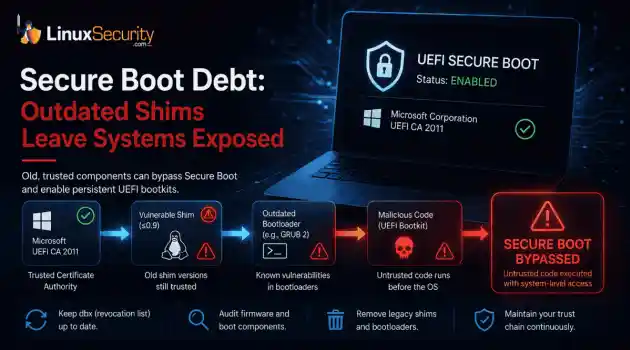
security advisory linux distribution ESET researchers identified 11 old and forgotten Linux UEFI shim bootloaders at versions 0.9 and below that can be used to bypass UEFI Secure Boot on any UEFI-based machine that trusts Microsoft’s Microsoft Corporation UEFI CA 2011 third-party certificate authority, regardless of the installed operating system (OS). Reported shims can be exploited to execute untrusted code during system boot, enabling attackers to deploy malicious UEFI bootkits even on systems with UEFI Secure Boot enabled.....
Jul 16, 2026
 Refine news
X Clear Filters
Get the latest News and Insights
Get the latest Linux and open source security news straight to your inbox.
Community Poll
Is continuous patching actually viable?
Loading...
Explore Latest Linux Security news
We found 12 articles for you...
209
 fedorasecurity assessmentopen source risk
Fedora AI Contributor Incident Highlights New Open Source Risks
A Fedora contributor account recently came under scrutiny for apparently AI-generated activity that disrupted the project's bug tracker. . Questionable Bugzilla comments, flawed patches, and improperly closed or reassigned bugs forced maintainers to spend time cleaning up the fallout. There is no evidence that malware was deployed or a backdoor reached production, but the incident exposed a different problem. Open-source projects can be disrupted without compromising a single line of code. This was not a traditional breach. The real target was the workflow itself. Why This Was Not a Normal Supply Chain Scare Most supply chain incidents follow a predictable pattern. An attacker poisons a dependency or hijacks a maintainer credential to push malicious code. This situation flipped that script. The primary risk was not the software itself. It was the contamination of the systems developers use to evaluate technical reality. Maintainers had to pivot from feature development to forensics. They had to investigate buggy patches, verify the validity of technical comments, and audit a surge of automated activity. This creates an operational tax. It is not measured in compromised binaries, but in wasted developer time. Review queues swell, bug reports become unreliable, and technical discussions lose the nuance required for high-stakes work. The damage is not a backdoor. It is the erosion of the consensus that makes development possible. The Scary Part: AI Does Not Need Commit Access to Cause Damage Traditional attacks require a foothold in the built infrastructure or direct push access to a repository. AI agents have lower barriers to entry. They only need access to the social and administrative layers of a project, like issue trackers, mailing lists, or review platforms. An AI can confidently explain a false root cause, leading developers to debug the wrong subsystem. It can submit patches that look correct but introduce subtle regressions. By creating a high volume of noise, it can masklegitimate issues or force maintainers to waste cycles on hallucinations. Even without a single line of malicious code reaching a user's machine, the integrity of the project decision-making process is compromised. The attacker essentially turns the project workflow against itself. Fedora Already Has an AI Policy. That Is What Makes This More Interesting. Fedora is not blind to these risks . The project has clear rules on disclosure, identity verification, and human oversight . These policies rely on the assumption that contributors act in good faith and that maintainers can easily spot low-quality machine output. This incident proved that those assumptions are fragile. Policies can demand disclosure, but they cannot force honesty or verify that a human actually reviewed an AI suggestion. As models become more fluent, distinguishing between expert developer logic and a convincing hallucination becomes exhausting. In a high-velocity project, maintainers do not have the time to treat every patch like a security audit. Open Source Runs on Trust, and AI Agents Stress Trust. Open-source development does not just run on code. It runs on reputation. Maintainers rely on consistent history to prioritize patches and vet reviews. That trust signal is the bedrock of the entire ecosystem. AI-generated activity weaponizes that signal. An account can generate a high volume of authoritative, yet technically hollow, contributions that mimic legitimate expertise. When identity and reputation can be faked, the social infrastructure of a project becomes a vulnerability. Open source evolved to handle malicious code. It has not yet adapted to handle the automated degradation of human consensus. What Linux Teams Should Learn From This Practical defense in the AI era requires tightening the workflow, not just the code. First, projects must mandate explicit disclosure for AI-assisted contributions and enforce secondary reviews for any change touching security-critical areas like authentication orcryptography. Second, limit autonomous triage. Systems that allow mass bug closures or reassignments should require higher privilege thresholds. Monitoring for anomalies is just as important. Sudden, repetitive, or unusually high-volume activity should trigger automated scrutiny. Finally, prioritize robust rollback capabilities. If a workflow is poisoned by AI-driven triage, the project needs a way to bulk-revert those actions without manually hunting down every ticket. Why Linux Admins Should Care System administrators and DevOps engineers do not typically live in Fedora bug trackers, but they rely on the results of those discussions to secure their production stacks. Upstream processes determine the quality of the patches that eventually reach stable distributions. If maintainers are forced to spend their limited time cleaning up AI-generated noise, that is time stolen from fixing actual vulnerabilities. When trust signals degrade at the top of the chain, the impact inevitably ripples downstream into enterprise environments. A slow or confused development process is a gateway for real security gaps to persist longer than they should. The Next Supply Chain Attack May Look Helpful Defenders have spent years building tools to catch backdoors and dependency poisoning. We are primed to look for the bad actor. We are not prepared for the helpful actor who never submits malware but spends all day filling the system with garbage. The Fedora incident was a warning shot. It showed that the next generation of supply chain risk will not necessarily arrive as an exploit chain. It will arrive as a contributor who is always active, always helping, and always undermining the human judgment that keeps the code base secure. Protecting the workflow is now as critical as protecting the binary. Do you think open-source projects should implement mandatory proof-of-human verification for all code submissions, or would that hurt the inclusivity of the community? Want more Linux security news,vulnerability analysis, and software supply chain updates? Subscribe to the LinuxSecurity Newsletter and get the latest threats, advisories, and expert insights delivered directly to your inbox. Related Reading Linux Security Uncovered: Open Source, User Privilege, and Defense Tactics TARmageddon: Archive Extraction Risk in Rust async-tar on Linux In-Depth Exploration Of Buffer Overflow Risks In Linux Systems . Questionable Bugzilla comments, flawed patches, and improperly closed or reassigned bugs forced main. fedora, contributor, account, recently, under, scrutiny, apparently, ai-generated, activity. . MaK Ulac
 Jun 12, 2026
•
Jun 12, 2026
• Security Trends
78
 fedoradebianubuntu
In-depth Security Comparisons: Debian, Fedora, and Ubuntu Distributions
As a Linux security admin, choosing the right distribution is a crucial decision that will immensely impact your administration workflow. Debian, Fedora, and Ubuntu are three popular Linux distros that offer unique security features and characteristics. Fedora is like a cutting-edge scientist, constantly innovating with built-in tools like SELinux and delivering rapid security updates. . On the other hand, Debian is the reliable guardian, known for its stability and extensive testing, albeit with slightly slower adoption of new technologies. Then there’s Ubuntu, the user-friendly diplomat, offering a balance between usability and security with features like AppArmor and timely, albeit less frequent, updates compared to Fedora. In this article, I'll dive into the nitty-gritty of these distributions' security landscapes. I'll explore how each handles default configurations, manages updates, and what kind of community support you can expect. I’ll also highlight some pain points — because no distribution is without flaws — and provide practical insights to help you decide which distro best fits your security needs. Whether you're an SELinux wizard, a Debian stability fan, or an AppArmor enthusiast, understanding these differences can make a notable difference in your day-to-day operations. An In-Depth Security Analysis of Debian Debian is a rock-solid choice for many Linux admins, primarily due to its stability and well-maintained security features. One thing that makes Debian stand out is its predictable and stable release cycle. Each stable release gets around five years of security updates, so you can count on your systems staying secure over time without any surprises. The Debian Security Team is on the ball, too. They issue security advisories and updates promptly, and their dedicated security repository ( security.debian.org ) ensures you can get these patches easily and quickly. Also, Debian's default installation is pretty lean and secure right off the bat. It avoids runningunnecessary services, which helps keep the attack surface small. And if you're looking to beef up security further, Debian supports AppArmor , which lets you confine applications to tight security policies. Debian’s participation in the Reproducible Builds project is a big plus, assuring that the binaries you're running are genuine and haven't been tampered with. Another thing I appreciate about Debian is its strong security community. These folks are passionate and extremely collaborative, consistently working on identifying and fixing vulnerabilities. And let's not forget the Debian Security Tracker, which keeps everything transparent—you can check the status of vulnerabilities and the rollout of patches anytime. However, no system is perfect. One gripe some admins have with Debian is its SELinux support. While it supports AppArmor, SELinux , which offers more granular control, isn’t as polished or user-friendly. This might be a sticking point if you come from a Fedora or CentOS background. Also, while Debian does a good job with security patches, it’s conservative. This means you might not get some updates as fast as you would on a rolling-release distro like Arch Linux. Kernel hardening is another area that could use a bit more love. Debian’s default kernel is secure but not as aggressively hardened as in some security-focused distributions like Qubes OS or Kali Linux . If you want those features, you’ll likely dive into manual configurations. Lastly, the commitment to stability sometimes means you're dealing with older versions of packages. This can be a double-edged sword; while you get well-tested software, you might miss out on newer security features found in the latest versions. Debian’s security framework offers an outstanding balance of stability and security, making it a dependable choice for many scenarios, especially on servers. But as with any distribution, knowing its strengths and weaknesses will help you maximize it for your specific use case. Fedora'sProactive Security Approach: Strengths & Challenges Fedora Linux stands out in the Linux ecosystem due to its solid focus on security. As a Linux admin, you'll appreciate that Fedora integrates cutting-edge technologies with a strong emphasis on keeping systems secure. One of its hallmark features is SELinux, which is baked right into the system to enforce strict access controls—imagine sleeping at night knowing that even if a service gets compromised, it's locked down tighter than Fort Knox! Plus, the Fedora team is on the ball with security patches and updates, pushing them out with a sense of urgency that keeps you ahead of potential threats. It’s also handy that Fedora comes with essential security tools, like firewalld , making it easy to hit the ground running. And let’s not underestimate the power of community; Fedora’s security community is teeming with experts whose contributions often improve not only Fedora but the entire Linux landscape. When setting up a new system, you’ll notice that Fedora promotes security best practices from the start, with default settings prioritizing the highest level of safety. On the flip side, some users find SELinux a bit of a beast to tame. Its complexity can be intimidating, especially for those just dipping their toes into Fedora's waters, sometimes leading them to disable it, precisely what you don't want. Also, given how up-to-the-minute everything is, all these frequent updates can be a bit resource-hungry, which might make you think twice if you're managing systems that aren't exactly brimming with hardware prowess. In essence, Fedora’s proactive security stance and robust community support make it a solid choice for any security-savvy admin. Still, it’s wise to brush up on your SELinux skills to make the most of Fedora's offerings. Ubuntu's Comprehensive Security Features: Benefits & Areas for Improvement Ubuntu is well-regarded for its strong security measures, making it a go-to Linux distribution for many users seekingrobust cybersecurity features. One of the main characteristics that stands out is its design philosophy, which prioritizes ease of use and accessibility, helping even those with a minimal technical background configure secure systems. Ubuntu provides regular security updates and patches faster than many other distributions. This proactive approach enables administrators to address vulnerabilities rapidly, reducing exposure to potential threats. Another unique aspect of Ubuntu is its default installation, which is configured with security in mind. By default, it includes a firewall called UFW (Uncomplicated Firewall) , making it easier to implement basic firewall settings without delving into complex configurations. Moreover, Ubuntu integrates with AppArmor, a security module that restricts the capabilities of programs to fortify your system against potential threats. The security community supporting Ubuntu is active and dedicated, frequently sharing best practices and guidelines for improving system security. Resources like Ubuntu Security Notices and Launchpad are vital for staying informed on recent threats and security patches. Ubuntu’s Security Team ensures that security vulnerabilities are closely monitored and promptly addressed. Despite these strong points, there are areas where Ubuntu could enhance its security offerings. For example, while AppArmor provides good protection, some users feel that the SELinux support isn’t as comprehensive as it could be, limiting users accustomed to the more granular policy controls found in SELinux. Although UFW simplifies firewall management, it does not offer the same depth of features as more advanced firewall solutions. Ubuntu's user-friendly security features, reliable update mechanisms, and supportive community make it a solid choice for many. However, there is always room for improvement, especially in broadening the capabilities of built-in security tools to match those in more specialized security distributions. Our FinalThoughts: Choosing the Right Linux Distribution for Optimal Security Choosing the right Linux distribution can significantly impact your security posture. Debian's focus on stability and extensive testing procedures makes it an excellent choice for those prioritizing a time-tested, reliable environment. Fedora's rapid update cycle and cutting-edge security features, such as SELinux, cater to those who need the latest advancements and are willing to manage a more dynamic system. With its balanced approach, Ubuntu provides an accessible yet secure platform, leveraging features like AppArmor to offer protection with ease of use. Your choice should reflect your specific security needs and operational priorities. Whether you prefer Debian's stability, Fedora's innovation, or Ubuntu's balanced approach, understanding what each distribution offers can help you make the right decision. With this knowledge, you can tailor your security strategy to match the unique characteristics of your chosen distro, ensuring robust protection for your systems. . Evaluate Linux distributions like Debian, Fedora, and Ubuntu by considering their unique security strengths and weaknesses to find the best fit for your needs. Debian Security, Fedora Features, Ubuntu Administration. . Brittany Day
Mar 26, 2025
•
Vendors/Products

210
 security advisoryhigh severityfedora
Debian, Fedora, openSUSE: Chromium Update Critical Exploits Fixed
Twenty-one severe vulnerabilities have been found in Chromium, including multiple use after frees and heap buffer overflows, among other security issues. These bugs have received a National Vulnerability Database severity rating of “High” due to their ease of exploitation and their significant threat to impacted systems' confidentiality, integrity, and availability. . These vulnerabilities have enabled remote attackers to exploit heap corruption and perform arbitrary read/write via a crafted HTML page. They also allowed an attacker who convinced a user to install a malicious extension to inject scripts or HTML into a privileged page via a crafted Chrome Extension. Important updates have been released for Chromium that fix these severe issues. We urge all impacted users to apply the updates released by Debian , Fedora and openSUSE now to protect against attacks leading to downtime and compromise. To stay on top of essential updates released by the open-source programs and applications you use, register as a LinuxSecurity user , subscribe to our Linux Advisory Watch newsletter, and customize your advisories for your distro(s). This will enable you to stay up-to-date on the latest, most significant issues impacting the security of your systems. Follow @LS_Advisories on Twitter for real-time updates on advisories for your distro(s) . . Critical weaknesses in Chromium might enable attacks through specially designed HTML files. Users are urged to upgrade promptly to reduce threats.. Chromium Security Update, High Severity Issues, Remote Exploit Risks. . Brittany Day
Aug 31, 2023
•
Security Vulnerabilities
210
security advisoryhigh severityfedoraUbuntu, Arch, Manjaro: Critical Firefox Vulnerabilities Resolved
Eleven severe vulnerabilities have been found in Chromium, including multiple Type Confusion bugs in V8, use-after-frees in Cast, Blink Task Scheduling and WebRTC, a heap buffer overflow in Visuals, out-of-bounds read and write in WebGL, out-of-bounds memory access in ANGLE, and insufficient data validation and inappropriate implementation in Extensions. These bugs have received a National Vulnerability Database severity rating of “High” due to their ease of exploitation and the significant threat they pose to impacted systems' confidentiality, integrity, and availability. . These issues have allowed a remote attacker to potentially exploit heap corruption and perform arbitrary read/write via a crafted HTML page. They also enabled an attacker who convinced a user to install a malicious extension to inject scripts or HTML into a privileged page via a crafted Chrome Extension. Important updates have been released for Chromium that fix these dangerous flaws. We urge all impacted users to apply the updates issued by Debian , Fedora and openSUSE to protect against potential security threats. To stay on top of essential updates released by the open-source programs and applications you use, register as a LinuxSecurity user , subscribe to our Linux Advisory Watch newsletter, and customize your advisories for your distro(s). This will enable you to stay up-to-date on the latest, most significant issues impacting the security of your systems. Follow @LS_Advisories on Twitter for real-time updates on advisories for your distro(s) . . Critical vulnerabilities in Chromium jeopardize platforms to distant attacks and memory corruption. Ensure updates are applied to safeguard against risks.. Chromium Flaws, High Severity Advisory, Remote Exploits, Security Update. . Brittany Day
Aug 09, 2023
•
Security Vulnerabilities
67
 fedoradata protectiondisk encryption
Fedora Workstation: Default Disk Encryption Plans For Enhanced Security
Fedora Workstation developers and those involved at Red Hat have been working to improve the state of disk encryption on Fedora with a end-goal of possibly making the installer encrypt systems by default. . While many Linux distributions allow for full-disk encryption these days, not many distributions enable it by default (Pop!_OS being among the rare that actively encourage it) while it looks like in the future Fedora Workstation could default to having its installer encrypt the disk. Owen Taylor of Red Hat laid out a mailing list post and Discourse thread today around the future of encryption with Fedora. With the encryption planning is also to have the encryption key stored in the system's Trusted Platform Module (TPM) and to also sign the bootloader/kernel/initrd with the TPM signatures. This work in turn is dependent upon the ongoing Unified Kernel Image support with Fedora and upstreams like systemd. The Fedora Workstation plan would be to use the upcoming Btrfs fscrypt support for encrypting both the system and home directories. The link for this article located at Phoronix is no longer available. . Ubuntu Desktop aims to bolster user privacy by implementing automatic disk encryption as a standard feature during setup for heightened security.. Fedora Workstation, Disk Encryption, Security Enhancement. . LinuxSecurity.com Team
Apr 18, 2023
•
Cryptography
78
 fedoraFedoralinux distribution
Discover Exciting New Features in Fedora 34 Beta for Developers
Considering Fedora? Now may be the time to switch. The new beta for Fedora 34 has been released with a selection of new features and improvements. . The beta for Fedora 34 is out now, with a whole truckload of improvements and changes. There's never been a better time to switch to Fedora Linux, so let's take a look at what's new. The Fedora Linux standard edition, also known as Fedora Workstation, is a rock-solid Linux distro that's designed with developers and creators in mind. It's a popular and powerful choice for anyone who wants an operating system that reliably works for you and lets you get to work. . Uncover the thrilling enhancements in Ubuntu 21.04 beta and compelling reasons to think about refreshing your operating system today.. Fedora 34, Linux Development, Upgrade Reasons. . LinuxSecurity.com Team
Apr 05, 2021
•
Vendors/Products
78
 fedoralinux distributionlinux update
Introducing Fedora 33: New Features for Developers and Enthusiasts
If you're looking for a Linux distro that explores the outer limits of what Linux can do, Fedora could very likely be for you. And there has never been a better time to make the switch - Red Hat has now released the latest and greatest update of this popular Linux distro: Fedora 33 . . Fedora has long been a favorite of Linux developers. Just ask Linus Torvalds, who uses Fedora on his personalized powerhouse workstation . Now Red Hat , Fedora's parent organization has released the latest and greatest update of this popular Linux distribution: Fedora 33 . The new Fedora 33 Workstation comes with the greatly improved GNOME 3.38 , desktop. If you aren't already familiar with GNOME, Fedora is not the Linux you want to learn it on. Try Ubuntu or openSUSE to get to know GNOME. . Explore Fedora 33 for developers with the latest GNOME desktop and exciting features.. Fedora 33, Linux Developers, GNOME Desktop. . LinuxSecurity.com Team
Oct 29, 2020
•
Vendors/Products
78
 Red Hatfedoralinux
Explore New Features of Fedora 28 Cutting-Edge Linux Distro
Red Hat-sponsored Fedora operating system is known for its bleeding features and leading the way for other Linux distros. Very often Fedora makes way for technologies that are often adopted by other distro developers. . It’s also Red Hat’s testing ground as it acts as the upstream source of RHEL. Fedora 28 is the latest release that you can download and use. The link for this article located at Fossbytes is no longer available. . Dive into Fedora 28, the new avant-garde Linux release from Red Hat, showcasing groundbreaking features and enhancements.. Fedora, Linux Features, Red Hat, Cutting Edge, Linux Distro. . LinuxSecurity.com Team
May 02, 2018
•
Vendors/Products

Get the latest News and Insights
Get the latest Linux and open source security news straight to your inbox.
Community Poll
Is continuous patching actually viable?
Search Topics
Powered By

Linux Security - Your source for Top Linux News, Advisories, HOWTOs and Feature Releases
QUICK LINKS
subscribe to newsletters!
Like staying secure? So do we.
Sign up for updates, tips, and alerts!