Explore top 10 tips to secure your open-source projects now. Read More
×



Server Security data privacy automation
data privacy automation Every system admin has lived through the same Monday morning ritual. A queue of forty tickets, half of them password resets, permission errors, or disk space warnings that any experienced technician could resolve in under two minutes. The other half require actual judgment. For years, automation promised that software would eventually sort the two apart on its own. That promise is now being tested in production Linux environments. . Early results are reshaping how IT teams think about tier-1...
 Jul 17, 2026

Privacydata collection automation
data collection automation You're running a web scraping project to collect pricing data from e-commerce sites. You set up a pool of datacenter proxies, launch your scripts, and within minutes — banned . CAPTCHAs everywhere. Your data pipeline stops before it really begins. . It's a frustrating scenario that plays out daily in ad verification, market research, and multi-account management. The website doesn't know you're doing legitimate research or monitoring. It just sees traffic coming from IP ranges it recognizes as...
Jul 17, 2026

Security Trends security advisory social engineering
security advisory social engineering Business Email Compromise used to be a numbers game — mass-blasted emails, broken English, an obvious "URGENT WIRE TRANSFER" subject line. That era is over. Generative AI has turned BEC into a tailored, low-noise operation that mimics writing style, voice, and even video presence. This piece looks at what's actually changed under the hood, what defenders are testing in response, and why so many organizations are still structurally unprepared for it. . The Infrastructure Problem Nobody Wants to...
Jul 17, 2026

Security Trends cybersecurity Linux documentation
cybersecurity Linux documentation Linux operating systems have gained prominence due to their stability, adaptability, and excellent security options. In the case of developing documentation, designing cybersecurity dashboards, or educational material, visuals are of vital importance when it comes to making things clear. The use of icons allows one to understand the message regarding alerts, authorization, encryption, authentication, or the state of the system just by looking at the visual cue without having to read long...
Jul 17, 2026
Security Vulnerabilities security advisory linux distribution
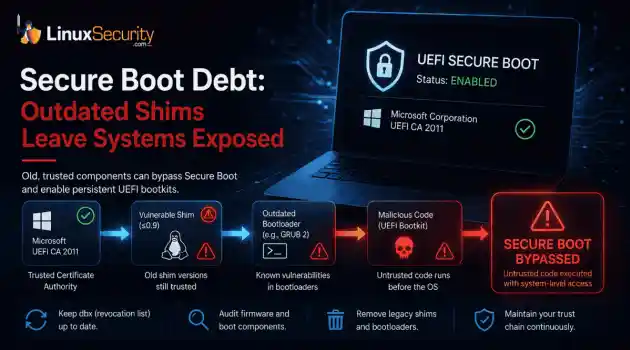
security advisory linux distribution ESET researchers identified 11 old and forgotten Linux UEFI shim bootloaders at versions 0.9 and below that can be used to bypass UEFI Secure Boot on any UEFI-based machine that trusts Microsoft’s Microsoft Corporation UEFI CA 2011 third-party certificate authority, regardless of the installed operating system (OS). Reported shims can be exploited to execute untrusted code during system boot, enabling attackers to deploy malicious UEFI bootkits even on systems with UEFI Secure Boot enabled.....
Jul 16, 2026
 Refine news
X Clear Filters
Get the latest News and Insights
Get the latest Linux and open source security news straight to your inbox.
Community Poll
Is continuous patching actually viable?
Loading...
Explore Latest Linux Security news
We found 18 articles for you...
81
 web browserinternet securityidentity protection
What Is Tor Browser & How Does It Impact Linux Security Teams?
Tor Browser is a privacy-focused web browser that routes traffic through the Tor network to obscure a user’s identity and destination—and that design has direct implications for Linux security teams. It’s built to limit tracking, resist surveillance, and reduce visibility into browsing activity. On a Linux endpoint, that means user activity can intentionally bypass many of the controls and assumptions your security stack relies on. . If you’ve ever noticed Tor Browser on a Linux system and thought, “Should I be worried?”, you’re not overreacting—but you’re also not looking at an automatic incident. Tor Browser is a legitimate tool used by researchers, journalists, and developers. At the same time, it can become a blind spot in Linux security, especially when it appears outside of an approved use case or without clear ownership. For Linux security admins, the real issue isn’t whether Tor Browser should exist—it’s understanding what Tor Browser is, how it behaves on Linux systems, and how its traffic model changes what you can and can’t see. Once you understand that impact, you’re in a better position to decide whether Tor Browser is acceptable noise, a policy exception, or a signal worth investigating. What Is Tor Browser? Tor Browser is a modified version of Firefox ESR that routes all browser traffic through the Tor network by default. The browser is hardened with privacy-focused settings, bundled with Tor client components, and designed to reduce fingerprinting at the application layer. It is not a VPN , not malware, and not synonymous with “the dark web.” Tor Browser does not magically grant access to illegal content, nor does its presence alone indicate malicious activity. It is a user-space application running on top of standard Linux libraries. From a security operations perspective, Tor Browser introduces classification and visibility problems. Network destinations are obscured, traffic blends with other Tor users, and traditional perimeter controlslose context. That makes it relevant even when policy forbids its use. How Does Tor Browser Work on Linux Systems? Before you can decide whether Tor Browser is a risk, you need a clear picture of what actually changes on a Linux system when it runs. Let’s focus on observable behavior at the network, process, and file levels. Network Behavior on Linux Tor uses onion routing to move traffic through multiple volunteer-operated nodes. Each layer knows only the hop before and after it, not the full path. A typical connection involves: An entry node that sees the client IP but not the destination One or more relay nodes that pass encrypted traffic along An exit node that sees the destination but not the originating client From a Linux host’s perspective, outbound connections go to Tor entry nodes. From a network monitoring perspective, you see encrypted traffic to known Tor infrastructure, but you cannot see the final destination or content without endpoint visibility. Process and File-Level Behavior Tor Browser runs entirely in user space and does not require root privileges. This matters because it lowers the barrier to installation and use. On Linux systems, it is commonly found: Extracted into a user’s home directory Run as a portable application without system-wide installation Launched from user-writable paths that bypass package managers Processes typically appear as Firefox-derived binaries with associated Tor processes, all running under the user’s UID. Why This Matters for Linux Security Monitoring At the network perimeter, visibility is limited by design. You can often identify Tor usage, but not intent. That shifts the burden inward. Endpoint telemetry, process context, file access patterns, and user behavior become more important than packet inspection alone. Linux security monitoring that assumes the network is the primary control plane tends to miss this shift. Why Tor Browser Exists and Why That Impacts You Tor Browserexists to reduce exposure in environments where observation carries real consequences. Journalists rely on it to protect sources, researchers use it to study censorship and surveillance, and developers test how applications behave when networks are constrained or hostile. Linux is often the platform of choice in these cases because it allows tighter control over execution, networking, and local state, not because the work itself is inherently suspicious. At the same time, those same properties can conceal activity you would normally expect to see. Tor has been documented as a channel for data exfiltration, policy evasion, and command-and-control traffic when direct outbound access is restricted. For a Linux security admin, the distinction between legitimate and risky use is rarely visible at the point of detection. Decisions have to be grounded in context: where the browser appears, what role the system plays, and what other behavior surrounds its use. Tor Browser and Linux Security Risk Models Tor Browser fits cleanly into some Linux environments, provided its use is intentional and bounded. Approved research or investigative roles may require it as part of their work, particularly when systems are segmented, and data access is deliberately limited. In controlled lab or testing environments, Tor Browser is often just another tool, with risk reduced through isolation rather than inspection. In these cases, its presence is contextual and typically mitigated by design choices made upstream. The posture changes when Tor Browser appears without explanation. Unexpected installs on user workstations, any presence on production servers, or usage that coincides with credential access, data staging, or unusual process trees should trigger closer scrutiny. Tor itself is rarely the deciding factor. It matters because it removes visibility at the same moment other behaviors suggest increased risk. From a threat modeling perspective, Tor Browser most often intersects with scenarios you are already planningfor. That includes insider threats where monitoring is intentionally bypassed, data leakage paths that evade standard egress controls, and compliance violations in regulated environments with logging requirements. Linux security frameworks that account for these realities tend to treat Tor as a conditional risk. Not harmless, not inherently malicious, but meaningful only when placed inside a broader behavioral model. Can You Detect or Control Tor Browser on Linux? Detecting or controlling Tor Browser on Linux is less about total visibility and more about knowing where observation still works. On the endpoint, you can see process execution, parent-child relationships, file system artifacts, and where the browser is installed or launched from. Local configuration changes and persistence attempts are also observable. This is the layer where host-based monitoring and EDR tools provide real value, especially in environments where user-space applications are otherwise lightly governed. What you cannot see is just as important to acknowledge. Tor is designed to obscure final destinations, session content, and in-browser activity, and it generally succeeds at that goal. Network traffic will indicate Tor usage, but not intent or outcome. Assuming deeper insight than this creates blind spots of a different kind, where confidence replaces accuracy. Practical Linux security controls tend to work best when they accept these limits and focus on behavior rather than perfect inspection. Effective programs usually combine: Application allow or deny policies where they make sense operationally Endpoint detection and response tuned for user-space tools Clear user education and unambiguous policy language around acceptable use Controls are most effective when users understand why they exist and how they are enforced, not when they are treated as invisible guardrails. Policy Decisions: Block, Allow, or Monitor? Policy decisions around Tor Browser work best when they are driven by intent andenvironment, not instinct. Blocking can reduce casual or accidental use, but it rarely holds up as a long-term control. Users who are determined will find alternatives, and adversaries already operate under the assumption that simple blocks are in place. In many cases, blocking removes a visible artifact without reducing underlying risk. Allowing Tor Browser with guardrails often aligns more closely with operational reality. Role-based access, system segmentation, and clear expectations around logging and acceptable use acknowledge that some loss of visibility is intentional. This approach trades complete observation for policy clarity, which can be the more defensible choice in environments where Tor has a legitimate purpose. Monitoring without overreach tends to produce the most durable outcomes. By focusing on behavior rather than specific tools, Linux security teams can prioritize signals that actually indicate risk. Anomalous access patterns, data movement, and process activity usually matter far more than the mere presence of Tor Browser. Our Final Thoughts: Key Takeaways and Considerations for Linux Security Admins Tor Browser is a tool, not a verdict. On Linux, it is easy to install, easy to run, and deliberately hard to observe at the network level. That does not make it inherently dangerous, but it does make assumptions risky. Your Linux security posture improves when you understand what Tor Browser is, plan for its presence, and evaluate it in context instead of reacting to it. Over time, you start to see the difference between noise and signal. That is usually where the real security work lives. . If you’ve ever noticed Tor Browser on a Linux system and thought, “Should I be worried?”, you. browser, privacy-focused, routes, traffic, through, network, obscure. . LinuxSecurity.com Team
 Jan 18, 2026
•
Jan 18, 2026
• Privacy
81
 security advisoryuser experienceanonymity
Tails 6.11: Key Updates on Security, Manual Upgrades, and Privacy Tools
The Tails 6.11 release is here as the latest version of the privacy- and anonymity-centric OS , and it brings several critical updates that you need to be aware of to maintain the utmost security and privacy in your workflows. This release is packed with crucial security patches addressing vulnerabilities identified by an external security audit, ensuring that attackers can no longer compromise your applications and track your activities. With significant updates to the Tor Browser , Thunderbird , and other integrated tools, Tails 6.11 enhances your user experience, offering early warnings for potential partition errors and more intuitive troubleshooting features. . One of the standout security measures in this release is the emphasis on the manual upgrade. This step is essential to clear out any malicious software that may have exploited previous vulnerabilities. Additionally, the phased-out support for Trezor hardware wallets aligns with Debian 12 compatibility, indicating Tails' commitment to staying updated with current security standards. These changes mean you can confidently manage and deploy Tails, knowing that your systems are safeguarded against advanced threats and equipped with the latest privacy tools. Let's examine this release's defining features and updates and how it could benefit the privacy and security of your Linux systems. Addressing Critical Security Flaws One of the most significant takeaways from the Tails 6.11 release is the focus on resolving critical security vulnerabilities. These vulnerabilities were uncovered during a comprehensive external security audit conducted by Radically Open Security. While these flaws could not be easily exploited, they exposed systems to a range of threats if infiltrated by a potent attacker who had already compromised an application within Tails. The implications of these vulnerabilities were significant enough to warrant immediate attention, underscoring the critical role that proactive security measures play in system integrity. This release is tailored to mitigate several risks, including preventing permanent malicious software installations, protecting against monitoring activities, and safeguarding persistent storage settings from unauthorized changes. For Linux security admins, particularly those responsible for managing Tails environments, this means enhanced peace of mind with reinforced defenses against sophisticated attacks. The Importance of Manual Upgrades In a starkly practical recommendation, the Tails 6.11 release emphasizes the need for manual upgrades , especially for users who have not updated their systems since January 9, 2025. This requirement stems from some updates that may have been compromised due to vulnerabilities in the Tails Upgrader. By conducting a manual upgrade, you can ensure the removal of any potentially malicious software lingering from prior vulnerabilities. The necessity of manual updates highlights an often-overlooked aspect of system administration: the vigilance required in regularly updating security measures. While automatic updates provide convenience, they are not failsafe. This release serves as a reminder for all administrators to manually verify the integrity and efficacy of security updates periodically. Enhanced User Experience and Functionality Beyond security patches, Tails 6.11 integrates various user experience improvements that further align with the needs of security-focused administrators. Users will appreciate the updated versions of key tools like the Tor Browser and Thunderbird, ensuring you have access to the latest features and security protocols. Source: Tails.net Furthermore, a new feature that detects partitioning errors early is handy for admins' workflows. Imagine running critical operations only to experience disruptions due to persistent storage failures. This enhancement lets you promptly identify, remediate, and resolve potential partitioning issues, saving valuable time and resources. Another noteworthy change is the decision to phase outsupport for Trezor hardware wallets . While this might initially seem restrictive, it illustrates the commitment of Tails to maintaining compatibility with the latest Debian 12 standards. Trezor wallet users must adapt, but safeguarding compatibility ensures that Tails remains a reliable option for secure Linux environments. Improved Interface and Troubleshooting While security and performance improvements take center stage, the Tails 6.11 release introduces intuitive interface enhancements that simplify administrative tasks. For example, GNOME Text Editor's update prevents it from automatically reopening the last opened file. This seemingly minor tweak offers greater control over document management, and in a security context, it ensures sensitive information is not inadvertently exposed. Moreover, for those overseeing multi-user environments, the Tor Connection Assistant now features a direct link accessible from the status icon menu. This provides quick, efficient navigation to essential connection settings, streamlining the process and increasing operational efficiency. When issues arise, swift resolution is paramount. Tails 6.11 includes improved WhisperBack reports to simplify troubleshooting. With more intuitive and detailed diagnostics, administrators can quickly identify the root causes of problems, reducing downtime and maintaining secure operations. Maximizing Security Potential As a Linux security admin, your primary goal is maintaining the highest security standards while ensuring operational smoothness. Tails 6.11 addresses current vulnerabilities and focuses on creating a more efficient, user-friendly environment. These updates play a significant role in fortifying the security architecture, requiring an understanding of technical improvements and practical implementations. To maximize these enhancements, you should view the Tails 6.11 release as part of a broader, ongoing security strategy. Consistently integrating the latest updates is just one aspect; fostering asecurity culture that emphasizes awareness and adaptability in the face of evolving threats is equally crucial. Using tools and updates effectively requires a comprehensive understanding of the overall security landscape and the specific context in which your systems operate. Final Thoughts & Looking Forward: The Future Is Bright for Tails OS The release of Tails 6.11 serves as a reminder of the continuous evolution required to maintain robust security postures in Linux environments. As administrators, the challenge is two-fold: keeping abreast of new updates and ensuring our broader infrastructure remains secure. Tails 6.11 represents a significant step forward in privacy tooling, offering reassurance and new challenges as we seek further secure and privacy-oriented solutions. Moving forward, it’s essential to remain adaptable and informed about further developments in privacy-conscious security applications. As technologies and threats evolve, so must the strategies and tools employed to counteract them. This proactive approach ensures that your systems remain secure while contributing to the broader goal of maintaining digital privacy and protection across Linux environments. Tails 6.11 offers an array of compelling updates essential for any Linux security admin dedicated to privacy and security. This release underscores the importance of staying current and vigilant in managing secure Linux environments by addressing critical vulnerabilities, enhancing user interactions, and providing a more robust platform. Whether you manage systems for a small organization or a vast network, applying the insights from this release will undoubtedly fortify your defenses and enhance your operations. Have you given Tails 6.11 a try? Let us know what you think @lnxsec! . Tails 6.11 brings significant enhancements tailored for Linux system administrators, emphasizing robust security, user anonymity, and improved efficiency in everyday operations.. Tails 6.11, Linux security updates, privacy-focused OS,user experience improvements. . Brittany Day
Jan 10, 2025
•
Privacy

81
 security advisorysoftware updateLinux distribution
Tails 5.20 Release: Updated Tor Browser and AdGuard Removal
Tails 5.20 is a Linux distribution designed to provide anonymity and privacy to its users. It comes pre-configured with tools like Tor Browser, HTTPS Everywhere, KeePassXC, and more. . This past week, the Tails developers released version 5.20 of their operating system. This release brings a number of improvements including an updated Tor Browser (version 8.0), an updated GNOME desktop environment (version 3.30), and numerous other software updates. The biggest change in this release is an update to the Tor Browser that was released last week by the Tor Project's developers. This update fixes a number of security issues related to JavaScript and other browser components. Another important update in this release is the removal of AdGuard's filter list from the default configuration file for filtering ads and tracking cookies in web browsers used by Tails users when browsing online content anonymously using the Tor network (which includes DuckDuckGo). I found the article linked below very helpful in understanding what's new in this release, and I wanted to share it with you. Check it out! . Tails 5.20 introduces a fortified Tor Browser that elevates security measures and eliminates AdGuard to boost online confidentiality.. Tails 5.20, Tor Browser update, privacy enhancement, Linux distribution, anonymizing tools. . LinuxSecurity.com Team
Nov 29, 2023
•
Privacy
81
 security featuresonline privacyprivacy tools
Comparing Firefox and Tor Browser for Better Online Privacy and Security
Firefox and Tor Browser are both computer browsers, but they are not exactly the same. The way these two websites handle privacy and anonymity is one of the biggest differences between them. Firefox is a well-known open-source web browser that is known for being fast, safe, and easy to use. It has a lot of features that make it easy and handy to browse the internet. Tor Browser, on the other hand, has privacy tools that come with it. . On the other hand, Tor Browser is a web browser that is made to keep people’s privacy and secrecy online safe. It is based on the Tor network, which is a decentralized group of servers that encrypt and route internet data through multiple nodes to hide the user’s IP address and location. Tor Browser also has extra privacy tools, such as the ability to turn off browser cookies, block third-party trackers, and always use HTTPS connections. Firefox is easy to use because the toolbars and buttons can be changed to fit your needs. It has a lot of add-ons that users can use to make their viewing experience unique. On the other hand, Tor Browser has a simple design that puts user privacy ahead of looks. It comes with privacy-focused add-ons like NoScript, HTTPS Everywhere, and Torbutton already set up. The link for this article located at Bolly Inside is no longer available. . For safer online experiences, Firefox and Tor Browser provide unique privacy and security features, catering to varying user needs and preferences. Tor Browser, Firefox, Secure Browsing. . LinuxSecurity.com Team
Apr 19, 2023
•
Privacy
81
data protectionopen sourceweb browserIntroducing Mullvad Browser: Enhance Your Privacy Online with Tor Project
The Tor Project and Mullvad VPN , two organizations that are all about user privacy, released a new privacy-focused web browser, called Mullvad Browser , on Monday. The browser is free to download and works on Windows, MacOS and Linux. There's also a Firefox extension in beta you can download. . "The mass surveillance of today is absurd," Jan Jonsson, Mullvad VPN's CEO, said in a news release. "The Mullvad Browser is all about providing more privacy alternatives to reach as many people as possible and make life harder for those who collect data from you." The Mullvad Browser was developed by the Tor Project's engineers, and it minimizes data tracking. It does that by making all users appear as one, similar to how the Tor Browser works. That means the more people who use the browser, the more protection users have. "Developing this browser with Mullvad is about providing people with more privacy options for everyday browsing and to challenge the current business model of exploiting people's behavioral data," said Isabela Fernandes, the Tor Project's executive director. . Mullvad collaborates with the Tor Project to introduce the Mullvad Browser, boosting user privacy and securing freedom from digital surveillance.. Mullvad Browser, Privacy Protection, Tor Project, Data Tracking, Secure Browsing. . LinuxSecurity.com Team
Apr 12, 2023
•
Privacy
81
security advisorykernel updatesecurity fixParrot OS 5.2: Kernel 6.0 Update Enhances Security And Performance
Parrot OS 5.2 brings Linux kernel 6.0, fixes important security issues, and improves its system performance on Raspberry Pi devices. . Parrot OS, similar to Kali, is a Debian-based Linux distribution designed for security and privacy. Using the MATE desktop environment, Parrot OS includes various tools for penetration testing, digital forensics, reverse engineering, cryptography, and anonymity, making it a popular choice for security professionals and researchers. Just over four months after its latest stable 5.1 release , Parrot OS 5.2 is finally here. So let’s see what’s changed. . Parrot OS boosts user safety and efficiency through updates in the Linux kernel, enhancing support for TOR and concentrating on system performance improvements.. Parrot OS, Kernel Update, Security Enhancements, System Performance. . LinuxSecurity.com Team
Feb 20, 2023
•
Privacy
81
 data protectionsecurity toolsonline safety
Essential Privacy Tools To Enhance Your Secure Linux Browsing Experience
There are many benefits provided by the internet, however, it also introduced new risks and challenges. The threat to our privacy is one of the most common and notable risks users have to face online. . Many users have the belief that their browser, search engine, and antivirus programs are protected, but rarely is enough actually being done. This article will discuss some great security tools that can help protect your privacy online. There are a few different ways that websites and apps can track users. Four commonly used methods that websites use to track visitors include IP addresses, permissions, emails, and search history. Despite data breaches and website tracking making browsing the internet safely seem impossible, you have control over your information, and there are ways to protect yourself. . Uncover vital security and privacy solutions for Linux that protect your digital footprint from surveillance and potential dangers.. Privacy Tools, Security Tools, Linux Protection, Online Safety, User Privacy. . LinuxSecurity.com Team
Jan 15, 2023
•
Privacy
81
 data protectionsecurity practicesonline safety
12 Must-Have Tools To Safeguard Your Online Privacy Effectively
Learn about 12 simple tools to guard your online privacy easily. . Data is one of the most valuable assets available. For better or worse, data collection techniques aren’t going anywhere. To be practical, we need all sorts of data to analyze, study, and learn about things. Of course, it also brings in the risk of exploiting the data collected, such as malicious agencies getting hold of your browsing data (or internet activity). . In today's digital world, protecting privacy is crucial. Discover 12 simple tools to enhance your online privacy and safeguard your personal information. Privacy Tools, Online Safety Solutions, Data Protection Tools. . LinuxSecurity.com Team
Feb 28, 2022
•
Privacy

Get the latest News and Insights
Get the latest Linux and open source security news straight to your inbox.
Community Poll
Is continuous patching actually viable?
Search Topics
Powered By

Linux Security - Your source for Top Linux News, Advisories, HOWTOs and Feature Releases
QUICK LINKS
subscribe to newsletters!
Like staying secure? So do we.
Sign up for updates, tips, and alerts!