Explore top 10 tips to secure your open-source projects now. Read More
×



Server Security data privacy automation
data privacy automation Every system admin has lived through the same Monday morning ritual. A queue of forty tickets, half of them password resets, permission errors, or disk space warnings that any experienced technician could resolve in under two minutes. The other half require actual judgment. For years, automation promised that software would eventually sort the two apart on its own. That promise is now being tested in production Linux environments. . Early results are reshaping how IT teams think about tier-1...
 Jul 17, 2026

Privacydata collection automation
data collection automation You're running a web scraping project to collect pricing data from e-commerce sites. You set up a pool of datacenter proxies, launch your scripts, and within minutes — banned . CAPTCHAs everywhere. Your data pipeline stops before it really begins. . It's a frustrating scenario that plays out daily in ad verification, market research, and multi-account management. The website doesn't know you're doing legitimate research or monitoring. It just sees traffic coming from IP ranges it recognizes as...
Jul 17, 2026

Security Trends security advisory social engineering
security advisory social engineering Business Email Compromise used to be a numbers game — mass-blasted emails, broken English, an obvious "URGENT WIRE TRANSFER" subject line. That era is over. Generative AI has turned BEC into a tailored, low-noise operation that mimics writing style, voice, and even video presence. This piece looks at what's actually changed under the hood, what defenders are testing in response, and why so many organizations are still structurally unprepared for it. . The Infrastructure Problem Nobody Wants to...
Jul 17, 2026

Security Trends cybersecurity Linux documentation
cybersecurity Linux documentation Linux operating systems have gained prominence due to their stability, adaptability, and excellent security options. In the case of developing documentation, designing cybersecurity dashboards, or educational material, visuals are of vital importance when it comes to making things clear. The use of icons allows one to understand the message regarding alerts, authorization, encryption, authentication, or the state of the system just by looking at the visual cue without having to read long...
Jul 17, 2026

Security Vulnerabilities security advisory linux distribution
security advisory linux distribution ESET researchers identified 11 old and forgotten Linux UEFI shim bootloaders at versions 0.9 and below that can be used to bypass UEFI Secure Boot on any UEFI-based machine that trusts Microsoft’s Microsoft Corporation UEFI CA 2011 third-party certificate authority, regardless of the installed operating system (OS). Reported shims can be exploited to execute untrusted code during system boot, enabling attackers to deploy malicious UEFI bootkits even on systems with UEFI Secure Boot enabled.....
Jul 16, 2026
 Refine news
X Clear Filters
Get the latest News and Insights
Get the latest Linux and open source security news straight to your inbox.
Community Poll
Is continuous patching actually viable?
Loading...
Explore Latest Linux Security news
We found 73 articles for you...
210
 security advisoryunauthorized accessLinux security
GhostApproval: Why Linux Developers Should Audit AI Coding Assistant Permissions
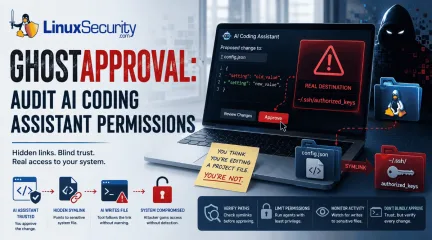
AI coding assistants have become a staple in many Linux developers' daily workflows. Whether you're generating boilerplate, refactoring code, or updating configuration files, it's easy to assume these tools stay safely inside your project directory. . Researchers recently pulled the curtain back on a threat they’ve dubbed " GhostApproval ." It’s a direct hit to the way we use tools like Cursor, Amazon Q, and Claude Code. They found these assistants have a dangerous blind spot: they can be tricked into modifying files outside of your project's sandbox. By hiding a simple, booby-trapped symbolic link in a code repository, an attacker can manipulate these assistants into editing sensitive system files instead of the project files you’re actually working on. Even worse, the confirmation prompts these tools show often hide the true destination of the change, making it look like you’re approving a harmless update when you’re actually handing over the keys to your system. It’s a classic trust boundary collapse, turning our favorite productivity boosters into high-speed conduits for unauthorized access. How the "Symlink Bypass" Exploit Actually Works At its core, this vulnerability is what we call a "symlink bypass." In Linux, a symbolic link—or symlink —is essentially a shortcut pointing to another spot on your hard drive. When you use an AI coding assistant, you naturally assume it’s playing by the rules and staying inside the "sandbox" of your current project folder. The security gap here is that many of these AI agents don’t bother to verify if a file is a legitimate file or just a shortcut before they start writing to it. If the tool skips that check, it will blindly follow the link wherever it goes. Quick Check: Is This File Really Inside Your Project? Before approving AI-generated file changes, verify the path: ls -l filename (Check if it points to a target) Readlink filename (See exactly where it points) Realpath filename (Confirm the fully resolvedpath is within your project) The attack itself is surprisingly straightforward: an attacker slips a seemingly harmless file, like config.json, into a repository, but turns it into a secret bridge pointing to a sensitive target, like your ~/.ssh/authorized_keys file. When you ask the AI to "update the config," it triggers a standard system call to write to that file. Because Linux is built to resolve these shortcuts automatically at the kernel level, it silently redirects the AI’s action straight to your SSH keys. Since the AI is running under your own user permissions, it has full authority to overwrite those files—and just like that, the attacker has effectively cracked open a back door to your machine without you ever suspecting a thing. Why This Matters for Linux Security At its core, this vulnerability punches a hole in the "human-in-the-loop" security model that we Linux admins have relied on for decades. We’re used to trusting our own oversight, but the breakdown here is all about trust boundaries. These AI assistants rely on us to vet every change, but when the UI shows you a harmless-looking project file while the OS is secretly hammering a sensitive system file, you aren't actually making an informed choice. You’re just rubber-stamping an action that’s hidden in plain sight. What makes this even more devious is that it’s not "malware" in the traditional sense, so your antivirus isn't going to have a heart attack. Instead, it’s a masterclass in " Living-off-the-Land ." The AI is performing perfectly normal, expected system calls—the same stuff your build tools do every day. Because it’s using your own trusted environment against you, it slips right past standard defenses. Since the system sees every move as an authorized action coming from you , it’s incredibly difficult to spot the foul play until the attacker has already gained a permanent foothold. Where Linux Users Are Most at Risk You are at a much higher risk if you frequently clone and run"AI-assisted" setups from untrusted or third-party repositories, particularly in the following environments: Cloud-based development environments: Where agents may have broad access to home directories and environment variables. Shared CI/CD build nodes: Where automated refactoring tools run without constant human oversight. Local Linux workstations: Where developers use AI agents to manage system-level configuration files or sensitive dotfiles. Sensitive Target Files: Keep a close eye on files that grant persistence or command execution, specifically ~/.ssh/authorized_keys, ~/.bashrc, ~/.profile, and core application configurations in ~/.config/. Staying Secure: Practical Defensive Steps If your team is using AI coding assistants, it’s time to stop treating them like basic text editors. You need to start viewing these tools as high-risk, privileged processes. Here is how you can lock down your environment: Audit Tool Permissions: Dig into your assistant’s documentation to see if it has access to your entire file system. If it does, do your best to restrict its scope strictly to your project folders. Don't Just "Rubber Stamp": Never blindly approve a diff from an AI. Take a second to use the command-line tools we covered to verify the actual file path before you give the agent the green light to modify anything. Tighten Path Resolution: If you’re writing scripts that handle files provided by others, always use realpath to double-check that the file is exactly where you think it is before your script touches it. Keep an Eye on System Calls: Consider setting up eBPF-based monitoring (like bpftrace ) to alert you if something tries to write to sensitive areas like your SSH keys or .bashrc. Run Agents with Low Privilege: Never run your development AI agent as a user with broad sudo access. Create a dedicated, low-privilege service account specifically for your development work—it’s the best way to minimize the "blast radius" if something goes wrong. At the end of the day, GhostApproval isn't exploiting a bug in the Linux kernel; it's exploiting the blind trust we put in the relationship between AI tools, our file systems, and our own approval processes. As AI becomes more deeply woven into our daily workflows, verifying what the AI is changing is just as important as reviewing the code it generates. As a Linux professional, how does the integration of AI-assisted tools into your current CI/CD pipeline change how you approach system-level auditing and access control? . Explore GhostApproval and how Linux developers can address AI coding assistant permission risks to enhance system security.. AI coding assistant permissions, GhostApproval vulnerability, Linux security practices, symlink dangers, unauthorized access management. . MaK Ulac
 Jul 09, 2026
•
Jul 09, 2026
• Security Vulnerabilities
210
 security advisoryunauthorized accessFedora
Fedora 6.12 Critical Advisory: Lockdown Mode Default Off, High Risk
System security is of utmost importance for any Linux admin, yet even those who take great measures to safeguard their systems can sometimes be caught off-guard by changes to default settings. A recent vulnerability in Fedora Linux kernel version 6.12, tracked as CVE-2025-1272 , has caused considerable alarm as Lockdown Mode was accidentally disabled without warning, though seemingly inconsequential at first glance. . Lockdown Mode is a critical defense mechanism against unauthorized access to essential kernel features and sensitive system information that requires protection from potential attacks. Lockdown mode should always be enabled to protect systems against adversaries probing into system internals by accessing kernel memory mappings, I/O ports, or even running unsigned code. Disabling Lockdown Mode makes it easier for malicious actors to bypass Secure Boot protections and gain control over systems. Understanding these risks is paramount for any Linux security admin to protect their systems against vulnerabilities and attacks. Let's examine this recent flaw in Fedora Linux kernel version 6.12 and delve deeper into the critical importance of Lockdown Mode and the risks of it being disabled. I'll also share proactive measures you can take to protect against this recent bug. Understanding The Importance of Lockdown Mode Lockdown mode is a Linux security feature designed to limit access to certain kernel functionalities that could allow an attacker to gain control of a system. By restricting certain kernel features that attackers could exploit to gain entry and take over, Lockdown Mode helps harden against even sophisticated forms of attack, effectively limiting what can be altered, accessed, or executed at the kernel level. Enforcing tighter security policies also helps mitigate risks posed by malicious activities originating from advanced persistent threats or common vulnerabilities that have gone undetected. Fedora Linux kernel versions 6.12 and later have shown an alarmingdevelopment: Lockdown Mode has been set off by default - meaning systems don't benefit from its protection instantly after installation. Unfortunately, users were never informed or warned about this security measure being disabled by default, leaving their systems more exposed than ever since some administrators may not realize the Lockdown Mode is inactive, which leads them down an inaccurate path toward believing their security is intact. As any Linux security admin knows, knowing the default state of Lockdown Mode in these versions of Fedora is vitally essential to secure system management. By taking proactive steps to manually enable Lockdown Mode upon setting up or upgrading a Fedora system, admins can safeguard against potential vulnerabilities while making it harder for attackers to exploit kernel-level features. Exposure of Sensitive System Information Lockdown Mode should always be enabled, as one of the greatest risks Linux admins face is the exposure of sensitive system information. Any attacker who gains even limited access can exploit this to gain invaluable insight into how a kernel operates - this includes critical components like kernel memory mappings, I/O ports and BPF (Berkeley Packet Filter) filters , as well as kprobes which play an essential part in diagnosing and debugging its operation. Kernel memory mappings reveal the layout of the kernel's memory, providing a roadmap that attackers can use to detect and exploit vulnerabilities. I/O ports that are often used for high-privilege operations also become accessible. BPF, an effective packet filtering tool many systems use, could also be compromised without sufficient protection. Access to these system parts considerably reduces an attacker's effort to achieve their goals. Imagine an attacker having access to blueprints of building wiring and security systems. This would significantly ease their task of bypassing security measures, similar to having kernel internals revealed for attack by more inexperienced adversaries who canuse that information against target systems. Security researchers and admins must, therefore, not only activate Lockdown Mode but also closely monitor system integrity and access patterns to detect any anomalies that could signal potential breaches quickly and react before significant damage has been done. The Danger of Unsigned Code Execution Lockdown Mode being disabled presents one of the greatest dangers to a system, which is allowing it to load and execute unsigned kernel modules, bypassing the Secure Boot process that ensures only authenticated and trusted code runs during boot-up, This gives attackers access to malicious operations with high privileges. Unsigned kernel modules pose an enormous security threat because their code can be written and altered by anyone with harmful intent, turning your system into a playground for attackers who can execute whatever code they wish under the guise of standard kernel operations - potentially leading to data breaches and disruptions or entire system compromise and giving attackers complete control of your Linux environment. Given this vulnerability, administrators must strictly enforce the signing of all kernel modules and configure their systems to reject unsigned code entirely. This may involve setting stricter policies or using monitoring tools to ensure compliance. Training and awareness are equally important. Admins must remain up-to-date with current security practices and vulnerabilities by regularly patching systems and understanding any associated changes that come with these patches, including their possible adverse impacts (like with Fedora 6.12). Adjusting configurations according to expert advice and trends is also key to maintaining strong defenses. Proactive Measures for Enhanced Security Faced with these risks, Linux security admins should take several proactive measures to reduce risks and strengthen system security. First and foremost, they should verify whether Lockdown Mode is enabled. Doing so can significantlystrengthen defenses against attacks on our systems. Administrators must also implement strict policies around signing and verifying kernel modules, only permitting trusted and verified modules to run, effectively closing off a potential attack vector. Monitoring tools are also essential for tracking system modifications or access attempts, providing insight and early warning of potential intrusions. Maintaining updated systems is equally important, as updates may bring new settings (as seen with Fedora Linux 6.12 updates), essential patches, and security enhancements. Therefore, updated notes must be read thoroughly to maintain robust security levels. Training and awareness programs for system administrators are key. Cybersecurity constantly changes, so staying abreast of threats, vulnerabilities, and best practices is vital in protecting systems. Our Final Thoughts on the Threat of Fedora Linux Lockdown Mode Being Disabled by Default Fedora Linux security admins have been recently reminded of the difficulty of maintaining robust system security by default due to an incident related to disabling Lockdown Mode. Though seemingly adequate kernel default settings might appear harmless at first glance, they can have significant ramifications for systems and pose major threats. By understanding Lockdown Mode's critical importance in protecting sensitive information and blocking the execution of unsigned code, Linux security administrators can significantly boost their defenses against threats like this recent Fedora Linux kernel flaw. . Secure Mode acts as a vital safeguard against unauthorized entry to core system functionalities and overall integrity.. Fedora Linux, Lockdown Mode, kernel security, system integrity. . Brittany Day
Feb 21, 2025
•
Security Vulnerabilities

210
 security advisoryunauthorized accesssevere issue
runC Security Flaws: Critical Access Risks for Linux Environments
A series of severe security vulnerabilities have been discovered in the popular runC command line tool. These vulnerabilities, collectively known as Leaky Vessels, allow threat actors to break out of containers and gain unauthorized access to the host operating system. . We'll examine the implications of these flaws, raise critical questions, and discuss the impact on Linux admins, infosec professionals, internet security enthusiasts, and sysadmins. What Are These Vulnerabilities & How Do They Impact runC Users? The runC command line tool is widely used for running containers on Linux. runC was initially developed as part of Docker and later became an independent open-source library. The vulnerabilities recently found in runC, tracked as CVE-2024-21626 , CVE-2024-23651 , CVE-2024-23652 , and CVE-2024-23653 , have been labeled Leaky Vessels by cybersecurity researchers. The most severe vulnerability is CVE-2024-21626, which revolves around the "WORKDIR" command. According to researchers, this flaw can be exploited by running a malicious image or building a container image using a malicious Dockerfile. It is concerning that these container escapes can provide attackers with unauthorized access to the underlying host operating system, potentially compromising sensitive data and granting superuser privileges. The above vulnerabilities have been addressed in runC version 1.1.12, which was released recently. However, it is crucial for Linux admins, infosec professionals, and sysadmins to ensure that their container runtime environments, including Docker, Kubernetes vendors, and cloud container services, are updated to mitigate these risks. The implications of these runC vulnerabilities are significant and require the attention of security practitioners globally. Firstly, the widespread use of runC makes this a pervasive threat, potentially affecting countless containerized applications running on Linux. Considering the rise of containerization as a preferred deployment method, the impacton both businesses and personal users can be substantial. Furthermore, there is currently no evidence of these flaws being exploited in the wild. However, this raises the question of how many attackers are already aware of these vulnerabilities and have the ability to exploit them covertly. The delay between vulnerability disclosure and patch implementation could allow attackers to gain unauthorized access and exfiltrate critical data. This highlights the urgency for Linux admins and infosec professionals to update their container runtime environments regularly . However, the responsibility does not solely lie with them. Vendors providing container runtime environments, such as Docker and Kubernetes, as well as cloud container services, need to prioritize prompt updates and communicate the severity of these vulnerabilities to their users effectively. The long-term consequences of these runC vulnerabilities extend beyond immediate remediation. This serves as a reminder that security should be an ongoing process rather than a one-time action. It emphasizes the need for continuous monitoring , vulnerability scanning , and timely patch management, particularly in the context of open-source and Linux security. Our Final Thoughts on These "Leaky Vessels" Bugs The critical vulnerabilities in the runC command line tool present considerable risks to containerized applications and the security posture of organizations relying on Linux environments. The significance of the flaws and the need for urgent action must be emphasized. Security practitioners, Linux admins, and infosec professionals must prioritize installing updates across container runtime environments to mitigate the potential impact of these vulnerabilities. As the field of containerization continues to evolve, the integration of robust security measures becomes increasingly crucial. Be sure to subscribe to our weekly newsletters for updates on flaws like these impacting the security of your Linux systems. Stay safe out there,Linux users! . Discover critical security flaws in the runC utility that may allow container breaches, threatening the integrity of Linux systems and compromising user information.. runC Security Flaws, Container Escape Risks, Linux Security Updates. . Anthony Pell
Feb 27, 2024
•
Security Vulnerabilities
74
 security advisoryunauthorized accesssecurity flaw
Register.com Security Advisory: Site Hijacking Risk Mitigated
Register.com, the second-largest domain name registrar, has acknowledged a security problem that could have allowed people to hijack others' Web sites. The problem allowed unauthorized access to the security software Register.com and its business partners use to manage Internet site information, . . . . Register.com, the second-largest domain name registrar, has acknowledged a security problem that could have allowed people to hijack others' Web sites. The problem allowed unauthorized access to the security software Register.com and its business partners use to manage Internet site information, such as a customer's contact information or the numerical address associated with a domain name. Spokeswoman Shonna Keogan said the security vulnerability was fixed today. The link for this article located at News.com is no longer available. . Domain provider DomainCheck.com uncovers critical vulnerability permitting illicit entry to websites, swiftly mitigated by their security team.. Register.com, Domain Registrar, Site Hijacking, Security Fix, Unauthorized Access. . Anthony Pell
Sep 15, 2021
•
Network Security
210
 security advisoryunauthorized accesssecurity fix
Linux and macOS Sudo Flaw: Critical Security Update for Unauthorized Access
Have you heard that Linux andmacOSsystems have been hit by a nasty little bug in the Sudo utility? The good news is it has already been patched. . Sudo is a tool that provides a specified user permissions above their normal levels, including root (administrative) access, but by leveraging this security flaw, it’s possible a low-privileged user (or malware) could get unauthorized root access, and thus potentially wreak all sorts of havoc on the host system. An Apple security expert, Joe Vennix, discovered the bug, and it’s not the first he has pinned down. Back in October 2019, Vennix drew attention to another Sudo flaw that potentially allowed any user to run commands as root . The link for this article located at techradar.pro is no longer available. . A critical update for Sudo addresses a serious flaw allowing unauthorized root access on Linux and macOS systems.. heard, linux, andmacossystems, nasty, little, utility. . Brittany Day
Feb 05, 2020
•
Security Vulnerabilities
83
 security advisoryunauthorized accessdata breach
Docker Hub Data Breach Affects 190,000 Users: Unauthorized Access Report
Docker Hub, the official repository for Docker container images, has announced a security breach on late Friday night. . The breach came to light after the company started emailing customers about a security incident that took place a day earlier on April 25. "On Thursday, April 25th, 2019, we discovered unauthorized access to a single Hub database storing a subset of non-financial user data," said Kent Lamb, Director of Docker Support. The link for this article located at ZDNet is no longer available. . A breach event at Docker Hub resulted in the exposure of personal user information, impacting approximately 190,000 accounts.. Docker Hub Breach, User Data Security, Data Exposure, Unauthorized Access. . LinuxSecurity.com Team
Apr 27, 2019
•
Hacks/Cracks
83
security advisoryunauthorized accessincident responseReddit Security Incident: Accounts Locked Due To Unauthorized Access
A large number of Reddit users have been locked out of their accounts as a precaution while the site’s admins investigate potential unauthorized access.. Staffer “Sporkicide” would not disclose exactly how many users were affected by the move, but claimed in a post yesterday that “a large group of accounts were locked down due to a security concern.” The link for this article located at InfoSecurity is no longer available. . Twitter has suspended numerous accounts following concerns of possible illicit entry during a security audit.. Reddit Account Lockout, Unauthorized Access Response, User Security Measures. . LinuxSecurity.com Team
Jan 10, 2019
•
Hacks/Cracks
81
unauthorized accessdata breachinformation securityMy Health Record Reports 42 Breaches: Issues And Access Concerns
Australia's troubled My Health Record recorded 42 data breaches between July 1, 2017 and June 30, 2018, the Australian Digital Health Agency (ADHA) has said in its 2017-18 annual report [PDF].. Three of the breaches were reported to the Office of the Australian Information Commissioner (OAIC) and involved one breach of unauthorised access due to an incorrect Parental Authorised Representative being assigned to a child, and two breaches due to suspected Medicare fraud that resulted in the potential fraudster seeing records without authority. The link for this article located at ZDNet is no longer available. . Three of the breaches were reported to the Office of the Australian Information Commissioner (OAIC) . australia's, troubled, health, record, recorded, breaches, between. . LinuxSecurity.com Team
Dec 31, 2018
•
Privacy

Get the latest News and Insights
Get the latest Linux and open source security news straight to your inbox.
Community Poll
Is continuous patching actually viable?
Search Topics
Powered By

Linux Security - Your source for Top Linux News, Advisories, HOWTOs and Feature Releases
QUICK LINKS
subscribe to newsletters!
Like staying secure? So do we.
Sign up for updates, tips, and alerts!