Explore top 10 tips to secure your open-source projects now. Read More
×


Why Linux Rootkits Still Matter in Cloud and VMware Environments
 Jun 01, 2026
•
Jun 01, 2026
•
 MaK Ulac
3 - 6 min read


Linux rootkits are old, but they never really disappeared. They just stopped attracting the same attention.
Most malware wants to execute and spread. A rootkit wants to stay invisible long enough that nobody notices the compromise until the damage is already done, and on Linux systems, that still works more often than many teams are comfortable admitting.
That difference matters because modern infrastructure runs heavily on Linux underneath. Cloud workloads, ESXi hosts, telecom appliances, Kubernetes nodes, internal web services. A quiet implant inside one of those systems can sit there for weeks while logs look normal and monitoring dashboards stay green.
Modern Intrusions Still Use Linux Rootkits
Researchers continue seeing Linux rootkits in campaigns tied to VMware exploitation, cloud intrusions, credential theft operations, and long-term persistence activity inside enterprise environments. The tooling changes. The goal usually does not.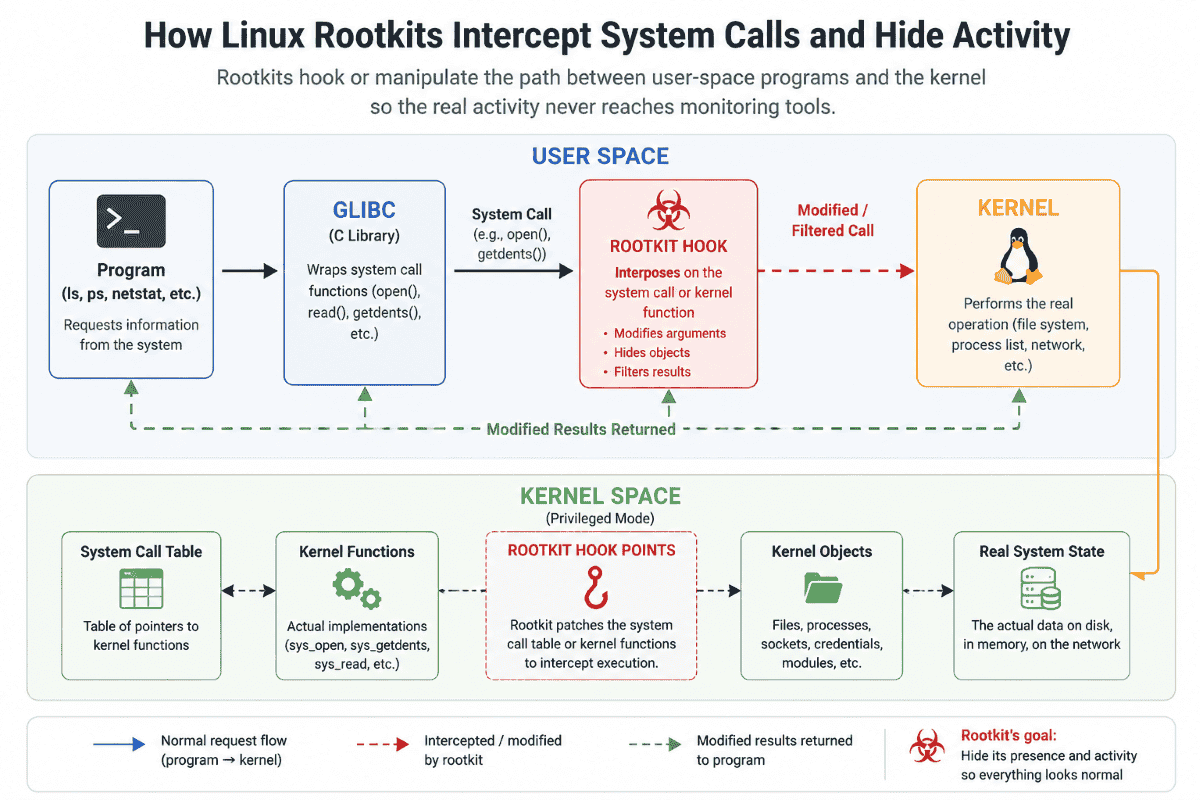
One of the more visible examples came from the UNC3886 activity targeting VMware environments. Researchers observed the group deploying Linux rootkits, including REPTILE and MEDUSA, after exploiting vCenter and ESXi vulnerabilities. The implants helped hide attacker activity, maintain persistence, and support credential theft across compromised systems.
The visibility problem sits underneath all of this.
Traditional security tooling still leans heavily on signatures, known malware hashes, or suspicious binaries sitting on disk. Rootkits work around that model by interfering with the operating system itself. Some operate in user space through shared libraries and linker abuse. Others load directly into the Linux kernel, where they can intercept activity before monitoring tools ever see the real picture.
What a Linux Rootkit Actually Does
A Linux rootkit exists for one reason: to make attacker activity disappear.
Sometimes that means hiding files or processes. Other times it means suppressing logs, concealing outbound connections, or masking remote access entirely. The goal is always the same — make the compromised system look normal long enough for nobody to investigate it closely.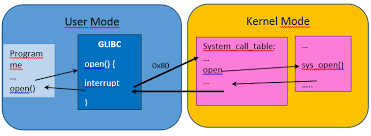
Some rootkits stay in the user space and tamper with what applications report back to administrators. Others run directly inside the Linux kernel itself. That is where things get dangerous fast.
Once attackers reach kernel space, they can interfere with the operating system before tools like ps, top, or netstat ever see the real activity. At that point, defenders are no longer investigating a trustworthy system. They are investigating a system that may already be lying to them.
Why Linux Remains an Attractive Target
Linux powers the backbone of modern enterprise infrastructure. Many of these systems—like storage appliances or CI/CD servers—stay online for months with limited downtime, making them perfect candidates for long-term persistence.
Attackers have shifted away from older, noisy binary-replacement methods to abusing legitimate system functionality:

- Loadable Kernel Modules (LKMs): Used for drivers, abused for stealth.
- LD_PRELOAD: Used for debugging, abused for code injection.
- eBPF / io_uring: Used for observability/performance, abused for undetectable kernel-level hooking.
The line between "necessary admin tool" and "malicious rootkit" is now paper-thin.
How Modern Linux Rootkits Stay Hidden
- LD_PRELOAD: Forces the system to load a malicious shared object before everything else. This can hide files or intercept credentials globally.
- Kernel-level Hooking: Once a module is in the kernel, it can "hook" functions. If you ask the kernel for a process list, the rootkit modifies the result on the fly to remove its own process ID.
- eBPF and io_uring: These modern features are hard to disable because they support critical system monitoring. Attackers use this "don't touch" status to hide their activity in plain sight.
Defender’s Toolkit: What to Check Tomorrow
If you suspect a system is compromised, stop relying on standard binary output. Use these commands to look for the "truth" underneath:
|
Target |
Command / Check |
Why it matters |
|
Modules |
lsmod |
Look for unsigned or unexplained modules. |
|
Libraries |
cat /etc/ld.so.preload |
This file should almost always be empty. |
|
eBPF |
bpftool prog show |
Identify hidden/unknown eBPF programs running in the kernel. |
|
Network |
ss -antp vs netstat |
Compare different tools; if they disagree, something is intercepting calls. |
|
Integrity |
ausearch -k module-load |
Check logs for unexpected module loading activity. |
Why Traditional Detection Breaks Down
Many security products still rely on static indicators like hashes or file signatures. Elastic Security Labs found that adding a single "null byte" to a rootkit’s code can be enough to bypass antivirus software entirely without breaking the malware's function.
Focus on behavior, not files:
- Unexpected kernel module loading.
- Unauthorized LD_PRELOAD usage.
- Sudden, unexplained process masquerading.
- Abnormal io_uring system call patterns.
Reducing Linux Rootkit Risk
Preventing kernel-level compromise is easier than recovering from it. Once a rootkit is in the kernel, you should treat the entire system as untrusted.
- Enforce Module Signing: Use modules_disabled or secure boot to prevent unauthorized kernel modules.
- Harden the Kernel: Use sysctl to restrict access to debugging interfaces like kprobes or perf_event_open.
- Layered Telemetry: Do not rely on local logs alone. Use hypervisor-level monitoring and external network traffic analysis. If the host is lying, the network and the hypervisor will tell the truth.
- Prioritize Patching: Most rootkits gain a foothold through known vulnerabilities. Closing the front door is the best way to keep these sophisticated tools from ever getting inside. For teams running bare-metal infrastructure, reviewing dedicated server security hardening practices at the hosting level adds another layer before attackers ever reach the OS.
Final Thoughts
Linux rootkits are not relics—they are high-value tools for attackers who understand that modern infrastructure is often a "black box" to defenders.
A hidden implant inside a cloud host or ESXi server can provide years of access while your dashboards stay green. The moment you stop trusting the operating system’s report is the moment your investigation actually begins. Traditional antivirus is only the first layer; true defense requires behavioral monitoring, deep visibility, and the readiness to rebuild rather than "clean" a compromised system.
The hardest attacks to stop are the ones that are already running, quiet and invisible, beneath your feet.
Related Articles
- Rootkits: Threats and Prevention Techniques For Linux Systems
- BERT: Cross-Platform Ransomware Hits Linux & ESXi - Important Advisory
- Understanding Play Ransomware's New Linux Variant Targeting ESXi
- LockBit 4.0: Safeguarding Linux from Ransomware Attacks and Risks
- Akira Ransomware Attacks VMware ESXi With Linux Encryptor
 PREVIOUS

 NEXT
NEXT

Powered By

Linux Security - Your source for Top Linux News, Advisories, HOWTOs and Feature Releases
QUICK LINKS
subscribe to newsletters!
Like staying secure? So do we.
Sign up for updates, tips, and alerts!