Audit Linux privileges now to limit compromise, escalation, and system-wide damage. Review Linux Privileges×


What Is A Virtual Private Network (VPN)?
 Aug 31, 2025
•
Aug 31, 2025
•
 Brittany Day
4 - 8 min read


Topics Covered
If you're managing a Linux environment, on-prem or in the cloud, chances are you've already tangled with questions of network security: firewalls, SSH hardening, package integrity checks — all the usual suspects. But Virtual Private Networks (VPNs)?
They often get relegated to the "nice-to-have" rather than "must-have" category. This is where things get murky, and complexity creeps in. VPNs aren’t just for corporate networks or privacy-obsessed individuals trying to bypass regional restrictions. They’re critical tools in safeguarding sensitive data, offering protection that boosts privacy, secures remote access, and mitigates attack vectors. Before we dive into practical advice, let’s start with a common question: How does VPN security actually work?
What Is a Virtual Private Network (VPN) and How Does It Work?
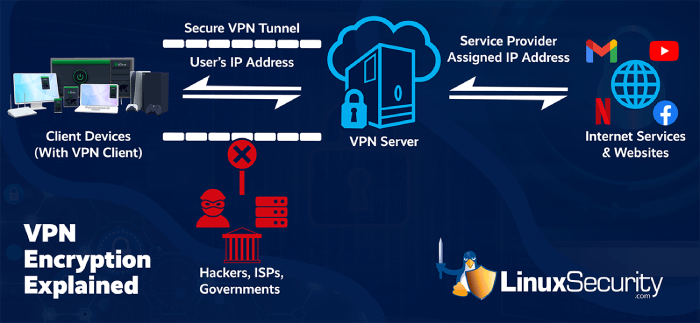 A Virtual Private Network (VPN) is a private, encrypted tunnel between your device and a remote server, or between two systems in a distributed setup. This is accomplished by routing your traffic through the VPN server, effectively hiding both the origin and destination of packets as seen from outside observers. The encryption layer ensures that even if someone intercepts this traffic, they’ll see nothing but scrambled data unless they’re in possession of the appropriate decryption keys.
From a technical perspective, the VPN protocols are the real MVPs here. When you work with OpenVPN, WireGuard, or IPSec, you’re essentially implementing specific standards for encryption, key exchange, and secure tunneling. WireGuard, for example, is praised for its lean codebase, minimal attack surface, and modern cryptography practices like ChaCha20 encryption. OpenVPN, on the other hand, trades performance for flexibility; it excels in highly customizable deployments but can be computationally heavier.
Whether you’re connecting to company servers abroad or cloaking internet traffic to avoid ISP throttling, VPNs act as that intermediary shield. As far as Linux admins are concerned, the ability to tailor VPN configurations for specific network environments (site-to-site, road-warrior, hybrid infrastructures) is invaluable.
What Are Virtual Private Networks (VPNs) Used For?
VPNs provide several key benefits, including allowing admins to bypass geo-restrictions, secure sensitive data, and segment networks internally. While the textbook answer might focus on privacy, VPNs wear several hats. For infosec professionals, VPNs are often about creating secure communication pathways, whether for internal operations or externally facing applications.
Let’s map out a few common use cases:
- Remote System Administration: SSH’ing into remote Linux servers without a VPN leaves you vulnerable, especially if port 22 is exposed on a public IP address. Wrapping remote connections inside a VPN ensures that only authenticated users can gain access via protected channels.
- Bypassing Geo-Restrictions: From an operational standpoint, this comes into play when accessing region-locked resources like documentation, repos, or SaaS tools. Note here: not all VPNs are equal in this regard — some struggle against aggressive region-blocking mechanisms.
- Securing Data Against Surveillance: Whether you’re avoiding ISP snooping, government surveillance, or mass harvesting of metadata, VPNs make it harder for anyone outside your organization to analyze your traffic. Encryption scrambles packet contents, and the VPN server masks your device’s IP address.
- Internal Network Segmentation: On a more advanced level, you can use VPNs to segment traffic across locations within your organization (site-to-site VPN) or isolate specific workloads that require enhanced security.
To Linux admins juggling multiple machines, these scenarios often overlap, especially in high-availability environments or developer setups, routing traffic across virtualized containers and cloud instances.
What Happens Without a VPN?
 Without VPN security, every exposed endpoint — from web servers to cloud instances — becomes a potential target for attackers. Here’s what you’re risking:
- Data Interception: When connecting to remote assets over unsecured networks, your data packets are fair game for man-in-the-middle (MITM) attacks. Passwords, database queries, config files — all could theoretically be intercepted.
- IP Address Exposure: Every time your device connects directly to a resource on the public internet, you’re essentially broadcasting your IP. This opens you up to targeted attacks, from DDoS to reconnaissance scans (think: Nmap sweeps).
- Compromised Privacy: Even encrypted traffic using HTTPS offers limited privacy — because metadata (e.g., DNS queries or connection timestamps) is still visible by default unless obfuscated by a VPN.
From a security hygiene perspective, not using a VPN is like leaving your server’s control panel unguarded: sure, you’ve "locked the door," but are you really shielded from sophisticated threats?
How Linux Admins Should Choose a Virtual Private Network (VPN)
Choosing the right Virtual Private Network (VPN) is a critical part of VPN security for Linux environments. The best option depends on your threat model, infrastructure, and operational needs, from protocol selection to provider trustworthiness.
Key VPN Security Considerations for Linux Admins
- Open Source vs. Proprietary: Transparency matters. Open-source VPNs like WireGuard and OpenVPN allow you to review codebases, assess vulnerabilities, and even contribute to improvements. Proprietary options, on the other hand, make you reliant on provider promises. Know your risk tolerance.
- Protocol Support: Modern protocols like WireGuard offer significant performance benefits over older options like PPTP. But compatibility matters too — if your infrastructure relies on legacy systems, you might need IPSec or L2TP hybrid configurations.
- Customizability: Linux admins live for configurability. Does the VPN allow granular control over routes, DNS settings, or key management? Avoid solutions with heavy GUI dependency or limited CLI tool access — they’re often poorly suited for automated setups.
- Privacy Policy: If you’re considering third-party VPN providers, scrutinize the logging policies. A VPN that retains connection logs for "diagnostics" undermines its purpose if your primary goal is anonymity.
- Performance and Scalability: Look for solutions optimized for low-latency connections or large-scale environments. For instance, WireGuard might be ideal for dev/test environments where speed is crucial, whereas OpenVPN balances customization with robust performance in wider deployments.
Linux admins frequently deal with everything from hybrid clouds to home labs, so the ability to mix protocols, integrate scripts, and scale efficiency is key.
LinuxSecurity's Top Open-Source Virtual Private Networks (VPNs) for Linux
Let’s focus on solutions that are proven in the field, built on solid design principles, and flexible enough for Linux power users:
WireGuard
 If simplicity is elegance, WireGuard nails it. Lightweight, extremely fast, and baked into the Linux kernel since version 5.6, WireGuard is perfect for time-sensitive workloads that demand low overhead. Notably, it uses modern cryptographic algorithms like Curve25519 for key exchange. Just know — minimalist design comes with trade-offs in configuration options.
OpenVPN
 The granddaddy of open-source VPNs. Despite its age, OpenVPN remains a crowd favorite for its sheer versatility. It scales well in enterprise settings, supports multiple encryption protocols, and allows for deep configuration. That said, don’t expect it to win any speed benchmarks.
Libreswan
 If your VPN needs involve IPSec protocol (especially for site-to-site VPNs), Libreswan is worth a look. It’s stable, well-maintained, and versatile enough for both multi-platform and Linux-dedicated setups.
SoftEther
 For admins operating in cross-platform environments, SoftEther offers broad compatibility and support for multiple protocols (including IPSec and OpenVPN). Its GUI-heavy approach can turn off Linux CLI purists, but don’t overlook its multi-functionality.
Tinc
 Not as popular, but Tinc provides a decentralized approach to network tunneling. It’s useful in environments prioritizing mesh networking and private subnets, but likely overkill for anyone managing simpler setups.
Experimentation is part of the process; different networks demand different VPN architectures. Don’t be afraid to spin up test environments to see what meshes best with your workflow.
Our Final Thoughts on the Importance of VPN Security on Linux

Virtual Private Networks (VPNs) aren’t a magic bullet for network security, but they’re foundational tools in reducing attack surfaces, securing communications, and controlling data flow. Linux admins and infosec professionals understand the importance of layered defense, and VPN security plays an integral role in that stack. Whether you’re using a solution like WireGuard for speed or OpenVPN for configurability, the right choice will depend entirely on your specific challenges and needs.
If you’ve got exposed endpoints, remote machines, or systems that interact with sensitive data, it’s time to rethink your VPN strategy. And if you aren’t using one at all, you’re leaving critical gaps wide open. As always, tread carefully – because in cybersecurity, the smallest oversight can become the largest vulnerability.
 PREVIOUS

 NEXT
NEXT

Powered By

Linux Security - Your source for Top Linux News, Advisories, HOWTOs and Feature Releases
QUICK LINKS
subscribe to newsletters!
Like staying secure? So do we.
Sign up for updates, tips, and alerts!