Explore top 10 tips to secure your open-source projects now. Read More
×


Linux IDS vs IPS: Operational Differences and Deployment Tradeoffs
 Jun 01, 2026
•
Jun 01, 2026
•
 Dave Wreski
5 - 10 min read
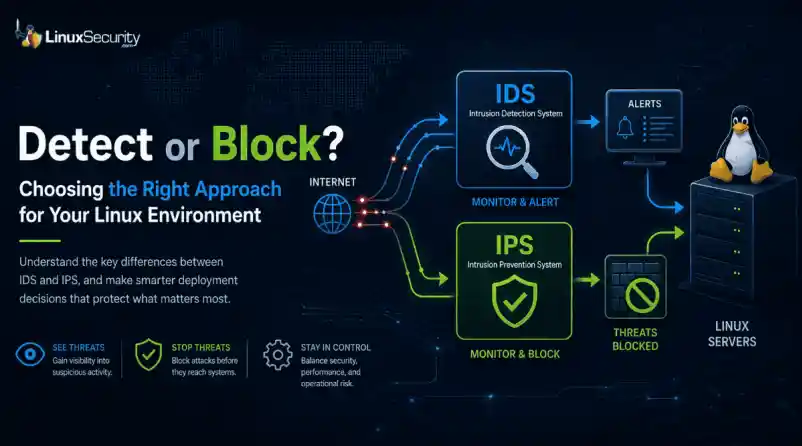

The wrong IPS rule can look like a security fix right up until it becomes an outage.
On Linux systems, detection and prevention are often discussed together, but they do not carry the same operational risk. One tells admins that something suspicious happened. The other can decide whether traffic is allowed to continue.
That is why IDS vs IPS is not just a definition to memorize. It is a deployment decision about where to monitor, where to block, and how much confidence a team needs before letting a tool take action.
What Is the Difference Between IDS and IPS?
An intrusion detection system, or IDS, monitors activity and generates alerts. It may watch network traffic, logs, file changes, process behavior, or suspicious authentication attempts.
An intrusion prevention system, or IPS, monitors activity too, but it can also take action. That action might be dropping packets, resetting a connection, adding a firewall rule, or running a response script.
IDS and IPS are not “set it and forget it” tools. They have to be designed, configured, monitored, and maintained like any other security control that becomes part of the environment.
The short version:
- IDS: watches and alerts
- IPS: watches and blocks
- IDPS: combines detection and prevention functions
The risk changes when a system moves from alerting to blocking.
Why Does This Matter on Linux?
Linux servers often run quietly in the background. A web server, mail relay, database host, VPN gateway, CI runner, or Kubernetes node may all look normal from the outside until something starts behaving differently.
An IDS helps admins notice that difference. It can show repeated scans, suspicious DNS traffic, exploit attempts, unexpected service traffic, or strange activity from a host that should be quiet.
An IPS goes further. It can stop traffic before it reaches the service.
That sounds better, but it depends on confidence. A false alert wastes time. A false block can take down access, interrupt an application, or lock out legitimate users.
NOTE: IDS is usually safer when you do not fully understand the traffic yet. IPS makes more sense when the traffic pattern is known, the rule is tested, and the team accepts the risk of automated blocking.
How Does an IDS Work?
An IDS looks for activity that matches something suspicious.
That may include:
- Known attack signatures
- Protocol behavior that looks wrong
- Repeated login failures
- Unexpected file changes
- Suspicious outbound connections
- Traffic patterns that do not fit the server’s role
A network IDS inspects traffic. A host-based IDS watches the system itself. Some tools do both, or send alerts into a central platform for review.
For example, Suricata can inspect network traffic and write alerts to eve.json. Wazuh can then read those Suricata logs and show the alerts in a dashboard. A simple Wazuh log collection block looks like this:
That does not block anything. It gives the team something to review. That is often where Linux admins should start.
How Does an IPS Work?
An IPS uses similar detection logic, but it sits closer to the decision point. When traffic matches a rule, the IPS can block it.
The basic split is simple: an IDS detects and alerts, while an IPS moves to block suspicious activity before it reaches the target. That second part is where admins need to slow down, because blocking legitimate traffic is one of the fastest ways to create problems for users and security teams.
An IPS is not just “IDS with stronger alerts.”
It becomes part of the traffic path. If it fails, slows down, or blocks too much, the impact is operational. That does not mean IPS is bad. It means IPS should be used where the team understands the traffic well enough to trust enforcement.
Passive Mode vs Inline Mode
The cleanest way to explain IDS vs IPS is placement. Passive mode watches traffic from the side. Inline mode sits in the path.
Passive mode lets Snort observe and detect traffic on an interface. Inline mode gives Snort the ability to block traffic, and the mode changes based on how traffic is passed into Snort.
Passive inspection might look like this:
snort -i eth0
That tells Snort to inspect traffic on eth0.
Inline mode is different:
snort -Q --daq afpacket -i "eth0:eth1"
Now traffic is moving through paired interfaces. Snort is not just observing. It can affect what passes through.
That is the deployment tradeoff in one place. Passive mode gives visibility with less risk. Inline mode gives more responsibility.
When Should You Use IDS First?
Use IDS first when the environment still needs a baseline.
That usually includes:
- New deployments
- Busy production networks
- Servers with unclear traffic patterns
- Cloud or hybrid environments with limited visibility
- Teams that are still tuning rules
- Systems where downtime would be worse than a delayed response
IDS helps answer basic questions before blocking begins.
What talks to this server? Which alerts are noisy? Which rules fire every day? Which detections actually matter? Which traffic is strange but expected?
Do not skip that work. If a team cannot explain the alerts, it probably should not automate the blocks yet.
A good IDS phase should produce useful decisions, not just more logs. After a few weeks of review, admins should know which rules are noise, which ones are valuable, and which ones might be safe enough to enforce later.
When Does IPS Make Sense?
IPS makes sense when the traffic is understood, and the action is worth the risk. Good IPS candidates usually have:
- A clear traffic path
- Tested detection rules
- Low tolerance for the activity being blocked
- A rollback plan
- Someone responsible for tuning
- Logging that shows what was blocked and why
A gateway protecting a narrow service may be a good place for IPS. A high-change production segment with poorly understood traffic may not be.
In one setup, Suricata uses Netfilter queues, and iptables sends traffic into that queue for inspection. To run Suricata with NFQUEUE:
sudo suricata -c /etc/suricata/suricata.yaml -q 0
To send forwarded gateway traffic to Suricata:
sudo iptables -I FORWARD -j NFQUEUE
For a host-based setup, traffic can be queued from input and output paths:
sudo iptables -I INPUT -j NFQUEUE
sudo iptables -I OUTPUT -j NFQUEUE
These commands are useful, but they are not casual changes. Once traffic is queued, the inspection path matters. If the queue fails, the behavior depends on how the system is configured.
What Can Go Wrong With IPS?
IPS problems usually come from confidence moving faster than testing. Common issues include:
- Legitimate traffic blocked by broad rules
- Latency from heavy inspection
- Rules enabled without understanding the impact
- Missing bypass or failover planning
- Alerts treated as proof instead of evidence
- Old exceptions nobody reviews
- Rule updates are changing behavior unexpectedly
The tricky part is that IPS failures may look like normal outages at first. Users cannot reach a service. A deployment fails. A connection resets. A vendor integration stops working.
Security may not be the first team blamed, but the IPS may still be the cause.
NOTE: If an IPS blocks traffic, the team should be able to answer three questions quickly: what rule fired, what traffic was blocked, and how to reverse the decision if needed.
What About Host-Based IDS and IPS?
Not all detection happens on the network.
Host-based tools watch the Linux system itself. They may monitor logs, file changes, users, processes, commands, or repeated authentication failures.
- Tripwire for file integrity monitoring
- fail2ban for blocking repeated login attempts
- OSSEC or Wazuh for host monitoring and alerting
- auditd for system-level event visibility
Host-based prevention can be useful because it is often narrow. For example, fail2ban may block an IP after repeated SSH failures. That is easier to reason about than blocking broad application traffic across a network segment.
Still, the same rule applies. Automate only what you understand. Blocking one abusive SSH source is different from pushing a bad firewall rule across every Linux server in the environment.
How Should Admins Decide?
Start with the system’s job. A database host should not behave like a CI runner. A mail relay should not behave like a web server. A backup system may need outbound access that would be strange on another host.
Before choosing IDS or IPS, ask:
- What is this system supposed to receive?
- What is it supposed to send?
- Which traffic is normal?
- Which traffic should never happen?
- Who reviews alerts?
- Who owns rule tuning?
- What happens if prevention blocks the wrong thing?
- How fast can the team roll back?
If the answers are unclear, use IDS first. If the answers are clear and the risk is high, IPS may be appropriate.
How Do IDS and IPS Fit With Modern Security Tools?
Many teams no longer run IDS and IPS as isolated tools. Detection and prevention may come from firewalls, endpoint agents, SIEM platforms, XDR tools, NDR tools, cloud controls, and Linux-native monitoring.
Modern security stacks often combine both ideas: IDS provides monitoring and evidence, while IPS provides control, with many teams now using detection and prevention alongside broader security tooling.
That is a useful way to think about it.
IDS and IPS are not replacements for patching, hardening, logging, segmentation, access control, or incident response. They support those efforts. The best setup is usually layered.
- Firewalls limit access.
- IDS shows suspicious activity.
- IPS blocks high-confidence threats.
- Host monitoring catches local behavior.
- Logs and alerts feed investigation.
- Admins tune the system as the environment changes.
No single layer catches everything.
What Linux Admins Should Keep in Mind
IDS vs IPS is not about which one is better. It is about what the system should be trusted to do. Use IDS when you need visibility, context, and safer testing. Use IPS when the traffic is understood, the rule is reliable, and blocking is worth the operational risk.
Most Linux environments benefit from both, but not everywhere and not in the same way. Detection can be broad. Prevention should be deliberate. Watch first where context is missing. Block only where confidence is high.
Stay Ahead of Linux Security & Infrastructure Trends
Interested in more in-depth coverage of Linux monitoring, intrusion detection, firewall behavior, prevention strategies, and enterprise hardening? Subscribe to the LinuxSecurity newsletter for weekly threat analysis, infrastructure security insights, and practical guidance covering the Linux and open-source ecosystem.
Related Reading
 PREVIOUS

 NEXT
NEXT



Powered By

Linux Security - Your source for Top Linux News, Advisories, HOWTOs and Feature Releases
QUICK LINKS
subscribe to newsletters!
Like staying secure? So do we.
Sign up for updates, tips, and alerts!