Audit Linux privileges now to limit compromise, escalation, and system-wide damage. Review Linux Privileges×


Stay Ahead With Linux Security HOWTOs

How to Learn Tips and Tricks incident response system monitoring
incident response system monitoring A Linux server can be fully patched, hardened, and compliant, yet still leave investigators unable to explain how an attacker got in. Without reliable Linux logging, even a well-secured system can become impossible to investigate. . Hardening defines what a system should allow, but logs reveal what actually happened. When visibility is incomplete, security teams lose the evidence they need to detect attacks, understand their scope, and determine how they unfolded. Why Linux Logging Must Come...
 Jul 23, 2026

How to Secure My Networkincident response network traffic
incident response network traffic Imagine logging into a production Linux server for routine maintenance and noticing background network activity connecting to an unfamiliar external IP address. Your endpoint protection agent is not popping up with an alert, there is no service failure, and on the surface, the system appears to be running normally. . For Linux administrators and security teams, such a situation is a moment of truth: Is this activity a sign of active intrusion or just a tool that was overlooked in the course of...
Jul 21, 2026

How to Harden My Filesystemsystem hardening open source security
system hardening open source security We all spend a lot of time defending our systems from external threats, but the amount of damage an attacker can cause often depends on what happens after they get in. A single compromised account doesn't always lead to a major incident. The real danger begins when that account has far more access than it actually needs. . That's exactly what the principle of least privilege is designed to prevent. By limiting users, services, and applications to only the permissions required for their jobs,...
Jul 20, 2026

How to Learn Tips and Tricksthreat detection system monitoring
threat detection system monitoring For small security and IT teams, the "enterprise" dream of a fully automated SIEM often feels like a distant luxury. It’s a vision built on massive budgets and dedicated engineering teams—things that, frankly, most of us don't have. But here is the reality: you don’t need a six-figure platform to maintain a secure environment. . Linux systems are, by design, incredibly verbose. Every time a user authenticates, a process executes, or a configuration file changes, your system creates a record of...
Jul 17, 2026

How to Learn Tips and Tricksnetwork security centralized logging
network security centralized logging Linux systems generate a steady stream of authentication, service, kernel, and application logs. On most systems, those logs never leave the machine that created them. If you're responsible for ten or twenty servers, that means checking each one separately. If one disappears before you can investigate it, its logs may disappear with it. Centralized logging solves that by sending log messages to another server as they're created. Instead of searching every machine, you have one place to review...
Jul 15, 2026
 Refine HOWTOs
X Clear Filters
Get the latest News and Insights
Get the latest Linux and open source security news straight to your inbox.
Community Poll
Should Linux servers automatically install security updates?
Loading...
Explore Latest Linux Security HOWTOs
We found 3 articles for you...
167
 security enhancementnetwork managementiptables
Efficient Network Management Through sslh Transparent Proxying
Imagine you run a small business with several web services, such as a corporate website, an employee intranet, and a remote access server for staff working from home. Each service typically requires its port: 80 for the website, 443 for secure access, and 22 for SSH. Managing multiple ports complicates configuration and increases your exposure to security risks. . A transparent proxy acts as a single entry point that intelligently directs incoming traffic to the right service based on the type of connection. This means you can have all your services neatly organized behind one port, simplifying network management and improving security. Let's explore how configuring sslh , an SSL/SSH multiplexer for transparent proxying , can help achieve this streamlined setup. What is sslh ? 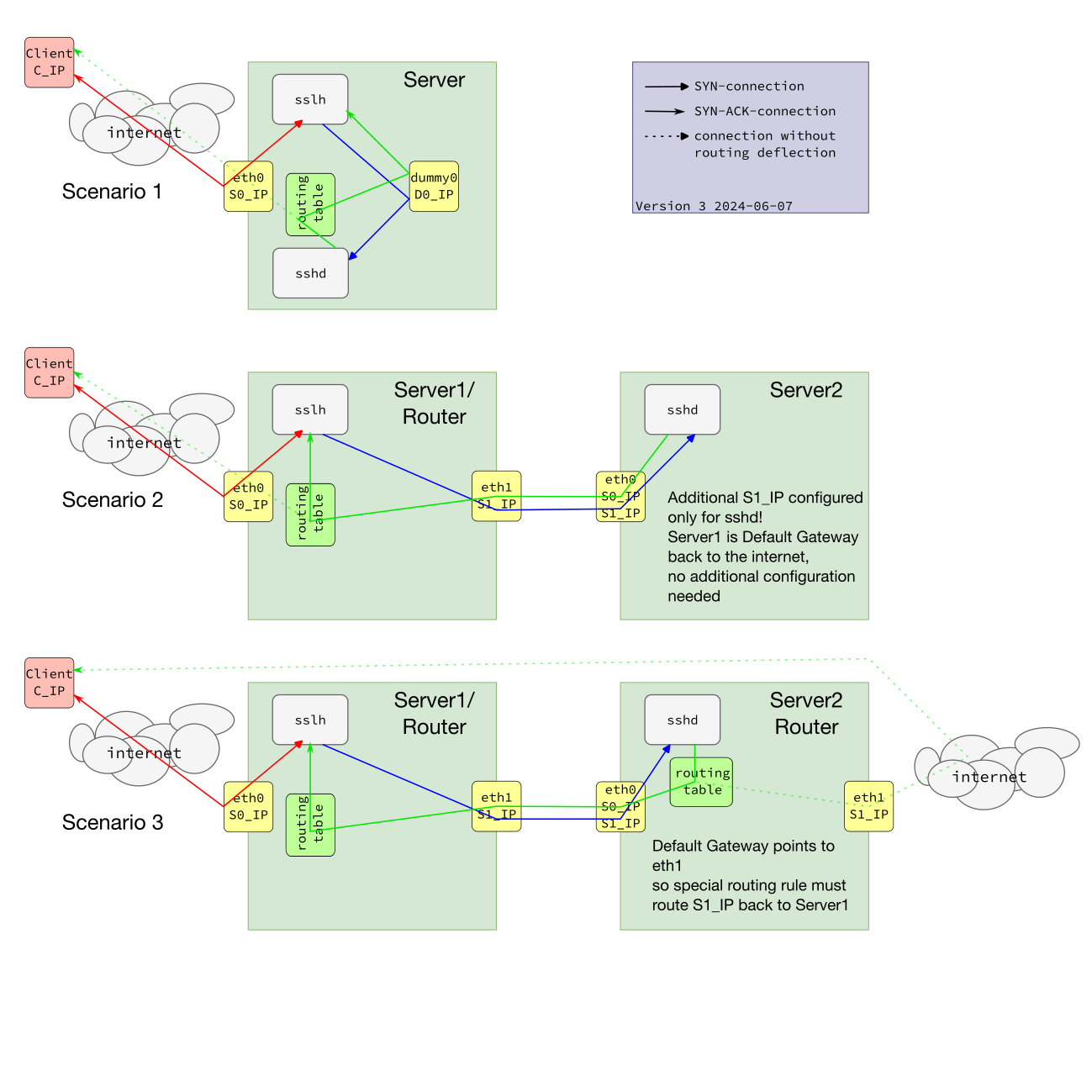 sslh is a powerful tool designed to multiplex protocols through a single port. It can intelligently redirect incoming packets to the appropriate backend service based on protocol characteristics. This versatility allows administrators to run multiple services on one port, making it an essential tool for efficient network management. Noteworthy Features of sslh Protocol Probing : sslh can detect multiple protocols, including HTTP, HTTPS, SSH, OpenVPN , XMPP, and more. Support for Multiple Technologies : Works seamlessly with IPv4, IPv6, TCP, and UDP. Various Operating Modes : It can operate in fork mode, select mode, and libev mode, depending on your performance needs. Importance of Transparent Proxying Transparent proxying allows a proxy server to intercept client requests to the backend server without needing any special configuration on the client side. This proxy type is particularly useful for logging and maintaining visibility of the original client IP addresses in backend servers. Use Cases Original Client IPAddress Visibility : Provides backend servers with the original client's IP address, which is crucial for accurate logging and monitoring. Simplified IP-based Access Control : Since the original client addresses are preserved, access control policies are easier to manage. Enhanced Security Tools Integration : Improves the effectiveness of security tools like fail2ban by ensuring accurate IP address tracking. Implementing Transparent Proxying on Linux To implement transparent proxying on a Linux system using sslh , you can choose from a couple of practical methods: using virtual network interfaces or employing iptables for packet marking. Method 1: Using Virtual Network Interfaces The first method involves creating virtual network interfaces. This approach grants precise control and management of network traffic flows by segregating traffic interfaces for sslh . The process begins with configuring virtual network interfaces using commands like ip link add , which creates peer interfaces. Following this, specific routing rules are adjusted to ensure that traffic flows through these virtual interfaces, with sslh then being configured to bind to them. Although this method provides high control and detailed traffic management, it does require significant network configuration expertise. Method 2: Using iptables Packet Marking The second method leverages iptables for packet marking. This technique relies on setting iptables rules to mark packets based on predefined criteria, which are then redirected to the designated backend services. For instance, create a rule to mark incoming HTTP traffic with a unique identifier, which sslh will then use to route the traffic appropriately. This method allows for a flexible and dynamic setup that is suitable for more complex network architectures. However, it necessitates a thorough understanding of iptables syntax and firewall rule management since improper configuration can lead to network complications. Both methods serve the ultimategoal of ensuring transparent proxying, where sslh intelligently routes traffic without requiring changes on client devices. By implementing either strategy, Linux and IT managers can better control their network traffic, preserve client IP addresses for accurate logging, and enhance overall system security. Configuring sslh for Transparent Proxying Configuring sslh for transparent proxying allows for managing multiple protocols over a single port, simplifying network service management and security. This involves setting up sslh to listen on a specific port and correctly forward incoming traffic based on its protocol type to the appropriate internal service. This section will guide you through the steps required to configure sslh for transparent proxying on a standard Linux system and within a Docker container, ensuring an efficient and secure network configuration. General Configuration for Transparent Proxying To configure sslh for transparent proxying on a Linux system, you must create or edit the /etc/sslh.cfg file. Below is a sample configuration: # /etc/sslh.cfg verbose: true; # Listening on the machine's external IP address listen: ( { host: "1.2.3.4"; port: "443"; } ); # Forwarding HTTP and SSH traffic to local services protocols: ( { name: "ssh"; host: "127.0.0.1"; port: "22"; }, { name: "tls"; host: "127.0.0.1"; port: "443"; }, { name: "openvpn"; host: "127.0.0.1"; port: "1194"; } ); # Increase timeout for OpenVPN timeout: 5; transparent: true; runas: "sslh"; For POSIX capabilities, run: sudo setcap cap_net_bind_service,cap_net_raw+pe /usr/sbin/sslh Then start sslh: sudo systemctl start sslh Docker Container Configuration for Transparent Proxying To run sslh in a Docker container with transparent proxying, you can create a Dockerfile and an accompanying configuration file. Here's how to do it: Create a Dockerfile: # Dockerfile FROM debian:latest RUN apt-get update&& \ apt-get install -y sslh && \ apt-get clean COPY sslh.cfg /etc/sslh.cfg RUN setcap cap_net_bind_service,cap_net_raw+pe /usr/sbin/sslh EXPOSE 443 CMD ["/usr/sbin/sslh", "-F", "/etc/sslh.cfg"] Create the sslh.cfg file: # sslh.cfg verbose: true; # Listening on the machine's external IP address listen: ( { host: "0.0.0.0"; port: "443"; } ); # Forwarding HTTP and SSH traffic to local services protocols: ( { name: "ssh"; host: "127.0.0.1"; port: "22"; }, { name: "tls"; host: "127.0.0.1"; port: "443"; }, { name: "openvpn"; host: "127.0.0.1"; port: "1194"; } ); # Increase timeout for OpenVPN timeout: 5; transparent: true; Build and Run the Docker Container: docker build -t sslh-transparent-proxy . docker run --cap-add=NET_ADMIN --cap-add=NET_RAW -p 443:443 -d sslh-transparent-proxy In the Docker setup, the container listens on 0.0.0.0:443 and forwards traffic internally. The --cap-add flags ensure the container has the capabilities for transparent proxying. This dockerized configuration makes it easy to deploy sslh transparently across various environments. What Are the Benefits of Using Transparent Proxying with sslh? Transparent proxying with sslh offers a range of benefits for network administrators and users looking to efficiently manage multiple protocols over a single port. By automatically detecting and routing incoming connections based on their protocol type, sslh simplifies the configuration of services such as SSH, HTTPS, and OpenVPN. This conserves valuable server resources by reducing the number of open ports required and enhances network security and operational flexibility. Below, we explore the key advantages of implementing transparent proxying with sslh in your network infrastructure. Improved Security Transparent proxying maintains the visibility of original client IP addresses at backend servers, which is crucial foraccurate logging and monitoring. This improves the ability to track and respond to malicious activities. Operational Advantages Transparent proxying simplifies firewall rules and offers consistent network traffic analysis. It provides better integration with IP-based security tools like fail2ban , enhancing the overall security posture. Real-World Applications and Use Cases Case Study Consider a mid-sized company that implemented sslh for transparent proxying to secure its SSH and HTTPS services. By preserving the original client IP addresses, it strengthened its logging mechanisms, enabling faster and more accurate detection of malicious activities. This implementation led to a significant reduction in unauthorized access attempts and streamlined its network traffic analysis processes. IT Management Impact For IT managers, transparent proxying with sslh aids in making strategic decisions by providing accurate and detailed logging data. This data is essential for network security audits and compliance with data protection regulations. Enhancing Logging and Monitoring By maintaining the visibility of the original client IPs, transparent proxying ensures logs are more comprehensive and accurate. This accuracy allows for better application of security policies and quicker identification of anomalies in network activities. Keep Learning About Transparent Proxying Transparent proxying with sslh significantly boosts network security by preserving original client IP addresses, simplifying access control, and enhancing logging accuracy. By implementing the methods described above, Linux and IT managers can secure their systems more effectively, making sslh an invaluable tool in their security arsenal. Additional Resources Official sslh Documentation sslh Configuration Guide sslh Docker Image iptables Documentation Linux Networking Guides . Optimize data flow oversight utilizing sslh for seamless proxying, preserving safety and genuine IP exposure.. sslhconfiguration, secure proxying solution, network protocol management. . Dave Wreski
 Jul 20, 2024
•
Jul 20, 2024
• How to Secure My Network
166
 remote accessnetwork managementlinux server
Essential Guide for Configuring a Linux Server for IoT Remote Access
Setting up a Linux server for remote accessing IoT devices is essential for managing and controlling these devices efficiently. Whether you are a system administrator or an IoT enthusiast, having remote access to your devices allows you to monitor and control them from anywhere in the world. By utilizing a Linux server, you can establish secure connections and ensure seamless communication with your IoT devices. . In this guide, we will walk you through the process of setting up a Linux server for remote accessing IoT devices. We will cover the installation and configuration of necessary software, as well as implementing security measures to protect your devices and network. Before we begin, it is important to note that this guide assumes you have basic knowledge of Linux operating systems, command-line interfaces, and networking concepts. Additionally, you will need a compatible IoT device and a stable internet connection. Now let’s dive into the step-by-step process of setting up your Linux server for remote accessing IoT devices. . Discover the steps to configure a Linux server for seamless remote access to IoT gadgets, ensuring robust security and effective oversight.. Linux Server Setup, IoT Device Management, Remote Server Access, Network Control, Security Measures. . Brittany Day
Oct 17, 2023
•
How to Learn Tips and Tricks

166
 network managementonline privacyself-hosting
Secure Your Privacy: Semi-Self-Hosting With Docker and Linode
Learn how to improve your security and privacy online with a semi-self-hosted solution on Linode. This tutorial shows how to set up a Linode instance, point a domain to Linode, set up Portainer and Nginx Proxy Manager and even created a network on Nginx Proxy Manager to be used by containers. . With the evolution of technology, we find ourselves needing to be even more vigilant with our online security every day. Our browsing and shopping behaviors are also being continuously tracked online via tracking cookies being dropped on our browsers that we allow by clicking the “I Accept” button next to deliberately long agreements on websites before we can get the full benefit of said site. Additionally, hackers are always looking for a target and it's common for even big companies to have their servers compromised in any number of ways and have sensitive data leaked, often to the highest bidder. . Enhance your cyber protection and data confidentiality by following this semi-self-hosting tutorial on Linode, utilizing Docker, Portainer, and Nginx.. Docker Self-Hosting, Linode Security, Online Privacy Solutions. . Brittany Day
Mar 30, 2022
•
How to Learn Tips and Tricks
167
 network securitynetwork managementprivacy protection
Secure Your Work-From-Home Network: Eight Essential Tips
Learn how to secure your work-from-home network and protect your privacy in eight simple steps. . Earlier this week, we published an article headlined “ If you connect it, protect it .” The TL;DR version of that article is, of course, exactly the same as the headline: if you connect it, protect it. Every time you hook up a poorly-protected device to your network, you run the risk that crooks will find it, probe it, attack it, exploit it and – if things end badly – use it as a toehold to dig into your digital life. . Discover seven crucial strategies to safeguard your digital environment and ensure your personal information remains shielded from various risks.. Network Security, Privacy Protection, Remote Work Tips, Cyber Hygiene, Home Office Security. . Brittany Day
Oct 09, 2020
•
How to Secure My Network
167
 network managementnetfiltertraffic shaping
Hands-On Guide To Traffic Control Using Iproute2 And Netfilter
A very hands-on approach to iproute2, traffic shaping and a bit of netfilter.. . Delve into iproute2 for advanced networking and discover traffic shaping methods with hands-on understanding of netfilter principles.. Iproute2 Traffic Control, Linux Networking Guide, Shaping Techniques, Network Management. . Anthony Pell
Jan 17, 2006
•
How to Secure My Network
160
security solutionscyber defensenetwork managementUnderstanding Internet Filtering Appliances for Effective Cyber Defense
The phrase "thinking outside the box" is often used to describe the creative process of coming up with a unique idea or process outside the norm. In this white paper, we use the phrase "thinking inside the box" to describe the benefits of an applianc. . Using an internet filtering device greatly improves network security and oversight. It helps organizations control web access, combating risks from harmful content.. Internet Filtering, Cyber Defense, Network Security Solutions. . Anthony Pell
Dec 02, 2004
•
How to Harden My Filesystem
166
network managementsystem monitoringfile managementUsing lsof Command for File and Process Tracking on Linux
lsof is a tool to list all the open files on the system. From this information, processes creating network sockets can be found, among other things.. . lsof is a tool to list all the open files on the system. From this information, processes creating n. files, system, information, processes, creating. . Anthony Pell
Nov 29, 2004
•
How to Learn Tips and Tricks
160
access controlconfigurationnetwork managementOptimize Service Access Control With Xinetd Configuration
This program is a "secure" replacement for inetd, meaning in this case that it offers many features that allow you to control who accesses which services, and from where.. . Fortify your system's defenses using xinetd, a robust substitute for inetd that manages and restricts service entry points.. xinetd management, access control software, secure services, network daemon configuration. . Anthony Pell
Nov 23, 2004
•
How to Harden My Filesystem

Get the latest News and Insights
Get the latest Linux and open source security news straight to your inbox.
Community Poll
Should Linux servers automatically install security updates?
Search Topics
Powered By

Linux Security - Your source for Top Linux News, Advisories, HOWTOs and Feature Releases
QUICK LINKS
subscribe to newsletters!
Like staying secure? So do we.
Sign up for updates, tips, and alerts!