Overly broad permissions can turn one compromised account into a much larger security problem. Learn how to reduce unnecessary access, review privileges, and apply least privilege across modern Linux systems. Review Linux Privileges×


Stay Ahead With Linux Security HOWTOs

How to Secure My Network incident response network traffic
incident response network traffic Imagine logging into a production Linux server for routine maintenance and noticing background network activity connecting to an unfamiliar external IP address. Your endpoint protection agent is not popping up with an alert, there is no service failure, and on the surface, the system appears to be running normally. . For Linux administrators and security teams, such a situation is a moment of truth: Is this activity a sign of active intrusion or just a tool that was overlooked in the course of...
 Jul 21, 2026

How to Harden My Filesystemsystem hardening open source security
system hardening open source security We all spend a lot of time defending our systems from external threats, but the amount of damage an attacker can cause often depends on what happens after they get in. A single compromised account doesn't always lead to a major incident. The real danger begins when that account has far more access than it actually needs. . That's exactly what the principle of least privilege is designed to prevent. By limiting users, services, and applications to only the permissions required for their jobs,...
Jul 20, 2026

How to Learn Tips and Tricksthreat detection system monitoring
threat detection system monitoring For small security and IT teams, the "enterprise" dream of a fully automated SIEM often feels like a distant luxury. It’s a vision built on massive budgets and dedicated engineering teams—things that, frankly, most of us don't have. But here is the reality: you don’t need a six-figure platform to maintain a secure environment. . Linux systems are, by design, incredibly verbose. Every time a user authenticates, a process executes, or a configuration file changes, your system creates a record of...
Jul 17, 2026

How to Learn Tips and Tricksnetwork security centralized logging
network security centralized logging Linux systems generate a steady stream of authentication, service, kernel, and application logs. On most systems, those logs never leave the machine that created them. If you're responsible for ten or twenty servers, that means checking each one separately. If one disappears before you can investigate it, its logs may disappear with it. Centralized logging solves that by sending log messages to another server as they're created. Instead of searching every machine, you have one place to review...
Jul 15, 2026

How to Secure My Networksecurity advisory audit
security advisory audit When you’re digging through an incident, your logs are the only thing you can actually trust. The problem is, attackers know that too. If someone gets root on your server, their first move is almost always to delete the evidence and cover their tracks. . If you aren't actively protecting your logs, you're basically flying blind the second a breach happens. It’s a miserable feeling to realize you have no idea what an attacker did because they wiped the logs before you even got there. In this...
Jul 11, 2026
 Refine HOWTOs
X Clear Filters
Get the latest News and Insights
Get the latest Linux and open source security news straight to your inbox.
Community Poll
Should Linux servers automatically install security updates?
Loading...
Explore Latest Linux Security HOWTOs
We found -2 articles for you...
166
 security frameworkprocess monitoringeBPF
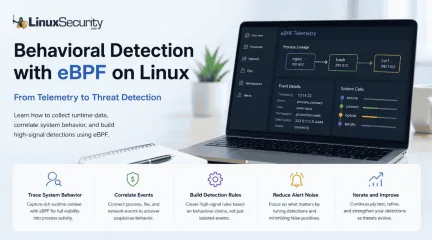
How to Build Behavioral Detections with eBPF on Linux
Building effective behavioral detections starts with understanding how processes behave at runtime, rather than simply collecting more logs. eBPF gives Linux security teams the visibility needed to correlate those behaviors into meaningful detections, moving away from static signatures and toward real-time analysis. . The first surprise for most people coming from auditd or legacy log collectors is how much context suddenly becomes available. Instead of just seeing that a shell executed, you also know who launched it, which container namespace it belonged to, and what it did next. That extra context is usually enough to explain why a process started in the first place. eBPF attaches to kernel events through mechanisms such as kprobes , tracepoints , and other hook types, allowing it to observe activity as it happens. You aren't parsing text logs after the fact. You are watching the system execute, which gives you low-latency runtime context. It helps capture short-lived process activity that might never make it into a traditional log file. A Practical Detection Workflow Before we dive into the mechanics, it helps to see the path. You aren't just writing rules; you're building a feedback loop. How eBPF Improves Runtime Security Visibility One thing you'll notice almost immediately is how noisy process execution becomes. A modern Linux server is constantly spawning short-lived processes you probably never realized existed. If you are a detection engineering practitioner, you know the frustration of alert fatigue: logs filled with thousands of events that tell you nothing about intent. eBPF gives you the granularity to cut through that. Much of this visibility comes from observing system calls, the interface processes use to request services from the Linux kernel. Process lineage ends up becoming one of the most valuable pieces of information you'll collect. Seeing /bin/bash execute tells you almost nothing. Seeing /bin/bash launched by nginx instead of an SSH session completely changes how you interpret that event. The command didn't change; the context did. Following that lineage across multiple generations often reveals the entire attack chain without requiring dozens of separate alerts. Choose an eBPF Security Framework You don't need to write raw C or Go code to harness this. Several frameworks sit on top of the eBPF layer. The underlying eBPF programs are doing the heavy lifting. These frameworks package that capability into rule engines, telemetry pipelines, and policy controls so you don't have to write kernel code yourself. Falco : Mature rule-based threat detection . Tetragon : Runtime policy and process-aware enforcement. Tracee : Event tracing and investigation. Cilium : Network visibility and policy for cloud-native environments. Falco is often the easiest place to start because it provides a mature rule engine and a large collection of community-maintained detections. Once you're comfortable with the telemetry, exploring tools like Tracee or Tetragon becomes much easier. Baseline Linux Monitoring Before Writing Detections Don't enable detections yet. Spend a day simply watching the telemetry. The first baseline almost always looks useless. There are hundreds of processes, package updates, scheduled jobs, and Kubernetes components doing things that initially appear suspicious. That's exactly the point. You aren't looking for attacks yet. You're learning what "Tuesday afternoon" looks like on this server. Limit your collection to events tied to process execution, network activity, sensitive file access, and namespace changes. The same approach applies to sensitive file access. Reading /etc/shadow isn't always suspicious, but who opened it, when, and what happened next often tells the real story. If you collect every available syscall , you’ll be staring at millions of records with no idea which ones matter. This is where most first-time eBPF security deployments gosideways. A common pattern is teams spending weeks writing complex detection logic before they've even collected a full day of runtime telemetry. Correlate Runtime Signals for Threat Detection Instead of monitoring isolated events, think about the "chain." An attacker’s goal is to go from entry point to a persistent foothold. Many of these behavioral chains map naturally to MITRE ATT&CK techniques, making them easier to organize and validate over time. When you capture an event, it looks something like this: Timestamp: 10:14:22 Event: process_connect Parent: nginx (PID 842) Child: /bin/bash (PID 913) User: www-data Namespace: production/web Destination: 203.0.113.5:4444 Every field here is a potential pivot point. None of these fields is particularly alarming on its own. Together, they tell a much more complete story. That's the difference between event collection and behavioral detection. Test and Tune Detection Engineering Rules Once you have a rule, verify it. Use Atomic Red Team . These are open-source scripts that mimic attacker behaviors. Run an "Atomic" test, observe the telemetry in your tool, and refine your rule. If you get a false positive, look at the parent process. Was it Ansible pushing a new configuration? Or was it apt or dnf running an unattended upgrade? If you see a legitimate process causing an alert, add an exception. Keep the exception as narrow as possible. If you just tell the system to "ignore bash," you've effectively turned off the security monitoring for that entire branch of your process tree. The Reality of False Positives You’ll see alerts for cloud-init running scripts that look suspiciously like persistence mechanisms. When that happens, your first instinct will be to write a broad ignore rule. Every allowlist entry should be specific enough that an attacker can't easily blend into legitimate activity. Also, remember container context. In a Kubernetes environment, seeing a process execute is nearly useless if youdon't know which pod, which container, and which namespace it belongs to. Always ensure your runtime security telemetry includes these metadata fields, or you’ll spend your entire day running kubectl commands just to find out which workload is generating an alert. Common eBPF Security Monitoring Mistakes Engineers often struggle with the same three mistakes during their first few months of deploying eBPF . First, they ignore the process lineage. They look at bash running a curl command and treat it as a standalone event, rather than looking at the process that spawned bash . Second, they try to treat these tools like a black-box EDR . EDR s often operate on a "install and forget" model, but eBPF provides the raw material, and it’s up to you to define what "bad" looks like. Third, they treat performance as the primary enemy. In reality, modern eBPF runtimes are hyper-efficient. The real enemy is poorly structured telemetry. If you collect everything indiscriminately, you won't have a performance problem, but you will have an "investigation" problem—you’ll be staring at a haystack trying to find a needle that wasn't indexed properly in the first place. Why Detection Engineering Rules Need Regular Tuning None of these detections are especially complex. Their value comes from the fact that they rely on behaviors attackers struggle to avoid, regardless of which malware or framework they're using. You’ll find that you stop trying to catch "everything" and start focusing on the five or six behavioral chains that represent your biggest risks. That focus is exactly what separates a noisy, unmanageable setup from a production-grade detection pipeline. Over time, you'll probably find yourself looking less at individual commands and more at the relationships between processes, users, namespaces, network activity, and file access. That's ultimately what eBPF changes. eBPF doesn't replace good detection engineering. It gives you richer runtime context, making iteasier to distinguish normal system activity from behavior that deserves investigation. Want more Linux security news, vulnerability analysis, and software supply chain updates? Subscribe to the LinuxSecurity Newsletter and get the latest threats, advisories, and expert insights delivered directly to your inbox. . Enhance Linux security with eBPF for real-time behavioral detection to identify threats and improve runtime visibility.. eBPF Linux behavioral detection security frameworks process monitoring. . MaK Ulac
 Jul 01, 2026
•
Jul 01, 2026
• How to Learn Tips and Tricks
166
 process monitoringLinux servicesservice management
Gaining Proficiency in Linux Service Control via the Systemctl Command
Knowing how to list and check the status of running services is essential when debugging system issues. Learn how to list and manage Linux services using the Systemctl utility in this Linuxize tutorial. . In Linux, a service is a program that runs in the background . Services can be started on-demand or at the boot time. If you are using Linux as your primary operating system or development, platform you will deal with different services such as webserver, ssh or, cron . Knowing how to list running services or check the service status is important when debugging system issues. Most of the recent Linux distributions are using systemd as the default init system and service manager. . Understand the utilization of Systemctl for overseeing and verifying the operational state of services in Linux to enhance troubleshooting capabilities.. Service Management,Systemctl Usage,Linux Services,Process Monitoring. . Brittany Day
Dec 29, 2020
•
How to Learn Tips and Tricks

167
 network monitoringsecurity managementsystem tools
How To Monitor Network Activity For Troubleshooting And Security
Whether you are troubleshooting a network issue or verifying the security of your network, monitoring network activity is crucial to maintaining a secure Linux system. Learn about multiple great methods for monitoring network activity on a Linux system in this LinuxConfig tutorial. . There are many reasons why you may want to monitor the network activity on your Linux system. You may be troubleshooting a network issue, you may want to check to make sure that there are no malicious applications creating suspicious network activity, or you may simply want to know if any processes are phoning home. Whatever the reason, here are a few methods to see which processes on your system are engaged in network activity and who they are communicating with. In this tutorial you will learn : How to monitor network connections and listening services with netstat How to monitor network connections and listening services with lsof How to monitor network connections and listening services with ifconfig What tools you can use to examine the data being sent over the network . Discover practical techniques to oversee network operations on your Linux machine, aiding in diagnostics and security assessments.. Linux Network Monitoring, Security Management, Process Monitoring. . Brittany Day
Nov 27, 2020
•
How to Secure My Network

Get the latest News and Insights
Get the latest Linux and open source security news straight to your inbox.
Community Poll
Should Linux servers automatically install security updates?
Search Topics
Powered By

Linux Security - Your source for Top Linux News, Advisories, HOWTOs and Feature Releases
QUICK LINKS
subscribe to newsletters!
Like staying secure? So do we.
Sign up for updates, tips, and alerts!