Audit Linux privileges now to limit compromise, escalation, and system-wide damage. Review Linux Privileges×


New Chaos RAT Malware Targets Windows and Linux Systems
 Jun 04, 2025
•
Jun 04, 2025
•
 Brittany Day
3 - 6 min read


Topics Covered
Alright, sysadmins and infosec pros, let’s talk about Chaos RAT. If you haven’t already crossed paths with this rather persistent piece of malware, it’s time you get familiar. This thing didn’t just pop up yesterday; it’s been lurking since 2017, originally as a legitimate remote access tool. But, like many open-source projects, it didn’t take long for someone to weaponize it. Fast forward to late 2022, and we’re seeing Chaos RAT meddling with Linux boxes, largely to mine cryptocurrency or snoop around for other nastiness. And now? Windows systems are in their crosshairs, too. Thanks, Golang.
What makes this malware so annoying? It’s multi-platform (thanks to Go’s effortless cross-compilation), heavily customizable, and surprisingly subtle, given its capabilities. Chaos RAT’s been revamped and repurposed into a tool geared for attacking systems under the guise of being a helpful utility. And I get it—how many of us have never grabbed some random utility on a Friday afternoon to “solve the problem right now” without too much thought? Let’s dig into how Chaos RAT works, what’s new, and most importantly, how to keep it off your systems.
How Are Attackers Rolling Out Chaos RAT?
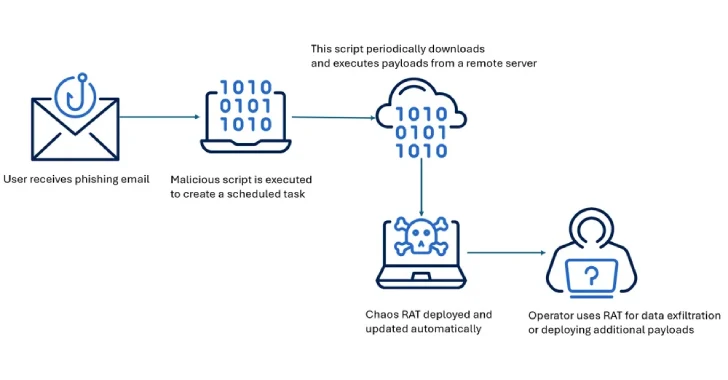 Source: The Hacker NewsHere’s the thing with Chaos RAT: it doesn’t arrive waving a giant red flag. Attackers are bundling it into tar.gz packages labeled as legitimate Linux tools—like a “NetworkAnalyzer.” You might think you’re downloading software to troubleshoot network hiccups, only to discover, oops, you’ve invited malware into your system instead. Usually, this starts with a phishing email. You’ve seen them: “Critical update required!” or “Check your network diagnostics!” Click. Download. Game over.
Once installed, it’s all about persistence. Early campaigns liked to hijack cron jobs—either modifying /etc/crontab or adding tasks elsewhere. If you’ve ever sifted through crontab only to find something sketchy sitting there, you know the feeling. It’s clever, though. With just a cron entry, attackers can maintain a foothold and ensure the RAT stays put, even after a reboot. Some Linux variants try to look less obvious by suppressing visible outputs and redirecting to /dev/null—a tactic that makes detecting its operations a bigger pain.
What’s unsettling is how seamlessly Chaos RAT calls home to its command-and-control (C2) server. Once a system is compromised, the malware starts chatting with its C2 every 30 seconds. JSON messages bounce back and forth. System info is captured and sent, including OS details, IP, MAC address, and even architecture. Everything an attacker needs for reconnaissance or launching commands remotely.
What Makes Chaos RAT Stand Out?
If you’re thinking this is just “yet another RAT,” think again. First, it leans heavily on its open-source origin. Attackers have been tweaking the code just enough to dodge detection signatures. Key configurations? Those are tucked neatly into Base64-encoded strings, making it harder for defenders to spot patterns. Decoding functions often lurk in compiled binaries, which means you need sharp detection tools to figure out what’s going on.
On Linux, Chaos RAT’s strategies are surprisingly lightweight but effective. Tailored commands can reboot or shut down the host, execute shell instructions, and pull system metadata—it’s no-frills, sure, but it works all too well. The lack of bloat means it stays fast and flexible, tailoring its tactics to the target system. While Windows versions carry their own quirks, it’s clear this malware has been actively adapting to Linux environments, where folks often expect fewer threats compared to their Windows counterparts. That misconception is exactly what Chaos RAT exploits.
How Can I Stay Ahead of Chaos RAT?
 Alright, let’s cut to the chase—how do you keep this pest off your servers? First off, pay closer attention to your logs. If you’re on Linux, comb through
 /etc/crontab for unexpected entries. While you’re at it, check for unusual outbound connections, especially ones repeatedly pinging remote IPs you don’t recognize.
Phishing is still its primary delivery method, so hammer the importance of email hygiene into your team. Filtering solutions work, but you’ll want to keep your users from downloading random utilities from sketchy corners of the internet. If your colleague still drags tools off untrusted forums, have a chat. Seriously.
Step up your defenses with EDR or antivirus tools that recognize Chaos RAT's patterns. Load up your network scanner with known IoCs like SHA256 hashes and C2 IPs tied to this malware. The more signals you can spot, the better.
If one of your machines does get infected, here’s your game plan: yank it off the network immediately. Isolate it. Dig in with tools like chkrootkit or rkhunter to identify and nuke the malicious payloads. And remember to inspect and manually fix cron jobs—not everything lurking in there is friendly. Once cleaned up, patch like your life depends on it. Outdated systems are free invites to attackers.
And hey, don’t overlook system hardening. Lock down execution permissions on non-critical clients. Enable SELinux or AppArmor—yes, I can hear you groaning, but seriously, these tools make life so much harder for malware. Finally, firewall outbound traffic to block unauthorized connections.
Closing Thoughts: What Can Linux Admins Learn from Chaos RAT?
Chaos RAT may not be the flashiest malware out there, but that doesn’t mean it’s not dangerous. It’s sneaky, persistent, and tailor-made to exploit neglected systems and human error. Anyone running Linux or Windows needs to start paying attention—it’s not confined to one platform anymore.
Above all, this is a reminder that attackers thrive when we let our guard down. Whether it’s scanning your logs, urging proper phishing defenses, or locking systems tighter than a jar of pickles, the best defense is preparation. Chaos RAT is the problem today, but tomorrow, it’ll be something else using the same playbook. Stay sharp, stay curious—and for heaven’s sake, double-check that tar.gz before you download it!
 PREVIOUS

 NEXT
NEXT


Powered By

Linux Security - Your source for Top Linux News, Advisories, HOWTOs and Feature Releases
QUICK LINKS
subscribe to newsletters!
Like staying secure? So do we.
Sign up for updates, tips, and alerts!