Explore top 10 tips to secure your open-source projects now. Read More
×


Kali Linux 2025: Ethical Pentesting and Blue Team Integration
 Nov 04, 2025
•
Nov 04, 2025
•
 MaK Ulac
4 - 8 min read


What is Kali Linux? The 2025 Guide for Security Operations
Kali Linux is a Debian-based system built and maintained by Offensive Security. It’s made for penetration testing and security assessments — not for checking email or running spreadsheets. Every tool inside it maps, probes, or breaks something under control. That’s the whole point.
People still picture hackers in dark rooms when they hear it. That reputation stuck from the early days, mostly because Kali ships with tools used to exploit networks. Inside most security teams, though, it’s just another piece of the kit. What matters is the intent behind the keyboard.
This guide walks through how Kali Linux evolved, how it fits into modern operations, and what it means to test your own defenses without crossing lines.
From BackTrack to Research Platform: How Kali Linux Evolved
Origin story: Kali Linux didn’t start from scratch. It came from BackTrack, an older live Linux distribution built for security auditing. BackTrack itself combined two smaller projects, Whoppix and Auditor Security Collection. In 2013, the team rebuilt and rebranded it under Debian to gain structure and long-term support. That rebuild turned a loose community effort into something stable enough for research and training.
Governance shift: Then Offensive Security took over maintenance. Their certification tracks, especially OSCP, gave the project direction and legitimacy. They also helped define offensive security as a formal practice instead of an underground skillset. Penetration testing became structured, repeatable, and respected work.
Technical leap: Early BackTrack builds supported only a few architectures and relied on rough scripts. Kali Linux expanded support across x86, ARM, virtual machines, and cloud setups, aligning better with other Linux versions. It moved from a one-off toolkit to a real deployment platform.
Why it matters: That shift showed how open-source security could mature without losing its edge. Kali Linux became more than a distro full of tools. It turned into a shared lab for testing, training, and collaborative research across the security community.
The Role of Kali Linux in Offensive Security
Kali Linux sits at the center of modern offensive security work.
Offensive Security Defined
Offensive security is proactive defense, using attacker methods under control to test how real your resilience is. It’s not about breaking systems for sport. It’s about finding weak spots early and feeding that data back into defense planning. Kali Linux gives teams a consistent platform to do that safely.
Real-World Use
In production environments, Kali Linux runs quietly in the background for continuous testing. Teams integrate it into CI/CD pipelines, spin it up inside containers, or deploy it in virtual labs to simulate attacks before release. It’s a standard image for red-team operations, letting testers validate configurations without touching production. Across Linux versions, that consistency matters. Same tools, same results, fewer surprises.
Tools with Purpose
The distro ships with hundreds of utilities, but they fall into clear groups — network mapping, digital forensics, web app testing, and password auditing. What’s changed is how people use them. Automation and scripting have taken over tasks that used to require manual exploitation. Teams build repeatable workflows instead of running one-off attacks. Kali Linux makes that practical, turning toolkits into processes instead of chaos.
More on the philosophy and training model behind Kali’s development can be found on Offensive Security’s site.
The Shift Toward Ethical Research and Blue-Team Integration
Kali Linux has started to look beyond offense. The launch of Kali Purple marked a real change in direction, blending SOC and monitoring tools into what used to be a purely offensive toolkit. It pulls in dashboards, SIEM connectors, and defensive utilities without losing the penetration-testing backbone that defined earlier builds. For a distribution rooted in offensive security, that’s a practical and overdue evolution.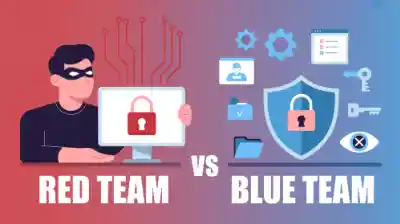
The change matters for hybrid teams. Many groups now train both offense and defense under one roof, using the same environment for red and blue exercises. With Kali Purple, analysts can detect and respond inside the same space that attackers use to probe. It keeps both sides honest — no guesswork about toolsets or data flow — and makes cross-team testing a routine part of operations.
Newer Linux versions make that flexibility possible. Broader hardware support, cleaner virtualization, and tighter kernel integration let the same Kali Linux image run across laptops, ARM boards, or cloud instances with little adjustment. What once required juggling multiple distros now runs from one build.
That’s the real shift in spirit. Kali Linux isn’t just an offensive sandbox anymore; it’s a shared lab for ethical research where intent sets the line between testing and abuse.
Kali Linux: Ethics, Governance, and Responsible Use
Even open-source tools need oversight. When a signing key incident shook trust across parts of the Linux community, it showed how fragile that chain of trust can be. Kali Linux runs on the same model — if integrity slips, every update and every test image becomes suspect. Governance isn’t optional; it’s the foundation.
- Accountability through training. Offensive Security’s certifications and community standards help define what responsible use looks like. Testing systems ethically isn’t instinct — it’s learned, verified, and documented.
- Transparency in practice. Kali Linux is a live example of how open-source security can stay trustworthy. Code is visible, updates are signed, and misuse gets addressed publicly.
- Teaching boundaries. It’s more than a toolkit. Kali Linux doubles as a classroom for responsible behavior — showing where offensive security stops and professional ethics begin.
Why Kali Linux Still Matters in Modern Linux Security
For all the changes in tooling, Kali Linux still earns its spot on most security benches.
Practical Administration
Admins use it to validate systems, probe configurations, and harden networks before issues surface. It fits easily into vulnerability scanning and remediation pipelines. Teams often use it to help security test their networks — mapping exposed services, verifying patch results, and checking resilience after major updates.
Education and Simulation
Kali Linux is standard gear in cyber ranges and internal labs. It gives new admins real exposure to offensive security tactics without the risk. Practicing detection and response in a controlled space builds muscle memory that carries into live environments.
Cross-Version Reliability
Different Linux versions behave differently under test, but Kali Linux stays stable across them. That reliability matters for research and repeatable testing. Same scripts, same output, same baseline — small details that keep results consistent across platforms.
Comparing Kali to Other Secure Linux Distributions
Every security-focused Linux build has its lane. Kali Linux just happens to cover the one most people train in. Here’s how it compares to similar distros:
Comparison Overview
|
Distribution |
Primary Focus |
Key Use Case |
|
Kali Linux |
Offensive security, research |
Pentesting, red/blue training |
|
Tails OS |
Privacy and anonymity |
Secure browsing, whistleblowing |
|
Qubes OS |
Compartmentalization |
High-security desktop environments |
|
Parrot OS |
Balanced pentesting + daily use |
Ethical hacking with privacy tools |
Key Takeaway
Each distro supports a different threat model, but Kali Linux stays central for hands-on testing and experimentation. It’s the place admins and analysts go to break, fix, and verify in one loop. Newer Linux versions only reinforce that, making cross-platform work smoother and more predictable.
For anyone comparing privacy- or research-focused builds, this deep dive into top secure Linux distributions gives a broader view of where Kali fits today.
Conclusion: Kali Linux as a Lens on Linux Security
Kali Linux isn’t really about the distro itself anymore. It’s more like a mirror for how Linux security keeps changing. Kali Linux stopped being a symbol years ago. It’s just how the work gets done now — quietly, methodically, and in the open.
What it actually shows is how testing, documentation, and defense all connect. You can trace a lot of modern security thinking back through how people use Kali.
The 2025.1 release is a good snapshot of that. Faster cycles, cleaner integrations, new hardware support. It’s just moving fast, and that pace says a lot about where open-source security is headed. Constant updates, constant testing, no real finish line.
As Linux versions spread everywhere — servers, cloud, edge — Kali Linux still ends up being the lab where people figure things out. It’s where you see how systems behave when they’re pushed. It keeps the work grounded.
Bottom line. The real difference isn’t the toolkit, it’s what you build with it. Stay ethical, stay curious, and keep pushing the work forward.
 PREVIOUS

 NEXT
NEXT

Powered By

Linux Security - Your source for Top Linux News, Advisories, HOWTOs and Feature Releases
QUICK LINKS
subscribe to newsletters!
Like staying secure? So do we.
Sign up for updates, tips, and alerts!