Explore top 10 tips to secure your open-source projects now. Read More
×


What Kali Linux 2026.2 Says About Today's Linux Security Priorities
 Jun 30, 2026
•
Jun 30, 2026
•
 MaK Ulac
4 - 7 min read
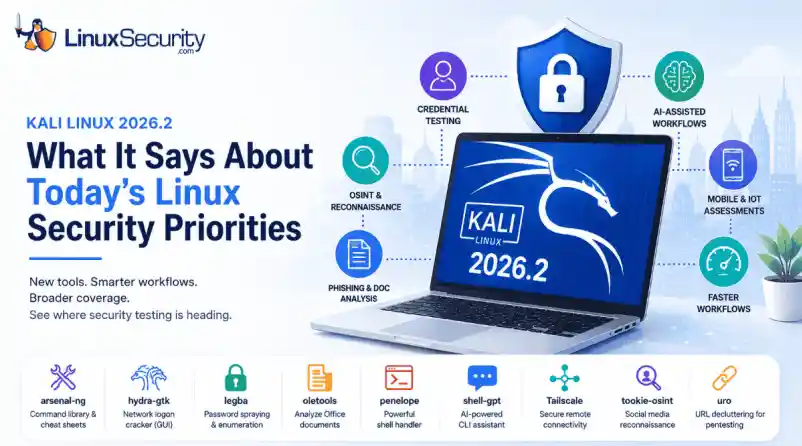

Offensive Security just dropped Kali Linux 2026.2, and at first glance, it looks like a standard quarterly refresh. You’ve got the usual kernel bumps, desktop environment updates, and a handful of new utilities. But don't write this off as just another routine version update.
If you look past the changelog, this release highlights several capabilities that continue to be important in offensive security. From AI-assisted workflows to credential testing and mobile assessments, Kali Linux 2026.2 reflects the techniques many security professionals are incorporating into modern Linux security testing.
For Linux administrators and defenders, understanding what tools are being added to Kali can be just as valuable as using them; they reflect the techniques security teams—and attackers—consider most relevant for evaluating modern Linux environments.
Why Kali Releases Matter Even If You Don't Use Kali
Most enterprise Linux systems will never run Kali Linux, but administrators still benefit from following its development. New tools often reflect the techniques penetration testers are actively using during real-world assessments. Reviewing each release helps defenders identify emerging testing priorities and evaluate whether their own monitoring, authentication controls, and hardening practices address those attack paths.
What's New in Kali Linux 2026.2
The headline for 2026.2 is the inclusion of nine new security tools, but the platform improvements are what really move the needle for daily operations. The distribution is now running on the Linux kernel 6.19, with the desktop experience receiving a facelift through GNOME 50 and KDE Plasma 6.6.
|
Tool |
Primary Purpose |
|
arsenal-ng |
Cybersecurity command reference and cheat sheets |
|
hydra-gtk |
GUI for Hydra credential testing |
|
legba |
Password spraying and authentication testing |
|
oletools |
Analyze Microsoft Office documents and macros |
|
penelope |
Shell handler for post-exploitation |
|
shell-gpt |
AI-assisted command generation |
|
Tailscale |
Secure remote connectivity |
|
tookie-osint |
Social media reconnaissance |
|
uro |
URL normalization for web testing |
Taken together, the new tools cover credential auditing, OSINT, phishing analysis, AI-assisted workflows, remote connectivity, and shell management. They reinforce a broader reality: modern security assessments rarely focus on a single system. Today's engagements often combine identity testing, cloud infrastructure, web applications, mobile devices, and social engineering into a single assessment.
Beyond the aesthetics, the team focused on friction reduction. VM deployments are significantly faster this time around, thanks to the removal of graphics firmware from pre-built images, and there’s a marked improvement in NetHunter’s stability. For those running security assessments in virtualized labs, these workflow optimizations save real time when you're spinning up or tearing down testing environments.
Another notable addition is Tailscale, which gives security teams a straightforward way to create encrypted connections between testing systems. For organizations with distributed labs or remote team members, it can simplify access to assessment environments without exposing them directly to the internet.
Credential Attacks Continue to Be a Priority
Among the new tools are additions focused on credential testing, including legba and the re-added hydra-gtk. Their inclusion reflects how identity-based attacks—including password spraying, credential reuse, and authentication testing—continue to play a central role in modern security assessments.
If an administrator uses the same password for a local Linux server and a corporate SSO account, that’s an open door. These tools act as a wake-up call: if you aren't enforcing MFA, disabling legacy authentication, and proactively monitoring for password-spraying attempts, your infrastructure is likely the low-hanging fruit in a credential-stuffing campaign.
AI Is Becoming Part of Everyday Security Operations
The inclusion of shell-gpt might trigger a knee-jerk reaction about AI replacing security pros, but that’s missing the point. Tools like shell-gpt illustrate how AI is beginning to reduce repetitive command-line work. Rather than replacing expertise, they help security professionals generate commands, reference syntax, and automate routine tasks more efficiently.
Offensive security is notoriously repetitive. Whether it's drafting boilerplate command syntax or normalizing log output, the friction of manual scripting slows down an assessment. These tools reduce repetitive command-line work and make common workflows easier to reproduce, allowing analysts to spend more time interpreting results than writing boilerplate commands.
Mobile Devices Are Now Part of Enterprise Security Assessments
The latest NetHunter improvements highlight a shift in scope. Many organizations that rely on Linux servers also manage Android devices, embedded Linux systems, and IoT endpoints. Expanding NetHunter reflects the reality that enterprise security assessments increasingly extend beyond traditional servers.
Strong Linux server hardening is only one part of the equation. If attackers can gain network access through an insecure Android device or wireless infrastructure, they may still be able to pivot toward Linux systems. Kali 2026.2 provides the tools to assess these wireless "flanks" of the enterprise, ensuring that mobile and IoT devices are part of your broader security program.
Security Testing Is Becoming Faster
There’s a clear emphasis on speed in 2026.2, from the faster VM boot times to the smaller initrd. When you're building disposable lab environments, validating detections, or conducting repeated penetration tests, time is your most limited resource. Faster deployments mean assessments can happen more frequently, which makes security validation a natural part of daily operations rather than a painful, quarterly event.
By removing unnecessary graphics firmware from pre-built virtual machine images, Kali reduces boot times for many VM-based testing environments while leaving bare-metal installations unchanged.
Office Documents Still Matter in Linux Environments
Kali 2026.2 also highlights the ongoing relevance of oletools. While Linux endpoints are less commonly associated with Office malware than Windows systems, Linux administrators frequently investigate phishing campaigns, analyze suspicious attachments, and protect mixed-platform environments. Tools like oletools help incident responders inspect Office documents for embedded macros and other malicious content before those files reach users or move deeper into an organization.
What Linux Administrators Should Take Away From the Release
One of the most useful aspects of following Kali releases isn't deciding whether to upgrade immediately. It's understanding where offensive security is investing its attention. The tools that enter Kali often mirror the techniques organizations are increasingly testing during security assessments, giving defenders an opportunity to evaluate whether their own controls keep pace. Use this table as a checklist for your own hardening efforts:
|
Area |
Question to Ask |
|
Authentication |
Could your SSH service withstand password spraying? |
|
AI Workflows |
Have you established guidelines for using AI tools without exposing sensitive commands or data? |
|
Email Security |
Are Office documents scanned for malicious content before users open them? |
|
OSINT |
Is unnecessary organizational information publicly exposed? |
|
Mobile Security |
Are Android and IoT devices included in security assessments? |
|
Detection |
Can your monitoring identify credential attacks and suspicious shell activity regardless of the specific tool used? |
Conclusion
Kali Linux 2026.2 is more than a collection of new packages and version upgrades. Its newest tools and platform improvements reflect the techniques security professionals are using to evaluate modern Linux environments. Whether your organization performs formal penetration tests or simply wants to strengthen its defenses, the release highlights where security testing is placing increasing emphasis: identity, automation, mobile devices, and operational efficiency. Pay attention to the techniques these tools are designed to test; they reflect the attack paths that penetration testers evaluate today and the behaviors defenders should be prepared to detect.
Want more Linux security news, vulnerability analysis, and software supply chain updates? Subscribe to the LinuxSecurity Newsletter and get the latest threats, advisories, and expert insights delivered directly to your inbox.
 PREVIOUS

 NEXT
NEXT
Powered By

Linux Security - Your source for Top Linux News, Advisories, HOWTOs and Feature Releases
QUICK LINKS
subscribe to newsletters!
Like staying secure? So do we.
Sign up for updates, tips, and alerts!