


20-Year Browser History Privacy Flaw Prompts Chrome 136 Release
 May 01, 2025
•
May 01, 2025
•
 Brittany Day
4 - 7 min read


Topics Covered
Google Chrome 136 is here, and it’s not just another version bump—it addresses critical security vulnerabilities, including a long-standing privacy risk tied to browser history. Imagine having your private browsing activities exposed to malicious actors without your knowledge. This is just one of the many risks you face when you fail to update Chrome to the latest version.
This significant update fixes a 20-year privacy issue that allowed malicious websites to access browsing history, enabling tracking and profiling without explicit permission. Chrome 136 also mitigates a serious heap buffer overflow vulnerability, insufficient data validation, and improper implementation in DevTools, which could compromise sensitive data and system integrity. As Chrome plays a vital role in both personal and enterprise environments, ensuring browsers are patched promptly is crucial to staying ahead of potential exploits.
Updating Chrome is straightforward on Linux, whether you prefer the command line or downloading packages manually. This release is a much-needed reminder of the importance of proactive security measures, as Google leverages tools like AddressSanitizer and MemorySanitizer, along with extensive internal audits, to catch vulnerabilities early. As threat actors grow increasingly sophisticated, leaving even minor browser risks, unattended could lead to far-reaching consequences for your organization's privacy and security. Don’t let outdated software become your weakest link—make Chrome 136 a priority in your update cycle.
Let’s examine the Chrome bugs that prompted this update, how Chrome 136 addresses these issues, and what steps we should take to ensure our systems are protected.
Why Chrome Security Must Be a Priority for Admins
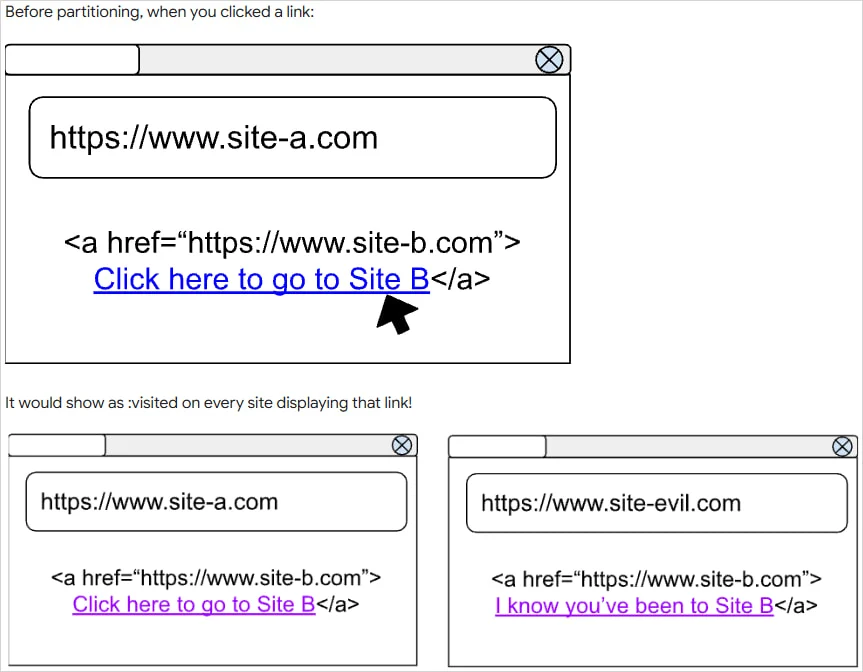 Overview of the Issue (Source: Google)Browsers aren't simply gateways to the web--they're also high-value targets for attackers. Chrome, one of the most widely used browsers, often finds itself vulnerable to exploits that compromise both privacy and security. On Linux systems with high security concerns, leaving a critical component like Chrome unpatched can create serious vulnerabilities that expose sensitive data or allow unauthorized actors to gain access to systems.
The recently released Chrome 136 update goes beyond incremental changes; it addresses real risks. Most notably, this release fixes a 20-year privacy issue caused by how the browser handled the :visited CSS selector, which allowed websites to detect which links users had previously visited. Malicious sites could exploit this loophole to stealthily probe users’ browsing history, enabling tracking and profiling without explicit permission. The fix introduced in Chrome 136 involves introducing "triple-key partitioning," which changes how visited links are tracked, preventing websites from identifying a user's browsing history.
In addition to this decades-old privacy flaw, Chrome 136 also fixes heap buffer overflow issues, which occur when software writes or reads more data than necessary into a memory allocation. This often leads to unpredictable behavior that attackers can exploit and may result in severe security risks if left unchecked. In addition, this update addresses improper data validation and implementation flaws within DevTools that were identified as weak points in Chrome's security model.
The Privacy and Security Risks of Browser History
One primary reason this update matters is its focus on data privacy, specifically browser history. Browser tracking has long been an issue not only among individuals but also among organizations that handle sensitive data. Browser history represents a detailed map of user activity, which gives attackers valuable insight into behavioral patterns, target organizations, and even specific system configurations.
Chrome 136 features several privacy-focused improvements, such as stronger safeguards for handling browser history. While casual users might view browser history as insignificant, security-conscious admins recognize its potential downside. Consider an unauthorized actor having unrestricted access to browsing patterns and website connections made from Linux servers or workstations. Such access could lead to social engineering attacks explicitly tailored for organizations, as well as wider data leaks. Upgrading to this latest Chrome version effectively closes one more door that may lead to devastating repercussions.
How Chrome 136 Raises the Bar on Security
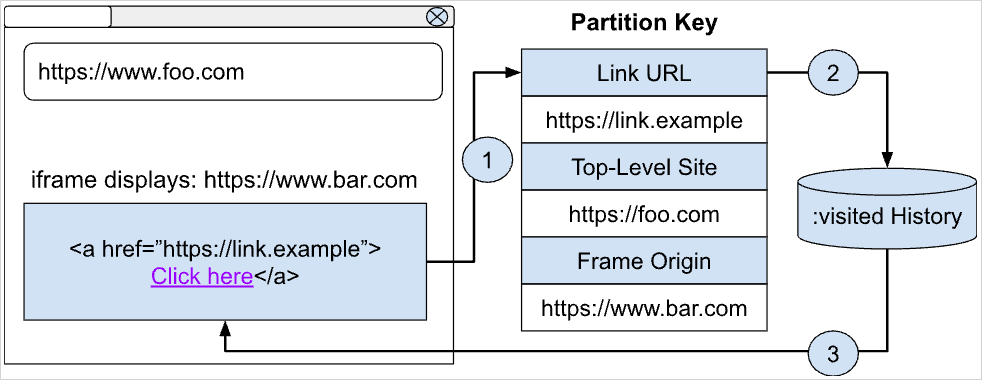 The Solution Implemented in Chrome 136 (Source: Google)Google's use of cutting-edge tools, such as AddressSanitizer and MemorySanitizer, during development stands out in this updater. These tools detect memory corruption issues or buffer overflow vulnerabilities before they can be exploited in the wild. Chrome engineers conducted internal audits and fuzz testing sessions with these tools in mind, identifying weak spots within Chrome's code. They then reinforced these areas to prevent attackers from gaining entry into its codebase.
Chrome 136 also illustrates Google's increasing commitment to security-driven design, with tighter validation of data inputs and a more robust DevTools architecture. For those of us tasked with protecting servers or desktops, such attention to detail reinforces that software can only be as strong as its weakest link. By adopting updates like these, you are working together with developers to protect against vulnerabilities before they become widespread threats.
Practical Steps to Implementing Chrome Updates on Linux
Though its importance is apparent, implementing updates across your systems can sometimes prove challenging. Luckily, updating Chrome on Linux can be done easily, regardless of your production environment or individual workstation needs. For those using popular distributions like Ubuntu or Debian, Chrome is often maintained through their official package repository provided by Google. Using simple terminal commands like sudo apt update && sudo apt upgrade will ensure that all systems update seamlessly to their newest version without interruption or downtime.
Those in environments that prohibit automatic updates or require manual intervention can download the latest version of Chrome .deb or .rpm packages directly from Google and install them using standard tools like dpkg or rpm. Environments using configuration management tools like Ansible, Chef, or Puppet can integrate Chrome updates into automated workflows to ensure consistent deployment across the infrastructure. None of these approaches is overly complex, making Chrome updates an easy and seamless part of regular patching cycles.
Be sure that any users of your systems — both internal teammates and external clients — understand the significance of browser updates as well. A quick email or bulletin about their importance could go a long way in encouraging those who interact with company systems to keep their software up to date.
Staying Ahead of Browser Vulnerabilities
 The Chrome 136 release achieves more than simply fixing specific bugs; it serves as an essential reminder that proactive security practices can significantly lower risks. With sophisticated exploits and attack vectors constantly emerging, using outdated software is no longer a safe and viable option. Waiting for updates sends a signal to potential attackers that vulnerabilities exist within an environment.
Moving forward, we must adopt a vigilant attitude regarding browser security. This involves keeping browsers like Chrome up to date, not just when new features or major fixes are released but also for less noticeable fixes that occur behind the scenes. Regularly reviewing changelogs for updates and testing patches in controlled environments before rolling them out promptly will help ensure resilience within your systems.
Consider creating policies requiring regular browser updates and patches as part of your organization's overall security strategy. Pair this approach with network-level protections, such as firewalls and intrusion detection systems, to form an integrated defense-in-depth solution and reduce attack surfaces.
Closing Thoughts: Make Updating to Chrome 136 a Priority
Google Chrome 136 represents more than just another browser update - it's an essential step toward strengthening security and protecting privacy on Linux systems, where every vulnerability matters. From fixing heap buffer overflow issues to refining data validations and adding privacy-centric features, this update proves the significance of proactive development and regular patching practices.
As Linux security admins, we recognize how subtle oversights can lead to significant ramifications. With Chrome 136's update comes your opportunity to ensure one of modern computing's core components—web browsing activity—remains protected against malicious actors. Don't wait for exploits to surface. Take immediate steps now by testing this update and installing Chrome 136 across your systems - every patch counts when it comes to robust digital security!
 PREVIOUS

 NEXT
NEXT



Powered By

Linux Security - Your source for Top Linux News, Advisories, HOWTOs and Feature Releases
QUICK LINKS
subscribe to newsletters!
Like staying secure? So do we.
Sign up for updates, tips, and alerts!