Overly broad permissions can turn one compromised account into a much larger security problem. Learn how to reduce unnecessary access, review privileges, and apply least privilege across modern Linux systems. Review Linux Privileges×



Desktop Security security advisory vulnerability
security advisory vulnerability GNOME is officially shortening its standard vulnerability disclosure window from 90 days to 30 days, a change that impacts upstream maintainers, downstream Linux distributions, and system administrators in how they handle software vulnerabilities. The policy shift, announced by long-time security coordinator Michael Catanzaro , addresses modern software patching realities and a growing influx of automated submissions. . Because GNOME is the default desktop environment on several major Linux...
 Jul 21, 2026

Security Vulnerabilities security advisory moderate
security advisory moderate For organizations that run a self-hosted Git platform, it’s no longer just about hosting static code repositories. Today, Git servers are responsible for deployment pipelines, API tokens, SSH keys, package repositories, and the automation scripts that push code directly. Confirm that the upgrade addresses known vulnerabilities but also provides production environments. . That makes them trusted systems within the development environment and attractive targets for attackers looking to move...
Jul 20, 2026

Server Securitydata privacy automation
data privacy automation Every system admin has lived through the same Monday morning ritual. A queue of forty tickets, half of them password resets, permission errors, or disk space warnings that any experienced technician could resolve in under two minutes. The other half require actual judgment. For years, automation promised that software would eventually sort the two apart on its own. That promise is now being tested in production Linux environments. . Early results are reshaping how IT teams think about tier-1...
Jul 17, 2026

Privacydata collection automation
data collection automation You're running a web scraping project to collect pricing data from e-commerce sites. You set up a pool of datacenter proxies, launch your scripts, and within minutes — banned . CAPTCHAs everywhere. Your data pipeline stops before it really begins. . It's a frustrating scenario that plays out daily in ad verification, market research, and multi-account management. The website doesn't know you're doing legitimate research or monitoring. It just sees traffic coming from IP ranges it recognizes as...
Jul 17, 2026

Security Trends security advisory social engineering
security advisory social engineering Business Email Compromise used to be a numbers game — mass-blasted emails, broken English, an obvious "URGENT WIRE TRANSFER" subject line. That era is over. Generative AI has turned BEC into a tailored, low-noise operation that mimics writing style, voice, and even video presence. This piece looks at what's actually changed under the hood, what defenders are testing in response, and why so many organizations are still structurally unprepared for it. . The Infrastructure Problem Nobody Wants to...
Jul 17, 2026
 Refine news
X Clear Filters
Get the latest News and Insights
Get the latest Linux and open source security news straight to your inbox.
Community Poll
Should Linux servers automatically install security updates?
Trending News
Loading...
Explore Latest Linux Security news
We found 1 articles for you...
78
 security advisoryUbuntusudo
Ubuntu 25.10 introduces Rust-based sudo for improved security features
Ubuntu 25.10 is switching up something we admins use practically every day—sudo. Yep, that trusty command-line companion we run for everything from installing packages to tweaking system settings is getting a replacement. Well, it's not exactly a replacement; it's more like a rewrite. Canonical’s moving from the decades-old C-based version to a Rust-based implementation , and honestly, it’s not just some background tweak you’ll never notice. There’s more going on here than you’d expect, and it’s a shift you’ll probably want to keep on your radar. . Now, Rust might seem like just another buzzword if you’ve been ignoring all the noise about how safe and modern it is, but the switch from C to Rust with sudo isn’t just about trendy programming languages or security posturing. It’s about rethinking a tool that’s basically glued into every admin's workflow, and there are real-world implications for stability and safety here. Maybe you’re already thinking, “Okay, do I need to worry about compatibility or some weird quirks popping up?” It's a legitimate question, and we’ll dive into that. But for now, let’s just say this move is worth your attention, even if you’re skeptical of change—or just already tired of typing "sudo" for the thousandth time today. Why Switch to Rust? First things first: you’re probably wondering why Canonical suddenly decided to rewrite a tool that has been rock-solid (for the most part) for decades. The short answer: security. Rust, unlike C, is built with memory safety baked into its DNA . If you’ve ever stayed up late patching a vulnerability caused by things like buffer overflows or use-after-free bugs, you’ll appreciate what this means. Rust doesn’t let those mistakes happen in the first place—it’s like having a safety net you don’t even notice is there until something tries to go horribly wrong. This change isn’t about jumping on the “modern programming language” bandwagon. It’s a deliberate move to reducesecurity headaches across the board. Rust is smart. It scans for nasties at compile time—so by the time code is running on your system, the odds of low-level bugs being exploitable drop dramatically. And frankly, tools like sudo—which basically hold the keys to the kingdom for elevating permissions—can’t afford to be anything less than airtight. Will Anything Actually Change for You? Here’s the good news: if you already know how to use sudo, there’s nothing new to learn. The syntax? Exactly the same. Whether you’re enabling admin rights with a quick sudo apt update or doing something gnarly like a one-liner shell escape, the core functionality doesn’t change. This isn’t some massive shakeup that’ll force you to rewrite all your scripts or rethink your workflows. But, and this is important— sudo-rs isn’t aimed at being a 1:1 replacement. It’s taking a “less is more” approach. Some obscure features from the original sudo have been culled. Don’t panic just yet; Canonical’s keeping the legacy C-based sudo available in the archives for anyone who’s dependent on some niche functionality. If you’ve got custom systems using funky sudo configurations, you’ll want to test things out before you jump in headfirst. Security Features Admins Will Appreciate Let’s talk about the stuff sudo-rs brings to the table that might make life a little easier—or at least harder for attackers. First off, there’s the reduced attack surface. Rust’s memory safety features mean vectors like memory misuse, overflows, and dangling pointers are essentially squashed. For a tool that deals directly with privilege escalation, that’s huge. You don’t want something that lets attackers slip through cracks—it should slam the door in their faces. Then there’s improved NOEXEC support. This will help lock down shell escapes to prevent privilege escalation shenanigans. If you’ve dealt with attackers trying to spawn shells from tools they weren’t supposed to, this feature isyour friend. For anyone deploying AppArmor profiles, sudo-rs integrates like a champ. It’s better aligned with modern application confinement frameworks, which makes it ideal for locking down environments while keeping a closer lid on privileges. And here’s a nice touch for organizations that are slow to upgrade kernels—sudo-rs supports pre-Linux 5.9 kernels. That’s welcome news for those of us still clinging to older LTS versions like Ubuntu 20.04 for stability reasons. Things to Watch for I’ve got to be upfront: no transition is perfect. While sudo-rs looks solid on paper, there are still a few things that might trip folks up: Missing Features: Some less obvious functionality from the old sudo didn’t make the cut in sudo-rs. Stuff like sudoreplay (great for auditing command logs) or SELinux support isn’t here yet—and those could be deal-breakers for certain enterprise setups. If you rely on those, hold tight for updates. Testing Phase: Canonical’s made it clear they want feedback. This is where you come in. Testing sudo-rs in staging environments could help surface problems before the tool becomes mandatory in Ubuntu 26.04 LTS. Throw it on some non-critical systems and see how it behaves with your workflows. Frankly, this is one of those situations where the transition might seem invisible—but under the right circumstances, small incompatibilities could jump out when you least expect them (looking at you, 3 a.m. outages). The time to find those snags is before sudo-rs becomes the default. The Bigger Picture: Rust in Linux System Utilities As much as this is a technical shift, there’s something symbolic about Canonical putting its weight behind Rust. It’s not just sudo—it’s the beginning of broader Rust adoption in Linux systems programming. Admins, if you haven’t brushed up on Rust, this might be your nudge to at least learn the basics. You don’t need to become an expert overnight, but knowing your way around tools written in Rust(or debugging them when things go sideways) is going to be increasingly relevant. I wouldn’t be surprised if we started seeing other distros follow suit. Debian, Fedora, and the like could easily pick up on the trend for critical components. This isn’t limited to sudo—it’s possible that utilities across the stack will shift toward Rust where it makes sense. What Canonical’s Got Right Switching to sudo-rs might sound like a big scary deal, but Canonical’s doing a couple of things that make it less daunting for admins: Legacy Support: They’re not forcing anyone into the new version cold turkey. If sudo-rs isn’t a perfect fit for your environment yet, the old C-based sudo isn’t disappearing. Feedback Window: By targeting Ubuntu 26.04 LTS for sudo-rs adoption, Canonical is giving us plenty of time to test and tweak. LTS versions are long-term commitments; they’re not rushing this transition. Here’s the kicker, though: most admins probably won’t notice anything dramatically different during their day-to-day operations. This redesign is happening quietly—you won’t see blinking neon signs shouting, “Now in Rust!” It’s designed to be unobtrusive, which, when it comes to a tool like sudo, is exactly what you want. Stability over flashiness. Our Final Thoughts on This Exciting Transition The move to Rust-based sudo isn’t some headline-grabbing gimmick. It’s about hardening one of the most critical pieces of our systems against modern threats while keeping things as seamless as possible for humans like you and me. Take this chance to test sudo-rs—I’d suggest tossing it onto a few staging boxes running varied workloads. The sooner you uncover quirks or compatibility surprises, the smoother your eventual transition will be. And hey, maybe this signals the start of something bigger. Rust creeping deeper into the Linux ecosystem isn’t just a technical curiosity—it’s a shift that could reshape system programming standards for years tocome. As always, the best approach is to get your hands dirty and see where things land. . The shift to a Rust-based sudo in Ubuntu 25.10 marks a move towards modern coding practices, enhancing security and reliability while executing superuser commands. Rust sudo administration security Ubuntu. . Brittany Day
 Jun 04, 2025
•
Jun 04, 2025
• Vendors/Products
79
 encryptionopen sourcefile transfer
Croc: Secure File Transfers With Encryption Across Platforms
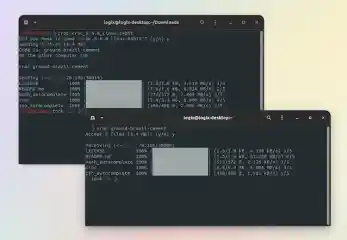
croc is a free and open-source command line tool for secure file transfers between computers. It uses relay-assisted peer-to-peer transactions and end-to-end encryption via password-authenticated key exchange. The program is written in Go and is available for Linux, Windows, macOS and *BSD. Learn about croc's key features and see how easy it is to use croc to send a file or folder in this Linux Uprising tutorial. . The idea behind croc is being able to transfer files and folders between cross-platform computers securely, fast and easy. With support for resumable, peer-to-peer transfers. As a bonus feature, croc is also able to securely transfer a short text or URL directly. The data transfer is done using a relay, either using raw TCP sockets or websockets. When the sender and the receiver are on the same LAN, croc uses a local relay, otherwise a public relay is used. Thanks to this, croc can send files between computers in the same LAN, or over the Internet, without having port-forwarding enabled. The data going through the relay is encrypted using a PAKE -generated session key. For this, croc uses code phrases, a combination of three random words. By default, a code phrase can only be used once between two parties, so an attacker would have a chance of less than 1 in 4 billion to guess the code phrase correctly to steal the data. . Explore croc, a powerful command-line tool crafted for secure and efficient file transfers across multiple platforms, featuring advanced encryption for superior data safety. Croc Tool, Secure File Transfers, Command Line Tool, Security, Encryption Tool. . LinuxSecurity.com Team
Mar 05, 2021
•
Security Projects

74
 malwarephishingcommand line
Defend Against Phishing Attacks With Unix Command Line Tips
This weekend, we're going to look at a little something (actually a HUGE something) that we all seem to have to deal with now (through email, IM, etc). It's called phishing and, for lack of a better explanation, it's a fraudulent way for a malicious individual, or group, to get username and password information from you using deceptive practices (was that redundant? ;) It's most commonly used to get information regarding a person's online bank accounts, credit card/mortgage management information, etc. In other words, stuff that could really screw up their lives if someone else had it. Phishing attacks are all too common, this article looks at tips to help combat this type of attack. . The link for this article located at linuxshellaccount is no longer available. . Harness command line skills to thwart phishing threats and elevate your cybersecurity expertise.. Phishing Tips, Command Line Security, Unix Defense, Malware Prevention. . Bill Locke
Jun 30, 2008
•
Network Security
78
security advisorycritical issueubuntuUbuntu: Critical GUI Failure After X Window Update Reversion
Many users of the increasingly popular Ubuntu Linux distribution found themselves on Tuesday thrown back to mid-1990s, when a botched update to the graphical X Window subsystem brought them face-to-face with the command-line terminal. . The update, pushed out to Ubuntu users Monday night, aimed to fix some hardware issues to the X Window software used by almost all Linux systems, but instead caused the graphical user interface (GUI) to fail to initialize, leaving users to deal with issuing text commands through the terminal. By Thursday, more than 700 comments had been posted to the Ubuntu forums by affected users looking for answers, and the Linux project--managed by software and service firm Canonical--issued an apology. The link for this article located at Security Focus is no longer available. . A recent system upgrade on Ubuntu intended to resolve performance glitches inadvertently caused users to lose graphical interface access, forcing them back to terminal commands.. Ubuntu Update, X Window Software, GUI Failure, Command Line Interface. . LinuxSecurity.com Team
Aug 24, 2006
•
Vendors/Products
77
command lineshortcutsterminal commandsMastering Essential Linux Commands And Terminal Shortcuts
This is a practical selection of the commands we use most often. Press to see the listing of all available command (on your PATH). On my small home system, it says there are 2595 executables on my PATH. Many of these "commands" can be accessed from your favourite GUI front-end (probably KDE or Gnome) by clicking on the right menu or button. They can all be run from the command line. Programs that require GUI have to be run from a terminal opened under a GUI. . . Dive into a curated list of vital Linux commands and keyboard shortcuts to enhance your terminal workflow.. Linux Commands, Terminal Shortcuts, Command Line Usage, Shell Efficiency. . LinuxSecurity.com Team
Jan 13, 2006
•
Server Security
67
encryptionsecurity toolscommand lineGuide to Installing PGPcmdfw 6.5.2 on Linux for Enhanced Security
The following is a description of how I got a Linux version of the PGP encryption program, how I installed it, and a few observations about quirks in the program. The Linux version of PGP that I got is PGPcmdfw_6.5.2_Linux.i386.rpm and . . . . The following is a description of how I got a Linux version of the PGP encryption program, how I installed it, and a few observations about quirks in the program. The Linux version of PGP that I got is PGPcmdfw_6.5.2_Linux.i386.rpm and it offers the options of 1024 or 2048 bit encryption. The 2048 bit option is compatible with people using PGP 2.6.2 with an extra command that will be noted later in REMARKS and QUIRKS. The link for this article located at LinuxNewbie.org is no longer available. . The following is a description of how I got a Linux version of the PGP encryption program, how I ins. description, linux, version, encryption, program. . LinuxSecurity.com Team
Aug 23, 2000
•
Cryptography

Get the latest News and Insights
Get the latest Linux and open source security news straight to your inbox.
Community Poll
Should Linux servers automatically install security updates?
Trending News
Search Topics
Powered By

Linux Security - Your source for Top Linux News, Advisories, HOWTOs and Feature Releases
QUICK LINKS
subscribe to newsletters!
Like staying secure? So do we.
Sign up for updates, tips, and alerts!