Audit Linux privileges now to limit compromise, escalation, and system-wide damage. Review Linux Privileges×


Security Vulnerabilities  email security Linux server
email security Linux server You've probably trained your team to look for red flags. Odd sender names, urgent language, mismatched links. But a well-crafted spoofed email won't trip any of those wires. It looks legitimate, sounds legitimate, and often comes from a domain that passes every automated check you throw at it. . Attackers know exactly how humans scan an inbox. They design around it. This guide walks you through the techniques attackers use to slip a spoofed email past both your filters and your users and what...
 Jul 25, 2026

Security Vulnerabilities cisa kev vulnerability prioritization
cisa kev vulnerability prioritization Most Linux teams don't struggle to find vulnerabilities anymore. They struggle to decide which ones deserve attention first. Between daily scanner results, vendor advisories, and hundreds of new CVEs each month, the challenge isn't visibility—it's prioritization. . To solve this, organizations typically lean on the National Vulnerability Database (NVD) and CISA’s Known Exploited Vulnerabilities Catalog. But these aren’t competing lists. They answer two entirely different questions. While the...
Jul 22, 2026

Desktop Securitysecurity advisory vulnerability
security advisory vulnerability GNOME is officially shortening its standard vulnerability disclosure window from 90 days to 30 days, a change that impacts upstream maintainers, downstream Linux distributions, and system administrators in how they handle software vulnerabilities. The policy shift, announced by long-time security coordinator Michael Catanzaro , addresses modern software patching realities and a growing influx of automated submissions. . Because GNOME is the default desktop environment on several major Linux...
Jul 21, 2026

Security Vulnerabilities security advisory moderate
security advisory moderate For organizations that run a self-hosted Git platform, it’s no longer just about hosting static code repositories. Today, Git servers are responsible for deployment pipelines, API tokens, SSH keys, package repositories, and the automation scripts that push code directly. Confirm that the upgrade addresses known vulnerabilities but also provides production environments. . That makes them trusted systems within the development environment and attractive targets for attackers looking to move...
Jul 20, 2026

Server Securitydata privacy automation
data privacy automation Every system admin has lived through the same Monday morning ritual. A queue of forty tickets, half of them password resets, permission errors, or disk space warnings that any experienced technician could resolve in under two minutes. The other half require actual judgment. For years, automation promised that software would eventually sort the two apart on its own. That promise is now being tested in production Linux environments. . Early results are reshaping how IT teams think about tier-1...
Jul 17, 2026
 Refine news
X Clear Filters
Get the latest News and Insights
Get the latest Linux and open source security news straight to your inbox.
Community Poll
Should Linux servers automatically install security updates?
Trending News
Loading...
Explore Latest Linux Security news
We found 0 articles for you...
210
 security advisorycriticalpath traversal
Langflow 1.9.0 Advisory CVE-2026-5027 High File Write Threat
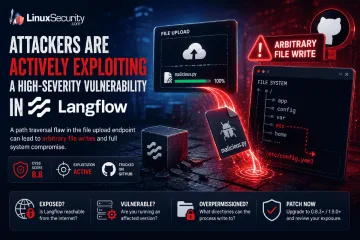
Attackers are actively exploiting a high-severity vulnerability in Langflow , an open-source platform used to build and run AI workflows. . The flaw turns a file upload into a filesystem write, allowing a user-controlled file to escape the application's intended upload directory and land in locations Langflow was never supposed to touch. The vulnerable upload endpoint permits path traversal through crafted filenames. From there, the impact depends heavily on how the platform is deployed. A Langflow process running with broad filesystem permissions may be able to overwrite existing files, alter application behavior, modify configuration data, or create persistence opportunities. The upload itself is only the entry point. The real concern is what the process can access after the file is written. For administrators responsible for self-hosted Langflow deployments, the focus should be on exposure and permissions. Is the instance reachable from the internet? Is a vulnerable version still running? What directories can the Langflow process write to? Those questions determine whether this remains a file upload issue or becomes a much broader compromise of the application and the underlying Linux host. What Is Langflow? Langflow is an open-source platform for building AI applications through visual workflows. Users can connect models, data sources, prompts, APIs, and external tools without building every component from scratch. The platform is increasingly showing up on Linux infrastructure because it solves a practical problem. Teams want to deploy AI-powered applications quickly while keeping control over the underlying environment. Common use cases include: AI agents RAG pipelines Workflow automation MCP integrations Internal AI development platforms Most organizations deploy Langflow themselves. Linux servers, cloud VMs, Docker containers, and Kubernetes clusters are all common targets. That changes how administrators should look at it. A Langflow instance is not justanother development tool sitting on a workstation. It often has access to storage, API keys, databases, model providers, internal services, and business data. It accepts user input, processes uploaded content, and stores files on disk. By the time a platform reaches production, it starts looking a lot like every other service administrators are already responsible for maintaining and securing. Why File Write Vulnerabilities Matter An arbitrary file write allows attackers to place or overwrite files outside an application's intended storage location. The impact depends less on the upload itself and more on what the affected process can access afterward. How the Vulnerability Works The vulnerability exists in Langflow's file upload functionality. Researchers found that the POST /api/v2/files endpoint did not properly handle user-controlled filenames supplied through multipart upload requests. An attacker could include directory traversal sequences within the filename and influence where the uploaded file was written. Under normal conditions, uploaded content should remain inside a designated upload directory: /uploads/file.txt Instead, a crafted filename could push the write operation outside that location and into other parts of the filesystem. The result is an arbitrary file write. Key details: Vulnerable endpoint: POST /api/v2/files Vulnerability type: Path traversal Impact: Arbitrary file write CVSS score: 8.8 Exploitation status: Active The distinction matters. Most file upload vulnerabilities are limited by where the application stores uploaded content. In this case, the attacker is influencing the destination path itself. The upload becomes a filesystem operation. What happens next depends on the host. A restricted container with minimal permissions may limit the impact considerably. A Langflow process running with broad filesystem access presents a different situation. Existing files may be overwritten. New files may be placed in sensitive locations.Configuration data may become reachable. The upload request is only the delivery mechanism. The filesystem write is a security problem. Understanding Path Traversal Path traversal vulnerabilities allow attackers to manipulate file paths and escape intended directories. When combined with file uploads, they can create opportunities to write files to unexpected locations on a system. Why Arbitrary File Writes Are Dangerous on Linux A file write sounds limited until the target path changes. On Linux systems, files control more than stored content. They influence service behavior, application startup, authentication paths, scheduled jobs, logs, templates, caches, and runtime configuration. If Langflow can write to a location, an attacker may be able to use that access to change what the application does next. Possible impact includes: Overwriting configuration files Modifying application behavior Creating persistence files Placing malicious content in accessible paths Damaging application data Preparing a later code execution path The host decides how bad this gets. A tightly scoped container with no sensitive writable mounts gives the attacker less room. A Linux service running with broad write access gives them much more. Mounted volumes matter. File ownership matters. Service account permissions matter. So do writable application directories. This is why arbitrary file write vulnerabilities rarely stay “just upload bugs.” Once the write escapes the expected directory, the investigation becomes about trust boundaries on the filesystem. What could the Langflow process touch? What files does the application load? What gets executed, parsed, imported, or trusted later? That is where the damage usually starts. How to Assess Your Exposure The official vulnerability description is direct. Langflow’s upload handling allows path traversal through multipart filenames, which can let an attacker create or overwrite files in arbitrary filesystem locations. Tenable Research identifies the vulnerable endpoint as POST /api/v2/files, and Snyk tracks the affected package as langflow-base. Risk assessment should start with reachability. Check: Is Langflow exposed to the internet? Is authentication enabled and enforced? Is the vulnerable upload endpoint reachable? Is the deployment running an affected version? What user does the Langflow process run as? What directories are writable by that user? Are host paths mounted into a container? Are secrets, workflows, or configuration files stored near writable paths? Internet-facing systems sit at the top of the list. Cloud VMs do too, especially when Langflow was deployed for testing and never placed behind proper access controls. Containerized deployments still need review. A container does not automatically remove the impact. If the container runs with writable mounted volumes, weak isolation, or excessive privileges, the file write may affect data outside the application’s intended storage path. Internal systems should not be ignored either. Langflow often connects to model providers, databases, internal APIs, workflow tools, and development resources. A file write inside that environment may expose credentials or alter workflows even when the instance is not public. The useful question is not only whether Langflow is installed. It is what Langflow can write. How to Mitigate Langflow Vulnerability Patch first. Snyk lists langflow-base 0.8.3 as the fixed package version for this issue, and GitHub’s advisory for the related v2 API arbitrary file write issue lists Langflow 1.9.0 as patched for affected langflow versions below 1.9.0. Verify the package actually used in the deployment, because Langflow environments may include both application and dependency-level components. Audit exposed AI development platforms, not only production systems. Look for files created or modified outside expected upload paths. Pay attention to configuration directories, applicationfolders, mounted volumes, startup locations, and anything loaded by Langflow during execution. Do not stop at version checks. A patched system may still have leftover files from earlier exploitation. A clean version does not remove persistence files, modified configuration, or payloads written before the upgrade. File timestamps, service logs, container volume contents, and reverse proxy logs can help narrow the window. The patch closes the vulnerable path. It does not prove the host was untouched. Conclusion Langflow is AI tooling, but on Linux it behaves like infrastructure. It runs as a process, it listens on a port, it handles uploads, it writes files, and it connects to internal systems. Once deployed that way, its vulnerabilities carry the same operational weight as flaws in web applications, automation servers, and other self-hosted platforms. This vulnerability shows the problem clearly. A weak filename check in an upload handler becomes an arbitrary file write. The impact then depends on Linux fundamentals: permissions, writable paths, mounted volumes, service accounts, exposure, and patch level. For administrators, the takeaway is practical. Treat self-hosted AI platforms like any other service with filesystem access and network reachability. Patch them. Limit them. Watch what they write. Want more Linux security news, vulnerability analysis, and software supply chain updates? Subscribe to the LinuxSecurity Newsletter and get the latest threats, advisories, and expert insights delivered directly to your inbox. Related Reading Linux Security Uncovered: Open Source, User Privilege, and Defense Tactics TARmageddon: Archive Extraction Risk in Rust async-tar on Linux In-Depth Exploration Of Buffer Overflow Risks In Linux Systems . The flaw turns a file upload into a filesystem write, allowing a user-controlled file to escape the . attackers, actively, exploiting, high-severity, vulnerability, langflow, open-source, platform. . MaK Ulac
 Jun 11, 2026
•
Jun 11, 2026
• Security Vulnerabilities
210
 security advisorylinuxautomation
TARmageddon: async-tar Vulnerability Exposes Linux Archive Extraction Risks
A path traversal flaw in the Rust async-tar library has people looking harder at archive extraction security on Linux. Researchers are calling it TARmageddon, which fits. It’s not a kernel panic or a zero-day bomb, but it’s the kind of quiet bug that ends up everywhere — build servers, CI pipelines, container images. . The problem’s simple. async-tar doesn’t properly sanitize file paths when unpacking a tar file. A crafted .tar file can slip files outside the intended directory and overwrite system data. No one’s shown a clean remote code execution (RCE) path yet, but that doesn’t matter much if your build process just wrote an attacker’s file to /etc/cron.d. CVE-2025-62518 is the provisional tag floating around. Whether or not it sticks, the point stands — these small libraries sit deep in automation stacks, and one unsafe assumption can cascade across thousands of systems. This isn’t news to most admins. Linux archive security has always been more about habits than patches. But TARmageddon is a good reminder of how easy it is to trust an archive you shouldn’t. How the async-tar Vulnerability Works on Linux Here’s what’s known about how it happens and where it shows up. Vulnerability Overview The Rust async-tar library handles archive extraction asynchronously. That’s great for speed but less so for safety. When unpacking a tar file, it doesn’t fully sanitize directory paths. A malicious archive can slip entries like ../../etc/passwd into the stream, and the library will write them outside the target directory. It’s a classic path traversal vulnerability. In most tests, that means files get overwritten like configs, scripts, whatever the process has write access to. No confirmed Linux remote code execution yet, but overwrite is usually step one in the chain. The bug shows up in projects that call async-tar directly or through build tooling that depends on it. For the technically inclined, the library’s behavior is documented in the async-tar library documentation . Affected Components and Environments You’ll see exposure mainly in Rust-based tools and CI/CD jobs using async-tar or its forks like tokio-tar. Anything unpacking untrusted tar files— containers, build pipelines, or automated deployment tasks can be hit. Maintainers working with tokio-tar have already pushed a fix, outlined in the astral-tokio-tar security advisory . A safer alternative for new projects is tar-rs, which includes proper path sanitization by default. This isn’t the first time archive libraries have failed this way. A nearly identical bug appeared in npm’s tar-fs module, as noted in the Debian security update for node-tar-fs path traversal . Different language, same blind spot, assuming file paths can be trusted. Technical Reference There’s no officially assigned CVE yet. Some reports reference CVE-2025-62518, but that listing hasn’t been verified. The CVE-2025-62518 vulnerability details page summarizes what’s been discussed publicly so far. Researchers found the issue during static analysis of unmaintained Rust crates, a reminder that dependency drift is its own risk. Once a library drops maintenance, small bugs like this one can hide for years. Why Tar File Extraction Security Matters on Linux Every admin unpacks a tar file without a second thought. It’s part of the muscle memory of Linux work. But that routine is exactly where this kind of mistake hides. Archive Extraction Risks in Linux Systems Tar archives run everything under the hood — packaging, backups, container layers, you name it. When that system breaks, it’s not flashy. It’s quiet. A build fails—a config change. Something odd starts running where it shouldn’t. A bad archive doesn’t need fancy malware. If it overwrites a script or drops a new file into a live directory, it’s already won. One poisoned tar file in a CI cache can move through a fleet before anyone notices. That’s why this bug lands squarely in Linux supply chainsecurity. Every automated build that extracts archives inherits the trust model of the tool doing the unpacking. Most of the time, that means CI/CD security is assumed rather than verified. Path Traversal Exploits and Real-World Parallels We’ve seen this movie before. The Python tarfile bug, CVE-2007-4559, sat unnoticed for years while developers kept shipping vulnerable code. npm’s tar and tar-fs had similar holes. Even core tools like GNU tar have cracked — see the Ubuntu GNU tar denial-of-service vulnerability . The async-tar issue just keeps the trend going. Same pattern, different stack. It’s not that engineers don’t know better. It’s that archive handling feels like solved work — until a path traversal vulnerability shows it isn’t. These flaws all fall under a familiar bucket in the NVD vulnerability classification framework : improper input validation. The oldest bug there is trust. Broader Linux Security Implications Automation makes life easier and attacks faster. Build jobs, containers, and deployment scripts unpack archives nonstop, sometimes with root rights, sometimes without a second thought. A single untrusted archive in that flow can rewrite a config, poison a container image, or slip into production. It’s not a headline-worthy hack. It’s just lazy archive extraction, security meeting real-world consequences. That’s the uncomfortable part of Linux hardening — we’re often defending against ourselves. Mitigation and Response: Securing Tar Extraction on Linux If async-tar exposed one thing, it’s that archive handling still needs guardrails. Here’s what actually helps when closing path traversal vulnerabilities in day-to-day Linux work. 1. Replace Vulnerable Libraries If you’re using async-tar or tokio-tar, stop. Switch to tar-rs , which includes proper path sanitization and is still maintained. It’s a drop-in option for most Rust tools, but more importantly, it’s alive. Run dependency scans often. Old or abandoned cratesare how these bugs stay hidden for years. cargo-audit and RustSec checks catch most of them. 2. Avoid Root Extraction Don’t run tar commands as root unless you enjoy rebuilding servers. Run extraction through a limited service account or inside a container with tight file permissions. Even a small tar file can overwrite critical configs if it runs with full privileges. 3. Sandbox Archive Operations Isolation beats cleanup every time. Use systemd-run --user --pty to launch a temporary environment, or go further with bubblewrap . Point the writable directory somewhere safe — /tmp/build or /work — and keep everything else read-only. It takes an extra command, but it cuts off most sandbox escape routes before they start. 4. Validate Before Extraction Never trust what you haven’t looked at. List archive contents first: tar -tvf archive.tar tar -tvf archive.tar Then extract safely: tar --one-top-level --restrict -xf archive.tar tar --one-top-level --restrict -xf archive.tar Those flags limit where files land and prevent accidental writes outside the target directory. 5. Automate Checks in CI/CD Don’t rely on memory. Add scripts that flag unsafe tar usage or call out unmaintained dependencies. Verify every archive source — mirrors, third-party packages, automated downloads. Most CI/CD pipelines already parse manifests; add validation before unpacking anything. Follow vendor updates when they land, like the Fedora advisory for astral-tokio-tar fix (FEDORA-2025-5e50082948) . The safest Linux hardening stance treats every archive as untrusted. Combine sandboxing, path sanitization, and strict tar command flags. That alone blocks most remote code execution attempts born from sloppy archive extraction. It’s not elegant, but it works, and that’s what counts. Conclusion: Reinforcing Linux Archive Extraction Security If TARmageddon showed anything, it’s that even familiar tools can become attack surfaces when the basics are ignored.async-tar wasn’t malicious, just unguarded — and that’s often worse. A single unchecked path can undo every other layer of defense on a system that looks hardened from the outside. The real takeaway is simple: treat every .tar file as untrusted input. Most remote code execution stories don’t start with zero-days; they start with shortcuts — missing flags, root extractions, and unreviewed scripts. Mitigation isn’t just about patching or replacing a crate. It’s about verifying every tar command, automating checks, and keeping privileges narrow enough that one bad archive can’t reach anything that matters. Sandboxing and privilege separation still win over theoretical fixes every time. Admins and DevOps teams should take this moment to audit the quiet stuff — build jobs, cron tasks, Dockerfiles — anything that extracts or handles archives. Move those processes into safer lanes with bubblewrap or systemd-run , and assume that tomorrow’s package might not be clean. Long-term, this is about supply chain security. Verifying not just what code runs, but how it arrives. It’s a small shift in mindset, but it’s the one that keeps your environment boring — and boring, in security, is the goal. For reference, LinuxSecurity.com has tracked similar issues before, like the Python tarfile vulnerability affecting 350,000 projects . The patterns haven’t changed much — only the toolchains have. . Explore the TARmageddon vulnerability in async-tar impacting archive extraction on Linux with vital security tips.. async-tar security, Rust vulnerabilities, archive extraction security, path traversal exploits, container security. . MaK Ulac
Oct 24, 2025
•
Security Vulnerabilities

210
 security advisoryexploitlinux
CISA: UnRAR Path Traversal Threat Exploitation Advisory on CVE-2022-30333
The U.S. Cybersecurity and Infrastructure Security Agency (CISA) on Tuesday added a recently disclosed security flaw in the UnRAR utility to its Known Exploited Vulnerabilities Catalog, based on evidence of active exploitation. . Tracked as CVE-2022-30333 (CVSS score: 7.5), the issue concerns a path traversal vulnerability in the Unix versions of UnRAR that can be triggered upon extracting a maliciously crafted RAR archive. This means that an adversary could exploit the flaw to drop arbitrary files on a target system that has the utility installed simply by decompressing the file. The vulnerability was revealed by SonarSource researcher Simon Scannell in late June. The link for this article located at The Hacker News is no longer available. . CISA has warned about the continued exploitation of the UnRAR tool due to a path traversal vulnerability known as CVE-2022-30333. UnRAR Exploit, Path Traversal Threat, CISA Advisory, Linux Security Issue. . Brittany Day
Aug 11, 2022
•
Security Vulnerabilities
210
 security advisoryremote code executionKDE
KDE: ARK Tool Flaw Allows Hackers To Execute Code Remotely
A dangerous vulnerability has been discovered in the default Linux KDE extraction utility called ARK that allows malicious actors to overwrite files or execute code on victims' computers by tricking them into downloading an archive and extracting it. . KDE is a desktop environment found in Linux distributions such as OpenSUSE, Kali, KUbuntu, and others that offers a graphical user interface to the operating system. Discovered by security researcher Dominik Penner of Hackers for Change, a path traversal vulnerability has been found in the default ARK archive utility that allows malicious actors to perform remote code execution by distributing malicious archives. . A security flaw in the KDE ARK application permits malicious code execution; discover strategies to safeguard yourself from this risk.. KDE, ARK Vulnerability, Linux Extraction Tool, Remote Code Execution, Path Traversal. . Brittany Day
Jul 31, 2020
•
Security Vulnerabilities
79
 denial of servicecode executioncross-site scripting
Google Jarlsberg Server: Learn Cross-Site Scripting and Exploit Methods
Google's online tutorial for web developers includes a server which demonstrates typical vulnerabilities for them to virtually exploit. The tutorial consists of two elements: an intentionally unsafe mini-blog web application . The Google Code University's guide includes sections on cross-site scripting, path traversal, code execution and denial of service. It then challenges the student to exploit the various vulnerabilities on the Jarlsberg server, providing some hints along the way. For those who do not discover the solutions, each section ends with answers and a suggestions on how the student might improve their technique. The link for this article located at H Security is no longer available. . Uncover flaws within the Google Code University’s web development guide, addressing issues like cross-site scripting and additional security concerns.. Google Vulnerability Guide, Web Development Security, Exploit Techniques. . LinuxSecurity.com Team
May 06, 2010
•
Security Projects

Get the latest News and Insights
Get the latest Linux and open source security news straight to your inbox.
Community Poll
Should Linux servers automatically install security updates?
Trending News
Search Topics
Powered By

Linux Security - Your source for Top Linux News, Advisories, HOWTOs and Feature Releases
QUICK LINKS
subscribe to newsletters!
Like staying secure? So do we.
Sign up for updates, tips, and alerts!