Explore top 10 tips to secure your open-source projects now. Read More
×



Security Vulnerabilities  security advisory moderate
security advisory moderate For organizations that run a self-hosted Git platform, it’s no longer just about hosting static code repositories. Today, Git servers are responsible for deployment pipelines, API tokens, SSH keys, package repositories, and the automation scripts that push code directly. Confirm that the upgrade addresses known vulnerabilities but also provides production environments. . That makes them trusted systems within the development environment and attractive targets for attackers looking to move...
 Jul 20, 2026

Server Securitydata privacy automation
data privacy automation Every system admin has lived through the same Monday morning ritual. A queue of forty tickets, half of them password resets, permission errors, or disk space warnings that any experienced technician could resolve in under two minutes. The other half require actual judgment. For years, automation promised that software would eventually sort the two apart on its own. That promise is now being tested in production Linux environments. . Early results are reshaping how IT teams think about tier-1...
Jul 17, 2026

Privacydata collection automation
data collection automation You're running a web scraping project to collect pricing data from e-commerce sites. You set up a pool of datacenter proxies, launch your scripts, and within minutes — banned . CAPTCHAs everywhere. Your data pipeline stops before it really begins. . It's a frustrating scenario that plays out daily in ad verification, market research, and multi-account management. The website doesn't know you're doing legitimate research or monitoring. It just sees traffic coming from IP ranges it recognizes as...
Jul 17, 2026

Security Trends security advisory social engineering
security advisory social engineering Business Email Compromise used to be a numbers game — mass-blasted emails, broken English, an obvious "URGENT WIRE TRANSFER" subject line. That era is over. Generative AI has turned BEC into a tailored, low-noise operation that mimics writing style, voice, and even video presence. This piece looks at what's actually changed under the hood, what defenders are testing in response, and why so many organizations are still structurally unprepared for it. . The Infrastructure Problem Nobody Wants to...
Jul 17, 2026

Security Trends cybersecurity Linux documentation
cybersecurity Linux documentation Linux operating systems have gained prominence due to their stability, adaptability, and excellent security options. In the case of developing documentation, designing cybersecurity dashboards, or educational material, visuals are of vital importance when it comes to making things clear. The use of icons allows one to understand the message regarding alerts, authorization, encryption, authentication, or the state of the system just by looking at the visual cue without having to read long...
Jul 17, 2026
 Refine news
X Clear Filters
Get the latest News and Insights
Get the latest Linux and open source security news straight to your inbox.
Community Poll
Should Linux servers automatically install security updates?
Trending News
Loading...
Explore Latest Linux Security news
We found 143 articles for you...
79
 Linux securitysecurity assessmentautomation
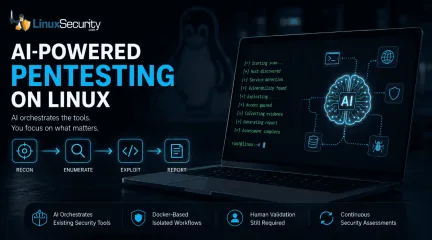
How AI Is Changing Open Source Penetration Testing
AI is beginning to reshape how penetration testing workflows are organized. For years, the penetration tester’s workflow has been a labor-intensive ritual: scan, enumerate, research, exploit, and report. But new frameworks are attempting to codify that intuition, turning the "human-in-the-loop" process into a machine-coordinated workflow. But is this a genuine evolution in how we secure Linux environments, or just a sophisticated wrapper around the same old tools? . Dark Moon is an open-source autonomous penetration testing framework that combines large language models with established offensive security tools. It supports assessments against web applications, APIs, Active Directory, Kubernetes environments, content management systems, and other common enterprise targets while orchestrating scans through Docker-based tooling. The "Conductor" Philosophy For the uninitiated, Dark Moon doesn’t aim to replace the core toolkit—tools like Nmap, sqlmap, or Nuclei—that Linux security professionals have relied on for decades. Instead, it positions itself as an "AI-powered conductor." In a traditional manual assessment, a tester has to constantly context-switch, analyzing the output of one tool to decide which flag to pass to the next. One open source implementation attempts to solve this via agentic reasoning. It doesn’t just scan; it interprets the HTTP response, determines if a CMS fingerprint is present, and proposes and executes the next stage of testing based on its reasoning model. For instance, imagine exposing a new Ubuntu web server. Traditionally, you might begin with Nmap, move to ffuf after discovering an HTTP service, fingerprint the application, then manually decide whether sqlmap or nuclei makes the most sense to run next. The Darkmoon project attempts to automate those transitions by using the output from one stage to dynamically determine what happens next. It can also consolidate findings into a structured report, sparing the operator from parsing dozens ofdisconnected tool outputs. Linux as the Working Environment for AI Security Tools One of the best things about these new security agents is that they’re built on the tools we’ve been using for years. The project leverages Docker for isolation, which is a massive win for Linux admins and DevOps folks who are already living in containers. It solves that classic "dependency hell" we’ve all dealt with—you know, trying to get some niche Python-based scanner to play nice with your system’s existing libraries. Because the framework runs everything in its own container, it keeps your host OS clean and stable while the AI manages the heavy lifting. For those of us who spend most of our day in a terminal, it’s not really about learning a whole new system. It’s more like getting an extra pair of hands to handle the repetitive, manual "grunt work" of orchestration, leaving us to actually dig into the interesting findings/ The Reality Check: Where AI Fits It is crucial to set expectations here. The AI is not a magic bullet. As noted in industry discussions on autonomous pentesting platforms , the real value lies in the reasoning layer. The AI isn’t discovering new exploits on its own; it is managing the execution of existing ones. This brings a specific set of limitations: Contextual Blindness: An AI can easily misinterpret a non-standard login portal or a specific network quirk that a human would recognize instantly. The "Hallucination" Risk: Some frameworks attempt to reduce hallucination risk by routing actions through controlled tool execution, the risk remains that the AI might prioritize the wrong path. Human Validation: The consensus among security researchers is that AI currently functions best as a "force multiplier." It handles the reconnaissance and the monotonous chaining of tools, allowing the professional to focus on the high-stakes analysis. Why It Matters for the Linux Community For sysadmins, researchers, and home-lab enthusiasts, these frameworksrepresent a shift in the security paradigm. We are moving away from "point-in-time" assessments—where you scan a network once a year—toward continuous security validation. The useful part is repeatability. The same checks can run after changes, after deployments, or against lab systems where configuration drift tends to show up first. While many people will use Dark Moon as a research or lab platform, the same orchestration model could eventually fit into CI/CD pipelines or scheduled internal assessments. It effectively turns your security posture from a static checkbox into a living component of your environment. Final Thoughts These frameworks don't replace tools like Nmap, ffuf, sqlmap, or the rest of the Linux security toolkit. Those tools remain the engines doing the work. What's changing is the orchestration layer sitting above them. As AI becomes better at interpreting results and coordinating workflows, frameworks like Dark Moon offer a glimpse of how future penetration testing may evolve while still relying on the open-source tools the Linux community has trusted for years. Whether you use it in production or just as a sandbox tool to explore the future of AI-driven red teaming, it’s a project that builds on the open-source spirit rather than trying to hide it behind a black-box paywall. Want more Linux security news, vulnerability analysis, and software supply chain updates? Subscribe to the LinuxSecurity Newsletter and get the latest threats, advisories, and expert insights delivered directly to your inbox. Related Reading Understanding Linux Privilege Escalation Patterns and Security Measures How Secure Is Linux? Exploring Security Design and User Privilege Models Optimizing Linux Security: Strategies for Modern Threats . Explore the capabilities of Dark Moon, an AI-powered framework transforming penetration testing workflows on Linux systems.. AI Penetration Testing, Automation Framework, Open Source Security, Linux Tools, Dark Moon. . MaK Ulac
 Jun 26, 2026
•
Jun 26, 2026
• Security Projects
74
 security advisorypenetration testingoffensive security
Kali Linux 2025: Ethical Pentesting and Blue Team Integration
What is Kali Linux? The 2025 Guide for Security Operations Kali Linux is a Debian-based system built and maintained by Offensive Security. It’s made for penetration testing and security assessments — not for checking email or running spreadsheets. Every tool inside it maps, probes, or breaks something under control. That’s the whole point. . People still picture hackers in dark rooms when they hear it. That reputation stuck from the early days, mostly because Kali ships with tools used to exploit networks. Inside most security teams, though, it’s just another piece of the kit. What matters is the intent behind the keyboard. This guide walks through how Kali Linux evolved, how it fits into modern operations, and what it means to test your own defenses without crossing lines. From BackTrack to Research Platform: How Kali Linux Evolved Origin story: Kali Linux didn’t start from scratch. It came from BackTrack, an older live Linux distribution built for security auditing. BackTrack itself combined two smaller projects, Whoppix and Auditor Security Collection. In 2013, the team rebuilt and rebranded it under Debian to gain structure and long-term support. That rebuild turned a loose community effort into something stable enough for research and training. Governance shift: Then Offensive Security took over maintenance. Their certification tracks, especially OSCP, gave the project direction and legitimacy. They also helped define offensive security as a formal practice instead of an underground skillset. Penetration testing became structured, repeatable, and respected work. Technical leap: Early BackTrack builds supported only a few architectures and relied on rough scripts. Kali Linux expanded support across x86, ARM, virtual machines, and cloud setups, aligning better with other Linux versions. It moved from a one-off toolkit to a real deployment platform. Why it matters: That shift showed how open-source security could mature without losing its edge. Kali Linuxbecame more than a distro full of tools. It turned into a shared lab for testing, training, and collaborative research across the security community. The Role of Kali Linux in Offensive Security Kali Linux sits at the center of modern offensive security work. Offensive Security Defined Offensive security is proactive defense, using attacker methods under control to test how real your resilience is. It’s not about breaking systems for sport. It’s about finding weak spots early and feeding that data back into defense planning. Kali Linux gives teams a consistent platform to do that safely. Real-World Use In production environments, Kali Linux runs quietly in the background for continuous testing. Teams integrate it into CI/CD pipelines, spin it up inside containers, or deploy it in virtual labs to simulate attacks before release. It’s a standard image for red-team operations, letting testers validate configurations without touching production. Across Linux versions, that consistency matters. Same tools, same results, fewer surprises. Tools with Purpose The distro ships with hundreds of utilities, but they fall into clear groups — network mapping, digital forensics, web app testing, and password auditing. What’s changed is how people use them. Automation and scripting have taken over tasks that used to require manual exploitation. Teams build repeatable workflows instead of running one-off attacks. Kali Linux makes that practical, turning toolkits into processes instead of chaos. More on the philosophy and training model behind Kali’s development can be found on Offensive Security’s site . The Shift Toward Ethical Research and Blue-Team Integration Kali Linux has started to look beyond offense. The launch of Kali Purple marked a real change in direction, blending SOC and monitoring tools into what used to be a purely offensive toolkit. It pulls in dashboards, SIEM connectors, and defensive utilities without losing the penetration-testing backbone that definedearlier builds. For a distribution rooted in offensive security, that’s a practical and overdue evolution. The change matters for hybrid teams. Many groups now train both offense and defense under one roof, using the same environment for red and blue exercises. With Kali Purple, analysts can detect and respond inside the same space that attackers use to probe. It keeps both sides honest — no guesswork about toolsets or data flow — and makes cross-team testing a routine part of operations. Newer Linux versions make that flexibility possible. Broader hardware support, cleaner virtualization, and tighter kernel integration let the same Kali Linux image run across laptops, ARM boards, or cloud instances with little adjustment. What once required juggling multiple distros now runs from one build. That’s the real shift in spirit. Kali Linux isn’t just an offensive sandbox anymore; it’s a shared lab for ethical research where intent sets the line between testing and abuse. Kali Linux: Ethics, Governance, and Responsible Use Even open-source tools need oversight. When a signing key incident shook trust across parts of the Linux community, it showed how fragile that chain of trust can be. Kali Linux runs on the same model — if integrity slips, every update and every test image becomes suspect. Governance isn’t optional; it’s the foundation. Accountability through training. Offensive Security’s certifications and community standards help define what responsible use looks like. Testing systems ethically isn’t instinct — it’s learned, verified, and documented. Transparency in practice. Kali Linux is a live example of how open-source security can stay trustworthy. Code is visible, updates are signed, and misuse gets addressed publicly. Teaching boundaries. It’s more than a toolkit. Kali Linux doubles as a classroom for responsible behavior — showing where offensive security stops and professional ethics begin. Why Kali Linux Still Matters in ModernLinux Security For all the changes in tooling, Kali Linux still earns its spot on most security benches. Practical Administration Admins use it to validate systems, probe configurations, and harden networks before issues surface. It fits easily into vulnerability scanning and remediation pipelines. Teams often use it to help security test their networks — mapping exposed services, verifying patch results, and checking resilience after major updates. Education and Simulation Kali Linux is standard gear in cyber ranges and internal labs. It gives new admins real exposure to offensive security tactics without the risk. Practicing detection and response in a controlled space builds muscle memory that carries into live environments. Cross-Version Reliability Different Linux versions behave differently under test, but Kali Linux stays stable across them. That reliability matters for research and repeatable testing. Same scripts, same output, same baseline — small details that keep results consistent across platforms. Comparing Kali to Other Secure Linux Distributions Every security-focused Linux build has its lane. Kali Linux just happens to cover the one most people train in. Here’s how it compares to similar distros: Comparison Overview Distribution Primary Focus Key Use Case Kali Linux Offensive security, research Pentesting, red/blue training Tails OS Privacy and anonymity Secure browsing, whistleblowing Qubes OS Compartmentalization High-security desktop environments Parrot OS Balanced pentesting + daily use Ethical hacking with privacy tools Key Takeaway Each distro supports a different threat model, but Kali Linux stays central for hands-on testing and experimentation. It’s the place admins and analysts go to break, fix, and verify in one loop. Newer Linux versions onlyreinforce that, making cross-platform work smoother and more predictable. For anyone comparing privacy- or research-focused builds, this deep dive into top secure Linux distributions gives a broader view of where Kali fits today. Conclusion: Kali Linux as a Lens on Linux Security Kali Linux isn’t really about the distro itself anymore. It’s more like a mirror for how Linux security keeps changing. Kali Linux stopped being a symbol years ago. It’s just how the work gets done now — quietly, methodically, and in the open. What it actually shows is how testing, documentation, and defense all connect. You can trace a lot of modern security thinking back through how people use Kali. The 2025.1 release is a good snapshot of that. Faster cycles, cleaner integrations, new hardware support. It’s just moving fast, and that pace says a lot about where open-source security is headed. Constant updates, constant testing, no real finish line. As Linux versions spread everywhere — servers, cloud, edge — Kali Linux still ends up being the lab where people figure things out. It’s where you see how systems behave when they’re pushed. It keeps the work grounded. Bottom line. The real difference isn’t the toolkit, it’s what you build with it. Stay ethical, stay curious, and keep pushing the work forward. . Kali Linux transforms ethical pentesting with a blend of offense and defense tools, enhancing security operations.. Kali Linux, penetration testing, ethical hacking, Offensive Security, blue team. . MaK Ulac
Nov 04, 2025
•
Network Security

209
 network securityrisk assessmentpenetration testing
Understanding Internal vs External Pen Testing for Your Business
Penetration tests are like fire drills for your network. They expose weak spots, test defenses, and help prevent real damage when threats come knocking. But not all pen tests are the same. . Some check what outsiders can reach from the internet. Others show what happens if a threat is already inside your systems. Both are valuable, but knowing where to begin depends on your setup, your risk, and what you’re trying to protect. Most companies will eventually need both internal and external tests, but figuring out where to start can feel a bit confusing. One test checks what strangers can reach from outside. The other shows what happens if the threat is already inside your system. So which one fits your business right now? That depends on your setup, your risk, and what you’re trying to protect. What External Pen Tests Focus On External pen tests target systems that are accessible from the internet. This includes things like public websites, login pages, and cloud platforms. These are the entry points anyone can find, and that’s why they’re often the first focus. Testers try to break in from the outside. They check for common issues like unpatched software, open ports, weak login systems, or exposed services. It’s about figuring out if attackers can get through the front door. If you haven’t done a pen test before, this is usually the best place to begin. What Internal Testing Covers Internal pen tests are different. Instead of trying to break in, they start with the idea that someone already has access. That could be an employee, a contractor, or a hacker who slipped through the cracks. This type of test is also where having a structured pentest reporting platform can make a difference. It helps ensure every finding is captured, tracked, and followed through to resolution. The test looks at how far someone could move through your network once inside. Can they find sensitive data? Can they escalate privileges? Can they stay hidden? This is where internaldefenses get tested. Access controls, logging, and segmentation all come into play. Choosing What to Run First External testing gives you a broad sense of where the obvious risks are. It’s good for spotting gaps before an attacker finds them. Internal testing goes deeper, but it assumes the attacker is already in. That makes it useful for companies that store sensitive data , rely on shared networks, or have a lot of user accounts. Either one can uncover serious problems, but your starting point depends on where your weaknesses are most likely to be. Other Factors to Think About Some industries have compliance rules that require specific kinds of testing. If you’re in healthcare, finance, or education, internal tests might be part of your audit process. Also, consider how your setup has changed recently. If your team went remote or shifted to the cloud , your attack surface probably expanded. That might make external testing more urgent. Final Thoughts: Picking the Right Pen Test You don’t have to choose one test and stick with it forever. Security needs change as your environment evolves. If you’re new to testing, an external pen test is usually the best first step to identify obvious risks. Once that’s covered, an internal pen test helps you understand how far an attacker could go if they gained access. What matters most is that you’re testing something. Each assessment moves you closer to resilience and a stronger security future for your organization. . Understand the critical differences between internal and external pen testing to enhance your business's security posture.. penetration testing, network security, internal tests, external tests, compliance requirements. . MaK Ulac
Aug 20, 2025
•
Security Trends
78
 threat detectionpenetration testingethical hacking
Kali Linux AI Tool: Enhancing Penetration Testing with Kali GPT
AI has been weaving itself into every corner of tech, but when it lands squarely in the realm of ethical hacking and cybersecurity, that’s when things get really interesting. Imagine combining the precision and adaptability of Kali Linux — a staple for anyone serious about infosec — with the analytical horsepower of a custom-trained GPT-4 model. That’s Kali GPT , and it’s changing how we approach security tasks. . You know how painstaking penetration testing can get — painstaking and repetitive. Running scans, combing through logs, mapping out a network’s weak points — it’s all essential for shoring up defenses, but it’s no small workload. Kali GPT steps in to streamline much of that. It interprets natural language commands with eerie accuracy, providing instant, actionable suggestions. Think of it as a co-pilot that not only assists in execution but also helps guide strategy before you’ve even started typing commands. Let’s cut through the noise and talk practical stuff. Kali GPT isn’t just another overhyped tool claiming to revolutionize workflows; it’s designed to complement the way security professionals already work. It doesn’t try to change the game — it just makes it smarter, faster, and, frankly, less annoying. What Does Kali GPT Actually Do? At its core, Kali GPT shifts how we analyze environments and make security decisions. It feeds off real-time system data, so it’s not just guessing or throwing out generic advice. This means you can run vulnerability scans or penetration tests, and alongside the results, Kali GPT will provide context — not the kind of generic “risk detected” alerts you’ve seen a thousand times, but insight tailored to the threats your network is facing right now. Say you’ve got a firewall with some questionable configuration best practices or a compromised web server hanging out on an overlooked subnet. Kali GPT won’t just flag the issues; it’ll tell you why they matter, suggest specific fixes, and, if youwant, give you commands or scripts ready to execute without having to sift through manuals or tweak syntax. Let’s be real — part of every Linux admin’s day revolves around efficiency. There’s nothing worse than sitting there, troubleshooting an obscure vulnerability, while deadlines loom. Kali GPT eliminates much of this pain by automating the drudgery out of penetration testing workflows. Need to perform a quick scan, confirm exploitability, and throw together mitigation steps? What might’ve been an hour-long chore can get shaved down to minutes. Real-World Uses: Why It’s Not Just Hype Here’s where Kali GPT breaks out of theoretical promises and delivers to optimize your workflows: Penetration Testing with Brainpower You’ll always need your core pentesting tools — Metasploit, Nmap, and the works — but Kali GPT layers on intelligence that weren’t there before. Let’s say you’re analyzing a vulnerable service after a Nmap scan. Normally, you’d review port configurations, correlate with known CVEs, and brainstorm mitigation steps. Kali GPT handles much of that interpretive heavy lifting for you. After you feed it system data, it may highlight potential exploits tied to outdated libraries, suggest specific Metasploit modules, or even point out overlooked secondary vulnerabilities — the kind that usually gets missed when you’re fixated on the big one. Threat Detection in Real-Time Reacting to attacks is all good, but Kali GPT thrives on proactively sniffing out vulnerabilities. If you’re within a corporate environment with continuous scans running, it can parse results dynamically and recommend adjustments before holes turn into nightmares. It’s like having a second set of eyes on your scans — eyes trained not just in detection but in actual remediation strategies. Customized Defensive Postures Not all organizations are alike. A single admin maintaining a web stack has completely different priorities than an enterprise overseeing sprawling networks.The beauty here lies in Kali GPT’s adaptability. If you’re operating on limited budgets or human resources, Kali GPT helps you shore up defenses methodically — prioritize critical assets without losing focus. On the other hand, enterprise admins can use it to fine-tune security architectures, run coordinated tests across environments, or even draft audits for upper management. Why Should Infosec Professionals Care About Kali GPT? If you’ve ever trained a junior admin or mentored someone new to cybersecurity, you know how technical barriers can alienate discussions on solving problems. Kali GPT bridges that gap by giving increasingly accessible answers without hand-holding your way out of important contexts. It translates technical depth into practical output, making it an ideal collaborative tool for both rookies and seasoned pros. In education and training, Kali GPT excels as well. This tool doesn’t “dumb down” hacking concepts — instead, it helps explain things as you work. Teaching privilege escalation techniques? Kali GPT can provide step-by-step explanations for kernel exploits while you execute them in tandem. Staging phishing simulations? It offers both the script templates needed for realistic testing and advice on countermeasures your intended target should deploy after identifying the attack. The Bigger Picture Kali GPT doesn’t try to replace you — it’s not some magic tool pretending to know your network better than you do. But it does make your job easier, especially when you’re spread thin. By pulling data in real time, automating low-effort yet critical steps, and generating precise output tailored to your workflows, it becomes an extension of your cybersecurity capabilities. This feels like the natural evolution of how Linux and AI can work together . Kali Linux was already the powerhouse of pentesting, but pairing it with GPT creates efficiencies that save time without compromising intelligence. It gives admins breathing room to focus on high-levelstrategic objectives, and for those newer to cybersecurity, it’s a handrail to steady your footing. For now, Kali GPT is proof that Machine Learning can grow the space we already work in without trying to bulldoze over it. Maybe AI isn’t going to replace the human intuition needed in security anytime soon. But if Kali GPT is anything to go by, it can amplify what we do in ways Linux admins and security experts have wanted for years. . Optimize vulnerability assessments using Kali AI, an advanced solution improving productivity in digital security operations and risk evaluation.. AI Penetration Testing, Kali Linux Tools, Cybersecurity Automation, Threat Intelligence Solutions. . Brittany Day
Jun 10, 2025
•
Vendors/Products
79
 data protectionaccess controlpenetration testing
PCI Compliance Checklist: Key Strategies for Linux Security Admins
Wondering whether PCI DSS compliance is really that big a deal for your business? . The answer is a resounding yes - it’s absolutely vital. Disregarding it could not only result in a hefty financial penalty but can also cause operational losses and general chaos. It can also inflict severe reputational damage. Don’t put it off: run through our handy checklist to ensure your organization is fully compliant. Check Network Security To begin, assess your business’s current network security . There should be secure, properly configured network firewalls at all network boundaries, with configuration reviews scheduled for at least every six months. Take a close look at your system’s security settings, too. When it comes to passwords, these should be changed before any system component is deployed into the network. Detailed records should be kept of any configuration changes, and regular audits should be undertaken to make sure all system settings remain as secure as possible and identify potential vulnerabilities. Implement Access Control Measures A key element of a PCI DSS compliance checklist is the implementation of strong access control measures. In general, access should be on a need-to-know basis, with strict security parameters in place and access right reviews conducted quarterly. Multi-factor authentication processes should be in place with, for example, each user having a unique user ID for access and password reuse prohibited. Ensure Proper Data Protection Protecting users’ card data is a crucial part of a business’s cybersecurity features. Encryption is critical to this, to make it much more difficult for scammers to intercept and steal data. To this end, secure key processes should be maintained, including secure key storage and regular key rotation. The business should also have adequate data storage policies in place and be aware that some sensitive card data, such as the CVV code, should not be stored after card authorization. Undertake RegularTesting Businesses should undertake systematic, regular, security and penetration testing as part of ensuring compliance. The recent updates to PCI DSS have expanded the requirements for penetration testing, stating that businesses must conduct both internal and external tests at least once a year and always after any significant application or infrastructure changes. Meticulous Monitoring For a business’s security processes to remain effective and compliant, system monitoring and log management need to be given careful attention. Audit logs must be maintained for system components for at least one year, be regularly reviewed, and secured against tampering. All access to cardholder data and network resources should be tracked and monitored, with full audit trails kept. PCI DSS Compliance Solutions to Give Businesses Peace of Mind Ensuring PCI DSS compliance may not sound like the most exciting business task, but not doing so can have severe and long-lasting consequences, from a financial fine to reputational damage. Our checklist above outlines the key elements of a compliance strategy. It’s also a good idea to consider bringing on board a holistic software solution to help your business stay compliant. Look for options that offer automated script management, simplified implementation, and real-time monitoring and protection for hassle-free peace of mind. Integration of Open Source Security Tools for PCI DSS Compliance Open-source tools offer an invaluable advantage when it comes to meeting PCI DSS compliance. Linux administrators and security engineers can take advantage of a vibrant ecosystem of open source solutions like OpenVAS and OSSEC to simplify compliance efforts, with OpenVAS being particularly adept at identifying security vulnerabilities - helping ensure that systems remain protected against threats that might compromise compliance efforts. OSSEC stands out as a reliable host-based intrusion detection system (HIDS), regularly scanning logs and network activity tolook out for breaches or noncompliance with PCI DSS standards. This tool is especially beneficial to Linux administrators looking for automated assistance in maintaining compliance within an ever-evolving environment; with open-source resources like this available to them, they can automate routine compliance checks to protect sensitive cardholder data more effectively. Leveraging Linux Security Modules for Increased Data Protection When it comes to enforcing stringent access controls--an essential aspect of PCI DSS compliance-- Linux Security Modules (LSMs) like SELinux and AppArmor are invaluable assets. They offer robust mechanisms for enforcing mandatory access controls (MAC) which prevent unapproved entities from reaching sensitive areas of your system and can reduce risks related to unauthorized data access--an essential feature required by PCI compliance. AppArmor also adds another level of control by enforcing per-program profiles, providing another layer of defense and guaranteeing applications only interact with data they are authorized to access, protecting cardholder data from possible exploits. Integrating these security modules into your systems will not only strengthen overall security but also bring you closer in line with PCI DSS's stringent requirements. Linux administrators will find that using SELinux and AppArmor gives them an edge, creating an environment in which compliance becomes an integral part of their everyday practices. Regular Patch Management with Linux Package Managers to Achieve PCI Compliance This section will explore the importance and ease of regular patch management using Linux package managers in order to achieve PCI DSS compliance. Keeping systems updated with security patches is crucial in protecting against vulnerabilities, which may result in cardholder data breaches; this section will also focus on this subject matter. It will include information such as: Utilize Linux Package Managers : Software such as Apt for Debian-based distributions,Yum for Red Hat systems, and Zypper for SUSE can help automate the updating process for software packages to ensure all components have the latest security updates installed. Implement Automated Updates : Implementing automated updates or scheduling regular manual updates can reduce the risk of unpatched vulnerabilities. Compliance Verification : On an ongoing basis, conduct regular compliance audits to ensure all security patches have been applied, creating the audit trail necessary for PCI DSS compliance. Keep Learning about Linux and PCI DSS Compliance Ensuring PCI DSS compliance is a critical task for any business dealing with cardholder data. This article has outlined essential steps towards achieving compliance, including assessing network security, implementing robust access control measures, ensuring proper data protection , and conducting regular security testing. Open-source security tools and Linux Security Modules LSMsM) Like SELinux and AppArmor, enhance these efforts by providing reliable solutions for detecting vulnerabilities and enforcing strict access controls. However, the journey towards comprehensive compliance doesn't end here. There are additional steps and deeper knowledge areas that Linux administrators can explore to solidify their understanding further and strengthen their systems: Advanced Logging and Monitoring Techniques : While this article touched on the importance of maintaining audit logs, diving deeper into advanced logging techniques and tools can provide even greater insights and protection. Tools such as ELK Stack (Elasticsearch, Logstash, Kibana) or Graylog offer powerful log management and analysis capabilities, allowing admins to easily identify and respond to potential security incidents. Regular Patch Management : Keeping systems updated with the latest security patches is a linchpin of compliance. Utilizing package managers like Apt for Debian-based distributions, Yum for Red Hat systems, and Zypper for SUSE can automate and simplifyensuring all software components are up to date. Establishing automated or scheduled manual updates can significantly reduce the risk of unpatched vulnerabilities that might be exploited. In-Depth Penetration Testing : While regular penetration testing is required per PCI DSS standards, advancing your approach by utilizing both commercial and open-source tools, such as Metasploit or Nmap, can further help identify and mitigate vulnerabilities. Compliance Verification and Documentation : Continuous compliance audits and meticulous records of all security measures implemented are crucial. Employing tools like OpenSCAP for automated compliance verification can help maintain the necessary audit trail and ensure ongoing adherence to PCI DSS requirements. Employee Training and Awareness : Enhancing the human element of cybersecurity by providing regular training sessions for employees on PCI DSS requirements and best practices can minimize the risk of human error leading to data breaches. Expanding your knowledge in these areas can strengthen your environment against potential threats and streamline PCI DSS compliance efforts. Staying informed about the latest PCI DSS and Linux security developments is vital for maintaining robust and compliant systems. . Grasping the principles of HIPAA regulations is crucial for safeguarding patient information and preventing severe repercussions.. pci compliance checklist, open source security tools, linux administrators, access control measures, network security best practices. . MaK Ulac
Apr 11, 2025
•
Security Projects
78
security advisorypenetration testingdesktop environmentKali Linux 2025.1: Enhanced Tools and Raspberry Pi Support for Pentesters
Kali Linux's latest release, version 2025.1, is set to revolutionize penetration testing and secure administration, offering security professionals numerous enhancements designed to streamline workflows and expand capabilities. Notable among these are the KDE Plasma 6.2 desktop environment and upgraded Xfce 4.20, which offer a more modern user experience. Raspberry Pi enthusiasts will be pleased with updated kernel support that increases compatibility with current hardware, such as Raspberry Pi 5. . At its core, Kali Linux's latest release does more than meet visual and compatibility improvements. It brings innovative hacking features with NetHunter and community-driven updates to existing packages such as Hoaxshell, demonstrating Kali Linux's commitment to staying ahead in cybersecurity. Furthermore, frequent community updates demonstrate its continued evolution as a robust ethical hacking . Whether you're diving into complex pentesting scenarios or managing a security-conscious Linux infrastructure, let's examine how Kali 2025.1 will ensure you have top tools in an efficient environment at your fingertips! An Enhanced Desktop Experience The KDE Plasma 6.2 desktop environment stands out as one of the highlights of this latest release, known for its sleek and modern appearance. Both its look and user interface have been renovated to become more intuitive and efficient. Users will enjoy an aesthetically pleasing user interface and practical benefits that accompany it, such as enhanced window management, dynamic panels, and optimized user experiences that enable smoother workflows, allowing security professionals to focus more on tasks than tools themselves. At the same time, the Xfce desktop environment has also received a substantial upgrade from version 4.18 to 4.20. Renowned for its lightweight nature and reliability, its latest iteration adds new features, such as keyboard shortcuts designed based on user feedback to make navigation simpler and more efficient. Theseshortcuts ultimately aim to provide a streamlined experience when engaged in complex or time-consuming tasks. Broadening Horizons with Raspberry Pi Support Kali Linux 2025.1 stands out as an exciting milestone with its improved support for Raspberry Pi devices, including Raspberry Pi 5 . A dedicated kernel version 6.6.74 specifically tailored for Raspberry Pi allows this release to provide compatibility updates that ensure seamless testing across a broader selection of hardware - an essential feature for penetration testers and security administrators who require flexible testing environments that scale with changing hardware availability. Additionally, this latest release introduces a partition layout compatible with Raspberry Pi OS images, simplifying deployment while improving maintainability. Beginning from a fresh image is essential to ensure stable and reliable operations while taking advantage of cutting-edge advances introduced in Kali Kali Linux 2025.1. A New Dimension in Pentesting with NetHunter Kali NetHunter remains an invaluable tool in mobile security, and the release of version 202.5 brings exciting updates—like an all-new "CAN Arsenal" tab in the NetHunter app that expands penetration testers' horizons by enabling car hacking capabilities, tapping into the increasingly interconnected world of automotive tech. As vehicles become more dependent on digital systems, so must security testing, with NetHunter taking an integral place within this expanding niche market. Dynamic updates to NetHunter, including phone-specific wallpapers and kernels, ensure it remains relevant and functional across diverse devices. These upgrades demonstrate Kali's dedication to staying ahead of industry developments and meeting contemporary security challenges. Tools and Package Renovations Kali Linux's greatest strength lies in its comprehensive suite of security tools, which have seen significant upgrades in its 2025.1 release. One stand-out tool is hoax-shell , an exciting Windows reverseshell payload generator that joins a robust arsenal of penetration testing tools. Other updated packages promise increased efficiency and reliability, essential in high-stakes security environments. Updated tools are essential, as pentesters must use the most current and bug-free versions available - critical for productivity and accurate test results. With cybersecurity constantly shifting, having up-to-date tools is an absolute necessity. Community-Driven Evolution and Aesthetic Refresh Kali Linux's longevity and success stem from its vibrant community. The release of Kali Linux 2025.1 showcases this collaborative effort, with various updates driven by user feedback and contributions worldwide. By drawing upon diverse viewpoints and testing methodologies, users will enjoy an adaptive distribution that offers greater resilience. The 2025 theme has brought about an aesthetic refresh that has enhanced user experience, such as revamping the boot menu, login screen, and community-contributed wallpapers. Such updates ensure that this platform meets functional demands and provides a visually appealing interface that enhances user experience. Our Final Thoughts: A Secure and Efficient Future for Kali Linux Users Kali Linux 2025.1 represents an innovative blend of creativity, community engagement, and functionality. With its user-friendly interface, extensive hardware compatibility, and cutting-edge tools, this release ensures penetration testers and security administrators are equipped to meet modern security challenges effectively. Kali's expanded capabilities, from car hacking to Raspberry Pi enhancements, demonstrate its dedication to ethical hacking practices. As cybersecurity threats advance, relying on an adaptable and powerful platform like Kali Linux becomes even more critical in protecting digital assets and infrastructures. With version 2025.1, Kali Linux meets today's cybersecurity demands and sets the bar high for tomorrow! Have you given Kali Linux 2025.1 a test drive? Let us knowyour thoughts and feedback @lnxsec ! . Kali Linux 2025.1 improves security resources, interface design, Raspberry Pi integration, and broadens ethical hacking features.. Kali Linux, Penetration Testing, Security Tools, Ethical Hacking, Raspberry Pi. . Brittany Day
Mar 24, 2025
•
Vendors/Products
78
 security toolshardware supportActive Directory
Kali Linux 2024.4: Enhanced Tools for Active Directory Privilege Escalation
If you're an admin responsible for managing and securing one or more Linux systems, you already know the importance of having top-notch tools at your disposal. The latest Kali Linux 2024.4 release is designed with you in mind, bringing new features and enhancements to make your job easier and more efficient! . This release introduces a range of new tools like bloodyad for Active Directory privilege escalation and web-cache-vulnerability-scanner for probing web cache security, equipping you with the latest penetration testing capabilities. But that's not all—Kali NetHunter now includes Wifipumpkin3, replacing the old Mana toolkit, and comes with a handy new "Kernel" tab to streamline kernel updates directly from the app. Additionally, Kali Linux 2024.4 enhances compatibility across various devices and ARM systems, adding support for the Realme X7 Max 5G and expanded functionalities for Raspberry Pi models. These updates ensure you can deploy Kali in various environments, from the lab to real-world enterprise scenarios. Whether you're conducting detailed forensic analysis or broad vulnerability assessments , the latest Kali release provides robust tools and expanded hardware support to help you stay ahead of the latest, most sophisticated Linux security threats. In this article, we'll delve deep into what's new in this release, from cutting-edge tools to expanded hardware support, and how these updates can make your job more effective and convenient. New Tools to Elevate Your Penetration Testing One of the most exciting aspects of the Kali Linux 2024.4 release is the addition of 14 new tools specifically designed to improve your penetration testing kit . These tools cover a range of functionalities that are crucial for modern cybersecurity practices. For instance, bloodyad focuses on Active Directory (AD) privilege escalation, a critical area for many security admins who protect environments heavily reliant on AD. This tool can help you identify potential vulnerabilities andunauthorized access points in your AD setup, enabling you to fortify your network against threats. Another valuable addition is the openssl-ssh1 tool. Since some legacy systems still utilize the older SSH1 protocol, having a reliable and secure client for interaction becomes essential. Although upgrading any system using SSH1 is recommended due to its outdated security, having openssl-ssh1 in your toolkit ensures you can still securely manage those that haven't updated yet. Then there's the web-cache-vulnerability-scanner , which addresses the increasingly relevant issue of web cache poisoning. As web applications become more complex and integral to business operations, vulnerabilities in web caching mechanisms pose significant security risks. This tool allows you to scan and test these caches, helping you to mitigate potential exploits before malicious actors can leverage them. Kali NetHunter: Now More Powerful and User-Friendly The Kali NetHunter platform , an essential tool for mobile penetration testing, has seen significant updates in this release. One of the biggest changes is the replacement of the Mana toolkit with Wifipumpkin3. This new tool allows you to create a rogue access point (AP) that provides a real internet connection, even over mobile networks. This is a game-changer for conducting man-in-the-middle (MiTM) attacks and testing wireless security in environments where setting up a traditional rogue AP would be inconvenient. Additionally, the NetHunter app now includes a "Kernel" tab. This seemingly small addition can have a substantial impact on your workflow. It simplifies and speeds up the process of keeping your systems up-to-date by allowing you to flash the kernel directly from the app without needing to enter recovery mode. This ease of use ensures that even those new to NetHunter can manage kernels with much less hassle, while veterans will appreciate the time savings. Expanded Device and ARM Support for More Versatile Deployments One of the ongoing challengesin Linux security administration is ensuring compatibility across diverse devices and platforms, and Kali Linux 2024.4 makes significant strides in this area. This release expands support to 100 devices, including models like the Realme X7 Max 5G and Xiaomi Mi 9 Lite. This broadened support means you can deploy Kali Linux on an even wider array of devices, making it a versatile choice for various testing environments and scenarios. There are also noteworthy enhancements for those who rely on ARM systems. The Raspberry Pi series, already popular among security admins for its flexibility and affordability, sees improved support in this release. Notably, there is now support for the Raspberry Pi 500, further cementing this platform's utility in your toolkit. Even though the Raspberry Pi 500 support remains untested due to hardware constraints, it's clear that Kali Linux is continuing to broaden its ARM support to ensure full functionality across these widely used devices. The team has also enabled Kernel Mode Setting (KMS) for better graphics performance and switched character maps to UTF-8 to avoid console issues, ensuring a smoother and more reliable user experience. These updates enhance ARM builds' performance and ensure that you can deploy and run Kali Linux smoothly on less conventional hardware setups, which can be particularly useful in field operations or specific security assessments. Practical Applications of Kali Linux 2024.4 in Everyday Linux Security Work So, how do these enhancements translate to your daily work as a Linux security admin? Let's consider a few practical scenarios. Imagine you are conducting a security audit for a client with a complex web infrastructure. Adding the web-cache-vulnerability-scanner allows you to identify and mitigate web cache-related vulnerabilities proactively. Instead of reacting to breaches or potential exploitations, you can stay ahead of the curve, fortifying the cache mechanisms before they become a target. Similarly, deploying bloodyad can helpyou uncover security weaknesses that could be exploited for privilege escalation in environments where Active Directory is heavily utilized. With this tool, you can simulate potential attacks, understand their impact, and implement the necessary controls to safeguard against threats. On the mobile front, setting up a rogue AP with Wifipumpkin3 can help you test the resilience of your network against MiTM attacks without the need for a cumbersome setup. This simplifies mobile security assessments and makes them more realistic, using the devices that end users might have in their pockets. Our Final Thoughts on Staying Ahead with Kali Linux 2024.4 Updating your Linux security tools and tactics is not just beneficial—it's essential. The Kali Linux 2024.4 release provides a robust suite of new tools, significant updates to the Kali NetHunter platform, and expanded device and ARM support that collectively enhance your ability to conduct comprehensive security assessments and maintain a robust security posture. From identifying and mitigating web cache vulnerabilities to securely managing legacy systems and conducting effective MiTM attacks with new tools, this release offers practical enhancements that can elevate your security practices. By leveraging the latest updates in Kali Linux 2024.4, you'll be better equipped to navigate modern cybersecurity challenges and stay one step ahead of potential threats. . Explore Kali Linux 2024.4's features, including the innovative bloodyad tool for enhancing Active Directory security and improved hardware compatibility for diverse deployments. Kali Linux 2024.4, penetration testing tools, Active Directory security, NetHunter updates. . Brittany Day
Dec 18, 2024
•
Vendors/Products
74
 security toolsLinux distributionsnetwork assessment
Enhance Network Security with Best Linux Pentest Distros 2024
Maintaining robust network defenses requires a proactive approach to keep pace with today's rapidly evolving network security threats. One crucial element of an effective network security strategy is penetration testing , or staged attacks in network security that mimic actual security incidents. Specialized pentesting distributions, or pentest distros, help admins and cybersecurity professionals identify and address vulnerabilities and weaknesses within IT infrastructures. By leveraging these distros, sysadmins and organizations can better protect their networks from malicious actors and improve their security posture. . To help you understand the benefits Linux pentest distros offer and how you can get started using one to support your network security efforts, I'll introduce some of the best options for Linux users and how to use these distros most effectively to maximize security. Understanding Linux Pentest Distros & Their Significance Pentest distros are customized versions of the Linux operating system that come preloaded with a wide array of tools specifically tailored for penetration testing and forensic analysis. These tools are crucial for conducting thorough security assessments, as they enable professionals to simulate attacks, identify vulnerabilities , and evaluate the effectiveness of existing security measures. Pentest distros are significant because they can provide a comprehensive suite of tools in a single, easily accessible environment. This consolidation of resources streamlines the penetration testing process, allowing cybersecurity experts to focus on identifying and addressing potential threats rather than configuring individual tools. Critical Benefits of Forensic Linux Distros Forensic Linux distros play a pivotal role in enhancing network security. By using these specialized distributions, admins and organizations can achieve the following benefits: Simplified Vulnerability Identification: Forensic distros have tools designed to scan and assessnetwork security. These tools help identify weaknesses, such as misconfigured systems, outdated software, and insecure protocols, enabling organizations to address these issues promptly. Enhanced Threat Detection: With the right tools, cybersecurity professionals can detect potential threats before they escalate into serious security breaches. Forensic distros provide capabilities to analyze network traffic, identify suspicious activities, and uncover hidden vulnerabilities. Strengthened Network Periphery: Pentest distros enable organizations to evaluate their network periphery, including firewalls, intrusion detection systems, and other security measures. By identifying and addressing weaknesses in these components, they can fortify their defenses against external threats. Open-source Tools: A significant advantage of using Linux pentest distros is that many of the most effective tools are open-source. This reduces costs and ensures the community regularly updates and maintains these tools. Open-source tools foster collaboration and innovation, leading to more robust and reliable security solutions. Our Top Linux Pentest Distros in 2024 Several pentest distros have gained prominence in 2024 due to their effectiveness and the quality of their tools. Among these, the following stand out as our top choices for admins and ethical hackers: Kali Linux: Widely recognized as one of the leading pentest distros, Kali Linux offers a comprehensive suite of penetration testing and forensic analysis tools. It includes over 600 pre-installed tools, covering everything from network scanning to exploit development. Kali Linux is known for its user-friendly interface and strong community support. Parrot Security OS: Parrot Security OS is another popular choice, known for its versatility and wide range of tools. It includes features for penetration testing, digital forensics, and privacy protection. Parrot Security OS is designed to be lightweight and flexible, making it suitablefor novice and experienced users. BackBox: BackBox is a Ubuntu-based pentest distro that focuses on providing a reliable and efficient environment for security assessments. It includes a curated selection of tools for network analysis, vulnerability assessment, and exploitation. BackBox is known for its stability and ease of use. BlackArch: BlackArch is a specialized distro designed for advanced penetration testing and security research. It features a vast repository of over 2,000 tools, making it a powerful resource for in-depth security analysis. BlackArch is geared towards experienced users who require a highly customizable and extensive toolkit. Utilizing Pentest Distros Effectively to Maximize Linux Network Security To maximize the benefits of pentest distros, organizations should implement the following best practices: Regular Updates: Ensure the pentest distros and their tools are regularly updated to incorporate the latest security patches and features. This helps maintain the tools’ effectiveness and ensures protection against emerging threats. Customized Toolsets: Tailor the tools and configurations within the pentest distro to align with your organization’s specific needs. Customizing the toolset allows for more targeted and efficient vulnerability assessments. Integration with Existing Systems: To enhance security posture, integrate pentest distros with existing security solutions and workflows. This integration ensures a cohesive approach to vulnerability management and threat detection. Our Final Thoughts on the Security Benefits of Linux Pentest Distros In cybersecurity, pentest distros are invaluable assets for identifying and mitigating vulnerabilities within IT infrastructures. By leveraging these specialized Linux distributions, organizations can streamline their security assessments, detect potential threats, and strengthen their defenses. The availability of open-source tools within these distros further enhances their value,offering cost-effective and regularly updated solutions for network security. As the cybersecurity landscape evolves, staying informed about the latest pentest distros and their capabilities is essential for maintaining robust and resilient network defenses. . Investigate the ways in which Linux penetration testing distributions bolster security measures and identify the leading choices for safeguarding your network architecture.. Linux pentest distros, network security enhancements, penetration testing tools, forensic analysis tools. . Brittany Day
Oct 10, 2024
•
Network Security

Get the latest News and Insights
Get the latest Linux and open source security news straight to your inbox.
Community Poll
Should Linux servers automatically install security updates?
Trending News
Search Topics
Powered By

Linux Security - Your source for Top Linux News, Advisories, HOWTOs and Feature Releases
QUICK LINKS
subscribe to newsletters!
Like staying secure? So do we.
Sign up for updates, tips, and alerts!