Audit Linux privileges now to limit compromise, escalation, and system-wide damage. Review Linux Privileges×


Security Vulnerabilities  cisa kev vulnerability prioritization
cisa kev vulnerability prioritization Most Linux teams don't struggle to find vulnerabilities anymore. They struggle to decide which ones deserve attention first. Between daily scanner results, vendor advisories, and hundreds of new CVEs each month, the challenge isn't visibility—it's prioritization. . To solve this, organizations typically lean on the National Vulnerability Database (NVD) and CISA’s Known Exploited Vulnerabilities Catalog. But these aren’t competing lists. They answer two entirely different questions. While the...
 Jul 22, 2026

Desktop Securitysecurity advisory vulnerability
security advisory vulnerability GNOME is officially shortening its standard vulnerability disclosure window from 90 days to 30 days, a change that impacts upstream maintainers, downstream Linux distributions, and system administrators in how they handle software vulnerabilities. The policy shift, announced by long-time security coordinator Michael Catanzaro , addresses modern software patching realities and a growing influx of automated submissions. . Because GNOME is the default desktop environment on several major Linux...
Jul 21, 2026

Security Vulnerabilities security advisory moderate
security advisory moderate For organizations that run a self-hosted Git platform, it’s no longer just about hosting static code repositories. Today, Git servers are responsible for deployment pipelines, API tokens, SSH keys, package repositories, and the automation scripts that push code directly. Confirm that the upgrade addresses known vulnerabilities but also provides production environments. . That makes them trusted systems within the development environment and attractive targets for attackers looking to move...
Jul 20, 2026

Server Securitydata privacy automation
data privacy automation Every system admin has lived through the same Monday morning ritual. A queue of forty tickets, half of them password resets, permission errors, or disk space warnings that any experienced technician could resolve in under two minutes. The other half require actual judgment. For years, automation promised that software would eventually sort the two apart on its own. That promise is now being tested in production Linux environments. . Early results are reshaping how IT teams think about tier-1...
Jul 17, 2026

Privacydata collection automation
data collection automation You're running a web scraping project to collect pricing data from e-commerce sites. You set up a pool of datacenter proxies, launch your scripts, and within minutes — banned . CAPTCHAs everywhere. Your data pipeline stops before it really begins. . It's a frustrating scenario that plays out daily in ad verification, market research, and multi-account management. The website doesn't know you're doing legitimate research or monitoring. It just sees traffic coming from IP ranges it recognizes as...
Jul 17, 2026
 Refine news
X Clear Filters
Get the latest News and Insights
Get the latest Linux and open source security news straight to your inbox.
Community Poll
Should Linux servers automatically install security updates?
Trending News
Loading...
Explore Latest Linux Security news
We found -1 articles for you...
209
 malwaresecurity researchtrojan
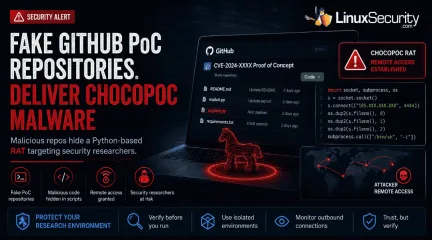
Trojanized GitHub PoC Repositories Deliver ChocoPoC Malware to Security Researchers
GitHub has become the latest delivery mechanism for malware aimed at security researchers. . YesWeHack and Sekoia identified a campaign that hid a Python-based remote access trojan (RAT) called ChocoPoC inside repositories presented as proof-of-concept exploits for recently disclosed vulnerabilities. Someone looking for a working exploit could clone the project, execute the code, and unknowingly launch a second payload that established remote access. Nothing about the campaign specifically targets Linux. The workflow does. Linux remains a common platform for exploit development, reverse engineering, malware analysis, and penetration testing, so it's also a common place to download and test public PoCs. That makes research workstations an appealing target when attackers decide the easiest way to reach an organization is through the people analyzing its vulnerabilities. How Trojanized GitHub PoC Repositories Delivered ChocoPoC Malware The campaign centers on the deployment of trojanized repositories that mimic legitimate exploit research. When a researcher clones and executes the code to validate a vulnerability, the malicious payload executes alongside the advertised exploit. Once the malicious script is triggered, it can establish remote access, allowing attackers to execute commands remotely on the compromised system. The repositories were designed to resemble legitimate security research projects, allowing the embedded malicious code to blend into routine research workflows. The Campaign Highlights a Common Workflow Risk The campaign highlights a standard practice among vulnerability researchers: downloading public proof-of-concept code to validate newly disclosed vulnerabilities. Linux is widely used for these tasks because of its native development tools, scripting ecosystem, and established penetration-testing distributions. Because researchers frequently execute public exploit code during vulnerability validation, Linux research environments can become attractive targets forcampaigns that abuse trusted repositories. Trust Abuse in Open Source Research Workflows ChocoPoC isn't remarkable because of the malware itself. Security researchers have seen Python backdoors before. What stands out is where it was hidden. Public proof-of-concept repositories have become a routine part of vulnerability research, and attackers are now using that expectation against the people who depend on them. This incident is part of a wider pattern of trust abuse on public code-sharing platforms. Academic research presented at USENIX WOOT 2025 in the paper SecurePoC: A Helping Hand to Identify Malicious CVE Proof of Concept Exploits in GitHub demonstrates that malicious and misleading proof-of-concept repositories have become a significant enough problem to warrant dedicated detection research ( USENIX WOOT 2025, el-Yadmani et al. ; Zenodo Artifact ). The researchers identified numerous cloned and modified repositories containing malicious additions, highlighting how public code-sharing platforms have become an attractive distribution channel for malicious proof-of-concept repositories. Why Linux Users Should Pay Attention ChocoPoC is not a Linux-specific threat. The malicious repositories described by YesWeHack and Sekoia could affect researchers working on Windows, macOS, or Linux. What makes the campaign relevant to Linux users is how many security professionals perform vulnerability research. Linux is widely used for penetration testing, exploit development, reverse engineering, and malware analysis. As a result, Linux workstations, virtual machines, and lab environments are common places to clone and execute public proof-of-concept code. The campaign exploits that research workflow, not the operating system itself. For Linux users who regularly test exploits from public repositories, it serves as a reminder that the repository deserves the same level of scrutiny as the vulnerability being investigated. Reducing Risk When Testing Public Exploit Code As public exploitrepositories become a more frequent source of opportunistic attacks, the security of the researcher’s workstation must be prioritized. Researchers should begin by performing a thorough source inspection, reviewing PoC code for obfuscated commands, unexpected network calls, or hardcoded IPs before any execution. Beyond manual review, consider using disposable virtual machines or isolated container environments when validating exploit code to ensure that malicious payloads cannot reach your host filesystem or network. For those working in Windows-based environments, Microsoft has recently launched a public preview of WSL Containers (WSLC), which allows for the creation of native, isolated Linux container environments ( Microsoft Dev Blog ; Microsoft Learn ; WSL API Reference ; Phoronix ). Furthermore, researchers should perform due diligence by assessing repository reputation, commit history, and the author's track record rather than relying on the code’s presence alone. Finally, monitoring outbound network connections during the testing phase is a practical way to identify and block any unexpected traffic generated by a script. Conclusion ChocoPoC serves as a critical reminder that the security industry’s own workflows are now firmly in the crosshairs of threat actors. As public exploit repositories continue to grow in volume, the ability to validate the integrity of the code we download is becoming just as essential as the ability to validate the vulnerabilities the code aims to address. Security professionals must treat unverified PoC code with the same scrutiny as any other untrusted software. . ChocoPoC malware highlights a serious risk in GitHub PoC repositories, impacting security researchers across platforms.. malware delivery techniques, security researcher risks, public code repositories, ChocoPoC attacks. . MaK Ulac
 Jul 02, 2026
•
Jul 02, 2026
• Security Trends
210
 security advisorycriticalrepository
GitHub Actions: Critical Risks from Misconfigured Workflow Triggers
You know how we always preach to secure everything: servers, processes, applications? It turns out that a lot of us missed a serious blind spot hiding in plain sight—CI/CD pipelines, particularly in how GitHub Actions workflows are configured. Sysdig’s Threat Research Team (TRT) recently dropped some eye-opening findings, uncovering dangerous vulnerabilities in workflows for major open-source projects like MITRE and Splunk. These issues aren’t just theoretical risks or something “future-you” can deal with. If you’re a Linux admin or developer involved in open-source projects, this is your nudge to take GitHub Actions security seriously—because bad actors already are. . The culprit? Misusing the pull_request_target trigger. It sounds innocent on paper—running workflows in the context of the base branch—but combine it with some lazy configurations, and you’re practically handing over your secrets and permissions to malicious actors. Let me break down exactly how the exploit works and why we need to address it yesterday. The Problem: Misconfiguring pull_request_target Opens Dangerous Doors Here’s the deal. GitHub Actions is a fan favorite for automating CI/CD pipelines , and it’s easy to see why. Integration with repos is smooth, flexible, and clean, eliminating manual grunt work. But flexibility comes at a cost if you don’t know what you’re doing—just ask Sysdig’s researchers. The pull_request_target trigger does something deceptively risky: it runs workflows in the base branch context (like main ) when processing pull requests from forks. That means it can access repository secrets and the high-privilege GITHUB_TOKEN by default. Here’s where things spiral: if your GitHub Action workflow checks out code from a fork’s head.ref (essentially untrusted pull request code from contributors), it opens the door for an attacker. A crafty user can inject malicious payloads—editing files like setup.py (for Python packages), or requirements.txt —and inone sweep, nab sensitive credentials or even escalate privileges across the repository. Think about it; this isn’t a complex exploit. It’s a glaring weakness, and popular open-source repositories are already vulnerable. Who’s a Sitting Duck? Honestly, this affects a lot of folks. Open-source projects with contributors all over the globe? Yep, you’re in the crosshairs. High-profile repositories like MITRE’s Cyber Analytics Repository or Splunk’s security_content ? Directly exposed. And here’s the gut-punch: many developers just don’t realize how dangerous the default high-privilege permissions tied to GITHUB_TOKEN really are. Combine that with the misuse of workflow triggers like pull_request_target , and you’ve got a recipe for repository-wide chaos. Even worse, this issue isn’t limited to the giants. Many smaller projects are equally at risk simply because workflow security isn’t a high priority (or maybe it’s not well-understood). How Do You Fix This? If reading this made you glance nervously at your own GitHub Actions configuration, you’re not alone. The good news? This isn’t rocket science to fix—it’s just a matter of being proactive and following smarter practices. Stop Using pull_request_target Recklessly Here’s the hard truth: if your workflows involve untrusted code (e.g., contributions from forks), avoid using pull_request_target . Instead, stick to pull_request for safety. Why? Unlike its dangerously convenient cousin, pull_request executes workflows against a pull request’s branch context, limiting exposure of secrets and privileged tokens. If you must use pull_request_target for some reason, block workflows from executing on untrusted foreign code. It’s better to inconvenience contributors a little than to jeopardize your whole repo. Clamp Down on GITHUB_TOKEN Permissions GitHub generously sets the GITHUB_TOKEN permissions high by default, which is a disaster waiting to happen. Adjust those privileges in your reposettings; make them read-only unless absolutely necessary. Better yet, use fine-grained personal access tokens for sensitive workflows where you need more control. Rethink Secret Management Here’s a tip: secrets don’t belong everywhere. Limit their scope to the specific workflows or jobs where they’re actually needed. If your repository secrets can be accessed globally, it’s time to rethink that setup. Apply the principle of least privilege like your job depends on it—because one day, it might. Audit Regularly When was the last time you actually audited your workflows ? If the answer is “never,” now’s a good time to start. Look for dangerous patterns like automatic checkout of pull-request branches, and get yourself some help from security-focused tools. Open-source linters designed for GitHub Actions can flag insecure practices before they become leaks. Train and Spread the Word Let’s be honest: GitHub Actions security isn’t exactly everyone’s favorite lunchtime topic. So make it one. Hold internal sessions, show your devs how GITHUB_TOKEN permissions work, and teach them why certain triggers (like pull_request_target ) are time bombs if misconfigured. Wrapping It All Up GitHub Actions is a great tool—until it isn’t. These workflows might not feel as major as your servers, but make no mistake, misconfigurations can lead directly to repository takeovers. And once sensitive credentials or secrets are exposed, it’s game over. The vulnerabilities discovered in repositories like MITRE and Splunk should be a wake-up call for all of us in the Linux and infosec community. This isn’t about being paranoid—it’s about being aware and acting before bad actors do. So if you haven’t already, start digging into your workflows and lock them down. It’s as much a part of your security stack as managing firewalls or deploying access controls . And the longer you wait, the closer attackers get to turning your CI/CD pipelines into their playground. Don’tgive them that chance. . Misconfiguring the pull_request_target trigger leads to serious security risks in GitHub Actions workflows for open-source projects.. GitHub Actions, CI/CD Security, Open Source Risks, Workflow Vulnerabilities, Secure Configurations. . Brittany Day
Jun 19, 2025
•
Security Vulnerabilities

78
 Ubuntusecurity improvementpackage management
Ubuntu 23.10: Enhanced PPA Management Boosts Security And Reliability
One of the great longtime features of Ubuntu Linux has been Launchpad's Personal Package Archives (PPAs) for easily augmenting the official Ubuntu repositories with additional packages either to supply updated versions of select software or for software not yet found in the official Ubuntu archives. With Ubuntu 23.10 a change is being made in how PPAs are managed to enhance the security and reliability. . Up to this point Ubuntu PPAs were managed via a .list file within /etc/apt/sources.list.d while a GPG keyring was added within /etc/apt/trusted.gpg.d. Starting with Ubuntu 23.10, PPAs will be managed by deb822-formatted .sources files where the keys are directly embedded into the same file. The intent of reworking how the Ubuntu PPAs are managed on user systems is intended to make it easier to also ensure a PPA's associated key is removed from the system if also removing the PPA from the system. The link for this article located at Phoronix is no longer available. . Explore the advancements in Ubuntu 23.10 that revolutionize PPA handling, leading to improved safety and dependability through innovative file structures.. PPA Management, Ubuntu 23.10, Enhanced Security, Software Repositories. . LinuxSecurity.com Team
May 23, 2023
•
Vendors/Products
81
 data collectionsecurity initiativeemail protection
CipherTrust Invites Community To Contribute Spam For Research
E-mail security company CipherTrust wants your spam. The company is calling on surfers of all stripes to help it wage a fight against spam by sending their unsolicited mass e-mail to its new Web site, Spamarchive.org. The idea is to . . . . E-mail security company CipherTrust wants your spam. The company is calling on surfers of all stripes to help it wage a fight against spam by sending their unsolicited mass e-mail to its new Web site, Spamarchive.org. The idea is to create a vast public repository of spam, so makers of antispam tools can test their algorithms on the latest mass-messaging trends. "It's kind of like donating your spam to science," Paul Judge, director of research and development at CipherTrust, said. CipherTrust is soliciting volunteers to help it determine which messages constitute spam. It plans to put the database online in a few days and will collect spam messages on an ongoing basis. The link for this article located at ZDNet is no longer available. . E-mail security company CipherTrust invites all users to donate their spam for research and database building.. Spam Archive,CipherTrust,Email Security,Antispam Tools,Public Repository. . LinuxSecurity.com Team
Nov 22, 2002
•
Privacy

Get the latest News and Insights
Get the latest Linux and open source security news straight to your inbox.
Community Poll
Should Linux servers automatically install security updates?
Trending News
Search Topics
Powered By

Linux Security - Your source for Top Linux News, Advisories, HOWTOs and Feature Releases
QUICK LINKS
subscribe to newsletters!
Like staying secure? So do we.
Sign up for updates, tips, and alerts!