Overly broad permissions can turn one compromised account into a much larger security problem. Learn how to reduce unnecessary access, review privileges, and apply least privilege across modern Linux systems. Review Linux Privileges×


Linux Server Hardening Guide for Secure System Management
 May 20, 2026
•
May 20, 2026
•
 MaK Ulac
6 - 11 min read
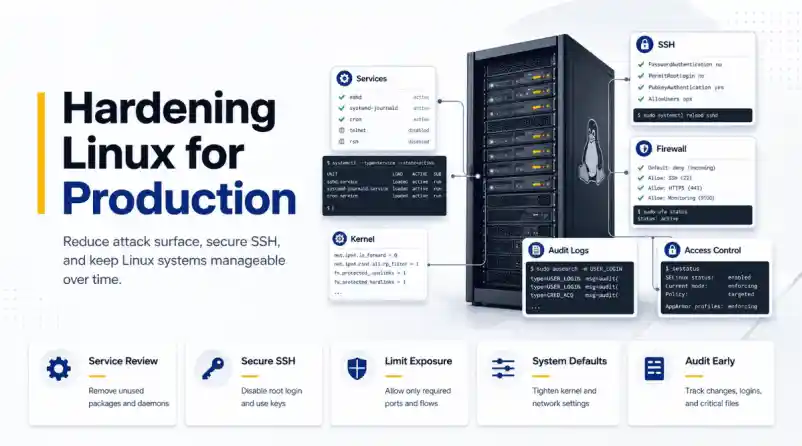

Linux server hardening is mostly about reducing unnecessary exposure while keeping systems stable enough to manage in production. That sounds straightforward until servers start accumulating changes over time. New services get deployed, firewall rules expand, SSH access grows, monitoring tools are added, and temporary operational fixes slowly become permanent parts of the environment.
Most security issues in Linux environments do not come from one catastrophic misconfiguration. They usually appear through drift. Systems become harder to fully understand after months of updates, integrations, administrative changes, and forgotten services continuing to run in the background.
This guide walks through a practical approach to Linux server hardening for beginners. We will focus on reducing attack surface, securing remote access, tightening system defaults, improving visibility, and building operational habits that keep servers manageable long after deployment.
Why Linux Servers Become Less Secure Over Time
Linux servers rarely become insecure because of a single catastrophic mistake. In most environments, security weakens gradually as systems accumulate services, firewall exceptions, SSH keys, monitoring agents, and temporary access rules that are never fully cleaned up.
Over time, administrators may lose visibility into:
- which services are still necessary,
- which ports should remain exposed,
- which accounts still require access,
- and which integrations are still active.
This operational drift increases the attack surface and makes systems harder to manage securely.
Linux server hardening helps reduce that exposure by:
- removing unnecessary services,
- restricting network access,
- tightening administrative controls,
- improving logging and auditing,
- and standardizing secure system defaults.
The goal is not to make Linux harder to operate. The goal is to reduce unnecessary exposure while keeping systems stable and manageable in production.
Start With the Services and Software You Actually Need
Most Linux distributions are built for compatibility first, not minimal exposure. A default installation frequently includes packages and background services that never serve any real purpose once the server moves into production.
Before changing firewall policies or tightening kernel behavior, it helps to understand what the machine is already running today instead of assuming the environment still resembles the original deployment.
We can start by reviewing active services:
systemctl list-units --type=service --state=runningThen inspect which ports are actively listening on the network:
ss -tulpenThis step matters because hardening decisions should always match the actual role of the system. A database server, internal utility host, and public web server all carry different operational requirements, and applying identical restrictions everywhere usually creates unnecessary problems later.
In many environments, reducing the attack surface starts with removing software that quietly stopped serving a purpose months ago. Legacy services like Telnet, FTP, discovery protocols, or printing systems often remain installed simply because nobody revisited them after the initial deployment work was finished.
For example:
sudo systemctl disable --now cupssudo systemctl disable --now avahi-daemonThe same logic applies to package management and patching. Systems need to stay current because attackers routinely target vulnerabilities that already have publicly available fixes, sometimes within days of disclosure, depending on how widely exposed the service is.
On Ubuntu systems:
sudo apt update && sudo apt upgrade -yOn RHEL-based systems:
sudo dnf update -yKeeping systems updated sounds basic, but it remains one of the most important parts of maintaining a hardened environment over time. Hardening is not only about strict configuration changes. A large part of the work comes down to reducing the amount of known vulnerable software still running on the machine in the first place.
Secure SSH Before Tightening Anything Else
For most Linux servers, SSH remains the primary administrative access point. That alone makes it one of the first areas worth reviewing carefully during any hardening effort.
Many default SSH configurations prioritize accessibility over restriction. Password authentication may still be enabled, root login might remain allowed, and unused forwarding features frequently stay active even though nobody actually relies on them operationally.
Before making changes, it helps to back up the current configuration first:
sudo cp /etc/ssh/sshd_config /etc/ssh/sshd_config.backupOne of the most common hardening adjustments is disabling direct root login:
PermitRootLogin noThis forces administrators to authenticate with individual accounts before elevating privileges through sudo, which matters operationally because actions can now be tied back to specific users instead of disappearing into a shared root session that nobody can properly attribute later.
Password authentication is also commonly disabled once SSH keys have been deployed correctly:
PasswordAuthentication no
PubkeyAuthentication yes
Additional restrictions often include reducing authentication attempts, limiting idle sessions, and disabling forwarding features that are unnecessary in most environments:
MaxAuthTries 3
ClientAliveInterval 300
AllowTcpForwarding no
X11Forwarding no
After modifying SSH configuration, the syntax should always be validated before restarting the service:
sudo sshd -tThat habit saves administrators from one of the fastest ways to lose access to a remote Linux system entirely. A small configuration mistake inside sshd_config can break authentication immediately, especially when multiple access methods are being changed at the same time.
Production environments should also maintain some form of console or out-of-band access before major SSH changes happen. Even experienced administrators eventually lock themselves out of a system by accident, particularly during authentication or firewall work where small errors have immediate consequences.
Reduce Network Exposure Carefully
One of the easiest mistakes during Linux hardening is enabling restrictive firewall policies before understanding how the server is actually being used across the environment.
Production systems often have old integrations, monitoring platforms, backup tooling, internal services, or management systems communicating across ports that administrators forgot were exposed months earlier. Everything may look quiet until a firewall rule suddenly interrupts some dependency nobody documented properly.
Before changing firewall behavior, it helps to inspect active listeners again: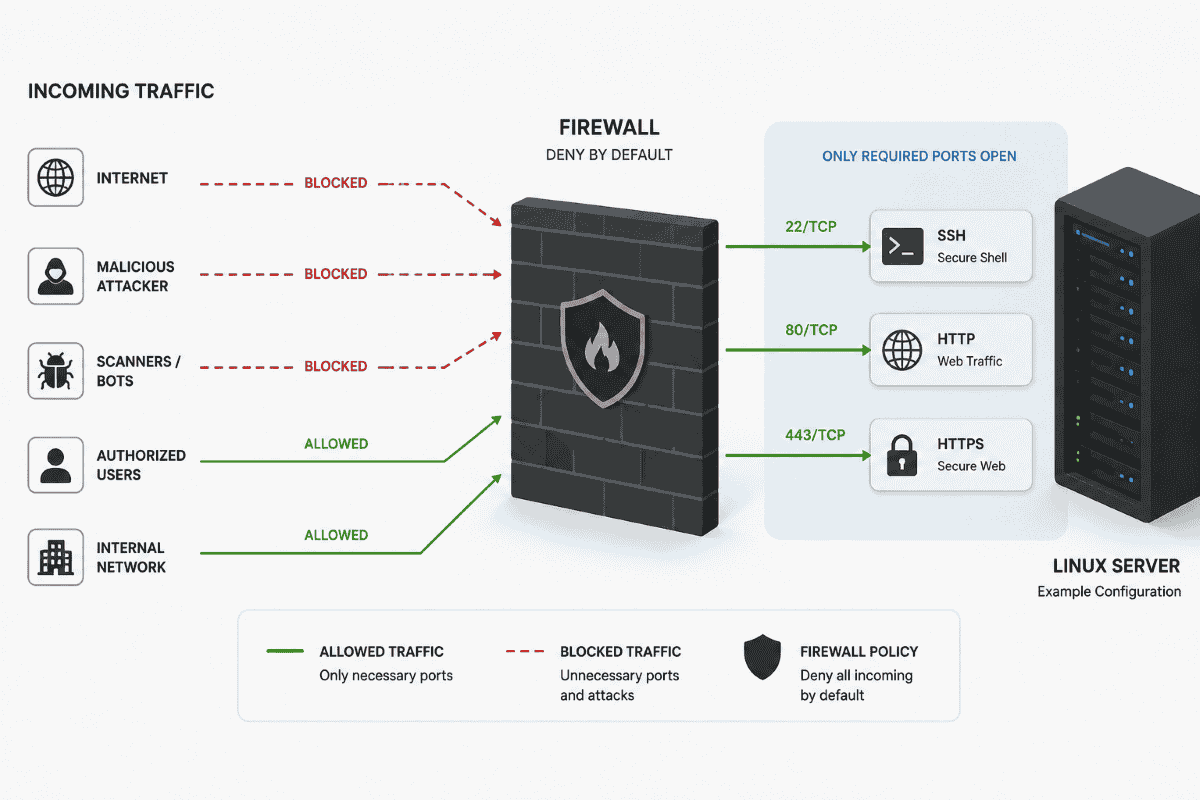
ss -tlnpThat output provides a clearer view of which services remain reachable across the network and whether they still need to exist at all.
In many environments, reducing exposure starts by removing unnecessary listeners before introducing stricter filtering policies. Once administrators understand which services are truly required, moving toward a deny-by-default firewall posture becomes a much safer and far less disruptive operationally.
On Ubuntu systems using UFW:
sudo ufw default deny incoming
sudo ufw default allow outgoing
sudo ufw allow 22/tcp
sudo ufw enable
On RHEL-based systems using firewalld:
sudo firewall-cmd --permanent --add-service=ssh
sudo firewall-cmd --reload
One detail beginners regularly overlook is that SSH access should always be permitted before restrictive firewall rules are enabled. Existing sessions may stay alive temporarily, but new SSH connections can fail immediately if port 22 was never allowed through the firewall policy.
That is also why production hardening work is usually scheduled during maintenance windows instead of happening casually throughout the day. A small firewall mistake can interrupt access faster than most administrators expect, particularly on systems supporting multiple internal dependencies at once.
Harden the Kernel and System Defaults
Linux kernel defaults are generally designed for broad compatibility across many environments. Hardening often involves tightening some of those defaults to reduce risky networking behavior and improve baseline protections.
Most of these changes are managed through sysctl.
A common approach is to create a dedicated hardening configuration under /etc/sysctl.d/:
sudo nano /etc/sysctl.d/99-hardening.confThe settings frequently focus on reducing spoofing risks, disabling unnecessary redirects, and improving memory protections within the kernel itself:
net.ipv4.conf.all.accept_redirects = 0
net.ipv4.conf.default.accept_redirects = 0
net.ipv4.tcp_syncookies = 1
kernel.randomize_va_space = 2
Once changes are added, they can be applied with:
sudo sysctl --systemKernel hardening improves baseline security, though it still needs to be approached carefully in production environments. Certain VPN deployments, routing configurations, or networking setups may rely on behaviors that stricter sysctl policies accidentally interfere with once they are applied broadly.
That is one reason experienced administrators usually implement kernel hardening incrementally instead of dropping dozens of settings onto a production server all at once. Security improvements matter, but stability still matters too, especially when the systems involved support business-critical workloads.
Logging and Auditing Should Happen Early
A hardened server without meaningful logging is still difficult to trust operationally. We may have reduced exposure, tightened SSH access, and restricted open ports, but without visibility, there is still no reliable way to understand what changes are happening on the system or who made them.
This becomes more important as environments grow. Linux servers rarely stay unchanged for very long. New users get added, firewall rules evolve, services move around, and temporary troubleshooting changes sometimes survive far longer than anyone originally intended.
Most Linux systems already provide baseline logging through journald or rsyslog, though audit logging is where hardening starts becoming significantly more useful from an operational perspective. Tools like auditd allow administrators to monitor authentication activity, privilege escalation attempts, and modifications to sensitive configuration files.
On Ubuntu systems:
sudo apt install auditd audispd-pluginsOn RHEL-based systems:
sudo dnf install auditOnce enabled, audit rules can monitor changes to files such as /etc/passwd, /etc/shadow, and SSH configuration files. That is one reason audit logging appears so consistently throughout CIS benchmark guidance and other hardening frameworks used in enterprise environments.
The value is not only prevention. It is accountability and visibility after changes occur, especially when multiple administrators or automation systems interact with the same infrastructure over long periods of time.
In larger environments, logs are often forwarded off the server entirely because attackers frequently attempt to remove evidence once they gain access to a machine. Remote logging helps preserve visibility even if the local host itself can no longer be trusted after compromise.
SELinux and AppArmor Are Often Disabled Too Quickly
Mandatory access control systems like SELinux and AppArmor provide some of the strongest protections available on modern Linux systems, though they are also among the first features administrators disable during troubleshooting when applications stop behaving as expected.
Part of the frustration comes from how restrictive these systems can initially feel. Applications that worked normally before may suddenly lose access to files, ports, or resources once policies start being enforced correctly.
In reality, that restriction is exactly the point.
SELinux and AppArmor They are designed to limit what applications are allowed to do even after a compromise. A vulnerable web process, for example, may still be prevented from reaching sensitive areas of the operating system because the policy surrounding that process restricts its behavior independently of traditional file permissions.
On Ubuntu systems, AppArmor status can be checked with:
apparmor_statusOn RHEL systems:
sestatusFor beginners, permissive or complain mode is usually the safest place to begin. This allows policy violations to be logged without immediately blocking activity, which makes troubleshooting significantly easier while administrators learn how the policies behave across their own workloads and applications.
Mandatory access controls require tuning over time, but they add an important layer of containment that traditional permissions alone simply do not provide once an application becomes compromised.
Hardening Works Best When It Becomes Routine
Linux hardening works best when it becomes part of regular operational maintenance instead of a one-time security project completed during deployment and forgotten afterward. Servers continue evolving long after launch. New applications appear, administrators rotate, temporary exceptions get added, and systems slowly drift away from their original state as operational complexity increases.
What matters most is keeping the environment understandable while those changes continue to happen. A hardened server should still remain manageable, observable, and predictable after months or years of production use instead of becoming something administrators are afraid to touch because nobody fully understands how it evolved.
Frameworks like CIS Benchmarks help provide structure, but even strong baselines still require testing, review, and adjustment based on the actual role of the server and the operational realities surrounding it.
Hardening is not about enabling every possible restriction available in Linux. The real goal is reducing unnecessary exposure while keeping the system stable enough to support the work it was originally built to handle.
Related Reading
- Linux Server Hardening Guide 2026 SSH Backup Strategies
- Comprehensive Linux Security Tools and Hardening Best Practices 2026
- SELinux Configuration Guide: Best Practices for Secure Linux Systems
- What Is SELinux? A Practical Take for Linux Admins
- Auditd vs eBPF: Modern Approaches to Linux System Monitoring
- Securing Linux Servers: Best Practices Against Modern Threats
 PREVIOUS

 NEXT
NEXT

Powered By

Linux Security - Your source for Top Linux News, Advisories, HOWTOs and Feature Releases
QUICK LINKS
subscribe to newsletters!
Like staying secure? So do we.
Sign up for updates, tips, and alerts!