Overly broad permissions can turn one compromised account into a much larger security problem. Learn how to reduce unnecessary access, review privileges, and apply least privilege across modern Linux systems. Review Linux Privileges×


Linux Server Advisory Unused Kernel Modules Threats CVE-2026-31431
 May 19, 2026
•
May 19, 2026
•
 MaK Ulac
5 - 10 min read

Topics Covered
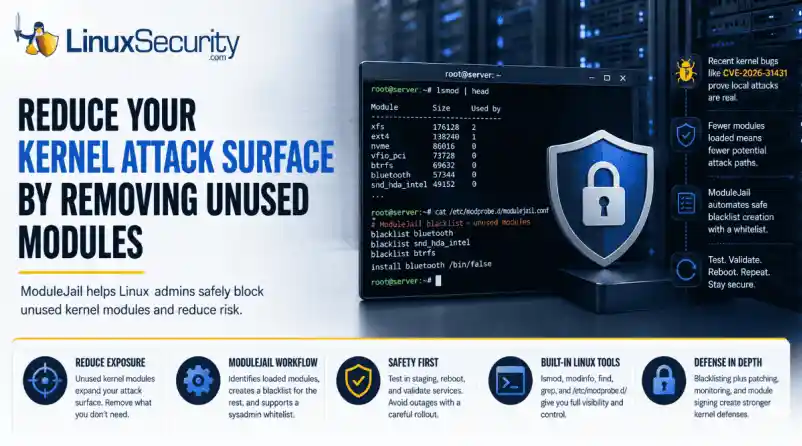
Your Linux server may be carrying kernel code for hardware, filesystems, cryptographic interfaces, and network features it will never use.
That extra flexibility is useful until one of those unused paths becomes part of an attack. Kernel modules help Linux support a wide range of systems, but they also expand what an attacker may be able to reach after gaining local access.
In this article, we’ll look at why unused kernel modules deserve more attention, how ModuleJail can help admins reduce unnecessary exposure, and what precautions teams should take before blacklisting modules in production.
Why Kernel Modules Deserve More Attention
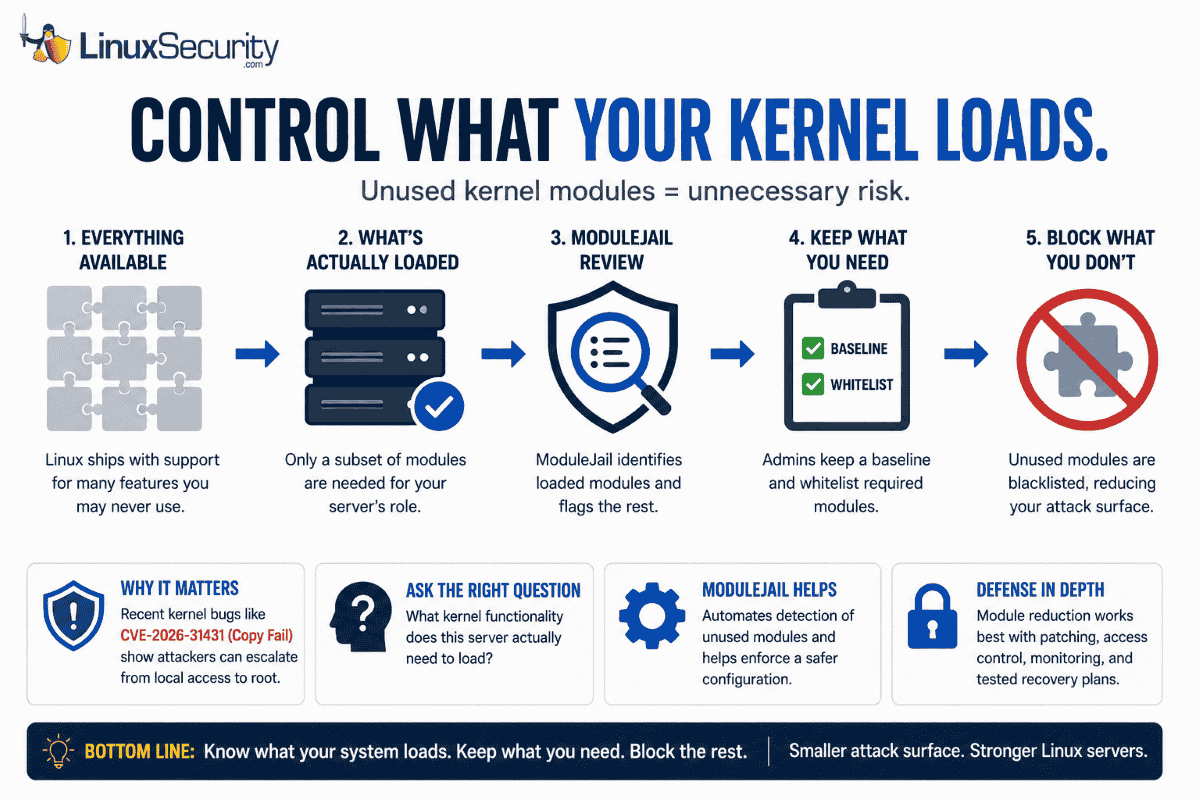
Linux admins already think about patching, SSH hardening, firewall rules, access control, and endpoint monitoring. Kernel modules deserve the same attention. Recent Linux kernel privilege-escalation bugs make this more than a theoretical concern. Microsoft reported that CVE-2026-31431, also known as “Copy Fail,” is a high-severity local privilege-escalation vulnerability affecting multiple major Linux distributions, including Red Hat, SUSE, Ubuntu, and AWS Linux.
Recent kernel bugs show why this matters. CVE-2026-31431, nicknamed “Copy Fail,” gave attackers a path from local access to root on several major Linux distributions. CISA later added it to its Known Exploited Vulnerabilities catalog, which is enough reason for admins to take kernel exposure seriously.
This does not mean admins should panic over every kernel module. It does mean they should ask a practical question: what kernel functionality does this server actually need to load?
That is where ModuleJail comes in. Instead of asking admins to build a blacklist from scratch, it checks which modules are actually loaded and helps block the ones the system is not using. Admins can keep a baseline list and add their own whitelist so required modules do not get caught in the cleanup.
Why Kernel Modules Deserve More Attention
A Linux kernel module is code that can be loaded into the running kernel when needed. Kernel modules commonly support hardware drivers, filesystems, network features, cryptographic functions, virtualization support, and other system capabilities.
That modularity is one of Linux’s strengths. It lets distributions support a wide range of use cases without forcing every feature into one fixed kernel image.
But there is a tradeoff. A general-purpose Linux system may include module support for far more functionality than a specific server needs.
A web server probably does not need many desktop hardware drivers. A database server may not need uncommon filesystems. A cloud instance may not need device support intended for physical workstations. A container host may need some kernel features but not every module available in the distribution’s kernel package.
Unused functionality can sit quietly for years. Then a vulnerability appears, a proof-of-concept exploit follows, and a subsystem nobody considered becomes part of the attack path.
Red Hat’s documentation explains that blacklisting can be used for performance or security reasons to prevent a system from using certain kernel modules. It also notes that this is handled through modprobe configuration files under /etc/modprobe.d/.
For admins, that makes kernel module review a real hardening task, not just a theoretical security idea.
Admin takeaway: If a module is not required for the system’s role, hardware, storage, networking, security tools, or recovery process, review it as part of your attack-surface reduction plan.
Where ModuleJail Fits
ModuleJail is useful because it turns a messy hardening idea into a repeatable workflow.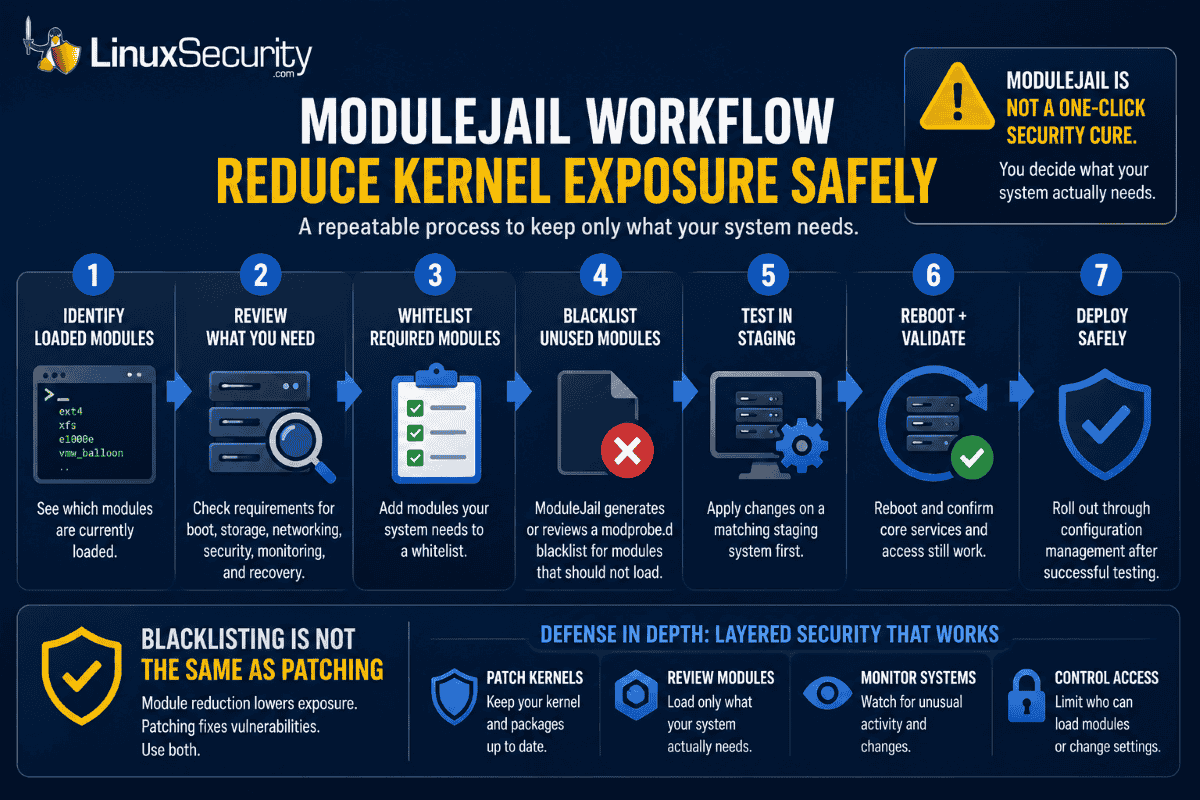
Instead of forcing admins to manually guess which modules should be blocked, ModuleJail looks at the modules currently in use and generates one modprobe.d blacklist file for unused modules, while preserving a baseline and allowing an optional sysadmin whitelist.
That matters because kernel module reduction is easy to understand but hard to do safely. A system may rely on modules for storage, networking, VPNs, containers, backup agents, endpoint tools, hardware monitoring, or recovery access. Blocking the wrong module can create downtime.
A safer workflow looks like this:
- Identify which modules are loaded now.
- Review what the system needs for boot, storage, networking, security, monitoring, and recovery.
- Add required modules to a whitelist.
- Generate or review blacklist entries for modules that should not load.
- Test the result on a matching staging system.
- Reboot and validate core services.
- Roll out through configuration management only after testing.
This is where Dave would probably want the article to be very clear: ModuleJail is not a one-click security cure. It is a tool that can help admins start the review process, but the final decision still belongs to the admin who understands the system’s role.
Blacklisting Is Not the Same as Patching
Blacklisting unused modules can reduce exposure, but it does not replace kernel updates. Treat module reduction as one layer in a defense-in-depth strategy alongside patching, monitoring, access control, and tested recovery plans.
What Module Blacklisting Actually Does
Linux module blacklisting is usually handled through files in /etc/modprobe.d/.
A basic blacklist entry looks like this:
blacklist module_nameThat tells modprobe not to automatically load that module. In some cases, admins may also use an install rule to prevent a module from being inserted through normal modprobe paths:
install module_name /bin/falseThat stronger approach should be used carefully. It can make sense for modules that should never load on a given system, but it can also break hardware, storage, or security tooling if applied without testing.
A good review process starts with visibility:
lsmodUse modinfo to inspect an unfamiliar module:
modinfo module_nameFind available kernel object files for the running kernel:
find /lib/modules/$(uname -r) -type f -name "*.ko*"Review existing blacklist rules:
grep -R "blacklist" /etc/modprobe.d/Check for existing module install overrides:
grep -R "^install" /etc/modprobe.d/After applying a blacklist policy, reboot a test system and confirm the module is not loaded:
lsmod | grep module_nameIf something breaks, rollback should be simple: remove or comment out the relevant blacklist or install rule, then reboot or reload the module if appropriate.
For example:
sudo sed -i '/module_name/d' /etc/modprobe.d/modulejail.conf
sudo reboot
The exact file name may differ depending on how the blacklist was created. The important point is that admins should know which file changed before they deploy the policy.
How Admins Should Review Kernel Module Exposure
Start with inventory, not enforcement.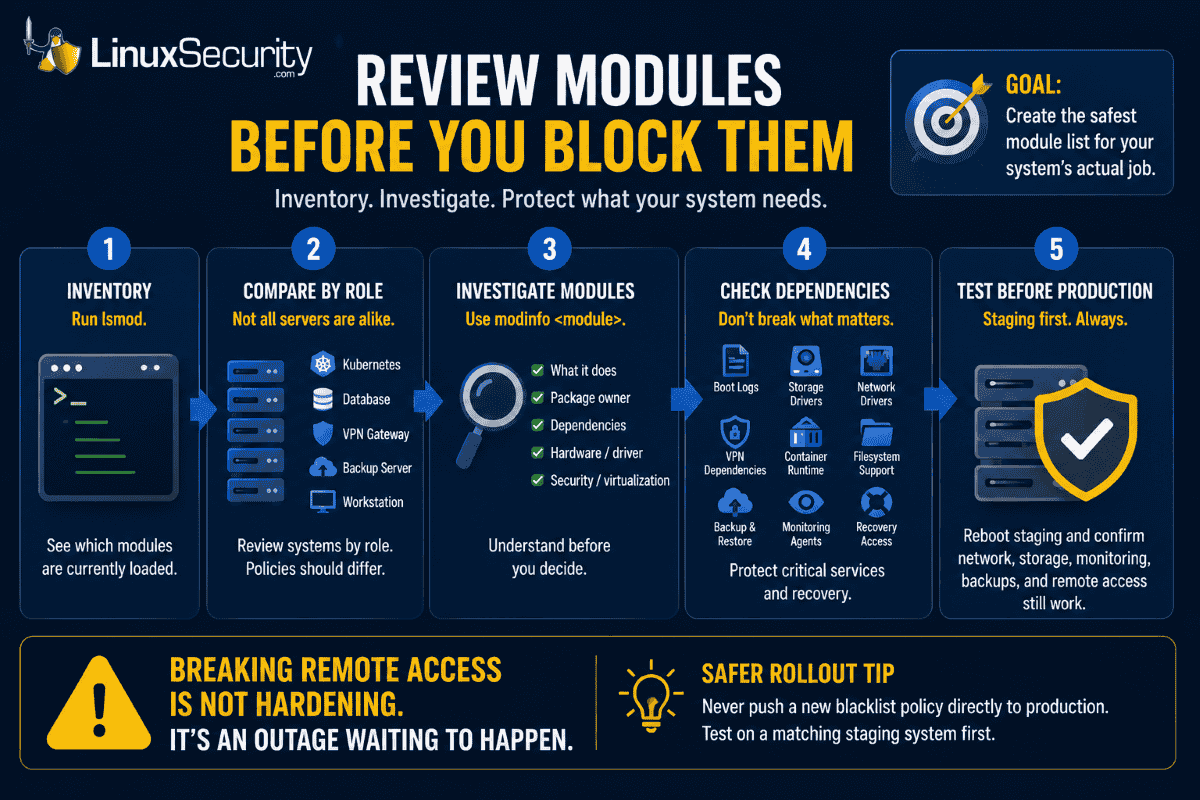
Run lsmod on representative systems and compare results by role. A Kubernetes worker, database server, VPN gateway, backup server, and developer workstation should not automatically share the same kernel module policy.
Then investigate unfamiliar modules:
modinfo Look for what the module does, which package owns it, whether it has dependencies, and whether it is tied to hardware, storage, networking, filesystems, security tooling, or virtualization.
Admins should also check:
- Boot logs
- Storage drivers
- Network interface drivers
- VPN dependencies
- Container runtime requirements
- Filesystem support
- Backup and restore tools
- Endpoint detection or monitoring agents
- Hardware management tools
- Out-of-band recovery requirements
The goal is not to create the shortest possible module list. The goal is to create the safest module list for that system’s actual job.
A blacklist policy that breaks remote administration, storage mounting, monitoring, or recovery access is not a security improvement. It is an outage waiting to happen.
Safer Rollout Tip
Do not apply a new blacklist policy directly to every production server. Test it first on a matching staging system, reboot, and confirm that networking, storage, monitoring, backups, and remote access still work.
Don’t Forget Module Signing
Blacklisting unused modules reduces what should be loadable. Module signing helps verify whether a module should be trusted before it loads.
The Linux kernel documentation explains that the kernel module signing facility cryptographically signs modules and checks those signatures when modules are loaded. It can increase security by making it harder to load unsigned modules or modules signed with an invalid key.
These controls solve different problems.
Blacklisting is about reducing unnecessary exposure. Module signing is about trust and integrity. Used together, they can make kernel module abuse harder.
Admins in higher-security environments should also review Secure Boot, kernel lockdown mode, vendor module policies, and how third-party drivers are handled. Out-of-tree modules from vendors, monitoring agents, storage tools, or security products may need special attention.
Practical Hardening Checklist
Use this as a starting point for a kernel module review: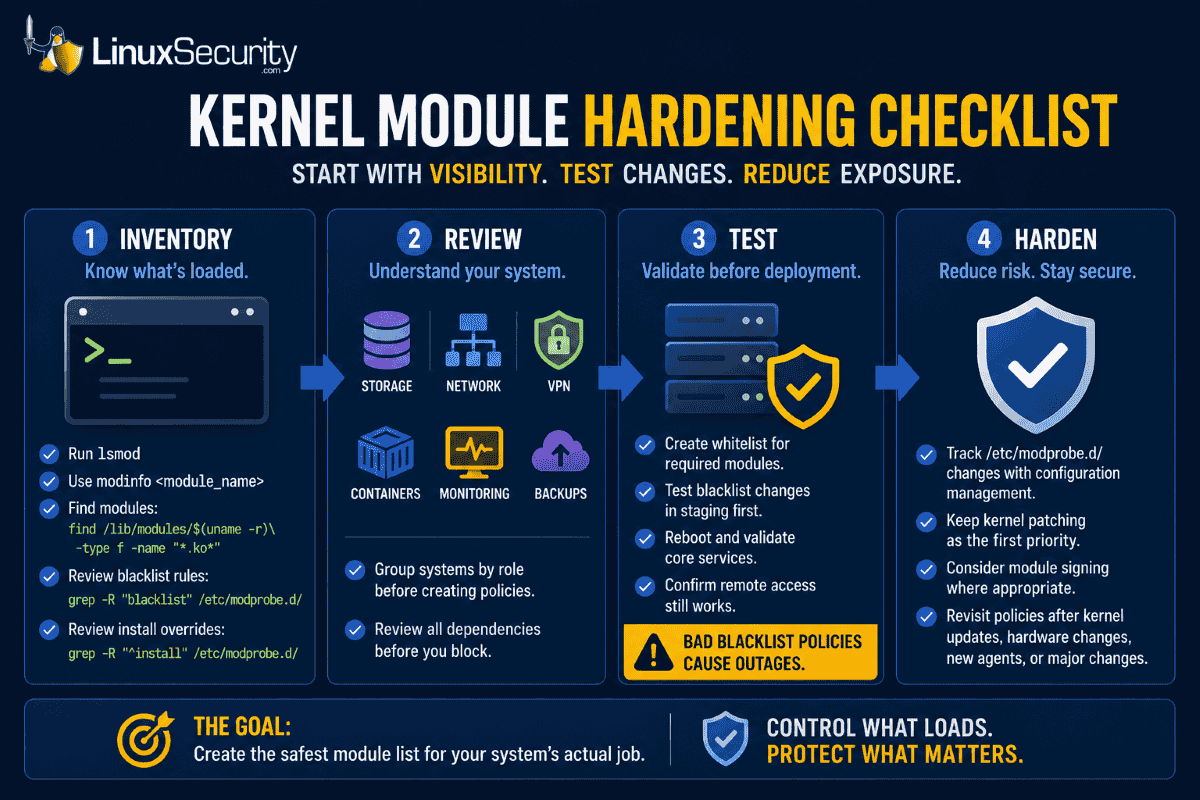
- Run
lsmodto identify currently loaded modules. - Use
modinfoto investigate unfamiliar modules. - Find available modules with
find /lib/modules/$(uname -r) -type f -name "*.ko*". - Review existing rules with
grep -R "blacklist" /etc/modprobe.d/. - Review install overrides with
grep -R "^install" /etc/modprobe.d/. - Group systems by role before creating policies.
- Review storage, network, VPN, container, monitoring, and backup dependencies.
- Create a whitelist for required modules.
- Test blacklist changes in staging first.
- Reboot after changes and validate core services.
- Confirm remote access still works before broad deployment.
- Track
/etc/modprobe.d/changes through configuration management. - Keep kernel patching as the first priority.
- Consider module signing where appropriate.
- Revisit module policies after kernel upgrades, hardware changes, new agents, or major application changes.
This process gives admins a practical middle ground. It does not require rebuilding the kernel or redesigning infrastructure. It starts with visibility, then moves toward controlled reduction.
Why This Matters Now
Most servers are not custom-built from the kernel up. They start with a general-purpose distribution, which means they often inherit support for hardware, filesystems, and drivers that have nothing to do with the workload they actually run.
That broad support is convenient. But convenience can create unnecessary exposure.
Kernel vulnerabilities will continue to appear. Some will affect common subsystems. Others will involve functionality that many admins did not realize was present or reachable. The best response is not only to patch faster, but also to reduce the amount of unnecessary kernel functionality exposed in the first place.
That is what makes ModuleJail interesting. It gives admins a concrete way to ask a better security question: what does this machine actually need to load?
The Bottom Line
Unused kernel modules are easy to forget because most admins rarely interact with them directly. But attackers do not care whether a vulnerable subsystem is part of your normal workflow. They care whether it can help them gain access, escalate privileges, or weaken the system.
ModuleJail brings attention back to a practical Linux hardening habit: know what your systems load, know what they need, and restrict what they do not.
For Linux admins, the best next step is not to blindly blacklist half the kernel. It is to start a disciplined review of module exposure across critical systems.
Patch your kernels. Audit your modules. Test your blacklist policies. Keep a whitelist. Document rollback steps before production deployment. And for more practical Linux hardening guidance, subscribe to the LinuxSecurity newsletter for weekly security updates, admin checklists, and real-world defense strategies.
Related Articles
- Ubuntu Copy Fail High Local Privilege Escalation Kernel Exploit 2026-31431
- Linux Kernel Fragnesia Critical Privilege Escalation CVE-2026-46300
- Exploring Kernel Hardening Trends for Enhanced Upstream Security Controls
- Comprehensive Linux Security Tools and Hardening Best Practices 2026
- Secure Boot: Enhancing Linux Security from Firmware to Kernel
 PREVIOUS
 NEXT
NEXT

Powered By

Linux Security - Your source for Top Linux News, Advisories, HOWTOs and Feature Releases
QUICK LINKS
subscribe to newsletters!
Like staying secure? So do we.
Sign up for updates, tips, and alerts!