Overly broad permissions can turn one compromised account into a much larger security problem. Learn how to reduce unnecessary access, review privileges, and apply least privilege across modern Linux systems. Review Linux Privileges×


Detecting Systemd Abuse on Linux Servers for Better Security
 May 19, 2026
•
May 19, 2026
•
 MaK Ulac
4 - 8 min read
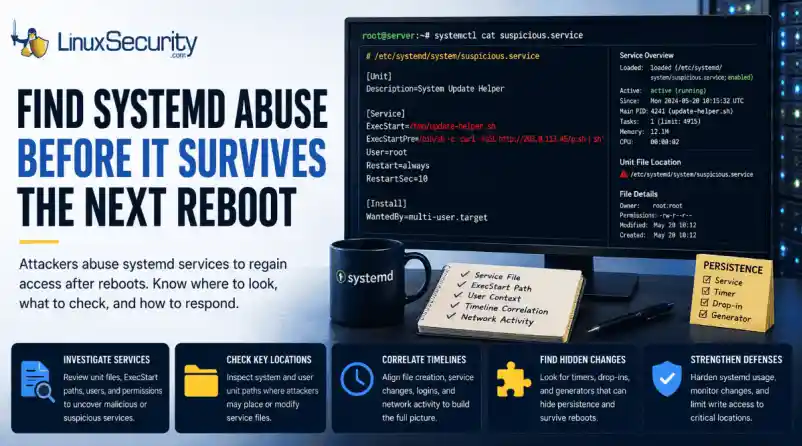

A Linux process that keeps coming back after a reboot is worth slowing down for. It may not crash anything. The name may look like normal maintenance, the server may keep serving traffic, and nothing on the box may feel urgent enough to pull an incident handler away from other work.
That is why systemd abuse sits quietly. If an attacker controls a service, they can bring their code back after every restart without needing the original foothold to still work. The process parent may look normal because systemd starts a lot of normal things. The unit file is where the useful answers usually start.
Today, we will walk through how systemd persistence works, where attackers place or alter service files, and what defenders should review during triage.
What is Systemd
Systemd manages background services on many Linux systems. When a server boots, it starts the pieces that need to run without a user typing commands—SSH, logging, networking, web servers, databases, monitoring agents, and backup tools. Normal work.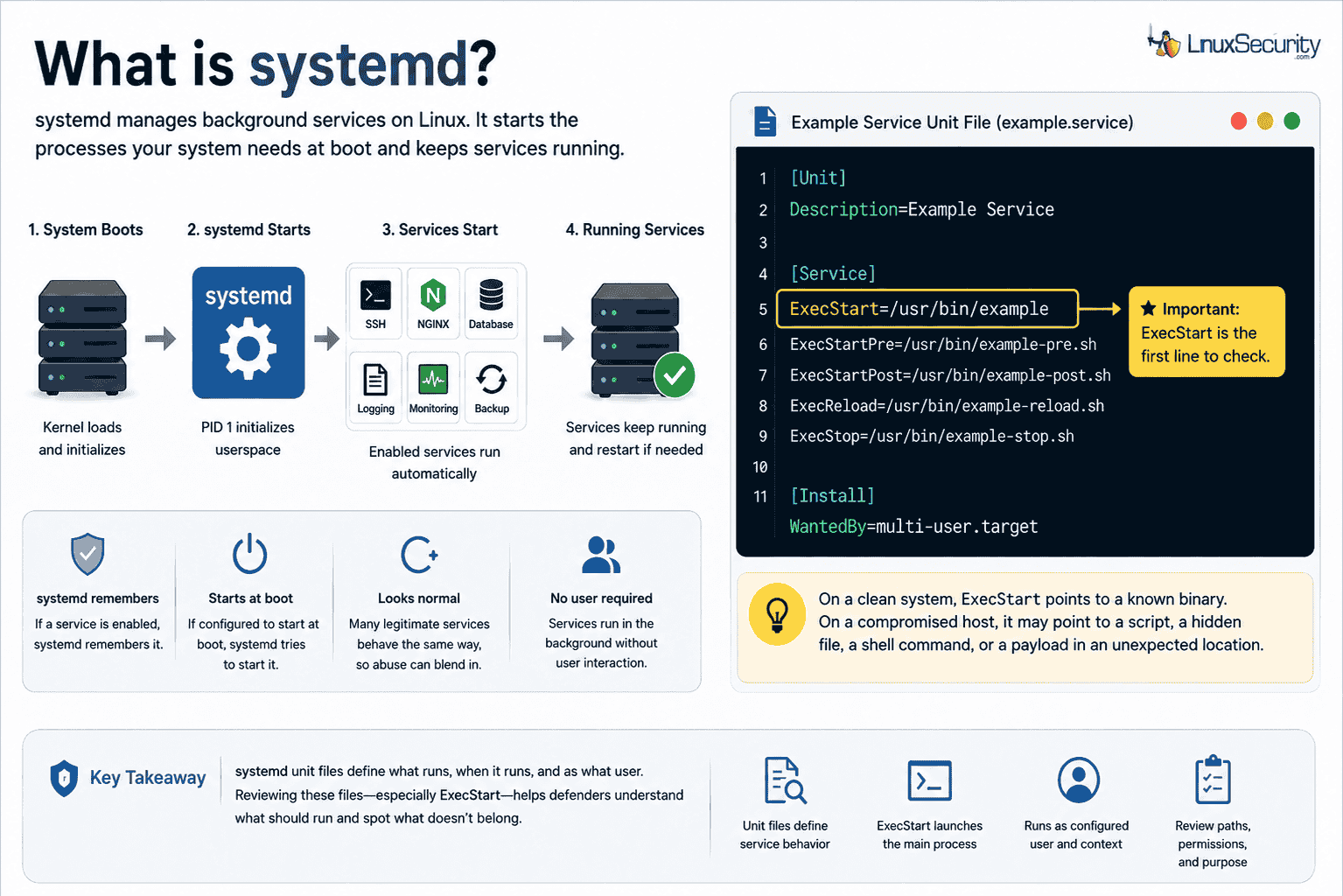
That trust is the point. If a service is enabled, systemd remembers it. If the service is configured to start at boot, systemd tries to start it. Since plenty of legitimate services behave the same way, a malicious process does not look weird by itself.
Services are defined in unit files (e.g., .service). They tell systemd what the service is called, when it should run, and what command should start.
Ini, TOML
[Unit]
Description=Example Service
[Service]
ExecStart=/usr/bin/example
[Install]
WantedBy=multi-user.target
For defenders, ExecStart is the line to read first. On a clean system, that points to a known binary. On a compromised host, it may point to a script, a hidden file, a shell command, or a payload stored somewhere it has no business living.
Why Attackers Use Systemd After Access
Systemd abuse shows up after the attacker is already on the machine. Now they need it to survive. That survival is persistence. If the server reboots, the original process dies, or the first access path gets closed, the attacker still wants a way back in. A service is useful because it is built to survive reboots and run without user interaction.
The attacker does not need a complicated change. They may create a new service that launches their tool, or they may alter an existing service so it runs one extra command. One bad path in one service file can be enough. A suspicious process may show systemd as the parent, which looks normal at first glance. It only becomes useful when you tie the process back to the service definition, file path, timestamp, and user context.
Investigating the Service File
ExecStart matters most because it launches the main process, but it is not the only field worth checking. Services can run commands before startup, after startup, during reload, or during shutdown. Fields worth reviewing include:
- ExecStart=
- ExecStartPre=
- ExecStartPost=
- ExecReload=
- ExecStop=
- ExecStopPost=
The presence of these fields does not make a service malicious—legitimate services use them all the time. The question is whether the command fits the host. A database service launching a known database binary is expected. A generic-looking service spawning /bin/bash from a writable directory is a different problem. User context matters, too. If an attacker controls where the service runs and which account it runs under, persistence can turn into a privilege issue pretty quickly.
Where Attackers May Place Files
Systemd reads unit files from multiple locations.
System-level:
- /etc/systemd/system/
- /usr/lib/systemd/system/
- /lib/systemd/system/
- /run/systemd/system/
User-level:
- ~/.config/systemd/user/
- ~/.local/share/systemd/user/
- /etc/systemd/user/
That split matters. Not every attacker starts with root. A compromised user account may still be able to create user-level persistence. On servers, defenders often focus on system-wide paths; if the activity is tied to a specific user account, the user-level paths need review too.
When Normal Activity Starts Looking Wrong
A server may have hundreds of service files. Some came from the OS, others from packages, administrators, or monitoring tools. A raw list without context gets noisy fast.
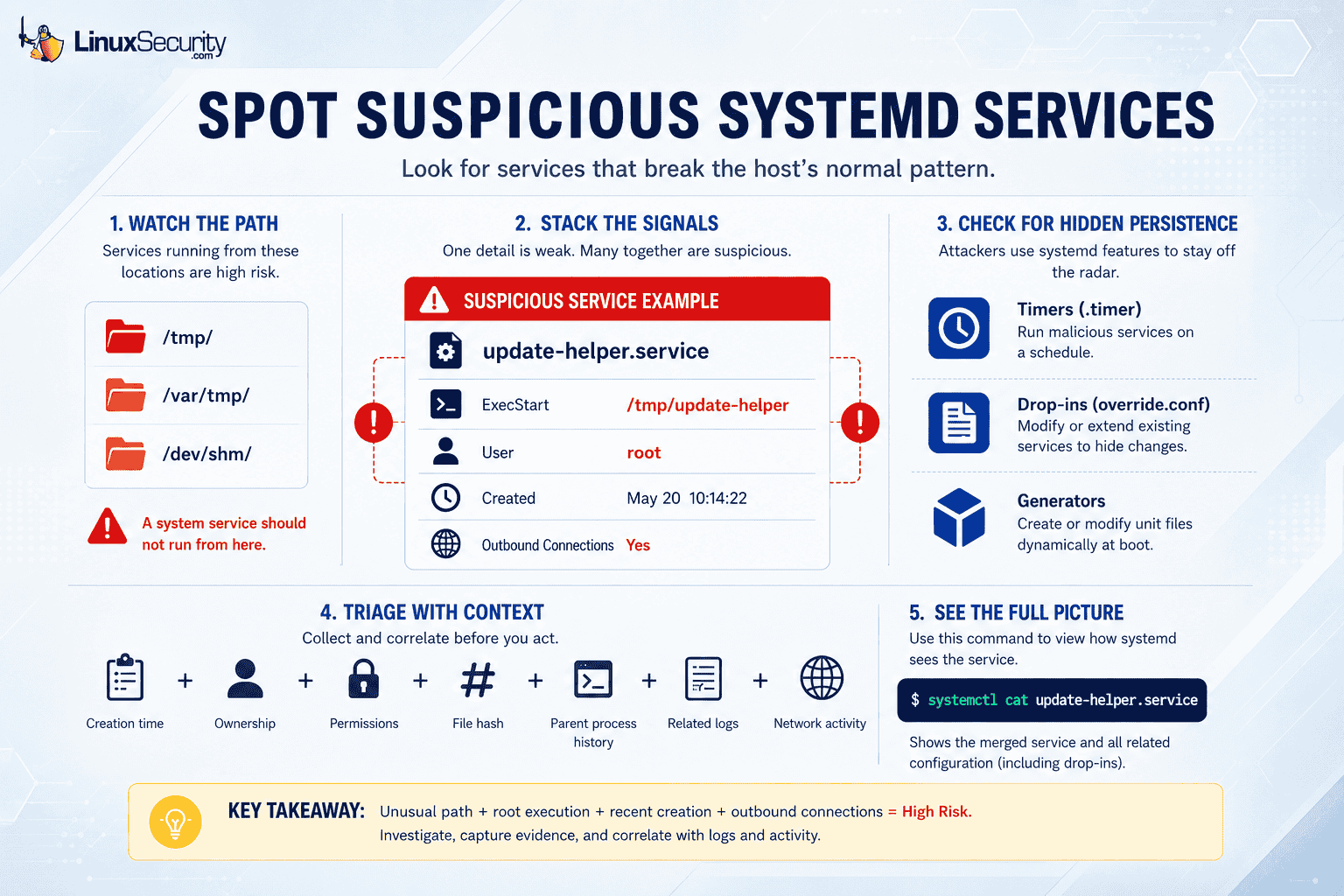
A better first move is to look for services that break the host’s pattern. A production web server should look different than a database server or a developer box. Suspicion usually comes from stacked details. A vague service name alone is weak. But a vague service created after suspicious access, launching a file from /tmp, running as root, and making outbound connections is no longer just noise.
Paths That Deserve a Slower Review
Temporary and memory-backed locations are common places for attacker files because they are writable and easy to use:
- /tmp/
- /var/tmp/
- /dev/shm/
A durable system service should usually not run from those locations. If you see ExecStart=/tmp/update-helper, do not just delete it. Capture the creation time, ownership, permissions, hash, and parent process history. Then line it up with logins, web requests, privilege changes, downloads, and outbound network activity.
Timers, Drop-ins, and Generators
- Timers: An attacker can use .timer units to launch a service on a schedule. If a malicious service runs every hour and exits, it may not show up in a process list.
- Drop-ins: These override or extend an existing service without replacing the original unit file. Administrators use this for clean changes; attackers use it to hide modifications.
- Generators: These create or modify unit files dynamically during boot or reload, making the source of the configuration less obvious.
Pro-Tip: Use systemctl cat service-name.service. This command shows how systemd sees the service, including related configuration content. During triage, that view is more useful than reading one file in isolation.
Basic Commands for a First Review
A first pass does not need fancy tooling. Use these to show what is loaded and what a specific service actually runs:
- List unit files: systemctl list-unit-files --type service
- List loaded units: systemctl list-units --type service
- Inspect service: systemctl status service-name.service
- View full configuration: systemctl cat service-name.service
- Review timers: systemctl list-timers --all
How to Triage a Suspicious Service
Start with preservation. Before removing anything, capture the service file, related timers, drop-ins, symlinks, file metadata, hashes, and process details.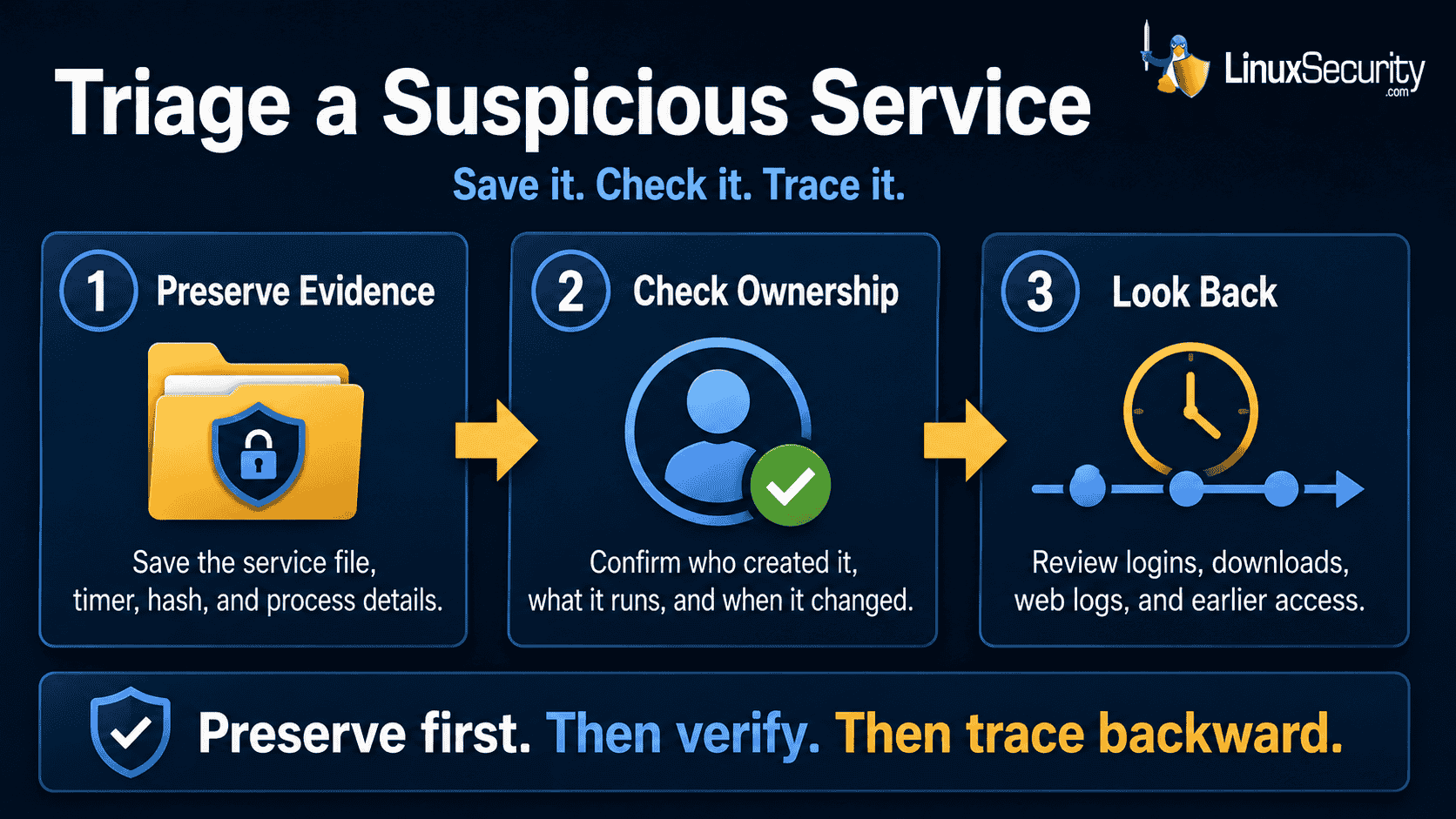
Next, determine if the service has a legitimate owner. Was it created by a package manager, deployment tool, or administrator? Does the timestamp match a maintenance window? Then review the command being executed. If the service runs a script, read the script. If that script calls another file, follow the chain.
Finally, look backward. Systemd persistence usually appears after initial access. Review recent authentication events, web logs, suspicious downloads, and other persistence mechanisms.
Hardening and Monitoring
Limit who can write to systemd directories. System-wide locations should be restricted to privileged users and trusted tools. User-level paths should not be ignored.
Monitoring should cover both file changes and activation. A .service file written to disk is useful to know. A service written, followed by daemon-reload, enable, and start, is more useful. Baselines help: important servers should have a known set of enabled services. When something new appears, your team should be able to decide whether it came from a planned change or belongs in the incident queue.
If You Confirm Abuse
Treat confirmed systemd abuse as an incident response, not a cleanup. If the host is talking to the attacker's infrastructure, prioritize containment.
- Stop and disable: sudo systemctl stop service-name.service, and sudo systemctl disable service-name.service.
- Handle timers: If a timer is involved, stop and disable that as well.
- Search the environment: Search for the same service name, path, hash, and network destination elsewhere.
Systemd persistence is often one piece of a larger compromise. Cleaning up the service without finding the original access path often leaves the server ready for reinfection.
Conclusion
Systemd is trusted Linux plumbing. That trust is why attackers abuse it. A service file restarts a payload; a timer brings it back on a schedule; a drop-in quietly alters a known service; a generator makes the trail harder to trace.
Defenders do not need to know every systemd feature to start improving coverage. You need visibility into service creation, modification, activation, and execution paths. When a suspicious service appears, treat it as evidence of a bigger story. The service shows how the attacker planned to stay. The next work is to determine how they arrived, what else they changed, and whether the same pattern exists elsewhere.
Related Articles
- Understanding Linux Persistence Mechanisms and Detection Tools
- Enhancing Security by Fortifying Systemd Services Effectively
- Linux EDR: Essential Tool for Cybersecurity and Incident Response
- Linux Security 2026 Hardening Monitoring and Real-World Defense
- Manage Linux Services to Enhance Security and System Hardening
 PREVIOUS

 NEXT
NEXT
Powered By

Linux Security - Your source for Top Linux News, Advisories, HOWTOs and Feature Releases
QUICK LINKS
subscribe to newsletters!
Like staying secure? So do we.
Sign up for updates, tips, and alerts!