Explore top 10 tips to secure your open-source projects now. Read More
×


Soco404: Linux Cryptomining Campaign Masquerades as 404 Error Pages
 Jul 28, 2025
•
Jul 28, 2025
•
 Brittany Day
4 - 7 min read

Topics Covered
Let’s talk about something that’s been slipping under the radar: Soco404. If you manage Linux systems in any capacity—or just spend time keeping production environments stable in the face of constant threats—this discovery warrants your immediate attention. What you’ve got here is a sneaky cryptomining campaign that digs into misconfigured PostgreSQL databases, outdated Apache Tomcat servers, and poorly secured cloud setups. The reason it’s making waves? It pulls off its moves while hiding behind fake 404 error pages.
Think about that for a second: A process on your box could be quietly mining cryptocurrency for someone else, blending into your system under names like sd-pam or kworker/R-rcu_p, while all you noticed was maybe a sluggish system or a spike in CPU usage during a downtime window. Let’s dig into what’s going on here, how the attackers are pulling it off, and what you can do to keep your servers out of their crosshairs.
How Does Soco404 Work?
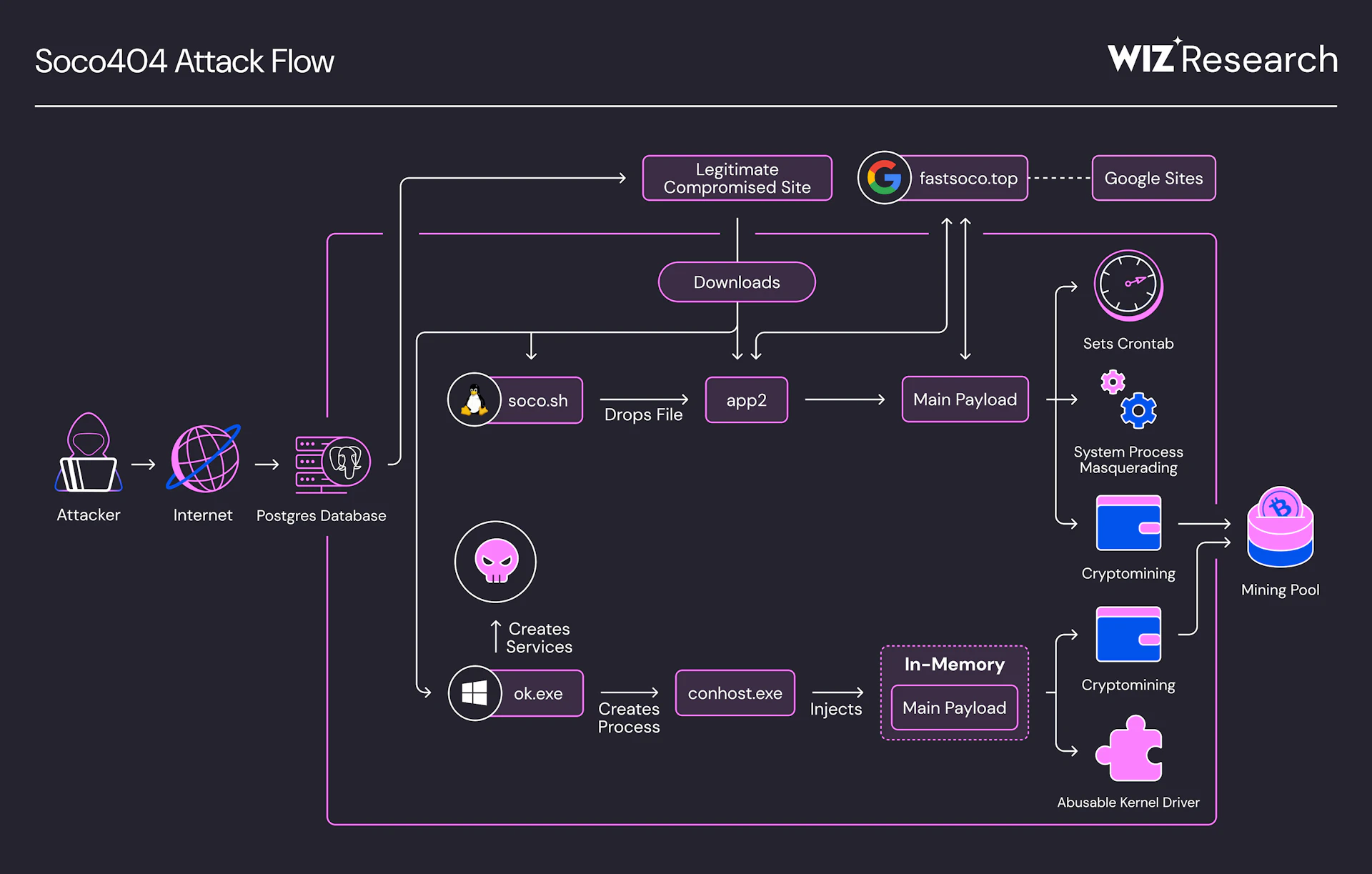 Soco404 Attack Flow (source: Wiz)Soco404 doesn’t hit you head-on. It’s more like one of those pickpockets who distracts you with a smile while slipping your wallet out of your pocket. Its tactics involve exploiting small cracks in your setup—misconfigured PostgreSQL installs, weak Tomcat credentials, or other exposed cloud services—and turning those into entry points for distributing cryptomining malware.
Here’s a breakdown of how they pull it off:
PostgreSQL: A Silver Platter for Attackers
PostgreSQL is a solid database, no doubt—but it can also turn into a liability if you leave doors open. Attackers in this campaign are taking advantage of public-facing PostgreSQL instances where authentication isn’t configured properly. Once in, they use the COPY ... FROM PROGRAM feature to execute code directly on your machine. Their weapon of choice? A malicious script called soco.sh. It works stealthily, downloading additional payloads and executing them without ever touching disk—so antivirus tools? Useless here.
Weak Apache Tomcat Servers
Got an Apache Tomcat installation running with default or weak credentials? You’re in the danger zone. Soco404 exploits either poor password hygiene or specific vulnerabilities (like CVE-2025-24813) to hijack these servers. From there, it can host malicious binaries like the oddly named app2, which handle the cryptomining tasks. What’s clever—though infuriating—is how the attackers sometimes disguise their payloads on Google Sites or dress up malware delivery as innocent-looking 404 error pages.
The Part That’ll Keep You Up at Night
Once Soco404 has found its way in, it’s crafty about staying there. The attackers clearly know that admins look for anything out of place, so they’ve fine-tuned how their malware blends into typical server activity.
- Process Masquerading: You'll find it tucked away as processes like sd-pam or even cpuhp, both of which sound harmless at first glance but are anything but.
- Persistence? Practically Guaranteed: It buries cron jobs into your system, running every minute to make sure that even if you kill the process, it comes back like clockwork. It also modifies shell initialization files like
.bashrcor.profile, meaning every new shell session could potentially reload the infection. - Cleaning House: Oh, and while it’s at it, Soco404 deletes logs—you know, the very same logs you’d normally rely on to investigate intrusions. So don’t rely on /var/log/wtmp or /var/log/secure to tell you a neat little story. They’ll be blank.
What Does It Want? (Hint: It’s Not Your Data)
Let’s not beat around the bush here: Soco404 isn’t trying to steal sensitive information. It wants your CPU cycles—your server’s processing power—to mine cryptocurrency, often for coins like Monero. The malware connects to mining pools like c3pool or moneroocean using a wallet controlled by the attacker. You end up footing the power bill; they reap the digital profits.
Indicators You’ve Been Hit: What to Watch For
 If you think you’re in the clear, you might want to double-check. Here’s what stands out when Soco404 sets up shop in your environment:
- Weird Processes Running: Check for anything masquerading as sd-pam, kworker/R-rcu_p, or cpuhp.
- Odd Cron Jobs: Look for recently added cron entries that keep firing every minute. If something doesn’t look familiar, don’t ignore it.
- Suspicious CPU Spikes: If your server’s cooking without a good reason, dig deeper. Mining workloads are heavy on the processor.
- Possible IoCs: These include malware hosted at URLs like
http://or:8080/soco.sh https://www[.]fastsoco[.]top. and the known attacker wallet:8BmVXbfsnRsiyPfUxsfnyyA9LqXvUsF2DYBX3wUmCEtejnBMyTiXe3XDCvq4...(yeah, it’s long).
How Can I Fight Back?
No one wants to spend days cleaning up a cryptominer and rebuilding compromised servers. The good news? You can protect yourself without overhauling everything. Here’s where you should start:
Harden PostgreSQL
If you’re running PostgreSQL, the first thing to verify is that it’s locked down. Don’t leave it exposed publicly. Use a VPN to move it into a private network or restrict access by whitelisting specific IPs. Disable the COPY ... FROM PROGRAM feature unless you absolutely need it—it’s a frequent attack vector. Finally, make sure your authentication is solid: enforce strong passwords and employ role-based access control. Weak login policies aren’t an option anymore.
Secure Tomcat
Tomcat servers are another popular target. Keep your Tomcat installation up to date, as attackers often exploit known vulnerabilities like CVE-2025-24813. Check and eliminate weak credentials—administrator accounts like admin/admin123 are an open door for attackers. Make sure all passwords are complex and hard to guess.
Monitor for Anomalies
 Proactive monitoring is crucial. Regularly review cron jobs and user initialization files like
 .bashrc to catch suspicious modifications. Use tools like auditd to track unexpected privilege escalation or commands being run in the background. Keep an eye on your system’s CPU usage with top or htop, as unauthorized cryptominers often create unusually high and unexplained loads.
Restrict External Traffic
Limit external exposure of your services. Anything like PostgreSQL, Tomcat, or other applications shouldn’t be open to the internet unless absolutely necessary. Use firewalls, security groups, or private subnets to restrict traffic. Design your network to only allow essential external communication.
Hunt the Malware
If you suspect an infection, start investigating runtime binaries. Look for UPX-packed files or obfuscated binaries, as attackers like to employ these techniques. Use file integrity monitoring tools like FIM or OSSEC to detect unauthorized changes to critical system files—pay extra attention to sensitive files like /etc/ld.so.preload, which attackers often tamper with.
Our Final Thoughts: Stay Vigilant
 Soco404 highlights something many admins already know but still occasionally forget: attackers don’t always need some dramatic zero-day exploit to waltz into your environment. Sometimes, a simple misconfiguration or weak password is the only thing standing between them and your servers.
If you’re running Linux systems—whether bare metal, virtualized, or in the cloud—this is a wake-up call. Keep your PostgreSQL installs locked down, maintain tight control over Tomcat servers, and start treating every CPU cycle your systems burn as valuable. Because if you don’t, someone else will.
Stay curious, stay vigilant, and above all, stay in control!
 PREVIOUS

 NEXT
NEXT

Powered By

Linux Security - Your source for Top Linux News, Advisories, HOWTOs and Feature Releases
QUICK LINKS
subscribe to newsletters!
Like staying secure? So do we.
Sign up for updates, tips, and alerts!