


Stay Ahead With Linux Security Features
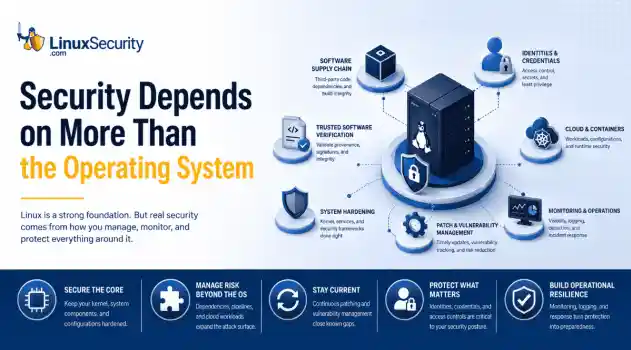
 security advisory risk management
 If more than 12 million enterprise systems can be exposed by flaws in a security control designed to harden Linux, it's probably worth asking whether Linux gives people a false sense of security. That's a question that has come up repeatedly throughout 2026. . This year alone, researchers have disclosed privilege-escalation vulnerabilities, root-level kernel flaws, and multiple supply-chain compromises affecting Linux environments. That doesn't mean Linux suddenly became insecure. It means...
 Jun 15, 2026
  security advisory attack
 A Linux server gets cleaned up after an intrusion. The suspicious process is terminated, credentials are rotated, and the system is rebooted during maintenance. Everything seems secure. A few hours later, the same outbound connection appears again. . Situations like that point to persistence . The attacker no longer needs the original exploit because something on the host continues restoring access behind the scenes. Finding that mechanism is often more important than understanding how the...
Jun 08, 2026  threat detection scalability
 Building a SIEM is easier than scaling one. Most open-source deployments start as a simple "all-in-one" server. It is easy to set up, but that design rarely survives the transition from a lab to a production workload. . A SIEM watching 20 endpoints is not doing the same job as one watching 500. More endpoints mean more logs; more logs require more storage; more storage makes search heavier. Eventually, the very architecture that made your lab easy to deploy becomes the reason your production...
Jun 04, 2026  security advisory apache
 A newly disclosed attack technique called HTTP/2 Bomb is drawing attention because it targets the software that sits at the front of much of the Linux internet. Apache HTTP Server, NGINX, Envoy, and the ingress layers that many Kubernetes environments depend on can be forced into consuming disproportionate amounts of memory using relatively small amounts of attacker traffic. . For Linux administrators, the concern is not the HTTP/2 protocol itself. It is the possibility that a single...
Jun 04, 2026  security advisory important
 The compromise of Nx Console shows how much infrastructure now sits behind a single developer account. GitHub repositories, CI/CD pipelines, container build systems, Terraform projects, Kubernetes deployments. None of those systems was the initial target. The workstation was. . Attackers did not need a Linux privilege escalation bug or a remote code execution chain. They needed developers to trust a tool they were already using. For many organizations, that was enough. What Happened? Federal...
Jun 03, 2026  Refine features
X Clear Filters Get the latest News and Insights
Get the latest Linux and open source security news straight to your inbox.
Community Poll
Is automated patching safe for servers?
Loading...

Explore Latest Linux Security features
We found -4 articles for you...
102
 incident responseLinux administrationsystem defense
Red Team Blue Team Insights for Linux Admins: Key Security Roles Explained
If you manage Linux systems long enough, you start to notice that most security conversations are not really about attackers or tools. They are about pressure. Uptime targets that do not move. Patch windows that keep shrinking. Audits that ask for proof you did the right thing six months ago. Incidents that blur together because the alerts never quite stop. . This is where the red team vs. blue team discussion actually lands for a Linux admin. Not as theory, but as something that quietly shapes your day. At a basic level, red teams simulate real Linux breach paths with authorization, while blue teams are responsible for detection, response, and hardening. Some organizations also talk about purple teams, which exist to turn findings into concrete improvements. The labels vary, but the dynamics are consistent. Why Does Red vs. Blue Matter to You as a Linux Admin? Red team activity influences the controls you are asked to deploy, while blue team priorities influence which alerts wake you up at night. Together, they shape the tools you are expected to run, tune, justify, and explain during audits. Even if your org doesn’t use these titles, the work still shows up as testing, audits, hardening requests, and detection tuning. In Linux security, red team and blue team efforts tend to surface through their downstream impact, such as a new logging requirement that lands in your backlog. OR, an SSH hardening change is becoming urgent overnight. An auditor may even ask how you detect privilege escalation, not whether it happened. Those requests usually trace back to red team findings, blue team gaps, or both. It helps to stop thinking of red team vs. blue team as abstract security functions. In practice, they are two opposing pressures acting on the same environment you are responsible for keeping stable. One side tests how Linux systems fail. The other tests whether those failures would be noticed and contained. Once you see it that way, the question shifts. It is no longer “whyshould I care?” It becomes “how does this change what I touch every day?” What a Red Team Really Is, From Your Side of the Console From a Linux admin’s perspective, a red team usually enters the picture after something uncomfortable happens. A report lands in your inbox. A meeting appears on your calendar with security, engineering, and maybe compliance. The findings reference systems you know well, sometimes a little too well. A red team is best understood as an authorized adversary focused on outcomes, not checklists. Their job is to see how far they can go once they touch a Linux environment, using the same paths a real attacker would try first. That focus tends to stay close to the operating system. Long-lived servers with uneven patch histories Containers with shared kernels and thin isolation boundaries SSH access that grew organically over years Sudo rules that made sense at the time Kernel features or defaults that trade visibility for performance This is where red team blue team work intersects directly with Linux security. The red team is not looking for every possible flaw. They are looking for the ones that chain together. It helps to be clear about what a red team is not. Not a vulnerability scan that dumps hundreds of CVEs with no context Not a penetration test limited to a single app or IP range Not an exercise designed to embarrass admins or operators A quick distinction makes this clearer. Red team: objective-based adversary emulation, often mapped to real threat behavior Pen test: scoped testing of specific systems or applications Vulnerability scanning: automated discovery of known issues When red teams focus on Linux, the value shows up in the gaps they expose. These are rarely exotic zero-days. More often, they are ordinary conditions that only become dangerous in combination. Services listening where no one remembered to look Privilege boundaries that exist on paper but not in practice Trustrelationships between systems that were never revisited Attack paths that cross hosts, containers, and users without tripping alarms From your side of the console, this can feel disruptive. But it is also one of the few ways to see how your Linux environment behaves under real pressure, not ideal assumptions. Red team findings tend to reveal how systems evolved, not how they were designed. That context becomes important when the blue team, or you, has to decide what actually gets fixed. What a Blue Team Does, and How You’re Already Part of It If the red team shows how Linux systems can be pushed, the blue team lives with what happens next. In most environments, that work looks a lot like system administration, whether or not anyone calls it blue team. At its core, a blue team is responsible for defending production Linux systems. That means visibility, response, and stability, usually all at once. For Linux security, those responsibilities overlap heavily with what admins already do to keep systems running and compliant. You see this most clearly in the day-to-day tasks. Reviewing logs from journald, auditd, or centralized logging pipelines Making sense of SIEM alerts that are high-volume, delayed, or incomplete Applying patches that affect uptime, performance, or kernel behavior Enforcing SELinux or AppArmor profiles without breaking workloads Hardening SSH, sudo, and firewall rules while users still need access This is why many Linux admins are already functioning as part of the blue team. You are the one translating security signals into system-level decisions. That role usually breaks down into three patterns. First responder when something looks wrong and no one else owns it yet System stabilizer who contains issues without escalating every anomaly Security signal interpreter who decides which alerts matter and which do not In red team blue team terms, this is where Linux security becomes practical. Blue team work is less aboutstopping every possible attack and more about making sure real attacks are visible, survivable, and explainable after the fact. Compliance reinforces this. Frameworks like PCI DSS, SOC 2, or ISO 27001 rarely ask whether an attack happened. They ask how you would know, what you would do, and how quickly you could prove it. For Linux admins, those answers usually live in logging configuration, access controls, and incident response habits. Over time, you start to notice that blue team maturity is not measured by the number of tools deployed. It shows up in fewer surprises, cleaner audit trails, and incidents that feel contained instead of chaotic. That is the context blue teams operate in, and why Linux admins end up at the center of it, even when security is someone else’s job on paper. Red Team vs. Blue Team Is Not Adversarial, It’s a Feedback Loop From the outside, red team blue team work is often framed like a contest. One side attacks. The other defends. Someone “wins.” In real Linux environments, that framing breaks down quickly. What actually happens is closer to a feedback loop. One side tests assumptions. The other side learns which of those assumptions hold up under pressure. Red team findings tend to do two useful things at once. They validate what you already suspected, and they invalidate what quietly stopped being true. Controls that looked solid on paper but failed in practice Risks that were considered theoretical until they showed up in a chain Gaps in detection that only appear once real behavior hits the logs For Linux security, this is especially important. Many hardening decisions involve tradeoffs. Performance versus visibility. Simplicity versus isolation. Red team activity forces those tradeoffs into the open. On the other side, the blue team's response shapes what actually improves. Detection rules become more specific and less noisy Incident response playbooks get grounded in real system behavior Linux hardening standardsstop being generic and start being situational This is where the idea of a purple team comes in. Not as a new org chart box, but as a way of working. Purple team efforts focus on making sure red team activity results in blue team improvements, rather than reports that age out in a ticket system. In practice, friction shows up before collaboration does. Red team activity accidentally impacts production workloads Alerts fire, but with low confidence and unclear ownership Findings compete with feature work and get deprioritized No one is sure who owns the fix once the report is delivered This is also where Linux admins tend to get pulled in. Modern security teams are usually split across several functions. SOC teams own alert monitoring and initial triage Security engineering owns the detection logic and control design DevSecOps owns pipeline checks and build-time enforcement SRE or platform teams own uptime, performance, and recovery Linux admins intersect with all of them. You are often the one who understands how a control behaves under load, how a fix affects uptime, and whether a recommendation fits the system as it actually exists. When the loop works, red team activity makes blue team work more precise, and blue team feedback makes red team testing more realistic. The environment improves, not because one side wins, but because the assumptions keep getting corrected. What Outputs and Deliverables Do Admins Actually Receive? When red team blue team work is described abstractly, it can sound vague. In practice, it produces very concrete artifacts that land on an admin’s desk. Understanding these outputs helps set expectations and makes it easier to decide what deserves attention first. From the red team side, the most visible deliverable is the report. For Linux security, a useful report usually goes beyond a narrative of what was compromised. Common elements include: A description of the attack path, step by step, across Linuxhosts or containers Evidence tied to specific systems, users, services, or configurations Mapping to MITRE ATT&CK techniques relevant to Linux environments Identification of detection gaps, not just exploited weaknesses This is where red team work becomes actionable. A finding that says “ privilege escalation was possible” is less useful than one that shows which sudo rule, kernel setting, or service interaction made it possible. What happens next depends on blue team and admin involvement. Red team findings are usually translated into work that looks more familiar. Remediation tickets tied to specific hosts or configuration changes Updates to Linux hardening standards or baseline images New or adjusted logging requirements for auditd, process execution, or authentication Detection use cases added to a SIEM or endpoint tool For admins, this translation step is often where the real effort lives. It is one thing to agree that a gap exists. It is another to implement a fix that does not break workloads, violate change controls, or introduce new instability. Over time, you start to recognize that the most valuable red team outputs are not the most dramatic ones. They are the findings that cleanly connect behavior to evidence, and evidence to a change you can actually make. When that connection is clear, blue team work becomes less reactive. Instead of chasing alerts, you are closing specific loops. A report becomes a hardening update. A detection gap becomes a logging decision. Linux security improves incrementally, in ways you can explain during the next audit or incident review. How Do Red Teams and Blue Teams Play Out in Real Linux Environments? Once you move past definitions and reports, red team blue team work becomes easiest to understand through patterns that repeat across Linux environments. These are not edge cases. They are the same scenarios showing up in different forms, across different orgs. Red teams tend to focus on attack paths that feelordinary because they often are. SSH key sprawl, where access persists long after ownership changes Credential reuse across hosts, service accounts, or automation Sudo configurations that grew permissive over time World-writable services, scripts, or cron jobs that no one revisits Container escape attempts that rely on misconfigured runtimes or shared mounts These paths rarely rely on a single mistake. They work because several small decisions line up. A key never rotated. A log never reviewed. A permission granted to solve a short-term problem. Blue team impact shows up in how those paths are detected and contained. Broader and more consistent logging coverage across hosts and workloads Alert thresholds that reflect real Linux behavior instead of defaults Process execution and authentication signals that can be correlated Security controls that protect systems without degrading performance In Linux security, this balance matters. Overly aggressive controls can create their own risk by pushing teams to bypass them. Blue teams that work closely with admins tend to aim for visibility first, then enforcement. You can usually tell when this alignment is working. Alerts start to carry context. Findings reference actual system behavior, not assumptions. Hardening changes feel deliberate instead of rushed. This is the practical side of red team blue team collaboration. It is not about simulating the most advanced attacker. It is about making sure common failure modes are visible, explainable, and harder to repeat the next time. What If You Don’t Have a Formal Red or Blue Team? Many Linux environments never have a team labeled red or blue. That does not mean the work is not happening. It usually means it shows up under different names and at different times. External audits are a common example. An auditor reviewing Linux security controls is effectively testing blue team assumptions. A penetration test, even a limited one, often plays the role of alightweight red team. Compliance-driven assessments ask the same questions red and blue teams ask, just with less context about how systems actually behave. In these environments, the red team blue team distinction becomes more about mindset than structure. Red thinking shows up during hardening and design. Asking how a misconfiguration could be chained with another Looking at access paths that cross hosts, users, and services Treating convenience exceptions as temporary, not permanent Blue thinking shows up in daily operations. Making sure logs exist before you need them Tuning alerts so they reflect real Linux behavior Practicing containment and recovery, not just prevention For Linux admins, this often aligns naturally with existing workflows. Hardening standards already reflect red team thinking, even if they came from past incidents instead of exercises. Incident response runbooks reflect blue team priorities, even if they were built reactively. The key difference in smaller or less formal setups is ownership. Without named teams, fixes can drift. Findings lose urgency. The important findings get buried under routine work like patching, access requests, and incident cleanup Admins tend to stabilize this by anchoring security work to things that already matter. Change management. Audit evidence. System reliability. When red and blue concepts are tied back to those anchors, they stop feeling optional. You do not need a formal program to benefit from red team blue team thinking. You need a habit of asking how Linux systems fail, and how you would know when they do. What Does Red vs. Blue Mean for You Going Forward? Once the red team blue team model clicks, it changes how you evaluate security work. Not in sweeping ways, but in small, practical decisions that add up over time. You start prioritizing fixes differently. Issues that break absolute attack paths move ahead of theoretical ones. Changes that improve visibility become easier to justify, evenwhen they do not block anything outright. In Linux security, that often means choosing better logging and clearer ownership over adding another control. Communication shifts as well. Red team findings become easier to explain when you can connect them to system behavior you recognize. Blue team recommendations land better with leadership when they are framed in terms of detection confidence, recovery time, and audit readiness instead of fear. This perspective also helps during incidents. When something goes wrong, you are not starting from zero. You already understand which assumptions were tested, which controls were supposed to work, and where gaps were previously identified. Response becomes faster because the context is already there. For Linux admins, this is where the role becomes more than operational. You sit between simulated attacks and real systems. You see which security ideas survive contact with production and which ones need adjustment. Red team blue team work, when taken seriously, turns Linux security into a continuous process rather than a series of one-off events. Over time, that consistency is what reduces surprise, shortens incidents, and makes audits feel less adversarial. The model does not change your job overnight. It changes how you think about it, and that tends to show up everywhere else. FAQs: Red vs. Blue Teams in Linux Security What is the difference between a red team and a blue team in Linux security? In Linux security, the red team simulates how an attacker would actually move through Linux systems, starting with realistic access and chaining misconfigurations, permissions, and trust relationships. The blue team focuses on whether that activity would be detected, contained, and explained using logs, alerts, and response processes tied to Linux hosts and workloads. Is red team blue team work only for large organizations? No. The labels are more common in larger orgs, but the activities show up everywhere. A penetration test, an external audit, oreven a post-incident review often fills the same role. Linux admins in smaller environments usually carry blue team responsibilities by default, even if no one calls it that. How does this relate to Linux compliance requirements? Most compliance frameworks care less about whether an attack happened and more about visibility and response. Red team activity helps validate whether required controls actually work. Blue team practices, such as logging, access control, and incident handling, provide the evidence auditors ask for. Linux security controls are often where that evidence lives. Do red teams try to break production systems? They should not, but it can happen. Well-run red teams coordinate scope and safety controls to avoid outages. When issues do occur, it often exposes unclear ownership or risky configurations that were already present. From a Linux admin perspective, these moments tend to highlight where guardrails are missing. What tools do blue teams rely on in Linux environments? Blue team work in Linux security usually depends on a mix of native and external tooling. Common examples include auditd, journald, centralized log aggregation, SIEM platforms , endpoint detection tools, and configuration management systems. The effectiveness comes less from the tools themselves and more from how consistently they are tuned and maintained. Is purple team a separate team I need to build? Not necessarily. Purple team is more about collaboration than structure. It describes the process of turning red team findings into blue team improvements. In many environments, Linux admins play a key role in this by translating findings into hardening changes, logging updates, or operational fixes. How can a Linux admin prepare for red team activity? Preparation usually starts with visibility. Making sure logs are complete, access paths are documented, and ownership is clear reduces friction when testing happens. Admins who understand common Linux attack paths tend to get more value out of redteam results because the findings map cleanly to real systems. What if red team findings conflict with uptime or performance goals? This is common. Linux security often involves tradeoffs. The goal is not to implement every recommendation blindly, but to understand the risk being addressed and adjust controls accordingly. Blue team input, combined with admin experience, usually leads to a balanced outcome. How often should red team blue team exercises happen? There is no universal schedule. Some organizations run them annually, others after major changes, and some only after incidents. What matters more is whether findings lead to lasting improvements in Linux security, rather than how frequently tests occur. Does red team blue team work replace vulnerability management? No. Vulnerability scanning and patching remain essential. Red team blue team work complements them by showing which issues matter most in practice and whether defenses would catch real exploitation. In Linux environments, this often helps prioritize patching and hardening efforts more effectively. The Bottom Line: How Are Red vs. Blue Teams Impacting Linux Security Administration? Red team blue team work shapes Linux security, whether or not it is formalized. Red teams expose how Linux systems can actually be abused, often through ordinary configurations that accumulate over time. Blue teams, and the admins who support them, turn those lessons into detection, response, and resilience. For Linux admins, the impact is practical. Clearer priorities. Better audit evidence. Fewer surprises during incidents. The real outcome is not about who wins an exercise. It is about how much stronger and more understandable your environment becomes after assumptions are tested and corrected. . Explore how red and blue teams shape Linux security for admins; enhance response, detect issues, and improve resilience.. Linux administration, security role, incident response, red team, blue team. . Brittany Day
 Jan 07, 2026 •

Get the latest News and Insights
Get the latest Linux and open source security news straight to your inbox.
Community Poll
Is automated patching safe for servers?
Search Topics
Powered By

Linux Security - Your source for Top Linux News, Advisories, HOWTOs and Feature Releases
QUICK LINKS
subscribe to newsletters!
Like staying secure? So do we.
Sign up for updates, tips, and alerts!
Discover faster search, smarter navigation, and deeper Linux security insights. Read More