Overly broad permissions can turn one compromised account into a much larger security problem. Learn how to reduce unnecessary access, review privileges, and apply least privilege across modern Linux systems. Review Linux Privileges×


Stay Ahead With Linux Security HOWTOs

How to Secure My Network incident response network traffic
incident response network traffic Imagine logging into a production Linux server for routine maintenance and noticing background network activity connecting to an unfamiliar external IP address. Your endpoint protection agent is not popping up with an alert, there is no service failure, and on the surface, the system appears to be running normally. . For Linux administrators and security teams, such a situation is a moment of truth: Is this activity a sign of active intrusion or just a tool that was overlooked in the course of...
 Jul 21, 2026

How to Harden My Filesystemsystem hardening open source security
system hardening open source security We all spend a lot of time defending our systems from external threats, but the amount of damage an attacker can cause often depends on what happens after they get in. A single compromised account doesn't always lead to a major incident. The real danger begins when that account has far more access than it actually needs. . That's exactly what the principle of least privilege is designed to prevent. By limiting users, services, and applications to only the permissions required for their jobs,...
Jul 20, 2026

How to Learn Tips and Tricksthreat detection system monitoring
threat detection system monitoring For small security and IT teams, the "enterprise" dream of a fully automated SIEM often feels like a distant luxury. It’s a vision built on massive budgets and dedicated engineering teams—things that, frankly, most of us don't have. But here is the reality: you don’t need a six-figure platform to maintain a secure environment. . Linux systems are, by design, incredibly verbose. Every time a user authenticates, a process executes, or a configuration file changes, your system creates a record of...
Jul 17, 2026

How to Learn Tips and Tricksnetwork security centralized logging
network security centralized logging Linux systems generate a steady stream of authentication, service, kernel, and application logs. On most systems, those logs never leave the machine that created them. If you're responsible for ten or twenty servers, that means checking each one separately. If one disappears before you can investigate it, its logs may disappear with it. Centralized logging solves that by sending log messages to another server as they're created. Instead of searching every machine, you have one place to review...
Jul 15, 2026

How to Secure My Networksecurity advisory audit
security advisory audit When you’re digging through an incident, your logs are the only thing you can actually trust. The problem is, attackers know that too. If someone gets root on your server, their first move is almost always to delete the evidence and cover their tracks. . If you aren't actively protecting your logs, you're basically flying blind the second a breach happens. It’s a miserable feeling to realize you have no idea what an attacker did because they wiped the logs before you even got there. In this...
Jul 11, 2026
 Refine HOWTOs
X Clear Filters
Get the latest News and Insights
Get the latest Linux and open source security news straight to your inbox.
Community Poll
Should Linux servers automatically install security updates?
Loading...
Explore Latest Linux Security HOWTOs
We found 4 articles for you...
167
 intrusion detectionapplication securityopen-source
Linux IDS vs IPS: Operational Differences and Deployment Tradeoffs
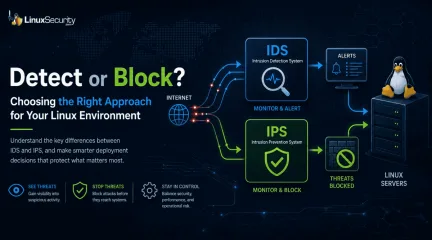
The wrong IPS rule can look like a security fix right up until it becomes an outage. . On Linux systems, detection and prevention are often discussed together, but they do not carry the same operational risk. One tells admins that something suspicious happened. The other can decide whether traffic is allowed to continue. That is why IDS vs IPS is not just a definition to memorize. It is a deployment decision about where to monitor, where to block, and how much confidence a team needs before letting a tool take action. What Is the Difference Between IDS and IPS? An intrusion detection system, or IDS, monitors activity and generates alerts. It may watch network traffic, logs, file changes, process behavior, or suspicious authentication attempts. An intrusion prevention system, or IPS, monitors activity too, but it can also take action. That action might be dropping packets, resetting a connection, adding a firewall rule, or running a response script. IDS and IPS are not “set it and forget it” tools. They have to be designed, configured, monitored, and maintained like any other security control that becomes part of the environment. The short version: IDS : watches and alerts IPS : watches and blocks IDPS : combines detection and prevention functions The risk changes when a system moves from alerting to blocking. Why Does This Matter on Linux? Linux servers often run quietly in the background. A web server, mail relay, database host, VPN gateway, CI runner, or Kubernetes node may all look normal from the outside until something starts behaving differently. An IDS helps admins notice that difference. It can show repeated scans, suspicious DNS traffic, exploit attempts, unexpected service traffic, or strange activity from a host that should be quiet. An IPS goes further. It can stop traffic before it reaches the service. That sounds better, but it depends on confidence. A false alert wastes time. A false block can take down access, interrupt anapplication, or lock out legitimate users. NOTE: IDS is usually safer when you do not fully understand the traffic yet. IPS makes more sense when the traffic pattern is known, the rule is tested, and the team accepts the risk of automated blocking. How Does an IDS Work? An IDS looks for activity that matches something suspicious. That may include: Known attack signatures Protocol behavior that looks wrong Repeated login failures Unexpected file changes Suspicious outbound connections Traffic patterns that do not fit the server’s role A network IDS inspects traffic. A host-based IDS watches the system itself. Some tools do both, or send alerts into a central platform for review. For example, Suricata can inspect network traffic and write alerts to eve.json. Wazuh can then read those Suricata logs and show the alerts in a dashboard. A simple Wazuh log collection block looks like this: json /var/log/suricata/eve.json That does not block anything. It gives the team something to review. That is often where Linux admins should start. How Does an IPS Work? An IPS uses similar detection logic, but it sits closer to the decision point. When traffic matches a rule, the IPS can block it. The basic split is simple: an IDS detects and alerts, while an IPS moves to block suspicious activity before it reaches the target. That second part is where admins need to slow down, because blocking legitimate traffic is one of the fastest ways to create problems for users and security teams. An IPS is not just “IDS with stronger alerts.” It becomes part of the traffic path. If it fails, slows down, or blocks too much, the impact is operational. That does not mean IPS is bad. It means IPS should be used where the team understands the traffic well enough to trust enforcement. Passive Mode vs Inline Mode The cleanest way to explain IDS vs IPS is placement. Passive mode watches traffic from the side. Inline mode sitsin the path. Passive mode lets Snort observe and detect traffic on an interface. Inline mode gives Snort the ability to block traffic, and the mode changes based on how traffic is passed into Snort . Passive inspection might look like this: snort -i eth0 That tells Snort to inspect traffic on eth0. Inline mode is different: snort -Q --daq afpacket -i "eth0:eth1" Now traffic is moving through paired interfaces. Snort is not just observing. It can affect what passes through. That is the deployment tradeoff in one place. Passive mode gives visibility with less risk. Inline mode gives more responsibility. When Should You Use IDS First? Use IDS first when the environment still needs a baseline. That usually includes: New deployments Busy production networks Servers with unclear traffic patterns Cloud or hybrid environments with limited visibility Teams that are still tuning rules Systems where downtime would be worse than a delayed response IDS helps answer basic questions before blocking begins. What talks to this server? Which alerts are noisy? Which rules fire every day? Which detections actually matter? Which traffic is strange but expected? Do not skip that work. If a team cannot explain the alerts, it probably should not automate the blocks yet. A good IDS phase should produce useful decisions, not just more logs. After a few weeks of review, admins should know which rules are noise, which ones are valuable, and which ones might be safe enough to enforce later. When Does IPS Make Sense? IPS makes sense when the traffic is understood, and the action is worth the risk. Good IPS candidates usually have: A clear traffic path Tested detection rules Low tolerance for the activity being blocked A rollback plan Someone responsible for tuning Logging that shows what was blocked and why A gateway protecting a narrow service may be a good place for IPS. A high-change production segment with poorly understood trafficmay not be. In one setup, Suricata uses Netfilter queues, and iptables sends traffic into that queue for inspection. To run Suricata with NFQUEUE: sudo suricata -c /etc/suricata/suricata.yaml -q 0 To send forwarded gateway traffic to Suricata: sudo iptables -I FORWARD -j NFQUEUE For a host-based setup, traffic can be queued from input and output paths: sudo iptables -I INPUT -j NFQUEUE sudo iptables -I OUTPUT -j NFQUEUE These commands are useful, but they are not casual changes. Once traffic is queued, the inspection path matters. If the queue fails, the behavior depends on how the system is configured. What Can Go Wrong With IPS? IPS problems usually come from confidence moving faster than testing. Common issues include: Legitimate traffic blocked by broad rules Latency from heavy inspection Rules enabled without understanding the impact Missing bypass or failover planning Alerts treated as proof instead of evidence Old exceptions nobody reviews Rule updates are changing behavior unexpectedly The tricky part is that IPS failures may look like normal outages at first. Users cannot reach a service. A deployment fails. A connection resets. A vendor integration stops working. Security may not be the first team blamed, but the IPS may still be the cause. NOTE : If an IPS blocks traffic, the team should be able to answer three questions quickly: what rule fired, what traffic was blocked, and how to reverse the decision if needed. What About Host-Based IDS and IPS? Not all detection happens on the network. Host-based tools watch the Linux system itself. They may monitor logs, file changes, users, processes, commands, or repeated authentication failures. Tripwire for file integrity monitoring fail2ban for blocking repeated login attempts OSSEC or Wazuh for host monitoring and alerting auditd for system-level event visibility Host-based prevention can be useful because it is often narrow. For example, fail2ban may blockan IP after repeated SSH failures. That is easier to reason about than blocking broad application traffic across a network segment. Still, the same rule applies. Automate only what you understand. Blocking one abusive SSH source is different from pushing a bad firewall rule across every Linux server in the environment. How Should Admins Decide? Start with the system’s job. A database host should not behave like a CI runner. A mail relay should not behave like a web server. A backup system may need outbound access that would be strange on another host. Before choosing IDS or IPS, ask: What is this system supposed to receive? What is it supposed to send? Which traffic is normal? Which traffic should never happen? Who reviews alerts? Who owns rule tuning? What happens if prevention blocks the wrong thing? How fast can the team roll back? If the answers are unclear, use IDS first. If the answers are clear and the risk is high, IPS may be appropriate. How Do IDS and IPS Fit With Modern Security Tools? Many teams no longer run IDS and IPS as isolated tools. Detection and prevention may come from firewalls, endpoint agents, SIEM platforms, XDR tools, NDR tools, cloud controls, and Linux-native monitoring. Modern security stacks often combine both ideas: IDS provides monitoring and evidence, while IPS provides control, with many teams now using detection and prevention alongside broader security tooling . That is a useful way to think about it. IDS and IPS are not replacements for patching, hardening, logging, segmentation, access control, or incident response. They support those efforts. The best setup is usually layered. Firewalls limit access. IDS shows suspicious activity. IPS blocks high-confidence threats. Host monitoring catches local behavior. Logs and alerts feed investigation. Admins tune the system as the environment changes. No single layer catches everything. What Linux Admins Should Keep in Mind IDS vs IPS isnot about which one is better. It is about what the system should be trusted to do. Use IDS when you need visibility, context, and safer testing. Use IPS when the traffic is understood, the rule is reliable, and blocking is worth the operational risk. Most Linux environments benefit from both, but not everywhere and not in the same way. Detection can be broad. Prevention should be deliberate. Watch first where context is missing. Block only where confidence is high. Stay Ahead of Linux Security & Infrastructure Trends Interested in more in-depth coverage of Linux monitoring, intrusion detection, firewall behavior, prevention strategies, and enterprise hardening? Subscribe to the LinuxSecurity newsletter for weekly threat analysis, infrastructure security insights, and practical guidance covering the Linux and open-source ecosystem. Related Reading Linux Server Monitoring Essential for Modern Security Operations Understanding Linux Persistence Mechanisms and Detection Tools Strengthening Linux SSH Configurations to Prevent Proxy Attacks Egress Filtering Primer for Monitoring Outbound Traffic . On Linux systems, detection and prevention are often discussed together, but they do not carry the s. wrong, security, right, until, becomes, outage, linux, system. . Dave Wreski
 Jun 01, 2026
•
Jun 01, 2026
• How to Secure My Network
166
 access controlapplication securitysecurity enhancements
How to Write SELinux Policies for Secure Application Access
The NSA created the SELinux policy to provide security to applications. SELinux policies best suit an app under specific conditions, which can be found in this tutorial. . Security-Enhanced Linux is a kernel security module created by the National Security Agency to provide a mechanism for access control policies. SELinux includes a set of kernel modifications and user tools to help configure access control policies on Linux. SELinux can cause problems with applications that behave outside the norm. Web servers, like Nginx or Apache, configure apps to serve sites from a directory that doesn't follow the default document root. Get site-specific data from /srv/www instead of /var/www. Apache or Nginx blocks web servers from serving up content from the nonstandard directory unless SELinux is aware of the change. Some admins disable SELinux on their servers due to complications with app configuration due to the policies' restrictions. This could leave servers open to attacks, however. Knowing how to write a SELinux policy enables developers to work with confined rules. . Master crafting SELinux policies to bolster application defense and orchestrate access permissions efficiently within Linux systems.. SELinux Policies, Access Control Policies, Security Enhancement. . Brittany Day
Sep 16, 2023
•
How to Learn Tips and Tricks

166
 application securitysecurity toolLinux setup
Setting Up Burp Suite For Web Application Testing On Linux
Get started with web application testing on your Linux computer by installing Burp Suite. . Burp Suite is a popular and powerful tool used by security professionals, developers, and quality assurance testers to identify and fix security vulnerabilities in web applications. Let’s learn what Burp Suite is and how you can install and set it up on your Linux system. Burp Suite is a powerful tool used to evaluate the safety of web applications. It essentially works as a MITM (man-in-the-middle) proxy, enabling you to intercept, inspect, and manipulate traffic bi-directionally. . Burp Suite is a popular and powerful tool used by security professionals, developers, and quality as. suite, started, application, testing, linux, computer, installing. . Brittany Day
Mar 26, 2023
•
How to Learn Tips and Tricks
166
 Debianapplication securitysoftware development
Step-By-Step Installation of Rust on Debian 11 Bullseye
Rust is a modern programming language that focuses on thread safety and performance designed to compete with C and C++. Learn the steps to install and start using RUST on Debian 11 Bullseye Linux in this tutorial. . C and C++ have been the most popular programming languages for developing operating systems and performance-critical applications. However, there is also another popular player known as Rust that has positioned itself in the programming language market between low-level languages like C/C++ and highly abstract languages like C# and Java. Like C/C++, the language is compiled directly into machine code and thus enables direct access to the hardware. At the same time, as in Java and C#, care is taken to ensure that memory accesses cannot lead to security gaps. The link for this article located at Linux Shout is no longer available. . Discover how to set up and utilize the Rust programming language on Debian 11 Bullseye for secure and effective software development.. Rust Installation on Debian, Thread Safety in Rust, Programming with Rust, Performance in Rust, Rust Language Tutorial. . Brittany Day
Feb 25, 2022
•
How to Learn Tips and Tricks
166
 cyber threatsapplication securityDDoS
Defend Against L7 DDoS Attacks Using CrowdSec And Cloudflare Solutions
Distributed Denial-of-service (DDoS) attacks have been targeting all types of businesses over the past few years. They have been used by hackers for quite some time and are some of the most common attacks but remain extremely efficient and harmful. . The concept is simple: hackers hammer a given target from many different locations to take it down (and usually ask for money afterward as a condition to stop the attack). There are several types of DDoS: L3 DDoS (referring to OSI Model Layer 3). The L3 is the network layer, and L3 DDoS typically target network equipment and connection to flood them up to the point where there are simply too many packets to handle. It’s a tremendously efficient attack, but most major hosting providers and hyperscalers are well protected against them nowadays. L7 DDoS (for Layer 7) directly targets applications. The goal here isn’t to shut down the network but rather the service itself, by flooding it with applicative requests (usually Web ones), leading to a resource shortage (CPU, RAM, or both). E-commerce sites are one of the usual victims: an e-commerce site down is a site that isn’t making money. There are many ways and tools to perform this kind of attack and many layers of defense, but today we will focus on application (layer 7) distributed denial of service, L7 DDoS in short. The link for this article located at CrowdSec is no longer available. . Cybercriminals aim at organizations using multiple DDoS assaults, examining security measures alongside CrowdSec and Cloudflare.. Application Security, DDoS Attack Strategies, Cyber Threat Prevention, Cloudflare Mitigation, CrowdSec Integration. . Brittany Day
Jul 21, 2021
•
How to Learn Tips and Tricks
166
 application securitysecure practicescontainer security
Building Secure Docker Images: Essential Practices and Compliance
How to build a secure Docker image? The biggest goal of this article, is to be a comprehensive guide on building and delivering secure and safe container images. . Having that said, we try to focus on build-time. We will not cover registry, orchestrator and runtime protection in this write-up. All of these are so broad, that they deserve a completely different article. Compliance, standards and order are the keys to organize and make relatively secure environment. Every organization’s environment, its threat and malicious actors are different. Our intention is to present the mindset for container images security; some terms might be very global, the others very strict to the project and processes. Having that said, in next points we will cover some terms that might not be related to your specific environment, dear Reader, however, we still hope you will find this guidance useful. Thank you to Kamil Zabielski (
Aug 27, 2020
•
How to Learn Tips and Tricks
160
 data protectionapplication securitysecure development
Strategies For Securing Databases In Application Development
This paper covers various ways databases are attacked, and how to prevent them from being "hacked".. . Explore essential strategies for safeguarding databases against threats and enhancing application security successfully.. Database Safety, Secure Applications, Threat Mitigation, Data Security Strategies. . Anthony Pell
Jun 19, 2006
•
How to Harden My Filesystem
163
phpapplication securitycoding flawsExploit PHP Weaknesses: Strengthening Application Security
This paper discusses how one can exploit common vulnerabilities in PHP applications.. . Discover how to identify prevalent weaknesses in PHP applications and strengthen security measures through this comprehensive analysis.. PHP Security, Web Application Risks, Coding Flaws, PHP Exploits. . Anthony Pell
Nov 23, 2004
•
How to Secure My Webserver

Get the latest News and Insights
Get the latest Linux and open source security news straight to your inbox.
Community Poll
Should Linux servers automatically install security updates?
Search Topics
Powered By

Linux Security - Your source for Top Linux News, Advisories, HOWTOs and Feature Releases
QUICK LINKS
subscribe to newsletters!
Like staying secure? So do we.
Sign up for updates, tips, and alerts!