Overly broad permissions can turn one compromised account into a much larger security problem. Learn how to reduce unnecessary access, review privileges, and apply least privilege across modern Linux systems. Review Linux Privileges×


Stay Ahead With Linux Security HOWTOs

How to Secure My Network incident response network traffic
incident response network traffic Imagine logging into a production Linux server for routine maintenance and noticing background network activity connecting to an unfamiliar external IP address. Your endpoint protection agent is not popping up with an alert, there is no service failure, and on the surface, the system appears to be running normally. . For Linux administrators and security teams, such a situation is a moment of truth: Is this activity a sign of active intrusion or just a tool that was overlooked in the course of...
 Jul 21, 2026

How to Harden My Filesystemsystem hardening open source security
system hardening open source security We all spend a lot of time defending our systems from external threats, but the amount of damage an attacker can cause often depends on what happens after they get in. A single compromised account doesn't always lead to a major incident. The real danger begins when that account has far more access than it actually needs. . That's exactly what the principle of least privilege is designed to prevent. By limiting users, services, and applications to only the permissions required for their jobs,...
Jul 20, 2026

How to Learn Tips and Tricksthreat detection system monitoring
threat detection system monitoring For small security and IT teams, the "enterprise" dream of a fully automated SIEM often feels like a distant luxury. It’s a vision built on massive budgets and dedicated engineering teams—things that, frankly, most of us don't have. But here is the reality: you don’t need a six-figure platform to maintain a secure environment. . Linux systems are, by design, incredibly verbose. Every time a user authenticates, a process executes, or a configuration file changes, your system creates a record of...
Jul 17, 2026

How to Learn Tips and Tricksnetwork security centralized logging
network security centralized logging Linux systems generate a steady stream of authentication, service, kernel, and application logs. On most systems, those logs never leave the machine that created them. If you're responsible for ten or twenty servers, that means checking each one separately. If one disappears before you can investigate it, its logs may disappear with it. Centralized logging solves that by sending log messages to another server as they're created. Instead of searching every machine, you have one place to review...
Jul 15, 2026

How to Secure My Networksecurity advisory audit
security advisory audit When you’re digging through an incident, your logs are the only thing you can actually trust. The problem is, attackers know that too. If someone gets root on your server, their first move is almost always to delete the evidence and cover their tracks. . If you aren't actively protecting your logs, you're basically flying blind the second a breach happens. It’s a miserable feeling to realize you have no idea what an attacker did because they wiped the logs before you even got there. In this...
Jul 11, 2026
 Refine HOWTOs
X Clear Filters
Get the latest News and Insights
Get the latest Linux and open source security news straight to your inbox.
Community Poll
Should Linux servers automatically install security updates?
Loading...
Explore Latest Linux Security HOWTOs
We found 4 articles for you...
160
 linuxsecurity considerationscontainer security
How to Check Docker Container Isolation in Linux
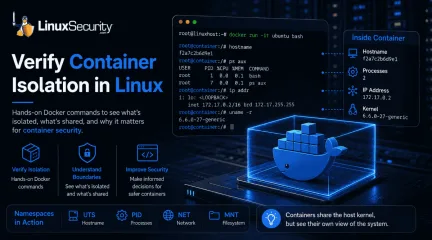
Docker makes containers feel like separate, lightweight virtual machines. They have their own hostnames, processes, and networking—but are they actually isolated? Many administrators assume they are without ever verifying the boundaries. If you’ve ever wondered what truly separates your application from the host, this guide is for you. We’ll use simple Docker commands to verify container isolation firsthand and uncover exactly what remains shared with the host. . What Is Container Isolation? Think of container isolation as a way to trick a process into thinking it has a server all to itself. If you’ve worked with virtual machines, you’re used to a hypervisor handling the heavy lifting—effectively carving out a slice of hardware. Containers are different. They don’t virtualize hardware; they use Linux namespaces to carve up the kernel’s view of the system. Basically, the kernel assigns labels to resources like network stacks or process lists. If a process in a container asks "What can I see?", the kernel only shows it the resources tagged with its specific namespace ID. It’s an illusion, sure, but it’s an incredibly effective one for keeping your applications from interfering with the host or each other. What Is Container Security? When people ask what container security is, they are usually looking for a way to keep their apps safe from start to finish. It’s not just one thing; it’s the whole process of managing your images, the runtime, and the host machine. The reason isolation is the biggest part of this is simple: if you don’t have a clear boundary, one bad script or one compromised app can easily reach into your host system. By knowing exactly what a container can (and can't) see, you can lock down your configuration and make sure that if one container fails, it doesn't take the whole server down with it. Step 1: Launch a Test Container with Docker Run To observe these boundaries, we’ll use the docker run command—the most common way to spin up a newcontainer. We are using the official Ubuntu image because it provides a familiar Linux userspace that is ideal for testing Docker commands. Run this command on your host: docker run -it ubuntu bash docker run : Creates and starts a new container instance. -it : Launches the container in interactive mode so you can run commands inside it. Once the command finishes, your terminal prompt will change. You are now working inside the container’s isolated environment. Step 2: Use Docker PS to Confirm the Container Is Running Open a second terminal window on your host and run: docker ps The output lists every active container, including its unique Container ID, image, uptime, and assigned name. Verify that your Ubuntu container appears in this list before moving to the next step. Step 3: Compare Hostnames to See Basic Isolation Let's see if the container truly has its own identity. Inside the container: Run hostname On your host: Run hostname You will see two different values. This is because the container uses the UTS (UNIX Timesharing System) namespace, which allows it to maintain a unique hostname independent of your machine. Step 4: Compare Running Processes Namespaces are at work here, too, preventing the container from seeing host-level processes. Inside the container: Run ps aux On your host: Run ps aux Inside the container, you will only see a small, clean list of processes, with bash as PID 1 because it is the first process started within that PID namespace. Meanwhile, your host terminal shows every system process. This PID namespace separation is vital for container isolation. Step 5: Use Docker Exec to Access a Running Container Administrators often need to debug a container that is already running in the background. For this, we use docker exec . Feature docker run docker exec Purpose Creates a new container Uses anexisting container State Starts a fresh environment Hooks into a running process Typical Use Initial testing/deployment Debugging or maintenance Run this on your host to jump back into your running container: docker exec -it bash Step 6: Compare Network Settings Run ip addr in both the container and the host. The container uses a separate network namespace, giving it its own virtual interfaces and a private IP address (usually in the 172.17.x.x range). This proves that the container has a private network stack, keeping its traffic separate from your host’s primary interfaces. Step 7: Compare Filesystems Create a file inside the container to test storage boundaries: touch /testfile.txt If you check your host’s current directory, you won't see this file. Although Docker stores the container's writable layer on the host, the file does not appear in your host's current working directory because the container has its own mount namespace. Step 8: See What Containers Still Share Finally, run this on both the host and the container: uname -r You will notice the kernel version is identical. This is the most critical lesson for container runtime security. Because containers share the host kernel, they do not provide the same "hard" security boundary as a virtual machine. According to official Linux kernel documentation , Linux namespaces provide logical partitioning, but they do not replace the need for secure kernel management. Common Container Isolation Mistakes Assuming Containers Are Virtual Machines: Containers are not hardware-virtualized. They are processes on your host, meaning a kernel-level exploit could impact the entire system. Running Privileged Containers: Using --privileged grants a container access to host devices, effectively bypassing many security namespaces. Using Host Networking: Using --net=host shares the host’s network namespace,removing all network isolation. Mounting Sensitive Directories: Mapping /etc or the Docker socket into a container can give the container full control over the host. Quick Reference: Observed Namespaces Namespace What You Verified UTS Different hostname PID Different process list Network Different interfaces and IP Mount Separate filesystem view Verify You've Observed Container Isolation Before you finish, ensure you’ve confirmed the following: Different hostname Different process list Different network interface Same kernel version File created inside the container is not visible in your host's working directory Container Security Best Practices To maintain a hardened environment, follow these container security best practices based on the CIS Docker Benchmark : Use Least Privilege: Never run your applications as root inside a container. Avoid Privileged Containers: Only use elevated privileges when absolutely necessary for hardware access. Keep Images Updated: Rebuild containers regularly using current base images to receive security patches and bug fixes. Patch Host Kernels: Since all containers share the host kernel, keeping your host OS updated is your primary defense against exploits. Audit Mounts: Regularly review which directories are mounted into your containers to prevent unauthorized host access. Final Takeaway You’ve now verified that containers provide effective logical isolation, but they are not the "air-gapped" environments that virtual machines are. Understanding these boundaries allows you to make informed container security decisions. Now that you’ve verified isolation firsthand, the next step is learning how Linux capabilities, cgroups, and seccomp further strengthen your environment. Exploring those features will help you move from basic containerusage to building truly resilient and secure systems. Want more Linux security news, vulnerability analysis, and software supply chain updates? Subscribe to the LinuxSecurity Newsletter and get the latest threats, advisories, and expert insights delivered directly to your inbox. . Explore how to verify Docker container isolation and understand its importance for securing Linux applications.. Docker Isolation, Container Security, Linux Best Practices. . MaK Ulac
 Jul 06, 2026
•
Jul 06, 2026
• How to Harden My Filesystem
166
 risk managementsecurity practicesrisk mitigation
Enhancing Docker Security: Four Essential Practices for IT Admins
Without the right tools and processes in place, Docker security can feel like a moving target. Learn four best practices for keeping deployments safe in this helpful TechTarget tutorial. . When it comes to container security, there are two key areas IT admins should emphasize: the container image and host. You can't, after all, secure one without the other. At the end of the day, virtualized containers still run on a host system. A privilege escalation bug could compromise the security of the entire host and lead to loss of confidentiality, integrity and availability. The good news is that IT admins can use freely available tools -- combined with a coherent build and test process -- to mitigate risks. To get started, embrace these four Docker security best practices. . Discover proactive strategies to mitigate threats in Docker security and protect your container environments with these essential guidelines.. Docker Security, Container Best Practices, Risk Management, IT Administration. . Brittany Day
Dec 21, 2020
•
How to Learn Tips and Tricks

166
 network securitynetwork protectionad blocker
How To Deploy Pi-hole Using Podman On Linux For Network Safety
Running Pi-hole is an excellent way to secure devices on your local network against unwanted content. Pi-hole was initially designed to run on a Raspberry Pi, but can be deployed as a container as well. Learn how to run Pi-hole as a container with Podman in this tutorial. . There is arguably no better way to protect devices on your local network from unwanted content than Pi-hole . Add a machine running Pi-hole to your network, and it will quietly scrub all incoming traffic from pesky stuff like ads and trackers in the background. As the name suggests, Pi-hole was initially designed to run on a Raspberry Pi. But if you already have a Linux server on your network, you can deploy a Pi-hole container on it instead. That's what I did when I replaced a QNAP NAS appliance with a ThinkPad T410 running Linux Mint. But instead of Docker, I chose to use Podman Deploying Pi-hole on Linux Mint (and by extension, on any Ubuntu-based Linux distribution) requires a few steps, but it's not beyond the wit of man. The link for this article located at Tokyoma is no longer available. . Secure your home network by following this tutorial to set up Pi-hole in a container using Podman.. Pi-hole Guide, Podman Tutorial, Container Security, Local Network Protection. . Brittany Day
Nov 30, 2020
•
How to Learn Tips and Tricks
166
 security best practiceskubernetescontainer security
Securing Kubernetes Clusters: Best Practices For Developers
Kubernetes is hot in the DevOps space - mainly due to the open-source platform's portability and scalability. However, misconfigurations are the biggest risk for cloud environments—and Kubernetes is no exception. Learn how to secure Kubernetes clusters in this Container Journal tutorial. . Kubernetes is hot in the DevOps space and is now the third most wanted platform among developers. The appeal of the platform largely stems from its portability and scalability. Kubernetes defines itself as “a portable, extensible, open-source platform for managing containerized workloads and services that facilitates both declarative configuration and automation.” Container adoption has surged in recent years, with the “ 2019 Cloud Native Computing Foundation survey ” reporting 84% of their respondents use some type of containerization in production. The same survey also found 78% of respondents use Kubernetes in production, making it a market leader. With clear benefits and rising adoption, it is critical that the security of Kubernetes is well-understood by any developer implementing this service in their cloud environment. To help developers distill all the information available on this topic, here are some of the key steps for securing Kubernetes clusters . . Securing your Kubernetes cluster in the cloud requires a layered security strategy to protect infrastructure and applications, ensuring overall safety and compliance. Kubernetes Security, Cloud Containerization, Secure DevOps, Kubernetes Configuration, Container Best Practices. . Brittany Day
Oct 13, 2020
•
How to Learn Tips and Tricks
166
 video seriescontainer securityuser namespace
Exploring Rootless Containers and User Namespaces with Podman
Want to gain a better understanding of root inside and outside of Podman containers and how user namespaces work? If so, you'll want to check out this informative two-part video series. . I have published a couple of videos that cover an overview of rootless containers through practical demonstration. If you are curious about terms like "rootless containers" or "running a container rootless as non-root," these videos will explain what they are and the benefits that these features provide. . Dive into the world of Podman with this engaging video series that covers the concepts of rootless containers and user namespaces.. Rootless Containers, Podman, Container Security, User Namespace. . Brittany Day
Sep 17, 2020
•
How to Learn Tips and Tricks
166
 Red Hatsoftware updatessecurity standards
Utilizing OpenSCAP for Scanning Containers in Red Hat Enterprise Linux 8.2
Containers are no more secure than physical machines. Find out how to scan your containers for vulnerabilities with the oscap-podman utility, available in Red Hat Enterprise Linux (RHEL) 8.2. . One of the main benefits of containers is that the software that makes up a container is separate from the system that it is running on. The container's software is placed in a container image that can easily be distributed and run. From a security perspective, however, this can be a challenge, because many security compliance scanning software utilities are focused only on the host system, and potentially miss security issues that might be present in containers on the system. For example, if a container image contains an outdated and vulnerable package, many compliance scanning utilities would miss that if they only look at the packages installed on the host. It is important that container images stay up-to-date with security updates, and that the container images also meet required security standards. Without an effective way to scan and evaluate container images, it is easy to get in a position where you are running containers with outdated, vulnerable versions of software, or containers with configurations that don't meet your security standards. . Discover the methods to efficiently assess containers for vulnerabilities utilizing OpenSCAP on Red Hat 8.2 for meeting compliance standards.. Container Security, OpenSCAP, Podman Utility, Vulnerability Scanning, Red Hat. . Brittany Day
Sep 03, 2020
•
How to Learn Tips and Tricks
166
 application securitysecure practicescontainer security
Building Secure Docker Images: Essential Practices and Compliance
How to build a secure Docker image? The biggest goal of this article, is to be a comprehensive guide on building and delivering secure and safe container images. . Having that said, we try to focus on build-time. We will not cover registry, orchestrator and runtime protection in this write-up. All of these are so broad, that they deserve a completely different article. Compliance, standards and order are the keys to organize and make relatively secure environment. Every organization’s environment, its threat and malicious actors are different. Our intention is to present the mindset for container images security; some terms might be very global, the others very strict to the project and processes. Having that said, in next points we will cover some terms that might not be related to your specific environment, dear Reader, however, we still hope you will find this guidance useful. Thank you to Kamil Zabielski (
Aug 27, 2020
•
How to Learn Tips and Tricks
166
 security practicesseccompcontainer security
Improving Container Security Using Seccomp Runtime Hooks
Looking for new methods for improving container security? Try using an OCI runtime hook for tracing syscalls prior to building a container. This article explains how this can be done. . Containers run everywhere. They run in the cloud, on IoT devices, in small and big companies, and wherever they run, we want them to do so as securely as possible. In this article, I describe the Google Summer of Code 2019 project that Dan Walsh and I have been working on with a brilliant student, Divyansh Kamboj , and how we improved container security. The tool has further matured in the past year and is planned to be released with Red Hat Enterprise Linux 8.3. More than just one reason to have a closer look! . Boosting container security is vital against rising cyber threats. Implementing seccomp and runtime syscall tracing can enhance security significantly. Container Security, Seccomp, Runtime Hook, Syscall Tracing, Security Practices. . Brittany Day
Jun 18, 2020
•
How to Learn Tips and Tricks

Get the latest News and Insights
Get the latest Linux and open source security news straight to your inbox.
Community Poll
Should Linux servers automatically install security updates?
Search Topics
Powered By

Linux Security - Your source for Top Linux News, Advisories, HOWTOs and Feature Releases
QUICK LINKS
subscribe to newsletters!
Like staying secure? So do we.
Sign up for updates, tips, and alerts!