


Stay Ahead With Linux Security HOWTOs

How to Secure My Network network security Linux administration
network security Linux administration Open ports have a way of accumulating over time. A test environment gets deployed and never removed. An administrative interface is exposed for troubleshooting and left in place. A database that was supposed to listen internally ends up reachable from the internet. . Attackers look for these mistakes constantly. Redis, Elasticsearch, MongoDB, Jenkins, and similar services still show up on internet-facing systems where they were never meant to be exposed. Sometimes it's a temporary change that...
 Jun 10, 2026
How to Secure My Networksecurity advisory intrusion detection
security advisory intrusion detection A compromised Linux server can continue running malware long after the initial intrusion. One of the most common persistence techniques is a malicious cron job that silently downloads payloads, restarts malware, or re-establishes attacker access every few minutes. This guide shows how to identify suspicious cron entries, preserve forensic evidence, remove unauthorized scheduled tasks, and verify that no additional persistence mechanisms remain. . What Should You Save Before Removing Cron Jobs...
Jun 09, 2026 
How to Secure My Networkaccess control Linux administration
access control Linux administration Most SSH hardening advice ends at the same recommendation: Disable password authentication and use SSH keys. . That's good advice. It removes entire classes of attacks, including password spraying, credential stuffing, and brute-force attempts against exposed servers. The problem is what happens next. Many administrators treat SSH keys as the finish line when they are really the beginning of the hardening process. Attackers rarely care whether they obtained access with a password or a private...
Jun 05, 2026 
How to Secure My Networksecurity advisory remote access
security advisory remote access Most of the time, nobody notices. SSH authentication succeeds, no alerts are generated, and the connection looks exactly the way it did the day the key was installed. That's part of the problem. . When security teams investigate unauthorized access on Linux systems, they often focus on passwords, exposed services, or vulnerable software. Trusted access receives less attention. Yet a single forgotten or unauthorized SSH key can provide the same access as a legitimate user while attracting very...
Jun 03, 2026 
How to Secure My Networkintrusion detection application security
intrusion detection application security The wrong IPS rule can look like a security fix right up until it becomes an outage. . On Linux systems, detection and prevention are often discussed together, but they do not carry the same operational risk. One tells admins that something suspicious happened. The other can decide whether traffic is allowed to continue. That is why IDS vs IPS is not just a definition to memorize. It is a deployment decision about where to monitor, where to block, and how much confidence a team needs before...
Jun 01, 2026  Refine HOWTOs
X Clear Filters Get the latest News and Insights
Get the latest Linux and open source security news straight to your inbox.
Community Poll
What got you started with Linux?
Loading...
Explore Latest Linux Security HOWTOs
We found 11 articles for you...
167
 security enhancementnetwork managementiptables
Efficient Network Management Through sslh Transparent Proxying
Imagine you run a small business with several web services, such as a corporate website, an employee intranet, and a remote access server for staff working from home. Each service typically requires its port: 80 for the website, 443 for secure access, and 22 for SSH. Managing multiple ports complicates configuration and increases your exposure to security risks. . A transparent proxy acts as a single entry point that intelligently directs incoming traffic to the right service based on the type of connection. This means you can have all your services neatly organized behind one port, simplifying network management and improving security. Let's explore how configuring sslh , an SSL/SSH multiplexer for transparent proxying , can help achieve this streamlined setup. What is sslh ? 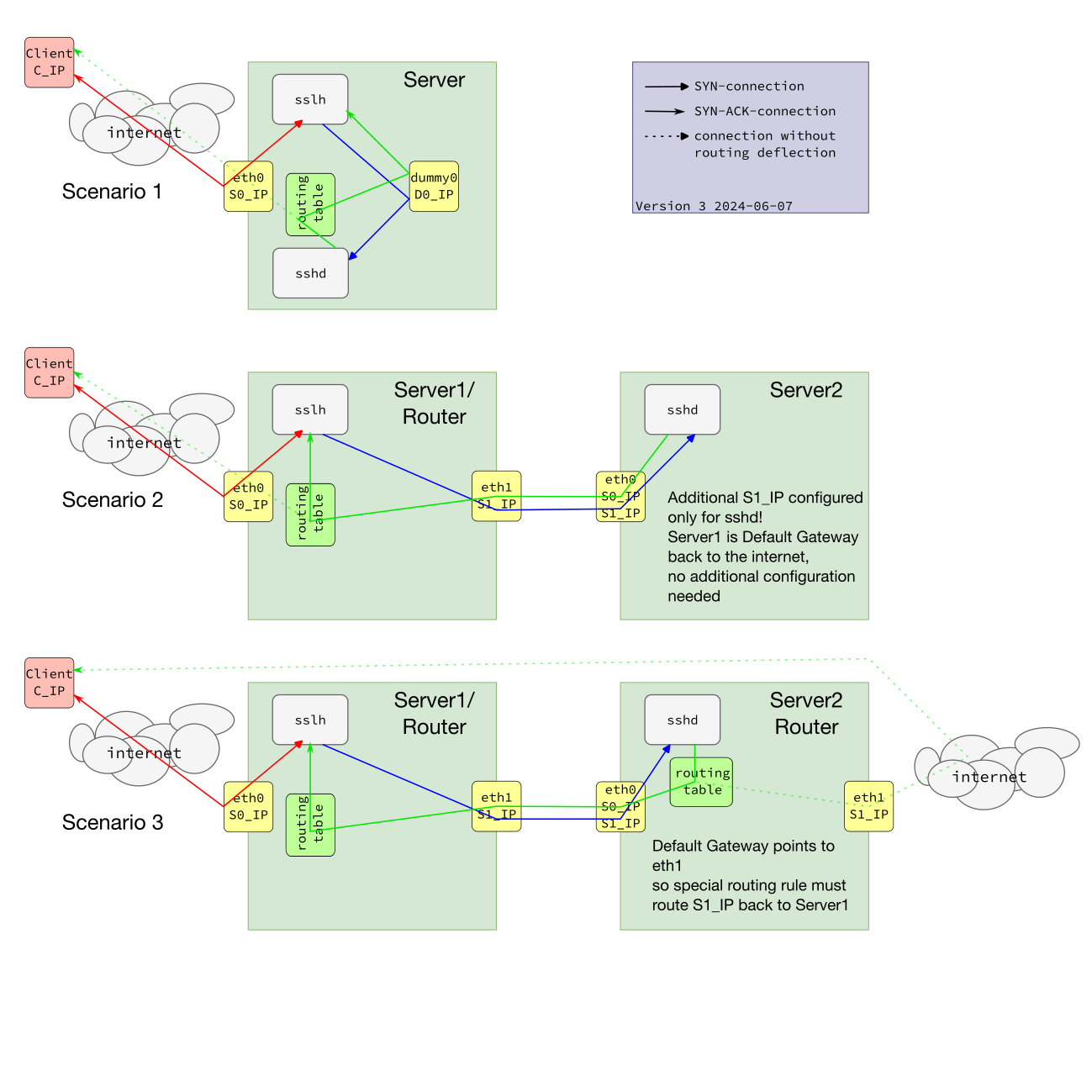 sslh is a powerful tool designed to multiplex protocols through a single port. It can intelligently redirect incoming packets to the appropriate backend service based on protocol characteristics. This versatility allows administrators to run multiple services on one port, making it an essential tool for efficient network management. Noteworthy Features of sslh Protocol Probing : sslh can detect multiple protocols, including HTTP, HTTPS, SSH, OpenVPN , XMPP, and more. Support for Multiple Technologies : Works seamlessly with IPv4, IPv6, TCP, and UDP. Various Operating Modes : It can operate in fork mode, select mode, and libev mode, depending on your performance needs. Importance of Transparent Proxying Transparent proxying allows a proxy server to intercept client requests to the backend server without needing any special configuration on the client side. This proxy type is particularly useful for logging and maintaining visibility of the original client IP addresses in backend servers. Use Cases Original Client IPAddress Visibility : Provides backend servers with the original client's IP address, which is crucial for accurate logging and monitoring. Simplified IP-based Access Control : Since the original client addresses are preserved, access control policies are easier to manage. Enhanced Security Tools Integration : Improves the effectiveness of security tools like fail2ban by ensuring accurate IP address tracking. Implementing Transparent Proxying on Linux To implement transparent proxying on a Linux system using sslh , you can choose from a couple of practical methods: using virtual network interfaces or employing iptables for packet marking. Method 1: Using Virtual Network Interfaces The first method involves creating virtual network interfaces. This approach grants precise control and management of network traffic flows by segregating traffic interfaces for sslh . The process begins with configuring virtual network interfaces using commands like ip link add , which creates peer interfaces. Following this, specific routing rules are adjusted to ensure that traffic flows through these virtual interfaces, with sslh then being configured to bind to them. Although this method provides high control and detailed traffic management, it does require significant network configuration expertise. Method 2: Using iptables Packet Marking The second method leverages iptables for packet marking. This technique relies on setting iptables rules to mark packets based on predefined criteria, which are then redirected to the designated backend services. For instance, create a rule to mark incoming HTTP traffic with a unique identifier, which sslh will then use to route the traffic appropriately. This method allows for a flexible and dynamic setup that is suitable for more complex network architectures. However, it necessitates a thorough understanding of iptables syntax and firewall rule management since improper configuration can lead to network complications. Both methods serve the ultimategoal of ensuring transparent proxying, where sslh intelligently routes traffic without requiring changes on client devices. By implementing either strategy, Linux and IT managers can better control their network traffic, preserve client IP addresses for accurate logging, and enhance overall system security. Configuring sslh for Transparent Proxying Configuring sslh for transparent proxying allows for managing multiple protocols over a single port, simplifying network service management and security. This involves setting up sslh to listen on a specific port and correctly forward incoming traffic based on its protocol type to the appropriate internal service. This section will guide you through the steps required to configure sslh for transparent proxying on a standard Linux system and within a Docker container, ensuring an efficient and secure network configuration. General Configuration for Transparent Proxying To configure sslh for transparent proxying on a Linux system, you must create or edit the /etc/sslh.cfg file. Below is a sample configuration: # /etc/sslh.cfg verbose: true; # Listening on the machine's external IP address listen: ( { host: "1.2.3.4"; port: "443"; } ); # Forwarding HTTP and SSH traffic to local services protocols: ( { name: "ssh"; host: "127.0.0.1"; port: "22"; }, { name: "tls"; host: "127.0.0.1"; port: "443"; }, { name: "openvpn"; host: "127.0.0.1"; port: "1194"; } ); # Increase timeout for OpenVPN timeout: 5; transparent: true; runas: "sslh"; For POSIX capabilities, run: sudo setcap cap_net_bind_service,cap_net_raw+pe /usr/sbin/sslh Then start sslh: sudo systemctl start sslh Docker Container Configuration for Transparent Proxying To run sslh in a Docker container with transparent proxying, you can create a Dockerfile and an accompanying configuration file. Here's how to do it: Create a Dockerfile: # Dockerfile FROM debian:latest RUN apt-get update&& \ apt-get install -y sslh && \ apt-get clean COPY sslh.cfg /etc/sslh.cfg RUN setcap cap_net_bind_service,cap_net_raw+pe /usr/sbin/sslh EXPOSE 443 CMD ["/usr/sbin/sslh", "-F", "/etc/sslh.cfg"] Create the sslh.cfg file: # sslh.cfg verbose: true; # Listening on the machine's external IP address listen: ( { host: "0.0.0.0"; port: "443"; } ); # Forwarding HTTP and SSH traffic to local services protocols: ( { name: "ssh"; host: "127.0.0.1"; port: "22"; }, { name: "tls"; host: "127.0.0.1"; port: "443"; }, { name: "openvpn"; host: "127.0.0.1"; port: "1194"; } ); # Increase timeout for OpenVPN timeout: 5; transparent: true; Build and Run the Docker Container: docker build -t sslh-transparent-proxy . docker run --cap-add=NET_ADMIN --cap-add=NET_RAW -p 443:443 -d sslh-transparent-proxy In the Docker setup, the container listens on 0.0.0.0:443 and forwards traffic internally. The --cap-add flags ensure the container has the capabilities for transparent proxying. This dockerized configuration makes it easy to deploy sslh transparently across various environments. What Are the Benefits of Using Transparent Proxying with sslh? Transparent proxying with sslh offers a range of benefits for network administrators and users looking to efficiently manage multiple protocols over a single port. By automatically detecting and routing incoming connections based on their protocol type, sslh simplifies the configuration of services such as SSH, HTTPS, and OpenVPN. This conserves valuable server resources by reducing the number of open ports required and enhances network security and operational flexibility. Below, we explore the key advantages of implementing transparent proxying with sslh in your network infrastructure. Improved Security Transparent proxying maintains the visibility of original client IP addresses at backend servers, which is crucial foraccurate logging and monitoring. This improves the ability to track and respond to malicious activities. Operational Advantages Transparent proxying simplifies firewall rules and offers consistent network traffic analysis. It provides better integration with IP-based security tools like fail2ban , enhancing the overall security posture. Real-World Applications and Use Cases Case Study Consider a mid-sized company that implemented sslh for transparent proxying to secure its SSH and HTTPS services. By preserving the original client IP addresses, it strengthened its logging mechanisms, enabling faster and more accurate detection of malicious activities. This implementation led to a significant reduction in unauthorized access attempts and streamlined its network traffic analysis processes. IT Management Impact For IT managers, transparent proxying with sslh aids in making strategic decisions by providing accurate and detailed logging data. This data is essential for network security audits and compliance with data protection regulations. Enhancing Logging and Monitoring By maintaining the visibility of the original client IPs, transparent proxying ensures logs are more comprehensive and accurate. This accuracy allows for better application of security policies and quicker identification of anomalies in network activities. Keep Learning About Transparent Proxying Transparent proxying with sslh significantly boosts network security by preserving original client IP addresses, simplifying access control, and enhancing logging accuracy. By implementing the methods described above, Linux and IT managers can secure their systems more effectively, making sslh an invaluable tool in their security arsenal. Additional Resources Official sslh Documentation sslh Configuration Guide sslh Docker Image iptables Documentation Linux Networking Guides . Optimize data flow oversight utilizing sslh for seamless proxying, preserving safety and genuine IP exposure.. sslhconfiguration, secure proxying solution, network protocol management. . Dave Wreski
 Jul 20, 2024 •
 How to Secure My Network
 166
 security enhancementUbuntunetwork access control
Enhance SSH Security on Ubuntu Using Port Knocking with Knockd
You've probably read the usual things admins do with the Secure Shell (SSH), such as changing the port, preventing root logins, using fail2ban , using SSH key authentication, etc. But there's another technique you can employ that does a great job of protecting your servers from unwanted SSH logins. . That technique is called port knocking and can be enabled with the help of knockd, a Linux port-knock server. This works by closing off all ports and only opening them "on demand," according to a pre-determined sequence of pings. Although you wouldn't use port knocking for every server or deployment (and you wouldn't rely on it alone), it's a very novel way of adding security to SSH. Of course, along with port knocking, you must always keep SSH up to date, ensure your /etc/ssh/sshd_config file is configured with best practices, and consider employing SSH key authentication. But if you want to add this extra layer to the system, read on, and I'll show you how it's done. What You'll Need The only things you'll need for this are a running instance of Ubuntu Server (preferably a recent release), a second Ubuntu machine (which can be either the server or desktop version) to serve as a client, a user with sudo privileges, and a network connection. That's it. Let's get to knocking. How Can I Install knockd? You'll need to install knockd on both the server and client. Log into your server and install the software with the command: sudo apt-get install knockd -y When that installation completes, log into your client machine and run the same command. Believe it or not, that's it for the installation. You will want to make sure the knockd service is running with the command: systemctl status knockd You'll probably find the service isn't running, and you won't be able to get it running out of the box. Why? Because knockd defaults to the old-school network device naming convention. We must change the configuration file to fit the newer device namingscheme. Open the default configuration with: sudo nano /etc/default/knockd At the bottom of the file, you'll see the line: #KNOCKD_OPTS="-i eth1" Locate the name of your networking device with the command: ip -a It might be something like enp0s3. If that's the case, you'd change the line to: KNOCKD_OPTS="-i enp0s3" Save and close the file. You can now start and enable the service with: sudo systemctl enable --now knockd How Can I Configure knockd? The knockd service is configured in the /etc/knockd.conf file. Open it for editing with the command: sudo nano /etc/knockd.conf In the [openSSH] section, the first line is: sequence = 7000, 8000, 9000 That's a port knocking sequence; you can change it to whatever you want. For example, you could reverse it with: sequence = 9000, 8000, 7000 Go to the command line (which is two lines below the sequence line) and change -A to -I, which ensures it will be the first line in the new iptables chain. Save and close the file. Restart knockd with: sudo systemctl restart knockd How Can I Close a Port? Next, we will close port 22, so incoming traffic won't be able to bypass the knockd system. We'll have UFW list our rules in a numbered sequence so they're easier to delete. Issue the command: sudo ufw status numbered If you have an SSH rule allowing incoming traffic to port 22, it'll show up and have an associated number. Say, the rule is number 1. To delete that rule, issue the command: sudo ufw delete 1 If you have more than 1 rule pertaining to SSH, make sure to delete them all. Using knockd Now it gets fun. Return to your client machine, where you'll send the knock sequence you configured in the knockd.conf file. So, if you configured a knock sequence of 8000, 7000, 9000, you would issue the open command: knock -v SERVER 8000 7000 9000 Where SERVER is the IP address of the server you want to log into. The output of the above command should look something like this: hitting tcp 192.168.1.100:8000 hitting tcp 192.168.1.100:7000 hitting tcp 192.168.1.100:9000 Of course, the IP address in the above output will reflect the address of your destination server. Once the knock open sequence is complete, you can SSH into that server as you normally would. After you're certain it works, exit from the server (with the exit command). Once you've exited the remote server, you must send the closing knock sequence, which is done by reversing the order of the opening knock sequence. So, if your knock sequence is 8000 7000 9000, the closing sequence will be 9000 7000 8000. You'd close it with: knock -v SERVER 9000 7000 8000 Where SERVER is the IP address of the remote server. Once the closing sequence succeeds, you will not be able to SSH back into the server until you send the opening knock sequence. Congratulations, you've just locked down SSH with the help of knockd. As I said, this system won't be ideal for every application, but it can certainly come in handy for certain use cases. Try it and see if it doesn't work to help secure some of your deployments. Have additional questions about port knocking for more secure SSH? Connect with us on X @lnxsec - we're here to help! . Enhance your SSH defense through port knocking using knockd. This tutorial targets Ubuntu servers to prevent unauthorized intrusion.. Port Knocking, SSH Security, Ubuntu Administration, Knockd Setup. . Brittany Day
Feb 04, 2024 • How to Learn Tips and Tricks 
160
 access controlsecurity enhancementmandatory access
Exploring Security-Enhanced Linux: Access Control and Integrity Features
This version of Linux has a strong, flexible mandatory access control architecture incorporated into the major subsystems of the kernel. The system provides a mechanism to enforce the separation of information based on confidentiality and integrity . . This iteration of Unix features a robust, adaptable permission management system built right into its foundation.. Security-Enhanced Linux, Access Control, Linux Architecture. . Anthony Pell
Jun 28, 2023 • How to Harden My Filesystem 166
 access controlsecurity enhancementUbuntu
Step-by-Step Guide to Installing SELinux On Ubuntu for Security
SELinux is a kernel module that injects additional security-focused functionalities into the Linux kernel. Here's how you can install it on Ubuntu. . You can improve the security of your Linux system by installing and implementing SELinux. This provides an extra layer of protection by isolating applications on the system and securing the host. By default, Ubuntu uses AppArmor, another Mandatory Access Control system. To make your Linux system more secure, you can make use of SELinux instead. Let's see how you can install and configure SELinux on Ubuntu using a few basic Linux commands. . Bolster your Linux defense by setting up AppArmor on Ubuntu. Discover straightforward setup procedures along with key command line instructions.. SELinux Installation, Ubuntu Security, Kernel Module Configuration. . Brittany Day
Feb 13, 2023 • How to Learn Tips and Tricks 162
 security enhancementtwo-factor authenticationLinux installation
Setup Guide for Authenticator App on Linux for Enhanced 2FA Security
Here's how to install and use the Authenticator 2FA desktop client on Linux. . I’ve relied on various authenticator apps for some time. For those that don’t know, an authenticator app is used to generate random codes used for two-factor authentication. How they work is simple: You install the app, add an account and the authenticator will generate a time-based six-digit code to use for 2FA for the site or service in question. In my opinion, using an authenticator app for 2FA is much more secure than having that code sent to you via SMS. Unfortunately, not every site and service works with authenticator apps, but those services that do make up for the random oversight. . Learn the steps to set up the latest Authenticator application for reliable two-factor authentication on Linux systems quickly and simply.. Authenticator App, Two-Factor Authentication, Linux Security. . Brittany Day
Jun 22, 2022 • How to Strengthen My Privacy 166
 security enhancementsystem administrationLinux tools
10 Great Monitoring Tools To Boost Linux Admin Efficiency
Learn about 10 great Linux system monitoring tools that can improve security, while making your life as an admin easier! . Our job as system administrators has always had two things that never seem to disappear, the first one is backing up data and the second one is to monitor this and to monitor that. In this article we are going to check out some of the best Linux monitoring tools in the terminal, starting with number 10 the all well known and built in top command. The link for this article located at LateWeb.Info is no longer available. . Explore essential Linux monitoring tools to enhance server security and simplify administration, including Nagios, Prometheus, and Netdata for efficient management. Linux Monitoring Tools,System Administration,Performance Monitoring. . Brittany Day
May 05, 2021 • How to Learn Tips and Tricks 166
 access controlsecurity enhancementUbuntu
How To Configure Endlessh SSH Tarpit On Ubuntu 20.04 For Security
Learn how to add an SSH tarpit to Ubuntu Server 20.04 with the help of endlessh. . In your never-ending quest to secure your Linux servers, you've probably found a lot of times the breaches happen through SSH. No matter how secure it is, it can still be cracked. That's why you might need to consider setting up a tarpit for that service. Essentially, a tarpit will run on the standard SSH port and, when a hacker attempts to break through that port, they'll wind up stuck in an endless loop. That's how endlessh works. Install it and configure it for port 22 and the script kiddies will wind up in a tarpit, unable to escape. I'm going to show you how to do just that. . Fortify your Linux servers by configuring an SSH tarpit with endlessh, enhancing defense against unpermitted access.. SSH Tarpit, Endlessh Setup, Server Security, Linux Protection, Ubuntu Server. . Brittany Day
Apr 16, 2021 • How to Learn Tips and Tricks 166
 risk managementsecurity enhancementsecurity strategies
Crucial Strategies to Enhance the Security of Your Linux Server
Looking to improve the security of your Linux server to protect against vulnerabilities and attacks? Here's a checklist to live by. . This article includes a collection of commands and best practices that you can use to improve the security of your Linux servers (RHEL/CentOS). If you have more suggestions, please mention them in the comments. Enjoy the read! . Explore valuable strategies and optimal methods to strengthen your Linux server protection and reduce vulnerabilities.. Linux Server Best Practices, Security Enhancement Tips, Risk Management. . Brittany Day
Apr 09, 2021 • How to Learn Tips and Tricks 
Get the latest News and Insights
Get the latest Linux and open source security news straight to your inbox.
Community Poll
What got you started with Linux?
Search Topics
Powered By

Linux Security - Your source for Top Linux News, Advisories, HOWTOs and Feature Releases
QUICK LINKS
subscribe to newsletters!
Like staying secure? So do we.
Sign up for updates, tips, and alerts!
Discover faster search, smarter navigation, and deeper Linux security insights. Read More