Overly broad permissions can turn one compromised account into a much larger security problem. Learn how to reduce unnecessary access, review privileges, and apply least privilege across modern Linux systems. Review Linux Privileges×


Stay Ahead With Linux Security HOWTOs

How to Secure My Network incident response network traffic
incident response network traffic Imagine logging into a production Linux server for routine maintenance and noticing background network activity connecting to an unfamiliar external IP address. Your endpoint protection agent is not popping up with an alert, there is no service failure, and on the surface, the system appears to be running normally. . For Linux administrators and security teams, such a situation is a moment of truth: Is this activity a sign of active intrusion or just a tool that was overlooked in the course of...
 Jul 21, 2026

How to Harden My Filesystemsystem hardening open source security
system hardening open source security We all spend a lot of time defending our systems from external threats, but the amount of damage an attacker can cause often depends on what happens after they get in. A single compromised account doesn't always lead to a major incident. The real danger begins when that account has far more access than it actually needs. . That's exactly what the principle of least privilege is designed to prevent. By limiting users, services, and applications to only the permissions required for their jobs,...
Jul 20, 2026

How to Learn Tips and Tricksthreat detection system monitoring
threat detection system monitoring For small security and IT teams, the "enterprise" dream of a fully automated SIEM often feels like a distant luxury. It’s a vision built on massive budgets and dedicated engineering teams—things that, frankly, most of us don't have. But here is the reality: you don’t need a six-figure platform to maintain a secure environment. . Linux systems are, by design, incredibly verbose. Every time a user authenticates, a process executes, or a configuration file changes, your system creates a record of...
Jul 17, 2026

How to Learn Tips and Tricksnetwork security centralized logging
network security centralized logging Linux systems generate a steady stream of authentication, service, kernel, and application logs. On most systems, those logs never leave the machine that created them. If you're responsible for ten or twenty servers, that means checking each one separately. If one disappears before you can investigate it, its logs may disappear with it. Centralized logging solves that by sending log messages to another server as they're created. Instead of searching every machine, you have one place to review...
Jul 15, 2026

How to Secure My Networksecurity advisory audit
security advisory audit When you’re digging through an incident, your logs are the only thing you can actually trust. The problem is, attackers know that too. If someone gets root on your server, their first move is almost always to delete the evidence and cover their tracks. . If you aren't actively protecting your logs, you're basically flying blind the second a breach happens. It’s a miserable feeling to realize you have no idea what an attacker did because they wiped the logs before you even got there. In this...
Jul 11, 2026
 Refine HOWTOs
X Clear Filters
Get the latest News and Insights
Get the latest Linux and open source security news straight to your inbox.
Community Poll
Should Linux servers automatically install security updates?
Loading...
Explore Latest Linux Security HOWTOs
We found 12 articles for you...
167
 intrusion detectionapplication securityopen-source
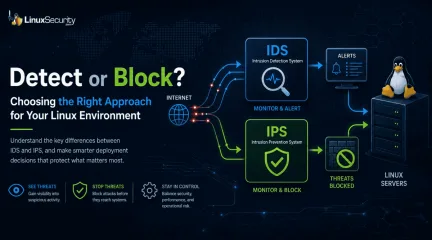
Linux IDS vs IPS: Operational Differences and Deployment Tradeoffs
The wrong IPS rule can look like a security fix right up until it becomes an outage. . On Linux systems, detection and prevention are often discussed together, but they do not carry the same operational risk. One tells admins that something suspicious happened. The other can decide whether traffic is allowed to continue. That is why IDS vs IPS is not just a definition to memorize. It is a deployment decision about where to monitor, where to block, and how much confidence a team needs before letting a tool take action. What Is the Difference Between IDS and IPS? An intrusion detection system, or IDS, monitors activity and generates alerts. It may watch network traffic, logs, file changes, process behavior, or suspicious authentication attempts. An intrusion prevention system, or IPS, monitors activity too, but it can also take action. That action might be dropping packets, resetting a connection, adding a firewall rule, or running a response script. IDS and IPS are not “set it and forget it” tools. They have to be designed, configured, monitored, and maintained like any other security control that becomes part of the environment. The short version: IDS : watches and alerts IPS : watches and blocks IDPS : combines detection and prevention functions The risk changes when a system moves from alerting to blocking. Why Does This Matter on Linux? Linux servers often run quietly in the background. A web server, mail relay, database host, VPN gateway, CI runner, or Kubernetes node may all look normal from the outside until something starts behaving differently. An IDS helps admins notice that difference. It can show repeated scans, suspicious DNS traffic, exploit attempts, unexpected service traffic, or strange activity from a host that should be quiet. An IPS goes further. It can stop traffic before it reaches the service. That sounds better, but it depends on confidence. A false alert wastes time. A false block can take down access, interrupt anapplication, or lock out legitimate users. NOTE: IDS is usually safer when you do not fully understand the traffic yet. IPS makes more sense when the traffic pattern is known, the rule is tested, and the team accepts the risk of automated blocking. How Does an IDS Work? An IDS looks for activity that matches something suspicious. That may include: Known attack signatures Protocol behavior that looks wrong Repeated login failures Unexpected file changes Suspicious outbound connections Traffic patterns that do not fit the server’s role A network IDS inspects traffic. A host-based IDS watches the system itself. Some tools do both, or send alerts into a central platform for review. For example, Suricata can inspect network traffic and write alerts to eve.json. Wazuh can then read those Suricata logs and show the alerts in a dashboard. A simple Wazuh log collection block looks like this: json /var/log/suricata/eve.json That does not block anything. It gives the team something to review. That is often where Linux admins should start. How Does an IPS Work? An IPS uses similar detection logic, but it sits closer to the decision point. When traffic matches a rule, the IPS can block it. The basic split is simple: an IDS detects and alerts, while an IPS moves to block suspicious activity before it reaches the target. That second part is where admins need to slow down, because blocking legitimate traffic is one of the fastest ways to create problems for users and security teams. An IPS is not just “IDS with stronger alerts.” It becomes part of the traffic path. If it fails, slows down, or blocks too much, the impact is operational. That does not mean IPS is bad. It means IPS should be used where the team understands the traffic well enough to trust enforcement. Passive Mode vs Inline Mode The cleanest way to explain IDS vs IPS is placement. Passive mode watches traffic from the side. Inline mode sitsin the path. Passive mode lets Snort observe and detect traffic on an interface. Inline mode gives Snort the ability to block traffic, and the mode changes based on how traffic is passed into Snort . Passive inspection might look like this: snort -i eth0 That tells Snort to inspect traffic on eth0. Inline mode is different: snort -Q --daq afpacket -i "eth0:eth1" Now traffic is moving through paired interfaces. Snort is not just observing. It can affect what passes through. That is the deployment tradeoff in one place. Passive mode gives visibility with less risk. Inline mode gives more responsibility. When Should You Use IDS First? Use IDS first when the environment still needs a baseline. That usually includes: New deployments Busy production networks Servers with unclear traffic patterns Cloud or hybrid environments with limited visibility Teams that are still tuning rules Systems where downtime would be worse than a delayed response IDS helps answer basic questions before blocking begins. What talks to this server? Which alerts are noisy? Which rules fire every day? Which detections actually matter? Which traffic is strange but expected? Do not skip that work. If a team cannot explain the alerts, it probably should not automate the blocks yet. A good IDS phase should produce useful decisions, not just more logs. After a few weeks of review, admins should know which rules are noise, which ones are valuable, and which ones might be safe enough to enforce later. When Does IPS Make Sense? IPS makes sense when the traffic is understood, and the action is worth the risk. Good IPS candidates usually have: A clear traffic path Tested detection rules Low tolerance for the activity being blocked A rollback plan Someone responsible for tuning Logging that shows what was blocked and why A gateway protecting a narrow service may be a good place for IPS. A high-change production segment with poorly understood trafficmay not be. In one setup, Suricata uses Netfilter queues, and iptables sends traffic into that queue for inspection. To run Suricata with NFQUEUE: sudo suricata -c /etc/suricata/suricata.yaml -q 0 To send forwarded gateway traffic to Suricata: sudo iptables -I FORWARD -j NFQUEUE For a host-based setup, traffic can be queued from input and output paths: sudo iptables -I INPUT -j NFQUEUE sudo iptables -I OUTPUT -j NFQUEUE These commands are useful, but they are not casual changes. Once traffic is queued, the inspection path matters. If the queue fails, the behavior depends on how the system is configured. What Can Go Wrong With IPS? IPS problems usually come from confidence moving faster than testing. Common issues include: Legitimate traffic blocked by broad rules Latency from heavy inspection Rules enabled without understanding the impact Missing bypass or failover planning Alerts treated as proof instead of evidence Old exceptions nobody reviews Rule updates are changing behavior unexpectedly The tricky part is that IPS failures may look like normal outages at first. Users cannot reach a service. A deployment fails. A connection resets. A vendor integration stops working. Security may not be the first team blamed, but the IPS may still be the cause. NOTE : If an IPS blocks traffic, the team should be able to answer three questions quickly: what rule fired, what traffic was blocked, and how to reverse the decision if needed. What About Host-Based IDS and IPS? Not all detection happens on the network. Host-based tools watch the Linux system itself. They may monitor logs, file changes, users, processes, commands, or repeated authentication failures. Tripwire for file integrity monitoring fail2ban for blocking repeated login attempts OSSEC or Wazuh for host monitoring and alerting auditd for system-level event visibility Host-based prevention can be useful because it is often narrow. For example, fail2ban may blockan IP after repeated SSH failures. That is easier to reason about than blocking broad application traffic across a network segment. Still, the same rule applies. Automate only what you understand. Blocking one abusive SSH source is different from pushing a bad firewall rule across every Linux server in the environment. How Should Admins Decide? Start with the system’s job. A database host should not behave like a CI runner. A mail relay should not behave like a web server. A backup system may need outbound access that would be strange on another host. Before choosing IDS or IPS, ask: What is this system supposed to receive? What is it supposed to send? Which traffic is normal? Which traffic should never happen? Who reviews alerts? Who owns rule tuning? What happens if prevention blocks the wrong thing? How fast can the team roll back? If the answers are unclear, use IDS first. If the answers are clear and the risk is high, IPS may be appropriate. How Do IDS and IPS Fit With Modern Security Tools? Many teams no longer run IDS and IPS as isolated tools. Detection and prevention may come from firewalls, endpoint agents, SIEM platforms, XDR tools, NDR tools, cloud controls, and Linux-native monitoring. Modern security stacks often combine both ideas: IDS provides monitoring and evidence, while IPS provides control, with many teams now using detection and prevention alongside broader security tooling . That is a useful way to think about it. IDS and IPS are not replacements for patching, hardening, logging, segmentation, access control, or incident response. They support those efforts. The best setup is usually layered. Firewalls limit access. IDS shows suspicious activity. IPS blocks high-confidence threats. Host monitoring catches local behavior. Logs and alerts feed investigation. Admins tune the system as the environment changes. No single layer catches everything. What Linux Admins Should Keep in Mind IDS vs IPS isnot about which one is better. It is about what the system should be trusted to do. Use IDS when you need visibility, context, and safer testing. Use IPS when the traffic is understood, the rule is reliable, and blocking is worth the operational risk. Most Linux environments benefit from both, but not everywhere and not in the same way. Detection can be broad. Prevention should be deliberate. Watch first where context is missing. Block only where confidence is high. Stay Ahead of Linux Security & Infrastructure Trends Interested in more in-depth coverage of Linux monitoring, intrusion detection, firewall behavior, prevention strategies, and enterprise hardening? Subscribe to the LinuxSecurity newsletter for weekly threat analysis, infrastructure security insights, and practical guidance covering the Linux and open-source ecosystem. Related Reading Linux Server Monitoring Essential for Modern Security Operations Understanding Linux Persistence Mechanisms and Detection Tools Strengthening Linux SSH Configurations to Prevent Proxy Attacks Egress Filtering Primer for Monitoring Outbound Traffic . On Linux systems, detection and prevention are often discussed together, but they do not carry the s. wrong, security, right, until, becomes, outage, linux, system. . Dave Wreski
 Jun 01, 2026
•
Jun 01, 2026
• How to Secure My Network
166
 security advisoryintrusion detectionaccess control
Elevate Linux Security in 2024 with Advanced Tools and Strategies
As we navigate 2024, the cybersecurity landscape continues to shift and evolve at an ever-increasing pace, increasing in sophistication as open-source environments gain popularity. This trend makes it imperative for administrators and organizations to stay ahead of emerging threats with cutting-edge security tools and strategies. . In this article, I'll guide you through increasing Linux security using cutting-edge tools and technologies designed to protect against advanced and emerging threats. Let's begin by examining the modern Linux security landscape. Understanding the Current Linux Security Landscape Despite their strong security track record, Linux systems remain susceptible to threats such as unpatched software, server misconfiguration, and inadequate endpoint protection. Furthermore, their inherent complexity and the use of third-party applications increase their vulnerability and risk of breaches. Open-source systems, including Linux, have seen an upsurge in targeted cyberattacks by threat actors exploiting vulnerabilities and creating sophisticated malware for Linux systems to attack critical infrastructures. This trend underscores the necessity of keeping vigilant and adopting advanced security solutions. Evaluating Your Linux Security Needs Assessing your Linux environment thoroughly is the first step toward fortifying its defenses. Tools like Lynis can assist with this endeavor by helping identify misconfigurations, out-of-date software installations, and other potential weaknesses in your system. An in-depth security audit identifies vulnerabilities within your system and prioritizes enhancement needs. Identifying critical assets—from customer data to intellectual property—is paramount to implementing tailored security measures that best protect them. High-value targets require multilayered approaches incorporating perimeter defenses, intrusion detection systems, and endpoint protection measures for maximum protection. Advanced Intrusion Detection Systems(IDS) for Linux Intrusion detection systems are indispensable tools for monitoring and analyzing network traffic for signs of malicious activity. In 2024, IDS technologies have become even more sophisticated, with Artificial Intelligence (AI) and Machine Learning integration providing improved anomaly detection and response times. Integration Tips for Snort and Suricata on Linux Systems Snort and Suricata are two prominent IDS solutions for Linux. To integrate Snort into your systems: Install Snort: Use package managers like APT (Debian/Ubuntu) or YUM (CentOS) to install it. Configure Detection Rules: Customize rules based on your network environment. Set Up Logging and Alerting: Ensure logs are correctly configured to alert for suspicious activities. For Suricata: Install Suricata: Follow similar installation steps using package managers. Configure YAML File: Tailor the suricata.yaml configuration file to your network specifics. Enable Emerging Threats Rules: Utilize community-contributed rules for enhanced detection. Automated Vulnerability Scanners and Their Integration Automation in vulnerability management drastically shortens the timeline from vulnerability identification to remediation. Tools like OpenVAS and Nessus automate scanning, rating vulnerabilities, and proposing remedies. Incorporating OpenVAS and Nessus in Your Systems To integrate OpenVAS: Install OpenVAS: Follow installation guides tailored for your distribution. Configure Scans: Schedule regular scans tailored to your environment. Analyze Reports: Use the detailed reports to prioritize and address vulnerabilities. For Nessus: Install Nessus: Download and install from the official site. Create Scan Policies: Customize policies for regular and ad-hoc scans. Review Results: Utilize built-in suggestions for remediation. Enhancing Access Control with SELinux and AppArmor SELinux and AppArmor providemandatory access controls, limiting what processes can do based on defined policies. To configure SELinux: Set Enforcing Mode: Enable SELinux in enforcing mode. Write Custom Policies: Develop policies tailored to your applications. Audit Logs: Regularly review logs for denied actions and adjust policies accordingly. For AppArmor: Install and Enable: Ensure AppArmor is installed and enabled. Create Profiles: Develop profiles for applications. Monitor Alerts: Use tools like aa-logprof to review and update profiles based on observed behaviors. Case Studies on Effective Enforcement Policies Organizations like Red Hat use SELinux to isolate services, blocking lateral movement in case of a breach. AppArmor is effectively used in Ubuntu to confine applications like MySQL , reducing their attack surface. Our Final Thoughts on Using Cutting-Edge Tools to Improve Linux Security Proactive security measures are crucial for Linux environments in the face of ever-evolving cybersecurity threats. Admins can build resilient defenses by integrating cutting-edge tools such as advanced IDS, automated vulnerability scanners, next-gen endpoint protection, and AI-driven solutions. Community-driven open-source projects further enhance security, offering collaborative defense mechanisms. Stay informed, continuously adapt, and engage with the broader security community to safeguard your Linux environment against future challenges. Your vigilance and proactive measures today will profoundly impact your overall security posture tomorrow! . Enhance Linux security in 2024 with advanced tools, strategies, and proactive measures to combat emerging threats.. navigate, cybersecurity, landscape, continues, shift, evolve, ever-increasing. . Anthony Pell
Sep 30, 2024
•
How to Learn Tips and Tricks

166
 security toolsbest practicespenetration testing
Kali Linux Tools for Automated Discovery: Strengthening Security Posture
As cybersecurity threats become increasingly complex, ensuring an impregnable security posture has never been more essential for Linux administrators and infosec professionals. Staying ahead of vulnerabilities that malicious actors could exploit requires resources like Kali Linux's robust suite of security tools - particularly its automated vulnerability discovery features, which help identify potential security breaches early on. . I'll explain the importance of automated vulnerability detection, the vulnerability analysis tools in Kali Linux , and how to set up and run automated scans. I'll also share best practices for automated vulnerability discovery. Understanding Automated Vulnerability Discovery Automated vulnerability discovery tools are vital to an effective and proactive security strategy. They automate the time-consuming and tedious task of scanning networks, systems, and applications for known vulnerabilities, saving security professionals valuable time to focus on fixing these weaknesses. Automated tools offer several benefits. Not only do they significantly increase efficiency and coverage rates, but they also ensure consistent scanning schedules, reduce risks of human error, and speed up vulnerability management processes. What Automated Vulnerability Discovery Tools Does Kali Linux Offer? Kali Linux provides an impressive collection of automated tools to address specific vulnerabilities or security needs. One notable tool is Metasploit Framework , an advanced open-source platform that automates vulnerability exploitation. Penetration testers rely on Aircrack-ng to validate vulnerabilities in systems and networks by simulating cyberattacks. At the same time, Aircrack-ng serves a different function, testing network security by identifying weaknesses in wireless networks. Wireshark is a tool that provides in-depth views into network traffic, enabling the analysis of packets for potential vulnerabilities. Nmap is integral to vulnerability discovery by mapping networkboundaries and identifying connected devices. Considerations for Setting Up and Running Automated Scans Setting up and running automated scans using these tools is straightforward, yet requires an in-depth knowledge of their features and functionalities. Metasploit provides the capability of automatically scanning targets against its database of vulnerabilities, making this approach to vulnerability analysis much faster. Aircrack-ng users must possess the necessary hardware and permissions to monitor wireless networks effectively and inject packets. On the other hand, Wireshark users should become adept at creating filters to efficiently sift through large volumes of data. Each tool has its own set of customizable options to tailor scans to specific environments or security requirements. Interpreting results is just as essential. Security professionals must be able to recognize false positives while finding actionable vulnerabilities in the noise. This requires experience and deep domain knowledge. Best Practices for Automated Vulnerability Discovery Adherence to best practices for automated vulnerability discovery is vital to achieving maximum results. Configuring scans to minimize false positives and negatives is critical, as is regularly updating tools' databases and fine-tuning their scanning parameters. The frequency of scans must also be considered. Frequent checks enable timely detection, while more intensive scans may impact system performance or bandwidth. Finally, updating tools helps ensure the latest vulnerabilities can be detected quickly. Practical Case Studies Automated vulnerability discovery using Kali Linux tools is best illustrated through real-life case studies. Consider, for instance, a mid-sized company that used Metasploit's automation features to identify and patch vulnerabilities in their web applications before they could be exploited in an offensive cyberattack or an agency that implemented Aircrack-ng to harden wireless networks against eavesdropping attempts.These examples demonstrate how automated vulnerability discovery makes an immediate and positive difference to security posture and prevents future cyber incidents. As illustrated above, automated vulnerability discovery tools are indispensable in improving Linux security. Kali Linux offers a suite of tools that make up its vital platform. By including these tools in regular security assessments and adopting an informed, proactive approach to vulnerability management, organizations can strengthen their defenses against constantly emerging cyber threats. Our Final Thoughts on the Importance of Kali Linux's Automated Vulnerability Discovery Tools Integrating Kali Linux's automated vulnerability discovery tools into an organization's security practices is not simply recommended; it is necessary in today's cyber threat landscape. Tools like Metasploit Framework, Aircrack-ng, and Wireshark help detect and mitigate vulnerabilities efficiently. By adopting them and adhering to best practices, Linux admins and infosec professionals can dramatically strengthen the security of their networks and systems. Kali Linux's official documentation offers those looking to delve deeper into this field an abundance of information on using automated tools effectively. As cyber threats continue to emerge and we must adapt our defenses accordingly, Kali Linux remains an integral weapon in any admin's cybersecurity arsenal. . The specialized utilities in Kali Linux significantly improve vulnerability assessment, providing strong defense mechanisms for Linux platforms against online dangers.. Automated Vulnerability Tools,Kali Linux Security,Network Threat Detection,Security Best Practices. . Anthony Pell
Sep 02, 2024
•
How to Learn Tips and Tricks
167
 network securitysecurity assessmentsecurity tools
Boost Linux Pentesting with BlackArch Linux's Extensive Tools and Features
Penetration testing (or pentesting) plays an integral part in cybersecurity. Ethical hackers employ this practice to simulate cyberattacks against systems, networks, or applications to locate vulnerabilities before malicious hackers do. The goal of pentesting is identifying and repairing security weaknesses. . Pentesters often rely on operating systems designed for security assessment, such as BlackArch Linux , ParrotOS , and Kali Linux . In this article, we'll focus on BlackArch Linux, outlining its benefits and discussing its prominent use cases alongside its counterparts, ParrotOS and Kali Linux. We aim to highlight how BlackArch Linux could enhance your Linux pentesting and network security efforts while helping you decide which secure Linux distro best fits your needs. Pentesting: What Is Its Importance and Its Purpose? Pentesting serves as a digital military exercise. It prepares organizations to deal with real-world cyber threats by identifying vulnerabilities. By strengthening defenses against potential attacks, this practice helps ensure data integrity and security. Pentesting should not focus on finding and fixing bugs but should explore an organization's overall security posture. Without effective pentesting, organizations remain vulnerable to data breaches, malware infections , and other cyberattacks that could have devastating consequences. What Is BlackArch Linux & What Are Its Main Benefits for Pentesters? BlackArch Linux is an advanced Arch Linux distribution designed specifically to meet the needs of security researchers and ethical hackers. What sets BlackArch apart is its vast repository and minimalist approach, coupled with over 2,700 security tools designed to aid security researchers in their work. These tools cater to every facet of pentesting, from vulnerability assessment and cryptography to reverse engineering and forensic analysis. Pentesters rarely need to search elsewhere for additional software solutions. There are various advantages associatedwith its Arch Linux base, including: Minimalism: Arch Linux is known for its elegance and minimalism. BlackArch adheres to this philosophy by providing an efficient operating system tailored to user needs. Customizability: BlackArch's Arch foundation makes it highly configurable, allowing pentesters to tailor their environment to their specific requirements. Rolling Release Model: Arch Linux and BlackArch Linux adhere to a rolling release model to ensure the up-to-dateness of tools and system components. Efficiency: BlackArch Linux was specifically created to be lightweight and efficient, which makes it essential for pentesters who operate in resource-constrained environments like virtual machines or older hardware. BlackArch's speed and efficiency allow users to complete their tasks quickly. Community and Documentation: At first glance, BlackArch may seem to lag in community support due to its smaller user base than Kali Linux or ParrotOS; however, that is far from true. Its active community remains strong while offering comprehensive documentation even for beginners in Arch. Comparing BlackArch Linux, ParrotOS, and Kali Linux BlackArch Linux, KaliLinux, and ParrotOS are all excellent options for Linux pentesters. That said, each has its own strengths and limitations: Ease of Use: Kali Linux is designed with beginners in mind, boasting an intuitive user interface. Community and Support: BlackArch offers more comprehensive options in terms of toolset capacity than other secure Linux distros. Security Focus: ParrotOS' primary security focus is privacy and sandboxing, featuring tools like Anonsurf for anonymizing network connections and isolating applications. Flexibility: ParrotOS caters to pentesting, forensic analysis, and secure software development projects. User Experience: BlackArch Linux offers a more user-friendly experience that is appealing to newcomers and intermediate users. Though its learning curve may be steeper dueto Arch Linux as its foundation, its benefits outweigh these drawbacks substantially. BlackArch is an efficient, lightweight solution for ideal resource management in environments with limited resources. Here are its primary use cases. Security Assessments: BlackArch Linux provides everything needed for comprehensive security assessments, from surveillance and scanning to exploiting and reporting. Its toolset caters to every stage of pentesting, from the initial survey to full exploitation and reporting. Research and Development: BlackArch is ideal for security researchers and developers working on new exploits or tools. Its vast repository offers abundant resources for security research and tool creation. BlackArch also provides tools for post-incident investigations, making it suitable for post-pentesting investigations. Our Final Thoughts on Improving Linux Pentesting with BlackArch Linux With cybersecurity constantly morphing and shifting, having access to appropriate tools and platforms is critical. BlackArch Linux is an exceptional choice among pentesting platforms thanks to its vast tool repository, Arch Linux core OS base platform, and lightweight nature - an ideal combination for pentesters. Although BlackArch may require more effort when learning than Kali Linux or ParrotOS due to its steep learning curve and a wide array of customizable features compared to those two alternatives, its customizability, efficiency, and breadth of tools make it invaluable for experienced security professionals. Whether conducting comprehensive security assessments, developing exploits, performing forensic analyses, or performing forensic investigations, BlackArch Linux provides a robust and versatile environment suitable for performing these activities and more! You can learn how to install BlackArch Linux and use the pacman package manager in the tutorial linked below. . BlackArch Linux is a potent OS tailored for penetration testing, featuring over 2700 tools for comprehensive securityresearch and vulnerability assessment. BlackArch Linux, Pentesting Tools, Ethical Hacking Techniques, Linux Security Assessment. . Brittany Day
Jul 24, 2024
•
How to Secure My Network
166
 linux toolssecurity managementLinux administration
Streamline Log Monitoring on Linux Systems with Logwatch Tool
Linux systems log a great deal of information. Each system service you install has its own log or logs, not just those generated by dmesg or the boot log. It is not uncommon to find thousands of entries in these files over a short period of time. . All this event logging is very useful for gathering insights into exactly what's going on in your computer (especially when a problem occurs), but the log files can grow to be very large and difficult to look through. Important warnings could be hidden in the log files. However, finding them among hundreds of entries can be difficult. It would be a time-consuming and manual task. Logwatch relieves the system administrator of this burden by monitoring log files on your behalf. It will monitor the log files you specify and notify you by email when an entry requires your attention. Once we have configured Logwatch to our liking, it will automatically check for events we want to monitor. We no longer have to do this manually. The tutorial linked below will show you how to install and configure Logwatch on Linux systems. . Logwatch is an essential tool for enhancing security on Linux systems by automating log file analysis, enabling efficient detection of critical events and anomalies. Logwatch, Linux Monitoring, Automated Alerts, Security Tools. . Anthony Pell
May 21, 2024
•
How to Learn Tips and Tricks
162
security toolsonline privacydigital privacyMaximize Online Privacy And Anonymity Using Tails Linux
Are you debating whether online privacy is a lost cause? Tails Linux allows you to be private online if you use it within its limits and don't accidentally blow your cover. . Learn how to use Tails Linux to achieve maximum privacy and anonymity online in the article linked below. The link for this article located at How-To Geek is no longer available. . Explore the methods to leverage Tails Linux for improved online privacy and anonymity while surfing the web.. Tails Linux, Online Privacy, Anonymity Tools, Secure Browsing, Privacy Solutions. . Brittany Day
May 05, 2024
•
How to Strengthen My Privacy
167
linux distributionsecurity toolsubuntuSnoopGod Linux 22.04 LTS: New Pentesting Distro with High Requirements
SnoopGod Linux is a new Linux distro built on an Ubuntu base specializing in pentesting, security, and development. It is the latest entrant in the Linux distro market, offering hacking and penetration testing functionalities. This article will explore the features of SnoopGod Linux, analyze its implications, and highlight some questions security practitioners may have about the new distro. . There's no shortage of Linux distributions; however, only some can be categorized as optimal distros for ethical hacking and penetration testing . Kali Linux is the most popular one and has gained a sizeable following. However, alternatives were always needed, and SnoopGod Linux has entered the fray. It is built on the Ubuntu base and comes pre-installed with many pentesting tools and libraries. Introducing SnoopGod Linux: Notable Features, Benefits & Considerations One of the significant advantages of SnoopGod Linux is its intuitive User Interface. The distro features KDE Plasma 5.24.7, providing an elegant and straightforward user interface that may attract Windows users. The multitude of additional packages increases the size of installation media, but that’s not the end. The resources required to manage the installed packages, keep them up-to-date, and maintain their dependencies multiply over time, posing a considerable challenge to users with less powerful hardware. An important factor is the lack of documentation for SnoopGod Linux, which can be a significant issue for inexperienced users. The latest release is based on Ubuntu 22.04.4 LTS; however, SnoopGod Linux does not have LTS (Long-Term Support) releases yet. This could cause concern among enterprise users who require highly supported systems for their organizations. Another crucial element one needs to consider before downloading and using SnoopGod Linux is resource needs and memory usage. The minimum requirement listed on the distro's official website is a processor that should have a minimum of 2 gigahertz and at least a dual-coresystem with more than 4 GB RAM and 80 GB free disk space. The high-end memory requirements for SnoopGod Linux can pose a significant challenge to many users. What Are the Security Implications of This Release? The release of SnoopGod Linux could have significant implications for the security industry, particularly for the pentesting domain. The distro offers newer penetration testing tools and libraries on the latest Ubuntu base, which could provide more reliable, secure, and faster results. At the same time, this can pose a challenge for users with older systems, as the distro's high memory requirements could make the operating system sluggish and slow. Our Final Thoughts on SnoopGod Linux for Ethical Hackers & Pentesters SnoopGod Linux is a promising new player on the pentesting scene. It offers an easy-to-use KDE Plasma interface with a vast array of pre-installed pentesting tools, making it an excellent alternative to Kali Linux. However, its high resource and memory usage could significantly challenge many users. Additionally, its lack of documentation and LTS releases may hurt its adoption rate in the enterprise sector. Nevertheless, it will be intriguing to see how the security community responds to this new distro and whether it can compete with established distros like Kali Linux. . Explore SnoopGod Linux, a cutting-edge penetration testing distribution anchored on Ubuntu, tailored for ethical hackers with advanced tools and security features. SnoopGod Linux,Pentesting Tools,Ethical Hacking,Security Applications. . Dave Wreski
Mar 20, 2024
•
How to Secure My Network
161
Linux administrationsecurity toolsfirewall managementMaster Linux Firewall Management Using Firewalld for Enhanced Security
Firewalld is a firewall management system for Linux that allows admins to create custom rules to control network traffic. It's designed to be much more user-friendly than the older style of managing firewalls, which requires editing configuration files (and risking breaking something). Firewalld also supports IPv6 features like NAT and port forwarding to act as a proxy or gateway between two networks. . Here's a tutorial on managing Linux firewalls with Firewalldtutorial on managing Linux firewalls with Firewalld that I found very helpful. It begins by describing how firewalls work and why they're important. It then explains how Firewalld works and how it differs from other methods of managing networks before providing an example of how to use Firewalld with a specific program called SSH. Check it out! Have additional questions? Connect with us on X @lnxsec - we're here to help! . Explore powerful methods for controlling Linux firewalls through Firewalld's intuitive GUI and sophisticated capabilities.. Firewalld, Firewall Management, Network Control, IPv6 Features. . Brittany Day
Dec 25, 2023
•
How to Secure My Firewall

Get the latest News and Insights
Get the latest Linux and open source security news straight to your inbox.
Community Poll
Should Linux servers automatically install security updates?
Search Topics
Powered By

Linux Security - Your source for Top Linux News, Advisories, HOWTOs and Feature Releases
QUICK LINKS
subscribe to newsletters!
Like staying secure? So do we.
Sign up for updates, tips, and alerts!