


Stay Ahead With Linux Security HOWTOs
How to Secure My Network network security Linux administration
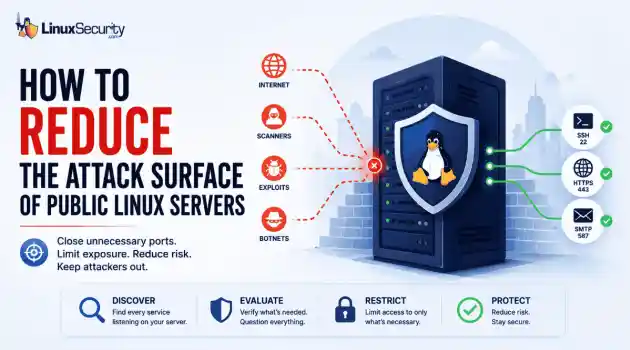
network security Linux administration Open ports have a way of accumulating over time. A test environment gets deployed and never removed. An administrative interface is exposed for troubleshooting and left in place. A database that was supposed to listen internally ends up reachable from the internet. . Attackers look for these mistakes constantly. Redis, Elasticsearch, MongoDB, Jenkins, and similar services still show up on internet-facing systems where they were never meant to be exposed. Sometimes it's a temporary change that...
 Jun 10, 2026
How to Secure My Networksecurity advisory intrusion detection
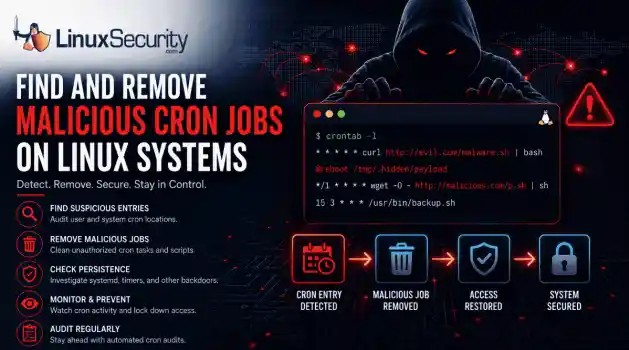
security advisory intrusion detection A compromised Linux server can continue running malware long after the initial intrusion. One of the most common persistence techniques is a malicious cron job that silently downloads payloads, restarts malware, or re-establishes attacker access every few minutes. This guide shows how to identify suspicious cron entries, preserve forensic evidence, remove unauthorized scheduled tasks, and verify that no additional persistence mechanisms remain. . What Should You Save Before Removing Cron Jobs...
Jun 09, 2026

How to Secure My Networkaccess control Linux administration
access control Linux administration Most SSH hardening advice ends at the same recommendation: Disable password authentication and use SSH keys. . That's good advice. It removes entire classes of attacks, including password spraying, credential stuffing, and brute-force attempts against exposed servers. The problem is what happens next. Many administrators treat SSH keys as the finish line when they are really the beginning of the hardening process. Attackers rarely care whether they obtained access with a password or a private...
Jun 05, 2026

How to Secure My Networksecurity advisory remote access
security advisory remote access Most of the time, nobody notices. SSH authentication succeeds, no alerts are generated, and the connection looks exactly the way it did the day the key was installed. That's part of the problem. . When security teams investigate unauthorized access on Linux systems, they often focus on passwords, exposed services, or vulnerable software. Trusted access receives less attention. Yet a single forgotten or unauthorized SSH key can provide the same access as a legitimate user while attracting very...
Jun 03, 2026

How to Secure My Networkintrusion detection application security
intrusion detection application security The wrong IPS rule can look like a security fix right up until it becomes an outage. . On Linux systems, detection and prevention are often discussed together, but they do not carry the same operational risk. One tells admins that something suspicious happened. The other can decide whether traffic is allowed to continue. That is why IDS vs IPS is not just a definition to memorize. It is a deployment decision about where to monitor, where to block, and how much confidence a team needs before...
Jun 01, 2026
 Refine HOWTOs
X Clear Filters
Get the latest News and Insights
Get the latest Linux and open source security news straight to your inbox.
Community Poll
What got you started with Linux?
Loading...

Explore Latest Linux Security HOWTOs
We found -4 articles for you...
167
 network securityLinux administrationsecurity audit
How to Find and Secure Exposed Services on Linux
Open ports have a way of accumulating over time. A test environment gets deployed and never removed. An administrative interface is exposed for troubleshooting and left in place. A database that was supposed to listen internally ends up reachable from the internet. . Attackers look for these mistakes constantly. Redis, Elasticsearch, MongoDB, Jenkins, and similar services still show up on internet-facing systems where they were never meant to be exposed. Sometimes it's a temporary change that becomes permanent. Sometimes a firewall rule was missed during deployment. Sometimes nobody realized the service was listening externally. The result is the same. A service intended for internal use ends up answering requests from anywhere. The first step is figuring out what's actually reachable. From there, it's usually obvious what belongs on the internet and what doesn't. Document Your Current State Before Making Changes Before disabling services or modifying firewall rules, establish a baseline of the system's current configuration. These records can help with troubleshooting, rollback planning, and future audits. Collect the following information: hostnamectl ip addr sudo ss -tulpn sudo lsof -i -n -P sudo systemctl list-unit-files --state=enabled sudo systemctl --failed Save the output to a secure location. At a minimum, you should document: Network interfaces and IP addresses Listening services and ports Enabled system services Existing firewall rules Server role and business purpose Security Tip Create a baseline immediately after provisioning a new server. Comparing future scans against a known-good state makes it easier to identify unexpected changes. How to Identify Exposed Services The first step in reducing the attack surface is understanding what is currently listening for connections. Using ss Modern Linux distributions include the ss utility, which is the preferred replacement for netstat . ss -tulpn Example output: Netid State Recv-Q Send-Q Local Address:Port tcp LISTEN 0 128 0.0.0.0:22 tcp LISTEN 0 128 127.0.0.1:3306 tcp LISTEN 0 128 0.0.0.0:8080 Key fields to review include: Protocol (TCP or UDP) Listening address Port number Associated process ID Executable name Pay particular attention to services in the LISTEN state that are bound to all interfaces. Using lsof To map open ports directly to processes: sudo lsof -i -n -P This command shows which applications own active network connections and listening sockets. Using netstat Many administrators still encounter systems that use netstat . sudo netstat -tulpn 2> /dev/null || echo "netstat is not installed" Although considered legacy, it remains common in documentation and troubleshooting workflows. Which Ports Should Raise Immediate Questions? Not every open port is a security problem. However, every exposed service should have a documented owner and business justification. The following ports frequently deserve additional review: Port Service Why Review It 22 SSH Direct internet exposure 21 FTP Legacy protocol with security concerns 23 Telnet Unencrypted remote access 3306 MySQL Often unintentionally exposed 5432 PostgreSQL Common cloud misconfiguration 6379 Redis Frequent attack target 9200 Elasticsearch Data exposure risk 27017 MongoDB Associated with numerous breaches 8080 Web/Admin Services Often forgotten after deployment An open port does not automatically indicate a vulnerability. Instead, ask: Who owns this service? Why is it exposed? Is internet access required? Can access be restricted? Ifnobody can answer these questions, further investigation is warranted. Determine Whether a Service Is Actually Needed Many production servers accumulate services over time as teams deploy software, perform testing, and forget to remove temporary components. Identify the process associated with a listening port: sudo ss -tulpn Example: LISTEN 0 128 *:8080 *:* users:(("java",pid=1234)) Inspect the process: ps -fp 1234 Then review the service: sudo systemctl status Ask the following questions: Is the application still actively used? Is it part of a supported workload? Does it need external connectivity? Can it be restricted to localhost? Is there a business owner? Unused services should be removed or disabled. Find Services Listening on All Interfaces One of the most common exposure issues occurs when applications listen on every network interface. Find services listening on all IPv4 interfaces: sudo ss -tulpn | grep "0.0.0.0" Find services listening on IPv6 interfaces: sudo ss -tulpn | grep "::" Compare these examples: 127.0.0.1:3306 and 0.0.0.0:3306 The first accepts connections only from the local host. The second accepts connections from any reachable network. For database servers, message brokers, and management interfaces, this distinction is often the difference between a secure configuration and an unnecessary exposure. Disable Unnecessary Services If a service is not required, disable it completely. For example: sudo systemctl stop rpcbind sudo systemctl disable rpcbind sudo systemctl status rpcbind Verify the service is disabled: sudo systemctl is-enabled rpcbind Confirm the listening port has disappeared: sudo ss -tulpn Removing unnecessary services not only reduces attack surface but also decreases maintenance and patching requirements. Restrict Services Instead of Removing Them Not every service can be removed. In many environments, the bettersolution is to limit where the service listens. MySQL # my.cnf bind-address = 127.0.0.1 Verify: sudo ss -tulpn | grep 3306 Why: Verify the change actually took effect. Expected result: 127.0.0.1:3306 not: 0.0.0.0:3306 PostgreSQL # postgresql.conf listen_addresses = 'localhost' Apply and verify: sudo systemctl restart postgresql sudo ss -tulpn | grep 5432 Why: Configuration changes without verification create support headaches. Expected result: 127.0.0.1:5432 Internal Web Interfaces listen 127.0.0.1:8080; This approach allows local applications to function normally while preventing external access. For many organizations, restricting exposure provides nearly the same security benefit as removing the service entirely. Audit Firewall Exposure A service may be listening, but that does not necessarily mean it is reachable. Review firewall policies and compare them against listening ports. Firewalld sudo firewall-cmd --list-all UFW sudo ufw status numbered iptables sudo iptables -L -n -v nftables sudo nft list ruleset Compare: Open firewall ports Listening services Intended application requirements Any discrepancy should be investigated. Verify Exposure from an External Perspective Internal checks alone do not provide a complete picture. Administrators should periodically perform scans from a separate host to see what external users can actually reach. Basic full TCP port scan: nmap -Pn -p- Identify service versions and common configurations: nmap -sV -sC Review results for: Unexpected open ports Service version disclosure Forgotten applications Legacy services This step frequently reveals exposures that internal reviews miss. Real-World Example Numerous Elasticsearch, Redis, and MongoDB exposure incidents have occurred because services intended for internal use were reachable from the internet due tofirewall, cloud security group, or binding misconfigurations. Commonly Overlooked Sources of Attack Surface Attack surface extends beyond traditional services. Forgotten Administrative Panels Review systems for: Jenkins Grafana Kibana phpMyAdmin Portainer Administrative tools often provide direct access to sensitive systems and should rarely be exposed publicly. Development and Debugging Services Look for: Node.js development servers Python development servers Java debugging interfaces Temporary testing environments These services are frequently deployed without security controls. Containerized Workloads Inspect running containers: docker ps docker port Depending on your environment, you may need sudo or membership in the docker group. Why: Many production environments still require root or Docker group membership. Cloud Metadata Services Review access controls for: AWS Instance Metadata Service (IMDS) Azure Instance Metadata Service Google Cloud Metadata Service Improper access controls can increase the impact of server compromise. Legacy Test Environments Old staging systems and proof-of-concept deployments often become forgotten attack vectors. Periodically inventory all externally reachable hosts and retire systems that are no longer required. Monitor Exposure Changes Over Time Attack surface management is not a one-time project. New software deployments, containers, updates, and configuration changes continually alter exposure. Regularly review listening services: sudo ss -tulpn Consider automated auditing tools such as: Lynis sudo lynis audit system OSQuery osqueryi "SELECT pid, port, protocol, address FROM listening_ports;" Why: Produces cleaner output and is more useful in a hardening workflow. Additional options include: OpenSCAP AIDE Scheduled Nmap scans Configuration management compliance checks Continuousmonitoring helps detect exposure drift before attackers do. How Often Should You Review Public Linux Systems? How often you should review public Linux systems depends on your risk profile, but they should be reviewed regularly and continuously monitored as part of attack surface management. Weekly Review new listening ports Check newly enabled services Validate firewall changes Investigate unexpected processes Monthly Perform a complete exposure audit Conduct external Nmap scans Review administrative interfaces Verify service ownership After Major Changes Always reassess exposure after: Software deployments Container updates Cloud migrations Infrastructure changes Major operating system updates The attack surface changes whenever the environment changes. Final Thoughts Most exposure issues aren't discovered during an incident response engagement. They're found later, when someone notices a service listening where it shouldn't be, a firewall rule that was never removed, or a system that changed over time without anyone revisiting the original configuration. Redis, Elasticsearch, MongoDB, Jenkins, administrative interfaces, internal dashboards, test environments. The technology changes, but the underlying problem tends to look familiar. Something that was meant to stay internal became reachable from somewhere it shouldn't. Public Linux systems rarely stay static for long. Services get deployed, containers come and go, firewall rules change, and cloud infrastructure evolves with them. Knowing what is exposed today is often more useful than knowing what was exposed six months ago. For more Linux hardening guidance, vulnerability coverage, and practical security administration tips, subscribe to the LinuxSecurity newsletter. Related Reading How to Harden SSH on Linux After Disabling Password Authentication Guide to Auditing UFW Firewall Rules on Long-Term Linux Environments UFW: Important HardeningPatterns for Long-Lived Linux Servers What is Nmap? How To Use It Effectively for Network Security Lynis Installation Guide: Comprehensive Security Assessments Linux Server Hardening Guide for Secure System Management . Learn how to identify and secure exposed services on your Linux systems to minimize potential security risks efficiently.. exposed services, Linux security audit, service configuration, network access, attack surface management. . Dave Wreski
 Jun 10, 2026
•
Jun 10, 2026
• How to Secure My Network

Get the latest News and Insights
Get the latest Linux and open source security news straight to your inbox.
Community Poll
What got you started with Linux?
Search Topics
Powered By

Linux Security - Your source for Top Linux News, Advisories, HOWTOs and Feature Releases
QUICK LINKS
subscribe to newsletters!
Like staying secure? So do we.
Sign up for updates, tips, and alerts!
Discover faster search, smarter navigation, and deeper Linux security insights. Read More