Explore top 10 tips to secure your open-source projects now. Read More
×


Linux: Auto-Color Malware Advisory - Advanced Evasion Tactics Explored
 Feb 26, 2025
•
Feb 26, 2025
•
 Brittany Day
3 - 5 min read


A newly discovered Linux malware variant dubbed Auto-Color is making headlines, targeting universities and government organizations across North America and Asia. Palo Alto Networks Unit 42 discovered a sophisticated Linux backdoor that uses advanced evasion techniques to hide within standard system processes, making detection and remediation efforts harder than they otherwise should be.
As admins, we must remain alert for suspicious activity that might signal its presence on our networks and systems. Auto-Color infiltrates systems through compromised software repositories and targeted phishing attacks targeting administrators with admin privileges, giving threat actors access to system resources without admins' knowledge. Attackers can manipulate these resources to gain unauthorized access and control over target systems, potentially compromising sensitive data.
By maintaining tight access controls, trusting only reliable sources when selecting software sources, and being vigilant in watching for abnormal system behaviors that indicate compromise, we Linux admins can better safeguard our environments against this emerging menace.
Let's examine how Auto-Color works in greater detail and discuss practical measures you can take to safeguard your Linux infrastructure and critical data against it.
Understanding Auto-Color's Evasion Techniques
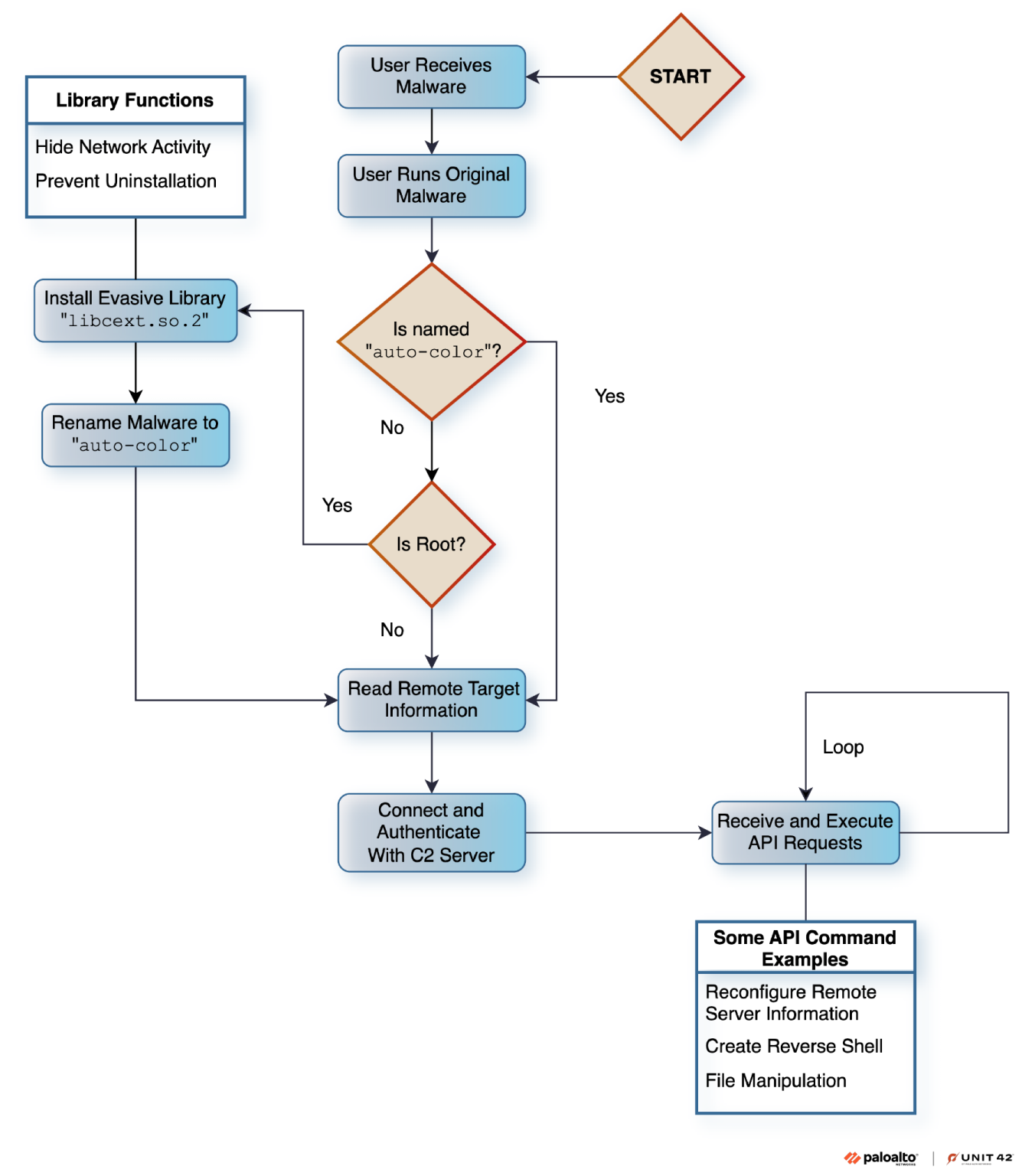 Auto-Color Flow Diagram (source: Paloalto)Auto-Color's most worrying trait is its ability to blend seamlessly into standard system processes, making it exceptionally hard to detect. Traditional security measures may fail to recognize this malware due to sophisticated obfuscation strategies that bypass typical security scans. Auto-Color excels at concealing its tracks by merging into legitimate processes to avoid raising alarms.
Linux security admins should depend upon more innovative detection methods to mitigate attacks. Anomaly Detection Systems that track for any abnormal patterns or behaviors within their network are critical in detecting Auto-Color. Regular manual audits of system processes are also helpful in detecting any unusual activities that automated systems might have missed.
The Path of Infection
How does Auto-Color penetrate Linux systems? The malware spreads through compromised software repositories and phishing strategies targeting administrators with elevated privileges. Its dual attack vector allows it to spread directly onto individual systems and indirectly via trusted sources of software downloads.
Securing system software and tools by procuring them from reliable, verified repositories is a fundamental way of combatting this threat. Furthermore, raising awareness among users about phishing attacks and using multi-factor authentication can add extra layers of protection against such attempts. Administrators should pay particular attention when receiving suspicious requests for login credentials or unusual updates. These could indicate that someone is trying to commit fraud against your system.
Examining Auto-Color's Impact
Auto-Color can have devastating consequences on compromised systems. Once it infiltrates, Auto-Color malware can monitor and alter user activity, steal sensitive data, and execute arbitrary commands - providing attackers with total control to steal valuable information while disrupting operations and creating significant system damage.
One of the most troubling aspects of this threat is its use in larger botnet activities. By commandeering multiple systems, attackers can launch widespread attacks, amp up their impact, and avoid detection - an impactful disruption for organizations that rely on continuous operations.
Reinforcing Your Defenses
 Due to the nature of Auto-Color, strengthening system defenses is of utmost importance. Implementing strict access controls ensures that only authorized users can perform high-level operations, thus decreasing the chances of a successful attack. Furthermore, regularly updating and patching all software components will close vulnerabilities that malware attacks can exploit.
Backing up data regularly is another essential component of an effective defense strategy. Doing this allows systems to remain functional even after they have been compromised by ensuring data can be restored with minimal loss. Backups should ideally be stored offline or in an encrypted cloud environment to avoid being targeted by malware attacks.
The Importance of Incident Response Planning
No matter how robust your defenses may be, breaches can still happen. A comprehensive incident response plan enables organizations to respond rapidly and effectively when security incidents arise. This plan should include protocols for detecting malware attacks, quickly alerting stakeholders, and returning systems to normal operations.
Training and drills are critical to ensure each team member understands their role during an emergency. Regular sessions help keep security protocols top-of-mind among everyone involved and enable a quick response during an incident.
Our Final Thoughts on Mitigating the Auto-Color Linux Malware Threat
 Auto-Color represents a sophisticated and potentially devasting malware threat to our Linux systems. With advanced evasion techniques combined with its ability to spread through both repository downloads and phishing emails, Auto-Color is an impressively persistent adversary. Yet, by understanding its operation and taking appropriate security precautions, Linux admins can protect their systems effectively against it.
From tight access controls and frequent software updates to proactive anomaly detection and robust incident response plans, many strategies exist to mitigate the risks posed by Auto-Color. Staying informed and prepared, keeping systems updated, and informing users about threats like Auto-Color are all part of maintaining a strong security posture.
 PREVIOUS

 NEXT
NEXT



Powered By

Linux Security - Your source for Top Linux News, Advisories, HOWTOs and Feature Releases
QUICK LINKS
subscribe to newsletters!
Like staying secure? So do we.
Sign up for updates, tips, and alerts!