Explore top 10 tips to secure your open-source projects now. Read More
×



Server Security data privacy automation
data privacy automation Every system admin has lived through the same Monday morning ritual. A queue of forty tickets, half of them password resets, permission errors, or disk space warnings that any experienced technician could resolve in under two minutes. The other half require actual judgment. For years, automation promised that software would eventually sort the two apart on its own. That promise is now being tested in production Linux environments. . Early results are reshaping how IT teams think about tier-1...
 Jul 17, 2026

Privacydata collection automation
data collection automation You're running a web scraping project to collect pricing data from e-commerce sites. You set up a pool of datacenter proxies, launch your scripts, and within minutes — banned . CAPTCHAs everywhere. Your data pipeline stops before it really begins. . It's a frustrating scenario that plays out daily in ad verification, market research, and multi-account management. The website doesn't know you're doing legitimate research or monitoring. It just sees traffic coming from IP ranges it recognizes as...
Jul 17, 2026

Security Trends security advisory social engineering
security advisory social engineering Business Email Compromise used to be a numbers game — mass-blasted emails, broken English, an obvious "URGENT WIRE TRANSFER" subject line. That era is over. Generative AI has turned BEC into a tailored, low-noise operation that mimics writing style, voice, and even video presence. This piece looks at what's actually changed under the hood, what defenders are testing in response, and why so many organizations are still structurally unprepared for it. . The Infrastructure Problem Nobody Wants to...
Jul 17, 2026

Security Trends cybersecurity Linux documentation
cybersecurity Linux documentation Linux operating systems have gained prominence due to their stability, adaptability, and excellent security options. In the case of developing documentation, designing cybersecurity dashboards, or educational material, visuals are of vital importance when it comes to making things clear. The use of icons allows one to understand the message regarding alerts, authorization, encryption, authentication, or the state of the system just by looking at the visual cue without having to read long...
Jul 17, 2026
Security Vulnerabilities security advisory linux distribution
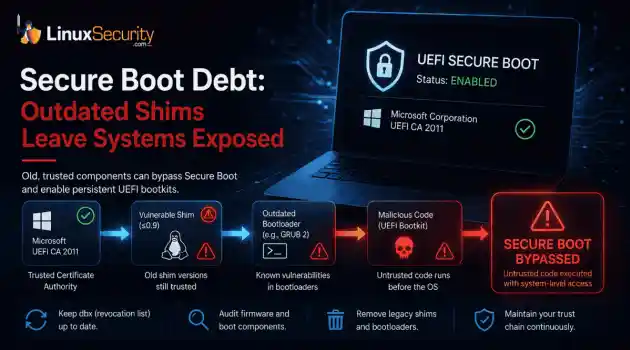
security advisory linux distribution ESET researchers identified 11 old and forgotten Linux UEFI shim bootloaders at versions 0.9 and below that can be used to bypass UEFI Secure Boot on any UEFI-based machine that trusts Microsoft’s Microsoft Corporation UEFI CA 2011 third-party certificate authority, regardless of the installed operating system (OS). Reported shims can be exploited to execute untrusted code during system boot, enabling attackers to deploy malicious UEFI bootkits even on systems with UEFI Secure Boot enabled.....
Jul 16, 2026
 Refine news
X Clear Filters
Get the latest News and Insights
Get the latest Linux and open source security news straight to your inbox.
Community Poll
Is continuous patching actually viable?
Loading...
Explore Latest Linux Security news
We found 205 articles for you...
209
 security advisorysocial engineeringphishing
Business Email Compromise with AI Enhancements and New Defense Strategies
Business Email Compromise used to be a numbers game — mass-blasted emails, broken English, an obvious "URGENT WIRE TRANSFER" subject line. That era is over. Generative AI has turned BEC into a tailored, low-noise operation that mimics writing style, voice, and even video presence. This piece looks at what's actually changed under the hood, what defenders are testing in response, and why so many organizations are still structurally unprepared for it. . The Infrastructure Problem Nobody Wants to Admit Here's an uncomfortable truth: most BEC defenses fail not because the AI is too clever, but because the mail infrastructure behind them is ancient. Legacy MTAs bolted together over a decade, half-configured SPF records, DKIM keys nobody rotated since 2019 — this is fertile ground for attackers who no longer need to guess your CFO's writing style, because a language model can extract it from three publicly available press releases in under a minute. Sysadmins carrying that kind of technical debt aren't fighting AI-generated phishing on equal footing; they're fighting it with one hand tied to a mail server that was never designed for this threat model. Modernizing that stack — replacing brittle, unmonitored legacy pipelines with something observable and policy-driven — has stopped being an IT hygiene task and become a security requirement. A proper software modernization solution addresses exactly this gap, turning fragmented legacy email and identity infrastructure into something that can actually enforce Zero Trust principles instead of just gesturing at them in a compliance document. That's not a hypothetical concern. According to industry incident data, BEC remains one of the costliest categories of cybercrime tracked by the FBI's IC3 division year over year, and the losses keep climbing even as awareness training budgets grow. Something isn't adding up — and the honest answer is that awareness training was built for a threat that has since evolved past it. What Attackers AreActually Testing Right Now Personalized Phishing at Machine Speed Large language models didn't just make phishing emails more grammatically correct. They collapsed the reconnaissance phase from days to minutes. Feed a model a target's LinkedIn history, a few earnings call transcripts, and a handful of public Slack or GitHub posts, and it will draft a message that references internal project codenames, mirrors the CEO's typical sentence rhythm, and lands in an inbox with zero red flags for a spam filter trained on 2021-era phishing patterns. A few technical shifts worth flagging: Style transfer at scale. Attackers fine-tune or prompt open-weight models on scraped email threads (often from prior breaches or public archives) to replicate an executive's tone precisely enough to fool colleagues who've worked with them for years. Multi-turn social engineering. Instead of one-shot emails, attackers now run conversational threads — the model adapts replies in real time, handling objections ("can you confirm this on a call?") with plausible, context-aware pushback. Automated OSINT pipelines. Reconnaissance that used to require a skilled human analyst is now a scripted pipeline chaining search APIs, scraping tools, and an LLM summarizer — cutting attacker prep time from days to under an hour. Voice Cloning and Deepfake Verification Calls This is the part that should genuinely worry anyone running finance operations. Voice cloning tools now need as little as three seconds of clean audio — pulled from a conference recording, a podcast appearance, an earnings call — to produce a convincing synthetic voice. Combine that with a deepfake video call (even a low-resolution one over a "bad connection," which conveniently masks artifacts), and you've defeated the exact verification step most finance teams were told to rely on: "just call them to confirm." Voice authentication as a control is quietly becoming obsolete. Not gone yet, but the trend line is unambiguous, and financeteams that still treat a phone call as a hard confirmation step are working from an outdated threat model. Business Logic Abuse Over Malware One detail that surprises people outside the field: a huge share of modern BEC doesn't involve malware at all. No payload, no exploit, nothing for an EDR agent to catch. It's pure social engineering wrapped around legitimate business processes — invoice changes, payroll redirects, vendor bank detail updates. Mapped against MITRE ATT&CK, this activity sits almost entirely in the Initial Access and Collection tactics, rarely touching Execution or Persistence in any way a traditional security stack is tuned to detect. That's precisely why signature-based and payload-based defenses keep missing it. What Defenders Are Building to Counter It The defensive side isn't standing still, and there's some genuinely interesting engineering happening — though most of it is still maturing from prototype into production reliability. Behavioral and Linguistic Baselining Instead of scanning for malicious links or attachments, newer platforms build a behavioral fingerprint per sender: typical sending hours, sentence length distribution, vocabulary patterns, even punctuation habits. When a message claiming to be from a known executive deviates from that baseline — arriving at 3 a.m., using unusually formal phrasing, requesting an action that's never occurred in that thread's history — it gets flagged for review, regardless of whether it contains any traditionally "malicious" content. AI-Driven Anomaly Detection Across Mail Flows Security teams are increasingly running anomaly detection models across aggregate mail flow data rather than individual messages: sudden changes in reply-to domains, unusual DKIM signature patterns, mismatches between the claimed sending infrastructure and actual delivery path. This is where solid fundamentals still matter enormously — a well-configured DMARC policy with strict alignment, properly rotated DKIM keys, andenforced SPF still catch a meaningful share of spoofing attempts before any AI layer even needs to look at content. For teams building this out on Linux mail infrastructure, the practical groundwork is covered well in Zero Trust for Email: Implementing Advanced Protections on Linux — worth revisiting even if your DMARC rollout already feels "done," because alignment mode and reporting configuration drift over time in ways nobody notices until an audit. Adaptive Filtering That Learns Per Organization Generic, vendor-wide filtering models struggle with BEC precisely because these attacks are so context-specific — there's no universal signature for "email pretending to be your specific CFO." Adaptive filtering approaches train lightweight models on an organization's own historical mail corpus, learning what "normal" actually looks like internally rather than applying a one-size-fits-all threat model. Early deployments show promise here, though false-positive tuning remains the genuine bottleneck; block too aggressively and you're fielding help desk tickets from the actual CFO. A quick summary of where the technical controls stack up: SPF/DKIM/DMARC enforcement — foundational, still catches a real share of spoofing, but useless against compromised legitimate accounts Behavioral baselining — effective against style mimicry, resource-intensive to maintain accurately Voice/video verification protocols — need a second, out-of-band channel (a pre-shared code phrase, a callback to a known number, not one provided in the suspicious message itself) Payload-agnostic anomaly detection — necessary given how much BEC skips malware entirely, but requires mature baseline data to avoid alert fatigue Attachments Still Matter — Just Not the Way They Used To It would be a mistake to assume BEC 2.0 has made malicious attachments irrelevant. Attackers still pair social-engineering pretext with weaponized documents in a meaningful minority of campaigns — usually as asecondary payload once initial trust is established through a convincing AI-generated thread. The detection techniques covered in Enhancing Linux Email Security: Identify Malicious Attachments Effectively remain directly relevant here; sandboxed detonation and macro analysis haven't gone anywhere; they've just become one layer among several rather than the primary defense. Where Server-Level Hardening Fits In None of the AI-era detection tooling matters much if the underlying mail transfer agent itself is exploitable. The disclosure and patch cycle around Exim 4.98 is a good reminder that MTA-level vulnerabilities remain very much alive as an attack surface, and BEC campaigns increasingly chain infrastructure compromise with social engineering — gaining a foothold through an unpatched mail server, then using that legitimate infrastructure to send convincing internal-looking messages that sail past reputation-based filtering entirely. NIST's guidance on email security practices (SP 800-177 and related publications) has aged surprisingly well as a baseline framework, even against threats its authors couldn't have fully anticipated — encrypted transport, authenticated sending domains, and least-privilege access to mail infrastructure are still exactly the right starting points. What's changed isn't the framework; it's the sophistication of what's probing for gaps in it. So What Should Actually Change on the Ground? Not a full teardown of existing security stacks — that's neither realistic nor necessary. But a few shifts in priority are overdue: Treat voice and video confirmation as compromised by default; require a genuinely out-of-band verification step for any financial or credential-related request. Audit DMARC alignment and DKIM key rotation schedules now, not after the next quarterly review — this is cheap to fix, and attackers are actively scanning for the gaps. Shift detection budget toward behavioral and flow-based anomaly detection, since a growing share ofBEC never triggers payload-based defenses at all. Stop treating legacy mail and identity infrastructure as untouchable. Every unpatched, unmonitored legacy component is one more surface a language model can map faster than your team can document it. Is this an arms race? Sure, in the sense that every era of email security has been. But the pace has changed — attacker tooling that took a skilled operator days to build manually is now a weekend project with off-the-shelf models. Defenders who treat that shift as just another line item in next year's budget request are going to keep losing ground. The ones who close the infrastructure gaps now, while also investing in behavior-aware detection, are the ones who'll actually keep pace. . Generative AI is revolutionizing Business Email Compromise, enhancing phishing tactics and challenging your existing defenses.. Business Email Compromise, AI Security, Phishing Attacks, Identity Infrastructure, Cyber Defense Strategies. . Anthony Pell
 Jul 17, 2026
•
Jul 17, 2026
• Security Trends
209
 cybersecurityLinux documentationsecurity icons
Enhancing Linux Documentation with Security Icons for Clarity
Linux operating systems have gained prominence due to their stability, adaptability, and excellent security options. In the case of developing documentation, designing cybersecurity dashboards, or educational material, visuals are of vital importance when it comes to making things clear. The use of icons allows one to understand the message regarding alerts, authorization, encryption, authentication, or the state of the system just by looking at the visual cue without having to read long descriptions. Their universally similar design helps improve the quality of communication while adding a professional touch to documentation. . Why Do Security Icons Matter in Linux Documentation? The technical documentation should be easy to understand by both novices and experienced professionals. Good icons will help readers distinguish the significant parts of the document, such as security warnings, firewalls, encryption, authentication , and other necessary elements. Thus, instead of using words only, meaningful icons make the technical documentation more attractive and easier to perceive. They will increase the readability and consistency of installation, administration, and troubleshooting documentation. If an organization uses several different Linux distributions, such icons may help to establish a unified style of documentation. Improving Technical Communication Using Linux security icons is a good way to communicate security-related information faster than using lengthy descriptions. Usually, developers use them to emphasize privileged commands, root permissions, Secure Shell access, and encrypted directories. Therefore, using icons will decrease the time spent learning Linux security principles and will help to perceive complex documentation in a better way. Moreover, the usage of icons will make the collaboration of team members easier since everybody knows what icons mean regardless of their background knowledge. According to research from the UX Design Institute , effectiveiconography is a cornerstone of intuitive UI, as it significantly lowers the cognitive load for users processing complex technical information. Common Types of Security Icons Used in Linux Projects The range of subjects covered in Linux documentation is diverse. Thus, a number of different icon categories become very important. Lock icons usually stand for encrypted documents, while shield images denote the overall security or antivirus functions of the system. Icons depicting authentication usually involve user profiles along with passwords or key images. To find a versatile library for your projects, you can explore various security icons to help symbolize firewall protection, vulnerability alerts, or encrypted status. Correctly chosen icons will provide information about the topic and help users avoid distractions from work. Authentication and Access Control Icons Authentication is probably the most critical part of any Linux security. The set of commonly used icons includes symbols for passwords, biometrics, SSH, and MFA authentication, as well as icons for user permissions. Such visuals make explanations of logging in much clearer. Administrators can distinguish between normal and privileged accounts easily. Useful authentication icons will make it easy for users to understand how to log into the system securely. Using Security Icons in Cybersecurity Projects Cybersecurity solutions make use of visualizations since many experts have to work with vast volumes of information in a very short period of time. The dashboards that are used to visualize information regarding threats, vulnerabilities, and security operations can be easily read when icons are applied appropriately. Colored graphics can make it easier for professionals to spot dangerous incidents and ensure efficient system monitoring and alert handling. Irrespective of whether the task is to create an intrusion detection solution or a network monitoring tool, icons will add clarity to the interface. Visualizing ThreatDetection When it comes to working with threat detection systems, analysts can see various types of information such as malware alerts, malicious activity, firewall activities, and network incidents. With the help of clearly defined security symbols, developers provide analysts with an opportunity to differentiate between various kinds of events in a matter of seconds. Best Practices for Choosing Security Icons Designing good icons entails much more than choosing pretty graphics. In addition to being clear and scalable, icons need to be consistent in all documentation and applications. They have to be clearly distinguishable at various sizes while retaining enough contrast. The use of a consistent style is one of the factors that help achieve professionalism, especially in enterprise Linux, where several teams are involved in documenting their systems. Well-designed icons should work in tandem with documentation and not distract from it. Maintaining Consistency Across Documentation Consistency is crucial in terms of trust and usability. Use of similar icon sets in installation guides, configuration instructions, security policies, and training material makes life easier for the reader. Besides, using a standardized library of icons facilitates further development as it adheres to a certain design language. Future Trends in Linux Security Documentation Since Linux is penetrating into the sphere of cloud computing, DevOps, and enterprise infrastructure, it means that documentation standards will keep on evolving. Interactive manuals, artificial intelligence-based documentation, and adaptive digital knowledge bases create the need for new icons that can be viewed successfully from any device or screen. We should expect an increased use of animated icons, scalable vector graphics, and icon designs focused on accessibility. This will help professionals explain complex cybersecurity notions and improve the user experience. Conclusion Quality Linux documentation requires a proper balancebetween technical correctness and visual presentation. Well-chosen security icons will make it easier for users to understand complicated notions, navigate through the information, and receive cybersecurity education in an effective manner. Thus, using icons in such documents as administrator manuals, cybersecurity dashboards, educational resources, and enterprise knowledge bases will significantly boost their usability and professional appearance. . Explore the importance of security icons in Linux documentation and their role in enhancing clarity in cybersecurity projects.. Security Icons, Linux Documentation, Cybersecurity, Visual Communication, Iconography. . Anthony Pell
Jul 17, 2026
•
Security Trends

209
 privilege escalationLinux securityvulnerability prioritization
How Linux Security Teams Can Prioritize Real-World Attack Paths and Reduce Alert Fatigue
Linux security teams are drowning. Patches, kernel updates, new CVEs every week. SSH exposed here, an old web service there, and a forgotten cron job running as root. On top of that, SIEM dashboards blink all day with alerts that all claim to be “high priority.” . It’s no surprise that people stop paying attention. The real problem isn’t a lack of data. It’s the opposite. Too much noise, not enough signal. Security teams see huge lists of vulnerabilities and thousands of alerts, but very little context about which ones actually matter for how an attacker would move through their Linux environment. The limits of counting vulnerabilities Most Linux environments today are judged by numbers. How many critical CVEs are open? How many high alerts did the SOC see yesterday? How many hosts are unpatched? Those metrics look good on a status slide, but they don’t tell you how close you are to a real compromise. A kernel vulnerability on an isolated lab box is not the same as a weak SSH configuration on an internet-facing bastion host. A missing patch on a backup server with no network access is not equal to a sudo misconfiguration on a server where every engineer logs in daily. Traditional vulnerability management tools usually treat them the same. They assign a score, drop it on a dashboard, and call it a day. Linux administrators then stare at pages of CVEs with vague descriptions and generic “apply patch” advice. It’s not that they don’t want to fix things. It’s that they can’t do everything, and the tools rarely tell them what they can safely ignore. Alert fatigue in Linux environments Alerts add another layer of pressure. IDS, EDR, log monitoring, file integrity checks, container security tools—they all generate events. A suspicious process here. A permission change there. An unusual SSH login pattern. Each rule is well-intentioned. Together, they become exhausting. Security engineers start to recognize patterns: the same noisy rule firing over and over,the same false positives from a backup job or a deployment script. After enough of that, people click “acknowledge” without digging in. Not because they’re careless. Because they’re overloaded. It's not just anecdotal. Recent research on SOC alert overload found that the volume and complexity of alerts have grown faster than most teams' ability to triage them. Alert fatigue is what happens when the team’s attention becomes a scarce resource. The more you burn it on low-value alerts, the less you have left for the one alert that actually signals an attack in progress. Shifting the focus: attack paths, not item counts The shift that’s happening in better-run Linux security programs is simple in concept: Stop treating vulnerabilities and alerts as individual items. Start treating them as parts of attack paths. Attackers don’t care about your entire CVE list. They care about chains. A weak external entry point. A misconfiguration that allows lateral movement. A privilege escalation that gives them root. A gap in monitoring that lets them stay quiet. That’s why attack surface visibility matters so much. Teams need a clear view of: Which Linux systems are exposed to the internet Which services and ports are open, and to whom Which identities can access which hosts Where sensitive data and critical workloads actually live Once you see the environment this way, a vulnerability is no longer just “critical.” It’s “critical on a public-facing server that has direct SSH access to our production database subnet.” That’s a different level of urgency. Prioritizing vulnerabilities in context On a practical level, Linux security teams can start by asking a few questions for each issue: Is this system reachable from the internet or from less-trusted networks? If exploited, does it help an attacker escalate privileges or move laterally? Does it expose credentials, secrets, or control over important services? Is this weakness part of a chainwe’ve already seen in real-world attacks? A local privilege escalation bug on a developer workstation running Linux might be important, but not nearly as urgent as a misconfigured sudoers file on a jump host used for production access. A medium-severity bug in an exposed SSH service with weak auth can be more dangerous than a “critical” bug buried behind multiple layers of segmentation. This is where concepts like continuous threat exposure management (ctem) come in. Instead of just counting issues, organizations try to understand how those issues connect, which ones create realistic attack paths, and how those paths change over time as systems are added, removed, or reconfigured. Privilege escalation and configuration weaknesses Linux gives a lot of power to configuration files. That’s both a strength and a risk. A single line in /etc/sudoers can decide whether a compromised user account turns into full root control. A world-writable script triggered by a cron job can hand over system-level access. An NFS export with the wrong settings can quietly bypass permissions you thought were enforced. These don’t always show up as flashy CVEs. They look like small misconfigurations. But in real incidents, these are often the steps attackers rely on after initial access. These common Linux privilege escalation patterns tend to repeat across environments, which is exactly why they're so easy to overlook. Prioritization here means treating privilege escalation risks as first-class citizens. That includes: Reviewing sudo rules and removing unnecessary privileges Locking down service accounts and automation scripts Tightening file permissions on scripts, configs, and logs Watching for setuid binaries and unusual capabilities Exposed services and attack surface Linux servers tend to accumulate services over time. Old admin tools. Forgotten testing daemons. Temporary debug ports that never got closed. From an attacker’s perspective, every listening service isan opportunity. Even if the version is fully patched, it may leak information, offer brute-force access, or serve as a foothold for future misconfigurations. Regular mapping of exposed services internally and externally is crucial. Not just listing ports, but also understanding business impact: What happens if this service is compromised? Does it sit in front of sensitive data or critical operations? Who really needs access to it? Again, the goal is to see where a real-world attack would likely begin, not to chase every open port with equal urgency. Continuous validation, not one-time cleanup The Linux landscape inside most organizations is not static. New containers spin up. New VMs appear. Engineers experiment, deploy, retire, and repurpose systems. One-time cleanups help, but they don’t last. The only sustainable approach is continuous validation of your controls. This shift toward validating exposures on an ongoing basis is becoming the norm for security teams who've outgrown periodic scans: Regularly simulate attack paths or run adversary-style tests Verify that segmentation actually blocks the movement you expect Check that logging, detection, and response playbooks work in practice Confirm that newly deployed Linux systems inherit hardened baselines This is where many teams are moving beyond traditional vulnerability scanning. They want a feedback loop that says, “Here is how an attacker would move through your Linux environment today,” and, “Here is what changed since last week that opened up a new path.” From noise to clarity In the end, reducing alert fatigue and making Linux environments safer are the same goal. You don’t need fewer tools. You need better questions: Which weaknesses create a clear path from the outside world to something we care about? Where are we giving away privilege too easily? What’s exposed that doesn’t need to be? Are our controls actually working, right now, against the waysattackers operate? When teams organize their work around realistic attack paths instead of raw counts and dashboards, something important happens. The noise drops. The work feels more meaningful. And when an alert arrives that fits into a known, dangerous path, it finally gets the attention it deserves. . Discover how Linux security teams can effectively manage alerts and vulnerabilities by focusing on real-world attack paths and reducing fatigue.. Linux security, alert management, attack path prioritization, privilege escalation, continuous validation. . Anthony Pell
Jul 06, 2026
•
Security Trends
209
 malwaresecurity researchtrojan
Trojanized GitHub PoC Repositories Deliver ChocoPoC Malware to Security Researchers
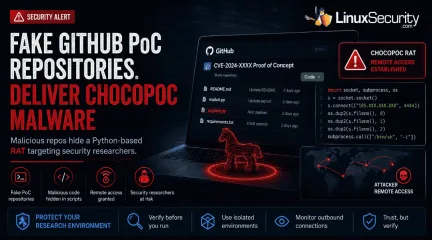
GitHub has become the latest delivery mechanism for malware aimed at security researchers. . YesWeHack and Sekoia identified a campaign that hid a Python-based remote access trojan (RAT) called ChocoPoC inside repositories presented as proof-of-concept exploits for recently disclosed vulnerabilities. Someone looking for a working exploit could clone the project, execute the code, and unknowingly launch a second payload that established remote access. Nothing about the campaign specifically targets Linux. The workflow does. Linux remains a common platform for exploit development, reverse engineering, malware analysis, and penetration testing, so it's also a common place to download and test public PoCs. That makes research workstations an appealing target when attackers decide the easiest way to reach an organization is through the people analyzing its vulnerabilities. How Trojanized GitHub PoC Repositories Delivered ChocoPoC Malware The campaign centers on the deployment of trojanized repositories that mimic legitimate exploit research. When a researcher clones and executes the code to validate a vulnerability, the malicious payload executes alongside the advertised exploit. Once the malicious script is triggered, it can establish remote access, allowing attackers to execute commands remotely on the compromised system. The repositories were designed to resemble legitimate security research projects, allowing the embedded malicious code to blend into routine research workflows. The Campaign Highlights a Common Workflow Risk The campaign highlights a standard practice among vulnerability researchers: downloading public proof-of-concept code to validate newly disclosed vulnerabilities. Linux is widely used for these tasks because of its native development tools, scripting ecosystem, and established penetration-testing distributions. Because researchers frequently execute public exploit code during vulnerability validation, Linux research environments can become attractive targets forcampaigns that abuse trusted repositories. Trust Abuse in Open Source Research Workflows ChocoPoC isn't remarkable because of the malware itself. Security researchers have seen Python backdoors before. What stands out is where it was hidden. Public proof-of-concept repositories have become a routine part of vulnerability research, and attackers are now using that expectation against the people who depend on them. This incident is part of a wider pattern of trust abuse on public code-sharing platforms. Academic research presented at USENIX WOOT 2025 in the paper SecurePoC: A Helping Hand to Identify Malicious CVE Proof of Concept Exploits in GitHub demonstrates that malicious and misleading proof-of-concept repositories have become a significant enough problem to warrant dedicated detection research ( USENIX WOOT 2025, el-Yadmani et al. ; Zenodo Artifact ). The researchers identified numerous cloned and modified repositories containing malicious additions, highlighting how public code-sharing platforms have become an attractive distribution channel for malicious proof-of-concept repositories. Why Linux Users Should Pay Attention ChocoPoC is not a Linux-specific threat. The malicious repositories described by YesWeHack and Sekoia could affect researchers working on Windows, macOS, or Linux. What makes the campaign relevant to Linux users is how many security professionals perform vulnerability research. Linux is widely used for penetration testing, exploit development, reverse engineering, and malware analysis. As a result, Linux workstations, virtual machines, and lab environments are common places to clone and execute public proof-of-concept code. The campaign exploits that research workflow, not the operating system itself. For Linux users who regularly test exploits from public repositories, it serves as a reminder that the repository deserves the same level of scrutiny as the vulnerability being investigated. Reducing Risk When Testing Public Exploit Code As public exploitrepositories become a more frequent source of opportunistic attacks, the security of the researcher’s workstation must be prioritized. Researchers should begin by performing a thorough source inspection, reviewing PoC code for obfuscated commands, unexpected network calls, or hardcoded IPs before any execution. Beyond manual review, consider using disposable virtual machines or isolated container environments when validating exploit code to ensure that malicious payloads cannot reach your host filesystem or network. For those working in Windows-based environments, Microsoft has recently launched a public preview of WSL Containers (WSLC), which allows for the creation of native, isolated Linux container environments ( Microsoft Dev Blog ; Microsoft Learn ; WSL API Reference ; Phoronix ). Furthermore, researchers should perform due diligence by assessing repository reputation, commit history, and the author's track record rather than relying on the code’s presence alone. Finally, monitoring outbound network connections during the testing phase is a practical way to identify and block any unexpected traffic generated by a script. Conclusion ChocoPoC serves as a critical reminder that the security industry’s own workflows are now firmly in the crosshairs of threat actors. As public exploit repositories continue to grow in volume, the ability to validate the integrity of the code we download is becoming just as essential as the ability to validate the vulnerabilities the code aims to address. Security professionals must treat unverified PoC code with the same scrutiny as any other untrusted software. . ChocoPoC malware highlights a serious risk in GitHub PoC repositories, impacting security researchers across platforms.. malware delivery techniques, security researcher risks, public code repositories, ChocoPoC attacks. . MaK Ulac
Jul 02, 2026
•
Security Trends
209
 security updatemobile securityoffensive security
What Kali Linux 2026.2 Says About Today's Linux Security Priorities
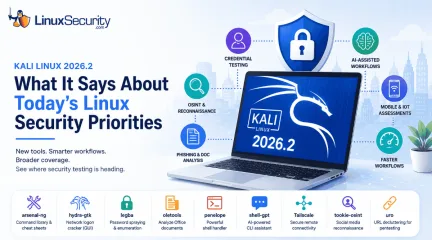
Offensive Security just dropped Kali Linux 2026.2 , and at first glance, it looks like a standard quarterly refresh. You’ve got the usual kernel bumps, desktop environment updates, and a handful of new utilities. But don't write this off as just another routine version update. If you look past the changelog, this release highlights several capabilities that continue to be important in offensive security. From AI-assisted workflows to credential testing and mobile assessments, Kali Linux 2026.2 reflects the techniques many security professionals are incorporating into modern Linux security testing. For Linux administrators and defenders, understanding what tools are being added to Kali can be just as valuable as using them; they reflect the techniques security teams—and attackers—consider most relevant for evaluating modern Linux environments. . Why Kali Releases Matter Even If You Don't Use Kali Most enterprise Linux systems will never run Kali Linux, but administrators still benefit from following its development. New tools often reflect the techniques penetration testers are actively using during real-world assessments. Reviewing each release helps defenders identify emerging testing priorities and evaluate whether their own monitoring, authentication controls, and hardening practices address those attack paths. What's New in Kali Linux 2026.2 The headline for 2026.2 is the inclusion of nine new security tools, but the platform improvements are what really move the needle for daily operations. The distribution is now running on the Linux kernel 6.19, with the desktop experience receiving a facelift through GNOME 50 and KDE Plasma 6.6. Tool Primary Purpose arsenal-ng Cybersecurity command reference and cheat sheets hydra-gtk GUI for Hydra credential testing legba Password spraying and authentication testing oletools Analyze Microsoft Office documents andmacros penelope Shell handler for post-exploitation shell-gpt AI-assisted command generation Tailscale Secure remote connectivity tookie-osint Social media reconnaissance uro URL normalization for web testing Taken together, the new tools cover credential auditing, OSINT, phishing analysis, AI-assisted workflows, remote connectivity, and shell management. They reinforce a broader reality: modern security assessments rarely focus on a single system. Today's engagements often combine identity testing, cloud infrastructure, web applications, mobile devices, and social engineering into a single assessment. Beyond the aesthetics, the team focused on friction reduction. VM deployments are significantly faster this time around, thanks to the removal of graphics firmware from pre-built images, and there’s a marked improvement in NetHunter’s stability. For those running security assessments in virtualized labs, these workflow optimizations save real time when you're spinning up or tearing down testing environments. Another notable addition is Tailscale, which gives security teams a straightforward way to create encrypted connections between testing systems. For organizations with distributed labs or remote team members, it can simplify access to assessment environments without exposing them directly to the internet. Credential Attacks Continue to Be a Priority Among the new tools are additions focused on credential testing, including legba and the re-added hydra-gtk . Their inclusion reflects how identity-based attacks—including password spraying, credential reuse, and authentication testing—continue to play a central role in modern security assessments. If an administrator uses the same password for a local Linux server and a corporate SSO account, that’s an open door. These tools act as a wake-up call: if you aren't enforcing MFA, disabling legacyauthentication, and proactively monitoring for password-spraying attempts, your infrastructure is likely the low-hanging fruit in a credential-stuffing campaign. AI Is Becoming Part of Everyday Security Operations The inclusion of shell-gpt might trigger a knee-jerk reaction about AI replacing security pros, but that’s missing the point. Tools like shell-gpt illustrate how AI is beginning to reduce repetitive command-line work. Rather than replacing expertise, they help security professionals generate commands, reference syntax, and automate routine tasks more efficiently. Offensive security is notoriously repetitive. Whether it's drafting boilerplate command syntax or normalizing log output, the friction of manual scripting slows down an assessment. These tools reduce repetitive command-line work and make common workflows easier to reproduce, allowing analysts to spend more time interpreting results than writing boilerplate commands. Mobile Devices Are Now Part of Enterprise Security Assessments The latest NetHunter improvements highlight a shift in scope. Many organizations that rely on Linux servers also manage Android devices, embedded Linux systems, and IoT endpoints. Expanding NetHunter reflects the reality that enterprise security assessments increasingly extend beyond traditional servers. Strong Linux server hardening is only one part of the equation. If attackers can gain network access through an insecure Android device or wireless infrastructure, they may still be able to pivot toward Linux systems. Kali 2026.2 provides the tools to assess these wireless "flanks" of the enterprise, ensuring that mobile and IoT devices are part of your broader security program. Security Testing Is Becoming Faster There’s a clear emphasis on speed in 2026.2, from the faster VM boot times to the smaller initrd. When you're building disposable lab environments, validating detections, or conducting repeated penetration tests, time is your most limited resource. Faster deployments meanassessments can happen more frequently, which makes security validation a natural part of daily operations rather than a painful, quarterly event. By removing unnecessary graphics firmware from pre-built virtual machine images, Kali reduces boot times for many VM-based testing environments while leaving bare-metal installations unchanged. Office Documents Still Matter in Linux Environments Kali 2026.2 also highlights the ongoing relevance of oletools . While Linux endpoints are less commonly associated with Office malware than Windows systems, Linux administrators frequently investigate phishing campaigns, analyze suspicious attachments, and protect mixed-platform environments. Tools like oletools help incident responders inspect Office documents for embedded macros and other malicious content before those files reach users or move deeper into an organization. What Linux Administrators Should Take Away From the Release One of the most useful aspects of following Kali releases isn't deciding whether to upgrade immediately. It's understanding where offensive security is investing its attention. The tools that enter Kali often mirror the techniques organizations are increasingly testing during security assessments, giving defenders an opportunity to evaluate whether their own controls keep pace. Use this table as a checklist for your own hardening efforts: Area Question to Ask Authentication Could your SSH service withstand password spraying? AI Workflows Have you established guidelines for using AI tools without exposing sensitive commands or data? Email Security Are Office documents scanned for malicious content before users open them? OSINT Is unnecessary organizational information publicly exposed? Mobile Security Are Android and IoT devices included in security assessments? Detection Can your monitoringidentify credential attacks and suspicious shell activity regardless of the specific tool used? Conclusion Kali Linux 2026.2 is more than a collection of new packages and version upgrades. Its newest tools and platform improvements reflect the techniques security professionals are using to evaluate modern Linux environments. Whether your organization performs formal penetration tests or simply wants to strengthen its defenses, the release highlights where security testing is placing increasing emphasis: identity, automation, mobile devices, and operational efficiency. Pay attention to the techniques these tools are designed to test; they reflect the attack paths that penetration testers evaluate today and the behaviors defenders should be prepared to detect. Want more Linux security news, vulnerability analysis, and software supply chain updates? Subscribe to the LinuxSecurity Newsletter and get the latest threats, advisories, and expert insights delivered directly to your inbox. . Kali Linux 2026.2 showcases new capabilities in offensive security, highlighting tools for credential testing, AI, and mobile assessments.. Linux Security Tools,Kali Linux 2026.2,Cybersecurity Tools,Credential Testing Techniques,AI in Security. . MaK Ulac
Jun 30, 2026
•
Security Trends
209
 open-sourcelinux developmentcode review
The New Rules for AI-Assisted Contributions: Ownership is Not Optional
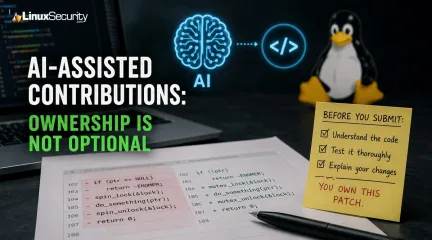
AI-assisted patches are already showing up across open source. Small GitHub projects, package updates, kernel-adjacent tools, system libraries. It’s not a future problem anymore. . Maintainers are going to see more of this code, and most of them aren’t trying to ban it outright. They’re trying to figure out what happens when a contributor submits a patch they didn’t fully write and may not fully understand. That’s where the review process gets messy. Linux development depends on trust, but that trust only works when the person submitting the code can answer for it. The Software Freedom Conservancy (SFC) just released a set of recommendations for how to handle this. They aren't trying to ban AI. They’re trying to solve a much more basic problem: who owns the mess when AI-generated code breaks in production? Why Maintainers Are Pushing Back Nobody really cares whether you used AI. They care whether you understand the patch you're asking them to merge. Linux development has always worked on the assumption that the person submitting the code knows why every change is there. If the review turns into the maintainer trying to reverse-engineer an AI-generated implementation because the contributor can't answer basic questions, the process starts breaking down pretty quickly. The Real-World Stakes for Linux Consider how kernel maintainers handle submissions. They have zero patience for "drive-by" patches that lack documentation. Imagine you submit a scheduler tweak that passes local tests but triggers a race condition under NUMA workloads six months later. If you didn't understand the original generation, you’re stuck—and so is the maintainer. You’ve moved from being a peer contributor to a black-box operator, and that makes the maintainer's job impossible. This is even more dangerous in the supply chain. If an upstream project silently accepts an unvetted AI patch that introduces an insecure fallback path in a crypto library or a PAM module, every downstream user ofFedora, Debian, or enterprise Linux inherits that vulnerability. We haven't even begun to grapple with how to track the provenance of AI-influenced commits in our SBOMs. A helper function generated by an AI might be fine for a small utility, but that same mistake inside the networking stack or a filesystem driver can create years of maintenance work. How Code Review Is Changing Blind approvals are becoming harder to justify. Reviewers are increasingly emphasizing verification over assumptions. Don't be surprised if your next PR gets hit with questions like: "Why did you choose this specific algorithm over a simpler approach?" "Can you walk me through the logic of this loop and why it’s safe?" "What specific edge cases did you manually test, and why?" This isn't to be difficult. It’s because the reviewer needs to know if they can trust you to maintain that code long-term. If you used an AI, you’d better be prepared to defend the output as if you had typed every character yourself. Enterprise Compliance If you work in a regulated environment—banking, government, or medical—this is a legal minefield. Enterprise Linux vendors already maintain extensive records around package provenance, vulnerability management, and software bills of materials. AI-assisted contributions introduce another layer of documentation that security and compliance teams will eventually need to account for. If your team starts pumping AI-generated code into your infrastructure without a clear audit trail, you’re inviting a massive licensing and liability headache. What Happens Next? Don't expect every project to handle this the same way. Some maintainers will update their contribution guidelines. Others won't bother writing anything down and will deal with AI-assisted patches the same way they deal with every other submission: by asking questions until they're satisfied. You'll probably see more projects asking contributors to disclose AI use when it makes sense. Whether that's an Assisted-Bytag, a note in the commit message, or something else depends on the project. There isn't a standard yet, and there may never be one. The bigger change is in review. Boilerplate isn't where maintainers lose sleep. Kernel code, authentication paths, memory management, networking, package managers. That's where the questions start. If a patch touches code that could introduce a regression or create a new attack surface, reviewers are going to want more than "the AI suggested it." None of this means maintainers are declaring war on AI. Most of them already use it for something, whether that's documentation, small scripts, or chasing down an unfamiliar API. The line gets crossed when generated code lands in a pull request, and nobody can explain why it works. That's the part the SFC is trying to address. The Bottom Line The guidance doesn't really change what Linux projects have expected for years. You own the patch you submit. AI doesn't change that. If anything, it makes that expectation more obvious because reviewers can no longer assume the person who wrote the commit also wrote every line of code. The tools will keep getting better. Review probably gets harder. The Software Freedom Conservancy is hosting ongoing public Q&A sessions to help navigate these practices. If you’re a maintainer or a frequent contributor, it’s worth the time to see how the landscape is shifting. Want more Linux security news, vulnerability analysis, and software supply chain updates? Subscribe to the LinuxSecurity Newsletter and get the latest threats, advisories, and expert insights delivered directly to your inbox. Related Reading AI's Quiet Move Into the Linux Kernel Raises New Linux Kernel Security Questions Fedora AI Disruption Highlights Emerging Risks in Open Source Software Strategies to Combat Social Engineering Threats to Open Source Projects . Maintainers are expected to embrace AI assistance in patches, understanding ownership and review complexities as trustdynamics shift.. AI contributions, open source patches, Linux development, code review, Software Freedom Conservancy. . MaK Ulac
Jun 25, 2026
•
Security Trends
209
security advisorydata protectionsecurity assessmentExamining Security Weaknesses and Regulatory Shortcomings
Today, organizations rely heavily on technology for their operations, to secure important information and provide services in a digital world. Digital transformation opens up new opportunities, but also poses an increasing challenge for businesses and institutions in the field of cybersecurity. Data breaches, financial losses, reputational damage, and compliance issues are ongoing challenges for organizations in all industries due to security weaknesses and regulatory shortcomings. . With the ever-evolving nature of cyber attacks, businesses need to enhance security infrastructures and tackle regulatory weaknesses exposing vital systems to attack. Knowing about these weaknesses and shortcomings is critical to developing cybersecurity-resilient strategies and to keeping stakeholders happy. Understanding Security Weaknesses in Modern Organizations Security weaknesses are potential points of attack in systems, networks, applications, or organizational processes. Such vulnerabilities can result from old technologies, inadequate security protocols, human error, or lack of risk management. Security vulnerabilities are often not identified until after an actual security incident. Unfortunately, the hackers are out and looking for these vulnerabilities, and proactive security assessments are more critical than ever. Common Types of Security Weaknesses Multiple security flaws are frequent causes of cyber incidents, including: Weak password policies Computers and systems that are not patched. Misconfigured cloud environments Inadequate access controls Lack of cybersecurity training for employees: Insufficient network monitoring Third-party vendor vulnerabilities If these issues are not addressed by the organizations, they leave chances for unauthorized access, malware infection, ransomware attack, and data theft. Human Error Remains a Major Risk Cybersecurity risks cannot be totally removed by technology. Employees can be the biggest vulnerability in anorganization's security. Phishing, social engineering, and unintentional disclosure remain problems for all users of the internet. Regular cybersecurity awareness training is a must for organizations to ensure that their employees are well-equipped to recognize threats and follow secure practices. Creating a culture of security helps limit successful attacks. The Growing Impact of Regulatory Shortcomings Regulatory safeguards are critical to the security of data, accountability, and best cybersecurity practices. But many of the regulations have a difficult time catching up with the ever-changing technology and new cyber threats. Regulatory gaps can be caused by laws, standards, or regulatory enforcement that do not respond to today's security challenges. These gaps can make organizations vulnerable to compliance requirements and decrease cybersecurity effectiveness. Challenges Facing Current Regulatory Frameworks There are several challenges to the existing regulatory frameworks. Rapid Technological Evolution The pace of change in technology far outpaces many regulatory processes. AI, cloud technology, Internet of Things (IoT) devices, and linked health systems present novel challenges that the current regulatory framework may not adequately cover. This is why organizations can sometimes find themselves in a situation where their cybersecurity is not as good as the technology they are using. Inconsistent Global Regulations Companies with a global presence often have varying cybersecurity and data protection needs. The mismatch makes it difficult to achieve compliance and raises the complexity of operations. There are multiple legal frameworks that organizations must navigate through, and security controls can be a challenge to keep effective, creating compliance gaps. Limited Enforcement Capabilities Regulations may be present, but regulatory bodies may not have the resources or authority to ensure that these are adhered to. Ifsome organizations don't see a return on investment, then they don't invest. Weak enforcement of the rules lowers the incentive for some organizations to make cybersecurity investments. Oversight and tangible consequences promote compliance and security practices. The Relationship Between Security Weaknesses and Regulatory Gaps Vulnerabilities and shortcomings in security often compound one another in a vicious cycle. Lack of definition in regulations can lead to under-investment in security. Likewise, a high degree of susceptibility can reveal already identified weaknesses of the regulatory frameworks. As healthcare institutions handle patient information and medical apparatus, they are particularly vulnerable to cybersecurity concerns, for instance. Regulatory bodies are keeping their requirements on the rise as part of their efforts to counter these risks. An FDA cybersecurity deficiency letter may indicate that a medical device manufacturer's cybersecurity documentation, risk assessment, or cybersecurity controls need to be improved before meeting regulatory expectations. This is a prime example of the ever-increasing link between cybersecurity readiness and regulatory compliance . Finding Problems Before Someone Else Does Most organizations only stumble upon their own security holes after a painful audit or a live incident. By then, the weakness might have been an open door for years. Regular risk assessments aren't just about checking boxes; they’re about brutal honesty. You have to look at your shadow IT, your sprawling permissions, and your third-party dependencies with a skeptical eye. The real goal isn't creating another compliance report. It is figuring out where your crown jewels are, how they’re actually held together, and exactly how bad things get when the current defenses buckle. Visibility is just as vital as assessment. If you aren't monitoring your environment, you’re flying blind. Real-time logging catches the noise—the weird privilege escalation,the odd admin behavior, or the spike in traffic—long before a user reports a problem. If you can’t see the activity, you effectively don’t have a defense. Focus on the Controls That Fail Most Often Security reviews often turn up the same recurring ghosts. Access control is usually the biggest offender. Employees shift roles, contractors come and go, and "temporary" service accounts turn permanent. Because the business keeps running, nobody notices the access bloat until a breach happens. If an account with stale, excessive permissions gets hijacked, the blast radius is almost always worse than anyone anticipated. Software maintenance is equally fragile. Often, it isn't that a patch is missing; it’s that the organization has lost track of the asset. Legacy servers and "forgotten" applications often sit outside the normal update rhythm. You can’t patch what you don’t know you own. Then there is training. Annual slideshows might satisfy an auditor, but they rarely prepare a human to spot a sophisticated social engineering attempt. Effective training feels less like a corporate mandate and more like a tactical briefing—giving employees realistic scenarios and a clear, non-punitive path to report when something just doesn’t look right. Where Regulation Still Struggles Organizations aren’t the only ones playing catch-up. The reality is that regulatory frameworks move like tectonic plates, while the technology we’re building on moves like a jet engine. We’re trying to secure cloud-native architectures, fragmented supply chains, and remote-first teams using rulebooks that were written for a different era. Because of that disconnect, security teams often spend thousands of hours performing "compliance theater"—ticking boxes for an auditor—instead of actually shoring up their defenses. It’s a massive drain on resources that could be better spent on real security. What we actually need is clearer, more pragmatic guidance. Right now, when requirements are vague, it’sa guessing game. Auditors interpret things one way, security teams another, and the work devolves into busywork. Real progress happens when a regulator tells us what outcome they need, rather than forcing a checklist that was outdated three years ago. Industry collaboration is the only way out of this trap. When security practitioners, vendors, and regulators actually speak the same language—sharing what’s breaking in the trenches rather than just reciting standards—we all get smarter. It’s about learning from each other’s scars so we don’t repeat the same expensive mistakes. Accountability still matters, of course, but it’s only effective when the goalposts aren't constantly moving. When the requirements are practical and the link between good hygiene and staying in business is obvious, organizations don't just comply—they invest. Final Thoughts Most of the time, security failures aren't the result of some high-tech, movie-style "zero-day" attack. They’re usually just boring, preventable stuff: an unpatched server, an old account that should have been deleted, or a total lack of visibility into what’s happening on the network. The hardest part of this job isn't spotting the gaps; it’s finding the discipline to close them before they end up on the evening news. The teams that actually move the needle don't obsess over "perfect" security. They obsess over the fundamentals. They know exactly what assets they’re running, who has the keys to them, and they’ve set up enough monitoring to actually see when something looks off. Regulators have to hold up their end of the bargain, too. They need to ensure that compliance isn't just a hurdle but a framework that keeps pace with the tech we’re actually using today. At the end of the day, the goal isn't a flawless system—because that doesn't exist. The goal is to shrink the window of opportunity so that a small human oversight doesn't spiral into a catastrophic failure. . Organizations face ongoing cybersecuritychallenges due to security weaknesses and regulatory gaps. Discover common flaws and proactive measures.. cybersecurity risk assessment,data protection compliance,security weaknesses analysis,regulatory compliance gaps. . Anthony Pell
Jun 23, 2026
•
Security Trends
209
 security advisoryopen-sourcesupply chain
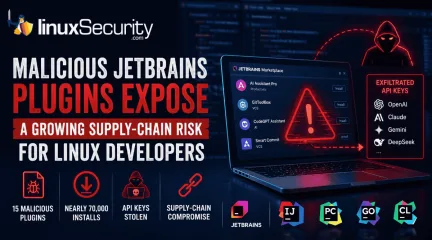
Malicious JetBrains Plugins: The IDE Is Now a Supply-Chain Attack
At least 15 malicious plugins and nearly 70,000 installs later, developers are being reminded that trusted marketplaces can become supply-chain attack vectors overnight. . How Malicious Plugins Steal API Credentials It’s simple. The user installs a plugin. It asks for API credentials. The developer clicks "Apply." A short time later, those keys could be sent to a third-party server. Think of an API key like a valet key to your house. It doesn't give them the deed to the property, but it lets them walk in and grab whatever is sitting on the counter. Technical analysis from Aikido confirms that the attackers harvested active keys for several major services. Security Risks to Linux Developer Workstations They are gold mines. Developers run IntelliJ, GoLand, or CLion on Linux boxes that hold keys for Kubernetes, production cloud-native infra, and CI/CD pipelines. An attacker getting a foothold here doesn't just get access to your AI credits. They get a pivot point. Once they have root access on a dev box—that’s the highest level of permission on your machine—your entire deployment pipeline is vulnerable. They can watch what you write, steal your passwords, or inject backdoors into the software you are building for your company. Why JetBrains Marketplace Security Reviews Fail Stop assuming the JetBrains Marketplace security model is a firewall. It relies on automated scans, which can be limited by code obfuscation or delayed execution techniques. Even with plugin review guidelines and a plugin signing framework, the "verified" tag is just a label. It doesn't mean the code is safe. The Dangers of Integrating AI Assistants in IDEs AI keys are the new password. Integrating AI services into the IDE can expand the attack surface because prompts and code may be sent to external services.. It isn't just about someone using your subscription to save money. It’s about them reading your prompts. If you are feeding the AI your company’s proprietary code to help you debugor write, the attacker is seeing that code, too. Understanding IDE Extension Supply-Chain Attacks This isn't a one-off. Whether it’s npm, PyPI, or VS Code, attackers are weaponizing these ecosystems because they know we don't audit plugins like we audit our own code. We treat them like "plug-and-play" tools, but they are actually small programs running with access to your workstation's environment variables. How to Prevent Plugin-Based Security Breaches Start treating IDE extensions like third-party dependencies. If you can’t justify the risk, pull it out of your IDE. Audit your plugin list today. Remove anything you aren't using. Every plugin is a door. Verify the publisher. Don't trust the green checkmark; check the link to their actual GitHub repo or website. If it’s a random account with no history, skip it. Isolate keys. Use environment-specific credentials for AI services. Don't use your personal "master" key for every project. Monitor your API usage logs. If you see weird traffic or access from locations you’ve never been to, kill the keys instantly. Those stolen AI keys were just the entry point. The real threat is that developer tools are now the perimeter. If your plugins aren't audited, your build pipeline isn't secure. That’s the reality. Want more Linux security news, vulnerability analysis, and software supply chain updates? Subscribe to the LinuxSecurity Newsletter and get the latest threats, advisories, and expert insights delivered directly to your inbox. Related Reading Why Linux Supply Chain Attacks Are Becoming a Nightmare for DevOps Teams Examines how attackers are shifting away from traditional exploits and increasingly targeting the software supply chain surrounding Linux development environments. Why Software Supply Chain Security Matters in Linux Systems Explores how trust in repositories, packages, mirrors, signing infrastructure, and third-party code can become attack vectors across Linuxenvironments. Why CI/CD Pipelines Are Targets in Software Supply Chain Attacks Looks at how attackers increasingly target developer credentials, build systems, deployment infrastructure, and automation pipelines instead of applications directly. . Developers face new risks from malicious JetBrains plugins targeting IDEs to steal sensitive API keys leading to security breaches.. JetBrains Security, Plugin Risks, IDE Security Breach, Supply Chain Attack, API Credential Theft. . MaK Ulac
Jun 17, 2026
•
Security Trends

Get the latest News and Insights
Get the latest Linux and open source security news straight to your inbox.
Community Poll
Is continuous patching actually viable?
Search Topics
Powered By

Linux Security - Your source for Top Linux News, Advisories, HOWTOs and Feature Releases
QUICK LINKS
subscribe to newsletters!
Like staying secure? So do we.
Sign up for updates, tips, and alerts!