Explore top 10 tips to secure your open-source projects now. Read More
×



Security Vulnerabilities  security advisory moderate
security advisory moderate For organizations that run a self-hosted Git platform, it’s no longer just about hosting static code repositories. Today, Git servers are responsible for deployment pipelines, API tokens, SSH keys, package repositories, and the automation scripts that push code directly. Confirm that the upgrade addresses known vulnerabilities but also provides production environments. . That makes them trusted systems within the development environment and attractive targets for attackers looking to move...
 Jul 20, 2026

Server Securitydata privacy automation
data privacy automation Every system admin has lived through the same Monday morning ritual. A queue of forty tickets, half of them password resets, permission errors, or disk space warnings that any experienced technician could resolve in under two minutes. The other half require actual judgment. For years, automation promised that software would eventually sort the two apart on its own. That promise is now being tested in production Linux environments. . Early results are reshaping how IT teams think about tier-1...
Jul 17, 2026

Privacydata collection automation
data collection automation You're running a web scraping project to collect pricing data from e-commerce sites. You set up a pool of datacenter proxies, launch your scripts, and within minutes — banned . CAPTCHAs everywhere. Your data pipeline stops before it really begins. . It's a frustrating scenario that plays out daily in ad verification, market research, and multi-account management. The website doesn't know you're doing legitimate research or monitoring. It just sees traffic coming from IP ranges it recognizes as...
Jul 17, 2026

Security Trends security advisory social engineering
security advisory social engineering Business Email Compromise used to be a numbers game — mass-blasted emails, broken English, an obvious "URGENT WIRE TRANSFER" subject line. That era is over. Generative AI has turned BEC into a tailored, low-noise operation that mimics writing style, voice, and even video presence. This piece looks at what's actually changed under the hood, what defenders are testing in response, and why so many organizations are still structurally unprepared for it. . The Infrastructure Problem Nobody Wants to...
Jul 17, 2026

Security Trends cybersecurity Linux documentation
cybersecurity Linux documentation Linux operating systems have gained prominence due to their stability, adaptability, and excellent security options. In the case of developing documentation, designing cybersecurity dashboards, or educational material, visuals are of vital importance when it comes to making things clear. The use of icons allows one to understand the message regarding alerts, authorization, encryption, authentication, or the state of the system just by looking at the visual cue without having to read long...
Jul 17, 2026
 Refine news
X Clear Filters
Get the latest News and Insights
Get the latest Linux and open source security news straight to your inbox.
Community Poll
Should Linux servers automatically install security updates?
Trending News
Loading...
Explore Latest Linux Security news
We found -2 articles for you...
209
 security updatemobile securityoffensive security
What Kali Linux 2026.2 Says About Today's Linux Security Priorities
Offensive Security just dropped Kali Linux 2026.2 , and at first glance, it looks like a standard quarterly refresh. You’ve got the usual kernel bumps, desktop environment updates, and a handful of new utilities. But don't write this off as just another routine version update. If you look past the changelog, this release highlights several capabilities that continue to be important in offensive security. From AI-assisted workflows to credential testing and mobile assessments, Kali Linux 2026.2 reflects the techniques many security professionals are incorporating into modern Linux security testing. For Linux administrators and defenders, understanding what tools are being added to Kali can be just as valuable as using them; they reflect the techniques security teams—and attackers—consider most relevant for evaluating modern Linux environments. . Why Kali Releases Matter Even If You Don't Use Kali Most enterprise Linux systems will never run Kali Linux, but administrators still benefit from following its development. New tools often reflect the techniques penetration testers are actively using during real-world assessments. Reviewing each release helps defenders identify emerging testing priorities and evaluate whether their own monitoring, authentication controls, and hardening practices address those attack paths. What's New in Kali Linux 2026.2 The headline for 2026.2 is the inclusion of nine new security tools, but the platform improvements are what really move the needle for daily operations. The distribution is now running on the Linux kernel 6.19, with the desktop experience receiving a facelift through GNOME 50 and KDE Plasma 6.6. Tool Primary Purpose arsenal-ng Cybersecurity command reference and cheat sheets hydra-gtk GUI for Hydra credential testing legba Password spraying and authentication testing oletools Analyze Microsoft Office documents andmacros penelope Shell handler for post-exploitation shell-gpt AI-assisted command generation Tailscale Secure remote connectivity tookie-osint Social media reconnaissance uro URL normalization for web testing Taken together, the new tools cover credential auditing, OSINT, phishing analysis, AI-assisted workflows, remote connectivity, and shell management. They reinforce a broader reality: modern security assessments rarely focus on a single system. Today's engagements often combine identity testing, cloud infrastructure, web applications, mobile devices, and social engineering into a single assessment. Beyond the aesthetics, the team focused on friction reduction. VM deployments are significantly faster this time around, thanks to the removal of graphics firmware from pre-built images, and there’s a marked improvement in NetHunter’s stability. For those running security assessments in virtualized labs, these workflow optimizations save real time when you're spinning up or tearing down testing environments. Another notable addition is Tailscale, which gives security teams a straightforward way to create encrypted connections between testing systems. For organizations with distributed labs or remote team members, it can simplify access to assessment environments without exposing them directly to the internet. Credential Attacks Continue to Be a Priority Among the new tools are additions focused on credential testing, including legba and the re-added hydra-gtk . Their inclusion reflects how identity-based attacks—including password spraying, credential reuse, and authentication testing—continue to play a central role in modern security assessments. If an administrator uses the same password for a local Linux server and a corporate SSO account, that’s an open door. These tools act as a wake-up call: if you aren't enforcing MFA, disabling legacyauthentication, and proactively monitoring for password-spraying attempts, your infrastructure is likely the low-hanging fruit in a credential-stuffing campaign. AI Is Becoming Part of Everyday Security Operations The inclusion of shell-gpt might trigger a knee-jerk reaction about AI replacing security pros, but that’s missing the point. Tools like shell-gpt illustrate how AI is beginning to reduce repetitive command-line work. Rather than replacing expertise, they help security professionals generate commands, reference syntax, and automate routine tasks more efficiently. Offensive security is notoriously repetitive. Whether it's drafting boilerplate command syntax or normalizing log output, the friction of manual scripting slows down an assessment. These tools reduce repetitive command-line work and make common workflows easier to reproduce, allowing analysts to spend more time interpreting results than writing boilerplate commands. Mobile Devices Are Now Part of Enterprise Security Assessments The latest NetHunter improvements highlight a shift in scope. Many organizations that rely on Linux servers also manage Android devices, embedded Linux systems, and IoT endpoints. Expanding NetHunter reflects the reality that enterprise security assessments increasingly extend beyond traditional servers. Strong Linux server hardening is only one part of the equation. If attackers can gain network access through an insecure Android device or wireless infrastructure, they may still be able to pivot toward Linux systems. Kali 2026.2 provides the tools to assess these wireless "flanks" of the enterprise, ensuring that mobile and IoT devices are part of your broader security program. Security Testing Is Becoming Faster There’s a clear emphasis on speed in 2026.2, from the faster VM boot times to the smaller initrd. When you're building disposable lab environments, validating detections, or conducting repeated penetration tests, time is your most limited resource. Faster deployments meanassessments can happen more frequently, which makes security validation a natural part of daily operations rather than a painful, quarterly event. By removing unnecessary graphics firmware from pre-built virtual machine images, Kali reduces boot times for many VM-based testing environments while leaving bare-metal installations unchanged. Office Documents Still Matter in Linux Environments Kali 2026.2 also highlights the ongoing relevance of oletools . While Linux endpoints are less commonly associated with Office malware than Windows systems, Linux administrators frequently investigate phishing campaigns, analyze suspicious attachments, and protect mixed-platform environments. Tools like oletools help incident responders inspect Office documents for embedded macros and other malicious content before those files reach users or move deeper into an organization. What Linux Administrators Should Take Away From the Release One of the most useful aspects of following Kali releases isn't deciding whether to upgrade immediately. It's understanding where offensive security is investing its attention. The tools that enter Kali often mirror the techniques organizations are increasingly testing during security assessments, giving defenders an opportunity to evaluate whether their own controls keep pace. Use this table as a checklist for your own hardening efforts: Area Question to Ask Authentication Could your SSH service withstand password spraying? AI Workflows Have you established guidelines for using AI tools without exposing sensitive commands or data? Email Security Are Office documents scanned for malicious content before users open them? OSINT Is unnecessary organizational information publicly exposed? Mobile Security Are Android and IoT devices included in security assessments? Detection Can your monitoringidentify credential attacks and suspicious shell activity regardless of the specific tool used? Conclusion Kali Linux 2026.2 is more than a collection of new packages and version upgrades. Its newest tools and platform improvements reflect the techniques security professionals are using to evaluate modern Linux environments. Whether your organization performs formal penetration tests or simply wants to strengthen its defenses, the release highlights where security testing is placing increasing emphasis: identity, automation, mobile devices, and operational efficiency. Pay attention to the techniques these tools are designed to test; they reflect the attack paths that penetration testers evaluate today and the behaviors defenders should be prepared to detect. Want more Linux security news, vulnerability analysis, and software supply chain updates? Subscribe to the LinuxSecurity Newsletter and get the latest threats, advisories, and expert insights delivered directly to your inbox. . Kali Linux 2026.2 showcases new capabilities in offensive security, highlighting tools for credential testing, AI, and mobile assessments.. Linux Security Tools,Kali Linux 2026.2,Cybersecurity Tools,Credential Testing Techniques,AI in Security. . MaK Ulac
 Jun 30, 2026
•
Jun 30, 2026
• Security Trends
79
 Linux securitysecurity assessmentautomation
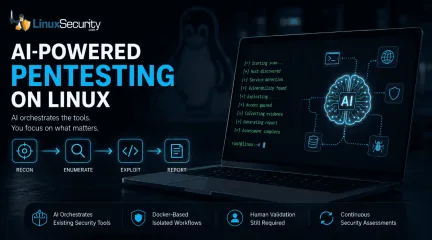
How AI Is Changing Open Source Penetration Testing
AI is beginning to reshape how penetration testing workflows are organized. For years, the penetration tester’s workflow has been a labor-intensive ritual: scan, enumerate, research, exploit, and report. But new frameworks are attempting to codify that intuition, turning the "human-in-the-loop" process into a machine-coordinated workflow. But is this a genuine evolution in how we secure Linux environments, or just a sophisticated wrapper around the same old tools? . Dark Moon is an open-source autonomous penetration testing framework that combines large language models with established offensive security tools. It supports assessments against web applications, APIs, Active Directory, Kubernetes environments, content management systems, and other common enterprise targets while orchestrating scans through Docker-based tooling. The "Conductor" Philosophy For the uninitiated, Dark Moon doesn’t aim to replace the core toolkit—tools like Nmap, sqlmap, or Nuclei—that Linux security professionals have relied on for decades. Instead, it positions itself as an "AI-powered conductor." In a traditional manual assessment, a tester has to constantly context-switch, analyzing the output of one tool to decide which flag to pass to the next. One open source implementation attempts to solve this via agentic reasoning. It doesn’t just scan; it interprets the HTTP response, determines if a CMS fingerprint is present, and proposes and executes the next stage of testing based on its reasoning model. For instance, imagine exposing a new Ubuntu web server. Traditionally, you might begin with Nmap, move to ffuf after discovering an HTTP service, fingerprint the application, then manually decide whether sqlmap or nuclei makes the most sense to run next. The Darkmoon project attempts to automate those transitions by using the output from one stage to dynamically determine what happens next. It can also consolidate findings into a structured report, sparing the operator from parsing dozens ofdisconnected tool outputs. Linux as the Working Environment for AI Security Tools One of the best things about these new security agents is that they’re built on the tools we’ve been using for years. The project leverages Docker for isolation, which is a massive win for Linux admins and DevOps folks who are already living in containers. It solves that classic "dependency hell" we’ve all dealt with—you know, trying to get some niche Python-based scanner to play nice with your system’s existing libraries. Because the framework runs everything in its own container, it keeps your host OS clean and stable while the AI manages the heavy lifting. For those of us who spend most of our day in a terminal, it’s not really about learning a whole new system. It’s more like getting an extra pair of hands to handle the repetitive, manual "grunt work" of orchestration, leaving us to actually dig into the interesting findings/ The Reality Check: Where AI Fits It is crucial to set expectations here. The AI is not a magic bullet. As noted in industry discussions on autonomous pentesting platforms , the real value lies in the reasoning layer. The AI isn’t discovering new exploits on its own; it is managing the execution of existing ones. This brings a specific set of limitations: Contextual Blindness: An AI can easily misinterpret a non-standard login portal or a specific network quirk that a human would recognize instantly. The "Hallucination" Risk: Some frameworks attempt to reduce hallucination risk by routing actions through controlled tool execution, the risk remains that the AI might prioritize the wrong path. Human Validation: The consensus among security researchers is that AI currently functions best as a "force multiplier." It handles the reconnaissance and the monotonous chaining of tools, allowing the professional to focus on the high-stakes analysis. Why It Matters for the Linux Community For sysadmins, researchers, and home-lab enthusiasts, these frameworksrepresent a shift in the security paradigm. We are moving away from "point-in-time" assessments—where you scan a network once a year—toward continuous security validation. The useful part is repeatability. The same checks can run after changes, after deployments, or against lab systems where configuration drift tends to show up first. While many people will use Dark Moon as a research or lab platform, the same orchestration model could eventually fit into CI/CD pipelines or scheduled internal assessments. It effectively turns your security posture from a static checkbox into a living component of your environment. Final Thoughts These frameworks don't replace tools like Nmap, ffuf, sqlmap, or the rest of the Linux security toolkit. Those tools remain the engines doing the work. What's changing is the orchestration layer sitting above them. As AI becomes better at interpreting results and coordinating workflows, frameworks like Dark Moon offer a glimpse of how future penetration testing may evolve while still relying on the open-source tools the Linux community has trusted for years. Whether you use it in production or just as a sandbox tool to explore the future of AI-driven red teaming, it’s a project that builds on the open-source spirit rather than trying to hide it behind a black-box paywall. Want more Linux security news, vulnerability analysis, and software supply chain updates? Subscribe to the LinuxSecurity Newsletter and get the latest threats, advisories, and expert insights delivered directly to your inbox. Related Reading Understanding Linux Privilege Escalation Patterns and Security Measures How Secure Is Linux? Exploring Security Design and User Privilege Models Optimizing Linux Security: Strategies for Modern Threats . Explore the capabilities of Dark Moon, an AI-powered framework transforming penetration testing workflows on Linux systems.. AI Penetration Testing, Automation Framework, Open Source Security, Linux Tools, Dark Moon. . MaK Ulac
Jun 26, 2026
•
Security Projects

77
 open-sourceLinux integrationimage optimization
Working Smarter: AI-Driven Image Optimization for Websites
Running a website involves a constant mix of updates, performance checks, and design adjustments. Images play a major role in this process, but they also bring complications—slow loading times, inconsistent formats, and extra work to get them right. . AI-generated image tools help simplify that workflow. They can compress files, adjust image sizes for different devices, and even create visuals on demand. These tools reduce manual tasks and improve how well a site performs, especially when integrated with trusted backend systems like a Linux server or supported by tools such as exiftool for metadata cleanup. This article looks at how AI-generated images make websites faster, easier to manage, and more responsive to user needs. How AI Tools Help Speed Up Image Loading When someone visits a web page, images often take longer to load than text. This delay can cause frustration. Website loading speed is important for keeping visitors interested. AI-generated image tools address this issue by compressing images smartly. They shrink file sizes but keep the image clear. For example, traditional compression does the same thing for all images. AI tools look at each image and choose the best way to compress it. If the user is on Chrome, the tool can pick the WebP format , which is more efficient. This targeted approach means images are smaller and load quicker. Studies show that most mobile web pages take about 8.6 seconds to load. Using AI to cut image sizes helps reduce this time. Websites that load faster have better Core Web Vitals . These are measures used by search engines to judge how smooth a website feels. AI: Smarter Image Optimization for Every Device AI image tools handle more than simple file shrinking. They resize images to fit different screens. For example, an image might be adjusted to display on a large computer monitor or a small phone. The AI looks at the device and delivers the right size. This reduces data use and speeds up loading, especially when mobileusers have slow internet. Another benefit is how AI adapts to each visitor’s network speed. If the internet is slow, AI serves a lower-resolution version first. If the connection gets better, it upgrades the image quietly. This method uses less data and still gives a clear picture. The process would be hard to do manually for lots of images. AI runs these checks and changes right away, saving time and avoiding errors. Generating Visuals That Fit Each Visitor Pictures are more than decoration. The right image can hold someone’s attention longer. AI systems make this job easy. They show different images to different visitors based on past behavior or known details. For example, a user who has browsed sports shoes before could see a header showing athletic gear. Someone else looking at home decor might get images of furniture. This makes each page feel more personal. AI also helps place images where people notice them most. By looking at how visitors interact with the site, the system can rearrange pictures for better results. It learns which images work best in certain spots and can suggest the most effective layouts. AI Images and Workflow Automation: A Technical Look Website owners often need to create a website, update product catalogs, and prepare blog illustrations at once. With AI-generated images, bulk tasks like resizing or format conversion become simple because the system handles them instantly. This saves time that would otherwise be spent on manual edits or coordination between designers. These systems often run on a Linux server, where image automation fits naturally into existing workflows and can scale without extra load. As an example, an e-commerce store owner can use AI tools to prepare images for new products and adjust them for different device screens. At the same time, someone running a blog can automate banner creation using the same AI system. This approach keeps tasks organized and efficient. Enhancing AI Workflows with Open Source Tools AI toolsdon’t have to run in isolation. For teams managing their own stack, open-source image software like ImageMagick pairs well with AI-driven optimization. On Linux, these tools can be scripted to work in headless setups or added to existing automation flows. They’re fast, flexible, and give admins full control over how and where images get processed. Using open source means fewer surprises—what the tools do, and how they do it, is visible and adjustable. UI Design & User Privacy When it comes to layering AI into your workflows--like image compression or resizing--don't hide privacy behind settings toggles or footnotes. Rather, incorporate it directly into the UI so both developers and users see it firsthand: for instance, add a small badge with "Data Stays Here," or provide an informative tooltip ("Processed on our secure server, not shared") when users hover over AI features; these cues keep people informed without slowing anyone down and demonstrate that privacy was top of mind from day one, not afterthought afterthought! Developers should also draw on lessons learned from practical UX design training . Fast Image Creation With Modern AI Tools A single blog post can need several pictures. A product page might need clear shots from many angles. AI generators create images from simple instructions in seconds. The quality of these generated images has improved. AI images look sharp and fit well with clean website layouts, and some workflows also include tools like exiftool to clean out metadata before publishing, helping reduce file bloat and improve privacy. For example, ChatGPT models can finish basic images in under 10 seconds. Detailed works take around half a minute. This speed matters when updating large amounts of content at once or when frequent website updates happen. AI images look sharp and fit well with clean website layouts. This approach saves the expense and delay of hiring extra design help or purchasing stock photos. Automation in Bulk: Handling Large Site Libraries Online stores and large content websites use thousands of pictures. Using manual tools for creating, naming, resizing, and converting images is slow and prone to mistakes. AI optimizes this whole process. Smart compression and format conversion happen automatically with AI. For each image, the tool picks the file type and dimensions that best fit its place on the site. It can also rename files using product codes or other details for easy tracking. Bulk resizing lets one master image turn into website banners, product cards, and thumbnails. The same image can be ready for both desktops and mobile phones without manual editing. These kinds of high-volume tasks run especially well on a Linux server , where automation scripts can scale without dragging down performance. Secure Image Handling on Linux Servers Linux-based sites handling large image libraries should set strict file permissions and use secure transfer methods like scp or rsync over SSH. Adding integrity checks—like hash verification—and watching upload directories with firewalls or tools like Fail2Ban helps prevent unwanted access. These steps run quietly in the background but do a lot to keep the system stable and secure. Image Content That Matches User Needs Websites built for user retention rely on images that speak to the viewer. AI not only generates new visuals but also picks images for each user. It bases these picks on browsing history or past site actions. When paired with AI-powered website design, images can shift location, size, or order depending on what works best. The site learns what pictures keep visitors on the page and brings those forward on future visits. This optimization helps keep the website feeling fresh, even if the base content does not change much. Product pages can look different for each user, which helps avoid a sense of repetition. Tools Site Owners Trust: Fast and Smart Website owners seek tools that blend into their current workflow. Many now use tools with AI-driven imagecreation and optimization. ChatGPT and similar products are popular because they produce results quickly and require no special training. AI compressors and format converters work in the background or as simple plug-ins within website managers. When images are uploaded, they get checked, processed, and delivered in the best form without extra steps. The process is smooth and reduces the risk of broken images or slow-loading galleries. This automation frees up time to focus on other tasks, like writing or marketing. Efficiency, Improvements, and User Satisfaction Instead of guessing the best sizes or formats, AI lets website owners set basic rules. The system makes daily decisions about image type, amount of detail, and delivery to each user’s screen. Websites that load quickly and have clear, good-looking images usually get better reviews and keep visitors for longer. As search engines track these signals, better image optimization can help pages rank higher. AI-generated images allow faster work, more updates, and fewer errors in a website’s image library. Digital shops get faster product updates. Bloggers post illustrated guides with no design lag. Tools learn what works and keep making small improvements. Image optimization, automated design, and instant generation save time and help websites perform better. When supported by a solid back end—whether that means a reliable Linux server, smart automation tools like exiftool, or a clean metadata workflow—these systems do more than save time. . Automated graphic design solutions enhance efficiency for online entrepreneurs, boosting site functionality and minimizing efforts.. AI image tools, website automation, image compression software, Linux server management, workflow solutions. . MaK Ulac
Jul 12, 2025
•
Server Security

Get the latest News and Insights
Get the latest Linux and open source security news straight to your inbox.
Community Poll
Should Linux servers automatically install security updates?
Trending News
Search Topics
Powered By

Linux Security - Your source for Top Linux News, Advisories, HOWTOs and Feature Releases
QUICK LINKS
subscribe to newsletters!
Like staying secure? So do we.
Sign up for updates, tips, and alerts!