


Cloud Security  incident response Linux administration
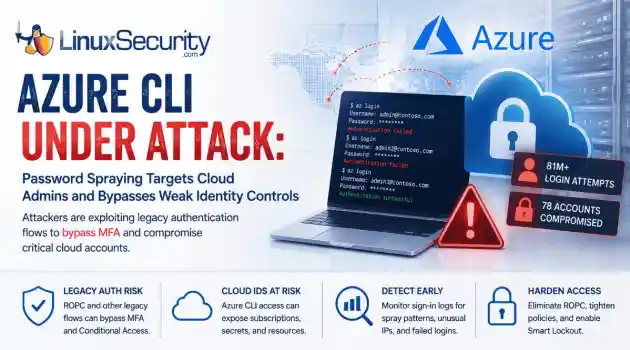
incident response Linux administration Over the span of just 14 days, threat actors unleashed more than 81 million login attempts against Microsoft’s Azure command-line interface (CLI). The campaign , which security researchers at Huntress identified as an ongoing, automated password-spraying effort, successfully compromised at least 78 Microsoft accounts across 64 organizations between June 12 and June 26, 2026. . While the scale is massive, the underlying strategy is surprisingly surgical. Attackers aren't exploiting a flaw in...
 Jul 01, 2026
Security Trends security update mobile security
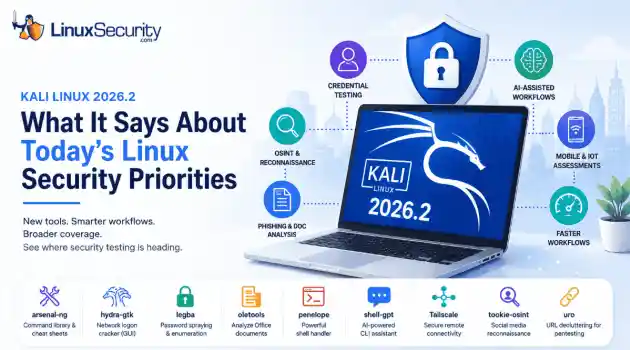
security update mobile security Offensive Security just dropped Kali Linux 2026.2 , and at first glance, it looks like a standard quarterly refresh. You’ve got the usual kernel bumps, desktop environment updates, and a handful of new utilities. But don't write this off as just another routine version update. If you look past the changelog, this release highlights several capabilities that continue to be important in offensive security. From AI-assisted workflows to credential testing and mobile assessments, Kali Linux 2026.2...
Jun 30, 2026
Security Projectssecurity advisory vulnerability management
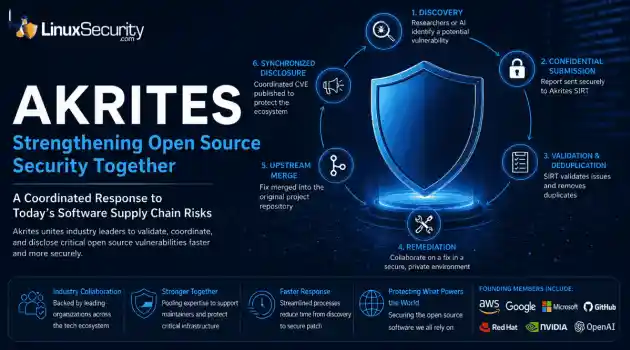
security advisory vulnerability management The Linux Foundation has officially launched Akrites , a coordinated industry initiative designed to improve how critical open source vulnerabilities are validated, coordinated, and disclosed before patches reach downstream users. Backed by a diverse coalition—including AWS, Google, Microsoft/GitHub, Red Hat, NVIDIA, and OpenAI—Akrites establishes a shared Security Incident Response Team (SIRT) to streamline the validation, remediation, and disclosure of vulnerabilities in the foundational...
Jun 29, 2026

Server Securitydenial of service open-source
denial of service open-source A process with a stable workload shouldn't keep growing its resident memory. When it does, the first question isn't how much RAM is available. It's where the allocations stopped being released. On Linux, that answer isn't always obvious because the kernel, allocator, and application all influence what memory usage looks like from the outside. . Separating normal allocation behavior from an actual leak takes more than watching top or container metrics. Heap growth, allocator caches, mapped...
Jun 26, 2026
Security ProjectsLinux security security assessment
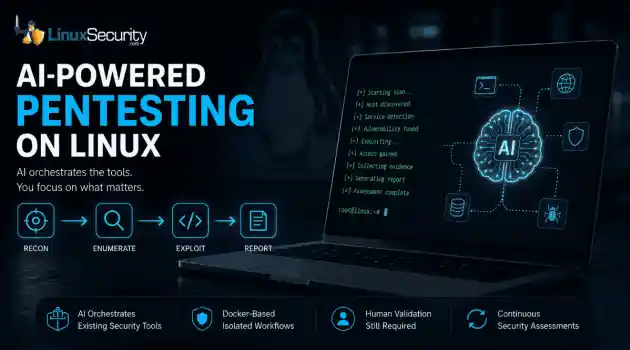
Linux security security assessment AI is beginning to reshape how penetration testing workflows are organized. For years, the penetration tester’s workflow has been a labor-intensive ritual: scan, enumerate, research, exploit, and report. But new frameworks are attempting to codify that intuition, turning the "human-in-the-loop" process into a machine-coordinated workflow. But is this a genuine evolution in how we secure Linux environments, or just a sophisticated wrapper around the same old tools? . Dark Moon is an open-source...
Jun 26, 2026
 Refine news
X Clear Filters
Get the latest News and Insights
Get the latest Linux and open source security news straight to your inbox.
Community Poll
Can sandbox isolation stop malware?
Loading...
Explore Latest Linux Security news
We found 36 articles for you...
209
 access controlmulti-tenantkubernetes
Addressing Multi-Tenant Risks in Linux Workloads on the Cloud
Linux administrators often face an ugly choice in the cloud: prioritize convenience and cost-efficiency by sharing infrastructure, or sacrifice those benefits for the sake of total isolation. Most modern Linux workloads don't live on their own private servers anymore. They live in shared environments like Kubernetes clusters, where multiple teams and services run side-by-side. It sounds efficient, and it usually is. . But cloud isolation isn't as ironclad as it looks on the diagram. If you don't know where the boundaries actually sit, a single misconfiguration can turn a shared server into an open door for an attacker. What “Multi-Tenant” Actually Means Most Kubernetes environments are shared whether teams realize it or not. Different workloads end up on the same worker nodes, using the same kernel underneath, separated mostly by configuration and orchestration rules. That separation holds until somebody exposes a service they forgot about, over-permissions a service account, or leaves lateral movement paths sitting open inside the cluster. Organizations love this model because it’s cheap and fast to scale. However, there is a big difference between "soft" and "hard" multi-tenancy. As explained in the official Kubernetes guidance on multi-tenancy , most setups are "soft." This means isolation depends heavily on configuration. Features like namespaces help separate workloads, but they are not always enough to contain an attacker after a system has been compromised. Why Linux Workloads Become Exposed in Shared Environments The fundamental security challenge in a shared Linux environment is that, despite the abstraction, the containers still share the same Linux kernel. When you deploy a pod, you are creating a logical boundary. But underneath that boundary, your workload is just a process—or a set of processes—running on a worker node that likely hosts dozens of other containers. Isolation here depends entirely on configuration. If the kernel is the "foundation" ofyour apartment building, the containers are just drywall partitions. They provide privacy, but they don't provide structural protection. If you are looking for more technical context on why this matters, the AWS tenant isolation guidance is an essential read. It breaks down why Kubernetes is not a hard security boundary and explores the reality of shared-node risks. In practice, this changes the threat model considerably. Attackers rarely need to "break" the cloud provider. They only need to find one weak, misconfigured workload on a shared node, and they can often use that foothold to begin enumerating the rest of your environment. Real-World Reality Check: The Tesla Breach The 2018 Tesla breach showed how quickly a weak Kubernetes configuration can turn into a larger cloud security problem. Security researchers found that one of Tesla’s Kubernetes consoles had been exposed to the public internet without password protection. Once attackers reached that management interface, they were able to view how containers were deployed and managed inside the environment. The bigger issue was what they found next. Cloud credentials were stored inside the cluster, giving the attackers a path from the Kubernetes environment into Tesla’s AWS storage. From there, they used Tesla’s compute resources to mine cryptocurrency. The lesson is blunt: configuration is part of the security boundary. The attackers did not need to break AWS isolation or exploit an advanced zero-day. They found an exposed control plane, pulled credentials from the environment, and moved laterally from there. For DevOps and platform teams, that is the real risk in multi-tenant infrastructure. If the management plane is exposed, the separation between workloads stops meaning much in practice. How Weak Isolation Leads to Real Security Problems When isolation fails, the damage usually starts small. An attacker gains access to one exposed workload, identifies overly broad permissions, and begins moving through theenvironment from there. In many cases, the first step is privilege escalation or lateral movement. A compromised container may expose access to the underlying node, shared resources, or internal services that were never meant to be reachable from that workload. Suddenly, that stolen service account token isn't just a key to one app; it’s a that token may provide access far beyond the workload it was originally created for. As discussed in Kubernetes RBAC best practices , these mistakes are almost always configuration-based. It is easy to accidentally grant "cluster-admin" or overly broad access to a service account that only needed to read a single secret. Why Cloud Security Gets Harder at Scale Security becomes harder once environments grow beyond what a single team can realistically track day to day. A cluster that started with a few workloads can eventually turn into thousands of pods spread across multiple environments, teams, and cloud accounts. At that point, consistency becomes the real problem. One team allows broad service account access for convenience. Another disables a network policy temporarily and forgets to restore it. Someone spins up a test workload that never gets cleaned up. Months later, nobody remembers which exceptions were intentional and which were accidents. This is why multi-tenant Kubernetes environments become difficult to secure at scale. The issue usually is not a single catastrophic mistake. It is the accumulation of small configuration decisions across hundreds of workloads and administrators. Google’s GKE enterprise multi-tenancy recommendations highlight that the challenge isn't just technology; it's governance. The Tradeoff Between Cost, Scalability, and Isolation If shared environments carry these risks, why do we use them? The answer is simple: business necessity. Dedicated clusters for every single team or customer are prohibitively expensive and difficult to maintain. Most organizations—especially those running SaaSplatforms—rely on tenant density to keep costs manageable. As outlined in the Azure Kubernetes multi-tenant architecture guidance , this is an operational decision. It forces a trade-off between the desire for perfect isolation and the reality of budget and operational efficiency. The goal for a modern engineering team isn't to eliminate shared infrastructure—it's to manage the risk that comes with it. Practical Ways to Reduce Multi-Tenant Linux Risks You don't need to abandon your cloud platform to stay secure, but you do need to stop relying on default isolation. Hardening a shared environment requires a layered approach: Implement Least Privilege: Audit your RBAC roles religiously. If a service account doesn't need it, don't give it. Segment Your Workloads: Use dedicated node pools for sensitive workloads. If an application handles PII or financial data, it shouldn't be sitting on the same physical host as your public-facing dev environment. Enforce Network Policies: Don't let your pods talk to everything. Use a "deny-all" default and explicitly allow only the traffic that is necessary. Monitor East-West Traffic: Most attacks happen laterally. If you aren't logging the traffic inside your cluster, you are blind to how an attacker moves once they get in. Audit Regularly: Use automated tools to scan for overly broad service accounts and risky container configurations. For those looking to build a more robust architecture, the AWS SaaS security best practices offer excellent guidance on how to build security decisions into the environment early instead of trying to retrofit them later. Conclusion Multi-tenant cloud infrastructure is the standard for modern Linux environments, but shared infrastructure inherently expands the importance of strong isolation and consistent governance. Organizations don't need to abandon shared cloud platforms, but they do need to understand where software-based isolation can fail. By moving toward a model ofleast-privilege access and layered controls, we can reduce our exposure. Shared infrastructure is not going away, which means containment matters just as much as prevention. Strong isolation and least-privilege controls help limit how far an attacker can move after gaining access to a workload. Linux threats evolve quickly, especially in shared cloud environments where a single weak configuration can expose an entire workload. Subscribe to the LinuxSecurity.com newsletter for the latest research, breach analysis, hardening guidance, and Linux-focused security updates delivered directly to your inbox. Related Reading What Is Kubernetes Security? A Linux Admin’s Practical Guide What Is a Container Escape Vulnerability? Kubernetes Security: Top Strategies for 2025 Against Emerging Threats Securing Kubernetes: DevSecOps Strategies for Cloud-Native Environments Beyond the Sandbox: Container Escape Techniques Observed in Recent Research . Explore the complexities of multi-tenant security in Linux workloads, and learn strategies to enhance your cloud environment.. Kubernetes Security, multi-tenant Linux workloads, cloud isolation strategies, container security best practices. . Dave Wreski
 May 21, 2026
•
May 21, 2026
• Security Trends
77
 Linux securityserver protectionsecurity hardening
Linux Security Hardening Guide 2026 SSH Backup Strategies
Linux security is not about stacking tools and hoping for the best. It comes down to deliberate configuration, steady maintenance, and systems that can withstand real-world pressure. . Most production compromises still trace back to the same issues. Weak SSH settings. Unpatched services. Overexposed ports. Backups that fail when you need them. None of these are exotic threats; they are operational gaps. If you run Linux in production, hardening has to be practical and repeatable. Start With SSH, Because Attackers Do SSH is still the main entry point into Linux systems. Treat it like the front door, not a side entrance. The default configuration is rarely strict enough for production. A hardened setup should: Disable direct root login. Force administrative access through controlled privilege escalation. Disable password authentication; use public-key authentication only. Restrict allowed users or groups – Make access explicit. Limit authentication attempts – reduce the effectiveness of brute-force attacks. Set idle timeouts – Close forgotten sessions automatically. These are small changes inside the SSH daemon configuration, but they remove entire categories of risk. Quick check # Verify what is actually listening on the system ss -tulnp # Confirm SSH is running with the expected settings grep -E '^(PermitRootLogin|PasswordAuthentication|MaxAuthTries|AllowUsers|ClientAliveInterval)' /etc/ssh/sshd_config Then add automation. Fail2Ban brute-force protection watches authentication logs and temporarily blocks IP addresses that repeatedly fail to log in. It turns constant background probing into a non-issue without daily oversight. Quiet automation beats manual reaction every time. Patch Automatically, Review Intentionally Waiting for someone to remember to apply updates is not a strategy. Most modern Linux distributions support automatic security updates through their native package managers. Enable them. Security patchesshould apply without waiting for a maintenance window that never comes. That said, automation does not remove responsibility. A healthy workflow looks like this: Automatic security updates enabled – Shrinks exposure windows. Scheduled reboots when required – Kernel updates need to be activated. Weekly review of applied updates – Confirm nothing critical broke. Security improves when patching becomes routine instead of reactive. Treat Open Ports as Liabilities Every listening service is a potential foothold. Linux provides strong native firewall tools such as nftables and simpler front ends like UFW . The tooling matters less than the policy. A secure baseline should follow one rule: deny everything by default, allow only what is necessary. That means: Default deny inbound traffic – No open doors without a reason. Explicitly allow required services – SSH, application ports, nothing more. Quick check # Review active firewall rules (UFW example) ufw status verbose Port sprawl happens quietly over time. Regular review keeps exposure under control. Logging That Survives an Incident Logging often gets attention only after something goes wrong. By then, it is too late. Start with auditd. It provides kernel-level auditing and records changes to sensitive files, account modifications, and authentication events. This gives visibility beyond standard system logs. But local logs alone are fragile. If an attacker gains sufficient privileges, they can alter or delete them. Forward logs to a separate system. That might be a dedicated log server or a security monitoring platform isolated from production. The important part is separation. Retention matters as well. Incidents are sometimes discovered weeks after they begin. Keeping short-term searchable logs and longer-term archived copies makes forensic review possible. Logs are not just for troubleshooting. They are evidence. Backups Designed for Ransomware, Not HardwareFailure Backups used to focus on disk crashes. In 2026, they must assume hostile access. A resilient Linux backup strategy includes: Immutable backup storage – Prevent deletion or modification during a retention window. Offline or air gapped copies – Ensure at least one copy is unreachable from production systems. Separate credentials – Backup systems should not trust production authentication. Encrypted storage and transfer – Protect backup data itself. The step many teams skip is restore testing. Quarterly restore tests validate more than file recovery. They confirm permissions, ownership, database integrity, and recovery time expectations. A backup that has never been restored is a guess. Design backups as if an attacker already has administrative access. Because one day, they might. Container Security Is Not Automatic Isolation Containers improve deployment speed, but they do not eliminate risk. Running containers as root on the host defeats much of the isolation benefit. Rootless containers reduce that exposure and should be the default where practical. Layer in additional controls: Mandatory access control profiles – Enforce AppArmor or SELinux in enforcing mode, not permissive. Seccomp filters – Restrict unnecessary system calls. Minimal base images – Reduce the attack surface. Dropped Linux capabilities – Remove privileges containers do not need. Network boundaries – Prevent containers from freely reaching internal services. Containers are processes with namespaces, not magic boxes. Treat them with the same discipline as traditional services. Build a Security Rhythm Hardening is not a one-time event. It is a cadence. A practical operational rhythm looks like this: Weekly patch review – Confirm updates applied successfully. Weekly log sampling – Check authentication spikes or unusual access. Monthly port and service audit – Validate exposed services. Quarterly restore test – Provebackups work. Quarterly access review – Remove unused accounts and SSH keys. Security improves when it becomes part of the calendar. Resilience Over Perfection No Linux system is invulnerable. The goal is controlled exposure, fast detection, and reliable recovery. Tight SSH configuration. Automatic patching. Minimal open ports. Centralised logging. Ransomware-resistant backups. Hardened containers. A steady review cycle. That combination does more for real-world Linux security than any single tool ever will. Production safety is built through discipline, not optimism. . Most production compromises still trace back to the same issues. Weak SSH settings. Unpatched servic. linux, security, about, stacking, tools, hoping, comes, deliberate. . MaK Ulac
Feb 05, 2026
•
Server Security

77
 security advisoryimportantLinux distributions
How Holiday Leave Exposes Linux Security Gaps in Docker and Kubernetes Environments
You start to notice a pattern after a few long breaks. Systems hum along, dashboards stay quiet, and the room feels calmer than it should. That calm is usually the first warning. Timing risk creeps into Linux security the moment people step away, because attackers read the calendar as closely as they read logs. . Activity shifts when humans disappear. Crews push late-night scans, probe weak auth, or test old footholds while ticket queues slow to a crawl. Nothing dramatic, just small moves that stack up when no one’s watching. The same lull hits containers and the orchestration layers wrapped around them. A stale image here, a drifted config there, and container security turns into a blind spot before anyone realizes it. Coverage matters more during these quiet stretches, not less. Visibility across hosts, containers, and the bits of automation between them is what keeps a quiet week from turning into cleanup duty in January. Pre-Holiday Linux Security Checks: What Your Systems Should Reveal You can tell how a Linux environment feels going into a break just by looking at the edges. Patch cycles slow, some jobs miss a run, and the gaps show up before anyone admits they’re gaps. Most teams give the baseline a quick read before leaving. It doesn’t fix every problem, but it surfaces the ones that age badly over a long weekend. What usually gets checked: Last known patch state, especially in places where server patch management stalled or waited for approval Alerting and monitoring paths that went quiet or were muted during cleanup work Critical CVEs that didn’t make the last sprint and might sit exposed until January Automation tasks that slipped a cycle, like container scans or backups that failed silently ACL changes or unexpected SSH activity that doesn’t match the week’s ticket flow Who’s still set to receive priority alerts once the office empties out Some of these checks trace back to broader patterns. Recent reports on modern malwarethreats to Linux highlight how attackers lean on quiet periods and unfinished patch work, which fits what teams see every December. The last step is usually a sanity pass over Linux security signals as a whole. Not a deep audit. Just enough to make sure the environment won’t drift into trouble while everyone is out. How Unmonitored Containers Create Linux Security Risks During Holiday Leave The issues show up fast when no one is watching the container layer. Old images keep running, tags fall out of sync, and things that should be ephemeral stick around long enough to become problems in container security . Here’s a layout that surfaces the weak spots without repeating the previous section’s structure: Early Signal What It Usually Means During Downtime Outdated base images Upstream fixes landed, but prod never rebuilt. Holiday leave makes this gap wider. Containers left running Temporary workloads turn into long-lived services because no one cleans up before leaving. Env drift across dev/test/prod Minor tag differences pile up and hide subtle changes in behavior. Weak runtime enforcement AppArmor or seccomp is stuck in permissive modes that no one revisits during the break. CI/CD steps quietly failing Pipelines show green even when critical stages are skipped. The supply chain angle threads through all of it. A rebuild that bypasses signature checks or skipped hash validation is easy to miss, especially when half the team is out. That pattern tracks with what’s covered in work on verifying Linux software integrity , and it shows how small cracks open wider during human downtime. By the time everyone returns, Linux container security behaves more like an incident review than routine hygiene, and Docker security ends up being the part no one wants to assume is fine until they check it twice. How Linux Teams Can Preparefor Holiday Leave The planning work usually sits in the background. People start shifting schedules, approvals get slower, and the whole stack depends on a few folks still online. That’s where small gaps turn into bigger ones in Linux security, mostly because the handoffs weren’t written down. On-call rotation One person watches the signals. Another verifies anything odd. Clear enough that no one assumes a silent fallback. Patch approvals Server patch management gets awkward during long breaks. A stalled approval can freeze an entire cycle, so someone needs authority to push critical fixes through without waking half the team. Known risks Most groups keep a short list of systems that act up or carry more exposure. Documenting that list before leaving makes incidents easier to triage when attention is thin. Ownership clarity Privileged systems don’t tolerate ambiguity: storage nodes, CI runners, cluster control planes. Someone has to own each piece, so work doesn’t wait for who’s back first. Urgent patch scenarios Zero-days land whenever they want. Pre-approving how those are handled keeps the response predictable and avoids arguments over timing. These habits line up with what you see in broader guidance on Linux hardening strategies for 2026 . Different angle, same pattern: teams that write things down have fewer problems later. It’s the prep that keeps Linux hardening from turning into recovery work once everyone returns. How to Spot Linux Security Breaches During Holiday Leave You spot most breaches during holiday leave by looking for activity that doesn’t match expected usage patterns. With fewer changes, irregular events surface more quickly, and Linux server security logs make these deviations easier to spot. Container workloads are a common early indicator. A service draws more CPU than usual during off-hours, or a pod sends outbound traffic when nothing legitimate should be running. These shifts indicate unauthorized tasks running within thecontainer runtime, which often precede broader Docker security issues. Account activity offers another concrete signal. A new user appears without a change request. A role gains elevated permissions outside normal working hours. These entries don’t occur during stable periods unless something external is driving them. Container images reveal their own form of drift. An image rebuilds without a deployment. A container restarts even though the service hasn’t been updated. When monitoring jobs skip a scheduled run at the same time, it suggests a process interfered with standard automation rather than a simple operational miss. Some intrusions begin with attempts to capture user input. During low-coverage periods, attackers test these paths because they expect less oversight. That aligns with findings on Linux keylogging risks , which show that compromised hosts exhibit early changes in how input events are handled. Taken together, these signals map a clear direction of travel. Linux security issues often appear as operational inconsistencies during holiday leave, and spotting them comes down to comparing each anomaly against the steady state the environment should maintain. Why Linux Workstations Become High-Risk During Holiday Leave Linux workstations shift into a higher-risk category during holiday leave because they stay powered on, hold long-lived access, and rarely receive the same attention as production hosts. That combination creates openings you don’t see elsewhere in Linux security, especially when fewer people are watching for small deviations. A major factor is how these devices retain trust for long stretches. SSH keys remain valid even when a laptop sits idle, and teams often carry those keys through multiple projects without rotation. An unused workstation with a loaded keychain still offers a direct path into internal systems. The desktop layer widens the surface. X11 and mixed Wayland setups expose input and interaction paths that don’t appear on servers, and mostorganizations don’t monitor those interfaces with much depth. The gaps match patterns described in work on advanced Linux keylogging techniques , where small changes in user-input handling are enough to create a foothold. Workstations also accumulate vulnerabilities that don’t surface in server scans: Local password storage tied to browsers or sync tools that hold credentials longer than expected Peripheral-driven input channels that bypass normal server-side controls Background clients that maintain valid session tokens long after active use Phishing pressure increases during long breaks as well. Reduced attention makes delayed clicks more common, and compromised credentials from a single workstation can extend much further than the device itself. What makes these systems risky during downtime isn’t one specific flaw. It’s the mix of persistent trust, lighter monitoring, and user workflows that continue even when the rest of the environment slows down. Why Unpatched Linux Kernels Become Major Holiday Attack Targets Unpatched kernels become high-value targets during holiday leave because they stay exposed longer than intended. Patch windows slip, reboot cycles get pushed, and Linux security depends heavily on those cycles to flush out vulnerable code paths. When updates sit in a pending state, the system keeps running the older kernel with every issue still active. The risk isn’t just the known flaws like Dirty Pipe or the XZ Utils backdoor . It’s how quietly kernel exploits operate when uptime stretches. They rarely generate the kind of signals teams expect, and any delay in rebooting gives attackers time to test privilege escalation across shared infrastructure. Small input-handling quirks also start to appear during long uptimes, the same kind of subtle shifts seen in kernel-level keylogging in Linux when the kernel stays unchanged for extended periods. Holiday preparation usually comes down to keeping the patch cadence tight before people sign off. Rebootsapplied ahead of the break prevent vulnerable kernels from lingering, and they reinforce the Linux hardening steps that matter most when coverage thins. How to Maintain Linux Security Coverage When Staff Is Out Coverage gaps during the holidays usually come from unclear ownership rather than tooling. Linux security holds up when teams define who handles alerts, how escalations move across time zones, and which tasks can sit until the full group returns. Most of that planning happens before the break, not during it. A straightforward structure works well and stays aligned with key strategies for modern Linux threats : Time-zone rotation so someone is always available to confirm or dismiss priority alerts Automated escalation paths that push stalled issues to the next reviewer Dashboards that track patch windows, pending tasks, and anything drifting past its deadline A current access inventory so urgent fixes aren’t slowed by missing permissions With that in place, Kubernetes security doesn’t hinge on one person checking in, and container security stays stable even while activity drops. The aim isn’t full speed — it’s predictable continuity until everyone is back. What Linux Teams Should Check First After Holiday Leave You check for drift in Linux first, because that’s the change most likely to surface after a long, quiet stretch. Linux server security depends on confirming that nothing shifted while patch cycles slowed, so teams usually start by reviewing whether any updates failed, stalled, or were pushed to a later timestamp during the break. Access activity is next. User and sudo logs tend to show the earliest signs of unusual movement, especially if a permission bump or a late-night login happened when no one was scheduled to work. These patterns stand out more sharply right after downtime. Containers need their own integrity pass. Many teams revalidate images using techniques similar to SHA256 and GPG verification for Linux admins , which helpsuncover signature mismatches or hash drift before workloads scale back up. Rotating secrets or SSH keys closes the loop, followed by a check through off-hour logs to make sure nothing ran when the environment should have been still. Once those checks are clear, Linux security returns to its baseline, and Docker security tasks fold back into routine operations without carrying uncertainty from the holiday gap. Preparing for the Next Linux Zero-Day After the Holidays The next zero-day won’t wait for the team to be fully staffed, which is why Linux security planning has to carry through the entire year. These issues surface on their own schedule, and the environments that recover fastest are the ones that treated holiday preparation as part of routine operations, not a seasonal exception. Resilience has to be in place before the break. Patch workflows, access controls, and monitoring paths work best when they don’t depend on a specific person being online, and gaps show up quickly in Kubernetes security when clusters rely too heavily on manual intervention. The goal is a system that can absorb a surprise without reshuffling the whole team. Most organizations treat holiday planning as an annual requirement now. Not a rush, not a special playbook, just a steady cycle that keeps the environment stable regardless of timing. Zero-days will land whenever they want; the structure around them determines how disruptive they become. . Ensuring Linux security during holiday leave is crucial to prevent breaches and maintain system stability. Key checks for success.. Linux security risks, container security, kubernetes security, holiday leave security checks. . MaK Ulac
Nov 26, 2025
•
Server Security
78
 security advisoryvulnerabilityRHEL
RHEL 10: Enhanced Security Features with Post-Quantum Crypto and AI Tools
Red Hat Enterprise Linux (RHEL) 10 isn’t just another update—it’s a serious step forward in the battle against security threats, both current and emerging. If you’ve been working in Linux for a while, you know the drill: new releases mean tweaks here and there, maybe a feature upgrade. But this? This is different. This version is gearing up for the future in ways that demand our attention, tackling issues like post-quantum cryptography and advanced container security head-on. It’s not just a response to today’s threats—it’s a preparation for tomorrow’s. . What makes RHEL 10 stand out is how it balances complexity with practicality. Security tools that once felt cumbersome are now streamlined into workflows and processes that make sense for active system admins. You’re not left wading through mysterious features; it’s clear what’s new and why it matters. From AI-powered management tools that adapt as you work to security enhancements designed to shield against quantum-level threats, everything is tuned to protect critical systems in the modern world. It doesn’t promise—it delivers. Let's take a closer look at the key updates and security improvements introduced in RHEL 10 and how they will help strengthen your security posture and optimize your workflows as an admin managing RHEL systems. Post-Quantum Cryptography Standards Protect Data & Ensure Compliance The advent of quantum computing poses significant challenges to traditional cryptographic methods. RHEL 10 introduces post-quantum cryptography standards recommended by the National Institute of Standards and Technology (NIST) to address this emerging threat. This approach incorporates quantum-resistant algorithms to safeguard against "harvest now, decrypt later" attacks. By integrating post-quantum signature schemes, RHEL 10 maintains the integrity and authenticity of software packages, systems, and TLS certificates. The impact of these measures is significant. By adopting these new standards, RHEL 10strengthens defenses against quantum-based decryption attacks on data that could have already been compromised. It also aligns with emerging regulatory requirements for advanced cryptographic standards, ensuring regulatory compliance for users. Red Hat Enterprise Linux Security Select Add-On Improves Vulnerability Management The Security Select Add-On is a significant addition to RHEL 10’s security arsenal. This feature allows admins to request fixes for up to 10 specific Common Vulnerabilities and Exposures (CVEs) per year. This ability to directly address critical vulnerabilities ensures administrators can target security fixes based on their unique environment needs. The impact is profound. Administrators can now manage vulnerabilities more flexibly and targeted, thus enhancing their system’s overall security posture. This add-on helps organizations prioritize and address more pressing security vulnerabilities efficiently. Enhanced Container Security RHEL 10 introduces a container-native approach to operating system image creation and management through its innovative image mode. This minimizes configuration drift by preventing unexpected patch deviations and maintaining operational consistency between application developers and IT ops teams. For administrators, this translates into stronger container security , improved standardization, and reduced security risks related to inconsistent configurations. Tighter control over container image integrity strengthens protection in hybrid and cloud-native environments. AI Integration to Boost Security Operations A notable feature in RHEL 10 is Lightspeed, an AI-powered Linux management tool. Built-in generative AI provides context-aware recommendations for troubleshooting and optimization, offering natural language assistance directly at the command line. The inclusion of Red Hat-specific expertise improves the management of complex environments. This integration is crucial in addressing Linux skills gaps and empoweringless experienced IT administrators with practical insights. It also improves workflow efficiency, resolving potential security issues and operational disruptions faster. Unified Management and Early Security Decisions RHEL 10 advances the concept of unified IT workflows through its container-native image mode, providing a single workflow for managing both the OS and applications. This approach helps administrators make key security-related decisions early in the lifecycle, with tools like the Red Hat Insights Image Builder offering tailored package recommendations that fit specific deployment needs. These features' proactive stance reduces the likelihood of misconfigurations leading to security vulnerabilities. Streamlining processes minimizes human error , improving overall system security. AI-Ready and Cloud-Native Security Features Recognizing the need for secure deployment of AI workloads, RHEL 10 introduces pre-tuned images optimized for major cloud platforms such as AWS, Google Cloud, and Azure. Additionally, it supports emerging architectures like RISC-V, providing developer previews for secure builds on these niche platforms. These pre-tested and validated solutions improve deployment security and scalability, particularly for AI workloads. Partner-validated hardware further supports this, increasing confidence in deploying RHEL 10 on advanced systems tailored for AI and other intensive computational tasks. How Do These Changes Impact My Security Posture & Administrative Workflows? Introducing these proactive features in RHEL 10 significantly boosts security resilience by reducing vulnerabilities associated with legacy and emerging technologies. Quantum-resilient cryptography integration ensures readiness for the next generation of cyber threats. Generative AI assistance simplifies administrative complexities and offers actionable insights, allowing security policies to be effectively implemented and monitored. Unified workflows for hybrid environments reduce frictionbetween security and operations teams, improving collaboration and compliance with security policies. Overall, RHEL 10 prepares administrators to handle evolving requirements with tools that align with regulatory compliance and advanced security best practices, whether the workloads are in the cloud, on-premises, or at the edge. Key Recommendations for Admins Adopting RHEL 10 RHEL 10's security enhancements offer great potential to its adopters. To take full advantage, adopters should prioritize early implementation of post-quantum cryptographic features to protect sensitive workloads against future threats and leverage AI tools like Lightspeed , which reduce troubleshooting. Unifying workflows using container-native image mode will minimize configuration drift, while exploring Security Select Add-On will help prioritize critical fixes. These strategies should help RHEL users maximize security when adopting RHEL 10. Our Final Thoughts on the Security Improvements Introduced in RHEL 10 RHEL 10 brings groundbreaking advancements in security, like post-quantum cryptography, AI-driven management tools, and container-native workflows. These features are designed to help admins strengthen their security posture while simplifying complex workflows. By embracing these new features, security-conscious admins can ensure their environments are robustly protected against evolving threats, maintain compliance with regulatory requirements, and significantly improve the efficiency of managing RHEL systems. This future-ready release is optimized for the challenges of hybrid cloud and AI-driven IT landscapes. It's not only prepared but proficient in tackling tomorrow’s security challenges today! . RHEL 10 boosts protection through sophisticated encryption methods, AI-powered functionalities, and improved container oversight for system administrators.. RHEL security enhancements, container security improvements, AI management Linux. . Brittany Day
May 21, 2025
•
Vendors/Products
210
 security advisoryaccess controlDoS attack
Incomplete NVIDIA Patch Threatens Sensitive Data and System Integrity
If you've patched CVE-2024-0132 , a notorious Time-Of-Use-Time-Of-Check (TOCTOU) flaw in NVIDIA Container Toolkit, you probably assume you're in the clear—but this is no longer the case! TrendMicro recently disclosed that the patch for this critical flaw in the NVIDIA Container Toolkit is incomplete. . This lingering vulnerability threatens system integrity by potentially allowing attackers to access sensitive host data and execute denial-of-service (DoS) attacks. The root cause stems from a Time-Of-Use-Time-Of-Check (TOCTOU) weakness and a performance flaw in Docker on Linux, which were not fully mitigated by the initial patch. We, Linux security admins, must adopt a multi-faceted approach to protect our systems. Key measures include restricting Docker API access, minimizing root-level permissions, and enabling essential security features in the latest NVIDIA Container Toolkit versions. Regularly auditing container-to-host interactions, monitoring for runtime anomalies, and applying validated patches promptly are critical mitigation measures. Let's examine this evolving threat, how it arose, and practical strategies you can employ to mitigate risk. Understanding This New Threat This recent flaw in NVIDIA Container Toolkit involves an incomplete patch released in September 2024 to address a previously identified vulnerability, CVE-2024-0132 . The issue exists at the intersection of container and host interactions, particularly through TOCTOU weaknesses. This vulnerability can allow maliciously crafted containers to bypass security checks and access parts of the host system that should remain off-limits. If successfully exploited, the flaw can lead to unauthorized access to sensitive data stored on the host system. This can include anything from proprietary software to confidential corporate information. The potential for denial-of-service attacks is equally alarming, where the attacker exhausts critical system resources, leading to significant disruptions. Examiningthe Root Cause of the Issue A key challenge for admins using NVIDIA Container Toolkit is that the previous patch for this flaw did not fully address certain security shortcomings, leaving gaps that can still be exploited. A TOCTOU vulnerability is particularly dangerous and challenging to address because it involves a timing issue, exploiting the brief window between when a security check is performed and when the actual resource is accessed. Researchers recently identified that a related performance flaw in Docker on Linux could allow attackers to escape container isolation, access sensitive host resources, and disrupt system operations. This complexity highlights the importance of implementing security patches and continuously monitoring and validating their effectiveness. A proactive stance is necessary to ensure that systems remain secure, even when initial patches fall short. Practical Advice for Securing NVIDIA Container Toolkit Against Bugs & Exploits When managing containers , particularly those using the NVIDIA Container Toolkit, security is paramount to ensure your systems and data remain safe. This involves implementing practices that range from restricting API access and minimizing container privileges to enabling security features and performing routine patch management. By following these guidelines, you can protect your container environment from unauthorized access and potential threats: Restrict Docker API Access: Tighten API access to ensure only trusted individuals and systems interact with the Docker daemon. This involves using TLS to authenticate connections, setting up firewall rules to limit IP addresses, and implementing role-based access control (RBAC) to grant permissions only when necessary. Minimize Container Privileges: Running containers with as few privileges as possible is crucial. Don’t let containers run as root and specify a different user in your Dockerfiles. Strip away unnecessary Linux kernel capabilities and, where feasible, makethe container's filesystem read-only. Enable and Configure Security Features: Always use the latest NVIDIA Container Toolkit version and ensure it's configured correctly. Disabling any features you don’t use can slim down the attack surface. Implement Comprehensive Auditing and Monitoring: Enabling detailed logging and integrating logs with security Information and Event Management (SIEM) tools can help you monitor for suspicious container activity. Implement Routine Patch Management: Apply updates promptly , but first, test them in a staging environment to ensure they don’t introduce new problems. Always plan to roll back patches if something goes wrong during deployment. Network Segmentation and Isolation: Separate your container networks to limit the scope of a potential breach. Use Docker's network features to isolate different types of traffic and keep communications secure. Define and enforce specific network policies to regulate container and host interactions. Our Final Thoughts on Securing Linux Environments Against This Critical Threat The discovery of an incomplete patch for a critical NVIDIA Container Toolkit flaw is a stark reminder of cybersecurity threats' dynamic and persistent nature. For us admins, this incident underscores the necessity of a multi-faceted approach to system protection. By managing access and privileges, configuring toolkit features appropriately, maintaining diligent auditing and monitoring practices, and ensuring thorough patch management, we can significantly reduce the risk posed by this vulnerability. Staying informed , proactive, and vigilant is key. While no single measure can guarantee complete security, combining these strategies creates a robust defense-in-depth approach. Engaged and informed admins are the first line of defense in safeguarding their systems against emerging threats, ensuring sensitive data remains secure, and maintaining operational integrity. . Persistent vulnerability in NVIDIA's ContainerToolkit grants malicious users the ability to extract confidential information and interfere with operations.. NVIDIA Container Toolkit, TOCTOU flaw, security measures, container isolation, attack prevention. . Brittany Day
Apr 14, 2025
•
Security Vulnerabilities
212
 security architecturecommunity supportautomated updates
Exploring Flatcar OS: A Game-Changer in Linux Container Security
As we Linux security admins continually seek robust and streamlined solutions to enhance our containerized environments , the open-source Flatcar OS emerges as a standout contender I'm eager to introduce! Designed with a laser focus on security, Flatcar OS offers a minimalistic footprint, effectively reducing the attack surface by stripping away unnecessary packages and delivering automated, immutable updates. . This means fewer manual interventions, reduced vulnerabilities, and a more secure infrastructure. Furthermore, its integration with industry-standard tools and cloud environments like Azure and AWS enables smooth deployment and management at scale, making it an attractive solution for tech professionals navigating multi-cloud ecosystems. Flatcar OS is customized and adaptable, offering support for ARM64 servers, AI workload integrations, system extensions, and similar enhancements to meet specific organizational needs without compromising security. As part of the CNCF Incubating Project Portfolio, Flatcar leverages the collective power of an open-source community, ensuring ongoing innovation and support. Via its automated atomic update mechanism, security admins can effortlessly maintain system integrity without risk while prioritizing security within their operational strategy. Let's have a closer look at how Flatcar OS could improve the security of your containerized Linux environment! A Security-Focused Architecture Flatcar OS is designed with a principal focus on security, making it an optimal choice for environments where safeguarding data integrity and availability are paramount. Traditional Linux distributions often come with numerous packages and services out of the box, many of which might remain unused and potentially increase the system's vulnerability profile. In contrast, Flatcar OS follows a minimalistic approach, including only the essential components needed for running containers. This reduced footprint inherently limits potential attack vectors,making it easier to maintain a secure environment. Furthermore, Flatcar employs a zero-touch provisioning method, streamlining the deployment process. This automation reduces the need for manual intervention, often where configuration errors and potential vulnerabilities can be introduced. Flatcar enhances security through consistency and repeatability by eliminating these manual processes, ensuring that each deployment adheres strictly to predefined security policies. Embracing Immutable Infrastructure One of the standout features of Flatcar OS is its immutable infrastructure . Unlike traditional operating systems where files and configurations can be modified, Flatcar operates with a read-only filesystem that is cryptographically secured. This setup significantly reduces the risk of post-deployment changes that could compromise the system. Immutable infrastructure ensures that its configuration cannot be tampered with once a system is deployed, providing a consistent environment reinforcing security measures. Node configurations in Flatcar are defined during the initial boot process and treated as immutable, effectively curbing configuration drift —a common issue in large-scale deployments. This approach not only makes the system more secure but also simplifies management, as administrators can rely on the consistency of their infrastructure. Automated and Atomic Updates Maintaining an up-to-date system is crucial for security, and Flatcar OS excels in this area with its automated and atomic update mechanisms. Updates are delivered as validated images and applied in an atomic fashion, meaning that updates are either fully applied or do not affect the system. This atomicity ensures that any issues encountered during the update process do not compromise the system. Moreover, Flatcar can automatically revert to a previous, stable state in the unlikely event of an update failure. This rollback capability provides an additional layer of assurance, minimizing downtime and maintainingsystem integrity. For admins, this means less time spent manually managing updates and greater confidence in the security of their deployments. Customization and System Extensions Flatcar OS also offers flexibility through system extensions (sysexts), which allow administrators to customize and extend the base operating system. These extensions enable adding specific functionalities or security features necessary for particular environments without altering the core, immutable system. This modularity is particularly beneficial in security-conscious settings where tailored configurations are often required to meet compliance and policy requirements. Recent updates to Flatcar have expanded its support to ARM64-based servers and GPUs for AI workloads , demonstrating its adaptability to various computing environments. This adaptability ensures that security admins can deploy Flatcar across a wide range of infrastructures, from traditional data centers to cutting-edge AI research environments, all while maintaining consistent security practices. Seamless Integration with Modern Environments Flatcar OS's compatibility with modern cloud environments further enhances its appeal. It integrates smoothly with major public cloud platforms like Azure, AWS, and VMware , supporting Ignition-based deployments. This seamless integration simplifies the management of containerized workloads in multi-cloud setups, allowing administrators to deploy and manage applications across diverse infrastructures efficiently. The integration with Cluster API, an essential tool for Kubernetes administrators, further demonstrates Flatcar's readiness for modernized deployment strategies. By leveraging these integrations, security admins can maintain secure, scalable, and manageable environments across various platforms, benefiting from unified monitoring and consistent security policies. Backed by the Community and Ecosystem Support As part of the Cloud Native Computing Foundation (CNCF) incubating projectportfolio, Flatcar OS benefits from the open-source community's robust support and continuous innovation. This backing ensures Flatcar remains at the forefront of container-focused operating systems, with ongoing updates, security enhancements, and feature developments. For Linux security admins, the community-driven approach translates to a dependable and continuously improving platform. The collective expertise and contributions from the community help identify and address security vulnerabilities swiftly , ensuring that Flatcar remains a resilient and up-to-date choice for containerized environments. Our Final Thoughts: Why You Should Give Flatcar OS a Test Drive! Flatcar OS has emerged as a powerful tool for Linux security admins seeking a secure, efficient, and adaptable platform for managing containerized applications. Its security-focused design, emphasizing minimal footprint and immutable infrastructure, aligns perfectly with the critical needs of modern IT environments. The automated atomic updates and system extensions offer both reliability and customization, while its seamless integration with cloud environments and support from the CNCF community ensure ongoing relevance and innovation. By adopting Flatcar OS, security admins can enhance their operations, ensuring that systems are secure, consistent, and efficiently managed. In a landscape where security and efficiency are paramount, Flatcar OS provides a practical, reliable, and forward-thinking solution for today’s container-centric world. Are you using Flatcar OS? How has your experience been? Let us know @lnxsec! . Flatcar OS boosts Linux container security with automated updates, easy management, and community support, reducing vulnerabilities and enhancing defenses.. Flatcar OS, container security, immutable infrastructure, cloud integration, automated updates. . Brittany Day
Jan 06, 2025
•
Cloud Security
212
vulnerability scannercontainer securityAnchoreEnhancing Container Security: Navigating Challenges with Anchore
Containerization is now standard in today's fast-paced technological landscape. It offers streamlined development, enhanced scalability, and improved resource efficiency. However, this technological shift also brings significant security issues, such as Linux buffer overflow vulnerabilities. Security in containerized environments has become more critical as organizations adopt DevOps for rapid development and continual deployment. . Due to the dynamic nature and flexibility of orchestration tools such as Kubernetes , traditional security measures are often inadequate. Integrating robust security practices into the development lifecycle will help protect infrastructure and sensitive data against potential threats. To help you secure your containerized Linux environment, I''ll explain the importance of vulnerability scanning and introduce a tool I love for proactively managing web application security vulnerabilities. What Is the Role of Vulnerability Scanners in Linux Container Security? Containerized environments are constantly facing new challenges. The need for comprehensive security becomes more critical as organizations scale their operations. In this ecosystem, vulnerability scanners such as Anchore are crucial. Anchore is a tool for proactive management of web application security vulnerabilities. By identifying known vulnerabilities and assessing compliance with security policy, applications can be deployed reliably and securely. This approach helps maintain customer trust and minimizes the risk of exploitation. What is Anchore? The open-source vulnerability scanner Anchore was explicitly built for Docker container images. It is a tool that offers a systematized approach to assessing security in container images. Anchore scans the images and compares the content to predefined policies, providing insights into whether or not they are secure. This information is essential to protecting applications against hidden vulnerabilities that could compromise systemsecurity and data integrity. Anchore focuses on compliance and security analyses. It helps organizations find and fix vulnerabilities and ensure container images comply with organizational policies. This dual functionality helps organizations maintain best practices in security management. Understanding Anchore''s Key Features Anchore has vital features that enhance its effectiveness as a vulnerability scanning tool, such as automatically scanning container images to detect known security risks. Early identification of vulnerabilities allows organizations to address them before deployment, helping maintain an effective security posture with minimal manual oversight. Anchore''s comprehensive vulnerability reports for container images provide thorough details on vulnerabilities found within them and extensive information regarding vulnerabilities, dependencies, and software packages. This level of visibility helps developers and operations teams assess potential risks more effectively while prioritizing remediation efforts based on the severity and type of vulnerabilities identified. Anchore also provides Custom Policy Enforcement, enabling organizations to define and enforce custom policies to ensure only trusted images are used by security standards and compliance needs. Customization of these policies allows them to tailor Anchore''s functionality according to their operational contexts, risk profiles, and compliance needs. Furthermore, Anchore integrates seamlessly into Continuous Integration/Continuous Deployment pipelines, enabling automated scanning of container images before deployment and early identification and remediation of cybersecurity vulnerabilities. Anchore offers an ongoing vulnerability database update that ensures scans remain comprehensive and relevant and allows its scanners to identify known vulnerabilities and emerging threats to application security. Best Practices for Implementing Anchore in Your Linux Environment Organizations seeking to maximize theefficiency and effectiveness of Anchore should follow certain best practices. First, it is vital to establish a regular scanning regimen for container images after updates or modifications. This ensures vulnerabilities can be quickly identified and fixed, improving overall security posture while making workflow more manageable. Establishing comprehensive and transparent security policies is also vital for Anchore''s compliance assessments to be practical. Organizations can build more robust security frameworks by including stakeholders in creating these policies. Integrating Anchore with existing tools can simplify workflows and foster a culture of security within the development process, making it much simpler to adopt secure coding techniques. Anchore is intended to educate all individuals who use its reporting and functionality so users can swiftly mitigate risks and maintain security standards. Training sessions may help strengthen understanding and promote more efficient use of this tool. Organizations should remain up-to-date with emerging vulnerabilities and threats in the cybersecurity landscape. Regularly updating vulnerability databases with current threat intelligence can make Anchore scans even more relevant and comprehensive assessments. Are you using Anchore to scan for vulnerabilities in your Linux container environment? Connect with us @lnxsec and let us know what you think! Our Final Thoughts on Navigating the Security Challenges of Containerization with Anchore The need for robust security measures is becoming more apparent as organizations adopt containerization and DevOps. Open-source vulnerability scanners like Anchore are valuable tools for identifying and managing cybersecurity vulnerabilities in containerized environments. Anchore''s automated scanning, detailed reports, custom policy enforcement, and seamless CI/CD integration empower organizations to deploy apps securely and reliably. Anchore can be integrated into security practices to helporganizations better protect their assets, ensure compliance with industry standards, and create a more secure operating framework. Enhancing the security of containerized apps will ultimately contribute to an organization''s resilience in the face of a constantly evolving threat landscape. . Dockwise equips enterprises with comprehensive analysis solutions to safeguard their virtualization initiatives from evolving risks.. Container Security, Anchore Tool, Scanning Practices, Kubernetes Security. . Brittany Day
Nov 05, 2024
•
Cloud Security
212
malware threatsystem administrationcloud securityTeamTNT Docker Assault: Mitigating Risks with Effective Security Strategies
TeamTNT has recently emerged at the forefront of the ever-evolving threat landscape by devising novel exploits assaulting Docker clusters. Their Docker Gatling Gun campaign has targeted 16 million IP addresses worldwide and attacked Docker clusters globally. . To help you understand and prepare for this emerging threat, I'll investigate its nature, attack flow, impact, and targets, providing system administrators with actionable insights to protect against this campaign and other Linux container security threats. Understanding This Docker Security Threat TeamTNT, widely recognized in the hacking community, has made headlines again by engaging in an unprecedented attack against cloud-native infrastructures. By exploiting exposed Docker daemons, this group systematically deploys Sliver malware, a multi-faceted cyber worm, and crypto miners through compromised servers and Docker Hub to perpetuate their spread while renting out computational resources to third parties for direct crypto mining operations. Their devious yet malevolent campaign uses native cloud capabilities by employing Docker Swarm E xpansion capabilities while using Docker Hub to distribute Sliver malware. Decoding the Attack Flow TeamTNT Gutling Gun Attack Flow (source: aquasec) TeamTNT's campaign showcases an intricately planned attack flow, with the following key components observed over seven years: External and Local Lateral Movement: Malware infections can be quickly deployed within an organization's network by employing tools like Masscan and ZGrab to deploy them quickly on related servers within its environment. Local network probing also plays a vital role in spreading infections quickly across servers within it. Resource Hijacking: This aspect primarily centers on crypto miner deployment and, more surprisingly, the sale of compromised infrastructure for computational resource stripping purposes, relieving mining operations, and maintaining operations independently. Commandand Control (C2): By employing Sliver malware as a significant barrier against counterintelligence efforts, TeamTNT has upped their game by potentially adding Tsunami functionality into their strategy. Cloud Tool Exploitation: Docker Hub has been used for malware storage and distribution, while Sliver provided command and control (C2) and exploit capability. Initial attacks involve exploiting Docker daemons on specific ports, laying the foundation for an advanced "Docker Gatling Gun" script which scans for vulnerable instances to create an extensive target range and, upon success, deploys an Alpine Linux image with malicious commands from TeamTNT's Docker Hub account. Sliver Malware Explodes to New Heights TeamTNT has swapped its previously utilized backdoor utility Tsunami for more subtle Sliver malware. This open-source tool enables dynamic C2 operations across various protocols while remaining undetectable due to its per-binary asymmetric encryption keys explicitly compiled for each binary encryption key used. TeamTNT can utilize Sliver malware to direct commands, execute payloads, and introduce in-memory execution capabilities. Through its exploits, TeamTNT poses a severe threat to cloud-native landscapes. This group's attacks silently spread across cloud infrastructures by seizing Docker clusters. Using Docker Swarm extends its reach and ensures persistent presence as crypto miners sap computational resources from victims, showing its devastating potential. Who Is at Risk? Its Docker cluster operators with exposed daemons are primary targets in this campaign. This can encompass businesses and organizations using cloud services or open-source cloud software—especially those operating operational baselines and open-source entities in the cloud environment. However, due to indications of potential future Kubernetes cluster exploitations, the net at risk can expand further; virtually any organization using containerized environments without taking stringent security precautionsis also at risk. Practical Strategies to Help Sysadmins Reduce Risk Protecting Docker clusters against such malignant threats requires a proactive and multi-layered approach including the following best practices: Port Security: For best practice, ensure that Docker daemon ports (2375, 2376, 4243, and 4244) do not expose themselves directly to the public internet. Instead, bind them directly to localhost or utilize VPN technology to access Docker environments. Secure Docker API endpoints: Set up mutual TLS authentication and implement encrypted communication for data protection while in transit. Monitor and Analyze Network Traffic: Regularly monitor for unusual network activity patterns that could indicate an attack script or illegal Docker images being pulled from registries. Maintain Docker and its Dependencies Regularly: To protect against vulnerabilities that attackers could exploit, it is recommended that Docker and all its dependencies be regularly updated and patched for optimal performance and to reduce vulnerabilities that malware could exploit. Access Controls: To limit the number of users who can push or pull images from Docker registries and environments, role-based access control (RBAC) should be applied. Secure Container Images: Before deployment, always utilize reliable base images and scan for vulnerabilities before rejecting those that do not pass security checks. Limit Resource Usage: Set restrictions on Docker containers to minimize potential gains from crypto miner deployment while monitoring for abnormal resource consumption patterns. Incident Response Plan: Develop an incident response plan so you can take quick, decisive action if your system becomes compromised. For example, you could isolate infected containers and servers and conduct a full forensic investigation. Backup and Recovery: Keep backup copies of crucial data and system configurations on hand to ensure fast recovery in case of security incidents. Education and Training: Provide all team members with training on this form of attack and ensure all operators use container operations judiciously while adhering to best practices for Docker security. Identity Threat Detection and Response (ITDR) What is ITDR? Have you thought about some of the ways we can block these types of attacks? Identity Threat Detection and Response (ITDR) is all about keeping a close eye on who is accessing your systems and ensuring they're supposed to be there. Imagine it as a vigilant security team dedicated to tracking user activities and catching any suspicious behavior that might indicate someone is trying to gain unauthorized access. With ITDR, you'll have tools that continuously monitor what users are doing, look for unusual patterns that could signal a threat, and enforce strong security measures like multi-factor authentication to make sure only the right people get in. If something fishy does happen, ITDR systems can jump into action automatically, alerting your team and taking steps to minimize any potential damage. In short, ITDR helps keep your digital environment safe by focusing intensely on the security of user identities. Check out ModSecurity for Apache. It's a bit complicated to use, but it's an open source web application firewall (WAF) that can also be configured to monitor and respond to potential identity threats happening through web applications. It includes real-time monitoring and logging of HTTP traffic, a rule-based detection system, and the ability to block suspicious activities and mitigate attacks against Apache. Our Final Thoughts on Combating This Container Security Threat Administrators can take proactive measures against TeamTNT and other threat actors by employing these measures, strengthening their cloud environments against any unauthorized exploitation and potential malware campaigns. Security is an ongoing priority for us admins, particularly given cloud technologies' increasing role in business operations and threatactors like TeamTNT becoming ever more sophisticated. Therefore, administrators must remain vigilant and implement robust measures to safeguard against potential breaches. . Grasp the implications of TeamTNT's latest attacks on Docker environments and explore strategies to safeguard your infrastructures from this advancing danger.. TeamTNT Malware, Docker Security Threat, Container Exploitation, Cloud Infrastructure Safety, Cybersecurity Practices. . Anthony Pell
Oct 29, 2024
•
Cloud Security

Get the latest News and Insights
Get the latest Linux and open source security news straight to your inbox.
Community Poll
Can sandbox isolation stop malware?
Search Topics
Powered By

Linux Security - Your source for Top Linux News, Advisories, HOWTOs and Feature Releases
QUICK LINKS
subscribe to newsletters!
Like staying secure? So do we.
Sign up for updates, tips, and alerts!
Discover faster search, smarter navigation, and deeper Linux security insights. Read More