


Cloud Security  incident response Linux administration
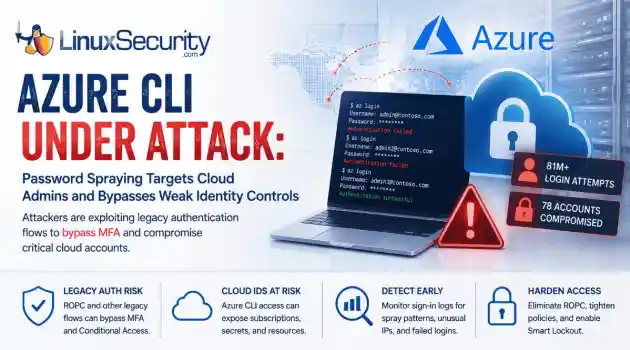
incident response Linux administration Over the span of just 14 days, threat actors unleashed more than 81 million login attempts against Microsoft’s Azure command-line interface (CLI). The campaign , which security researchers at Huntress identified as an ongoing, automated password-spraying effort, successfully compromised at least 78 Microsoft accounts across 64 organizations between June 12 and June 26, 2026. . While the scale is massive, the underlying strategy is surprisingly surgical. Attackers aren't exploiting a flaw in...
 Jul 01, 2026
Security Trends security update mobile security
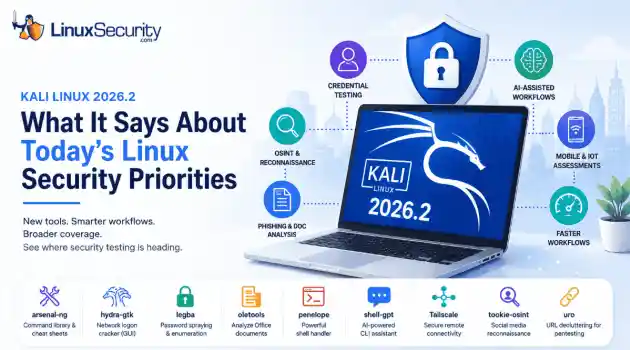
security update mobile security Offensive Security just dropped Kali Linux 2026.2 , and at first glance, it looks like a standard quarterly refresh. You’ve got the usual kernel bumps, desktop environment updates, and a handful of new utilities. But don't write this off as just another routine version update. If you look past the changelog, this release highlights several capabilities that continue to be important in offensive security. From AI-assisted workflows to credential testing and mobile assessments, Kali Linux 2026.2...
Jun 30, 2026
Security Projectssecurity advisory vulnerability management
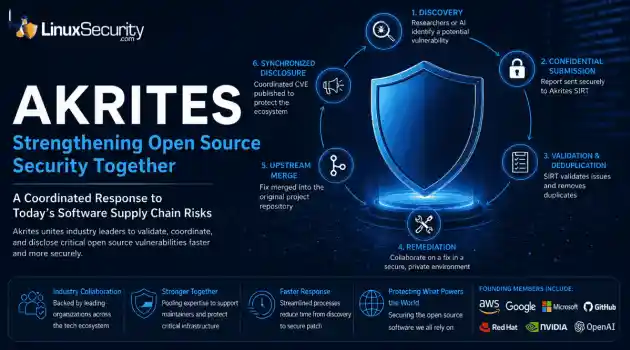
security advisory vulnerability management The Linux Foundation has officially launched Akrites , a coordinated industry initiative designed to improve how critical open source vulnerabilities are validated, coordinated, and disclosed before patches reach downstream users. Backed by a diverse coalition—including AWS, Google, Microsoft/GitHub, Red Hat, NVIDIA, and OpenAI—Akrites establishes a shared Security Incident Response Team (SIRT) to streamline the validation, remediation, and disclosure of vulnerabilities in the foundational...
Jun 29, 2026

Server Securitydenial of service open-source
denial of service open-source A process with a stable workload shouldn't keep growing its resident memory. When it does, the first question isn't how much RAM is available. It's where the allocations stopped being released. On Linux, that answer isn't always obvious because the kernel, allocator, and application all influence what memory usage looks like from the outside. . Separating normal allocation behavior from an actual leak takes more than watching top or container metrics. Heap growth, allocator caches, mapped...
Jun 26, 2026
Security ProjectsLinux security security assessment
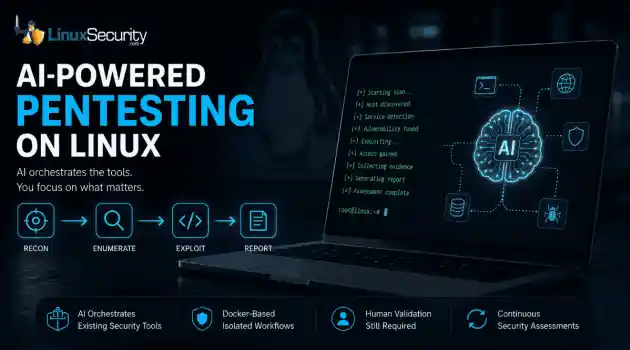
Linux security security assessment AI is beginning to reshape how penetration testing workflows are organized. For years, the penetration tester’s workflow has been a labor-intensive ritual: scan, enumerate, research, exploit, and report. But new frameworks are attempting to codify that intuition, turning the "human-in-the-loop" process into a machine-coordinated workflow. But is this a genuine evolution in how we secure Linux environments, or just a sophisticated wrapper around the same old tools? . Dark Moon is an open-source...
Jun 26, 2026
 Refine news
X Clear Filters
Get the latest News and Insights
Get the latest Linux and open source security news straight to your inbox.
Community Poll
Can sandbox isolation stop malware?
Loading...
Explore Latest Linux Security news
We found 981 articles for you...
209
 security advisorydata protectionsecurity assessment
Examining Security Weaknesses and Regulatory Shortcomings
Today, organizations rely heavily on technology for their operations, to secure important information and provide services in a digital world. Digital transformation opens up new opportunities, but also poses an increasing challenge for businesses and institutions in the field of cybersecurity. Data breaches, financial losses, reputational damage, and compliance issues are ongoing challenges for organizations in all industries due to security weaknesses and regulatory shortcomings. . With the ever-evolving nature of cyber attacks, businesses need to enhance security infrastructures and tackle regulatory weaknesses exposing vital systems to attack. Knowing about these weaknesses and shortcomings is critical to developing cybersecurity-resilient strategies and to keeping stakeholders happy. Understanding Security Weaknesses in Modern Organizations Security weaknesses are potential points of attack in systems, networks, applications, or organizational processes. Such vulnerabilities can result from old technologies, inadequate security protocols, human error, or lack of risk management. Security vulnerabilities are often not identified until after an actual security incident. Unfortunately, the hackers are out and looking for these vulnerabilities, and proactive security assessments are more critical than ever. Common Types of Security Weaknesses Multiple security flaws are frequent causes of cyber incidents, including: Weak password policies Computers and systems that are not patched. Misconfigured cloud environments Inadequate access controls Lack of cybersecurity training for employees: Insufficient network monitoring Third-party vendor vulnerabilities If these issues are not addressed by the organizations, they leave chances for unauthorized access, malware infection, ransomware attack, and data theft. Human Error Remains a Major Risk Cybersecurity risks cannot be totally removed by technology. Employees can be the biggest vulnerability in anorganization's security. Phishing, social engineering, and unintentional disclosure remain problems for all users of the internet. Regular cybersecurity awareness training is a must for organizations to ensure that their employees are well-equipped to recognize threats and follow secure practices. Creating a culture of security helps limit successful attacks. The Growing Impact of Regulatory Shortcomings Regulatory safeguards are critical to the security of data, accountability, and best cybersecurity practices. But many of the regulations have a difficult time catching up with the ever-changing technology and new cyber threats. Regulatory gaps can be caused by laws, standards, or regulatory enforcement that do not respond to today's security challenges. These gaps can make organizations vulnerable to compliance requirements and decrease cybersecurity effectiveness. Challenges Facing Current Regulatory Frameworks There are several challenges to the existing regulatory frameworks. Rapid Technological Evolution The pace of change in technology far outpaces many regulatory processes. AI, cloud technology, Internet of Things (IoT) devices, and linked health systems present novel challenges that the current regulatory framework may not adequately cover. This is why organizations can sometimes find themselves in a situation where their cybersecurity is not as good as the technology they are using. Inconsistent Global Regulations Companies with a global presence often have varying cybersecurity and data protection needs. The mismatch makes it difficult to achieve compliance and raises the complexity of operations. There are multiple legal frameworks that organizations must navigate through, and security controls can be a challenge to keep effective, creating compliance gaps. Limited Enforcement Capabilities Regulations may be present, but regulatory bodies may not have the resources or authority to ensure that these are adhered to. Ifsome organizations don't see a return on investment, then they don't invest. Weak enforcement of the rules lowers the incentive for some organizations to make cybersecurity investments. Oversight and tangible consequences promote compliance and security practices. The Relationship Between Security Weaknesses and Regulatory Gaps Vulnerabilities and shortcomings in security often compound one another in a vicious cycle. Lack of definition in regulations can lead to under-investment in security. Likewise, a high degree of susceptibility can reveal already identified weaknesses of the regulatory frameworks. As healthcare institutions handle patient information and medical apparatus, they are particularly vulnerable to cybersecurity concerns, for instance. Regulatory bodies are keeping their requirements on the rise as part of their efforts to counter these risks. An FDA cybersecurity deficiency letter may indicate that a medical device manufacturer's cybersecurity documentation, risk assessment, or cybersecurity controls need to be improved before meeting regulatory expectations. This is a prime example of the ever-increasing link between cybersecurity readiness and regulatory compliance . Finding Problems Before Someone Else Does Most organizations only stumble upon their own security holes after a painful audit or a live incident. By then, the weakness might have been an open door for years. Regular risk assessments aren't just about checking boxes; they’re about brutal honesty. You have to look at your shadow IT, your sprawling permissions, and your third-party dependencies with a skeptical eye. The real goal isn't creating another compliance report. It is figuring out where your crown jewels are, how they’re actually held together, and exactly how bad things get when the current defenses buckle. Visibility is just as vital as assessment. If you aren't monitoring your environment, you’re flying blind. Real-time logging catches the noise—the weird privilege escalation,the odd admin behavior, or the spike in traffic—long before a user reports a problem. If you can’t see the activity, you effectively don’t have a defense. Focus on the Controls That Fail Most Often Security reviews often turn up the same recurring ghosts. Access control is usually the biggest offender. Employees shift roles, contractors come and go, and "temporary" service accounts turn permanent. Because the business keeps running, nobody notices the access bloat until a breach happens. If an account with stale, excessive permissions gets hijacked, the blast radius is almost always worse than anyone anticipated. Software maintenance is equally fragile. Often, it isn't that a patch is missing; it’s that the organization has lost track of the asset. Legacy servers and "forgotten" applications often sit outside the normal update rhythm. You can’t patch what you don’t know you own. Then there is training. Annual slideshows might satisfy an auditor, but they rarely prepare a human to spot a sophisticated social engineering attempt. Effective training feels less like a corporate mandate and more like a tactical briefing—giving employees realistic scenarios and a clear, non-punitive path to report when something just doesn’t look right. Where Regulation Still Struggles Organizations aren’t the only ones playing catch-up. The reality is that regulatory frameworks move like tectonic plates, while the technology we’re building on moves like a jet engine. We’re trying to secure cloud-native architectures, fragmented supply chains, and remote-first teams using rulebooks that were written for a different era. Because of that disconnect, security teams often spend thousands of hours performing "compliance theater"—ticking boxes for an auditor—instead of actually shoring up their defenses. It’s a massive drain on resources that could be better spent on real security. What we actually need is clearer, more pragmatic guidance. Right now, when requirements are vague, it’sa guessing game. Auditors interpret things one way, security teams another, and the work devolves into busywork. Real progress happens when a regulator tells us what outcome they need, rather than forcing a checklist that was outdated three years ago. Industry collaboration is the only way out of this trap. When security practitioners, vendors, and regulators actually speak the same language—sharing what’s breaking in the trenches rather than just reciting standards—we all get smarter. It’s about learning from each other’s scars so we don’t repeat the same expensive mistakes. Accountability still matters, of course, but it’s only effective when the goalposts aren't constantly moving. When the requirements are practical and the link between good hygiene and staying in business is obvious, organizations don't just comply—they invest. Final Thoughts Most of the time, security failures aren't the result of some high-tech, movie-style "zero-day" attack. They’re usually just boring, preventable stuff: an unpatched server, an old account that should have been deleted, or a total lack of visibility into what’s happening on the network. The hardest part of this job isn't spotting the gaps; it’s finding the discipline to close them before they end up on the evening news. The teams that actually move the needle don't obsess over "perfect" security. They obsess over the fundamentals. They know exactly what assets they’re running, who has the keys to them, and they’ve set up enough monitoring to actually see when something looks off. Regulators have to hold up their end of the bargain, too. They need to ensure that compliance isn't just a hurdle but a framework that keeps pace with the tech we’re actually using today. At the end of the day, the goal isn't a flawless system—because that doesn't exist. The goal is to shrink the window of opportunity so that a small human oversight doesn't spiral into a catastrophic failure. . Organizations face ongoing cybersecuritychallenges due to security weaknesses and regulatory gaps. Discover common flaws and proactive measures.. cybersecurity risk assessment,data protection compliance,security weaknesses analysis,regulatory compliance gaps. . Anthony Pell
 Jun 23, 2026
•
Jun 23, 2026
• Security Trends
209
 data protectioninfrastructure securitycloud security
Rethinking Data Protection in Modern Linux Cloud Environments
For a long time, security teams approached infrastructure with a fairly simple idea. Protect the perimeter, patch the servers inside it, and keep attackers from crossing the boundary. That model made sense when systems were stable, and applications lived on a handful of long-running machines. . Modern Linux cloud environments do not behave that way anymore. Containers appear and disappear constantly, services communicate through internal APIs, and storage layers stretch across regions and clusters. Data moves through the system faster than most security tools were originally designed to track. That shift forces a different conversation around Linux security. Instead of concentrating primarily on where the network boundary sits, teams are increasingly asking a more practical question. Where is the sensitive data actually living right now? Once you start looking closely, the answer is often more complicated than expected. The Quiet Problem of Data Sprawl Infrastructure grows quickly in most DevOps environments . New services appear during development cycles, staging environments spin up for testing, and developers regularly create temporary databases or volumes to debug something that looked strange in production. Sometimes those resources disappear the same day. Sometimes they stay online for months. Over time, the environment accumulates all kinds of leftover data locations. Old snapshots sitting in storage. Test databases are still reachable from internal networks. Containers that wrote logs or exported files into volumes nobody remembers creating. From a Linux operations perspective, this is normal. The infrastructure evolves constantly, and people move on to the next task before everything is perfectly cleaned up. From a Linux security perspective, it creates blind spots. Attackers scanning cloud environments tend to look for exactly these forgotten assets. An unencrypted volume, an exposed storage endpoint, or a staging database with real production data copied into itfor testing. None of those systems was intended to stay accessible, but they often do. The simple reality is that protecting data becomes difficult once teams lose track of where it lives. Visibility Across Distributed Linux Systems Tracking data locations used to be easier. Applications ran on predictable servers, databases lived on well-defined storage, and access patterns stayed relatively stable. Cloud-native Linux environments changed that pattern. Data now moves between several layers of infrastructure: Containers exchanging data across clusters Object storage buckets created during development or testing Internal APIs collecting logs, telemetry, or user activity Background services exporting files into shared storage volumes Integrations that temporarily copy data into external systems Each of these paths can leave data behind. A developer copies a dataset into a staging environment. A backup process creates snapshots every night. A container writes logs into a persistent volume that nobody monitors very closely. Why DSPM Matters in Linux Security Data Security Posture Management focuses on mapping and understanding data rather than only scanning infrastructure for vulnerabilities. Instead of starting with servers or applications, the analysis begins with the information itself. Where is the data stored, how sensitive is it, and who has access to it? In large Linux cloud environments, the answers are rarely obvious. Data might be spread across container volumes, managed databases, backup snapshots, and storage buckets created by automated deployment scripts. DSPM platforms help build a map of that landscape. They identify where data resides and how it interacts with the surrounding infrastructure, which gives Linux security teams a clearer understanding of the real exposure points inside their systems. The value often becomes obvious the first time discovery runs across a large environment. Automated Discovery Across Linux Infrastructure Manualdata tracking does not scale well once environments grow beyond a handful of systems. That is why many discovery tools rely on agentless scanning rather than installing software inside every Linux host. These tools examine infrastructure through APIs and cloud integrations, scanning disk volumes, databases, and storage services across clusters. Because the process does not rely on agents, it can observe the environment without adding additional management overhead to every machine. Once the data is located, classification begins. Different types of information require different protection strategies. Security tools typically scan for patterns that indicate sensitive content, including: Personally identifiable information stored in application databases Payment or transaction records generated by financial systems Proprietary source code sitting in shared repositories or storage volumes Regulated data that falls under compliance frameworks such as GDPR Automation helps here because manual tagging rarely survives long in fast-moving infrastructure. Developers create new services, databases appear during testing, and data gets copied between systems more often than anyone expects. Understanding Risk Through Data Context Security teams always have more alerts than they can realistically address at once. The real challenge is determining which problems matter most. A misconfigured security group might appear concerning at first glance. The level of risk changes quickly depending on what sits behind that configuration. If the rule exposes an empty development instance, the urgency might be limited. If the same rule exposes a database containing unencrypted customer records, the situation becomes far more serious. DSPM systems provide context that helps clarify those situations. By evaluating data sensitivity alongside permissions and infrastructure configuration, they highlight combinations that create meaningful risk. Security teams often look at several factorstogether: The sensitivity level of the exposed data How broadly users or services can access it Whether the system is reachable from external networks The privileges attached to the accounts interacting with the data When those signals align in the wrong way, the exposure becomes easier to prioritize. That approach has become increasingly important in Linux security environments where thousands of containers, services, and storage layers operate simultaneously. Bringing Security into the Linux Pipeline One pattern appears in nearly every cloud-native organization. Security issues discovered late in the deployment process take much longer to resolve. Linux teams increasingly address this by integrating security checks directly into CI/CD pipelines . Infrastructure-as-code templates can be analyzed before deployment, allowing tools to evaluate permissions, storage configuration, and data exposure while systems are still being built. Developers receive feedback early rather than discovering problems after services reach production. This “shift-left” model works particularly well in Linux environments where automation already drives most infrastructure changes. Security checks become another step in the pipeline rather than an external review process that slows development. Consistency Across Linux Cloud Platforms Many organizations now run Linux workloads across multiple environments. Some systems operate in AWS , others in Azure , and many teams maintain hybrid infrastructure that mixes public cloud services with internal clusters. Without consistent policies, security practices can drift between those environments. One platform might enforce strict storage permissions while another allows broader access during development cycles. Logging policies differ. Backup configurations change. Over time, the differences accumulate. Maintaining unified policies across Linux platforms helps prevent those gaps from forming. When security controls behaveconsistently regardless of where workloads run, teams gain clearer visibility into how data moves across the environment. That visibility is becoming central to modern Linux security programs. Cloud infrastructure will continue expanding. Containers, microservices, and distributed storage systems are not going away. As those systems grow more complex, understanding where sensitive data lives inside Linux environments becomes one of the most practical ways to reduce risk. . Explore new strategies for data protection in Linux cloud environments, addressing data visibility and security integrations.. Cloud Security Strategies, Linux Data Protection, DSPM Solutions, Infrastructure Security Practices. . MaK Ulac
Mar 16, 2026
•
Security Trends

215
 security advisorydata protectionopen-source
Linux Desktop Adoption Surges to 5% with Security Gaps Identified
Linux just cleared 5% of the U.S. desktop market, based on recent Linux adoption statistics. That’s small in absolute terms but meaningful if you’ve watched the curve over the years. Linux used to sit in racks and lab machines — out of sight, mostly stable, rarely targeted. Now it’s on more workstations, inside environments that weren’t built with it in mind. . That change raises a real question. As adoption grows, are we tracking the risk that comes with it? We’re entering a new era for Linux security as desktop use expands, and the monitoring gap is obvious. The attack surface keeps spreading while most frameworks still assume the desktop is someone else’s problem. It’s not just another market-share bump. It’s a shift in how exposure looks on a normal network — one that blurs what used to be a clean line between server and endpoint. Next, we step back and look at what’s happening across the broader landscape that’s feeding this shift. Ransomware in Trends 2025 and How Linux Systems Became a Target Ransomware is still driving most large incidents in 2025. It moves easily between Windows, Linux, and cloud workloads because the tooling has matured to that point. Crews don’t rebuild for each platform anymore. They reuse the same encryption methods, the same persistence scripts, just compiled for different targets. That overlap is why Linux security now sits inside the same threat picture as everything else, not apart from it. We’re seeing that play out in the data. Ransomware’s New Frontier: Linux Systems Face Intensifying Attacks Ransomware’s New Frontier: Linux Systems Face Intensifying Attacks (2025) documents how groups like LockBit, Royal, and BlackCat maintain dedicated Linux ransomware payloads. These aren’t test runs; they’re built into active ransomware operations. Operators deploy them against hypervisors, file servers, and storage nodes to hit the core of virtualized infrastructure. It’s efficient: compromise one management layer,encrypt hundreds of systems below it. That kind of reach explains why attackers keep investing in Linux tooling. The same payloads that lock storage arrays also run on bare-metal servers, and with small changes, they can reach developer workstations too. StatCounter’s June 2025 data shows Linux crossing 5% of the U.S. desktop market, enough to make those endpoints visible to groups that already know the environment. They don’t have to pivot far to start targeting them. The same groups running ransomware on servers now include developer and user systems in scope. Linux shows up in daily work, not just in back-end infrastructure, and that shift changes how exposure looks inside real environments. To see what that means in practice, we can look at the limited evidence available on Linux desktop attacks. What We Know About Linux Desktop Attacks Ransomware on Linux servers is well-documented. What’s still unclear is how often those attacks reach desktops. The evidence is there, but scattered. Most of what we know about Linux malware on endpoints comes from isolated investigations, not consistent telemetry, which leaves a gap in how Linux security is tracked and understood. Research presented at DFRWS 2025 took one of the few direct looks at this problem. The team analyzed confirmed intrusions where attackers used purpose-built Linux malware to collect data from desktop environments. These weren’t proof-of-concept samples — they were operational tools found during live investigations. Findings from that work and other field data show a few consistent points: Linux desktop infections tend to focus on espionage or data theft, not encryption. Samples are limited, and no dataset tracks how widespread they are. Researchers describe the field as “largely unexamined.” There’s proof of capability, but no reliable measure of scale. That lack of scope is the real issue. We can confirm incidents, but we can’t see the trend line behind them. For Linux desktop security,that means detection and defense still depend on anecdotal evidence rather than sustained visibility — a gap that shapes how every response team approaches the platform. More Linux Users but Less Visibility in Desktop Security Linux keeps spreading into daily work, but the visibility hasn’t followed. There’s still no dataset that tracks what happens on Linux desktops. Most of what gets collected comes from servers or managed enterprise systems — the parts already wired for reporting. Everything else sits off the grid. That’s what happens when a platform grows faster than the tools watching it. The security stack built around Linux started in data centers, not on personal machines. The same focus is carried forward. Endpoint agents, SIEM connectors, and even the open-source telemetry feeds all center on infrastructure. So when Linux showed up on developer laptops and office machines, it slipped past the coverage meant to protect it. You can see the effect in how incidents get logged. Server breaches flow into shared datasets. Desktop compromises rarely do. They get handled quietly, or not at all. The end result is a version of Linux security that looks stable because it’s missing half the picture. The DFRWS 2025 research cracked that open a little. Investigators found working Linux malware running on desktops — not concept code, but live tools built for espionage and data collection. The numbers were small, and that’s the problem. Proof exists, but it doesn’t scale. The researchers called the field “largely unexamined,” which still fits. That’s the pattern repeating underneath the growth curve. More users, same blind spots. Linux adoption rises every quarter, but the visibility line stays flat. We can count installs, not compromises. And that’s the part that keeps slipping behind. Why Enterprise Linux Endpoint Protection Falls Short for Desktops The irony is that Linux already has strong defenses — just not where they’re needed most. Enterprise systemsrun on hardened builds with strict policies baked in. Kernel integrity checks, audit logging, mandatory access control, and least-privilege enforcement — the layers are there, and they work when maintained. It’s the same base operating system, but a completely different level of attention. At the enterprise level, those defenses form a complete Linux hardening guide. The model typically includes: Kernel integrity validation: verify modules, restrict unsigned code, monitor for tampering. Access control enforcement: Use SELinux or AppArmor in enforcing mode. Audit and logging: collect detailed activity records and feed them into centralized systems. Privilege management: limit administrative rights and require escalation for high-risk actions. Every one of these controls assumes managed devices, centralized oversight, and staff to keep them current. Desktops sit outside that framework. A personal or developer machine might share the same kernel, but it runs without policy enforcement or continuous monitoring. Logs stay local, updates depend on habit, and privilege boundaries loosen over time. The protections aren’t missing — they’re dormant. That’s the divide taking shape as adoption spreads. Enterprise Linux endpoint protection has matured into a dependable model for systems under management, but its reach ends there. Desktops carry the same attack surface without the structure that keeps those defenses alive. Why Linux Adoption Is Rising and How It Impacts Open Source Security Linux is growing because it finally feels finished. The installation is simple, drivers load automatically, and updates happen quietly in the background. It behaves like any other desktop now, which is why the Linux adoption statistics keep moving up. What changed wasn’t marketing — it was standardization. Flatpak, Snap, and other packaging systems made applications portable across distributions. Interfaces stopped fighting for defaults, and hardware vendors couldsupport one consistent target instead of ten. The work described in Linux for Everyone showed how these shared standards lowered the entry bar for everyone, not just experienced users. That ease brought new faces with different habits. Admins and developers aren’t the only users anymore. It’s students, contractors, small offices — people who treat Linux like a normal workstation. They install what they need, skip updates, reuse passwords, and download software from wherever it’s convenient. Simplification drew them in; it also added new human-factor risks that Linux security hasn’t adapted to yet. That’s where planning has to change. The controls built for enterprise systems don’t reach this broader base. We need lighter, automatic protections and better guidance for people who won’t configure their own defenses. Open-source security depends on collective upkeep, but the crowd has changed. The code stayed resilient; the users didn’t get the same training. Linux adoption will keep rising. The question now is whether Linux security — and the education that supports it — can scale fast enough to match the growth. How the Linux Community Can Close the Desktop Security Gap We can see where this is heading. Linux use keeps climbing. Ransomware crews are already built for it, and desktop compromises surface even if most never reach shared data. The defenses exist in the enterprise but rarely reach the systems people actually use. Standardization made Linux easier to run and also made the weak spots easier to miss. What’s missing is connection. We can track adoption, but not what follows it. There’s no shared dataset linking growth to attacks, no baseline that shows where pressure really sits. The quiet isn’t safety; it’s what happens when visibility stops halfway through the stack. Closing that gap takes the same kind of work that built Linux in the first place: Share what’s found. Desktop incidents stay buried in local logs. The community needs to seethem to learn from them. Study what’s changing. Researchers, vendors, and analysts should map Linux security beyond infrastructure—the desktops, the edge cases, the missed updates. Watch what’s normal. Extend telemetry from servers to endpoints. Even light monitoring helps show how Linux security holds up in daily use. Teach what’s missing. New users aren’t experts. They need clear defaults and reminders that openness cuts both ways. The pieces are already here. Tools. People. The habits that keep open-source security alive. They just haven’t been lined up to cover the desktop yet. Extending that focus from kernel to user space isn’t new work—it’s the next part of the same job. . As Linux adoption rises to 5%, the security gap widens. Explore the risks and strategies to enhance desktop security.. Linux desktop, ransomware risks, open source security, security gap, endpoint protection. . MaK Ulac
Nov 10, 2025
•
Desktop Security
72
 data protectionincident responseLinux administration
SonicWall: Firewall Management and Security Lessons After Breach
SonicWall confirmed a breach in its cloud backup system that exposed customer configuration files. It’s the kind of incident that looks small until you see what was taken. Inside those backups were network layouts, VPN details, and even admin credentials. . Plenty of Linux shops rely on SonicWall gear for edge filtering, site-to-site tunnels, or IDS feeds. When that stuff leaks, it’s not just a vendor issue — it’s a blueprint of your internal layout. You can patch the OS all day, but if your firewall settings are public, that’s the open door. We’ll break down what actually went wrong here, where the weak spots usually hide in firewall management, and what Linux admins can do to harden things before the next breach makes headlines. What Happened: SonicWall’s Disclosure and Breach Overview SonicWall’s disclosure confirms that attackers accessed a cloud storage system tied to MySonicWall accounts. The breach was discovered during routine monitoring, when their team noticed unusual activity on the backup service. It didn’t compromise SonicOS itself, but it did expose configuration files uploaded from customer firewalls. Those backups contained everything needed to understand how a network is built. Firewall rules, VPN setups, NAT data, and internal IPs that outline how traffic moves through the network. Anyone holding that data can see which hosts matter most and where the trust lines stop. In Linux environments, that exposure runs deep because it can point directly to management interfaces or backend servers. SonicWall contained the issue by isolating the affected systems and invalidating backup tokens. They also told customers to reset passwords and review stored configurations. The fix was quick, but the risk runs deeper than a leaked backup. Those configuration files define how Linux servers connect, what subnets they trust, and which gateways secure them. Once that information is out, attackers can plan targeted moves through the network instead of guessing their wayin. How Firewall Management Gaps Expose Linux Systems Analysis of the leaked data made the risk clear. Those configuration files weren’t harmless backups; they showed how internal systems link behind the firewall. That connection between network control and host exposure is where firewall management turns into a Linux security concern, consistent with recent industry guidance . Several parts of the leaked data create direct risk: VPN and ACL details can expose Linux SSH, web admin, or NFS servers to targeted scans. Routing and NAT information reveals the internal addressing of Linux hosts hidden behind perimeter firewalls. Backup credentials or SNMP strings reused across Linux systems can be used for lateral movement once an attacker gains access. Metadata from rule comments may identify Linux distributions, kernel versions, or management tools such as Cockpit or Webmin. Those pieces turn configuration data into a working map of the environment. Attackers no longer have to scan or guess; they can move straight toward known services and reachable hosts. With that level of detail, it’s easier to slip through detection tools and stay active inside the network longer. Once the firewall’s layout is exposed, the rest of the infrastructure starts to follow predictable patterns. System hardening keeps that exposure from turning into a full compromise. Each Linux host needs strict access control, current patches, and locked-down management ports to resist lateral movement. Good firewall management limits what gets in, but hardened systems decide how far an attacker can go. Official Remediation Steps and What Linux Admins Should Do Next The vendor’s published remediation steps focused on recovery and control. The plan called for rotating credentials, rebuilding configurations, auditing user access, and reviewing logs for unusual activity. Each action translates cleanly into day-to-day Linux administration. Vendor Recommendation Linux AdminTask Purpose Rotate credentials Regenerate VPN and SSH keys, refresh RADIUS or LDAP binds. Prevent credential reuse. Rebuild configs Rebaseline iptables or nftables rules, verify policies against known-good backups. Remove inherited misconfigurations. Audit accounts Disable old sudoers and service users, enforce MFA on admin roles. Limit privilege escalation. Inspect logs Review syslog, auditd, and VPN logs for repeated or suspicious authentication events. Catch lateral movement early. For Linux admins, this is about keeping control of firewall management even when parts of it run outside the local network. Using an external firewall management tool can save time, but it also exposes stored configurations and credentials to another environment. Once that data leaves your perimeter, it’s only as safe as the service hosting it. The real defense is server hardening. Linux hosts should be built to stay secure if the management plane goes down. Patched systems, limited accounts, and locked management ports stop an exposed configuration from becoming a full breach. The firewall limits what comes in, but hardened systems decide what stays contained. Strengthening Firewall Management Tools in Linux Environments The breach exposed a common problem across infrastructure operations. When teams rely on cloud-hosted services to manage critical systems, they lose control over how data is stored and protected. In Linux environments, secure firewall management begins with knowing where configurations live and who has access to them. To strengthen that control, focus on the fundamentals that make firewall management dependable and verifiable: Use open-source, self-hosted firewall management solutions such as firewalld, nftables, or Shorewall for direct integration with Linux systems. Encrypt and store configuration backups locally instead of inshared cloud platforms. Keeping data isolated reduces shared risk. Apply version control with Git to track configuration history and maintain clear audit trails. Restrict administrative access with IP allowlists and role-based permissions to limit unnecessary reach. Review configurations quarterly to catch drift before it weakens the security posture. Each of these measures reinforces the reliability of the firewall management tool itself. Strong local control keeps network policies consistent and limits the fallout if an external service is ever compromised. A well-structured backup strategy supports the same goal. Backups should be encrypted, verified, and stored in isolated locations so they can’t be turned into another attack path. These practices anchor ongoing Linux security and help keep day-to-day operations stable and predictable. System and Server Hardening After a Firewall Breach When a firewall fails, the next safeguard is the Linux host. Attackers who reach the internal network start testing what’s unprotected — unpatched kernels, idle services, weak privileges. That’s where system hardening matters most. Start with the essentials that close off the easiest entry points: Keep kernels and packages fully updated across all servers. Configure SELinux or AppArmor to enforce least privilege across processes. Use auditd to log detailed activity and line up events with firewall alerts. Disable daemons and background services that serve no operational purpose. Rotate every API token, SSH key, and certificate tied to firewall rules or scripts. Check sudoers, PAM policies, and cron jobs for changes that shouldn’t be there. Test recovery from clean, isolated backups to confirm restoration works as planned. For teams tightening configurations further, internal guidance on kernel hardening covers compile-time protections and kernel-level mitigations. These measures reinforce the foundation once routine system hardening is in place. Server hardening completes that process by making each host self-sufficient. When credentials or configurations leak, these layers limit how far an attacker can move. Together, they keep Linux security steady even when the perimeter gives way. FAQs: Firewall Management, Tools, and Linux Security Admins tend to ask the same things when locking down Linux systems. These answers keep it practical: how to manage traffic, pick tools that last, and keep hosts secure even when the edge fails. What is firewall management in Linux security? In Linux, firewall management is really about control, deciding what traffic comes in and what goes out. The goal isn’t to block everything, it’s to let the right connections move the way they should. Most admins use tools like iptables, nftables, or firewalld to do that. Each handles the job a little differently, but the idea stays the same: keep the rules clear and easy to manage. Which firewall management tools are most reliable for Linux servers? A few tools have proven steady over time. Firewalld is simple to adjust and handles dynamic changes well. Nftables is faster and cleaner for complex rules once you’re familiar with its syntax. Shorewall works best in multi-interface setups where readability matters. The right firewall management tool depends on scale and workflow, but all three keep configurations transparent and easy to audit. How does system hardening prevent breach escalation? System hardening cuts down what an attacker can do once they’re in. Kernel controls keep processes from crossing lines they shouldn’t. Dropping extra services shrinks what’s exposed. Locking down credentials stops one bad login from turning into ten. When those pieces are in place, a breach stays small instead of spreading. What server hardening steps should you follow after a firewall compromise? If a firewall is breached, start from the inside out. Update every package and kernel, rotate SSH keys and API tokens, and review logs for unusualauthentication activity. Then tighten privileges, clean up idle accounts, and confirm backups are safe and recoverable. These server hardening steps make sure hosts don’t become the next jump point for an attacker. How can Linux admins prevent future SonicWall-type exposures? The best defense is to keep control close. Host your own management systems, audit regularly, and watch for drift in policies or permissions. Avoid depending on external services for storage or configuration syncing. Steady monitoring, tested recovery, and consistent patching keep Linux security stable even when outside systems fail. Lessons for Firewall Management and Linux Security Going Forward The breach showed how quickly control can slip when firewall management runs through a single cloud service. It wasn’t only a vendor problem. Centralized control spreads risk across every network that depends on it. For Linux teams, the takeaway is simple. Keep configuration and access close to home, and failure stays contained. Here’s what matters going forward: Keep management interfaces self-hosted, segmented, and accessible only from trusted networks. Encrypt every configuration archive and rotate credentials on a regular schedule. Fold system hardening into each patch cycle so that new code doesn’t reopen old paths. Treat vendor-hosted tools and “cloud convenience” features as potential threat vectors that need the same oversight as internal systems. Security still comes down to layers. Linux admins can’t control how vendors design their platforms, but they can control how resilient their own hosts remain. Strong server hardening, consistent monitoring, and disciplined response keep Linux security steady even when the larger ecosystem stumbles. . SonicWall's breach highlights crucial lessons in managing Linux firewall security and protecting customer data.. firewall management, Linux security, SonicWall incident, incident response, system hardening. . MaK Ulac
Nov 08, 2025
•
Firewalls
215
data protectionnetwork hardeninglinux configurationLinux Kiosk Security Guide: Best Practices for Management and Safety
Linux kiosks are everywhere, even if you don’t notice them. A ticketing station at the airport. A self-checkout line at the grocery store. A touchscreen on the factory floor. They make daily tasks easier, but the same accessibility that helps users also creates risk. . A kiosk is often exposed, unattended, and running in public. If it’s misconfigured, it doesn’t take much for an attacker to turn convenience into an entry point. That’s why Linux kiosk mode has to be more than functional — it has to be secure. Linux is a common choice for kiosks because it’s stable and adaptable, and because the open-source ecosystem gives teams more control than most platforms. That same freedom is the challenge. Every build is different, and security depends on the people setting it up. A Linux kiosk has to be thought through, not just installed and left alone. Why kiosk security matters? It’s easy to underestimate kiosks. After all, they’re just terminals running a few applications, right? Not quite. Kiosks often handle sensitive information. Such as customer details, login credentials, payment information, or industrial data. If a kiosk is compromised, the consequences can be serious: Unauthorized access to sensitive data Malware infections are spreading across networks Exploitation of unpatched vulnerabilities Physical tampering leading to data leakage Unlike office workstations, kiosks are usually unattended and publicly accessible, which makes them prime targets for attackers. That’s why security must be baked in from the start, not added as an afterthought. OS hardening for Linux kiosks Locking down the operating system is the first step in securing any Linux kiosk. The less surface area you expose, the fewer options an attacker has to work with. Start with the install itself. A kiosk doesn’t need the full set of Linux packages you’d find on a desktop. The leaner the build, the safer it is, so strip away anything that isn’t essential— extra services, background daemons, unused tools. User accounts are another weak spot. Applications should never run as root. Instead, use restricted accounts or a chroot environment, and add Linux security modules like SELinux or AppArmor to keep processes contained. System partitions deserve attention, too. Making critical directories read-only stops attackers from tampering with the base OS. OverlayFS is a useful option here, since it lets temporary changes happen in memory while the core system stays intact. Finally, secure the boot process. Secure Boot can stop unapproved kernels before they load, and kernel lockdown features add another layer by blocking unsigned modules. Without those checks, a Linux kiosk mode system is much easier to tamper with. Application-level isolation in Linux device environments Even if the OS is hardened, poorly configured applications can still be a weak point. Sandboxing applications: Whether it’s a browser, a custom interface, or a point-of-sale application, run each component in a sandbox or container. This prevents a single compromised application from affecting the whole system. Session isolation: Automatically empty the session data on each use: cookies, cache, and temporary files. The temporary directories should be created using tmpfs, and hence they will vanish after reboot. Least privilege principle: Applications must have the minimum necessary permissions. This minimizes the effects in case an attacker is allowed access to the process. These prevent the malicious software from having an easy time taking over or moving horizontally through the kiosk. Network security for Linux kiosk A variety of kiosks are linked to either the internet or internal networks to update or provide reporting/backend services. Such connectivity brings danger, but it can be mitigated: Firewalls and traffic filtering: Using iptables or nftables, configure the software to allow or deny incoming and outgoing traffic. Accept only theconnections to reliable servers. Encrypted communication: TLS should be used to encrypt network traffic. Authentication of the certificates must be done appropriately to avoid a man-in-the-middle attack. Network segmentation: Have kiosks on a different VLAN or a different network segment to allow them to be laterally moved in the event of compromise. Even a physically secure kiosk can be exposed if network access is ignored. Layered defenses are essential. Data protection and storage Kiosks may process sensitive user data, making secure storage critical: Ephemeral storage: Design kiosks to erase user data after every session. This ensures that no residual information is left behind. Encryption at rest: Full-disk encryption or partition-level encryption protects data if the device is physically stolen. Key management: Encryption is only effective if keys are stored securely. Ideally, keys should reside outside the kiosk, being centrally managed and rotated regularly. A secure kiosk is one where even physical theft doesn’t compromise sensitive information. Centralized management for scale Managing multiple kiosks individually is a logistical havoc you don’t want to face. Enterprise-grade MDM solutions similar to Scalefusion allow administrators to: Push operating system updates and security patches Monitor health and security events in real time Enforce policies consistently across all kiosks Remotely reset, wipe, or recover devices in case of issues Centralized management ensures consistent security across the devices and drastically reduces human error. Physical security matters too Even the most hardened Linux kiosk is vulnerable if attackers can access the hardware: Use tamper-proof casings and lockable enclosures. Hide or disable unused ports, like USB or HDMI. Employ environmental sensors or alerts for physical tampering. Monitoring, auditing, and continuous hardening Security is not a set-it-and-forget-it process.Ongoing monitoring is very important: Collect logs for audit and anomaly detection. Regularly test recovery procedures and update patches. Audit user sessions and software configurations to detect deviations. Wrapping it up A Linux kiosk isn’t just another endpoint. It’s out in the open, often unattended, and that makes it an easy mark if it isn’t secured properly. Locking down the OS is only the start. You also have to think about how apps run, how the network is exposed, what happens to stored data, and how each device is managed once it’s deployed. Tools like Scalefusion make that work easier — patches, policies, monitoring — but they don’t solve everything. People still have to check logs, review configurations, and deal with the hardware itself. A kiosk is only as strong as the team that keeps it in shape. . Explore the best practices for safeguarding and overseeing Linux-based kiosks in large deployments. Uncover essential tactics for maintaining data integrity and fortifying network security.. Linux kiosk management, kiosk security measures, application isolation techniques, network hardening Linux, data protection strategies. . MaK Ulac
Sep 25, 2025
•
Desktop Security
77
 security advisorydata protectionlinux
Exploring Security Insights for Linux-Based Open-Source ERP Systems
ERP systems don’t make headlines, but they run the show. . They move money, track suppliers, schedule deliveries, and keep teams aligned—all without anyone stopping to say thanks. On Linux, they get even stronger. Stability, control, flexibility: the open-source trifecta. But once those ERP systems start talking to the outside world, the spotlight turns on. And the risks step in. Integrations make ERP systems more powerful. They connect financial platforms, e-commerce tools, and real-time business systems. That’s powerful. But it’s also dangerous, because every API call is another chance for an attacker to slip in. For Linux admins, the question is simple: how do you keep workflows fast, open, and connected without handing over the keys? This is where smart API management comes into play. Gateways and frameworks don’t just organize traffic—they enforce rules, authenticate users, and keep the flow of data under control. When paired with Linux’s open-source security layers, they form the first line of defense against attackers who are always searching for weak spots. The answer isn’t paranoia. It’s a balance. Lock things down too tight, and nobody gets work done. Leave them wide open and you’ll be patching leaks until sunrise. The goal is layered defenses that are smart, flexible, and built with open-source tools that match the spirit of Linux itself. Why Linux ERP Security Needs Extra Care ERP systems aren’t just glorified spreadsheets. They carry financial records, employee details, and supplier contracts—the stuff attackers dream of stealing. Once that data starts moving across networks, it becomes a high-value target. Linux has always been the obvious choice. Modular, endlessly customizable, backed by a deep library of security tools. But here’s the trap: flexibility only matters if you configure it well. If your API endpoints are exposed or your SSL setup is outdated, all that open-source muscle won’t save you. Bottom line: ERP integration isalways a security project. If you treat it like just another IT rollout, you’re walking straight into blind spots. API Security on Linux: Protecting the ERP Bridge APIs make integrations tick. They’re the bridges. But they’re also the battleground. A poorly secured API is practically an open invitation. That’s why API gateways matter. Kong, KrakenD, Tyk—these open-source tools don’t just shuffle traffic. They enforce authentication, validate requests, and throw up red flags on suspicious activity. Add token-based access and mutual TLS, and suddenly your weakest link becomes one of your strongest. And when that gateway runs on Linux? You get bonus shields. AppArmor. SELinux. Namespaces. They sandbox processes so even if something does go wrong, it doesn’t spread. Containment is survival. Encryption in Linux ERP Security Data should never travel naked. TLS 1.3 isn’t a nice-to-have. It’s table stakes. Automate certificate renewals with Certbot so you don’t end up scrambling over an expired cert at 3 a.m. And data at rest? Encrypt it. LUKS on the disk. pgcrypto in the database. If someone walks off with your backups, all they’ll have is a scrambled puzzle they can’t solve. Simple rule: if it moves, encrypt it. If it sits, encrypt it too. Monitoring and Detection in Linux ERP Security Security isn’t just about walls. It’s about eyes. You can’t defend what you don’t see. Tools like Wazuh, OSSEC, and Suricata are your tripwires. They spot unusual ERP traffic, strange login attempts, or midnight data floods from your Sage endpoint. Centralize those logs in Elastic Stack, and the real magic happens. Suddenly, you see patterns. Failed logins followed by privilege escalation attempts. Data drips that turn into data leaks. Things you’d never notice if logs stayed siloed. Access Control and Identity in Linux ERP Security Attackers love over-privileged accounts. One compromised password and they own the house. That’s why role-based accesscontrol isn’t optional. FreeIPA and Keycloak are your friends here. Everyone gets only what they need. Nothing more. And don’t forget the non-human players. Scripts, middleware, service accounts—they’re just as risky. Keep them on the tightest leash possible. If one falls, it shouldn’t pull the whole system down with it. Securing Middleware and APIs on Linux ERP Systems Middleware is where things get messy. It holds business logic, data transformations, and sometimes secrets like API tokens. Containers make it easy to deploy, but containers can also be leaky. So scan them. Clair or OpenVAS can dig out vulnerabilities before they turn into trouble. Keep secrets safe with HashiCorp Vault instead of plain-text configs. And lock containers into place with SELinux or AppArmor profiles. Think of it as bolting down the last layer of your defense. The Future of Linux ERP Security and API Protection Protecting Linux-based ERP workflows isn’t overkill. It’s common sense. The data flowing through those systems is too sensitive, too central, too valuable to treat casually. Open-source security tools give you the control you need without locking you into proprietary black boxes. Gateways, encryption, monitoring, RBAC, and container hardening—none of these alone is enough. Together, they’re the defense-in-depth strategy that keeps things moving without leaving the door open. ERP platforms will only get more powerful. Integrations will only get richer. And with every step forward, the security stakes climb higher. The playbook doesn’t change, though. Stay layered. Stay vigilant. Stay open-source. . Secure your Linux-based ERP systems with open-source strategies focusing on updates, RBAC, encryption, firewalls, IDS, log management, backups, and user training. Linux API security, ERP security management, open-source tools, data encryption, access control strategies. . MaK Ulac
Sep 04, 2025
•
Server Security
74
 security advisorynetwork securitydata protection
Linux Network Security 2025: Vital Role of VPNs and WireGuard Protocols
Why VPNs Still Matter for Linux Users Linux has a reputation for strong security, but network security is where the gaps show. The OS gives you a solid base, yet the traffic leaving your machine can still be watched, intercepted, or abused. That’s where a VPN comes in. It shields your activity, keeps communication private, strengthens data protection, and provides a way around the surveillance and restrictions built into the modern internet. . This is where Virtual Private Networks (VPNs) come in. VPNs represent an essential protective measure for anyone who wants privacy protection, secure communication, or needs to circumvent surveillance restrictions in the present-day world. LinuxSecurity.com has provided a thorough analysis of VPNs while focusing on WireGuard as an open-source protocol that offers faster speeds than OpenVPN by a factor of 4. VPNs represent a fundamental necessity for the Linux ecosystem because of their fast performance combined with lightweight code and strict cryptographic standards. The following article examines VPN benefits for Linux users, alongside their advantages and disadvantages, along with important VPN protocols and safe implementation methods. The article presents a comprehensive introduction to VPNs for new users who should start by reading What Is a VPN? Explained . The Role of VPNs in Linux Network Security A VPN functions as an encrypted tunnel that connects your device directly to a distant server. The data transmission process begins at your device before it goes through the VPN server, which hides your IP address while encrypting the information. For Linux users, this breaks down into a few things worth noting: Encryption at Layer 3: Hides your packets from ISPs, from whoever’s on the same public Wi-Fi, or from an attacker watching the line. Tunneling protocols: How they’re built — kernel space or user space — decides both the security and the speed you get. Auditability: Open-source VPNs like WireGuard orOpenVPN can be read line by line, making it harder for bugs or backdoors to stay hidden. Benefits & Drawbacks of VPNs on Linux for Data Protection Linux users care about privacy. VPNs help. They also come with limits. Benefits Privacy : ISPs and governments can’t log your browsing. Security and data protection : Safer on open Wi-Fi — airports, cafés, hotels. Restrictions : Works around censorship, region locks, and throttling. Anonymity : Not full, but an IP mask still matters. Drawbacks Performance Hit: Even with WireGuard, encryption adds latency and can reduce throughput. Complex Setup: While consumer VPN apps are GUI-driven, Linux often requires CLI configuration, systemd integration, or editing.conf files. DNS & WebRTC Leaks: If not properly configured, your real IP can still leak. Free VPN Risks: LinuxSecurity.com highlights that many free VPNs are privacy traps—logging data or injecting ads. VPN Protocols for Linux Users The selection of protocol is equally important to the VPN provider choice, especially when evaluating overall Linux network security . Let’s compare the big players: OpenVPN Long-standing, highly compatible. Runs in user space, which can impact speed. Still widely supported, especially on servers. WireGuard The kernel-based design, along with its compact codebase consisting of approximately 4000 lines, contrasts with OpenVPN's extensive 100,000+ lines. Cryptographically modern (ChaCha20, Curve25519). LinuxSecurity benchmarks: up to 4× faster than OpenVPN. Simpler configs (wg-quick makes setup easy). IKEv2/IPSec Stable, mobile-friendly (resilient against network switching). Supported natively in many OSes, including Linux. Strong but less popular among the Linux purist crowd due to complexity. Why VPNs Remain Critical to Linux Network Security in 2025 Many users believe Linux security capabilities will providesufficient protection, but network security requires more than the OS alone. VPNs have become essential because of multiple present-day conditions. Mass Surveillance Various governments across the world have been expanding their surveillance capabilities. HTTPS encryption protects your data but exposes your IP address and other communication details, leaving data protection incomplete without a VPN. VPNs obscure this layer. ISP Practices The practice of ISP traffic throttling persists through different types of network traffic. The encryption process, together with packet obfuscation, protects your data from ISP monitoring. Remote Work & Administration SSH remote server admins who need to manage their infrastructure through SSH rely on VPN connections for stronger data protection and reduced exposure. Geo-Access for Professionals Linux professionals who require worldwide testing environments benefit from VPN technology to access region-specific content or services. Choosing the Right VPN for Linux Network Security Security professionals base their VPN selection on functionality and its role in broader network security rather than user interface appearance, and they ignore advertisements about accessing international streaming content. The critical factors are: Select WireGuard whenever available, but implement OpenVPN as a protocol when compatibility becomes essential. Open-Source Clients: A transparent system earns more trust than proprietary black boxes. Users should verify VPN providers’ no-logs policies by checking both their terms and their reputation. A VPN provider's claim of no-logs operation remains ineffective without auditing processes. Linux users need providers who offer configuration files for Linux systems rather than focusing on Windows and Mac applications. Server Network: Wider coverage means lower latency globally. WireGuard: The Game-Changer for Linux The VPN protocol WireGuard has become the ‘rising star’ in Linuxnetwork security, according to LinuxSecurity.com, because of its advantages. OpenVPN performs poorly against WireGuard when benchmarked because it produces higher latency and lower throughput, according to benchmark results. Security: Uses modern cryptographic primitives with far fewer moving parts. Simplicity: Easy to audit; a sysadmin can read the entire codebase in a day. Kernel Integration: First-class citizen in Linux since kernel 5.6. Linux users should select WireGuard as their VPN because it provides both high security and speed while maintaining complete transparency in their online activities. Best Practices: VPN Configuration for Stronger Data Protection on Linux Poor VPN configuration renders the most secure VPN systems useless. Some must-do practices: Enable a Kill Switch Prevents traffic leaks if the VPN disconnects. Implement via iptables or firewall rules. Check for DNS Leaks You can verify DNS requests pass through the VPN connection using online tools or dig and nslookup commands. Keep Clients Updated Users who employ OpenVPN or strongSwan for IPSec need to keep their clients up to date with the latest patches since these patches address security vulnerabilities. Avoid Free VPNs LinuxSecurity explains that free VPNs generate revenue by stealing user information, and their encryption capabilities remain weak. Pair With Other Security Layers The implementation of VPNs — paired with Firewalls (UFW, nftables), intrusion detection systems (Snort, Suricata), and SSH hardening practices — creates a layered approach to Linux data protection. Frequently Asked Questions Is Linux secure enough without a VPN? Linux is one of the most secure operating systems around, but it can’t do everything. Once your data leaves your device, it’s exposed. A VPN fills that gap by encrypting traffic and hiding your IP address — something Linux on its own doesn’t cover. What’s the best VPN protocol for Linux? In 2025, WireGuard is the clear favorite. It’s fast, lightweight, and uses modern cryptography. That said, OpenVPN still has its place, especially if you need compatibility with older systems or existing setups. Are free VPNs safe on Linux? Rarely. Most free services pay the bills by logging your activity, selling data, or showing ads. Some also cut corners with weak encryption. If you’re considering one, read the privacy policy carefully and assume “free” comes with strings attached. Does a VPN slow down Linux networking? A little. Any VPN adds overhead, but with WireGuard the difference is usually so small you won’t notice it. For most users, the extra protection easily outweighs the minor speed hit. Conclusion: VPNs as a Necessary Layer in Linux Security Linux gives you a secure base. But without a VPN, network security gaps remain once traffic leaves the machine. That’s where a VPN fits in — encrypting data, masking identity, and blocking outside eyes from your network. With surveillance, throttling, and remote work everywhere, a VPN isn’t optional. For Linux pros in 2025, it’s standard kit. The LinuxSecurity.com community values openness and control. Open-source VPNs like WireGuard line up with that. Set it up right, pair it with solid practices, and your Linux box gets harder to compromise. . VPNs are essential for Linux users, creating secure tunnels for data, enhancing privacy, and improving network performance in a tracking-heavy world. Linux Network Security, VPN Protocols, Data Privacy, WireGuard VPN. . MaK Ulac
Sep 02, 2025
•
Network Security
77
 data protectioncompliancecybersecurity best practices
Cybersecurity Best Practices for Email Templates Enhancing Data Security
Template email is more than a design tool in the campaign of consistent communication; it also has a hidden danger. . Recycled within the same department or a different campaign context, they are likely to include placeholders, links, and formatting that may unintentionally disclose aspects that are confidential. Unless secured appropriately, templates may bleed internal data like customer IDs, account numbers, or system-generated tokens. Those are weak points that cybercriminals try to use, especially knowing that many companies don’t perform template auditing. That is why adopting cybersecurity best practices for creating, storing, and exchanging templates is essential. A thought-out template helps build trust. An ill-managed one can become an open gateway to phishing or even data loss. Becoming aware of this relationship is where it should begin to secure both brand reputation and customer data. Core Risks in Email Templates That Expose Data The risks hidden within email templates don’t always seem obvious. Any template built for convenience may carry vulnerabilities that attackers are happy to exploit. Cases in point: unmasked personal details or hard-coded credentials in a draft that bypass normal review. Another recurring problem? Incorrect use of merge fields. Placeholders for names, account balances, or case numbers might be exposed or misconfigured, delivering the wrong or unintended data to recipients. Busted or outdated links are also dangerous, especially when hijacked by malicious actors. A single vulnerability in one template can scale across thousands of messages. These aren’t hypotheticals. Attackers look at corporate templates for openings that are often left by employees, unaware of the risk. That’s why adopting principles of secure email design and cybersecurity best practices becomes critical. Templates should be built with safeguards from the start, not patched after the fact. Cybersecurity Best Practices for Safe Email Template Content Organizations need to implement practical rules that cover template design, governance, and employee behavior to ensure templates are secure. Central and Pivotal Information Never hard-code confidential information like passwords, account details, or internal codes into a template. If dynamic content is essential, placeholders should pull from trusted sources only. Governance and Control Edit privileges should be limited; templates shouldn’t be modified freely by unvetted staff. Version control is also critical: changes should be logged and reversible. That way, when a mistake happens, it doesn’t escalate. Templates are time-saving and promote consistency, but when unchecked, they’re dangerous. With clear policies on content, administration, and access, companies can turn templates into secure communication channels, not data leakage traps. A structured process promotes compliance, protects clients, and makes organizations more resilient to evolving threats. Testing and Ongoing Review of Email Templates No email template is ever “done.” To stay secure, they need continuous review. Threats change fast. Even minor tweaks in email client behavior or the arrival of a new phishing campaign can turn a once-safe template into a liability. That’s why templates should be revisited regularly, especially those that don’t see frequent use. Reviews should check for placeholder issues, incorrect redirects, and attachments that no longer behave as expected. Scanners help, but automation has limits. Contextual errors, the kind that make sense to humans but not machines, are often caught only by trained eyes. Many organizations do quarterly reviews. Risk-heavy sectors like finance may need to do them more often. Keeping a log of template changes improves accountability and helps trace incidents if a breach occurs. Templates are living things. If treated that way with care and regular checks, they’re far less likely to turn into security liabilities. Staff and CustomerAwareness Around Templates Technology alone won’t solve this. People are the last line of defense and often the first point of failure. Designers and senders need to know what a placeholder does, when not to embed sensitive data, and what happens when a message goes to the wrong address. Real-world examples like fake delivery notifications or internal request impersonation should be part of training. Basic rules work when they’re repeated. Never ask for passwords in email. Never send links to non-verified domains. Always check that the sender address matches the brand. And it’s not just staff. Customers need guidance, too. Trust is built through consistency: clean design, sender domains that match the company name, and links that go where they’re supposed to. Some companies go further, offering reporting buttons or phishing hotlines. When both customers and employees are educated, attackers lose their easiest entry points, and the organization becomes much harder to reach. Summary of Cybersecurity Best Practices for Email Templates Email templates aren’t just a convenience; they’re a risk vector. Over time, they grow bloated with reused placeholders, outdated links, and assumptions about who’s sending what to whom. That’s exactly why cybersecurity best practices need to be part of how they’re created, stored, and reused, especially in organizations running Linux-based infrastructure where templates often live on mail servers managed through the command line. Securing templates starts with limiting what’s inside them. No embedded credentials. No hard-coded IDs. And no trust that merge fields will behave without checking. Every placeholder should be pulled from a reliable source, and every link should be tested regularly. On Linux systems, where many mail setups rely on Postfix, Exim, or Sendmail, that also means controlling file permissions and locking down who can edit or deploy templates in the first place. Templates shouldn’t be floating around in a sharedfolder; they should sit behind proper access controls, just like code or config files. Then there’s behavior. The best-designed template still needs regular inspection; automated scans help, but human review is what catches the strange logic or the token that slipped into the subject line by mistake. Logging and versioning are also part of that. On Linux, that can mean using auditd, git-based storage, or even cron-scheduled checks that flag anomalies in template usage or edits. None of this works without people. Mistakes don’t come from bad code; they come from habits, and attackers know it. That’s why cybersecurity best practices need to include awareness: designers who know what a placeholder actually does, admins who understand what’s getting pulled from where, and customers who’ve seen enough phishing to know what a legitimate message looks like. On Linux systems or elsewhere, email templates aren’t static assets. They’re living, shifting parts of how your organization communicates, and without the right controls, they quietly become one of the easiest ways in. Why Cybersecurity Best Practices Must Include Template Security The security of email template management can’t rely on ad hoc solutions. A scalable system should store templates centrally, establish an approval process, and check for security issues before emails ever go live. Compliance with GDPR , HIPAA , or other regulations ensures personal information is handled legally, protecting both clients and the organization itself. Maintaining a documented update cycle also proves accountability in audits. When governance, scalability, and compliance are aligned, leaks are minimized, and trust is earned. Templates become more than formatting; they become part of your long-term security resilience, built on consistent cybersecurity best practices. . Understand the hidden risks in email templates and implement best practices to protect sensitive data through secure design and management.. template, email, design,campaign, consistent, communication. MaKenna Hensley. MaK Ulac
Aug 28, 2025
•
Server Security

Get the latest News and Insights
Get the latest Linux and open source security news straight to your inbox.
Community Poll
Can sandbox isolation stop malware?
Search Topics
Powered By

Linux Security - Your source for Top Linux News, Advisories, HOWTOs and Feature Releases
QUICK LINKS
subscribe to newsletters!
Like staying secure? So do we.
Sign up for updates, tips, and alerts!
Discover faster search, smarter navigation, and deeper Linux security insights. Read More