



Government European Commission public sector
European Commission public sector Some of the software the world depends on most is maintained by people most users will never know by name. The project might be sitting inside Linux distributions, enterprise software, cloud platforms, and government systems without most users ever realizing it is there. . The problem is not difficult to find. Critical software components can end up supporting thousands of products and services while being maintained by small teams with limited resources. By the time a vulnerability,...
 Jun 19, 2026
Server Securitysecurity advisory privilege escalation
security advisory privilege escalation The recent Keystone advisory is unusual because the vulnerabilities are scattered across several features but keep affecting the same class of security controls. Application credentials, trusts, RBAC enforcement, project ownership validation, token expiration. Different code paths. Similar failures. . Most require authentication already. The concern is what happens after access exists. Several of the disclosed vulnerabilities affect how Keystone validates identity, ownership, delegation, and...
Jun 19, 2026 Security Vulnerabilities security advisory authentication bypass
security advisory authentication bypass Fortinet has confirmed active exploitation of three FortiSandbox vulnerabilities . One allows attackers to bypass login controls, while the other two enable command execution directly on the appliance. Combined, they create a path from unauthenticated access to direct interaction with a system many organizations trust to analyze suspicious content. . In many environments, FortiSandbox sits between incoming content and the systems responsible for making security decisions about it. Before a...
Jun 18, 2026 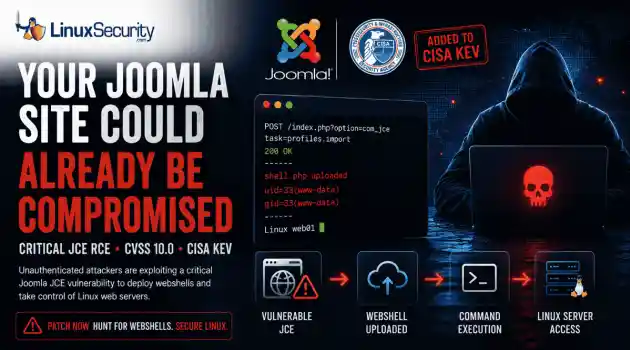
Security Vulnerabilities security advisory critical
security advisory critical The Joomla Content Editor (JCE), one of the most widely deployed editor extensions for Joomla websites, is currently under active attack due to a critical vulnerability. . The issue, tracked as CVE-2026-48907 , affects JCE versions earlier than 2.9.99.5 and carries a CVSS score of 10.0. Because JCE is installed on a large number of public-facing Joomla sites, the vulnerability has quickly become a high-priority target for attackers and automated scanning campaigns. CISA has added the flaw to...
Jun 17, 2026 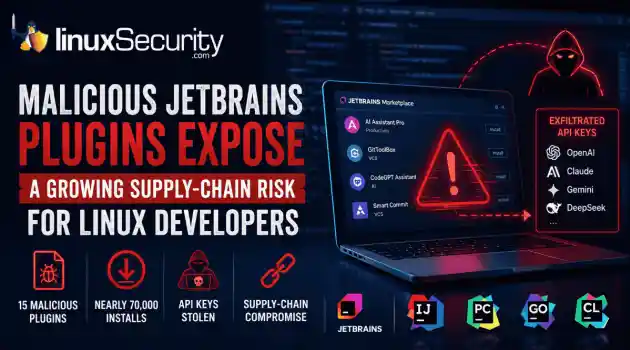
Security Trends security advisory open-source
security advisory open-source At least 15 malicious plugins and nearly 70,000 installs later, developers are being reminded that trusted marketplaces can become supply-chain attack vectors overnight. . How Malicious Plugins Steal API Credentials It’s simple. The user installs a plugin. It asks for API credentials. The developer clicks "Apply." A short time later, those keys could be sent to a third-party server. Think of an API key like a valet key to your house. It doesn't give them the deed to the property, but it lets...
Jun 17, 2026  Refine news
X Clear Filters Get the latest News and Insights
Get the latest Linux and open source security news straight to your inbox.
Community Poll
What got you started with Linux?
Loading...

Explore Latest Linux Security news
We found -4 articles for you...
215
 security managementnetwork configurationlinux administration
Introducing Canonical's Desktop Security Center for Ubuntu Users
Canonical is introducing a new Desktop Security Center , aiming to enhance accessibility to underlying security features for users of Ubuntu and other Linux distros. Although still a work in progress, this Flutter-based tool has generated considerable interest. . This article delves into the details of this center, discussing its notable features and potential benefits. Furthermore, it explores the implications of this development and raises questions about its long-term consequences. What Features Does Ubuntu's Desktop Security Center Offer Linux Admins? Canonical's Desktop Security Center addresses the need for a dedicated hub to streamline the accessibility of Ubuntu's security features. By consolidating scattered elements across various tools, the Desktop Security Center aims to provide a comprehensive platform for managing and controlling key security aspects. This initiative is particularly valuable for Linux administrators, infosec professionals, and sysadmins who deal with the intricate security requirements of their systems. The integration of Ubuntu Pro into the Desktop Security Center must not be overlooked. Enabling users to attach their machines to a Ubuntu Pro plan allows for features like ESM coverage, kernel liv e-patching, compliance, and hardening options. This integration implies that Canonical envisions the Desktop Security Center as a fundamental component of its premium offering, catering to enterprise-level security needs. Another notable feature is the ability to manage file access requests from confined apps. This functionality provides enhanced control over app permissions, making it easier for users to handle security aspects related to application access. Additionally, including a Network section allows users to enable or disable the firewall, configure ports, and utilize "stealth mode," which emphasizes Canonical's commitment to empowering users in securing their systems. From a long-term perspective, this release raises thought-provoking questions about thepotential robustness of the Desktop Security Center. As Ubuntu plans to ship it with the LTS release, Ubuntu 24.04, it positions the center as a critical dashboard for Ubuntu Pro users. However, further development and improvement is needed at the moment. The fact that the GitHub project page currently lacks documentation adds to the uncertainty regarding the maturity and stability of the tool. Implications & Consequences The introduction of the Desktop Security Center has several implications for security practitioners. Firstly, it simplifies the management of Ubuntu's security features, making it more accessible to users without extensive technical expertise. This can potentially bridge the gap between security requirements and user capabilities, improving protection against threats. However, admins must question if the current state of the tool is sufficient for its intended release. The absence of a functional snap permissions section and incomplete documentation on the project page raises concerns about stability and user experience. Delivering a robust and feature-complete Desktop Security Center is crucial to ensure the trust and adoption of the tool by security-conscious users and enterprises. Our Final Thoughts on Canonical's Desktop Security Center In conclusion, Canonical's new Desktop Security Center holds promise as a central hub for managing and controlling security aspects. By consolidating diverse features into a unified interface, it aims to enhance the security practices of Linux admins, infosec professionals, and sysadmins. However, concerns about the tool's completeness and maturity must be addressed to ensure its effectiveness and long-term viability. As security practitioners, it is essential to closely monitor the development and improvements of the Desktop Security Center to assess its potential impact on securing Ubuntu-based systems. Be sure to subscribe to our weekly newsletters for updates on timely, impactful Linux security-related topics like this. Stay safe outthere, fellow Linux enthusiasts! . Dive into Canonical's Desktop Protection Hub, a central platform for Ubuntu safeguarding tools tailored for Linux administrators and information security experts.. Desktop Security Center, Linux Administration, Ubuntu Pro, Security Management, Sysadmin Tools. . Brittany Day
 Feb 14, 2024 •
 Desktop Security
Get the latest News and Insights
Get the latest Linux and open source security news straight to your inbox.
Community Poll
What got you started with Linux?
Search Topics
Powered By

Linux Security - Your source for Top Linux News, Advisories, HOWTOs and Feature Releases
QUICK LINKS
subscribe to newsletters!
Like staying secure? So do we.
Sign up for updates, tips, and alerts!
Discover faster search, smarter navigation, and deeper Linux security insights. Read More