Overly broad permissions can turn one compromised account into a much larger security problem. Learn how to reduce unnecessary access, review privileges, and apply least privilege across modern Linux systems. Review Linux Privileges×



Desktop Security security advisory vulnerability
security advisory vulnerability GNOME is officially shortening its standard vulnerability disclosure window from 90 days to 30 days, a change that impacts upstream maintainers, downstream Linux distributions, and system administrators in how they handle software vulnerabilities. The policy shift, announced by long-time security coordinator Michael Catanzaro , addresses modern software patching realities and a growing influx of automated submissions. . Because GNOME is the default desktop environment on several major Linux...
 Jul 21, 2026

Security Vulnerabilities security advisory moderate
security advisory moderate For organizations that run a self-hosted Git platform, it’s no longer just about hosting static code repositories. Today, Git servers are responsible for deployment pipelines, API tokens, SSH keys, package repositories, and the automation scripts that push code directly. Confirm that the upgrade addresses known vulnerabilities but also provides production environments. . That makes them trusted systems within the development environment and attractive targets for attackers looking to move...
Jul 20, 2026

Server Securitydata privacy automation
data privacy automation Every system admin has lived through the same Monday morning ritual. A queue of forty tickets, half of them password resets, permission errors, or disk space warnings that any experienced technician could resolve in under two minutes. The other half require actual judgment. For years, automation promised that software would eventually sort the two apart on its own. That promise is now being tested in production Linux environments. . Early results are reshaping how IT teams think about tier-1...
Jul 17, 2026

Privacydata collection automation
data collection automation You're running a web scraping project to collect pricing data from e-commerce sites. You set up a pool of datacenter proxies, launch your scripts, and within minutes — banned . CAPTCHAs everywhere. Your data pipeline stops before it really begins. . It's a frustrating scenario that plays out daily in ad verification, market research, and multi-account management. The website doesn't know you're doing legitimate research or monitoring. It just sees traffic coming from IP ranges it recognizes as...
Jul 17, 2026

Security Trends security advisory social engineering
security advisory social engineering Business Email Compromise used to be a numbers game — mass-blasted emails, broken English, an obvious "URGENT WIRE TRANSFER" subject line. That era is over. Generative AI has turned BEC into a tailored, low-noise operation that mimics writing style, voice, and even video presence. This piece looks at what's actually changed under the hood, what defenders are testing in response, and why so many organizations are still structurally unprepared for it. . The Infrastructure Problem Nobody Wants to...
Jul 17, 2026
 Refine news
X Clear Filters
Get the latest News and Insights
Get the latest Linux and open source security news straight to your inbox.
Community Poll
Should Linux servers automatically install security updates?
Trending News
Loading...
Explore Latest Linux Security news
We found 10 articles for you...
77
 ftp serverproftpdfile transfer
Comparing the Differences Between Vsftpd and ProFTPd FTP Servers
FTP is a standard protocol that is used to transfer files widely, and FTP servers like Vsftpd and ProFTPd provide a way to use that protocol and access plus transfer files stored on a remote server. Here we quickly learn the difference between Vsftpd and ProFTPd. . vsftpd (Very Secure FTP Daemon) is a GPL-licensed FTP server software developed to provide a secure but fast way to transfer files. It is popular among Linux users because of its simplicity and efficient use of system resources. That’s the reason why most Linux distros such as Redhat, Fedora, Ubuntu, Debian, and more offer this FTP server package to install directly from the base repository of the system. Learn – How to install VSFTPD to Setup FTP Server on Ubuntu 22.04. ProFTPd (Pro FTP daemon) is also an open-source FTP server just like Vsftpd but comes highly customizable and extensible. It offers a wide range of advanced features like virtual hosts, SSL/TLS encryption, and LDAP authentication. It is designed to be a highly feature-rich FTP server. . When comparing vsftpd and ProFTPd, both excel in secure file transfers, but vsftpd is simpler and more performance-oriented, while ProFTPd offers flexibility and advanced features. Vsftpd, ProFTPd, FTP Server Comparison, File Transfer Protocols. . LinuxSecurity.com Team
 Mar 29, 2023
•
Mar 29, 2023
• Server Security
79
 encryptionopen sourcefile transfer
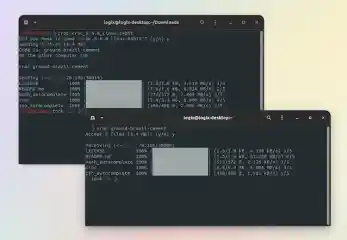
Croc: Secure File Transfers With Encryption Across Platforms
croc is a free and open-source command line tool for secure file transfers between computers. It uses relay-assisted peer-to-peer transactions and end-to-end encryption via password-authenticated key exchange. The program is written in Go and is available for Linux, Windows, macOS and *BSD. Learn about croc's key features and see how easy it is to use croc to send a file or folder in this Linux Uprising tutorial. . The idea behind croc is being able to transfer files and folders between cross-platform computers securely, fast and easy. With support for resumable, peer-to-peer transfers. As a bonus feature, croc is also able to securely transfer a short text or URL directly. The data transfer is done using a relay, either using raw TCP sockets or websockets. When the sender and the receiver are on the same LAN, croc uses a local relay, otherwise a public relay is used. Thanks to this, croc can send files between computers in the same LAN, or over the Internet, without having port-forwarding enabled. The data going through the relay is encrypted using a PAKE -generated session key. For this, croc uses code phrases, a combination of three random words. By default, a code phrase can only be used once between two parties, so an attacker would have a chance of less than 1 in 4 billion to guess the code phrase correctly to steal the data. . Explore croc, a powerful command-line tool crafted for secure and efficient file transfers across multiple platforms, featuring advanced encryption for superior data safety. Croc Tool, Secure File Transfers, Command Line Tool, Security, Encryption Tool. . LinuxSecurity.com Team
Mar 05, 2021
•
Security Projects

77
 security practicesfile transferserver hardening
Hardening Linux Server Configuration: Disable Root Login & Use SFTP
There are a few things you need to always remember when setting up a new Linux server. By default the root login is enabled for most systems. The best practice is to disable root login. Also, if you are transferring files via FTP, the best way to do this securely is via SFTP (not FTP). . The quick difference is that FTP sends passwords/data in plain text versus encrypted text in SFTP. Let The link for this article located at pinhead.tv is no longer available. . The quick difference is that FTP sends passwords/data in plain text versus encrypted text in SFTP. L. there, things, always, remember, setting, linux, server, default. . LinuxSecurity.com Team
Apr 16, 2012
•
Server Security
74
remote accessfile transferssh-xferStreamlining File Transfers With Ssh-Xfer Over Ssh Connections
The ssh-xfer project uses the local SSH agent to allow you to easily grab files using an existing SSH shell connection. You do not have to modify either the SSH client or server programs to use ssh-xfer -- but you will need to patch your ssh-agent. Although having to patch the ssh-agent is not ideal, you do gain one major advantage by doing this: you can send a file through more than one SSH connection. Have you ever used ssh-xfer? This article shows the user how to use ssh-xfer to get files over a network using a SSH shell connection.. The link for this article located at Linux.com is no longer available. . The link for this article located at Linux.com is no longer available.. ssh-xfer, project, local, agent, allow, easily, files, using, existing. . Bill Locke
Aug 11, 2008
•
Network Security
74
file transferSSHSFTPHow To Securely Transfer Files Using SFTP And SCP Over SSH
File Transfer Protocol (FTP) was once the most widely used protocol for transferring files between computers. However, because FTP sends authentication information and file contents over the wire unencrypted, it's not a secure way to communicate. Secure Copy (SCP) and the more robust SSH File Transfer Protocol (SFTP) address this security concern by providing data transfer over a fully encrypted channel. You can use these alternatives for transferring files securely over the Internet or any other untrusted network. . Both SCP and SFTP rely on Secure Shell (SSH) as their underlying protocol. SSH establishes a secure and encrypted channel of communication between computers using authentication and encryption based on Public Key Infrastructure. SSH uses encryption for the authentication data exchanged to set up the session and the subsequent data transfer. The link for this article located at Linux.com is no longer available. . SCP and SFTP leverage SSH for secure data transfer over untrusted networks. Learn secure file transfer methods now.. protocol, transfer, (ftp), widely, transferring, files, between. . Bill Locke
Jun 04, 2007
•
Network Security
77
system upgradefile transferLinux distributionEffortless Backup Solutions for Slackware Using Bash and Netcat Tools
I recently ran into the problem of not having enough hard drive space on my slackware linux laptop, but was lucky enough to have a much bigger drive sitting around from before and wanted a way to perform a hassle free seamless upgrade. i had this idea and it worked pretty well so i thought i would share it since i think it's pretty cool and only requires the use of two tools that should be included with all distributions. sometimes you won't find netcat (known as nc, or ncat as it is sometimes named) and if bash incorporated my server redirections patch that i posted before you wouldn't need it at all, but for now it's required to listen for the incoming connections over the net. . The link for this article located at Metashell is no longer available. . Discover the best practices for securing your Windows setup through PowerShell, zip, and FTP with this concise tutorial.. Linux Backup,Bash Scripts,Netcat Transfer,Tar Archiving,System Upgrade Process. . LinuxSecurity.com Team
Apr 04, 2006
•
Server Security
74
remote accessfile transferOpenSSHExplore Advanced OpenSSH Features For Secure Remote Access
We've covered SSH before in CLI Magic, but this week let's look at some additional SSH features that new users might not be aware of. For the purpose of this article, we'll be looking specifically at OpenSSH, but many of these features apply to other SSH variants as well. SSH is the best way to establish a secure connection to a remote networked machine. Whether you want to transfer files, encrypt traffic, or just log in to a remote machine, SSH is the way to go. . Let's start with one of the basics. If you log into a remote machine frequently, you might be tired of typing your password over and over again. You can set up SSH so that you can authenticate without typing a password. First, you'll need to create an authentication key for SSH. This will actually consist of a key pair: a private key and a public key. To create your keys, run the command: ssh-keygen -t dsa The link for this article located at Linux.com is no longer available. . Examine SSH functionalities for streamlined remote access, secure file transfers, and encrypted communications without the hassle of entering passwords repeatedly.. SSH Management, OpenSSH Features, Remote Server Access, Secure File Transfer. . Benjamin D. Thomas
Dec 06, 2005
•
Network Security
74
remote accesssecurity risksfile transferSecure Shell Approaches for Enhanced Remote Access Security
Telnet, Rsh, Rlogin, Rcp, and FTP are commonly used methods to access files and execute commands on remote servers. They are available in most operating systems and work seamlessly in multi-platform environments. However, this convenience comes with major security risks. This document is intended for IT professionals at enterprises who need to secure file transfer and system administration access methods in heterogeneous and large-scale environments. . The document describes common vulnerabilities and known exploits of plaintext file transfer and terminal connections. Also, eight areas to examine when seeking and evaluating products and technologies for an FTP and Telnet replacement are introduced. Finally, a cost-effective security approach based on Secure Shell for cross-platform, large-scale environments is introduced. The link for this article located at Net-Security.org is no longer available. . Securing plaintext file transfers and terminal connections is vital, as they expose sensitive data to interception. Switching to SFTP and SSH enhances security significantly. Secure Shell Solutions, File Transfer Security, Remote Access Protocols. . Benjamin D. Thomas
Nov 07, 2005
•
Network Security

Get the latest News and Insights
Get the latest Linux and open source security news straight to your inbox.
Community Poll
Should Linux servers automatically install security updates?
Trending News
Search Topics
Powered By

Linux Security - Your source for Top Linux News, Advisories, HOWTOs and Feature Releases
QUICK LINKS
subscribe to newsletters!
Like staying secure? So do we.
Sign up for updates, tips, and alerts!