Overly broad permissions can turn one compromised account into a much larger security problem. Learn how to reduce unnecessary access, review privileges, and apply least privilege across modern Linux systems. Review Linux Privileges×



Desktop Security security advisory vulnerability
security advisory vulnerability GNOME is officially shortening its standard vulnerability disclosure window from 90 days to 30 days, a change that impacts upstream maintainers, downstream Linux distributions, and system administrators in how they handle software vulnerabilities. The policy shift, announced by long-time security coordinator Michael Catanzaro , addresses modern software patching realities and a growing influx of automated submissions. . Because GNOME is the default desktop environment on several major Linux...
 Jul 21, 2026

Security Vulnerabilities security advisory moderate
security advisory moderate For organizations that run a self-hosted Git platform, it’s no longer just about hosting static code repositories. Today, Git servers are responsible for deployment pipelines, API tokens, SSH keys, package repositories, and the automation scripts that push code directly. Confirm that the upgrade addresses known vulnerabilities but also provides production environments. . That makes them trusted systems within the development environment and attractive targets for attackers looking to move...
Jul 20, 2026

Server Securitydata privacy automation
data privacy automation Every system admin has lived through the same Monday morning ritual. A queue of forty tickets, half of them password resets, permission errors, or disk space warnings that any experienced technician could resolve in under two minutes. The other half require actual judgment. For years, automation promised that software would eventually sort the two apart on its own. That promise is now being tested in production Linux environments. . Early results are reshaping how IT teams think about tier-1...
Jul 17, 2026

Privacydata collection automation
data collection automation You're running a web scraping project to collect pricing data from e-commerce sites. You set up a pool of datacenter proxies, launch your scripts, and within minutes — banned . CAPTCHAs everywhere. Your data pipeline stops before it really begins. . It's a frustrating scenario that plays out daily in ad verification, market research, and multi-account management. The website doesn't know you're doing legitimate research or monitoring. It just sees traffic coming from IP ranges it recognizes as...
Jul 17, 2026

Security Trends security advisory social engineering
security advisory social engineering Business Email Compromise used to be a numbers game — mass-blasted emails, broken English, an obvious "URGENT WIRE TRANSFER" subject line. That era is over. Generative AI has turned BEC into a tailored, low-noise operation that mimics writing style, voice, and even video presence. This piece looks at what's actually changed under the hood, what defenders are testing in response, and why so many organizations are still structurally unprepared for it. . The Infrastructure Problem Nobody Wants to...
Jul 17, 2026
 Refine news
X Clear Filters
Get the latest News and Insights
Get the latest Linux and open source security news straight to your inbox.
Community Poll
Should Linux servers automatically install security updates?
Trending News
Loading...
Explore Latest Linux Security news
We found 1 articles for you...
78
 security advisoryimportantlinux
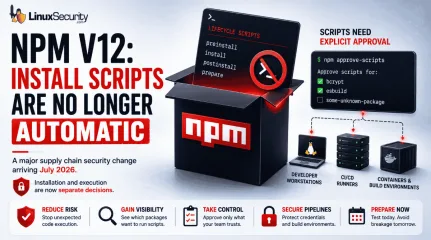
After Years of Supply Chain Attacks, npm Is Finally Closing the Door on Auto-Scripts
With npm v12, dependency preinstall, install, and postinstall scripts will no longer execute automatically during package installation. Script execution will require explicit approval through new controls such as npm approve-scripts, with the change expected to arrive in July 2026. . The announcement targets a part of the software supply chain that has repeatedly appeared in package registry abuse, credential theft, and CI/CD compromise investigations. A single npm install could trigger code from direct dependencies, transitive packages, Git repositories, and build hooks before anyone reviewed what was about to run. On Linux systems, that execution often happens on developer workstations, build servers, containers, and self-hosted runners that already hold access to production resources. This is more than a JavaScript ecosystem update. It is a change to how code execution is handled during dependency installation. Teams that rely on install-time compilation, binary downloads, or package setup scripts will need to adjust workflows, while Linux administrators and DevOps teams will need to identify where automatic execution is currently embedded in build and deployment pipelines. npm Install Was Never Just an Install Command A surprising number of developers still think of npm install as a download operation. In practice, npm has long treated package installation as an execution event. Several lifecycle hooks can run automatically during installation, including preinstall, install, postinstall, and prepare. Packages use these to compile native modules or download binaries, but this execution is opaque; a package may pull in hundreds of transitive dependencies, each with its own scripts, meaning code from unknown maintainers can execute on your system without review. On Linux, this execution frequently happens inside infrastructure—such as CI pipelines or container build stages—that often contains SSH keys, cloud credentials, and deployment secrets. A malicious install script does notneed a complicated exploit chain if it is already running with access to those resources. The risk has never been theoretical; once installation begins, the script runs with the permissions available to the process that launched it. Why GitHub Is Changing the Default Now GitHub did not arrive at this decision suddenly. Malicious packages have used install scripts to collect credentials, fingerprint systems, download secondary payloads, and exfiltrate secrets. The common theme is simple: Installation became a trusted execution path. For years, npm treated installation and code execution as closely connected operations. That made development convenient, but it also created an environment where downloading a dependency frequently meant running code before developers had a chance to review what was happening. From an incident response perspective, install-time execution is difficult to track. Because this activity mimics a legitimate package manager during routine builds, it is incredibly difficult to detect—a reality that disabling execution by default aims to fix. Why Install Scripts Became a Security Concern Install-time scripts have been repeatedly abused in software supply chain attacks to steal credentials, fingerprint developer systems, download secondary payloads, and exfiltrate CI/CD secrets. Because these scripts execute as part of a normal package installation process, malicious activity can blend into routine development and build workflows. What npm v12 Actually Changes Install Scripts Will Be Disabled by Default Dependency lifecycle scripts will no longer automatically execute during installation. Packages that depend on these scripts will require explicit approval. The package still installs, but the script remains dormant. This change finally separates dependency retrieval from dependency execution. Teams Must Explicitly Approve Install Scripts Instead of trusting every package by default, teams will decide which packages are allowed to executeinstall-time scripts. Tools such as npm approve-scripts and npm deny-scripts manage these approvals. The allowScripts field in package.json allows organizations to identify and authorize required scripts before v12 becomes the default. For many teams, the first test run will reveal dependencies they did not realize were executing code during installation. That visibility alone has operational value. npm v12 Tightens Controls on Git Dependencies GitHub has also signaled tighter controls around Git-based dependencies, which introduce risk because their contents can change independently of registry workflows. npm v12 will likely push more organizations to inventory and justify these dependencies. Why npm v12 Matters for Linux Systems and CI/CD Pipelines Linux systems sit at the center of modern software delivery pipelines, where install scripts often perform their most dangerous work. Developer Workstations: Scripts run with the permissions of the logged-in user and may access SSH keys, cloud credentials, and local .env files. CI/CD Runners : These are high-value targets containing deployment credentials, signing keys, and internal repository access. Containers & Native Modules: Whether it is a RUN npm install in a Dockerfile or a package requiring node-gyp for native compilation, these execution-heavy workflows will now require explicit approval. Supply Chain Attacks Continue to Rise Industry reports have shown continued growth in software supply chain attacks targeting package registries, open-source dependencies, CI/CD environments, and developer tooling. Attackers increasingly focus on trusted software distribution channels because a single compromised dependency can impact thousands of downstream systems. The Security Benefits and Operational Challenges of npm v12 The immediate security benefit is a reduction in automatic code execution. A compromised dependency can no longer assume its installation script will run automatically onevery target system. The operational impact, however, is real: Building pipelines will break. Native modules may fail to compile. Packages that download binaries may stop working until approvals are configured. CI workflows that previously assumed unrestricted execution will require updates. Organizations that have never reviewed their dependency scripts may discover how heavily they depend on them. That discovery is uncomfortable, but useful. Does Disabling Install Scripts Prevent Supply Chain Attacks? No. Attackers still have plenty of options, including typosquatting, dependency confusion, and compromised maintainer accounts. This change doesn't stop supply chain attacks, but it closes one of the most convenient execution paths available to attackers. The risk does not disappear; the timing simply changes. How Linux Admins and DevOps Teams Can Prepare for npm v12 Start testing builds with npm 11.16.0 or newer to identify packages that trigger install-script warnings. Review script approvals before adding them to allowlists. A package that compiles native code has an understandable reason; a package that performs unrelated network activity deserves scrutiny. Audit Dockerfiles and CI pipelines to determine if dependency installation occurs in privileged stages. Inventory Git dependencies. Removing unnecessary remote dependencies reduces another source of install-time uncertainty. What npm v12 Says About Software Supply Chain Security The larger lesson extends beyond JavaScript. Whether it is container builds, bootstrap tools, or curl-to-shell installers, the pattern of "download-and-execute" is pervasive across Linux environments. The mechanism changes, but the core assumption remains the same: code arrives and is immediately granted permission to run. npm v12 pushes the ecosystem toward a different default, where installation and execution become separate decisions again. Final Thoughts GitHub is not eliminating supplychain risk, but it is eliminating one of the most convenient paths from dependency download to immediate code execution. For Linux environments, that matters because npm rarely runs in isolation; it runs on systems that often hold credentials capable of reaching production infrastructure. After years of incidents tied to install-time behavior, GitHub is finally treating installation and execution as separate actions. Want more Linux security news, vulnerability analysis, and software supply chain updates? Subscribe to the LinuxSecurity Newsletter and get the latest threats, advisories, and expert insights delivered directly to your inbox. Related Reading NPM Attack Exposes Supply Chain Risks in Open Source Software Supply Chain Attacks Impact NPM, PyPI, Docker Hub - 2025 Why Linux Supply Chain Attacks Are Becoming a Nightmare for DevOps Teams Why CI/CD Pipelines Are Targets in Software Supply Chain Attacks Why Software Supply Chain Security Matters in Linux Systems . GitHub's npm v12 effectively limits automatic script execution during installs, improving supply chain security for Linux.. npm security, supply chain attacks, install scripts, Linux security, DevOps practices. . MaK Ulac
 Jun 11, 2026
•
Jun 11, 2026
• Vendors/Products
210
 malwarelinuxsupply chain
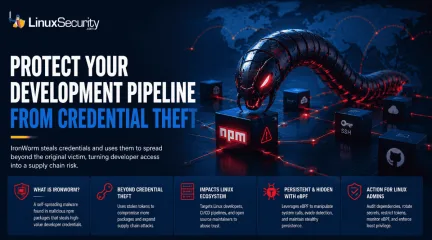
IronWorm Supply Chain Threat from Linux Credential Theft
IronWorm steals credentials and uses them to spread beyond the original victim, turning developer access into a supply chain risk. . A new campaign targeting npm has evolved past simple credential theft. Researchers identified IronWorm, a self-spreading threat. It harvests high-value Linux development secrets—SSH keys, cloud tokens, package publishing credentials. One compromised workstation becomes a launchpad for downstream supply chain attacks. This is not a get-in-and-get-out operation. IronWorm maintains persistence, expands through the software you maintain, and leverages your reputation to push malicious code to every user who pulls your next update. The threat model shifted. Your workstation is no longer just an endpoint. It is the most significant vulnerability in your production supply chain. What Is IronWorm? IronWorm acts like a digital parasite. It hides inside software developers' trust. Researchers found the malware inside dozens of malicious npm packages on the public registry. It operates with a singular focus: collecting secrets. It ignores browser history. It ignores personal files. It hunts for digital keys that allow an attacker to move beyond a single machine and into the broader software ecosystem. Why The IronWorm Malware Attack Is Different Most malware follows a predictable, finite lifecycle. It infects a system. It scrapes what it can. It exists. IronWorm breaks that model. It is designed for expansion. A developer pulls a tainted dependency. The malware scrapes tokens. It uses those stolen tokens to compromise additional packages. It creates new victims through the very infrastructure you use to build software. This is not just credential theft. It is an automated supply chain assault. It uses your own reputation to lure the next target. How IronWorm Impacts Linux Users Most security reports stop at the npm layer. That is a mistake. For the Linux ecosystem, the threat is existential. Linux Developers Are Prime Targets Linux workstationsare rarely just office computers. They are development hubs. Attackers know this. They are not looking for standard user credentials. They are looking for SSH keys, cloud secrets, and Git tokens. They want the bridge between a local machine and a production environment. Linux Build Servers and CI/CD Pipelines Linux systems act as the engine room for software delivery. They run GitHub Actions, GitLab CI, or Jenkins. If IronWorm compromises a machine used to manage build runners, the attacker gains more than a workstation. They gain the ability to tamper with software before it reaches a user. Open Source Maintainers Face Elevated Risk If you maintain public-facing packages, you are a primary target. IronWorm is specifically designed to hijack npm publishing tokens used to push updates. If an attacker gains those credentials, they push malicious code under your name. Trust is the hardest thing to build in open source. IronWorm is engineered to break it. The eBPF Rootkit Connection Beyond credential theft, IronWorm introduces a technical layer of persistence. Researchers found that the malware leverages eBPF . This is a powerful Linux kernel technology typically used for networking, observability, and security tools. Administrators use eBPF to monitor system health and detect intrusions. Attackers realized the same power that allows a security tool to inspect the kernel also allows malware to remain hidden. By utilizing eBPF, IronWorm manipulates system calls. It bypasses traditional monitoring. It stays stealthy while it harvests the next set of credentials. Why Supply Chain Attacks Keep Getting Worse IronWorm is not an isolated anomaly. It is part of a broader trend in which attackers target trusted software distribution channels rather than individual users. The 2024 XZ Utils backdoor demonstrated how a compromise in a widely trusted open-source project can ripple through Linux distributions and enterprise environments. IronWorm follows a similar trust-abuse strategy, but insteadof inserting malicious code directly into a project, it focuses on stealing developer credentials that can be used to compromise additional software packages and development pipelines. Whether the attack begins with a compromised maintainer, a malicious dependency, or stolen publishing credentials, the goal remains the same: abuse trust to reach as many downstream systems as possible. What Linux Administrators Should Do Now If you manage Linux development environments, close the gap between developer workstations and production infrastructure. That's where a lot of these attacks gain traction. Audit Dependencies: Review package manifests and dependency trees for anything unauthorized, unexpected, or recently introduced without a clear reason. Restrict Tokens: Move away from long-lived master keys where possible. Use scoped, short-lived publishing credentials instead. Rotate Secrets: Assume every SSH key, API token, cloud credential, and other secret stored on an affected machine has been exposed. Rotate them. Isolate CI/CD: Build runners should not keep persistent secrets on disk. An infected process only needs a moment to scrape them. Monitor eBPF Activity: Configure detection and monitoring tools to alert on unexpected or unauthorized eBPF program loading. Enforce Least Privilege: Limit what a user session can access. Developer accounts rarely need direct access to production systems or high-value credentials. For defenders, the interesting part isn't the Linux infection itself. It's the focus on credentials. Once an attacker has access to developer tokens, keys, and deployment accounts, the scope of the incident can change quickly. A compromised workstation is manageable. A compromised development pipeline is a different problem. Related Reading Why CI/CD Pipelines Are Targets in Software Supply Chain Attacks Red Hat npm Package Compromise Highlights Supply Chain Risks Nx Console Important Supply Chain Breach Affects Linux DevPipelines Linux Supply Chain Attacks Threaten DevOps Teams and Security . IronWorm exploits Linux credentials, turning machines into supply chain threats with far-reaching impacts.. IronWorm Credential Theft Supply Chain Linux Development. . MaK Ulac
Jun 08, 2026
•
Security Vulnerabilities

77
 security advisoryremote accesslinux
Linux Strapi Medium Redis RCE Threats from Malicious npm Packages
The first week of April 2026 marked a significant escalation in supply chain tactics. A coordinated campaign involving 36 malicious npm packages, disguised as Strapi CMS plugins, was uncovered by security researchers. This was not a broad, opportunistic "grab" for credentials. Forensic evidence, including hardcoded credentials and internal hostname checks, reveals a surgical strike against the cryptocurrency platform Guardarian. By weaponizing a trusted development workflow, attackers achieved a total compromise. Moving from initial execution to database theft and long-term persistence in minutes. . Attack Delivery: npm Postinstall Execution The campaign bypassed traditional runtime security by embedding malicious code in the of the package.json file. According to official npm documentation , these lifecycle scripts execute automatically upon installation. In a modern CI/CD pipeline or a developer’s local environment, this creates a zero-click infection vector. Because many build servers run with elevated or container-root privileges, the malware immediately inherits the ability to probe the underlying Linux host without further user interaction. Initial Exploitation: Redis RCE and Shell Access Once the postinstall hook fires, the malware doesn't just sit there—it immediately goes to work on the underlying Linux infrastructure. The most aggressive tactic identified by researchers was the weaponization of locally accessible Redis instances. The Redis Persistence Trick: Using the CONFIG SET command, the script reconfigures the Redis working directory to point directly to /var/spool/cron/crontabs/. By forcing a database "save" to this directory, the attacker effectively injects a malicious cron job into the system scheduler. This ensures that even if the npm process is killed, the attacker’s shell script re-downloads and executes every 60 seconds. Breaking Out with Reverse Shells: To bridge the gap between the application and the attacker, the payloads spawn multiplereverse shells—primarily on port 4444—to establish a persistent command link. In a particularly bold move, the script utilizes mknod and dd to create raw device nodes. This technique allows the malware to read directly from the disk blocks, potentially bypassing standard filesystem permissions to scrape sensitive data like SSH private keys or raw database files. Expansion: Moving Laterally Through the Stack With a foothold established, the malware shifts from exploitation to a full-scale reconnaissance mission. It doesn't just look for local files; it looks for the keys to the entire cloud kingdom. The payloads perform a comprehensive sweep of the environment, systematically harvesting secrets from CI/CD logs and configuration files. This includes a total "environment dump" where the malware captures every active variable in process.env—snagging everything from AWS session tokens to internal JWT secrets. Beyond the host, the script maps out the local network, probing for Docker sockets and Kubernetes API endpoints, searching for a way to pivot from a single compromised container to the broader production cluster. Expansion: Credential Harvesting and Infrastructure Access As the attack progressed, it shifted from exploitation to reconnaissance. The malware collected environment variables, configuration data, and credentials from the host system. It accessed .env files and application configs, extracted API keys and JWT secrets, and searched for cloud and container credentials, including Kubernetes service account tokens . The payload also gathered basic network information and checked for access to Docker sockets and internal services, which could be used to move further inside the environment. Targeting Indicators: Guardarian References The smoking gun for this being a targeted operation lies in the hostname check. One payload variant remained dormant unless the host identified itself as prod-strapi. Furthermore, the malware included hardcoded PostgreSQL credentials totarget databases named guardarian, guardarian_payments, exchange, and custody. This level of specificity strongly indicates that the attackers had prior knowledge of the target's internal infrastructure and used this npm campaign as a persistent "backdoor" into the company's financial core. Persistence and Evasion Techniques To ensure long-term access, the attackers utilized sophisticated persistence mechanisms that avoid standard filesystem detection: Hidden Processes: Payloads ran a background /proc scanner for 10 minutes after the main script exited. Fileless Execution: Later variants avoided the disk entirely, running a detached process via node -e that stayed in system memory long after the npm install process was terminated. SSH Backdoors: The script attempted to append rogue public keys to ~/.ssh/authorized_keys, providing a permanent "front door" for the attackers. Supply Chain Risk in CI/CD Pipelines This incident is part of a 2026 surge in "high-velocity" supply chain hits, arriving just days after the Axios maintainer account was hijacked to push malicious Remote Access Trojans. Industry reports confirm that the npm ecosystem is now a primary vector for targeting CI/CD pipelines. When pipelines blindly execute unverified code during the build phase, the "trusted" dependency graph becomes a Trojan horse for the entire production environment. Sonatype’s latest research suggests these attacks have increased by over 200% year-over-year. Mitigation and Response Organizations using Strapi or Node-based workflows should follow these recovery protocols immediately: Audit for Shadow Plugins: Legitimate Strapi plugins are strictly scoped under @strapi/. Any unscoped plugin versioned at 3.6.8 is a red flag. Rotate All Credentials: Assume any.env file or database password on an infected host is now compromised. Inspect Persistence: Check /etc/crontab and /tmp/ for hidden Node.js processes or scripts. Block C2 Egress: Block alloutbound traffic to known C2 infrastructure and restrict outbound connections from production servers. . A coordinated attack using malicious npm packages escalates supply chain threats impacting Strapi on Linux systems.. npm malware, Strapi security, CI/CD risks, Linux attacks, supply chain. . MaK Ulac
Apr 06, 2026
•
Server Security
210
 security advisorymoderatemalware
NPM Attack Exposes Supply Chain Risks in Open Source Software
An attack against the npm ecosystem compromised 18 widely used packages — libraries downloaded more than 2.6 billion times each week. The malicious versions were uploaded through a maintainer account compromise, turning trusted dependencies into a malware download pipeline. . This wasn’t limited to JavaScript developers. Because npm packages run inside containers and Linux servers, the blast radius extended far beyond web projects. The incident underscores a hard truth: if the npm registry can be poisoned, any open-source registry is vulnerable. What is npm and Why It Matters to Linux npm is the largest package manager for JavaScript and Node.js, serving millions of developers who pull libraries daily from the npm registry. These aren’t fringe utilities. Packages like chalk, debug, and ansi-styles are core building blocks in open-source software. They colorize logs, handle debugging, and support frameworks that power production systems. In Linux environments, npm libraries are bundled into pipelines, containers, and workloads that almost always run on Linux. When a trusted package gets compromised, the impact doesn’t stop with developers on laptops — it cascades into Linux servers, Kubernetes clusters, and CI/CD environments that rely on npm every day. History backs this up. npm flaws have carried downstream into distributions themselves. Ubuntu, for example, issued Ubuntu: 6643-1 Moderate: Node-IP SSRF Risk Exposing Information when an npm package vulnerability created exposure inside the distro’s ecosystem. This is part of the broader risks highlighted in the open source software supply chain security . That’s why a compromise in the npm registry isn’t a web developer’s problem alone. It’s an open-source supply chain issue that affects Linux at the core — the servers, workloads, and production environments organizations depend on. How npm Packages Were Compromised in the Attack Malicious updates were uploaded to the npm registry after attackers gainedcontrol of a maintainer account. The registry itself wasn’t breached. The compromise came from a phishing campaign against a well-known maintainer who publishes several popular libraries. Going by the handle qix, the maintainer was tricked into sharing two-factor credentials with an attacker posing as npm support. With access in hand, the attackers injected malicious code into trusted packages, including chalk, debug, and ansi-styles. Because those libraries sit at the base of so many open-source projects, any automated build pipeline, often running on Linux servers, could have pulled in the poisoned code without warning. The poisoned versions stayed up for about two hours — long enough to slip into production builds. This technique wasn’t limited to phishing, across ecosystems. A recent supply chain attack targeting Telegram bots shows how easily attackers can adapt these methods across platforms. Once a maintainer account is compromised or a dependency is poisoned, the malicious update doesn’t stop at development — it spreads into CI/CD pipelines and production environments at scale. Technical Breakdown of the Injected Malware The injected malware followed a five-stage sequence , designed for stealth and long-term impact: Stage 1 — Injection into Browser APIs The malicious code hooked common browser entry points like fetch, XMLHttpRequest, and wallet APIs such as window.ethereum. By intercepting these functions, attackers gained direct access to application traffic and wallet interactions. Since Node.js apps often bundle front-end tooling from the npm registry , this interception could flow downstream into Linux-hosted services. Stage 2 — Monitoring for Wallet Activity Network responses and DOM data were scanned for wallet addresses and transaction payloads across Ethereum, Solana, Bitcoin-like chains, and others. This wasn’t passive logging — it was active surveillance waiting for the precise moment a transfer was initiated. Stage 3 — Rewriting TransactionTargets Once a wallet address was detected, the code silently swapped it for one controlled by the attacker. Often, the replacement used a visually similar address to evade notice. Because the swap occurred before the signing prompt, the UI still displayed expected values while the actual transaction routed funds elsewhere. Stage 4 — Hijacking Before Signing For EVM-style chains, the payload manipulated recipients, amounts, or allowance fields just before signing. Automated signing flows in CI systems or headless Linux environments were especially vulnerable, as they could approve poisoned transactions without human review. Stage 5 — Stealth and Persistence The malware minimized detection: avoiding alerts, cleaning traces, and persisting across sessions. It could delay activation or perform environment checks to evade sandboxes. A single malicious npm install could therefore establish a long-term malware download risk. Affected npm Packages and Versions Eighteen npm packages were compromised, including core utilities like chalk and debug. Together, they see over 2.6 billion weekly downloads. That’s enough for one poisoned release to spread through open-source stacks and into Linux production. Package Compromised Version Notes ansi-styles 6.2.2 Core styling utility debug 4.4.2 Widely used logging lib chalk 5.6.1 Common CLI color package supports-color 10.2.1 Terminal detection strip-ansi 7.1.1 Removes ANSI codes Other compromised libraries included ansi-regex, wrap-ansi, color-convert, color-name, slice-ansi, color, color-string, simple-swizzle, supports-hyperlinks, has-ansi, chalk-template, backslash , and is-arrayish . For sysadmins, the risk comes from transitive dependencies that let poisoned releases slip through unnoticed. A single update in the npm registrycan move downstream into build systems, container images, and eventually Linux servers in production — the exact environments organizations trust to stay stable. Supply Chain Risks Beyond npm: The Linux Parallel This npm attack shows why supply chain compromises are so effective: attackers don’t go after applications directly — they poison trusted dependencies upstream. It’s like tampering with brake pads at the factory instead of cutting brakes after a car is sold. Once malicious code is injected into a widely used package on the npm registry, it rides downstream into thousands of projects automatically. The risk isn’t limited to npm. Linux package managers like APT, RPM, and pacman rely on the same trust in upstream maintainers. A compromised dependency in those ecosystems could spread just as quickly. For open source, the warning is clear: even a single poisoned dependency can spread widely across dependent projects and networks — a fact that IBM observed when studying how supply chain vulnerabilities escalate across large vendor ecosystems. How This Attack Compares to Past Incidents This npm compromise wasn’t the first supply chain attack to exploit upstream trust. Dependency confusion campaigns have already targeted Amazon and Slack, slipping poisoned packages into build pipelines. A Telegram bot supply chain attack used similar phishing tactics to compromise maintainer accounts. Even Linux distributions have been exposed — Ubuntu issued 6643-1 Node-IP SSRF Risk after an npm dependency vulnerability. The CHAOS RAT in AUR incident showed the same kind of upstream trust failure: three packages posing as browser tools were uploaded on July 16, 2025, delivered remote-access malware, and weren’t removed until two days later. As outlined in evaluating an open source security baseline , these cases all point to the same weakness: ecosystems rely on a handful of maintainers, and when trust in those accounts is broken, thefallout spreads far beyond a single project. What Developers and Linux Admins Should Do Now Immediate Steps (triage) Audit projects and servers: npm ls chalk debug ansi-styles Pin safe versions and rebuild: npm install chalk@5.6.0 --save-exact Rebuild containers and scan with tools like Trivy or Grype . Audit & Prevention Run audits (npm audit, yarn audit). Generate and scan SBOMs with Syft + Grype, following NIST supply chain risk management guidance. Use npm ci and lockfiles in CI/CD. Require 2FA and rotate credentials. Verify package integrity with checksums ( what are checksums and why you should be using them ). Ongoing Security Monitor the npm registry for unusual version bumps. Add CI/CD checks to block unsafe dependencies. Sign and verify builds with cosign . Keep a short checklist in your runbook: audit, rebuild, pin, SBOM, scan, sign, monitor. The takeaway here is straightforward: detection and response matter, but prevention is critical. Securing the supply chain around npm and Linux workloads means assuming that any dependency can be compromised and building safeguards before the attack lands. Implications for Open Source and Linux Security The npm attack makes the trust problem clear: popularity does not equal safety. Millions of downloads each week do not make a package safe. The same risk model applies outside npm. PyPI, RubyGems, and Linux distribution repositories all rely on upstream maintainers and community oversight. A single poisoned dependency in any of those registries can cascade into production workloads just as easily as a malicious release in the npm registry. Closing Takeaway: npm Supply Chain Risks at Scale The npm supply chain attack shows how quickly trust in open source can be turned against the community. A single injected update was enough to create a malware download pipeline that reached millions of developers in hours. For Linux and OSS users, one poisoned npm packagecan ripple through pipelines, containers, and production systems at scale. When npm breaks, the internet feels it — and the same is true for every open-source registry. . A major npm security breach affected 18 trusted libraries, turning reliable code into a vector for malware. Discover details and strategies to protect your software supply chain.. npm attack, supply chain security, middleware vulnerabilities, open source risk management, package integrity. . MaK Ulac
Sep 18, 2025
•
Security Vulnerabilities
83
 open sourcethreat assessmentnpm
Over 700 Malicious Packages Discovered in npm and PyPI Registries
Security researchers have discovered another sizeable haul of malicious packages on the npm and PyPI open source registries, which could cause issues if unwittingly downloaded by developers. . In January, Sonatype said it found 691 malicious npm packages and 49 malicious PyPI components containing crypto-miners, remote access Trojans (RATs) and more. The discoveries by the firm’s AI tooling brings its total haul to nearly 107,000 packages flagged as malicious, suspicious or proof-of-concept since 2019. It includes multiple packages that contain the same malicious package.go file – a Trojan designed to mine cryptocurrency from Linux systems. Sixteen of these were traced to the same actor, trendava, who has now been removed from the npm registry, according to Sonatype. Separate finds include PyPI malware “minimums,” which is designed to check for the presence of a virtual machine (VM) before executing. The idea is to disrupt attempts by security researchers, who often run suspected malware in VMs, to find out more about the threat. . Experts in cybersecurity have discovered an extensive collection of more than 800 harmful open source libraries available on the npm and PyPI platforms.. Malicious Packages,Npm,Pypi,Open Source Threats,Security Research. . LinuxSecurity.com Team
Feb 22, 2023
•
Hacks/Cracks
83
 open sourcelinuxmalicious package
241 Malicious Npm And Pypi Packages Downloading Cryptominers Threat
More than 200 malicious packages have been discovered infiltrating the PyPI and npm open source registries this week. . These packages are largely typosquats of widely used libraries and each one of them downloads a Bash script on Linux systems that run cryptominers. Researchers have caught at least 241 malicious npm and PyPI packages that drop cryptominers after infecting Linux machines. These packages are typosquats of popular open source libraries and commands like React , argparse , and AIOHTTP , but instead, download and install cryptomining Bash scripts from the threat actor's server. On Wednesday, software developer and researcher Hauke Lübbers shared coming across " at least 33 projects " on PyPI that all launched XMRig , an open source Monero cryptominer, after infecting a system. . Over 250 nefarious npm and PyPI packages identified that install cryptominers via typosquatting on Unix-like operating systems.. Malicious Packages, Cryptominer Threat, Open Source Vulnerabilities. . LinuxSecurity.com Team
Aug 23, 2022
•
Hacks/Cracks

Get the latest News and Insights
Get the latest Linux and open source security news straight to your inbox.
Community Poll
Should Linux servers automatically install security updates?
Trending News
Search Topics
Powered By

Linux Security - Your source for Top Linux News, Advisories, HOWTOs and Feature Releases
QUICK LINKS
subscribe to newsletters!
Like staying secure? So do we.
Sign up for updates, tips, and alerts!