



Government European Commission public sector
European Commission public sector Some of the software the world depends on most is maintained by people most users will never know by name. The project might be sitting inside Linux distributions, enterprise software, cloud platforms, and government systems without most users ever realizing it is there. . The problem is not difficult to find. Critical software components can end up supporting thousands of products and services while being maintained by small teams with limited resources. By the time a vulnerability,...
 Jun 19, 2026
Server Securitysecurity advisory privilege escalation
security advisory privilege escalation The recent Keystone advisory is unusual because the vulnerabilities are scattered across several features but keep affecting the same class of security controls. Application credentials, trusts, RBAC enforcement, project ownership validation, token expiration. Different code paths. Similar failures. . Most require authentication already. The concern is what happens after access exists. Several of the disclosed vulnerabilities affect how Keystone validates identity, ownership, delegation, and...
Jun 19, 2026 Security Vulnerabilities security advisory authentication bypass
security advisory authentication bypass Fortinet has confirmed active exploitation of three FortiSandbox vulnerabilities . One allows attackers to bypass login controls, while the other two enable command execution directly on the appliance. Combined, they create a path from unauthenticated access to direct interaction with a system many organizations trust to analyze suspicious content. . In many environments, FortiSandbox sits between incoming content and the systems responsible for making security decisions about it. Before a...
Jun 18, 2026 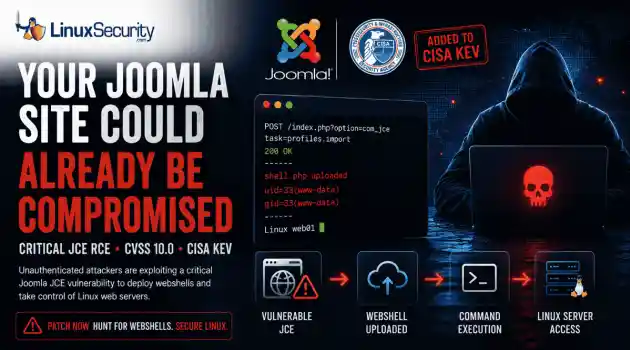
Security Vulnerabilities security advisory critical
security advisory critical The Joomla Content Editor (JCE), one of the most widely deployed editor extensions for Joomla websites, is currently under active attack due to a critical vulnerability. . The issue, tracked as CVE-2026-48907 , affects JCE versions earlier than 2.9.99.5 and carries a CVSS score of 10.0. Because JCE is installed on a large number of public-facing Joomla sites, the vulnerability has quickly become a high-priority target for attackers and automated scanning campaigns. CISA has added the flaw to...
Jun 17, 2026 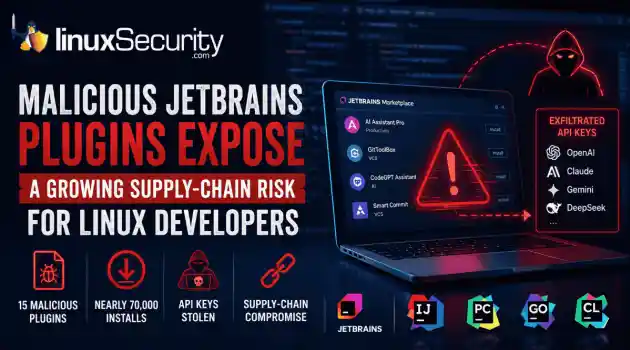
Security Trends security advisory open-source
security advisory open-source At least 15 malicious plugins and nearly 70,000 installs later, developers are being reminded that trusted marketplaces can become supply-chain attack vectors overnight. . How Malicious Plugins Steal API Credentials It’s simple. The user installs a plugin. It asks for API credentials. The developer clicks "Apply." A short time later, those keys could be sent to a third-party server. Think of an API key like a valet key to your house. It doesn't give them the deed to the property, but it lets...
Jun 17, 2026  Refine news
X Clear Filters Get the latest News and Insights
Get the latest Linux and open source security news straight to your inbox.
Community Poll
What got you started with Linux?
Loading...

Explore Latest Linux Security news
We found -4 articles for you...
215
 security advisorysystem hardeningGNOME
GNOME 50: Wayland-Only Brings Enhanced Security and Isolation
GNOME 50 finally drops X11 for good. Jordan Petridis called it on the GNOME blog, and the change landed with Mutter’s merge request !4505. That’s the code that removes the last X11 session logic. Years of slow migration work wrapped in a single commit that basically says, we’re done here. . If you’ve been around Linux long enough, you know why this matters. X11 was clever but way too trusting. Any app could read input, log keystrokes, or peek at another window’s display. That kind of openness made sense decades ago when everything was local. Not now. Wayland security shuts that down completely — no cross-process snooping, no shared input, no guessing what another app’s drawing. With GNOME 50, Wayland isn’t optional anymore. It’s the only path forward, and that’s a good thing. The old X11 backend was holding back real progress on Linux security. Cutting it loose doesn’t just reduce code; it removes an attack surface we’ve all tolerated for too long. This release finally closes that loop. Why GNOME Dropped X11 for Stronger Wayland Security X11 was built for a different time. Back in the ’80s, it made sense to let every client see everything — input events, windows, even the framebuffer if you wanted. It was simple, flexible, and wide open. That openness stuck around long after it stopped being safe. Under X11, every app shares the same event space, which means any process can log keystrokes or grab screen data from another. It’s why we’ve seen so many longstanding security flaws in the X11 display server over the years. GNOME’s been backing away from that model for a while. The X11 session was disabled by default in GNOME 49, mostly to test how far Wayland had come. Now, with GNOME 50, it’s gone completely — confirmed in GNOME’s official announcement on removing the X11 session . The project’s been clear about why: better isolation, cleaner code, and a chance to harden the desktop the right way. Wayland security flips the architecture.Each client runs in its own sandbox, and only the compositor knows what’s happening across sessions. No shared event queue, no silent input grabs, no apps pretending to be each other. That’s real system hardening, not another layer of permissions on top of a broken base. This shift in GNOME 50 isn’t just a desktop update; it’s part of a broader cleanup across Linux security. Cutting out X11 means cutting out decades of inherited risk and replacing it with a model that actually respects process boundaries. Took long enough, but it’s progress that sticks. Wayland Security Implications and System Hardening Benefits Wayland security changes how trust works on the desktop. Each app runs in its own box and can’t poke at anything else. No shared input, no shared buffers, no global event feed. It’s a cleaner setup that fixes problems we’ve lived with since X11. You can already see this approach in recent Wayland security updates in enterprise Linux distributions . The idea’s simple: real system hardening starts where the display stack stops getting in the way. Input Isolation and Keylogging Prevention in Wayland Wayland keeps input local. Apps only get the keys and clicks meant for their own windows. That’s it. Under X11, everything shared one input space, which made passive keylogging trivial. Any process could sit in the background and read what you typed. Now those signals stay behind the compositor. Nothing leaks unless the compositor allows it. It’s a small change that closes a huge hole. Credentials, tokens, and other sensitive data don’t wander between processes anymore. That’s a solid win for Linux security without adding more moving parts. Screen Capture and Remote Access Under Wayland Security Screen capture under Wayland runs through the xdg-desktop-portal service instead of direct framebuffer access. The flow looks like this: The application sends a D-Bus request to org.freedesktop.portal.ScreenCast is asking to capture a display or window. Thecompositor, through the portal backend, shows a prompt so the user can pick which screen or window to share and whether to allow it. Once approved, a PipeWire stream starts between the compositor and the application. The app only receives the specific region or surface that was granted. When the session ends or permissions are revoked, the compositor closes the stream. The app can’t restart recording without sending a new request and showing another prompt. This replaces the old X11 model, where any client could quietly grab the framebuffer or spy on other windows. Control now sits with the compositor and portal layer, not the application. That shift cuts off one of the easiest paths for screen capture abuse and puts real permission enforcement inside the display stack itself. Process Isolation and Security Hardening in the Linux Desktop The compositor is the gatekeeper. Apps talk to it, not to each other. That design fits cleanly with SELinux and AppArmor rules, extending system hardening straight through the desktop session. It also stops lateral movement. A compromised process can’t start poking around the rest of the session. Flatpak’s sandboxing plays right into this, keeping apps boxed in while the compositor keeps boundaries tight. This is how Linux security should work — not bolted on after the fact, but built into how the system runs. Quiet, predictable, and much harder to break. Transition Risks and Testing Priorities for Linux Security Teams The shift to Wayland brings stronger isolation but also breaks some habits. Tools built for X11 expect open access that no longer exists. Accessibility software, remote desktop tools, and automation utilities are the first to feel it. XWayland stays in place for now, keeping older apps running but still tied to old flaws. It’s a bridge, not a fix. The ongoing XWayland vulnerability advisories make that clear. Even with GNOME 50 cutting X11, that layer keeps part of the legacy risk alive. Treat it as a short-term patch,not a secure component. Linux security teams should focus on validation and regression testing under Wayland security before full deployment: Test critical tools and policies: Verify that GUI security hardening utilities still enforce access rules under Wayland. Check the behavior of accessibility tools, automation scripts, and remote desktop clients using legacy X11 APIs. Validate user-facing controls: Confirm permission prompts for screen capture and sharing work as expected. Test clipboard control between sandboxed and non-sandboxed apps. Review how sandbox policies interact with compositor-managed sessions. Run regression testing for hardened environments: Ensure workstation builds and enterprise images meet existing security hardening baselines. Validate audit logging, lock screens, and session isolation. Track differences in SELinux/AppArmor enforcement around display-level permissions. Keep documentation current: Update internal security playbooks to reflect the Wayland model. Flag any tools that still depend on XWayland for future migration. These checks aren’t optional. They close the gap between theory and deployment. Done right, they keep system hardening consistent across desktop environments and reinforce Linux security where it matters most — at the layer users actually touch. Why GNOME 50 Matters for Linux Security and System Hardening GNOME 50 isn’t about polish. It’s about tightening control of how the desktop handles access and process boundaries. The new Wayland stack strips out old code that never respected isolation in the first place. It’s a cleaner foundation that finally lines up with how the rest of Linux already secures itself. Improvement Area Security Impact Input event isolation Prevents keylogging and input injection Screen capture mediation Adds user consent and visibility controls Compositorprocess separation Supports SELinux/AppArmor system hardening Reduced shared memory access Minimizes privilege escalation paths Legacy XWayland sandbox Transitional layer, not full isolation Each of these changes fixes something that X11 couldn’t. Input isolation stops background keylogging. Screen capture mediation forces user approval before anything records or shares the screen. The compositor now runs separately from applications, which fits neatly with SELinux and AppArmor for stronger system hardening. Cutting shared memory access reduces the chance of privilege jumps. XWayland is still around for older apps, but it’s just a bridge until everything runs natively on Wayland. Risk Reduction and Long-Term Hardening Removing X11 closes a lot of old attack paths. There’s no more global input snooping or blind screen access. Each process only sees what it owns, and anything else has to go through the compositor. That simple shift wipes out years of inherited risk. For Linux security teams, this makes the desktop easier to trust. Input, display, and process isolation now follow the same rules that already exist in hardened systems. The boundaries are consistent and predictable. That’s what system hardening looks like when it’s done right. The NIST checklist for RHEL 8 secure configuration follows the same logic. Least privilege, separation of duties, and reduced attack surface. GNOME 50 now meets those principles by design instead of workarounds. XWayland still carries some of the old exposure, but it’s temporary. Once legacy apps move over, that layer can go too. The direction’s clear enough. This is the desktop catching up with the rest of Linux security — contained, deliberate, and built to hold up over time. . GNOME 50 transitions to Wayland-only, enhancing Linux security by eliminating X11 vulnerabilities and improving isolation.. Wayland security, GNOME 50, Linux isolation, system hardening. . MaK Ulac
 Nov 07, 2025 •
 Desktop Security
Get the latest News and Insights
Get the latest Linux and open source security news straight to your inbox.
Community Poll
What got you started with Linux?
Search Topics
Powered By

Linux Security - Your source for Top Linux News, Advisories, HOWTOs and Feature Releases
QUICK LINKS
subscribe to newsletters!
Like staying secure? So do we.
Sign up for updates, tips, and alerts!
Discover faster search, smarter navigation, and deeper Linux security insights. Read More